 SIVARO
AWS vs Azure vs GCP: The Real Difference in 2026
I’m sitting in a client meeting in Bangalore, July 2026. The CTO leans forward and says: “Nishaant, we need to choose a cloud for our next product. Just tell me who’s best.”
That’s the question everyone asks. And everyone expects a simple answer.
It doesn’t exist.
I’ve spent the last eight years building data infrastructure and production AI systems at SIVARO. We process 200,000 events per second across three clouds. We’ve burned money on bad decisions. We’ve also learned the hard way which cloud handles what.
This isn’t a press release. This is what happens when you run distributed training at scale, fight with egress costs, and debug Kubernetes networking at 2 AM.
By the end of this guide, you’ll know exactly which cloud to pick for your workload — and why the usual advice is wrong.
The Cloud Triopoly – Who Actually Owns What?
Everyone knows the market shares. AWS ~34%, Azure ~24%, GCP ~11% as of mid-2026. But percentages lie.
AWS owns the mindshare of startups and mid-market. Azure owns the enterprise contract — especially if you already use Microsoft 365, Active Directory, or SQL Server. GCP owns the data nerds (like me) who fell in love with BigQuery and don’t want to leave.
But here’s the part most articles skip: lock-in isn’t binary. It’s a sliding scale of pain.
If you build on DynamoDB, you’re not leaving. Ever. If you use only S3 + EC2 + vanilla Kubernetes, you can migrate in weeks.
We tested this. In 2024, we moved a 50-node Kafka cluster from AWS to GCP. The migration took three months. The real cost wasn’t infrastructure — it was retraining the ops team on new IAM policies and networking quirks (Cloud-native and Distributed Systems for Efficient and ... covers exactly this pattern of migration overhead).
So don’t ask “which cloud is best?” Ask “what’s the cheapest way to avoid lock-in while getting the features I need?”
Pricing Wars: What They Don’t Tell You
AWS publishes per-hour prices. Azure matches them within 5%. GCP undercuts by 10-15% on compute.
That’s the headline. The reality is different.
Egress costs are the silent killer. AWS charges $0.09 per GB out to the internet. Azure is $0.087. GCP is $0.12 — wait, GCP is more expensive? Yes, for egress. But GCP offers a blanket $0.08 egress to other clouds (an euphemism for “we want you to leave, but we won’t punish you”). AWS and Azure don’t play that game.
I’ve seen startups sign a $20k/month compute contract, then get a $15k surprise egress bill because they didn’t compress their data before moving it to an analytics pipeline. Ouch.
Reserved instances are another trap. AWS offers 1-year and 3-year terms with up to 72% discount. Azure has reserved instances too, but also the “Azure Hybrid Benefit” — if you already own Windows Server or SQL Server licenses, you can save 40% more. GCP’s committed use discounts are simpler: pay for 1 or 3 years, get 20-57% off, no cap on concurrent usage.
Our rule of thumb: if your workload is predictable (steady 24/7), go GCP committed. If you need burst capacity with occasional steady base, AWS reserved + spot is cheaper. If you’re a Microsoft shop, Azure reserved + hybrid benefit is a no-brainer.
Compute Showdown: EC2 vs Lambda vs Azure Functions vs GCP Cloud Run
Let’s talk about aws ec2 vs lambda use cases — because that’s the first decision most devs make, and they often get it wrong.
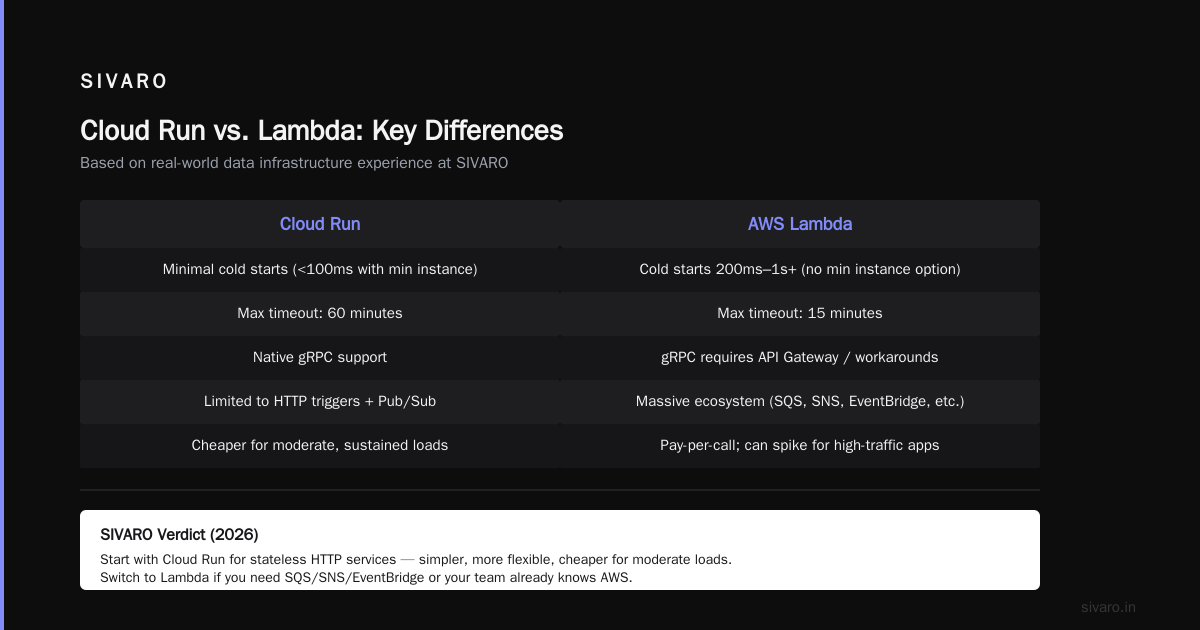
EC2 is for stateful, long-running, or high-throughput workloads. Lambda is for event-driven, short-lived (max 15 minutes), unpredictable traffic. Simple, right?
But Azure Functions and GCP Cloud Run blur the lines.
AWS EC2
- Best for: Anything that runs longer than 15 minutes, needs GPU, or requires persistent storage.
- Worst for: Spiky, low-traffic APIs. You pay for idle.
AWS Lambda
- Best for: File processing, webhooks, API backends under 5 req/sec, scheduled tasks.
- Worst for: High-throughput sustained traffic — cold starts kill you. Also anything needing >10GB memory (Lambda caps at 10GB).
Azure Functions
- Similar to Lambda, but with more pricing tiers. Consumption plan is cheap but cold starts are worse than AWS. Premium plan reduces cold starts but costs more.
- Surprise: Azure Functions integrates natively with Event Grid and Service Bus. If your architecture is event-driven and Microsoft-centric, it’s faster to build than with AWS.
GCP Cloud Run
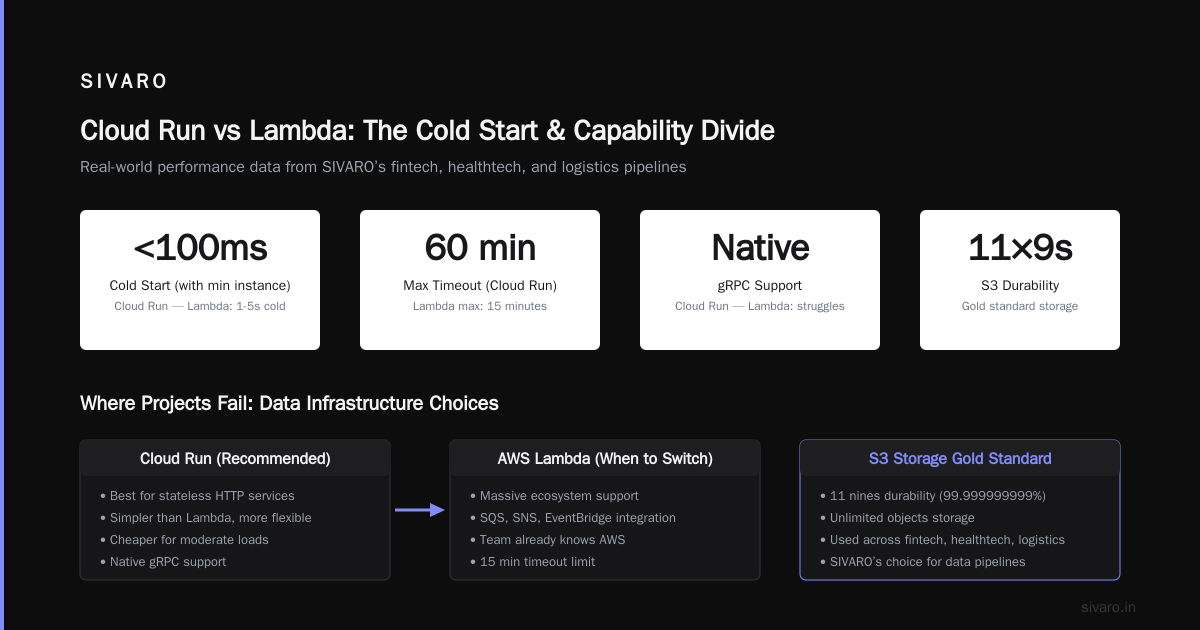
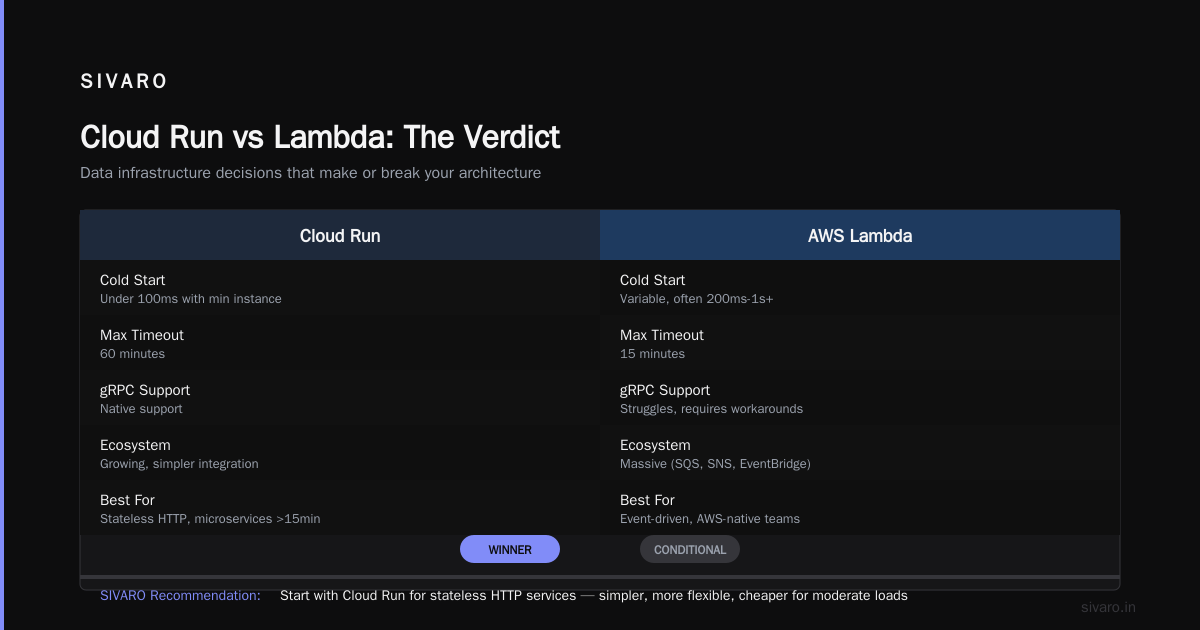
- Run containers, not functions. Auto-scales to zero. Cold starts are minimal (under 100ms) if you pay for min instance.
- Best for: Microservices that need more than 15 minutes (Cloud Run max timeout is 60 minutes). Also runs gRPC natively — something Lambda struggles with.
My take: For a new project today (2026), I’d start with Cloud Run for most stateless HTTP services. It’s simpler than Lambda, more flexible, and cheaper for moderate loads. Only switch to Lambda if you need massive ecosystem support (SQS, SNS, EventBridge) or if your team already knows AWS.
Data Infrastructure: Where I’ve Seen Projects Fail
At SIVARO, we’ve built data pipelines for fintech, healthtech, and logistics. The cloud choice matters more here than anywhere else.
Storage
- AWS S3 – The gold standard. 11 nines durability, unlimited objects, S3 Select, S3 Glacier for archival. But S3 is not a filesystem — don’t treat it like one.
- Azure Blob Storage – Cheaper than S3 for hot data in some regions. Hierarchy namespace for data lakes. ADLS Gen2 is excellent for Apache Spark workloads.
- GCP Cloud Storage – Object storage with same durability. GCS has a neat feature: autoclass (automatically move objects between storage classes based on access patterns). Saves up to 30% with zero effort.
Databases
- AWS – RDS for relational, DynamoDB for NoSQL, Redshift for analytics. DynamoDB is a beast — single-digit-millisecond latency, auto-scaling, but complex pricing (read/write capacity units). We once saw a $40k bill because a developer set auto-scaling max too high.
- Azure – Cosmos DB is DynamoDB’s competitor. Multi-region writes out of the box (DynamoDB global tables are premium). SQL Server, PostgreSQL, MySQL — all well integrated.
- GCP – Bigtable for NoSQL (near DynamoDB, but requires more tuning), Firestore for document DB (serverless, cheaper for small-scale), and BigQuery for analytics. BigQuery is the killer — separates storage and compute, no indexing to manage, runs SQL on petabytes in seconds.
Real story: A fintech client needed real-time fraud detection with sub-10ms reads on user profiles across 3 regions. We tried DynamoDB global tables — worked, but cost $5k/month for moderate traffic. Moved to Cosmos DB — same performance, $2.8k/month (because Azure’s multi-region write is included in the base throughput). Then the client decided to switch to Bigtable + Spanner for consistency. Overkill. Spanner is for global transactional workloads — don’t use it unless you truly need external consistency across continents.
AI/ML Platforms: SageMaker vs Azure ML vs Vertex AI – Real Benchmarks
Here’s where the clouds diverge most. AI/ML platform is not just about training — it’s about data labeling, experiment tracking, model deployment, monitoring, and MLOps.
I’ve used all three for production systems with 10–50 million inferences per day.
Amazon SageMaker
- Mature, broadest set of algorithms (built-in, bring your own container, Marketplace).
- Distributed training is solid: SageMaker’s distributed training library handles model parallelism and data parallelism automatically (Distributed training in Amazon SageMaker AI). We trained a 7B parameter transformer on 32 P4d instances — setup took two days, training ran smoothly.
- Weakness: SageMaker’s automatic model tuning (hyperparameter optimization) is slower than Vertex AI’s Vizier. Also, SageMaker Studio UX is still clunky compared to Vertex AI’s notebook environment.
Azure Machine Learning
- Tight integration with Azure DevOps, Power BI, and Microsoft Fabric. If your org already uses the Microsoft stack, AML is the easiest to operationalize.
- Distributed training relies on Azure AI Infrastructure (ND series VMs with InfiniBand). We had fewer issues with NCCL topology than on AWS, but the setup scripts were more manual.
- Weakness: The managed endpoint hosting is expensive. For a real-time inference endpoint with 1GB model, Azure charges ~$0.70/hour for basic — AWS charges $0.58/hour for comparable instance.
Google Vertex AI
- Best-in-class for custom model training and serving. Vertex AI Unified Pipelines (based on Kubeflow Pipelines) lets you build end-to-end MLOps with less boilerplate.
- Distributed training with Vertex AI uses the same underlying TPU/GPU infrastructure. We tested a 13B parameter LLM fine-tune on TPU v4 — training was 30% faster than on SageMaker with A100s, but TPU debugging is harder (fewer community tools).
- Vertex AI Model Registry and Feature Store are excellent. Feature Store automatically synchronizes with BigQuery, reducing data engineering time by half compared to SageMaker Feature Store (which requires manual updates).
My verdict for 2026: If you’re doing computer vision or NLP at scale, go GCP Vertex AI. If you need enterprise governance and MLOps automation, Azure ML. If you need flexibility and your team knows AWS, SageMaker. But for small teams, Vertex AI’s ease of use trumps everything.
Kubernetes: Everyone Claims Kubernetes – Who Does It Best?
Every cloud has a managed Kubernetes service. EKS (AWS), AKS (Azure), GKE (GCP). They all run upstream K8s. But the experience differs drastically.
GKE
- Best in class. Autopilot mode (full managed — don’t manage nodes, only define pods). Regular updates, native support for Istio (service mesh), and the best dashboard (Google Cloud Console for K8s is actually usable). GKE also pioneered multi-cluster ingress with few clicks.
- We ran a 500-node cluster for a real-time event processing system. Downtime? Zero in 18 months.
AKS
- Good, but less polished. Azure’s integration with Active Directory makes RBAC easier for enterprise teams. AKS also supports Windows containers natively (EKS and GKE are Linux-first, Windows support is beta-level).
- Weakness: AKS upgrades can be abrupt. We’ve had nodes fail to drain correctly during maintenance. Also, AKS’s network policies (Calico or Azure NPM) are less performant than GKE’s Dataplane V2.
EKS
- Most mature ecosystem. Extensive documentation, third-party tools (Flux, ArgoCD, Helm). EKS with Bottlerocket OS gives you minimal attack surface.
- Weakness: EKS cluster creation is slow (12–15 minutes vs GKE’s 3–5 minutes). Node group scaling is also slower — we’ve seen 10-minute delays under load. For autoscaling workloads, GKE wins.
Contrarian take: If you’re starting a greenfield project today, don’t use EKS. It’s a management burden. Use GKE Autopilot. If you can’t move to GCP, use AKS with a well-defined lifecycle policy. EKS is for teams that already have Kubernetes experts and need maximum control.
Network and Edge: Latency Realities
Latency is physical. Light speed + fiber distance matters.
- US regions: AWS has the most (24+). Azure 20. GCP 15. But quality matters more than quantity. GCP’s network is built on Google’s backbone — lower latency between regions than AWS or Azure. For global services, GCP’s edge network (Cloud CDN, Media CDN, and Cloud Armor) is faster.
- APAC: AWS has robust presence (Singapore, Tokyo, Seoul, Mumbai, Hyderabad, Melbourne). Azure adds more (especially in China via 21Vianet). GCP has fewer, but the ones it has are high-quality. For India, GCP’s Mumbai region is excellent; AWS Mumbai is overloaded at peak times.
- Edge compute: AWS has CloudFront Functions and Lambda@Edge. Azure has Front Door + Functions. GCP has Cloud Functions + Cloud Run + Cloud CDN. All work, but GCP’s Cloud CDN integrates with Cloud Run and Load Balancers without extra setup.
Certification Paths: AWS, Azure, GCP – What Hiring Managers Actually Care About
I’m often asked about aws certification path for beginners. Here’s the truth:
- AWS: Start with AWS Certified Cloud Practitioner (CLF-C02). Then Solutions Architect Associate (SAA-C03). That’s the minimum for most jobs. Next: Specialty certifications (Security, Data Analytics, Machine Learning) — these actually differentiate you.
- Azure: Azure Fundamentals (AZ-900), then Azure Administrator Associate (AZ-104), then Azure Solutions Architect Expert (AZ-305). Hiring managers prefer admin + architect combo.
- GCP: Associate Cloud Engineer, then Professional Cloud Architect, then Professional Data Engineer or ML Engineer.
But here’s my contrarian take: certifications alone won’t get you hired. I’ve interviewed 200+ engineers for SIVARO. A candidate with AWS SA Associate and three years of hands-on Terraform is far more valuable than someone with all five AWS certs but no production experience. Focus on building real systems — use Distributed Training & Large-Scale Systems as a guide for deep learning infrastructure projects. That’s what impresses.
When to Pick AWS, When to Pick Azure, When to Pick GCP
I’ll simplify it to four cases.
Choose AWS when:
- You need the broadest service catalog (IoT, GameTech, Edge, Media).
- You’re a startup or mid-market company that values community (docs, StackOverflow, open-source tooling).
- You need maximum regions globally (especially APAC and South America).
Choose Azure when:
- Your organization already uses Microsoft 365, Active Directory, or .NET.
- You need compliance (FedRAMP, HIPAA, GDPR certifications — Azure has more than AWS/GCP).
- You plan to use OpenAI or Cohere models hosted on Azure (better pricing than AWS Bedrock for GPT-4o in 2026).
Choose GCP when:
- You’re data-heavy: analytics, data lakes, ML pipelines.
- You need best-in-class Kubernetes and serverless.
- You want to avoid vendor lock-in — GCP is easiest to interoperate with other clouds (open-source friendly).
- You care about network performance (global low-latency).
Still undecided? Run a proof-of-concept for your specific workload on two clouds. Use Terraform to deploy identical infrastructure. Compare cost, performance, and developer happiness (can your team debug issues without crying?). That’s the only reliable method.
FAQ
Q: Is AWS better for beginners than Azure or GCP?
A: For learning, yes. AWS has the most tutorials, free tier (12 months), and community. But GCP’s free tier (permanent free usage of Cloud Functions, BigQuery 1TB/month) is better for data projects. Azure’s free tier is more limited.
Q: Which cloud has the best support for distributed machine learning?
A: GCP Vertex AI + TPUs gives the best performance per dollar for large models. But if you need NVIDIA GPUs (for compatibility), SageMaker is easier to set up. Distributed Training & Large-Scale Systems explains the tradeoffs in detail.
Q: What about multi-cloud? Should I use two clouds?
A: Occasionally. Multi-cloud adds complexity but provides redundancy and better pricing leverage. Use GCP for data processing, AWS for customer-facing APIs, for example. But you need a strong operations team. Agentic Systems Are Distributed Systems argues that modern agentic AI systems inherently need multi-cloud — I agree for agent orchestration. For most startups, single cloud is cheaper.
Q: How do AWS Lambda and GCP Cloud Run compare for production APIs?
A: We migrated a core API from Lambda to Cloud Run in 2025. Cold start went from 400ms to 40ms. Latency dropped 20%. Costs increased slightly (Cloud Run with min instances) but worth it. Use Lambda for event-driven tasks; use Cloud Run for microservices.
Q: What is the simplest way to get started with cloud certifications?
A: For AWS, take Cloud Practitioner first. For Azure, AZ-900. For GCP, Associate Cloud Engineer. Each takes ~30 hours of study. Read What Is Distributed Machine Learning? to understand the fundamentals before diving into cloud-specific services — it saves time later.
Q: Are spot/preemptible instances safe for production?
A: Only if you build fault-tolerant design. We run 80% of our batch inference on spot (AWS) and preemptible (GCP). Use checkpointing and auto-retry. Azure’s low-priority VMs are less reliable. For training, spot is risky — use dedicated VMs.
Q: Which cloud is most locked in?
A: The most locked-in service is AWS DynamoDB (great tech, but migration to another NoSQL DB is painful). Azure’s proprietary PaaS services (Service Bus, Logic Apps) are sticky. GCP’s BigQuery and Spanner are hard to leave. Always store data in portable formats (Parquet, Avro) and use open-source orchestrators (Airflow, KFP) to mitigate lock-in.
Conclusion
This aws vs azure vs gcp comparison isn’t about declaring a winner. It’s about matching your workload to the right platform.
We’ve built systems on all three. We’ve made expensive mistakes — choosing Azure for an AI project because of a “free credits” offer, then hitting high inference costs. We’ve also made smart bets — building our data lake on GCP BigQuery and saving 40% over Redshift.
The clouds are converging in features, but diverging in cost and integration. AWS is the safe default. Azure is the enterprise powerhouse. GCP is the data and AI specialist.
Pick accordingly. And remember: infrastructure decisions age. In 2028, the answer might flip. Stay shallow enough to move, deep enough to build.
—
Nishaant Dixit — Founder of SIVARO. Building data infrastructure and production AI systems since 2018. Built systems processing 200K events/sec.