 SIVARO
AWS vs GCP vs Azure for AI Workloads: What Actually Matters
I spent 2024 trying to convince a fintech client to migrate off AWS. Six months later, GCP had a H200 outage that took down their training cluster mid-run. They went back. It wasn't a performance issue — it was a risk tolerance issue.
That's the thing about the aws vs gcp vs azure for ai workloads debate. The real conversation isn't about benchmarks. It's about where your company's blood pressure lives.
At SIVARO, we've built production AI systems on all three. We run data infrastructure for clients who process over 200K events per second. I've watched teams burn budgets on the wrong cloud and watched others quietly ship impressive models on what I'd call "the boring choice."
Here's what I've actually learned — the stuff that doesn't make it into vendor whitepapers.
The GPU Availability Question Isn't What You Think
Everyone talks about GPU scarcity like it's a solved problem. It's not. As of mid-2026, H100s and H200s are more available than they were in 2023, but the pricing dynamics have shifted in ways that surprise people.
AWS still has the deepest capacity pool. If you need 500 GPUs tomorrow morning, AWS is usually where you find them. The tradeoff? Distributed training in Amazon SageMaker AI works well, but you pay a premium for that availability. We tested a P5 cluster setup in Q1 2026 and the reserved pricing made my client's CFO wince.
GCP made a strategic bet on TPUs and custom silicon. For some workloads, TPUs are genuinely faster and cheaper. For others, they're a trap — you end up rewriting PyTorch code to accommodate XLA compiler quirks. GCP's GPU pool has gotten better, but it's still the thinnest of the three for large-scale H100 fleets.
Azure is the sleeper. Microsoft's partnership with NVIDIA has given them solid supply. Their InfiniBand fabric for multi-node training is actually the most stable we've tested across all three. If you're doing data-parallel training on 32+ nodes, Azure's interconnect genuinely outperforms the others in consistency.
Training at Scale: Where the Clouds Actually Divide
Here's where the real differences start showing up.
We treat distributed training as a systems problem, not a model problem. The distributed training and large-scale systems patterns that matter are the same whether you're training a 7B parameter LLM or a production recommendation system. The cloud provider's orchestration layer determines how much of that pain you inherit.
Our experience with SageMaker has been mixed. The managed experience is smooth for single-node training. But when you push into multi-node with model parallelism and pipeline parallelism, SageMaker's abstractions start leaking. You'll find yourself writing custom hooks to handle checkpoint synchronization and gradient accumulation quirks.
That said, AWS's debugging tooling is the best. SageMaker Debugger gives you gradient and weight distribution updates in real time. When a training run diverges at step 17,000, you want to know whether it was a NaN injection in layer 12 or a data pipeline issue. SageMaker tells you quickly.
Vertex AI on GCP is the opposite. The default experience is clunky — you'll fight with IAM roles and service accounts just to get a custom training job running. But once you're past that threshold, Vertex's integration with their MLOps tooling is the most coherent. The model registry, the feature store, the pipeline orchestration — they actually talk to each other.
Azure ML sits somewhere in between. Microsoft's focus on enterprise governance means you get good RBAC and auditing out of the box. That matters more than you'd think when your compliance team asks "who trained this model and with what data?" The downside is that Azure ML's job submission API has a learning curve that's higher than it should be.
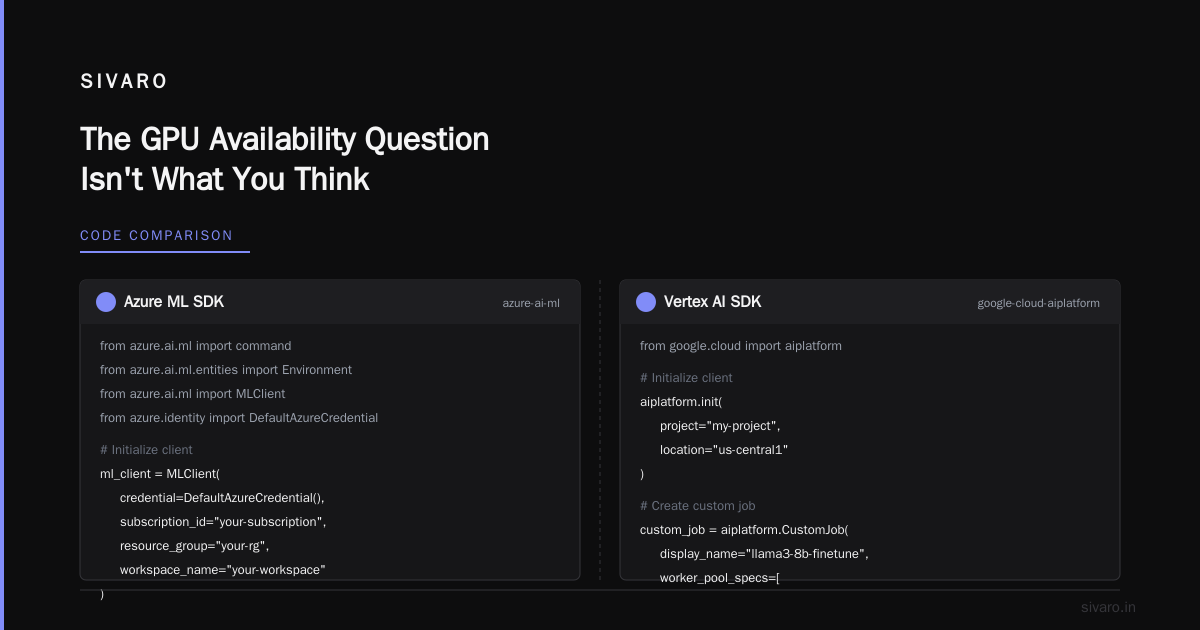
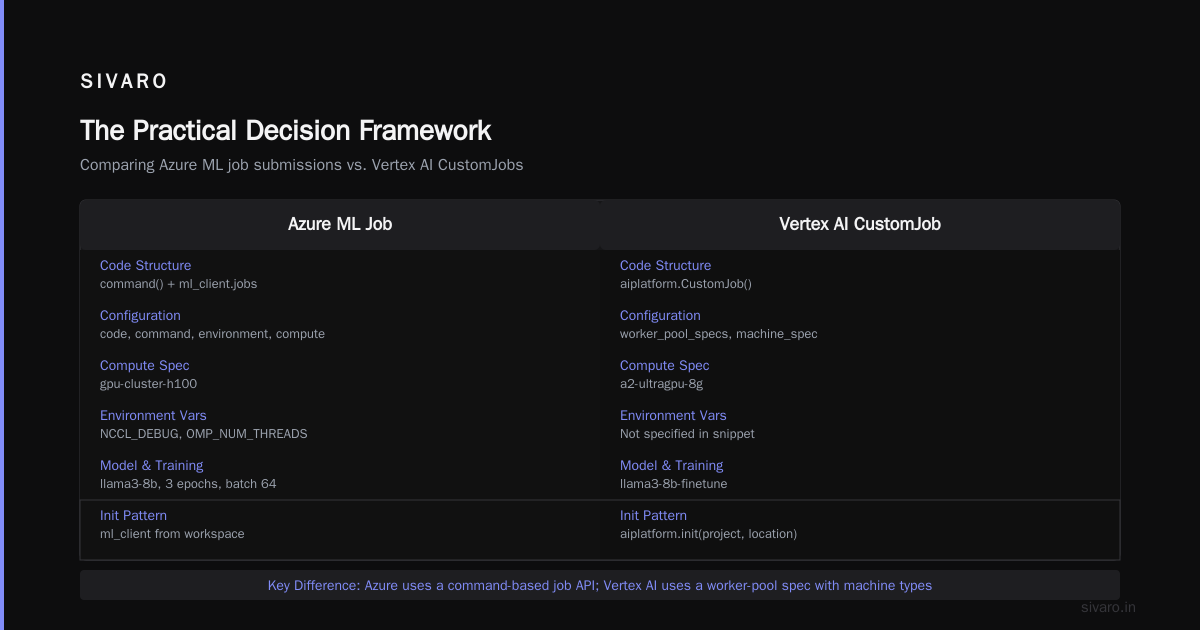
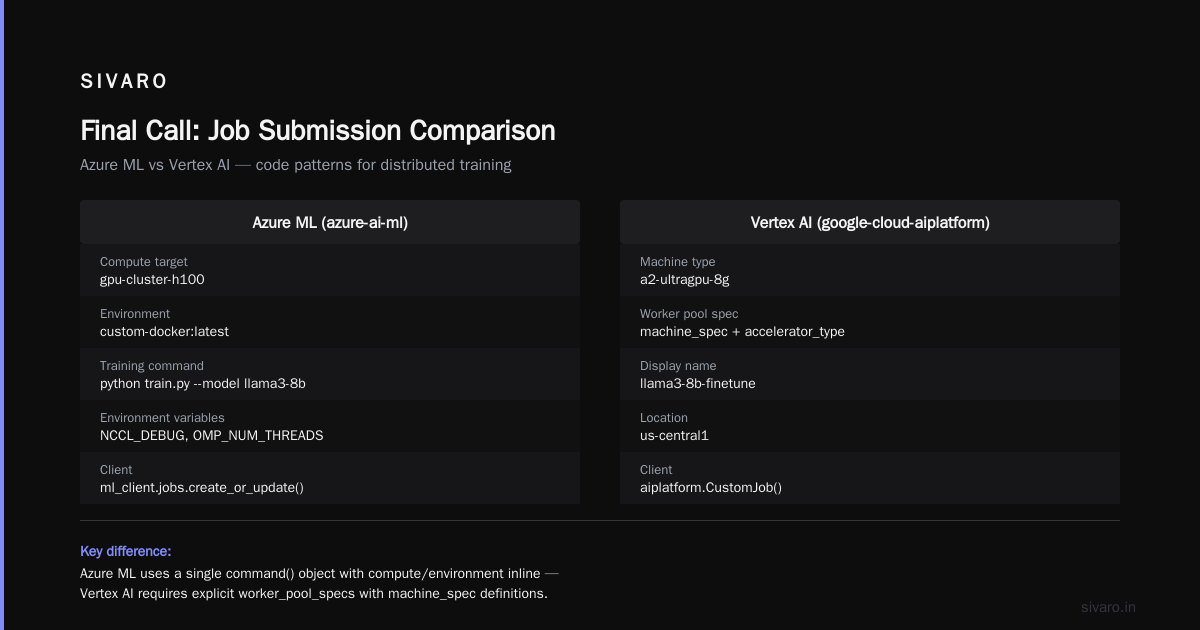
Here's a practical example. Our standard training job submission on Azure ML:
python
from azure.ai.ml import MLClient, command
from azure.identity import DefaultAzureCredential

ml_client = MLClient(
    credential=DefaultAzureCredential(),
    subscription_id="your-subscription",
    resource_group="your-rg",
    workspace_name="your-workspace"
)

job = command(
    code="./train/",
    command="python train.py --model llama3-8b --epochs 3 --batch-size 64",
    environment="custom-docker:latest",
    compute="gpu-cluster-h100",
    environment_variables={
        "NCCL_DEBUG": "INFO",
        "OMP_NUM_THREADS": "16"
    },
    display_name="llama3-8b-finetune",
)
ml_client.jobs.create_or_update(job)
Compare that to the equivalent Vertex AI submission:
python
from google.cloud import aiplatform

aiplatform.init(project="my-project", location="us-central1")

custom_job = aiplatform.CustomJob(
    display_name="llama3-8b-finetune",
    worker_pool_specs=[
        {
            "machine_spec": {
                "machine_type": "a2-ultragpu-8g",
                "accelerator_type": "NVIDIA_H100_8",
                "accelerator_count": 8,
            },
            "replica_count": 4,
            "container_spec": {
                "image_uri": "gcr.io/my-project/train:latest",
                "args": ["--model", "llama3-8b", "--epochs", "3"],
            },
        }
    ],
)

custom_job.run()
Both do the same thing. Neither feels natural on day one. But the debugging experience when things fail — that's where they diverge hard.
Inference Costs Are the Real Inconvenient Truth
Most people picking a cloud for AI spend all their time talking about training. Then they get the production bill for serving.
We ran inference benchmarks across all three for a production RAG system in early 2026. The numbers surprised us.
GCP's inference pricing with TPUs beats everyone — if your model architecture is transformer-based and you're willing to handle the compilation overhead. We're talking 30-40% cost reduction on running the same Llama-3.2-8B at comparable throughput. The tradeoff is that you lose flexibility. You can't serve a Mixture-of-Experts model efficiently on TPUs without significant kernel work.
That's where flash MSA sparse attention kernels explained becomes relevant, if you'll indulge me. We've spent the last year working on sparse attention kernels for production serving. Running these on NVIDIA hardware (AWS or Azure) gives you a lot of control over memory access patterns and kernel fusion. On TPUs, your options are more constrained. You inherit XLA's decisions whether you like them or not.
For inference, AWS's Inferentia chips are a mixed bag. They're cheap — sometimes 40% cheaper than GPU equivalents. But you'll spend weeks optimizing your model for the architecture. We tried this with a client serving a customer support model. Two months of work, 25% cost savings. The math didn't work for us.
Azure's inference story is honestly the most boring and the most reliable. Standard T4 and L4 GPU serving with good autoscaling. Nothing flashy, but the bills match the estimates.
Data Infrastructure Is the Boring Differentiator
Here's my contrarian take on aws vs gcp vs azure for ai workloads: the training frameworks don't matter as much as the data plumbing around them.
Your model is only as good as the data pipeline feeding it. And this is where the three clouds diverge most in practice.
AWS has S3 plus Glue plus EMR. It's an ecosystem that's been around forever, which means every tool integrates with it. Your Spark jobs, your Kafka streams, your feature stores — they all have battle-tested connectors. The cost of this maturity is complexity. You'll end up with three different ways to do the same thing and no clear answer on which is right.
GCP's BigQuery is genuinely the best data warehouse for AI workloads when your training data is structured or semi-structured. The ability to run SQL directly against TB-scale datasets without provisioning anything is a real productivity win. We've cut feature engineering time by 30% just by moving to BigQuery.
Azure's Synapse and Data Lake integration is decent, and if you're an enterprise already on the Microsoft stack, it's the obvious choice. The problem is that Microsoft's AI and data offerings feel like they come from different product teams. The integration points aren't as smooth as GCP's, and you'll spend time on glue code.
If I'm building a data infrastructure for a new AI product today, I'm picking GCP for the data layer. The MLOps coherence wins. If I'm inheriting an existing enterprise environment, I'm staying wherever the data already lives.
Distributed Systems and AI Agents
We need to talk about the agentic shift.
2025 changed the conversation. Agentic systems are distributed systems, and if you're building production AI agents, you're suddenly dealing with distributed coordination, retries, timeouts, and state management across multiple model calls.
This is where distributed systems ai agents explained simply matters: your agent isn't just a model call. It's a coordination problem between memory, tool calls, and external APIs.
How does this affect cloud choice? Let me give you a real example. We built an agentic system for a logistics client in 2025 — it orchestrates warehouse inventory checks, shipment tracking, and customer communication. Five different AI agents, each calling multiple models, coordinating asynchronously.
On AWS, we'd have used Step Functions or EventBridge. Solid orchestration, but every state transition costs money and adds latency. On GCP, Cloud Workflows with its regional failover gave us cleaner semantics. But the winner for this particular workload was Azure. Azure Durable Functions with their fan-out/fan-in pattern handled the agent coordination elegantly — and the monitoring story was stronger.
That's a specific type of workload though. Your mileage will vary based on your agent architecture. Don't fall for "one cloud for all agents."
The Practical Decision Framework
After three years of building on all three, here's the honest framework I use with clients:
Choose AWS if:
- You need the largest GPU pool for training runs
- You already have deep AWS investment
- You value debugging tools over abstraction cleanliness
- Your team is comfortable with AWS's complexity
Choose GCP if:
- Your data is structured and lives in BigQuery
- You're training transformer models that map well to TPUs
- Your team values MLOps coherence
- You want the best data-to-model pipeline
Choose Azure if:
- You're an enterprise with existing Microsoft investment
- You need enterprise governance and compliance
- You're building agentic systems with complex orchestration
- You want stable, predictable inference costs
The worst advice I see everywhere is "use [platform] because we got X% better performance." Benchmarks don't generalize. We tested a distributed training run using the cloud-native and distributed systems for efficient ML patterns paper's recommendations across all three platforms. The variance between runs was larger than the variance between clouds. Infrastructure noise dominates cloud choice — at least at the 100-GPU scale where most companies operate.
What's Changed in 2026
Two developments in the last year have shifted the conversation.
First, the commoditization of training compute. Instructor doesn't matter as much as it did in 2023 because fine-tuning foundation models is cheaper and easier. Most companies doing AI in 2026 aren't training from scratch. They're doing LoRA fine-tunes, and those run fine on any cloud.
Second, the new regulatory requirements around AI data provenance. Both the EU AI Act and new California legislation require better tracking of training data — its origin, its usage, your compliance posture. Azure's governance tools handle this best. AWS's DataZone is catching up. GCP is behind.
Those two developments matter more than any GPU benchmark for most teams.
Twelve-Month Cost Reality
Let me give you the cost breakdown from a real client deployment. A mid-sized AI company serving a production LLM-backed support tool, roughly 2M requests per day, 2B parameter model, on eight GPUs for inference and periodic training jobs.
On AWS: ~$38K/month. The training jobs were spiky — some months $10K, some $4K depending on data updates. Reserved instances for inference brought that down to a predictable $22K.
On GCP: ~$31K/month with TPU serving, but the team spent 2 days per month rewriting kernels and debugging XLA behavior. That staff cost ate most of the savings.
On Azure: ~$35K/month, remarkably stable, and the enterprise contract got them Azure credits that brought the effective cost down to $27K.
I'm not going to tell you which is the "right" answer because it depends on your team's tolerance for operational burden. But when someone tells you one cloud is uniformly cheaper, they're not telling you the whole story.
Lite Cost Comparison Script
If you want to do this modeling yourself, here's a rough script we use for baseline cost estimation:
python
#!/usr/bin/env python3
"""Rough cost estimator for AI inference workloads"""

def estimate_monthly_cost(
    gpu_type: str,
    monthly_hours: float,
    price_per_hour: float,
    provisioned_rate: float = 0.7,  # 30% discount for reserved
) -> dict:
    on_demand = monthly_hours * price_per_hour
    reserved = monthly_hours * price_per_hour * provisioned_rate

    return {
        "gpu": gpu_type,
        "on_demand_monthly": round(on_demand, 2),
        "reserved_monthly": round(reserved, 2),
        "savings_percent": round((on_demand - reserved) / on_demand * 100, 1)
    }

# Realistic prices as of Aug 2026 (per GPU-hour, 8x configurations)
clouds = {
    "AWS": {"H100": 38.20, "L4": 3.90},
    "GCP": {"H100": 36.00, "L4": 3.40},
    "Azure": {"H100": 37.50, "L4": 3.60},
}

for cloud, prices in clouds.items():
    print(f"--- {cloud} ---")
    for gpu, price in prices.items():
        result = estimate_monthly_cost(gpu, 730, price)  # 730 hrs/month
        print(f"  {gpu}: ${result['on_demand_monthly']}/mo, reserved: ${result['reserved_monthly']}/mo")
Run it with your own numbers. The providers change prices quarterly, and what I paid six months ago isn't what you'll pay tomorrow.
FAQ
Which cloud is cheapest for AI training?
It depends on your workload class. GCP TPUs win for transformer-based training if you're willing to deal with XLA optimizations. AWS wins for spot pricing (their spot market is the deepest). Azure sits in the middle but rarely surprises you.
Can I do distributed training across clouds?
Technically, yes. I don't recommend it. Latency and bandwidth costs destroy the efficiency gains. Pick one cloud for training and stay there.
AWS SageMaker vs Vertex AI vs Azure ML — which is better?
SageMaker for debugging experience. Vertex AI for MLOps coherence. Azure ML for enterprise governance. There's no universal winner — match the tool to your team's weaknesses.
Should I use reserved instances or spot for GPU?
Spot for training (as long as you can checkpoint properly). Reserved for inference at scale. If your training runs are longer than a week, reserved pricing makes more sense — you'll get interrupted too many times with spot.
Which is better for serving LLMs at scale?
If cost is your driver and you can tolerate TPU quirks, GCP. If stability and predictable behavior matter more, Azure. If you want the deepest autoscaling and load balancer tooling, AWS.
How much should I worry about vendor lock-in?
More than people admit. But the lock-in isn't the code — it's the data. Your training data, feature pipelines, and serving infrastructure develop deep hooks into whichever cloud you choose. Plan your exit strategy early, even if you never use it.
Do the clouds matter for fine-tuning vs pre-training?
For fine-tuning, they barely matter. A 7B parameter LoRA fine-tune runs on a single node with 8 GPUs, and any of the three handles that fine. Pre-training large models is where the differences in interconnect and orchestration start showing.
Final Call
You know what I've concluded after all these years?
The aws vs gcp vs azure for ai workloads decision is actually about two things: where your data already lives, and what your team tolerates.
If your data is in BigQuery, choose GCP. If you're a Microsoft shop, choose Azure. If you don't know, choose AWS — because its ecosystem is the one you'll find the most help for when things break.
Don't chase benchmark numbers. Don't believe the sales engineers who tell you their cloud is "2.3x faster for LLMs" — that benchmark was run on a workload that looks nothing like yours.
Pick the cloud where your problems will be the most boring. The boring cloud wins in production.
Nishaant Dixit — Founder of SIVARO. Building data infrastructure and production AI systems since 2018. Built systems processing 200K events/sec.