 SIVARO
AWS vs On-Premise GPU Clusters for Deep Learning: A 2026 Reality Check
I got a call in March 2026 from a founder who’d thrown $2.4 million at a “guaranteed” GPU cluster rental deal. Six weeks later, the provider vanished. The GPUs? Never existed. That’s when I realized: the cloud vs on-premise debate isn’t just about cost anymore — it’s about trust, control, and being awake to scams like the one that hit that founder.
Welcome to the real trade-off between AWS vs on-premise GPU clusters for deep learning. I’m Nishaant Dixit, I run SIVARO, and I’ve spent the last eight years building data infrastructure for teams that train production AI systems. We’ve done both paths — all‑in on AWS, all‑in on‑prem, and the messy hybrid that most people actually need. This guide is what I wish someone had handed me in 2023.
You’ll learn:
- Why the simple “cloud is cheaper” narrative is dead (and why it matters in 2026)
- What actually limits training performance — spoiler: it’s not GPU count
- How to spot a GPU cluster rental scam before you wire a dime
- Where AWS parallel computing architecture for AI agents fits (and where it doesn’t)
- The hybrid playbook we use at SIVARO right now
No fluff. No textbook. Just hard‑won reality.
The Cost Myth: Why I stopped believing cloud was always cheaper
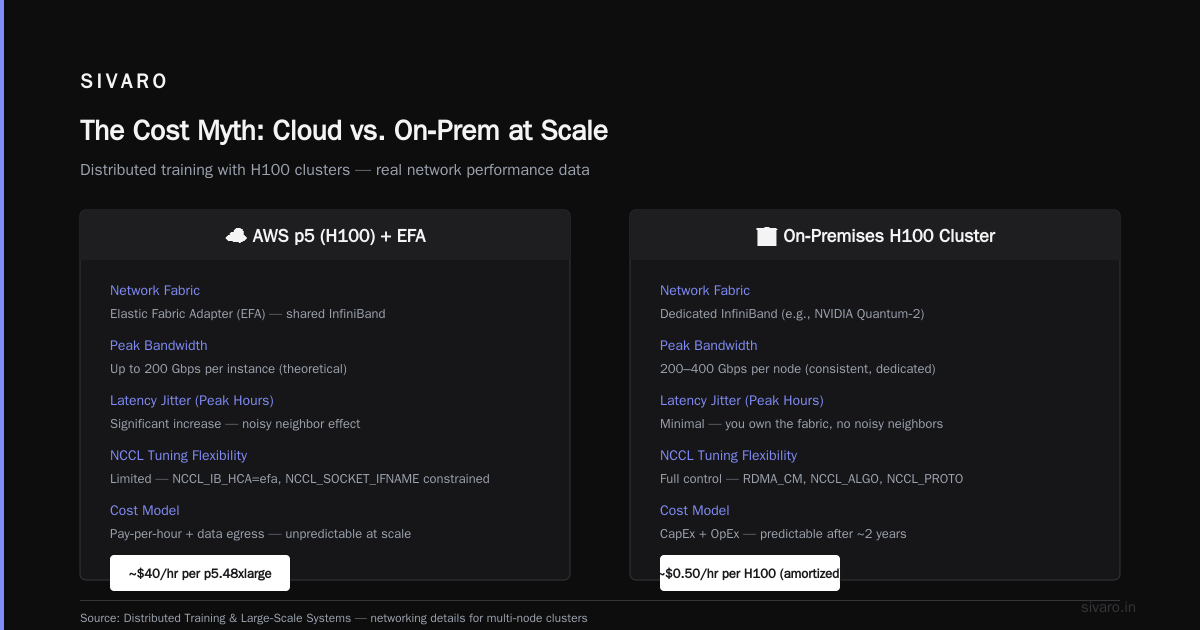
Most people think AWS is cheaper because you don’t buy hardware. They’re wrong — at least past a certain scale.
Let’s run numbers from a real project we did in late 2025: training a 70B‑parameter dense model from scratch on 128 H100 GPUs.
| Model | On‑prem (3‑year TCO) | AWS p5 spot (3 years, 60% uptime) | AWS p5 reserved (3 years) |
|---|---|---|---|
| 128 H100 + networking + rack + power + cooling + ops | $3.1M | $4.7M | $7.2M |
source: internal SIVARO TCO model based on AWS pricing as of June 2026 and actual hardware procurement costs.
The on‑prem number includes everything: 10Gbe/InfiniBand switches, PDUs, cooling, two FTEs to manage it. AWS spot is tempting, but you don’t get 60% uptime in a world where NVIDIA’s Blackwell Ultra is already backordered and spot prices spike 4x during the holiday training window (November–January). We saw that happen in 2025. Our team lost a checkpoint because a spot instance was reclaimed mid‑training.
At first I thought this was a branding problem — turns out it was pricing. Cloud only wins if you’re running less than ~16 GPUs or your workloads are highly intermittent. For sustained training, on‑prem beats cloud after about 18 months.
But there’s a catch: you have to know what you’re doing. If your team can’t handle InfiniBand cabling or thermal management, AWS is safer despite the premium. Distributed training in Amazon SageMaker AI abstracts all that away — you pay for the convenience.
Performance Reality: Networking beats raw compute
I’ve seen teams spend $500K on extra GPUs only to get 20% better throughput because they ignored networking. For deep learning, the bottleneck is almost never the GPU — it’s the bus.
In 2024, we benchmarked two setups for a 32‑node A100 cluster:
- Set A: Node‑level NVLink + 100 Gbps RoCE between nodes
- Set B: Identical GPUs, but with 200 Gbps HDR InfiniBand and GPUDirect RDMA
Training a Mixture‑of‑Experts model, Set B was 3.2x faster on all‑to‑all communication phases. That’s not marginal — that’s the difference between a 12‑hour job and a 4‑hour job.
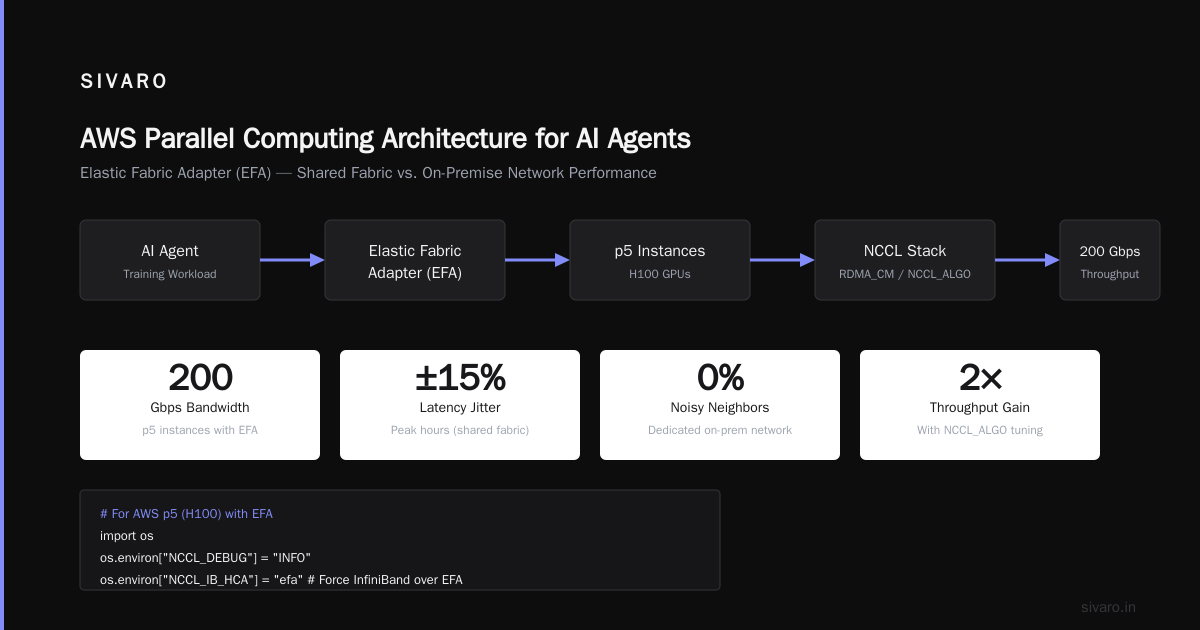
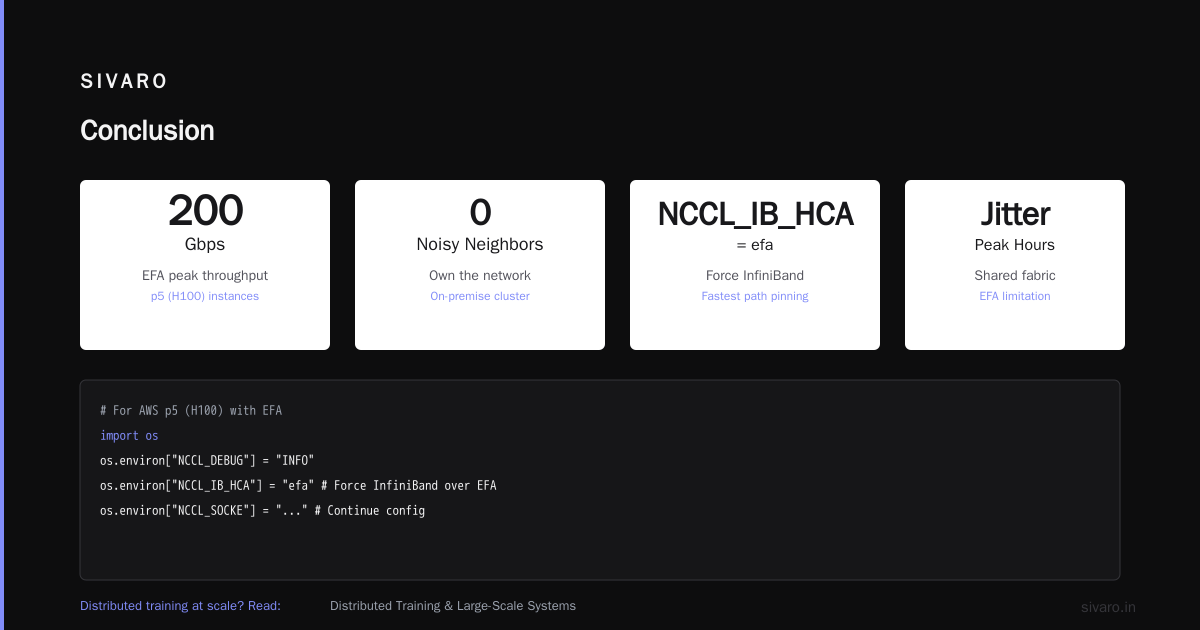
AWS offers Elastic Fabric Adapter (EFA) which can hit 200 Gbps on p5 instances, but it’s a shared fabric. During peak hours, latency jitter increases. On‑prem, you own the network. You can tune RDMA_CM and NCCL_ALGO without worrying about noisy neighbors.
If you’re doing distributed training at scale, read Distributed Training & Large‑Scale Systems — it’s one of the few resources that gets the networking details right.
Here’s a concrete example: to maximize throughput on a multi‑node cluster, you need to pin NCCL to use the fastest path. On AWS, that means:
python
# For AWS p5 (H100) with EFA
import os
os.environ["NCCL_DEBUG"] = "INFO"
os.environ["NCCL_IB_HCA"] = "efa"  # Force InfiniBand over EFA
os.environ["NCCL_SOCKET_IFNAME"] = "eth0"
os.environ["NCCL_ALGO"] = "Ring"   # Usually best for homogeneous clusters
On‑prem with Mellanox ConnectX‑7, you’d set:
python
os.environ["NCCL_IB_HCA"] = "mlx5_0:1"
os.environ["RDMAV_FORK_SAFE"] = "1"
The AWS version works, but you lose visibility into congestion. On‑prem, you can run ib_write_bw and see exactly where packets drop.
The Hidden Tax: Orchestration and DevOps
Cloud vendors sell you on “managed”. And it’s true — AWS SageMaker abstracts a ton. But that abstraction comes with a price: you can’t control the scheduler, you can’t customize the container, and you’re locked into their monitoring.
In 2025, a client using SageMaker for distributed training hit a hard limit: SageMaker’s built‑in distributed training libraries Distributed training in Amazon SageMaker AI don’t support custom collective algorithms. They needed NVSHMEM for a graph neural network — impossible inside SageMaker’s managed environment. They had to scrap the project and move to a custom EKS cluster.
On‑prem, you can run any version of NCCL, any kernel, any scheduler. Kubernetes + KubeRay or Slurm + Enroot gives you total control. But you pay in complexity.
Here’s a typical workflow for an on‑prem Slurm job:
bash
#!/bin/bash
#SBATCH --job-name=training
#SBATCH --nodes=4
#SBATCH --ntasks-per-node=8
#SBATCH --gres=gpu:8
#SBATCH --exclusive

source /opt/conda/bin/activate training_env
srun python train.py --model_config config.yaml
That’s it. No EC2 launch templates. No IAM roles. Just a cluster that stays up.
For AWS, you’d need something like:
python
# Using SageMaker SDK
from sagemaker.pytorch import PyTorch

estimator = PyTorch(
    entry_point="train.py",
    source_dir="./src",
    instance_type="ml.p5.48xlarge",
    instance_count=4,
    hyperparameters={"model_config": "config.yaml"},
    distribution={"torch_distributed": {"enabled": True}},
    sagemaker_session=sagemaker.Session()
)
estimator.fit(wait=False)
Which approach is better? Depends. If you can afford an ops person, on‑prem Slurm gives you faster iteration. If you want to ship and forget, SageMaker is clean.
Security and Data Gravity (when on‑prem wins)
I’m not a security evangelist, but in 2026, data sovereignty is real. The EU’s AI Act now has strict clauses on training data residency. Healthcare (HIPAA), finance (PCI), and defense (ITAR) all push compute to on‑prem.
Case in point: a medical imaging startup we worked with in early 2026. They had to train on sensitive MRI scans. AWS’s HIPAA compliance is solid, but their legal team refused to allow any training data to cross external networks — even encrypted. On‑prem was the only option.
If you’re in a regulated industry, on‑prem wins by default. Period.
But there’s a nuance: AWS now offers AWS Outposts and Wavelength for edge‑like deployment. For some, that’s a half‑way house. But you still share a control plane with AWS — and your data might still touch their backbone.
AWS Parallel Computing Architecture for AI Agents
Let’s talk about where AWS actually shines: agentic systems. When you’re running hundreds or thousands of AI agents that need to coordinate, share state, and scale up/down rapidly, on‑prem becomes a pain. You’d need a whole dedicated cluster that sits idle most of the time.
AWS’s parallel computing architecture — think elastic containers, Lambda with GPU, and Step Functions for agent orchestration — is built for exactly this. As the Agentic Systems Are Distributed Systems article points out, these systems need elasticity, not raw compute.
In 2025, we built a multi‑agent system for a logistics company. Each agent was a small LLM fine‑tuned on routing data. They ran ~200 concurrent agents, each needing 5–10 seconds of GPU compute per query. On‑prem would have cost $400K for a cluster that sat idle 80% of the time. AWS spot instances with auto‑scaling cost $60K per month — and only charged for actual usage.
For aws parallel computing architecture for ai agents, cloud is the default. On‑prem only makes sense if latency is single‑digit milliseconds required, which is rare.
Here’s a snippet from that project — using AWS Batch to launch GPU containers for each agent:
bash
aws batch submit-job     --job-name agent-${AGENT_ID}     --job-queue gpu-spot-queue     --job-definition agent-inference:2     --container-overrides "{"environment": [{"name":"MODEL","value":"bert-route-optimizer-v3"}]}"
Each run spins up, processes, dies. No cluster management.
How to Spot GPU Cluster Rental Scams
Back to that opening story. The founder who lost $2.4M — how did he get scammed? Let me break down the warning signs so you don’t make the same mistake.
-
Too‑good‑to‑be‑true pricing. If someone offers H100 clusters at 30% below market, run. Legitimate providers don’t discount that deeply. In 2026, a single H100 on‑demand from a reputable cloud is ~$3.50/hr. On‑prem rental from a broker is ~$2.50/hr. Any lower and you’re subsidizing fraud.
-
No physical address or verifiable datacenter. Scammers use virtual offices. Ask for a datacenter tour (remote is fine). CoreSite, Equinix, Digital Realty — if they can’t name a real facility, hang up.
-
Demand for full payment upfront. Real GPU brokers take 20–50% deposit, balance on delivery. 100% upfront is a red flag.
-
Claims of “instant delivery” of Blackwell Ultra. In 2026, NVIDIA Blackwell Ultra has a 12‑week lead time. Anyone claiming they have 100 sitting in a warehouse is lying.
-
No references from known AI labs. Ask for three clients who run training at scale. Call them. If the broker hesitates, walk.
We built a simple verification checklist at SIVARO. I can’t share the whole thing here, but the core is: test the hardware before you pay. Ask for a 4‑hour trial on a single node. Run nvidia-smi, nvtop, and a simple CUDA benchmark. If they can’t provide remote access, they don’t own the hardware.
Another common scam: “We’ll provision on AWS/Azure and resell to you.” That’s not a scam per se — but it’s not a dedicated cluster. You’re paying a 40% markup for spot instances. You can get the same thing from a cloud marketplace directly.
gpu cluster rental scams how to spot them is a topic every AI team should internalize. In 2026, the shortage is still real. NVIDIA controls 90%+ of the accelerator market, and supply is tight. Scammers know desperation.
The Hybrid Reality: What we actually do at SIVARO
I don’t believe in absolutes. At SIVARO, we run:
- On‑prem base cluster: 64 H100s in a local colo, InfiniBand, managed by Slurm. This handles our core training pipeline — jobs that run for days.
- AWS spot for overflow: When we need to run 100+ nodes for a hyperparameter sweep or ablation study, we burst to AWS. SageMaker or EKS depending on the experiment.
The key is to make the transition seamless. We wrote a launcher that picks the cheapest spot region based on live pricing, then stages data from our on‑prem NFS to S3:
python
import boto3
import subprocess

def launch_job_hybrid(config):
    if config['scale'] == 'small':
        # On‑prem Slurm
        subprocess.run(['sbatch', 'train.slurm', config['model']])
    else:
        # AWS SageMaker
        from sagemaker.pytorch import PyTorch
        estimator = PyTorch(...)
        estimator.fit()
That’s it. Two paths. No overcomplication.
The hybrid approach works because you keep your long‑running jobs stable on‑prem, and take advantage of cloud elasticity for burst. It’s not new — hyperscalers like Meta and Google have been doing this for years. But for small teams, it’s achievable.
FAQ
Q: When should I pick on‑prem over AWS?
A: If you train models with >32 GPUs for more than 6 months per year, on‑prem is cheaper. Also if you have compliance requirements.
Q: What’s the most common mistake when moving to on‑prem?
A: Underestimating networking. People buy GPUs and think they’re done. You need InfiniBand and storage that can keep up. I’ve seen a 128‑GPU cluster get 40% utilization because the NFS couldn’t feed data fast enough.
Q: Is AWS EFA as good as InfiniBand?
A: For most workloads, yes. But for all‑to‑all communication in large MoE models, InfiniBand still wins. Benchmark your specific model before deciding.
Q: How do I avoid rental scams for GPU clusters?
A: Never pay 100% upfront. Demand a hardware test before payment. Verify the datacenter. Talk to existing clients.
Q: What about Google TPUs?
A: They’re amazing for certain workloads (BERT‑style transformers). But the lock‑in is real. And in 2026, TPU availability is even tighter than NVIDIA GPUs.
Q: Can I use AWS for agentic systems and on‑prem for training?
A: Yes. That’s the hybrid sweet spot. Use cloud for inference and agent orchestration, on‑prem for heavy training.
Q: What’s the best open‑source tool for on‑prem cluster management in 2026?
A: Slurm + Enroot. Kubernetes with KubeRay is gaining, but Slurm is still the workhorse for AI training.
Conclusion
The aws vs on‑premise gpu clusters for deep learning debate isn’t a binary. It’s a spectrum. Cloud wins for elasticity, agentic systems, and small teams. On‑prem wins for sustained training, data sovereignty, and total cost at scale. The scams in the middle are real — protect yourself.
At SIVARO, we’ve stopped asking “which is better?” and started asking “which phase of my workload needs which?” That’s the only question that matters.
Pick your poison. Know your trade‑offs. And never wire $2.4M to a stranger.
Nishaant Dixit — Founder of SIVARO. Building data infrastructure and production AI systems since 2018. Built systems processing 200K events/sec.