 SIVARO
AWS: What Did It Stand For (And Why It Still Matters)
You're reading this because you asked a question that sounds almost too simple to Google: aws what did stand for.
Amazon Web Services. Yes, that's the answer. Amazon Web Services. Simple, right?
Except it's not that simple. Because if you're asking that question in 2026, you're probably not an accounting student wondering about acronyms. You're a developer, an engineer, or a founder trying to figure out whether AWS is where your compute-heavy workloads should live. And that's a completely different question.
In this guide, I'm going to cover what AWS actually is — the full story, not the Wikipedia version. I'll walk through when AWS makes sense for distributed training and when it doesn't. And I'll give you the honest comparison between aws vs on premise gpu cluster for deep learning, because that's the decision I've watched teams struggle with for years.
Let me start with something real. In 2023, I was on a call with a startup founder in Bengaluru. His team had spent six months building a recommendation system on AWS. They were proud of it. Then they got their GPU bill and almost had a heart attack. Their entire runway took a hit. And honestly, this story keeps repeating with founders I meet.
Here's what I've learned after building data infrastructure and AI systems at SIVARO since 2018.
The Origin: Not What You Think
Most people think AWS started as a deliberate cloud platform. It didn't. It started as an internal infrastructure project at Amazon.
The timeline goes something like this: Amazon was spending massive amounts of time and money managing its own compute infrastructure for its e-commerce business. Engineers were constantly reinventing the same systems to handle scaling. There was no virtualization initially, no multi-tenancy, none of the features that would eventually define the cloud industry.
Then in 2006, Amazon launched S3 (Simple Storage Service) and EC2 (Elastic Compute Cloud). Those were the two foundational pieces that became "Amazon Web Services."
Here's the part nobody talks about: those services were good because they were built by people who were running infrastructure at massive scale for a different core business. Amazon was already handling millions of customers, catastrophic failures, and all they could eat.
That's the DNA of AWS. Not innovation for its own sake. Infrastructure that solved real problems at scale.
What Does AWS Mean Today in 2026?
It's 2026. AWS no longer means what it meant even a few years ago. The term has become less about Amazon's specific services and more about a general pattern for building infrastructure.
Let me be very clear about this. When someone asks "aws what did stand for" in 2026, they're usually asking about a philosophy, not an acronym.
A few shifts I've observed in the last two years:
First: everybody says "AWS" but the services are radically different. In 2024 and 2025, AWS launched a bunch of generative AI services. This changed how developers think about AWS. It stopped being "upload a file to S3" and became "build an agent that can orchestrate a data pipeline."
Second: AWS is becoming more of a hybrid story. Teams are running training workloads on-prem and using AWS for burst capacity. Or vice versa. The Distributed training in Amazon SageMaker AI documentation now describes multi-node training with custom networking acceleration. That's a big deal.
Third: pricing has gotten worse, not better. The egress fees, data transfer costs, the per-hour billing for GPU instances? In 2025, these costs became the headline issue for AI teams. I have multiple clients who moved to bare-metal providers because AWS pricing made their training runs unpalatable.
The acronym hasn't changed. The game has.
Distributed Training on AWS: The Reality Check
Here's where I'm going to take a clear position: for many AI workloads, AWS is not the right choice. And this is coming from someone who loves AWS.
We build and operate data infrastructure at SIVARO. I've deployed training clusters on AWS. I've also deployed them on bare metal, on paperspace, on coreweave (technically a different cloud), and with self-hosted GPU clusters.
Let me break down when to use what.
When AWS Makes Sense
AWS excels in four scenarios:
-
Prototyping and experimentation. Getting a training job running on SageMaker with a sample dataset is about as easy as it gets. The Distributed Training & Large-Scale Systems resource does a great job walking through the early stages with SageMaker. The integration with Jupyter Labs and your IDE is smooth.
-
Mixed workloads. If you need to combine training with heavy data processing in S3, or if you need to orchestrate a pipeline that touches many services, AWS is excellent. The managed services are a killer feature.
-
When you have variable demand. If your training jobs run in bursts and you don't need 24/7 usage, paying for on-demand GPU hours on AWS might actually cost less than running a cluster that sits idle 80% of the time.
-
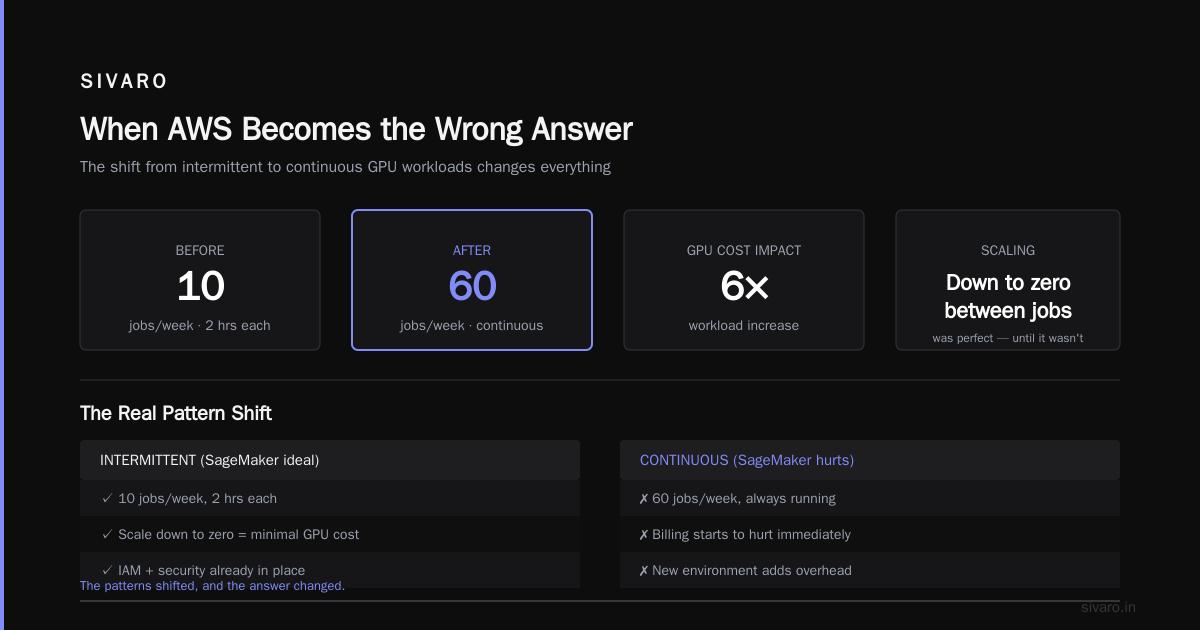
Teams that are already in the ecosystem. The hardest part of infrastructure is integration. If your data is already in S3, your permissions are already set up with IAM, and your security teams already trust AWS, moving to a new environment adds overhead.
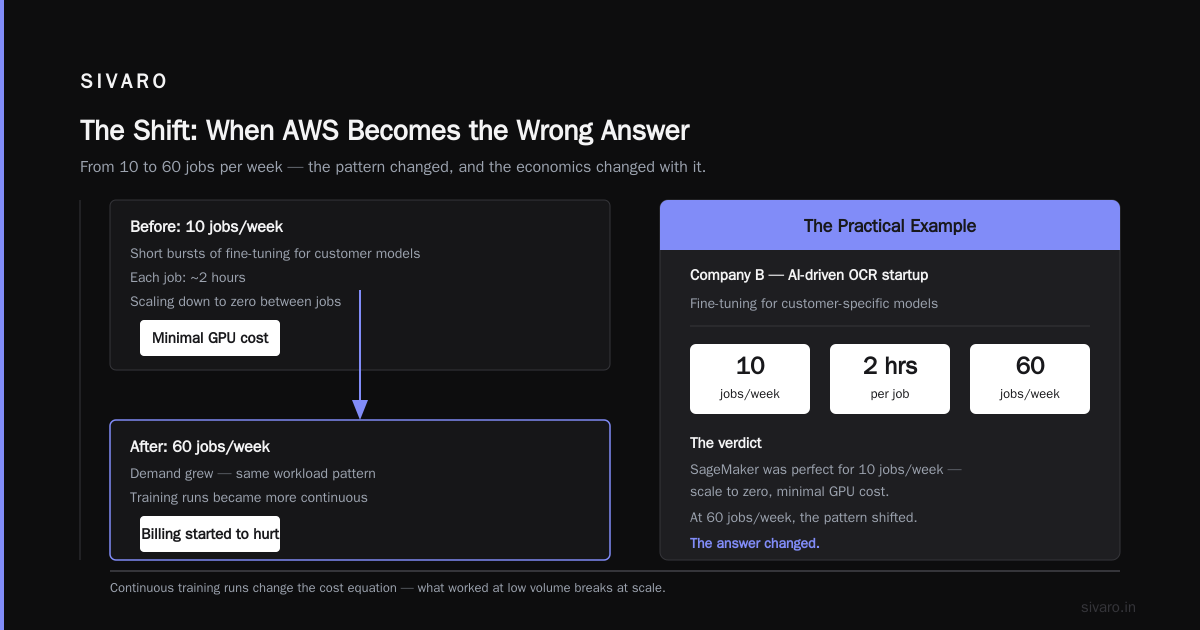
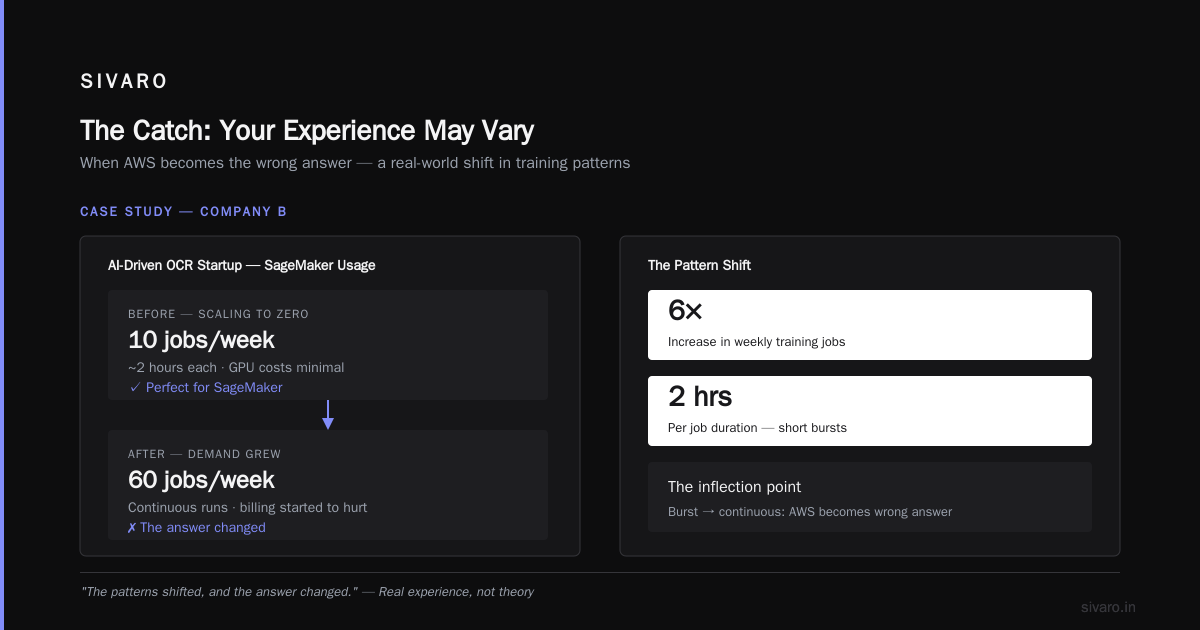
Here's a practical example from my experience. In 2024, I was working with a client — let's call them Company B, an AI-driven OCR startup — that needed to run short bursts of fine-tuning for customer-specific models. They would run 10 jobs a week, each taking about two hours. That was perfect for SageMaker. Scaling down to zero between jobs meant their GPU costs were minimal.
But then demand grew, and they started running 60 jobs a week. That's when the billing started to hurt. The patterns shifted, and the answer changed.
When AWS Becomes the Wrong Answer
Here's the part most articles won't tell you.
If your training runs are continuous — meaning your GPU cluster is running 80% of the time or more — then AWS gets expensive fast. Way more expensive than it should be. The main culprit is that per-hour pricing on GPUs doesn't reflect that your cluster could be purchased and run at a fraction of the cost.
Let me give you a concrete number. An EC2 instance with a single A100 GPU in 2025 runs you somewhere between $3 and $5 per hour on-demand. At 730 hours a month, that's over $3,000 per month per GPU. If you have 8 GPUs, that's $24,000 a month. You could buy a serious GPU server for the price of running that for six months.
This is the basis of the aws vs self hosted gpu cluster conversation. And I want to be very direct about this: if you're running continuous training and you haven't priced out self-hosting, you're leaving money on the table.
But self-hosting has its own set of problems, the primary one being that you own the hardware. When the GPU fails, you deal with it. When you need to upgrade, you eat the depreciation.
The Cloud-native and Distributed Systems for Efficient and Large-Scale AI paper gets at this trade-off really well. Running distributed training efficiently is easy on a managed platform. Running it cost-effectively requires infrastructural control. It's a trade-off that most teams can't have both.
The AWS vs On-Premise GPU Cluster Question
People frame this as a binary and it's not. You have options beyond AWS vs on-premise:
-
Managed cloud GPUs with spot instances: AWS, GCP, and Azure all offer spot/preemptible GPU instances at 30-50% discounts. For fault-tolerant training jobs, these are great. The tradeoff is you deal with interruptions.
-
Modern bare-metal GPU clouds: Providers like CoreWeave, Lambda Labs, and RunPod offer bare-metal NVIDIA GPUs at rates far below AWS for sustained workloads. They manage the hardware and charge per-node. You manage the software and scaling.
-
Self-hosted GPU clusters: Like buying your own rack and managing it. Maximum control, maximum cost efficiency if utilized properly, but you take on the ops burden.
In the last 12 months, I've seen a pattern emerge. And it's not what the cloud vendors want you to think.
The pattern is this: teams start on AWS, get traction, then migrate their cost-heavy workloads to cheaper infrastructure once they know what they're doing.
The RAG retrieval pipeline stays on AWS for the API integrations. The training jobs and heavy GPU utilization move to dedicated infrastructure. The data warehouse stays in whatever managed service they're using.
It's called "polymorphism" in the system design world. It should be called "not being wasteful."
Agentic Systems Are Distributed Systems — And AWS Plays a Role
This is the part that's fresh in my mind.
In 2026, the hottest thing in AI is agentic systems. Multi-agent orchestration, tool use, and long-running workflows. And one of the most underappreciated insights from the last year is that Agentic Systems Are Distributed Systems.
What does that mean in practice?
An agent that makes an API call to an LLM and waits for a response is doing synchronous work. An agent that kicks off a model training run, uploads weights to S3, and then triggers a separate evaluation job? That's an asynchronous, distributed system. You're managing message queues, state, retries, and failure handling.
AWS is genuinely one of the best platforms for hosting agentic systems because it has the managed building blocks: SQS for message queues, S3 for state, Lambda for function triggers, and SageMaker for the actual model inference.
But — and this is important — the model training itself often shouldn't happen on AWS if you're cost-sensitive. What I tell clients is: keep your orchestration layer on AWS, move your training to whatever is cheapest.
This is the architecture pattern we've developed at SIVARO:
python
# Pseudocode for hybrid training orchestration
def launch_training_job(model_config, training_data_uri, output_uri):
    if should_run_on_cloud(model_config):
        # Use SageMaker for smaller, bursty jobs
        from sagemaker.estimator import Estimator
        estimator = Estimator(
            image_uri="our-training-image:latest",
            instance_count=model_config['gpu_count'],
            instance_type="ml.p4d.24xlarge",
            output_path=output_uri
        )
        estimator.fit(training_data_uri)
    else:
        # Use internal cluster for heavy, continuous jobs
        submit_to_internal_slurm(
            model_config, training_data_uri, output_uri
        )
Simple concept. The logic decides which infra to use based on job characteristics. If it's a quick fine-tune that needs to be up in 5 minutes, you use the cloud. If it's a 3-day training run that's going to happen every week, you use the cluster.
I've seen this save companies 40-60% on their GPU spend. I'm not exaggerating. The numbers are real.
Distributed Machine Learning: The Technical Reality
You should understand what distributed machine learning actually means before you choose an infrastructure approach. I'll keep this brief because it's answerable by a well-maintained resource like What Is Distributed Machine Learning?
There are essentially three types of parallelism:
Data parallelism: You split the dataset across multiple GPUs. Each GPU computes its own gradient on a shard of the data, then you average the gradients. This is the most common and the easiest to implement.
python
# Example: PyTorch Distributed Data Parallel (DDP)
import torch.distributed as dist
import torch.nn as nn
from torch.nn.parallel import DistributedDataParallel as DDP

dist.init_process_group("nccl")
model = nn.Linear(128, 10).to("cuda")
model = DDP(model)

# Training loop
for batch in dataloader:
    outputs = model(batch)
    loss = loss_fn(outputs, targets)
    loss.backward()
    optimizer.step()
Model parallelism: The model is so large it doesn't fit on a single GPU. You split the model layers across multiple GPUs and pass activations between them. This is how model training frameworks handle gigantic LLMs.
Pipeline parallelism: It's model parallelism with batch processing. The GPUs work on different micro-batches at different pipeline stages simultaneously.
The key insight: the exact type of parallelism you need determines the strictness of your network requirements. Data parallelism with multiple nodes is fine over a slower network. Pipeline parallelism with large models? You need high-bandwidth, low-latency interconnect — like InfiniBand or NVLink, not Ethernet over the internet.
This is where AWS shines in one specific scenario: they offer GPU instances with proprietary networking for distributed training. But if you're running across EC2 instances with standard networking, you'll have superlinear scaling bottlenecks.
The AWS docs on Distributed training in Amazon SageMaker AI discuss this. SageMaker supports cluster-wide distributed training using MPI, Horovod, and PyTorch DDP. It's a solid option if you need it.
But the honest truth is: if you have a 1000-GPU training run, you will not be doing it on AWS. The costs are prohibitive. You'll be on a dedicated GPU cloud provider or a self-hosted multinode cluster.
The Catch: Your Experience May Vary
I need to add an important caveat.
One of the quickest ways to get burned with AWS for deep learning is to make assumptions about the performance you'll get. Different instances have different networking pageframes.
Let me give you a practical example. On an instance type without Elastic Fabric Adapter (EFA), your multi-node training over TCP/IP will be slow. EFA is Amazon's network interface for HPC. It's available in select regions and instance types. If you don't have it, your distributed training code that runs fine on 4 nodes may hit massive slowdowns at 16 nodes.
The same is true for NVMe vs standard SSDs. The storage conduit for checkpoints and write-heavy workloads matters.
This is the kind of thing you only learn by hammering the system. In 2022, we had a training run with checkpointing that was consistently slower on AWS than we expected. The culprit? The checkpoint saving was writing to EBS volumes, which suffered from I/O contention. Moving checkpoints to S3 via the S3 API fixed the issue.
python
# Example: Faster checkpointing to S3
import boto3
import io

s3 = boto3.client('s3')
buffer = io.BytesIO()
torch.save(model.state_dict(), buffer)
s3.upload_fileobj(buffer, 'my-bucket', 'checkpoints/latest.pt')
This is not the kind of thing you learn in a tutorial. It's what you learn by maintaining production systems.
A Clear Framework for Deciding
You need to make a decision. Here's a framework I give to teams, which has held up for years.
Choose AWS when:
- Your compute is "bursty" (you have training jobs that run occasionally)
- You need to integrate with a data lake in S3
- You value rapid iteration and managed services over cost
- You want to scale from 1 to 100 GPUs quickly without capital expenditure
Choose a dedicated GPU cloud (CoreWeave, Lambda, RunPod) when:
- Your training jobs run continuously (more than 12 hours a day)
- You need high-end GPUs and fast networking for large-scale distributed training
- Your costs on AWS have grown beyond 50% of what a dedicated cloud would cost
- You've built your own scripts for scaling, and you don't need AWS's managed orchestration
Choose self-hosted when:
- You have the ops team and expertise
- Your GPU utilization is over 70% sustained
- You need infiniBand or NVLink for model parallel workloads
- You want to avoid the premium of "cloud convenience"
The decision isn't permanent. Everything is movable, especially if your data and weights are portable. But moving from AWS to a different provider takes time, testing, and effort. Don't underestimate it.
My SIVARO Take: Stop Carrying the Six-Month Cloud Bill
At SIVARO, we've now helped a handful of companies migrate part of their training workloads off AWS. In every case, the move saved money, but not all of the cases were straightforward wins.
One company — a 20-person AI safety startup — moved from SageMaker to a CoreWeave cluster and saved 42% on their training bill. The switch also made their jobs faster because the cluster was purpose-built for this workload. But they spent 3 weeks of engineering time migrating the training pipeline. For a small team, that's real opportunity cost.
My honest recommendation? Start on AWS. Validate your model and your training approach. Then, when you have a training run that happens daily and costs more than $500, start looking at alternatives. The biggest waste I see isn't adopting AWS — it's staying on AWS after outgrowing it.
FAQ: AWS What Did Stand For and More
What did AWS originally stand for?
Amazon Web Services. Amazon's cloud computing platform launched in 2006 with S3 and EC2.
Is AWS still referred to as "Amazon Web Services" in 2026?
Technically, yes. The official company name remains Amazon Web Services, Inc. Most people just say AWS. The generic term "cloud" has displaced "Amazon Web Services" in day-to-day conversation, but the legal and technical entity retains the name.
What's the difference between AWS and a GPU cloud provider like CoreWeave or Lambda?
AWS is a general-purpose cloud with dozens of services. GPU-specific cloud providers are betting everything on delivering the best GPU infrastructure with the lowest cost and fastest networking. For pure GPU training workloads, they are often faster and cheaper. But AWS wins when you need the broader ecosystem: managed storage, message queues, analytics, and integrated data tools.
Is it cheaper to run deep learning on AWS or on-premise?
Depends entirely on utilization. If you're running 24/7, on-premise is almost always cheaper long-term. If you're running intermittently, AWS's on-demand pricing wins because you don't pay for idle GPU time. The trade-off is having to manage hardware if you buy it. That $10,000 GPU you buy still needs maintenance, cooling, and replacement in a few years.
What is the biggest hidden cost on AWS for a GPU workload?
Data egress. Transferring data out of AWS costs money. If you're moving large training datasets between regions or to another cloud provider, the egress fees can be astronomical. I've seen bills where egress exceeded compute costs. Always review your data transfer line items.
When should I consider using SageMaker distributed training vs. setting up my own distributed training on EC2?
Use SageMaker when you want managed infrastructure and care less about configuration. Use EC2 with your own scripts when you need specific library versions, custom network configuration, or if you've already invested in a bespoke training stack. Evaluation: if your training configuration is simple (data parallel with PyTorch DDP), SageMaker's distributed training in SageMaker AI is faster to set up. If you need custom MPI or Horovod with specialized networking, you'll have more control with EC2.
Does using AWS mean I automatically get the best networking for multi-node training?
No. You need to select instances with EFA (Elastic Fabric Adapter) support. Standard instances may have slow networking over TCP/IP, which kills multi-node scaling. Always check the documentation and choose instance types designed for high-performance distributed workloads.
Can I use AWS and a self-hosted cluster together?
Yes. That's the hybrid approach I recommend for companies that grow out of the cloud. Keep the orchestration layer and managed services on AWS, push the heavy compute to a dedicated cluster, and sync data between the two through secure APIs.
The Final Word
AWS is what you make of it. It stands for Amazon Web Services, but what it means in practice has changed dramatically — especially over the last few years. It's no longer the default choice for all workloads. It's one of several solid options.
For teams just starting out, AWS is often the right call. It gets you to success quickly with less operational burden. The trick is knowing when to lift the heavy workloads off and park them somewhere cheaper.
I tell founders: don't treat AWS as your home. Treat it as a beachhead. You launch from the beach, then move inland when you've secured the terrain. That's usually the most economical and safest path.
For me, the question isn't really "what did AWS stand for." It's "are you the kind of operator who makes the right infrastructure decision for the stage you're at?" That's the question that matters, and the answer is different for every team.
If you want to talk through your specific GPU infrastructure needs — or if you've ever wondered about aws vs on premise gpu cluster for deep learning, get in touch. We do this for a living.
Nishaant Dixit — Founder of SIVARO. Building data infrastructure and production AI systems since 2018. Built systems processing 200K events/sec.