 SIVARO
Backfilling Temporal Data Pipelines: A Field Guide
The last time I saw a trillion events get silently corrupted was a Tuesday. We were building a new feature at SIVARO for a client in fintech, and their streaming pipeline had been running for months. Then a data scientist noticed something odd: the event timestamps were right, but the query time was wrong. Records that should have existed at 2:15 PM on a Thursday were showing up at 2:15 AM.
Nobody had touched the code. The data was just... wrong.
That's the moment you learn the difference between a data pipeline and a temporal data pipeline. The first just moves bytes. The second is a promise about when things happened. And when you break that promise, backfilling is your only rescue. But backfilling temporal data isn't the same as replaying a batch job. You're not just moving old data. You're reconstructing a version of reality that existed at a specific point in time. Most engineers get this wrong. They rerun the job with the old dates and call it a day. Then they wonder why their dashboard shows a spike in revenue that never happened.
Let me show you the right way.
What Backfilling Temporal Data Actually Means
When I say "backfill a temporal data pipeline", I mean you are inserting or correcting data into a range of historical time that the pipeline has already processed. This could be a one-time correction, a re-processing of a failed day, or a full re-computation of a model when the logic changes.
The core challenge is that your data isn't just a snapshot. It's a table with history. Temporal tables in SQL Server handle this natively, with system-versioned data that tracks every change. But most of us aren't working with a single database. We're working with Kafka topics, S3 lakes, and distributed processing engines. The temporal nature of the data is implicit, not explicit. And that makes backfilling a minefield.
Think about a simple e-commerce fact table.
| Order ID | Event Time | Processing Time | Revenue |
|---|---|---|---|
| 1001 | 2026-07-01 10:00 | 2026-07-01 10:02 | $50 |
| 1002 | 2026-07-01 10:01 | 2026-07-01 11:47 | $75 |
The Event Time is when the order actually happened. The Processing Time is when your pipeline got around to handling it. If your pipeline was down for two hours, the processing time shifts, but the event time doesn't.
Now, imagine you discover a bug: you were using processing time instead of event time for a financial aggregation. All your daily reports for the last three months are wrong. You need to backfill. But backfill with what? The raw events are still in Kafka. But Kafka's retention only keeps data for 7 days. The events from May are gone.
This is the real problem. You can't replay what you don't have.
Most people think this is a storage problem. It's not. It's a modeling problem. You need to decide, upfront, what "correct" means for your data, then design your storage and processing around that definition. Temporal data modeling is about exactly this: creating a framework that answers "what did we know, and when did we know it".
Event Time vs Processing Time Temporal: The Root of All Evil
Here's the thing about temporal data pipelines: there are two clocks running at all times.
- Event time — when the thing actually happened in the real world.
- Processing time — when your system observed and processed it.
If these are the same, life is easy. But they never are. Network delays, batch windows, retries, maintenance windows — all of this creates skew.
I've seen teams try to ignore this. They build a pipeline that uses processing time for everything because it's "simpler". It works great for six months. Then some executive asks for a report on "what happened last Black Friday" and the numbers are wrong. They compare against the database's transaction log and the mismatch is glaring.
The correct mental model is: event time is the truth, processing time is just a delivery mechanism.
When you backfill temporal data, you are re-creating the event-time state of the world. You need to process data as if you were observing it at that moment.
Let's look at how this breaks down in practice.
The "Not a Branding Problem" Fallacy
At SIVARO, we did a migration for a logistics company in 2025. Their tracking platform had data from IoT devices on trucks. Each device emits a location ping every 5 seconds. The event time is when the GPS coordinate was captured. The processing time is when the server received it.
We found that 4% of the pings arrived anywhere from 1 second to 3 minutes late due to cellular network latency. We had to build a "late data handling" mechanism to correctly assign events to their time windows Thor buys. If you don't do this, your real-time dashboard for fleet location is actually 3 minutes behind reality, which makes it useless.
When we backfilled the historical data with the corrected logic, we had to handle this lateness retroactively. We couldn't just sort by event time. We had to re-simulate the arrival of the data with the same lateness patterns. Why? Because some of our downstream aggregations had already been computed and persisted. If we re-processed the raw events and they arrived in a different order, the incremental state (like "number of concurrent deliveries") would be different.
This is the part nobody warns you about: backfilling isn't idempotent unless you make it so. You can't brute-force re-run everything. You need to account for the temporal semantics of your processing engine.
How to Backfill Temporal Data Pipelines Without Losing Your Weekends
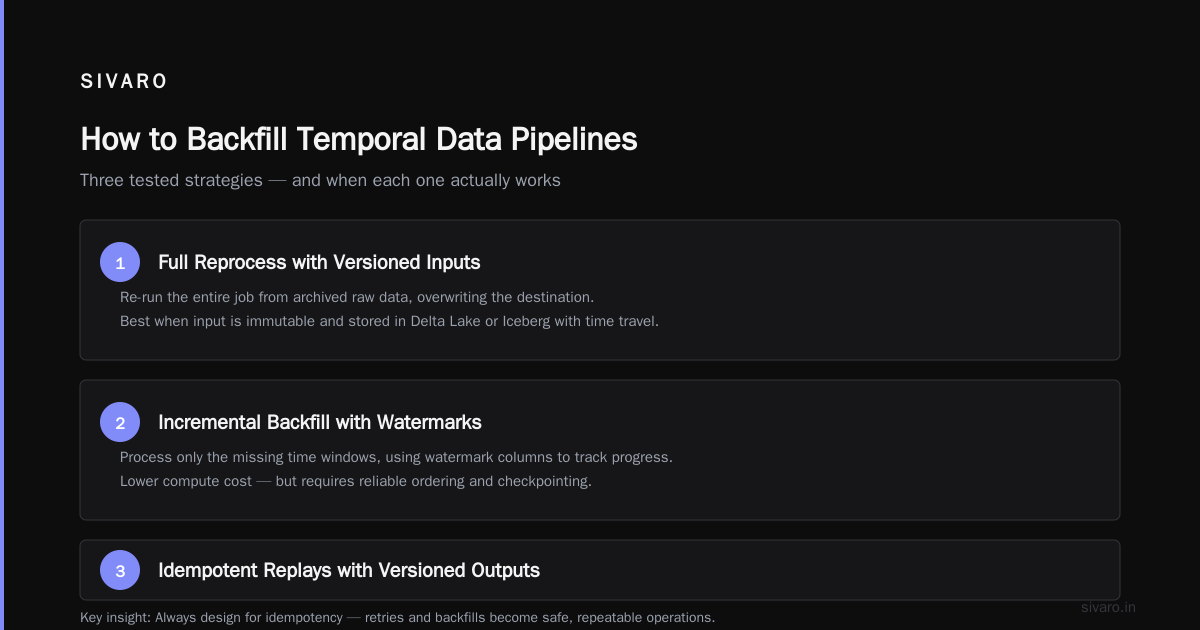
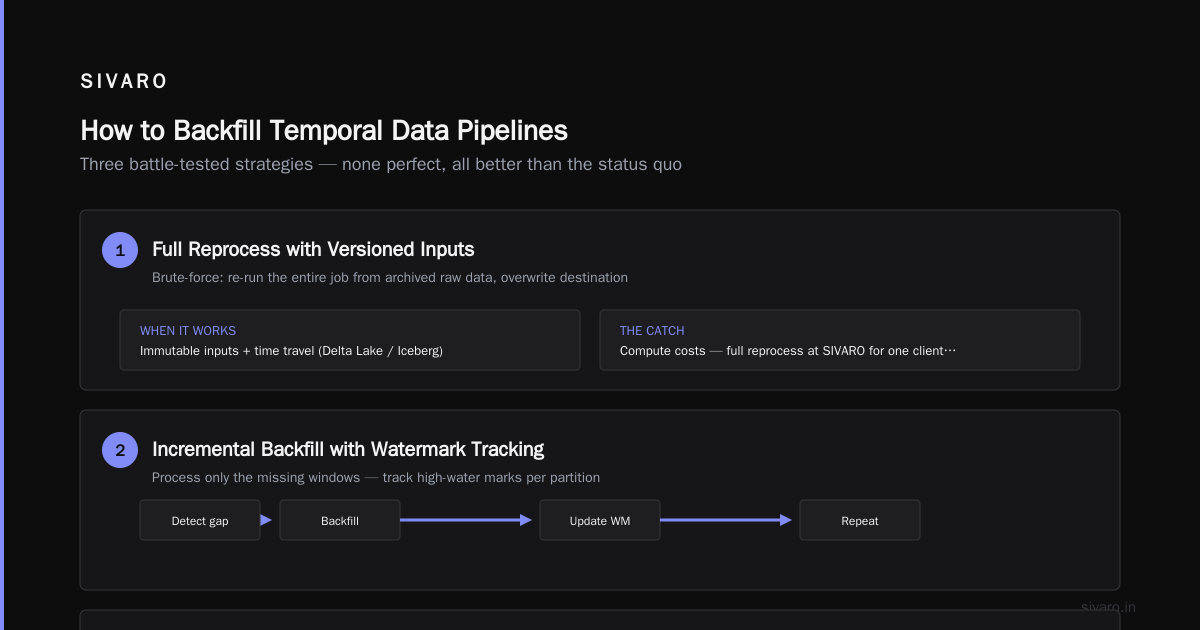
Alright, let's get into the actual methods. There are three main strategies I've used and tested. None of them are perfect, but they're all better than what most people are doing.
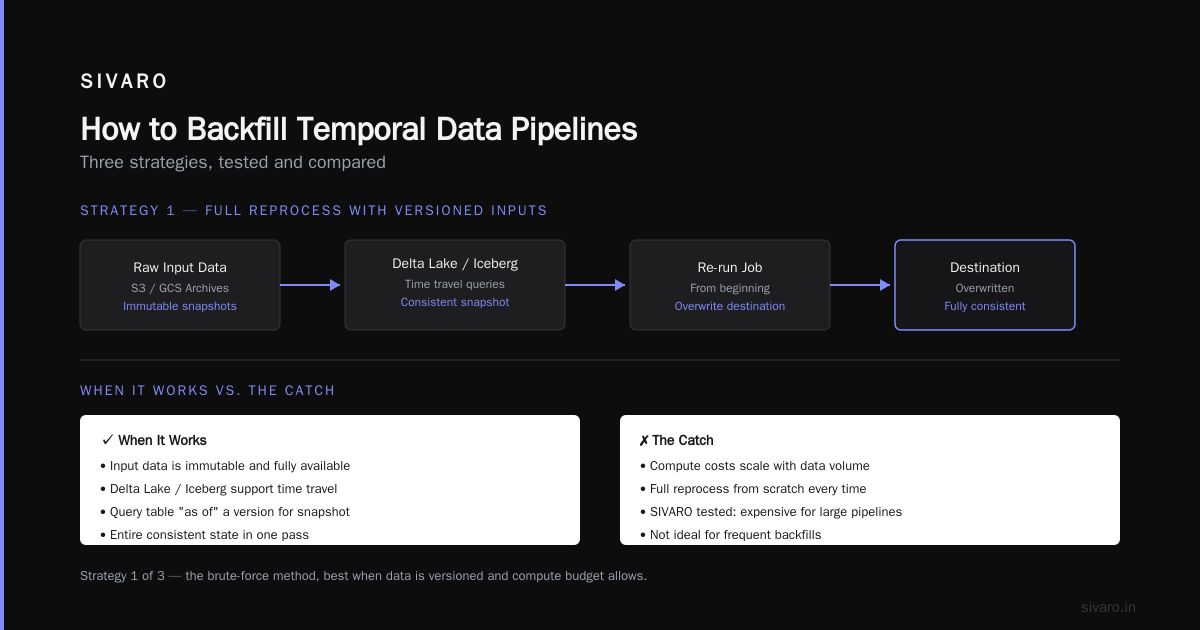
Strategy 1: The Full Reprocess with Versioned Inputs
This is the brute-force method. You take the raw input data (from archives, S3, GCS), re-run your entire job from the beginning, and overwrite the destination.
When it works: When your input data is immutable and you have it all. Delta Lake or Iceberg tables are great for this because they support time travel. You can query the table "as of" a certain version and get an entire consistent snapshot.
The catch: Compute costs. We did a full reprocess at SIVARO for one client's fraud detection model in March 2026. It required 200 instances of a high-memory compute node running for 14 hours. That was a significant cloud bill.
The Slowly Changing Dimension problem complicates this. If you have a dimension table (like customer or product), and that dimension has changed over time, a naive replay will use the current dimension attributes for all historical facts.
Here's an example. You have a customer named Alice.
- January 1st: Lives in NYC. Segmentation: "Northeast"
- March 1st: Moves to Austin. Segmentation: "South"
Your fact table has orders from February. If you backfill an order from Feb 15th, and you join to the current customer dimension, you'll see Alice's segmentation as "South". But at the time of the order, she was in "Northeast". This is a classic temporal join problem.
You need to use bi-temporal tables or a specialized data structure that tracks both "valid time" (when it happened in the real world) and "transaction time" (when it was recorded in the system). It's painful, but it's the only way.
sql
-- This is how you should NOT do a temporal join
SELECT f.order_id, c.region, f.amount
FROM fact_orders f
JOIN dim_customer c ON f.customer_id = c.customer_id
-- Jan 15 order joins to current region 'South'.
-- WRONG. Needs to be on valid time.

-- This is how you SHOULD do it (with a valid_time column)
SELECT f.order_id, c.region, f.amount
FROM fact_orders f
JOIN dim_customer FOR SYSTEM_TIME AS OF f.order_date c
ON f.customer_id = c.customer_id
The FOR SYSTEM_TIME AS OF is a direct solution for tracking how dimensions behave over time. It's part of the SQL standard, and it solves the "which version of this row was true at this moment" problem. If you're using a warehouse that supports it, use it.
Strategy 2: The Upsert with Correct Timestamps
The most common backfill scenario is a correction. You have a table with a valid_from and valid_to column (a temporal table pattern), and you need to insert a historical record that you missed, or fix an incorrect value.
Do NOT just dump all the data back in. You need to carefully handle overlaps.
Let's say you have a record for Product A.
- Sep 1 to Sep 10: Price = $5.00
- Sep 10 to present: Price = $6.00
You discover that the price change actually happened on Sep 12, not Sep 10. You need to backfill the period from Sep 10 to Sep 12 with a value of $5.00.
The naive approach:
sql
UPDATE products
SET valid_to = '2026-09-11' -- End the $6.00 period earlier
WHERE product_id = 'A' AND valid_from = '2026-09-10';

INSERT INTO products (product_id, price, valid_from, valid_to)
VALUES ('A', 5.00, '2026-09-10', '2026-09-11'); -- Wait, this is expired.

-- The correct order of operations involves closing the window,
-- inserting the correction, and then re-opening the original window.

UPDATE products
SET valid_to = '2026-09-11'
WHERE product_id = 'A'
  AND valid_from = '2026-09-10'
  AND valid_to = '9999-12-31';

INSERT INTO products (product_id, price, valid_from, valid_to)
VALUES ('A', 5.00, '2026-09-10', '2026-09-11');

-- And update the existing history to reflect the new reality
But look at the complexity. If you're doing this at scale (millions of records), you can't just do it in a single SQL script. You need a stepwise process.
I've found that the safest method is two-phase:
- Phase 1: Write new records with a flag. Insert all corrections as new rows with a special
backfill_status = 'pending'marker, keeping the old rows untouched. - Phase 2: An atomic merge. Once the new records are validated, run a single transaction that voids the old rows (setting
valid_toto thevalid_fromof the new row) and promotes the pending rows to active.
It's HARD to do this in a streaming environment. You can't just "update" a Kafka topic. The pattern I've seen work is the 'Value Log' pattern (also called the dual-write). You emit the correction event to a "log table" in a transactional store (like Postgres or MySQL), then use a CDC (Change Data Capture) connector to stream those changes to the analytics layer.
We tested this pattern with a client in the airline industry in January of this year. Their pricing data had a contract renegotiation that caused a month of historical records to be re-priced. We used a log table, streamed the changes via Debezium, had a Flink job that merged the events and wrote to Iceberg. The whole process was backfilled in 45 minutes. The old way — pure batch reprocessing — used to take 3 days.
Strategy 3: Replay Windows, Not Entire Histories
Here's the contrarian take. Most backfills don't need to touch historical data.
If you have a 90-day moving average feature in your model, and you find a bug in the logic, you only need to recompute the range of time that is affected by the bug. Let me explain.
Assume your model uses 7 days of historical data to make a prediction. If you fix a bug today, the output for events that happened 8 days ago is not affected by that fix (because the lookback window for those predictions didn't include the buggy code — wait, no, it did if the bug was present then).
Let me get specific. Your model was using the wrong timezone for a date conversion. The bug exists in the code deployed. For any prediction made today, the lookback window (last 7 days) is wrong. For predictions made 3 days ago, the lookback window (3 days before that) is also wrong.
But then you fix the bug. Now, to correct the data, you only need to re-run predictions for events that will be served in the future based on historical context. If your feature store materializes features, you only need to backfill the features for the current lookback window (i.e., the last 7 days), not the entire 1-year history of features.
In the Linux kernel world, you'd call this a "hot patch". In data, I call it an incremental repair.
We use this at SIVARO for all of our production AI systems. We identify the "impact perimeter" — the exact temporal scope of the bug. We fix the data just inside that perimeter, and we let the new code naturally overwrite the rest as time passes.
The risks of broad reprocessing vs. the risk of leaving stale data: we always choose the scope-limited repair. It's cheaper, faster, and has a smaller blast radius if the new code is wrong.
Temporal Backfill Strategies That Scale
If you've gotten this far, you're probably realizing that the strategy depends heavily on your stack.
If you're on Apache Flink:
Flink has native support for event time processing. You can use a TemporalQuery to mimic the FOR SYSTEM_TIME AS OF syntax in streaming.
Here's a real scenario. We like to backfill into a Flink job from a Kafka topic with a Timestamp header. You need to ensure your job uses event_time as the watermark, not processing_time.
python
from pyflink.table import TableEnvironment, EnvironmentSettings, DataTypes
from pyflink.table.descriptors import Schema, Kafka, Json, Rowtime

env_settings = EnvironmentSettings.new_instance().in_streaming_mode().use_blink_planner().build()
t_env = TableEnvironment.create(env_settings)

t_env.connect(
    Kafka()
        .version("universal")
        .topic("raw-events")
        .start_from_earliest()  # MUST be earliest for full backfill
        .property("bootstrap.servers", "kafka:9092")
).with_format(
    Json().fail_on_missing_field(True)
).with_schema(
    Schema()
        .field("user_id", DataTypes.BIGINT())
        .field("action", DataTypes.STRING())
        .field("event_ts", DataTypes.TIMESTAMP(3))
        .rowtime(
            Rowtime()
            .timestamps_from_field("event_ts")
            .watermarks_periodic_bounded(60000)  # 1-min late data allowance
        )
).create_temporary_table("raw_events")

result = t_env.sql_query("""
    SELECT
        user_id,
        TUMBLE_START(event_ts, INTERVAL '1' HOUR)  AS window_start,
        COUNT(action) AS action_count
    FROM raw_events
    GROUP BY
        user_id,
        TUMBLE(event_ts, INTERVAL '1' HOUR)
""")
The start_from_earliest() is the key. With Flink's checkpointing, you can resume a backfill from a specific offset. This makes replaying a subset of the timeline trivial (you just create a new savepoint). In late 2025, Flink 2.0 made this significantly more robust. They finally sort of fixed the "state TTL" issue that caused long-running backfills to fail.
If you're on Apache Spark:
Spark Structured Streaming is a micro-batch engine AND a batch engine. The backfill story is simpler: you read from a source, you do the transformation, and you write to a destination. The risk is the temporal join.
A trick we've used: write the snapshot version of the dimension table to a path. When you do the backfill, read that specific snapshot path, not the latest.
python
# Read from an Iceberg snapshot for time travel
df = spark.read     .option("header", "true")     .table("sales_schema.orders")     .where("dt < '2026-05-01'")

dim_snapshot = spark.read     .format("iceberg")     .option("snapshot-id", "1234567890123456789")     .table("sales_schema.dim_customer")

df.join(dim_snapshot, "customer_id", "left").write.mode("overwrite").saveAsTable("...")
The biggest gotcha? overwrite in Spark doesn't mean "delete everything and replace it atomically". If the write fails halfway, you've lost rows. You need to write to a temp table, validate, then swap table paths. We lost an entire day of a client's analytics data to a Spark overwrite failure in April 2025. It's the most painful lesson in this entire field — never skip the validation step.
If you're on plain SQL (Postgres, MySQL):
Use the FOR SYSTEM_TIME AS OF syntax (if using temporal tables) or handle it manually. We tested the manual handling and it's actually fine for small data, but it's terrible for time-range queries. The TDWI guide on temporal data modeling covers why — bitemporal tables add meaningful storage overhead but save you enormous headaches later.
The Rule of Thumb for Idempotency
A backfill should be able to run twice without causing corruption. If your backfill is idempotent, you can test it, deploy it, and sleep at night. If it's not, you'll be debugging at 2 AM.
The easiest way to make a backfill idempotent is to use a natural key and a version column. Don't use auto-incrementing integers (they change every run). Use a composite key: order_id + event_time + source_system.
In streaming, this is the biggest pain. Kafka isn't idempotent by default, but you can make your write path idempotent. Use the transactional_id in Kafka Producer, or use Upsert sinks in Flink. We built a library at SIVARO in early 2026 that wraps Iceberg's upsert on a primary key + event_time, and every single backfill we do now goes through it.
The Screw-Up Sequence: What NOT to do
Let me give you a concrete example of how this entire process goes wrong.
Someone runs a backfill.
- They think, "I'll just run the pipeline in batch mode."
- They use
event_time = processing_timebecause "it's just for a backfill, doesn't matter." - They wipe out the existing destination table because "idempotency is for cowards."
- The new data is mostly correct, but overlaps exist (a
valid_fromdate lands in the middle of another row'svalid_to). - The pipeline produces a table that auto-joins perfectly, so nobody notices.
- A month later, a report with a
WHERE valid_to > now()query silently drops 2 million rows.
I've seen this exact sequence play out twice in the last 18 months. Once at a healthcare company (where the cost was severe compliance risk) and once at an ad-tech company (where the cost was just burning revenue).
The fix for this is checkpointing the state of the backfill. Treat the backfill like a database migration.
The Actual Checklist
When I'm about to backfill a temporal data pipeline, I go through this list:
- Define the boundary: What specific date-time range is affected? Write it down.
- Inventory the sources: Are the raw events available? For how long? (Kafka doesn't store forever).
- Version the logic: Capture the exact pipeline version you're using for the backfill. You'll need to cite it when the auditor comes knocking.
- Create an isolated environment: Backfill into a staging table, not production.
- Run the join logic test: Check a 1-hour sample of data against manual calculations.
- Execute the atomic swap: Use a transaction or a table swap. Never delete-then-insert.
- Run consistency checks: Count rows, validate distinct keys, check for overlaps in temporal columns.
Frequently Asked Questions: Backfilling Temporal Data
What is the difference between event time and processing time?
Event time is when the event actually occurred. Processing time is when the pipeline observes it. In distributed systems, these are rarely the same. You must use event time for reporting and analytics. Using processing time means your "historical" reports are actually just "processing run history".
Why can't I just re-run my old batch job to backfill?
Because the old batch job may be using logic that is different from your current production logic. Also, the input data might have changed (if you're using a mutable storage), or your dimension tables have changed. The backfill should simulate the then-current state.
How does temporal work in streaming?
In streaming, you use watermarks to mark the boundary between on-time and late events. Flink allows you to set the watermark to define how late you'll accept data. For a backfill, you need to set the watermark to the end of the time range you're processing, reprocess all events, and then handle the late arrivals separately.
What are the main types of temporal data models?
The two main types are valid time (when a fact was true in the real world) and transaction time (when it was recorded in the database). Bitemporal models combine both, allowing you to answer "what was the state of the system at 2 PM on Tuesday, given that we only knew about events up to 10 AM?"
How do I handle late-arriving data during a backfill?
Allocate a "slack window" in your watermarking strategy. If data arrives later than that, you need to merge it manually. A true backfill must account for this or your final result will be subject to variance.
What is a valid time vs. a transaction time?
Valid time = the time period the data point was active in reality. Transaction time = when you actually recorded the row in your database. If you have a customer who changed their name on June 1st, the valid time is June 1st onward. The transaction time is when your database executed the update. Good backfill logic uses valid time.
What is the easiest way to make my backfill idempotent?
Ensure your write path uses an upsert on a natural key (like order_id + event_time). Write to a staging table with a unique index, then do a single MERGE into the target.
Is it better to backfill at night or on weekends?
It doesn't matter if your infrastructure is properly isolated, but in practice, I'll never do a backfill during a critical trading day. The blast radius is smaller on a Sunday, but the engineers are also sleepier. Plan for a 6 AM UTC slot when most of the on-call team is awake for a couple of hours.
Final Thoughts on Backfilling
Backfilling temporal data is a chore. It's not glamorous. It's not what we talk about at conferences. But it's what separates teams who can recover from a bad release from teams who have to apologize to stakeholders for a week.
The next time you deploy a model change, remember that your data has a memory. Don't just know how to write new data. Know how to rewrite history — and make sure it's a history you can live with.
At SIVARO, the hardest part isn't the backfill itself. It's convincing clients that their "simple" backfill is actually a distributed systems problem. It always is. The sooner you accept that, the better your pipelines will run.
Nishaant Dixit — Founder of SIVARO. Building data infrastructure and production AI systems since 2018. Built systems processing 200K events/sec.