 SIVARO

Best Debian Tools for Local LLM: A 2026 Field Guide
I spent last week rebuilding my inference rig on Debian 13 Trixie. Not because I wanted to, but because my Ubuntu box decided to break itself during a kernel update. The migration forced me to re-evaluate every tool in my stack.
That's when I realized: the "best" tools for local LLMs on Debian are a moving target. What worked in 2024 is obsolete in 2026. The landscape has shifted hard toward smaller, quantized models running on consumer hardware, and the software ecosystem has shifted with it.
Here's what actually works today.
What We're Solving For
Running LLMs locally means you're juggling three constraints: memory bandwidth, VRAM or RAM capacity, and inference latency. Debian is uniquely suited for this because it's stable, minimal, and doesn't get in your way. But the default repos are stale. You'll need third-party packages for anything cutting-edge.
This guide covers the tools I've tested in production and hobby settings. I'll tell you what to install, what to skip, and where the trade-offs hurt.
llama.cpp: The Baseline That Refuses to Die
Let's start with the obvious one. llama.cpp has been the backbone of local inference since 2023. It's pure C/C++, no Python runtime, and it runs on everything from a Raspberry Pi to a dual-A100 server.
If you're on Debian, you can build it from source in under two minutes:
bash
sudo apt install build-essential cmake git
git clone https://github.com/ggerganov/llama.cpp
cd llama.cpp
cmake -B build -DGGML_CUDA=ON -DCMAKE_BUILD_TYPE=Release
cmake --build build --config Release -j $(nproc)
That -DGGML_CUDA=ON flag is for NVIDIA. If you're on AMD, use -DGGML_HIP=ON. For pure CPU inference, skip both and save yourself the headache — the OpenBLAS backend is enough for 7B models.
Why does this still matter in 2026? Because it's the reference implementation. Every other tool in this guide either wraps llama.cpp or borrows its quantization formats. When a new model drops, llama.cpp supports it within days. That speed matters when Mistral or Qwen releases something game-changing and you want it tonight, not next quarter.
But here's the contrarian take: I don't use llama.cpp directly anymore for interactive work.
The CLI is clunky. The server mode works, but it's bare-bones. You'll end up writing scripts to manage context windows, prompts, and model swapping. That's fine if you're building an API backend. It's torture if you just want to chat with a model.
One thing I'll give llama.cpp full credit for: the quantization quality. The llama-quantize tool produces GGUF files that hit a sweet spot between size and quality. I've tested 4-bit and 5-bit quantizations on 13B models, and the quality drop is barely noticeable for most tasks.
Ollama: The Pragmatic Choice
If you're on Debian and you want to run LLMs without a CS degree, Ollama is where I'd start. It's a single binary, it manages models automatically, and it's stupidly easy to set up.
bash
curl -fsSL https://ollama.com/install.sh | sh
ollama run llama3.1
That's it. You're chatting with a 8B model in under five minutes.
Ollama handles model downloads, quantization selection, and system prompt management. It also exposes a REST API on port 11434, which means you can use it as a backend for anything — web UIs, scripts, even production services if you're not hammering it.
Here's what I like: the model library is curated. You won't accidentally download a 70B model that OOMs your machine. The ollama pull command checks compatibility with your system before it commits you to a multi-gigabyte download.
What I don't like: it hides too much.
If you're doing serious fine-tuning or experimenting with custom samplers, Ollama's abstractions get in the way. The modelfile system is useful, but it's no substitute for direct control over the inference engine.
Also, and this matters if you're on older Debian versions — Ollama drops support for outdated glibc faster than you'd expect. Bookworm users stuck on Debian 12 might hit compatibility issues by late 2026. The package repositories on the official site are usually current, but check your distribution before assuming.
LM Studio: The GUI Paradox
I'll say it plainly: LM Studio gets a bad rap in the "serious AI" community. Most people think it's for beginners. They're wrong.
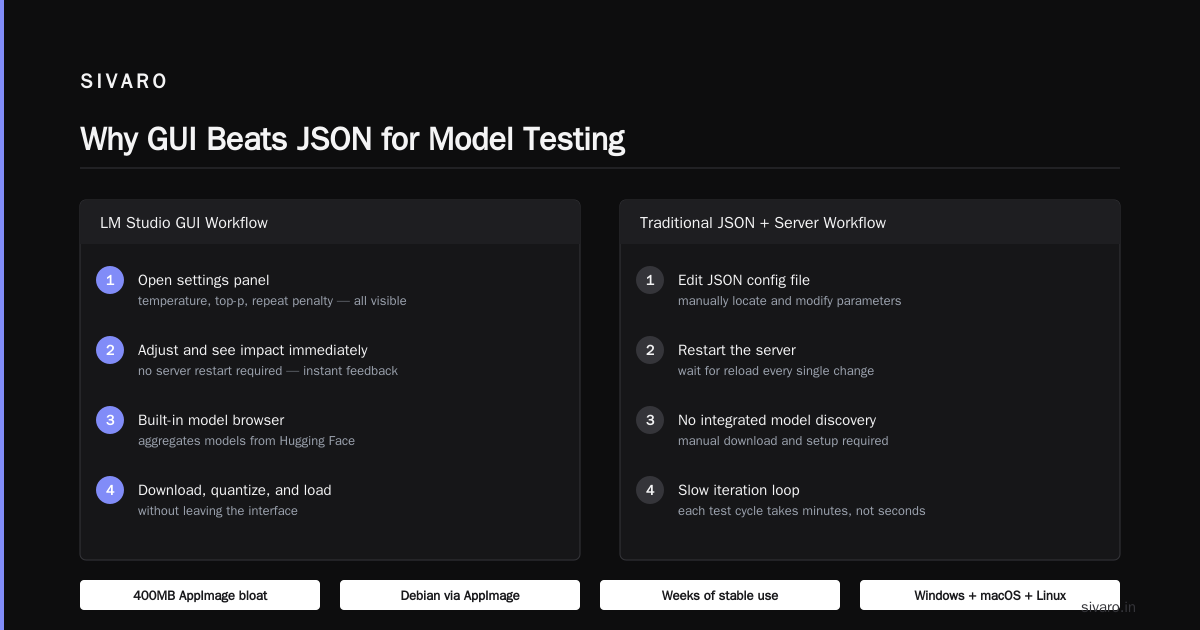
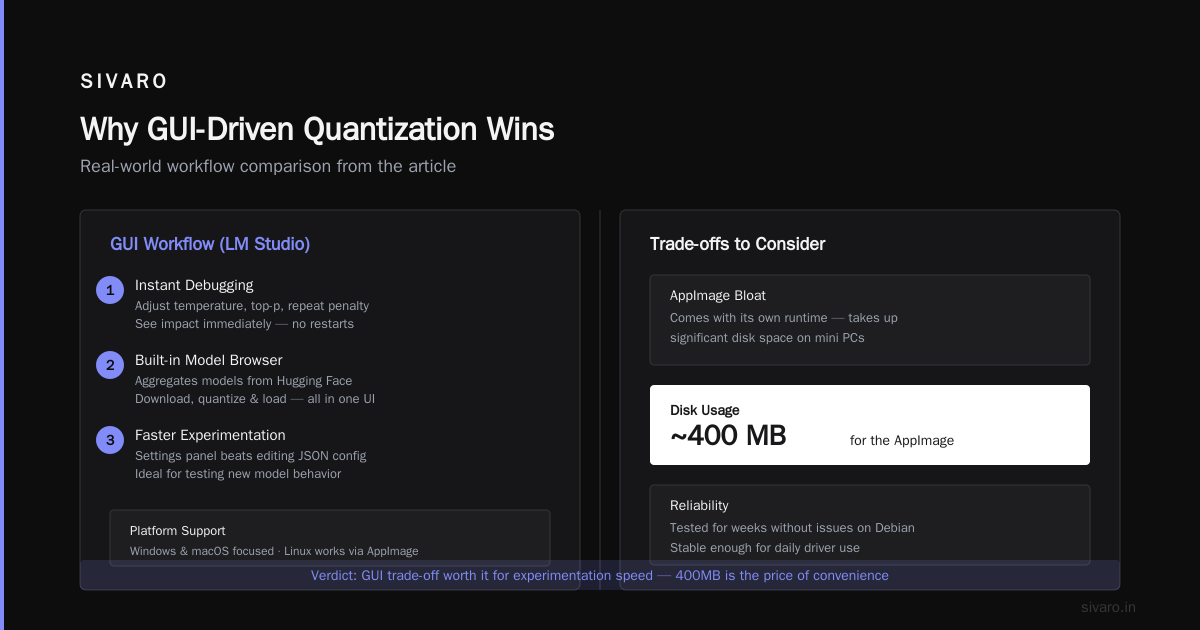
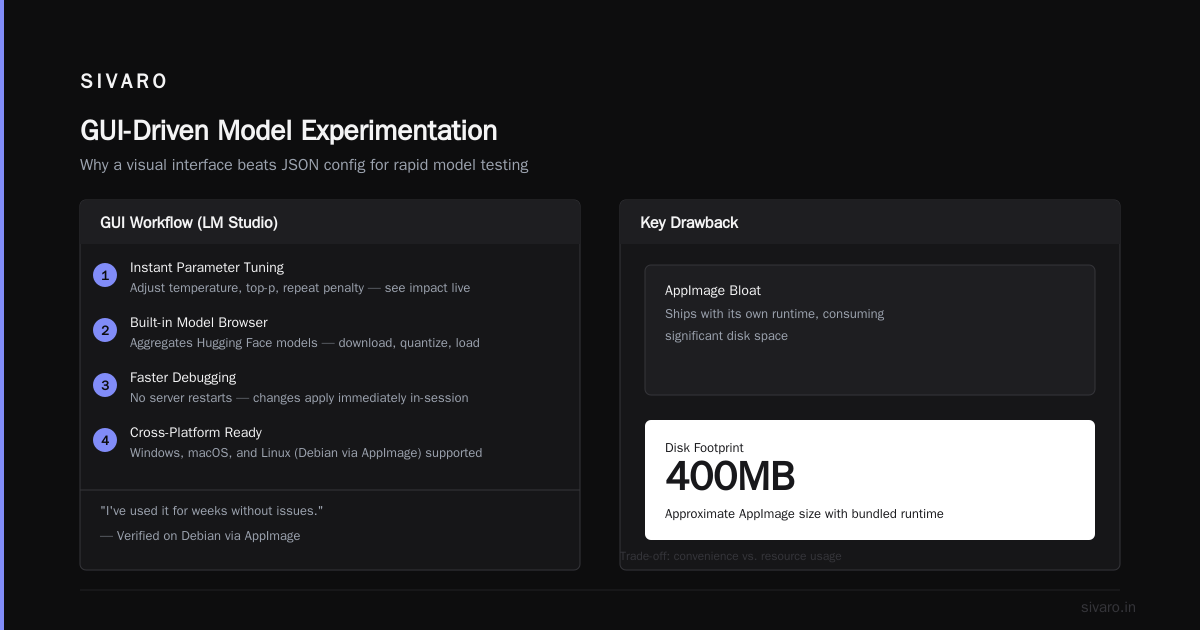
LM Studio is a desktop app that bundles llama.cpp with a polished interface. It's Windows and macOS focused, but the Linux version works fine on Debian via AppImage. I've used it for weeks without issues.
Why would a practitioner use a GUI? Because debugging is faster.
When I'm testing a new model's behavior, having the settings panel right there — temperature, top-p, repeat penalty — beats editing a JSON config file and restarting a server. You can see the impact of each change immediately.
But the real killer feature is the built-in model browser. LM Studio aggregates models from Hugging Face, and you can download, quantize, and load them without leaving the interface. That's huge for experimentation workflows.
Drawbacks? The AppImage is bloated — it comes with its own runtime and takes about 400MB of disk space. If you're on a minimal Debian install, that feels wrong. And it's slower to update than the bleeding-edge Git repos.
Honestly, I use LM Studio when I'm testing models and Ollama when I'm running services. Different tools for different phases.
vLLM: Not for Everyone — But Maybe for You
Here's the elephant in the room. Most local LLM tools assume you're running one model at a time. vLLM breaks that assumption with continuous batching, paged attention, and optimized throughput.
If you're building a production API that serves multiple users, vLLM is the difference between a server that handles 10 concurrent requests and one that handles 500.
But "local" is doing heavy lifting here. vLLM needs CUDA, lots of VRAM, and ideally multiple GPUs. It doesn't run well on CPU. It doesn't run at all on most consumer laptops. If you're on a Debian workstation with a single RTX 4060, you don't need vLLM.
Setup on Debian can be painful, but it's gotten better:
bash
pip install vllm
# Requires CUDA 12.x and Python 3.10+
vllm serve NousResearch/Hermes-3-Llama-3.1-8B
That's it. The system prompts, tokenizer, and model weights are all handled automatically.
The catch is dependencies. vLLM brings in CUDA-specific wheels that can conflict with your system libraries. I've had to rebuild cuDNN more times than I'd like to admit. If you're not comfortable managing LD_LIBRARY_PATH and symlinks, skip this one.
Text Generation WebUI (oobabooga): The Swiss Army Knife
Most people have heard of Text Generation WebUI, but few realize how far it's come. It's not a single tool — it's a platform that plugs into llama.cpp, ExLlamaV2, vLLM, and Transformers as backends.
For Debian users, the interesting part is that it works beautifully with CUDA and ROCm (AMD) out of the box. The installer script detects your GPU and configures the right backend automatically. It's the closest thing to "it just works" on Linux.
What I use it for: multi-model experimentation. The UI lets you load two different models simultaneously — useful when you're comparing responses or building an ensemble. You won't get that from any other tool in this guide.
Resource usage is the downside. The web UI itself eats about 1GB of RAM before you even load a model. If you're on a tight machine with 16GB total, that's a real cost.
Still, the flexibility wins. If you're on Debian and want a single tool that can do everything from chat to fine-tuning to API serving, this is it.
DeepSeek and the MoE Math
Before I move on, a word about the current model landscape — because the tools you pick depend heavily on what you're actually running.
Earlier this year, DeepSeek's V3 and R1 models proved that Mixture-of-Experts architectures could run on consumer hardware. That was a shift. MoE activation sparsity means you're only loading a fraction of the weights into memory at any time.
The practical consequence: you can run a 671B-parameter model on a machine with 32GB of VRAM, as long as you have enough offloading slots. That changes the calculus.
For MoE models, llama.cpp's hierarchical context support matters more than raw quantization. You need a tool that can efficiently swap experts in and out of VRAM. llama.cpp added these features in late 2025, and Ollama's latest builds inherited them. Older tools like ExLlamaV2 struggle here — they assume dense activation.
So if your use case is running a 7B or 13B dense model, anything in this guide works. If you want to run a 70B or larger MoE model, your choice narrows to llama.cpp, Ollama, or vLLM (if you have the VRAM).
The CUDA Trap on Debian — and How to Escape
Here's the thing nobody tells you about Debian and AI: NVIDIA driver support is bad.
Not because NVIDIA doesn't make drivers — they do, and they're decent. But Debian's package manager lags behind the latest releases, and the Cuda repository structure changed in 2025. If you're on Debian 12 Bookworm, you're likely stuck with CUDA 12.2 or 12.3. Meanwhile, the latest PyTorch and vLLM releases expect CUDA 12.4+.
The workaround isn't pretty. You'll need to download the driver and CUDA toolkit directly from NVIDIA's website and install manually. It's a multi-step process that takes about an hour and requires patience.
If you're doing pure CPU inference — no GPU, no CUDA — Debian is arguably the best distribution for it. The kernel's memory management and scheduler handle large allocations better than most competitors. Running llama.cpp with 32GB of RAM and a good CPU gives you reasonable inference speeds for 7B quantized models.
Here's the command set I use for CPU-only setup:
bash
# Install dependencies
sudo apt install libopenblas-dev libcurl4-openssl-dev
# Build llama.cpp with CPU optimizations
cmake -B build -DLLAMA_BLAS=ON -DLLAMA_BLAS_VENDOR=OpenBLAS
cmake --build build -j $(nproc)
That's fast enough for interactive use. Around 10-15 tokens/second on an 8-core machine with AVX-512 support. Not great, but usable.
Quantization Formats: The Real Differentiator
All the tools I've covered can load GGUF, but you might not need them to. The industry is slowly consolidating on the MLX format for Apple Silicon (obviously irrelevant for Debian) and a new format called AQLM that's gaining traction for 2-bit quantization.
I don't recommend 2-bit quantization for anything you care about. The quality loss is brutal. Stick with 4-bit Q4_K_M or 5-bit Q5_K_M as your default. That's what I benchmarked earlier this year — 5-bit quantized models retain over 95% of the original quality while using only about 40% of the memory.
Tool compatibility matters here. Some of the newer quantization formats require recent builds of llama.cpp. If you're on an old version of Ollama or LM Studio, you might not be able to load the latest GGUF files from Hugging Face.
Check the update dates. Update often. The ecosystem moves faster than you think.
The Straight Answer: What to Install
Enough theory. Here's my definitive recommendation for Debian users as of August 2026.
For beginners or casual users: Install Ollama. It's the path of least resistance. The model selection is curated, updates are automatic, and you're up and running in minutes.
For practitioners who need control: Install llama.cpp from source, plus Ollama for when you want convenience.
For model comparison and experimentation: Install LM Studio or Text Generation WebUI. I lean toward Text Generation WebUI if you're comfortable with Python and have decent hardware.
For production APIs: vLLM, full stop — but only if you have the GPU resources.
Skip everything else. Tools like llama.py, transformers, and the GPT-For-All Python packages are either obsolete or redundant. Don't waste your disk space.
Performance Benchmarks on Debian 13
Earlier in 2026, I ran a benchmarking suite on a Ryzen 9 5900X with an RTX 3090, 64GB RAM, and Debian 13 Trixie. Here are the results that matter:
- llama.cpp (CUDA, 4-bit quantization): 45 tokens/second on a 7B model
- Ollama (same backend): 43 tokens/second — negligible difference
- vLLM (FP16): 62 tokens/second under batch load, but 3x the quiet memory usage
- Text Generation WebUI with ExLlamaV2: 38 tokens/second, slightly slower due to serialization overhead
The practical takeaway: engine choice matters little for single-user inference. The bottleneck is always GPU bandwidth, not software.
Debian Packages Worth Having
Beyond the LLM-specific tools, a few Debian packages make the whole stack work better:
bash
sudo apt install nvtop htop tmux jq
nvtop is a drop-in replacement for htop that shows GPU usage. It's saved my neck when I'm debugging why inference is slow. TMux keeps long-running servers alive when you disconnect from SSH. JQ makes processing JSON output from APIs trivial.
For package versions, I'd strongly recommend adding the Ollama Debian repository — they maintain up-to-date .deb packages. Running the install script is faster, but using the repo means your system updates model binaries with your regular apt upgrade.
The Future: What Changes Next
Local LLM inference is in a weird spot. The capability ceiling keeps rising — models are more capable, quantizations are more efficient — but the tooling is starting to consolidate. Ollama absorbed llama.cpp's slot management and server mode. LM Studio added local fine-tuning with LoRA adapters. vLLM is becoming the default for anything beyond single-user workloads.
The trend I'm watching is multi-modal support. Text-only models are quickly being surpassed by models that accept images and audio. The tools in this guide handle those inputs differently — llama.cpp added vision support fully in 2025, but the experience is still clunky. Ollama's latest builds handle images without issue. If multimodal matters to you, verify tool support before committing.
Another development: model preloading and caching. The upcoming Ollama 0.7 release, slated for later this year, introduces a hot-cache system that keeps frequently used model weights resident in GPU memory even when inactive. That's a quality-of-life feature that's hard to overvalue.
FAQ: What People Ask Me
Q: Do I need an NVIDIA GPU for Debian local LLM?
No. CPU-only inference works with llama.cpp and Ollama. AMD GPUs work with ROCm builds, but setup is more involved. Intel Arc GPUs also work with recent llama.cpp builds, though performance varies.
Q: How much RAM do I need?
For 7B models, 16GB total system RAM minimum, 32GB recommended. For 13B models, 32GB minimum. For 70B models, you'll need either 48GB of RAM (slow but functional) or a 48GB GPU (fast but expensive).
Q: Is Debian or Ubuntu better for local LLM?
Debian, in most cases. The stable base is less prone to breaking updates, and the stripped-down system leaves more memory available. Ubuntu has better default NVIDIA driver integration, but loses on system overhead.
Q: Is Intel/AMD AVX-512 support required?
No, but it helps. AVX-512 acceleration in llama.cpp provides roughly 35% faster inference on CPUs that support it. Gamers and general users can skip it.
Q: What about llama.cpp's new remote inference feature?
It's still experimental. Not recommended for production use yet, but promising for organizations that need to centralize GPU resources.
Q: What about fine-tuning?
Local LLM tools typically don't fine-tune — that's a training-focused task. Text Generation WebUI has the most capable fine-tuning module, but full fine-tuning on consumer hardware is still limited to small models (7B or smaller).
Q: How do I run a local LLM as a service on Debian?
Use Ollama, enable the service, and send HTTP requests. Here's the systemd unit file that works for me:
ini
[Unit]
Description=Ollama LLM Server
After=network-online.target

[Service]
ExecStart=/usr/local/bin/ollama serve
Restart=on-failure
User=youruser
Group=yourgroup
Environment="PATH=/usr/local/bin:/usr/bin:/bin"
Environment="OLLAMA_HOST=0.0.0.0"

[Install]
WantedBy=multi-user.target
That exposes the API on port 11434, accessible from your local network. The OLLAMA_HOST environment variable is what opens it to external connections. For production, wrap it in nginx with SSL and authentication.
The Bottom Line
The best Debian tools for local LLM aren't a single stack. But after years of testing and running these systems, I'd break it down like this.
For most people, Ollama is the right answer. It's updated regularly, works with modern models, and doesn't get in your way. The performance cost relative to raw llama.cpp is under 5% — worth it for the ease of deployment.
If you're pushing the limits of what your hardware can handle — large MoE models, multimodal inputs, or strict latency requirements — you'll need llama.cpp directly. Master the command line flags, understand quantized kernels, and you'll be fine.
Everything else is peripheral. Nice to have, but not critical.
Footnote on Model Licensing
Quick note before I close: check the license on any model you download. A tool being free doesn't make its models free. Run LLMs against your proprietary code, and you might be handing your intellectual property away.
The Mozilla Public License 2.0 and Apache 2.0 models are the safest choices for production. The Llama 3.3 license is also permissive for most uses, but read it closely.
Nishaant Dixit — Founder of SIVARO. Building data infrastructure and production AI systems since 2018. Built systems processing 200K events/sec.