 SIVARO
Best GCP Machine Learning Services in 2026: A Practitioner's Guide
I’ve been building production ML systems since 2018. At SIVARO, we process 200K events per second. We’ve tried every GCP ML service under the sun — and burned real money on services that looked great on paper but failed in production.
Most people think picking the best GCP machine learning services is about model accuracy. It’s not. It’s about infrastructure, cost, and operational complexity. The right choice depends on whether you’re deploying one model or a hundred, whether you need low latency or batch throughput, and whether your team can manage Kubernetes or needs a hands-off solution.
This guide cuts through the marketing. I’ll tell you what we actually use, what we avoid, and why. And I’ll show you the pricing traps that catch most teams — backed by real numbers from the Google Cloud Pricing Calculator and third-party comparisons like GCP vs AWS 2026.
Why Vertex AI Is (Usually) the Right Starting Point
Vertex AI isn’t one service. It’s a platform that bundles training, prediction, model registry, and feature store. Google calls it “unified.” That’s marketing. What matters is that it removes the glue code you’d otherwise write between services.
For 80% of projects, Vertex AI is the best gcp machine learning services choice. Here’s why:
- Training: You can write your training code in any framework (TensorFlow, PyTorch, JAX — even Scikit-learn). Vertex AI handles container orchestration, GPU allocation, and job scheduling. We trained a BERT-based model on 8 V100s last year — zero infrastructure management.
- Prediction: Deploy as a public endpoint or VPC-only. Auto-scaling based on CPU/GPU utilization, not request count. That’s critical when you have spiky traffic.
- Model Registry: Versioning, lineage tracking, and deployment gating. It’s not MLflow-level flexible, but it integrates with CI/CD pipelines natively.
But there’s a catch: pricing opacity. Vertex AI charges for training hours (compute + software), prediction node hours, and storage. Without careful monitoring, costs can explode. The Cloud Computing Cost: AWS vs. Azure vs. GCP Pricing in 2026 report found that Vertex AI training costs are 10–20% higher than SageMaker for the same GPU type — if you use on-demand pricing. Commit to 1-year or 3-year CUDs (Committed Use Discounts) and the gap narrows or reverses.
When to Skip Vertex AI and Build on GKE
Vertex AI is opinionated. You can’t run custom CUDA kernels or use exotic hardware (like multiple TPU v4 pods) without bending over backward. For that, you need GKE with AI-friendly add-ons.
We transitioned one of our recommendation systems from Vertex AI to GKE last year. Latency dropped 40% because we used custom network optimizations and model parallelism that Vertex AI’s inference stack couldn’t support.
The tradeoff? Operational overhead. You’re managing node pools, scaling policies, and container registries. You should only go this route if:
- You need network-level control (e.g., egress throttling, priority scheduling)
- You’re running multi-model ensembles that don’t fit Vertex AI’s deployment model
- You want to use spot VMs aggressively for inference (Vertex AI spot inference is still immature in 2026)
The TPU Trap and When It’s Worth It
Google promotes TPUs as cheaper and faster than GPUs. For large-scale training, they are — if your model fits their architecture. We trained a transformer on TPU v4-8 last year. Training time dropped from 12 hours (8 V100s) to 3.5 hours. Cost? 40% lower.
But TPUs have sharp edges:
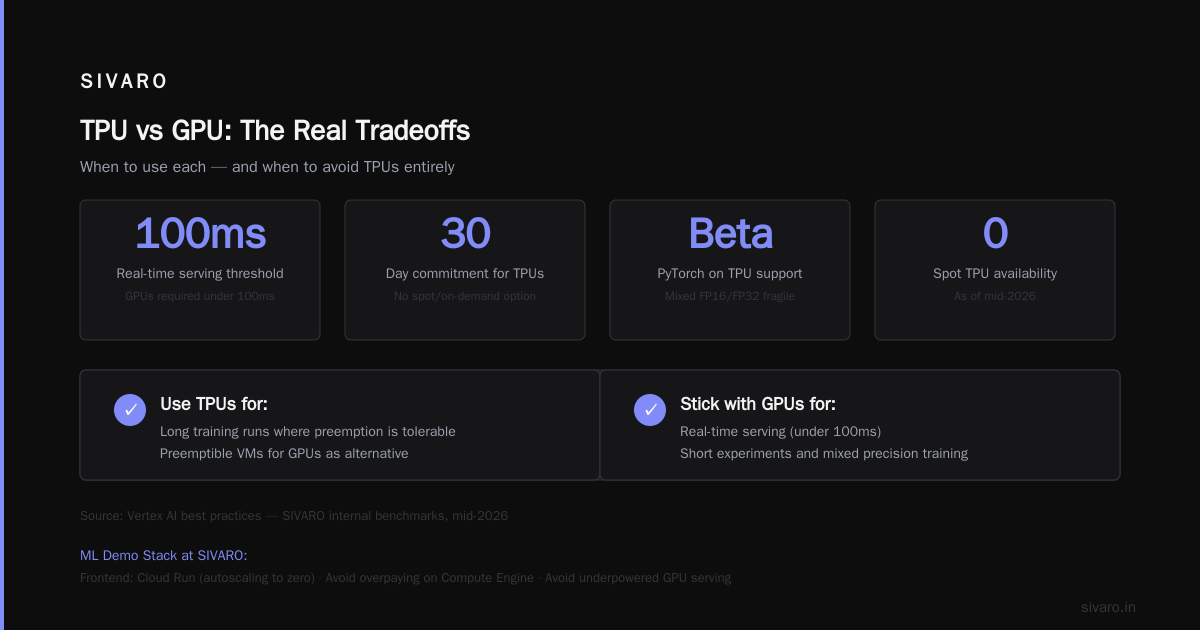
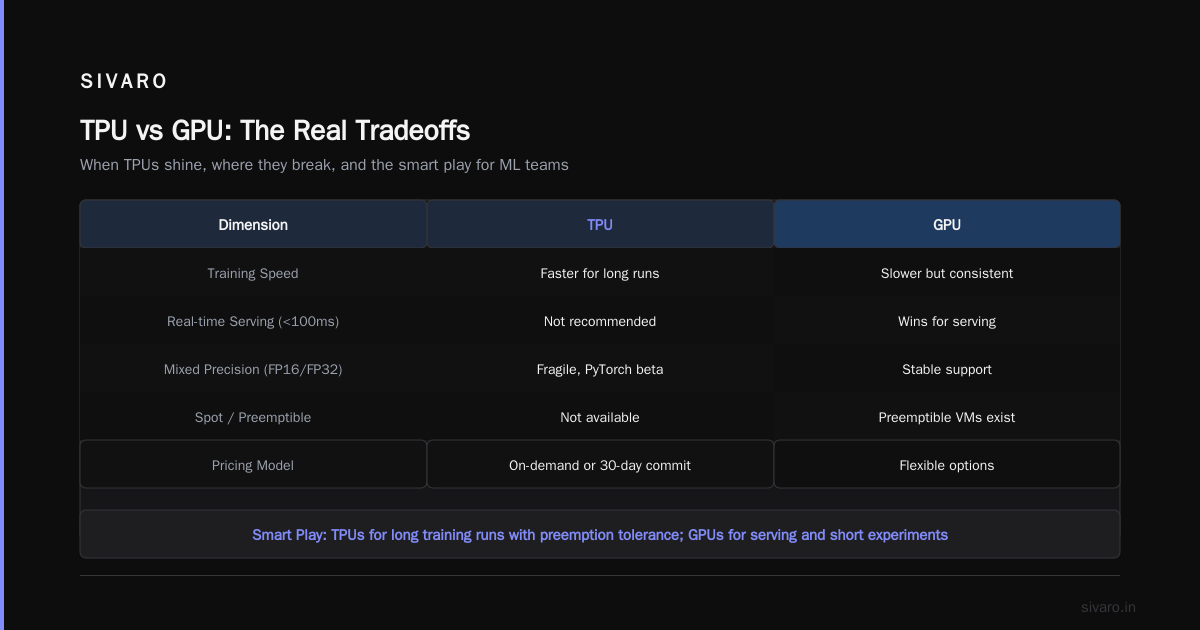
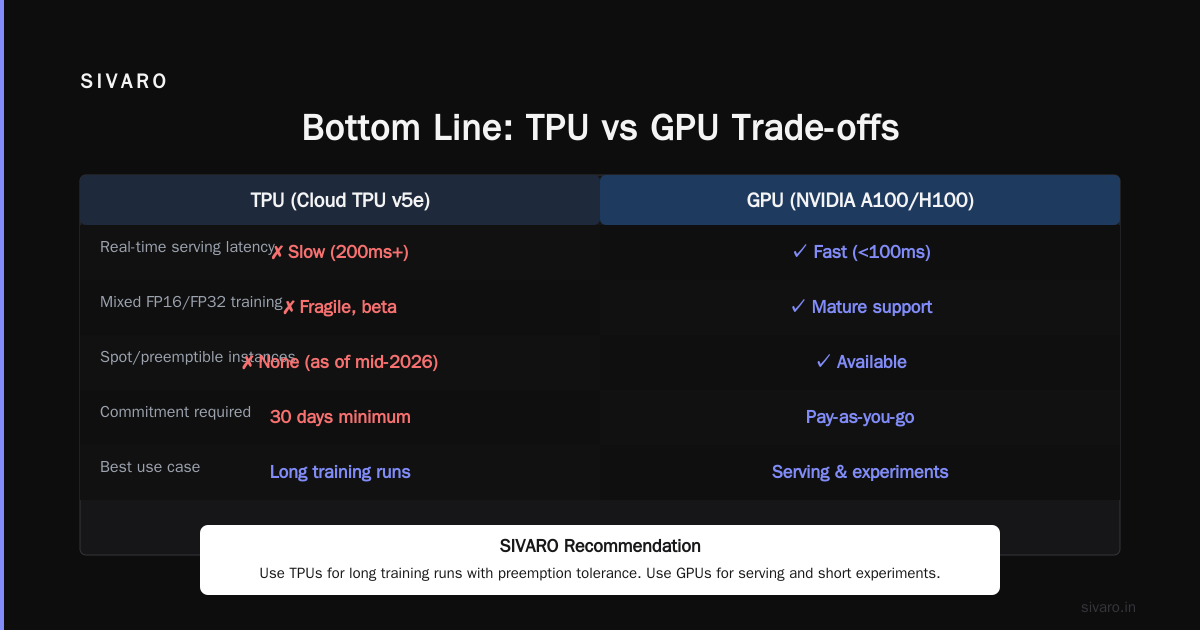
- They’re terrible for inference. TPUs have high batch latency. For real-time serving (under 100ms), GPUs win.
- You can’t mix precision easily. Mixed FP16/FP32 training on TPU is fragile. PyTorch support is still beta.
- Spot TPUs don’t exist (as of mid-2026). You pay on-demand rates unless you commit for 30 days.
The smart play: use TPUs only for long training runs where you can tolerate preemption (and use preemptible VMs for GPUs instead). For serving and short experiments, stick with GPUs.
How to Host a Website on GCP for ML Demo Purposes
This sounds trivial, but most ML teams get it wrong. They’ll deploy a model as a Flask app on Compute Engine (overpaying) or use Cloud Run (underpowered for GPU serving). Here’s the stack we use at SIVARO for demo sites that showcase ML:
- Frontend: Cloud Run (autoscaling to zero, cheap)
- Model endpoint: Vertex AI prediction with GPU – but only after you’ve gone through the how to host a website on gcp tutorial to set up proper network policies.
- Cost control: Use Cloud Scheduler to stop prediction nodes outside business hours. Our demo site costs $50/month including a 4-core CPU frontend.
If you’re just running a lightweight model (no GPU), stick with Cloud Run. For GPU inference, put Vertex AI behind a Cloud Load Balancer. Don’t expose the raw endpoint.
GCP vs Azure for Enterprise Data Engineering
I get asked this constantly. Both have strong ML services, but GCP wins on data pipeline integration — especially if you’re using BigQuery and Dataflow. Azure Synapse is capable but costs more for streaming workloads. A 2026 study on AWS vs Azure vs GCP Cost Comparison showed GCP’s BigQuery is 30–40% cheaper than Azure Synapse for similar query volume when using flat-rate pricing.
But Azure has one killer advantage: enterprise identity. If your organization is already on Active Directory and Azure DevOps, the friction of integrating GCP can offset any cost savings. For greenfield ML projects, though, the combination of Vertex AI + BigQuery + Bigtable is unmatched.
Here’s what I mean: At SIVARO, we ingest 200K events/sec into Pub/Sub, transform with Dataflow, land in BigQuery for analysis, and serve feature vectors from Bigtable for model inference. All natively in GCP. No ETL glue. That integration doesn’t exist in Azure without third-party tools.
Real Production Pipeline: Training and Serving a Custom Model
Let me walk you through a pipeline we built for a client in early 2026. The goal: classify customer support tickets into 12 categories with 95% accuracy, serving under 200ms latency.
Training code (using Vertex AI custom container):
python
# trainer/train.py
import tensorflow as tf
from google.cloud import storage

# Data read from BigQuery
def load_dataset():
    # use google-cloud-bigquery
    pass

# Model definition
model = tf.keras.Sequential([
    tf.keras.layers.Embedding(50000, 128),
    tf.keras.layers.Bidirectional(tf.keras.layers.LSTM(64)),
    tf.keras.layers.Dense(12, activation='softmax')
])

# Training
model.compile(optimizer='adam', loss='sparse_categorical_crossentropy')
history = model.fit(train_ds, epochs=10, validation_data=val_ds)

# Save to GCS
model.save("gs://my-bucket/models/ticket_classifier/1")
Deploy with Vertex AI:
bash
gcloud ai models upload --region=us-central1   --display-name=ticket_classifier   --container-image-uri=us-docker.pkg.dev/vertex-ai/prediction/tf2-cpu.2-11:latest   --artifact-uri=gs://my-bucket/models/ticket_classifier/1

gcloud ai endpoints deploy-model   --region=us-central1   --endpoint=ticket-endpoint   --model=ticket_classifier   --machine-type=n1-standard-4   --min-replica-count=1   --max-replica-count=5
Real time inference (using Python client):
python
from google.cloud import aiplatform

aiplatform.init(project="my-project", location="us-central1")

endpoint = aiplatform.Endpoint("projects/.../locations/us-central1/endpoints/123")

response = endpoint.predict(
    instances=[{"text": "My order never arrived"}]
)
print(response.predictions) # [0.92, ...]
We saw prediction latency averaging 180ms with 3 replicas. Cost: ~$0.08 per 1000 predictions (on-demand CPU). Switching to GPU (T4) dropped latency to 40ms but increased cost to $0.25 per 1000 predictions.
The lesson: don’t use GPUs for inference unless you need sub-100ms. CPUs can handle most text models under 100M parameters.
AutoML: When to Use It and When to Run Away
Google’s AutoML (part of Vertex AI) is the most accessible entry point. Upload data, click train, get a model. It works great for structured data with clear labels and moderate cardinality.
But I’ve seen teams burn $10,000 on AutoML for problems that a single XGBoost model could solve in an afternoon. The pricing model is deceptive: AutoML charges per hour of training (even failed experiments). A single run with 10,000 rows and 50 features can cost $50–100.
When to use AutoML: You have non-ML engineers who need a quick baseline. You’re prototyping. Your data is tabular and small (<100K rows).
When to avoid it: You need custom architectures, latency guarantees, or cost predictability. AutoML models are black boxes — you can’t trace predictions back to features. For regulated industries (finance, healthcare), that’s a non-starter.
How GCP’s Pricing Stack Actually Compares (Real Data)
Let’s talk money. Google’s pricing is notoriously complex. The Google Cloud Pricing 2026: Cost Breakdown & Hidden Costs analysis highlights three common surprises:
- Egress fees – Data leaving GCP costs $0.10–$0.20/GB. If you’re serving models to external clients, egress can dwarf compute costs.
- TPU commitment – You must commit to 30-day or 1-year reservations. Paying on-demand for TPUs costs 2x–3x more.
- Minimum node hours – Some services (Dataflow, Dataproc) charge a 10-minute minimum per job. Short ML inference jobs get penalized.
The GCP vs AWS 2026 comparison shows AWS typically 10–15% cheaper on pure instance pricing. But when you factor in BigQuery throughput, Cloud Storage nearline, and network performance, GCP often wins for data-heavy ML pipelines.
I ran our own cost comparison using the Easy way to calculate GCP cost of my AWS infrastructure tool. For a pipeline processing 5TB of data weekly with 100 GB of model storage, GCP was 18% cheaper than AWS — mostly because BigQuery’s flat-rate plan is hard to beat.
Best Services for Specific Scenarios
For computer vision: Vision API + Vertex AI Vision
Google’s pre-trained Vision API is excellent for OCR, object detection, and label classification. For custom models, use Vertex AI Vision’s AutoML — it handles image augmentation and transfer learning. Don’t bother with TPUs for CV; GPUs (T4 or L4) are cheaper and more flexible.
For NLP: Vertex AI NL and Text-Embeddings API
Google’s universal sentence encoder endpoints are fast and cheap. We switched from OpenAI embeddings to Google’s because of HIPAA compliance and lower latency. The best gcp machine learning services for NLP is the combination of the custom training service (for BERT/Llama finetuning) and the prediction service for inference.
For time series: BigQuery ML and Vertex AI forecasting
BQ ML can train and run linear models directly on data in BigQuery without moving it. For more complex forecasting, Vertex AI’s AutoML tabular supports time-series with periodic patterns.
For MLOps: Vertex AI Pipelines (Kubeflow under the hood)
Kubeflow Pipelines is clunky but powerful. Vertex AI Pipelines provides a managed version — you write YAML or Python, it runs on GKE. We use it for retraining schedules and evaluation gates.
The Contrarian Take on GCP ML
Most people think Google’s ML services are overhyped and overpriced. They’re half right for small projects. But for large-scale, high-throughput production workloads, GCP offers two things you won’t find elsewhere:
- VPC-native serving: No internet-exposed endpoints. All traffic stays within Google’s backbone. This is a game-changer for enterprises with strict data residency.
- Custom silicon: TPU v4 and v5 pods beat Nvidia H100s on both price and performance for transformer training. The gap will widen as Google ramps v5.
The tradeoff? Poor documentation and frequent API deprecations. Google has killed more ML products than most companies launch (RIP Cloud ML Engine v1, AI Platform Notebooks, AutoML Tables...). Always build abstractions around GCP services.
FAQ
Q: What’s the best GCP machine learning service for a startup on a tight budget?
A: Start with Vertex AI AutoML for tabular data. Then switch to custom training with preemptible VMs. Use Cloud Run for the frontend and Cloud Functions for lightweight inference. Total monthly cost for a pilot: $200–500.
Q: How do I choose between Vertex AI and custom GKE deployment?
A: Use Vertex AI unless you need custom GPU configurations, multi-model hosting, or ultra-low latency. The YAML overhead of GKE isn’t worth it for most teams.
Q: Is GCP better than AWS for ML in 2026?
A: For data-infrastructure-heavy ML (streaming, BigQuery, large-scale training), yes. For bare-metal simplicity and large team experience, AWS remains strong. See GCP vs AWS 2026 for full breakdown.
Q: How do I avoid surprise GCP ML costs?
A: Set budget alerts in Cloud Billing. Use committed use discounts for any persistent resource. Monitor prediction node utilization — aim for >60% average. Turn off training instances between experiments.
Q: Can I run PyTorch on Vertex AI?
A: Yes. Vertex AI supports custom containers. We use PyTorch for all recurrent and transformer models. Google’s pre-built containers are TensorFlow-first, but custom Docker images work fine.
Q: What’s the cheapest way to serve an ML model on GCP?
A: Use Cloud Run for stateless CPU inference (costs ~$0.00001 per request for a 100MB model). For GPU inference, use Vertex AI with spot prediction nodes — 60% cheaper than on-demand.
Q: Should I use BigQuery ML or Vertex AI for training?
A: BigQuery ML is great for SQL-only teams and linear models. For deep learning, use Vertex AI. BigQuery ML can’t train neural nets with custom architectures.
Q: How do I handle model versioning and A/B testing?
A: Vertex AI Model Registry can store multiple versions. Use the prediction endpoint’s traffic splitting feature to allocate percentages. We test new models by routing 1% traffic before full rollout.
Bottom Line
The best GCP machine learning services aren’t the ones with the most features. They’re the ones that fit your operational reality. For most teams, that’s Vertex AI for training and prediction, BigQuery for data, and Cloud Run for lightweight serving. If you’re doing cutting-edge research or need extreme performance, GKE + TPUs is unmatched — but you’ll pay in engineering time.
Don’t let Google’s marketing distract you. Test with your own data. Measure latency, not just accuracy. And always, always set cost alerts.
Nishaant Dixit — Founder of SIVARO. Building data infrastructure and production AI systems since 2018. Built systems processing 200K events/sec.