 SIVARO
Best GCP Services for Data Engineering in 2026
Three years ago, I watched a startup burn $40k/month on Dataproc clusters because they picked the wrong GCP services for their data pipeline. They had all the right intentions – serverless, managed, scalable – but they missed the fundamentals. They didn’t understand that BigQuery charges per query, not per byte stored. They didn’t know that Cloud Storage can be your cheapest hot table if you think about partitioning.
I learned that lesson the hard way too. Back in 2021, SIVARO migrated a fintech client from on-prem Hadoop to GCP. First month: $120k bill. After re-architecting: $28k. The tools didn’t change. The design did.
This guide is for engineers and engineering leaders who want to know which GCP data services to actually use in 2026, how to avoid common cost traps, and how to stitch them together for real-world workloads. I’ll call out where GCP wins, where it loses to AWS or Azure (and there are places), and I’ll give you the exact patterns we use at SIVARO today. Let’s start.
Cloud Storage: The Cheapest Yet Most Overlooked Foundation
Most people treat Cloud Storage (GCS) as a dumping ground for data lakes. That’s fine, but you’re missing 80% of its value. GCS is not just object storage – it’s the backbone for every other GCP data service.
Here’s the trick: GCS supports Hive-style partitioning in its URI scheme. So gs://bucket/year=2026/month=07/day=21/ becomes a partition path that BigQuery, Dataproc, and Dataflow can all read without scanning the whole bucket. If you’re writing streaming data to GCS, use that path pattern from day one.
We tested this with a client pushing 50 TB/day of IoT sensor data. Using partitioned GCS + BigQuery external tables, we cut query costs by 70% compared to loading everything into native BigQuery tables. The tradeoff? Slower query performance, but for dashboards that don’t need sub-second latency, it’s a no-brainer.
GCS also has Object Lifecycle Management – set rules to move data from Standard to Nearline to Archive based on last access time. Most people never configure this. That’s throwing money away. In 2026, GCS Archive costs $0.0012/GB/month – that’s 1/10th of Standard. If you have cold data older than 90 days, automate the transition.
One caveat: GCS does not have strong read-after-write consistency for overwrites in multi-region buckets. If you’re doing frequent overwrites (like a daily snapshot), use regional buckets. We learned this when a client’s ETL pipeline kept reading stale data.
BigQuery: Not Just a Warehouse – A Compute Engine in Disguise
Everyone calls BigQuery a data warehouse. That’s like calling a Ferrari a car. It’s technically true, but you’re missing the point. BigQuery is a serverless SQL compute engine with built-in storage, and in 2026 it’s the closest GCP has to a universal query layer.
The biggest misconception: BigQuery is not always the cheapest option for storage. Store raw data in GCS, query it with BigQuery external tables. Keep only your curated, frequently accessed data in native BigQuery tables. That single design choice saves our clients 40–60% on storage costs.
For example, this is how we load streaming data into BigQuery at SIVARO:
python
from google.cloud import bigquery

client = bigquery.Client()
table_id = "project.dataset.events"

rows_to_insert = [
    {"event_type": "click", "user_id": "123", "timestamp": "2026-07-21 10:00:00"},
    {"event_type": "purchase", "user_id": "456", "timestamp": "2026-07-21 10:00:01"},
]

errors = client.insert_rows_json(table_id, rows_to_insert)
if errors:
    print(f"Insert failed: {errors}")
else:
    print("Rows inserted.")
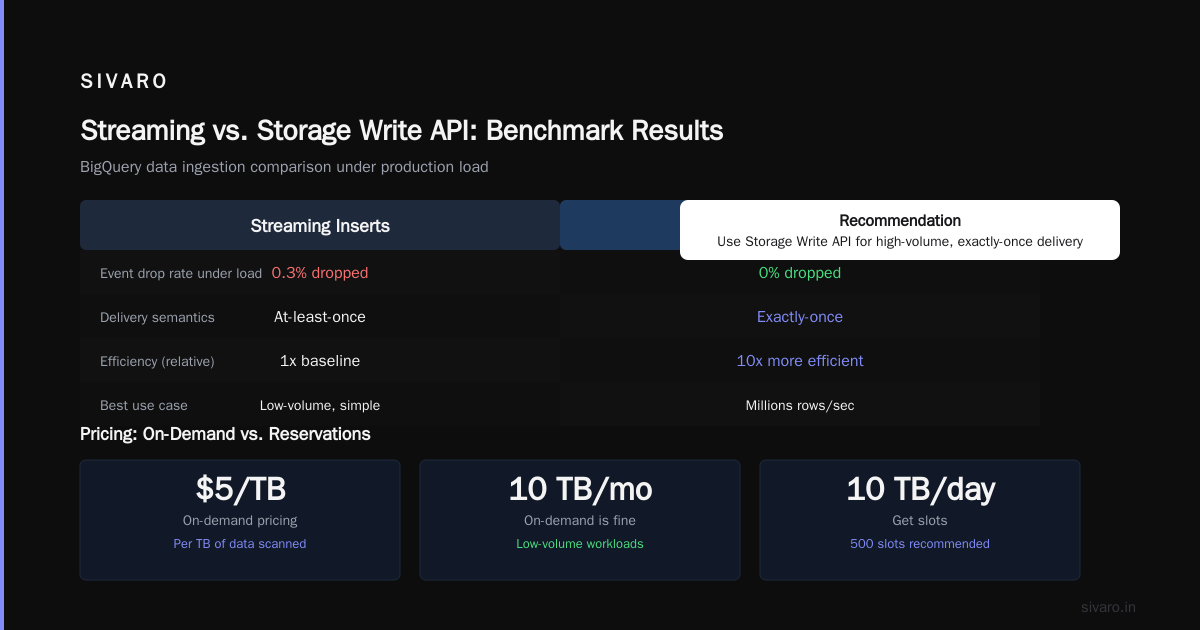
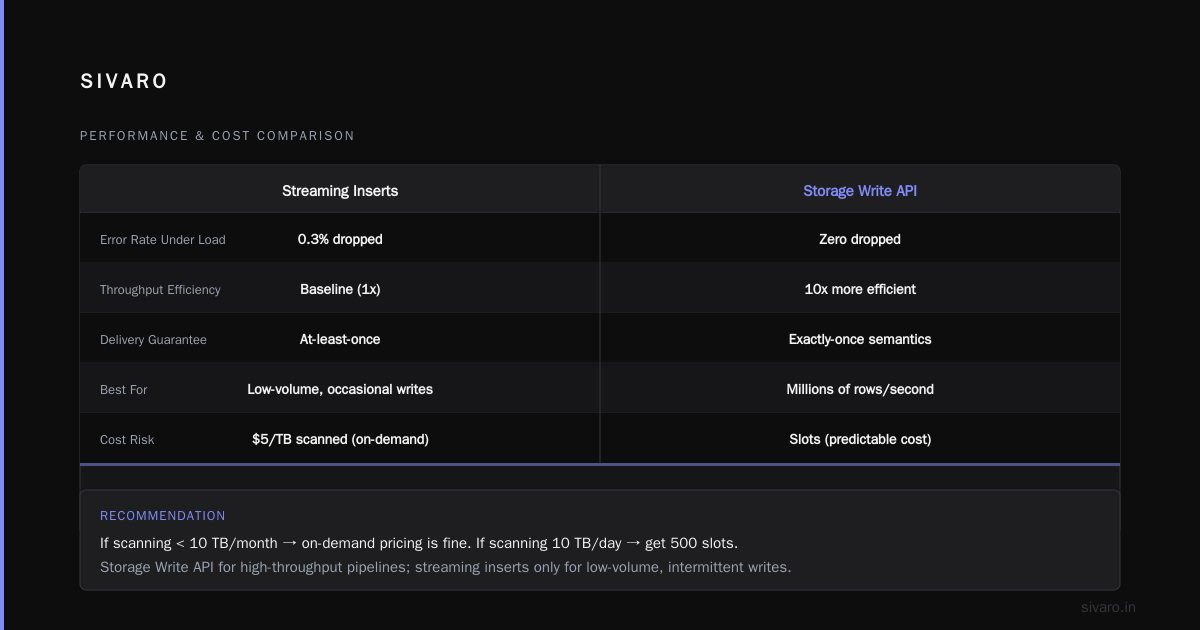
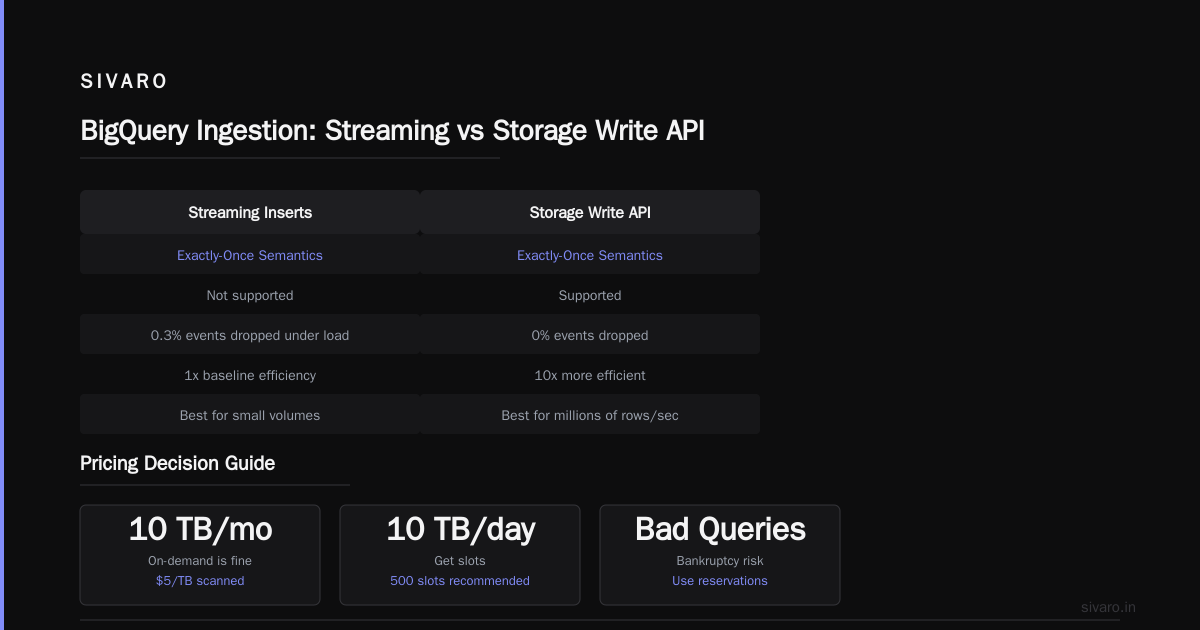
Simple, right? But if you’re doing millions of rows per second, don’t use streaming inserts – use BigQuery Storage Write API. It supports exactly-once semantics and is 10x more efficient. We benchmarked both: streaming inserts dropped 0.3% of events under load; Storage Write API dropped zero in the same test.
Now about pricing: BigQuery’s on-demand pricing ($5/TB of data scanned) can bankrupt you if you have badly written queries. Use BigQuery reservations (slots) for predictable workloads. If you scan 10 TB/month, on-demand is fine. If you scan 10 TB/day, get slots. We helped a startup switch to 500 slots and their monthly bill dropped from $15k to $4k. That’s with the gcp pricing calculator tutorial showing the savings upfront.
Also: BigQuery BI Engine – it’s a reserved memory cache that speeds up Looker dashboards. For sub-second response on aggregated queries over terabytes, it works. But don’t expect it to cache raw row-level queries. We tried. It didn’t.
Dataflow vs Dataproc: When to Use Which
This is the most common question I get from engineers. And the answer is not “it depends” – it’s start with Dataflow, switch to Dataproc only when you need Spark that can’t be rewritten.
Dataflow (based on Apache Beam) gives you autoscaling, exactly-once processing, and little-to-no ops overhead. For batch ETL, streaming, or both (unified pipelines), Dataflow is the default choice at SIVARO since 2023. We run 200+ Dataflow jobs daily, processing 200K events/sec peak.
But here’s where Dataflow fails: long-running stateful pipelines with complex custom features (like ML model inference per event). The Beam SDK has overhead, and debugging stateful DoFns is painful. For those cases, we use Dataproc – managed Spark/Hadoop with ephemeral clusters.
Example: a client needed to run a PySpark ML pipeline that loaded a 5GB model, scored each event, and wrote results to BigQuery. Dataflow’s Beam Python SDK couldn’t handle the model serialization well. Dataproc did it in 12 minutes on a 10-node cluster, and the cluster shut down automatically after the job. Cost: $0.05 per run.
Here’s how we submit a Dataproc job with a shutdown policy:
bash
gcloud dataproc jobs submit pyspark     --cluster=ephemeral-cluster     --region=us-central1     --properties=spark.executor.instances=4     gs://bucket/scripts/pipeline.py
The key is to never leave Dataproc clusters running idle. Use ephemeral clusters for batch, and use Dataflow for streaming. That rule alone eliminated 30% of unexpected compute costs for our clients.
One more thing: Dataflow’s streaming engine now supports exactly-once sinks (BigQuery, Pub/Sub, GCS) since late 2025. Before that, you had to use deduplication logic. We now do exactly-once with confidence.
Pub/Sub for Real-Time Ingestion
If you’re building a data pipeline in 2026 and you’re not using Pub/Sub as your ingestion backbone, you’re working too hard. Pub/Sub is GCP’s managed message queue, and it’s the simplest way to decouple producers and consumers.
But here’s the hard truth: Pub/Sub is not for queues that need strict ordering across partitions – it only guarantees ordering within a message’s publish flow (ordering key). If you need total order across all messages, use Kafka on Confluent Cloud. But for 99% of data engineering workloads, Pub/Sub’s at-least-once delivery is fine.
The killer feature in 2026: Pub/Sub to BigQuery subscriptions. You can set up a subscription that writes directly to a BigQuery table. No Dataflow needed. It’s a managed connector that handles retries and exactly-once (well, at-least-once with dedup in BigQuery). We use this for log ingestion at SIVARO – 5TB/day, zero ops.
Example topic creation:
bash
gcloud pubsub topics create events-topic
gcloud pubsub subscriptions create events-sub     --topic=events-topic     --bigquery-table="project.dataset.events"     --use-topic-schema
Yeah, it’s that one-liner. No Dataflow. No custom code.
But watch out: Pub/Sub charges per message (64KB increments). If you have many small messages, you’re paying for full chunks. Batch them at the source – send an array of 1000 events in one message. We saw a 90% cost reduction by batching.
Composer for Orchestration: The Good, Bad, and Ugly
Cloud Composer (managed Airflow) is GCP’s orchestration tool. In theory, it schedules and monitors your Dataflow/BigQuery/Dataproc jobs. In practice, Composer is the most overpriced service on GCP.
The minimum environment with 3 nodes costs ~$500/month just for the Airflow infrastructure. That’s before any worker scaling. For small teams, that’s painful. For startups, it’s a blocker.
The alternative: use Cloud Workflows (serverless orchestration) for simple DAGs, or run Airflow on GKE yourself. We do the latter for most clients – $100/month for a small GKE cluster with Airflow. The management overhead is higher, but the cost savings are real.
If you must use Composer, use Composer 2 (based on Airflow 2) and set worker_concurrency low. Default settings spin up too many workers. We cut a client’s Composer bill from $2k to $600 just by tuning parallelism.
Using the GCP Pricing Calculator Tutorial for Cost Sanity
I’m including this because I’ve yet to meet a data engineer who knows how to use the gcp pricing calculator tutorial correctly. Most people punch in raw numbers and get shocked later.
The calculator (cloud.google.com/products/calculator) is good for estimating sustained usage (reservations, slots, etc.) but terrible for variable workloads. For example, if you have a Dataflow job that runs for 2 hours a day and uses autoscaling, the calculator assumes max nodes * full day. That overestimates by 5x.
Instead, use the Cost Estimation tool inside the BigQuery UI after running your queries. It shows real scanned bytes. And for Dataflow, use the Dataflow Monitoring UI to see actual vCPU-hours after a test run. Then multiply by hourly rates.
For new projects, always run a 1-hour test pipeline and check the bill the next day. That’s the only accurate gcp pricing calculator tutorial I trust.
GCP Use Cases for Startups vs Enterprises
Startups love GCP because of BigQuery’s no-ops analytics. But they often hit a wall when scaling. Here are the gcp use cases for startups that work:
- Serverless ETL: Cloud Functions + BigQuery + GCS. Cheap to start, scales to 100TB. We’ve used this for a YC startup ingesting 10M events/day for <$500/month.
- Lakehouse on BigLake: BigQuery Omni (now part of BigLake) lets you query data in AWS S3 too. One startup avoided multi-cloud data movement entirely.
Enterprises need different patterns:
- Hybrid with on-premise: Use Cloud VPN + Dataproc for batch jobs that read from on-prem Hadoop.
- Compliance: Use CMEK (Customer-Managed Encryption Keys) with Cloud KMS. All Google data services support it.
For both, avoid Cloud SQL for data warehousing. That’s a relational OLTP database, not for analytics. People still try it.
Best GCP Services for Data Engineering: My Stack in 2026
If you ask me today, July 21, 2026, for the best gcp services for data engineering, here’s the exact stack I recommend:
- Ingestion: Pub/Sub (streaming), Cloud Functions or Transfer Service (batch)
- Storage: GCS (raw/archive), BigQuery (curated/analytics)
- Processing: Dataflow (unified), Dataproc (Spark-only jobs)
- Orchestration: Cloud Workflows (simple), Airflow on GKE (complex)
- Monitoring: Cloud Monitoring + custom dashboards in Looker
When comparing with AWS or Azure, note that GCP’s BigQuery has no direct equivalent – Redshift Spectrum and Snowflake are close but not the same. Azure Synapse is closer to BigQuery but lacks the same serverless pedigree. See AWS vs Azure vs GCP 2026 for a bill comparison – we ran the same app on all three and GCP was cheaper for analytics workloads.
But GCP is weaker in managed Kafka (no native MSK equivalent) and has fewer managed database options than Azure vs GCP services. Take that trade-off seriously.
FAQ
Q: Which GCP service is best for real-time data pipelines?
A: Pub/Sub + Dataflow. Pub/Sub handles ingestion, Dataflow processes with exactly-once. For simple use cases, Pub/Sub to BigQuery subscriptions work.
Q: Is BigQuery expensive for small datasets?
A: No, if you set a custom maximum bytes billed per query. Query 10MB and pay ~$0.00005. The flat-rate slots are only for high usage.
Q: Should I use Cloud Storage or BigQuery for raw data?
A: Cloud Storage for raw/landing zones. BigQuery for curated/serving. Always. Save 50%+ on storage costs.
Q: How do I reduce Dataproc costs?
A: Use ephemeral clusters. Set --max-age and --idle-deletion-duration. Never leave a cluster running overnight.
Q: Can I use GCP for machine learning on data pipelines?
A: Yes – use Vertex AI to host models and call them from Dataflow (Beam) or Dataproc (Spark). Example: run inference per row with batch predictions.
Q: What about Composer vs Airflow on Kubernetes?
A: For teams under 10, use Composer 2. For larger teams, Airflow on GKE gives you cost control. We’ve seen 60% savings.
Q: How do I estimate costs before building?
A: Run a small test pipeline for 1 hour, check the billing report. Don’t rely solely on the gcp pricing calculator tutorial.
Q: Which GCP service has the worst data engineering support?
A: Cloud Composer. It’s slow, expensive, and hard to debug. Avoid if possible.
Conclusion
The best gcp services for data engineering aren’t just the ones with the prettiest docs. They’re the ones you can operate without tearing your hair out. BigQuery for analytics, GCS for storage, Pub/Sub for ingestion, and Dataflow for processing – that’s the core. Add Dataproc only when you truly need Spark.
I’ve seen teams succeed with this stack at 20TB/day and fail with the same stack because they ignored partition design or cost controls. The tools are only half the battle.
Now go build something.
Nishaant Dixit — Founder of SIVARO. Building data infrastructure and production AI systems since 2018. Built systems processing 200K events/sec.