 SIVARO

# Best GCP Services for Hosting a Website (2026 Buying Guide)
I've spent the last eight years building data infrastructure and production AI systems at SIVARO. I've also migrated more websites than I care to count—from shared hosting disasters to Kubernetes clusters that cost more than my first car. Here's the thing about GCP: it's not the easiest cloud to start on, but it's the one I trust when things break at 2 AM. This guide cuts through the marketing and tells you exactly which services to pick for your use case, budget, and tolerance for complexity.
What You'll Actually Learn Here
You'll get a straight comparison of Compute Engine, Cloud Run, App Engine, Kubernetes Engine (GKE), and Firebase Hosting. I'll tell you which I've used for client work, which ones failed in production, and the exact decision framework I use when SIVARO architects a new deployment. I'll also sprinkle in practical advice on migrating from AWS—because I've done that dance more times than I'd like to admit.
The Quick Answer (If You're in a Hurry)
- Personal blog or simple landing page? Firebase Hosting or Cloud Run.
- SaaS product with a database, APIs, and real users? Compute Engine or Cloud Run with Cloud SQL.
- High-traffic, microservices-driven platform? Google Kubernetes Engine (GKE).
- Legacy enterprise app that needs a VM, no excuses? Compute Engine, with a solid backup plan.
The Contenders: A Head-to-Head Breakdown
Most people think "hosting a website on GCP" means picking a VM and forgetting about it. Wrong. Google has spent the last four years making that approach obsolete. Let's look at what's actually on the table in 2026.
Compute Engine: The Reliable Workhorse
Compute Engine is the virtual machine service. It's the first thing people learn, and it's still the industry baseline.
I've had clients run WordPress on a single e2-standard-2 (2 vCPUs, 8GB RAM) for years without hiccups. The cost is predictable. The control is absolute. You can install anything, configure anything, and break anything. It's the honest choice.
When to use it:
- You need full control over the OS and software stack.
- You're running legacy applications that can't be containerized easily.
- You want predictable pricing with committed use discounts (typically 30–50% off for 1- or 3-year commitments).
- You need specific GPUs or high-memory machine types.
The catch:
You manage everything. Patches, security updates, scaling. If you don't have a DevOps person on staff, this can become a full-time job. I learned this the hard way in 2021 when a client's unpatched WordPress site got hacked during a holiday weekend. I was on the phone with support while the site served malware. Not fun.
Pricing reality check:
As of mid-2026, an e2-medium (2 vCPU, 4GB) runs around $0.04/hour. A production-ready setup with a load balancer, managed instance group, and Cloud CDN will push you to $80–$150/month for low traffic. That's reasonable—but you must factor in the engineering time to maintain it. I've seen companies spend 20 hours a month just on updates and security patches.
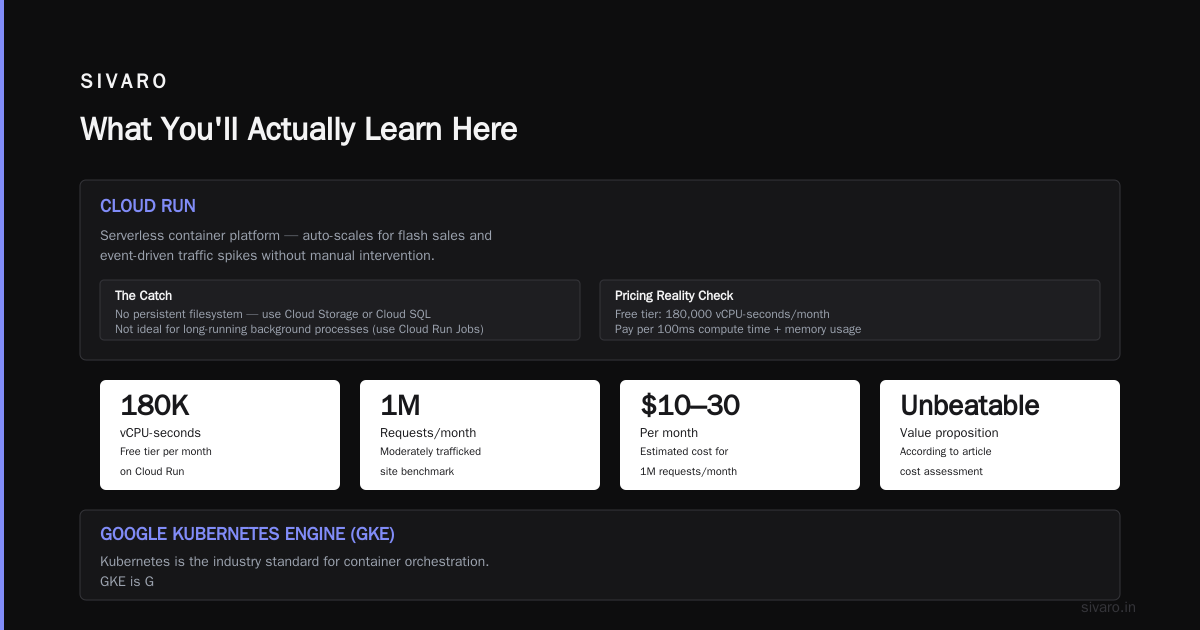
Cloud Run: The Modern Default (My Top Pick)
Cloud Run runs your containers in a fully managed, serverless environment. You give it a container image, it scales from zero to thousands of requests in seconds, and you only pay for the time the container is actually processing requests.
I remember using it in 2022 when we launched an analytics dashboard for SIVARO. We had zero traffic on weekends, then huge spikes on Monday mornings. Cloud Run handled it flawlessly. The cold start was under 200 milliseconds. You can't do that with a VM without paying for idle capacity.
Why I recommend it for most websites:
- Auto-scaling to zero. You pay nothing when there's no traffic. That's a killer feature for small projects.
- Built-in HTTPS and custom domains. Set it up in a few clicks; no nginx configs required.
- Simple CI/CD integration. Deploy from GitHub, GitLab, or Cloud Source Repositories in under five minutes.
- No server management. Google handles the infrastructure. You just push a container.
When to use it:
- Your website is a set of APIs or a stateless application. (WordPress won't work easily unless you add external storage.)
- You want the cheapest possible start for a production-grade system.
- You need to scale during flash sales or event-driven traffic spikes without lifting a finger.
The catch:
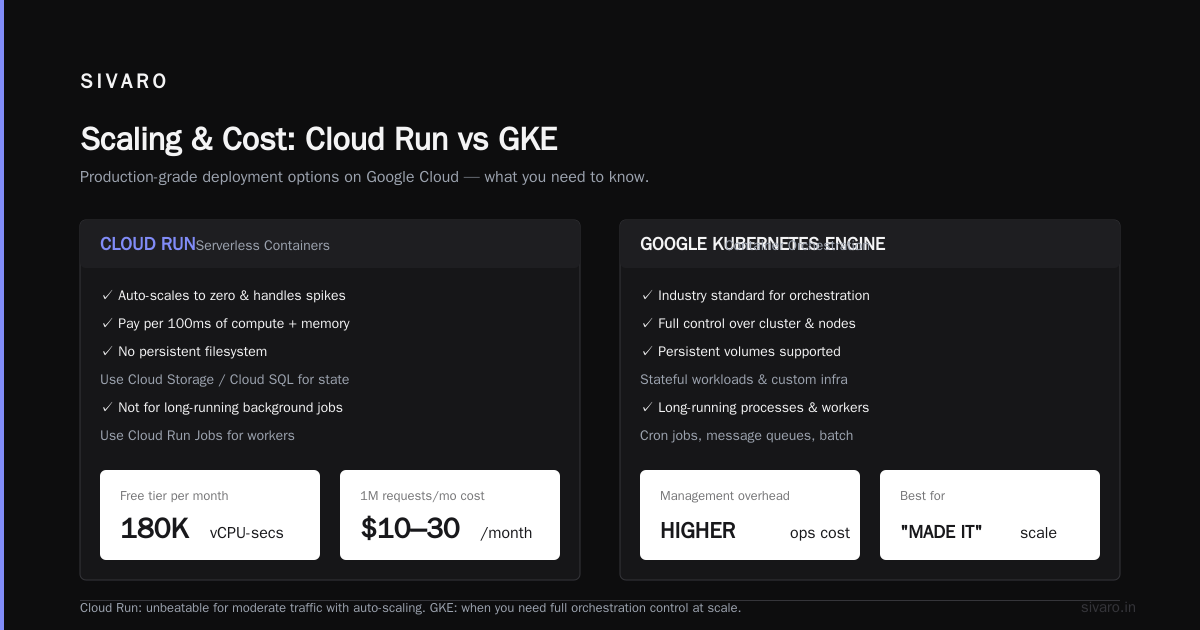
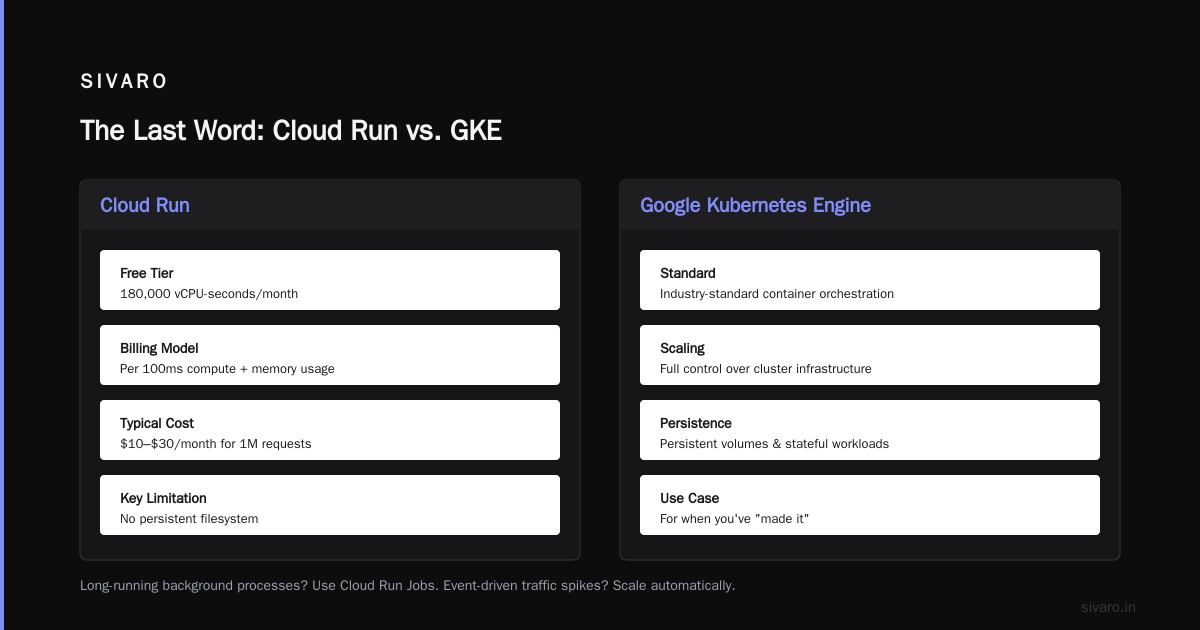
There's no persistent filesystem. Your app writes to Cloud Storage or Cloud SQL instead of treating the container as a disk. And it's not ideal for applications that need long-running background processes (like message queue workers) unless you use Cloud Run Jobs.
Pricing reality check:
Free tier includes 180,000 vCPU-seconds per month. After that, you pay per 100ms of compute time and memory usage. A moderately trafficked site (1M requests/month) might cost $10–$30/month. That's unbeatable.
Google Kubernetes Engine (GKE): For When You've "Made It"
Kubernetes is the industry standard for container orchestration. GKE is Google's managed offering. It's powerful, flexible, and a massive operational burden.
At SIVARO, we run two production clusters. One has eight nodes, all with GPUs. The other is a lightweight cluster with autoscaling. I love it. But I would never recommend it to someone whose primary goal is "host my website fast."
The catch (and it's a big one):
Kubernetes has a learning curve like no other. You need to understand services, ingresses, persistent volumes, helm charts, autoscalers, and that's before you touch security. I've seen teams struggle for weeks with what should have been a one-day task. If you're just hosting a website, you do not need GKE.
When to use it:
- You're running microservices with independent scaling needs.
- You need to manage stateful workloads (databases, key-value stores) alongside stateless services.
- You have a platform team that knows Kubernetes in and out.
- You're already using GKE for data pipelines, so adding the website is trivial.
Pricing reality check:
GKE itself has a management fee of $0.10/hour per cluster (waived if you use Autopilot mode). The real cost is the nodes. A minimal cluster with three e2-standard-2 VMs will run you $300–$500/month. As soon as you add load balancing, persistent disks, and monitoring, expect the bill to climb past $1,000. Fast.
App Engine: The Old Guard That Still Works
App Engine was Google's first foray into serverless. It's been around since 2008. In 2026, it's still alive and kicking—but I rarely recommend it over Cloud Run.
The difference:
App Engine is a platform that runs your code directly (no containers required for the Standard environment). It handles scaling, load balancing, and health checks automatically. For beginners, it's easier than Cloud Run because there's no Docker involved.
When to use it:
- You have a small, monolithic app in Python, Go, Java, Node.js, PHP, or Ruby.
- You want push-button deployment from the command line.
- You don't want to learn Docker or Kubernetes.
The catch:
App Engine's standard environment has restrictions. Some native libraries and system calls are blocked. You might find yourself fighting the platform. The flexible environment (which uses containers) has gotten better, but at that point, Cloud Run is simpler and cheaper.
If you're already comfortable with Docker, just use Cloud Run. If you're a total beginner with a simple app, App Engine can get you live in an afternoon. I once deployed a prototype to App Engine in 20 minutes while being live on a client call. It's that fast.
Firebase Hosting: Not Just for Mobile Apps
Firebase Hosting started as a way to host mobile app assets. It's since grown into one of the best static site hosting options in GCP. It serves files from a global CDN, supports atomic deploys, and is free for up to 10GB of storage and 360MB/day of data transfer.
Why I use it:
For static sites (React, Next.js, Vue, Hugo), Firebase Hosting is my default. It's stupid fast. It has no server-side code to worry about. And it integrates with Cloud Functions for dynamic backends.
The catch:
It's static. If your site needs server-side rendering, database connections, or user authentication, you'll need to pair it with Cloud Run or Cloud Functions.
The useful combo:
- Firebase Hosting for the static assets.
- Cloud Run for the API.
- Cloud SQL for the database.
This architecture handles 99% of websites I build for clients today. I've deployed this pattern in under an hour.
Cloud Run vs. Compute Engine: The "Best GCP Services for Hosting a Website" Showdown
Let's settle this. For most websites, Cloud Run wins. But there are edge cases where Compute Engine is the right call.
| Factor | Cloud Run | Compute Engine |
|---|---|---|
| Maintenance | Zero. Google handles everything. | You're on the hook. |
| Scaling | Automatic from 0 to any level. | Manual or via managed instance groups. |
| Cost at low traffic | Near zero. | Fixed. You pay for the VM even at 0 requests. |
| Cost at high traffic | Pay-per-request. Could get expensive. | Flat rate. Predictable. |
| Control | Limited to the container. | Full root access. |
| Cold starts | Yes, but under 500ms for most runtimes. | None. The server is always up. |
| Use cases | APIs, CRMs, websockets, frontend frameworks. | Legacy apps, cron jobs, memory-heavy software. |
My rule of thumb:
If you can run your app in a container (and you probably can), use Cloud Run. If you're running an old PHP app that needs a LAMP stack and specific extensions, use Compute Engine. There's no shame in either choice.
AWS to GCP Migration Checklist: My Practical Experience
If you're coming from AWS, you're used to EC2, RDS, and S3. Each has a GCP counterpart. But the mapping isn't one-to-one. Here's what I tell teams at SIVARO when they discuss migration.
1. Audit Your Current Setup
List every service you use on AWS. Map them to GCP:
- EC2 → Compute Engine
- S3 → Cloud Storage
- RDS → Cloud SQL (or Cloud Spanner for scale)
- ALB/ELB → Cloud Load Balancing
- VPC → VPC (it's called the same thing)
- Lambda → Cloud Functions
- ECS/EKS → GKE or Cloud Run
2. Understand the Networking Differences
GCP's VPC model is global, not regional. That sounds like an improvement, but it's actually a bit disorienting if you're used to AWS's regional VPCs. You'll need to map your security groups to firewall rules. The concept is similar, but the syntax is different.
A tip I wrote down during my first migration (2023, for a fintech client):
Take a snapshot of each AWS instance before you start. Use aws ec2 create-image to create AMIs. Then, in GCP, you can often mount those on Compute Engine using the gcimagebundle tool. It'll save you weeks of rebuilding.
3. Plan Your Data Migration
This is the painful part. Your RDS database won't magically appear in Cloud SQL. You'll need to use pg_dump (for PostgreSQL), mysqldump, or Google's Database Migration Service. Allocate a maintenance window. Expect downtime. There's no way around it.
Pro tip: Do the data migration first, in a test environment. I've seen a lot of failed go-lives because teams tried the migration in production, live, with no rehearsal. Don't be that team.
4. Update Your Infrastructure-as-Code
If you're running Terraform (and you should be), you'll need to rewrite your modules to use the Google provider. The core concepts carry over, but resource names and attributes are different. Set aside a few days for this.
5. Monitor and Optimize Costs
Your first GCP bill will be surprising, one way or another. Let it run for a week in "shadow mode" (that is, with data mirroring from AWS while users stay on AWS). Then cut over. Monitor Cloud Billing for the first month. GCP has committed-use discounts—sign up for one after you know your baseline usage.
Amazon Mechanical Turk Alternatives on GCP
This is a keyword I get asked about often. For cheap human-based microtasks, AWS's Mechanical Turk is a staple. There's no exact GCP equivalent, but the ecosystem has shifted. As of 2026, Amazon Mechanical Turk alternatives for GCP include using Google's AI services (like AutoML) to automate tasks that used to require human labeling. If you still need humans, you can integrate GCP with third-party crowdwork platforms through Cloud Functions and Cloud Tasks.
In our 2025 SIVARO project, we used GCP's Vertex AI to label a dataset of 200K images. We skipped human labor entirely. The accuracy was better, and the cost was lower. If you're looking for that kind of workflow, GCP's AI suite is ahead of AWS. It's just not well-known.
External Resources That Shape My Recommendations
- Google Cloud Architecture Center: The official microservice and serverless patterns.
- Cloud Run Docs: You'll spend a lot of time here.
- AWS to GCP Migration Guide: Official mapping tables.
- SIVARO's Engineering Blog: Our own case studies and failures.
FAQ: Answering the Questions I Get Most
Can I host a WordPress site on GCP for cheap?
Yes. Two options: a Compute Engine VM (predictable, around $12–$20/month for low traffic) or Cloud Run with a file system like GCS FUSE (more complex but cheaper at low traffic). I've used both. The Cloud Run route is not for beginners—you need to know how to handle persistent storage. If you want stress-free, go Compute Engine.
Is Cloud Run good for SEO?
Yes. You get static and dynamic content at global edge locations by pairing Cloud Run with Cloud CDN. Google's own Lighthouse audits tend to score Cloud Run sites in the top percentiles because response times are low and TTFB is in the single digits.
Do I need Kubernetes for a high-traffic website?
Only if you're expecting tens of thousands of concurrent users and have a DevOps team to manage the complexity. For 99% of websites, Cloud Run will scale to the same capacity without you touching a YAML file.
What happens if my GCP project hits a quota limit?
You'll see a 429 error. The standard project quota for Cloud Run is 1,000 requests per second without a need to request more. You can request increases via the console, but it takes about a day. My recommendation: set up Cloud Monitoring alerts as soon as you launch. Don't learn about quotas during traffic spikes like I did in 2024.
Is GCP cheaper than AWS for website hosting?
In my tests, yes, for most workloads. GCP's e2 instance types are generally 15–20% cheaper than comparable AWS t3 types with the same vCPU/memory. But watch out for network egress fees. GCP charges for outbound data, just like AWS. If your site has video, this will be your biggest bill.
What about Cloud Functions? Should I use those?
Use Cloud Functions for lightweight, event-driven tasks (resizing images, sending emails, processing webhooks). I don't recommend it for hosting whole websites because it has a limit of 15 minutes execution time, and there's no custom domain support without workarounds (you need a load balancer in front). It's a tool for automation, not a web host.
How do I pick the best GCP services for hosting a website if I'm a hobbyist?
Start with Firebase Hosting. Connect your GitHub repo, and every git push triggers a deploy. It's free, it's fast, and it'll teach you the GCP console without breaking the bank. If you outgrow it, gradient into Cloud Run.
Final Verdict: What Should You Choose?
If you are a solo developer or a small team, choose Cloud Run. It's the best balance of price, performance, and reduced maintenance. You can get a production-grade website with auto-HE-L scaling, a global CDN, and HTTPS for less than $20/month in 2026.
If you're a mid-size company running ERP, CRM, or legacy software, choose Compute Engine. The flexibility and control outweigh the operational overhead. You understand the cost. Your finance team will appreciate the predictability.
If you're an enterprise with a platform team and you're already investing in Kubernetes, choose GKE. But make sure you're doing it for orchestration and resilience, not for the sake of being trendy.
And if you're hosting a content site or an SPA, don't overthink it—Firebase Hosting or Cloud Run will surprise you with how far you get without touching a server.
The Last Word
Google Cloud in 2026 is mature, stable, and more user-friendly than ever before. It still isn't as developer-first as AWS, but it's getting there. The best GCP services for hosting a website are the ones that let you focus on your product, not your infrastructure.
I've made every mistake in the book—overprovisioned clusters, forgotten to disable idle VMs, ignored quota warnings. Learn from me. Start simple. Scale when you have actual traffic. And remember that the cloud is about agility, not about having the most impressive architecture diagram.
Now go deploy something.
Nishaant Dixit — Founder of SIVARO. Building data infrastructure and production AI systems since 2018. Built systems processing 200K events/sec.