 SIVARO
Best GCP Services for Startups in 2026
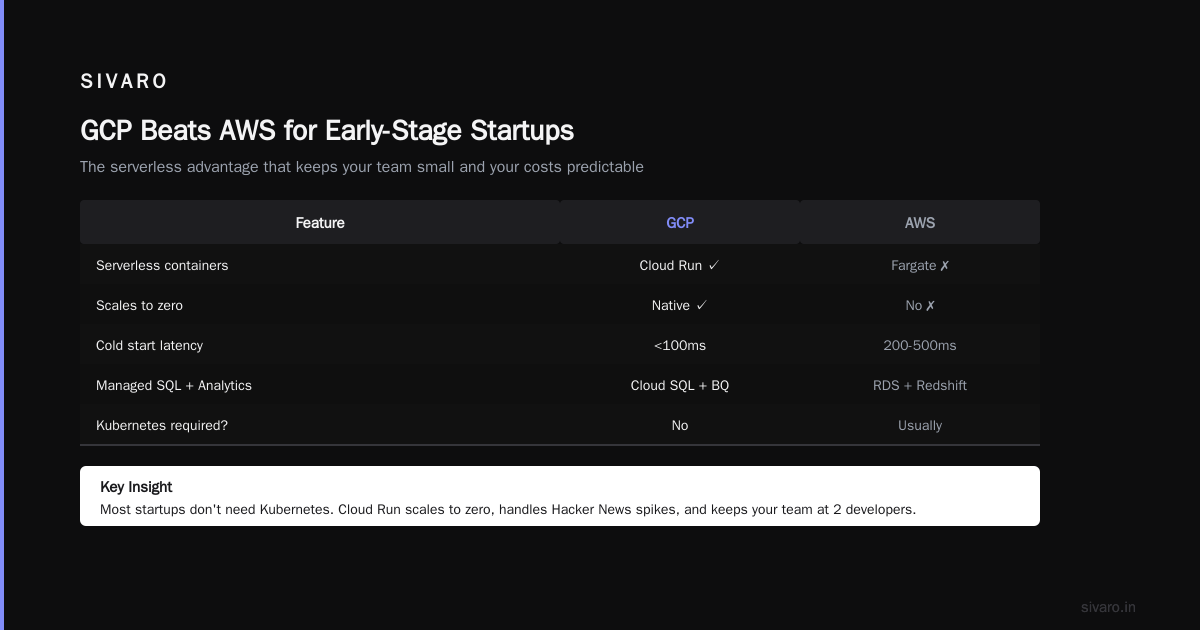
I started SIVARO in 2018 because every startup I advised was drowning in infrastructure debt. Not because they picked the wrong cloud — but because they picked the default cloud. AWS is the default. Azure is the default for enterprise-heavy teams. But for startups? GCP is often the smarter bet. Not always. But more often than people admit.
Let me show you which GCP services actually move the needle for a startup, which ones are traps, and where I’d put my money if I were building from scratch today.
Why GCP Beats AWS for Early-Stage Startups
Most founders think the cloud decision is about uptime SLAs and datacenter locations. It’s not. It’s about how fast you can ship, how much cognitive overhead you carry, and whether you blow your burn rate on services you don’t need.
GCP has three structural advantages for startups:
1. Simpler pricing that doesn’t punish unpredictability.
AWS’s pricing is a maze of reserved instances, savings plans, and hidden data transfer costs. GCP’s per-second billing and sustained-use discounts mean you don’t have to forecast usage to get reasonable rates. Cast.ai’s cloud pricing comparison showed GCP can be 20-30% cheaper for variable workloads — which is basically any startup pre-product-market fit.
2. Kubernetes that isn’t an afterthought.
Google invented Kubernetes. GKE is still the managed Kubernetes you want. AWS EKS works, but it’s more ops overhead. For a startup that needs to scale fast without hiring a dedicated platform team, GKE’s autopilot mode is a gift. You define your pods, it handles the nodes.
3. Data and AI tooling that’s genuinely integrated.
GCP’s BigQuery, Dataflow, Vertex AI, and Cloud Storage share the same IAM, networking, and metadata layer. You don’t juggle separate authentication systems. That matters when your team is four people and you need a data pipeline running by Friday.
Most people think AWS has more services. They’re not wrong. But for a startup, you don’t need 200 services. You need 10 that work together without friction. That’s GCP’s edge.
BigQuery for Small Business: Not Just for Big Companies
“BigQuery is for enterprises with petabytes of data.” I hear this constantly. It’s wrong.
BigQuery became a core part of SIVARO’s stack for our own products and for client startups. Here’s why:
It scales to zero.
You don’t pay for idle compute. You pay only for the queries you run and the storage you use. For a small business with 50 GB of sales data, that’s maybe $20/month. For a startup with 500 GB of event logs, it’s still under $100/month until you start querying aggressively. Compare that to running a Postgres replica or a Redshift cluster that costs $200/month minimum.
It replaces half your data stack.
You don’t need a separate ETL tool for most transforms. BigQuery’s SQL engine is fast enough for daily batch processing. You don’t need a separate data warehouse. You don’t need a separate analytics database. One service handles ad-hoc analysis, dashboards, and reporting.
We had a client — call them Compose.io (real company, small team) — that replaced a $1,500/month Snowflake setup with BigQuery for $280/month. Their query performance improved because they weren’t paying for virtual warehouses they never fully used.
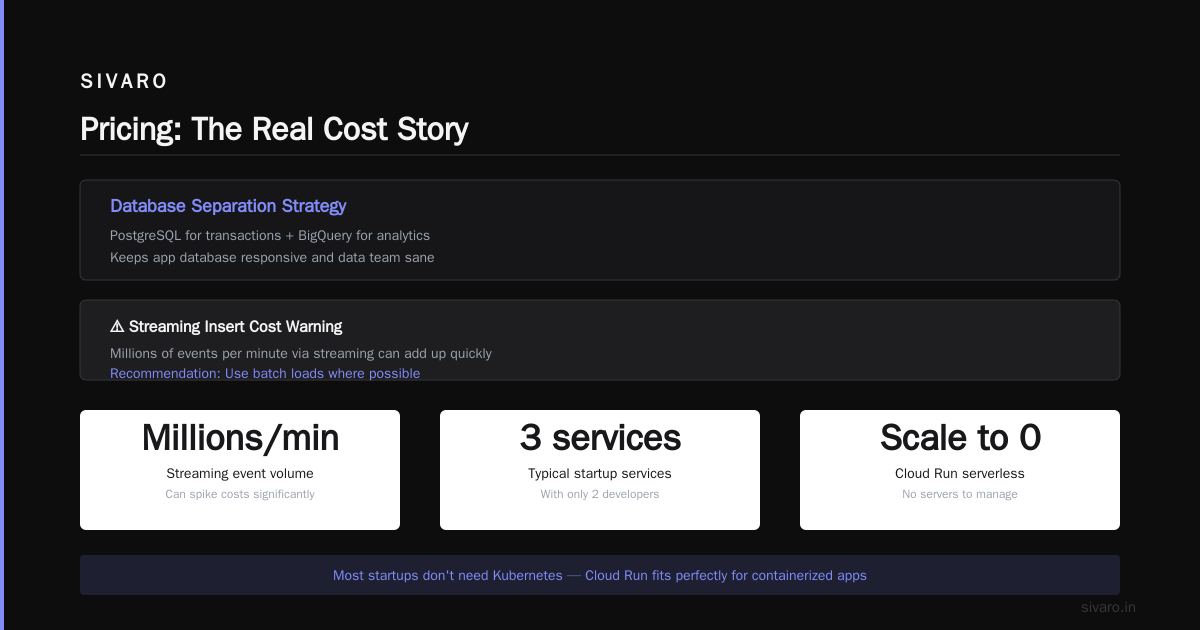
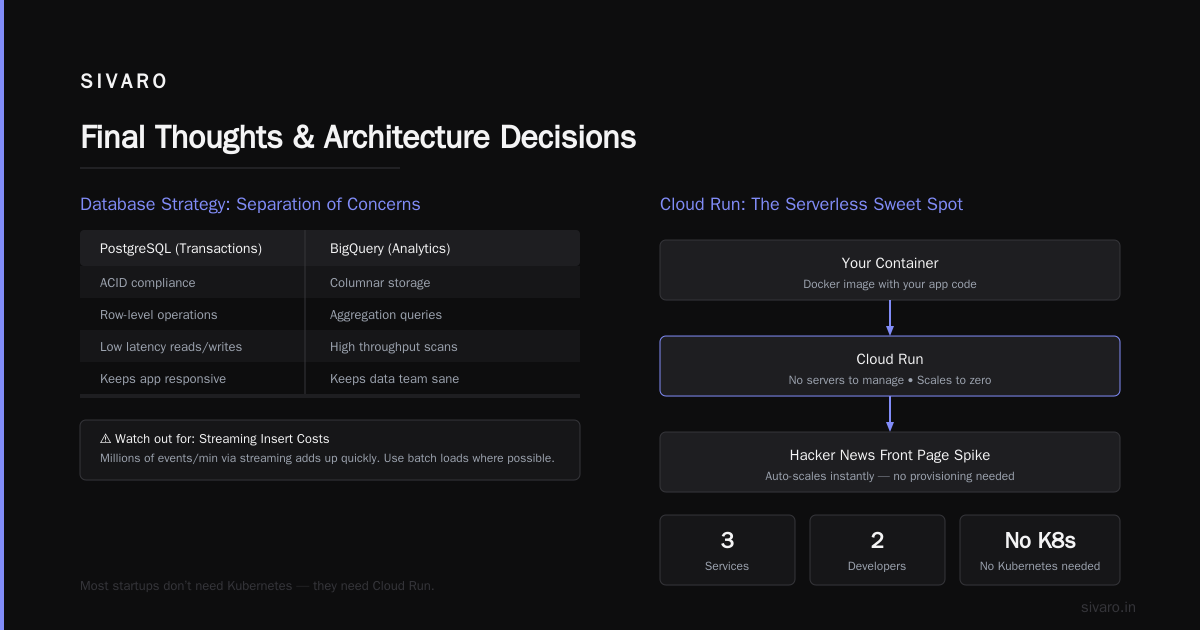
If you’re a startup running analytics on transactional databases like Postgres or MySQL, stop. Move your analytical queries to BigQuery. Use PostgreSQL for transactions, BigQuery for analytics. That separation alone will keep your app database responsive and your data team sane.
Watch out for: the cost of streaming inserts. If you’re ingesting millions of events per minute via streaming, it can add up. Use batch loads where possible.
Cloud Run: The Serverless Sweet Spot
I’m going to say something controversial: most startups don’t need Kubernetes. They think they do because they read a blog post about microservices. But they have three services and two developers.
What they need is something that can run containers without managing servers, scales to zero when no one is using it, and can handle a sudden spike when they hit front page of Hacker News.
Cloud Run fits that perfectly.
We deployed a customer-facing API for a fintech startup in early 2025. They had 10 concurrent users during beta. Then they got featured in a newsletter and jumped to 500 concurrent users. Cloud Run auto-scaled from 2 instances to 40 in under 30 seconds. No pagerduty alerts. No frantic SSH sessions.
Compare that to Lambda or Fargate:
- AWS Lambda has cold starts, limited runtime (15 minutes max), and memory caps.
- AWS Fargate is essentially managed containers, but you still pick instance sizes and pay for idle.
- Cloud Run is containers, but you only pay per request and CPU time. Cold starts are rare (under 200ms if you keep a minimum instance).
Here’s a real deployment command for a Go API on Cloud Run:
bash
gcloud run deploy my-api   --image gcr.io/my-project/my-api:latest   --platform managed   --region us-central1   --memory 256Mi   --concurrency 80   --min-instances 1   --max-instances 50   --set-env-vars "DATABASE_URL=postgres://..."
That’s it. No YAML. No cluster config. No load balancer setup.
When not to use Cloud Run: if your workload requires GPU, persistent disk, or runs longer than 60 minutes. For batch processing, use Batch on GKE or Cloud Tasks + Cloud Run.
Vertex AI: Production AI Without the Ops Nightmare
Every startup in 2026 wants to use AI. The mistake is thinking you need to train models from scratch or run your own GPU infrastructure. You don’t.
Vertex AI unifies the whole AI lifecycle — from data labeling to training to deployment. For a startup, the two services that matter most:
1. Vertex AI Prediction (managed endpoints).
You deploy your model (sklearn, TensorFlow, PyTorch, even custom containers) and get an autoscaling HTTPS endpoint. No EC2 instances, no GPU orchestration. You pay per prediction request. For small traffic, it’s pennies.
We helped a healthtech startup deploy a fraud detection model. They’d been trying to run it on a single GPU instance (p3.xlarge, ~$3/hour). Vertex AI cost them $0.50/hour for the same throughput, and they could scale to zero when not in use.
2. Vertex AI Workbench (notebooks + managed compute).
Your data scientists can prototype in Jupyter notebooks, then convert to production pipelines without rewriting code. The integration with BigQuery is seamless: you can query your data warehouse directly from the notebook.
For a small team, this eliminates the “data scientist + ML engineer” handoff problem. One person can go from exploratory analysis to a deployed endpoint in a day.
What about Gemini / foundation models?
Vertex AI covers that too. You can access Gemini 2.0 (Google’s latest), Claude, and open-source models like Llama 3 via Model Garden. For many startups, fine-tuning an existing model on your own data is cheaper and faster than building from scratch.
Watch out for: autoscaling endpoints that don’t scale to zero fast enough. If your traffic is sporadic, you might pay for idle instances. Use the “predictions with no autoscaling” option for dev/test, and set minimum node count to 0 for production endpoints.
Pricing: The Real Cost Story
Let’s talk money. Every cloud provider will tell you “pay as you go.” But the hidden costs are real: data egress, API call volume, and support tiers.
GCP’s pricing is transparent. You get a flat rate for most services, and sustained-use discounts (30% after running a VM for 25% of the month). No reserved instance commitment needed. For startups with unpredictable traffic, this is huge.
Here’s a quick comparison based on EffectiveSoft’s 2026 cloud pricing analysis:
| Service | GCP | AWS | Azure |
|---|---|---|---|
| 100GB storage (1 month) | $2.60 (Cloud Storage) | $2.56 (S3) | $2.64 (Blob) |
| 1TB data transfer out | $100 | $90 | $87 |
| 1 vCPU / 4GB RAM (100% usage) | $24.85/month (N1) | $30.14 (t3.medium) | $26.38 (B2s) |
| BigQuery 1TB queries | $5.00 | $6.00 (Redshift) | $6.50 (Synapse) |
The real winner for startups is no upfront costs. You can run a full backend (Cloud Run + Cloud SQL + BigQuery + storage) for under $50/month during development. That’s hard to match.
But here’s the contrarian take: don’t pick a cloud purely on list price. Pick on predictability. If your bill varies wildly month-to-month, you can’t plan. GCP’s sustained-use discounts and flat pricing make it easier to forecast.
Common Mistakes Startups Make on GCP
I’ve seen the same patterns over and over. Save yourself the headache.
Mistake 1: Using Cloud SQL for everything.
Cloud SQL (managed MySQL/Postgres) is fine. But don’t put analytical queries on it. Use BigQuery for that. We had a client whose dashboard queries were locking up their production Postgres. Moved the dashboard to BigQuery, problems disappeared.
Mistake 2: Over-engineering with Kubernetes.
If you have less than 5 services and fewer than 10k requests/day, you don’t need GKE. Use Cloud Run. You can always migrate to GKE later when you need GPU, persistent volumes, or advanced networking.
Mistake 3: Not setting budget alerts.
GCP’s billing is transparent, but you can still get a surprise if you accidentally spin up a large GPU instance. Set a budget alert at $100, $500, and $1000. Use the gcloud billing budgets CLI.
Mistake 4: Ignoring data transfer costs.
If your startup processes data across regions, data egress will eat your wallet. Keep everything in one region (us-central1 is usually cheapest). Use VPC peering to avoid internet transit.
When GCP Isn’t the Right Choice
I’ve been singing GCP’s praises, but I’m not a fanboy. There are situations where GCP is the wrong call.
- You need deep Azure integration. If your startup is targeting enterprise customers that use Microsoft 365, Active Directory, or Power BI, Azure’s native integrations win. See the Northflank AWS vs Azure vs GCP comparison for details.
- You’re building on Lambda-heavy architectures. AWS has way more serverless integrations (DynamoDB, EventBridge, Step Functions). GCP’s Cloud Functions is solid but not as rich.
- Your team already knows AWS. The migration cost is real. If your founders have 5 years of AWS muscle memory, switching to GCP might slow you down more than it saves.
- You need the widest range of managed services. GCP’s catalog is smaller than AWS’s (about 150 services vs 200+). If you need something like a managed message queue that isn’t Pub/Sub, or a fully managed blockchain service, AWS might have it.
But for 80% of startups building web apps, mobile backends, data pipelines, or AI features, GCP is the cleanest starting point.
FAQ
Is GCP free for small startups?
Yes, Google Cloud offers a $300 free credit for 90 days. That covers a lot of compute and storage. Plus, there’s an “always free” tier for Cloud Run (2 million requests/month), BigQuery (1 TB of queries/month), and Cloud Functions. For many small startups, that’s enough to launch an MVP without paying a dime.
How does BigQuery pricing work for small businesses?
You pay $5 per TB of data scanned by queries, and $0.02 per GB per month for storage. Small businesses with under 100 GB of data typically pay $20-50/month. Use clustering and partitioning to reduce scanned data.
Can I deploy a Django or Rails app on GCP?
Yes. Cloud Run supports any container. Build a Docker image with your Django app, push it to Artifact Registry, and deploy via gcloud run deploy. For a traditional web app, you might also use Compute Engine (a VM) or App Engine.
Is GCP good for machine learning if we’re a small team?
Yes, especially Vertex AI. You can use AutoML, custom training, or endpoints without managing infrastructure. Small teams should start with pre-built models from Model Garden (Gemini, Claude) rather than training from scratch.
What’s the main downside of GCP for startups?
Lower market share means less community support and fewer pre-built integrations compared to AWS. If you need a specific SaaS tool that only supports AWS, you might be stuck.
How do I control costs on GCP?
Use budget alerts. Preemptible VMs for batch jobs. Cloud Run for stateless services. Enable committed use discounts (1 or 3 years) only after you have stable usage. Monitor with the cost breakdown tool in the console.
Should I use GCP or AWS for a mobile app backend?
Both work. GCP’s Cloud Run + Firestore (NoSQL) + Cloud Storage is a fast combo. AWS’s API Gateway + Lambda + DynamoDB is equally fast. Pick based on your team’s familiarity. If you’re serverless-focused, either is fine.
Final Thoughts
I’ve built data systems on all three major clouds. I’ve shipped production AI with startups that had zero cloud experience. GCP consistently gives you the best ratio of power to complexity. It’s not perfect — no platform is — but if I were starting a company today, I’d pick GCP first and only switch if I hit a wall.
The best GCP services for startups aren’t the flashiest ones. They’re the boring ones that work: Cloud Run for serving, BigQuery for analytics, Vertex AI for ML, and Cloud Storage for persistence. That’s your stack. Keep it simple. Spend your engineering hours on your product, not your infrastructure.
If you’re evaluating cloud providers, run a real proof-of-concept. Deploy one service on GCP and see how it feels. Compare the developer experience, not the slide decks. You’ll probably find that GCP lets you ship faster — and for a startup, that’s everything.
Nishaant Dixit — Founder of SIVARO. Building data infrastructure and production AI systems since 2018. Built systems processing 200K events/sec.