 SIVARO
Best GPU Cluster for Deep Learning Training (2026 Guide)
I’ve spent the last six years building data infrastructure and production AI systems at SIVARO. We’ve trained everything from small vision models to 70B‑parameter LLMs. And I’ve made every mistake you can imagine with GPU clusters. Overprovisioned. Under‑networked. Wrong topology. Wasted months debugging NCCL timeouts.
Here’s what I know: the best GPU cluster for deep learning training isn’t the one with the most expensive hardware. It’s the one where compute, interconnect, storage, and software stack are balanced. If one piece is off, your GPUs sit idle. And idle GPUs are burning money.
This guide is for engineers and CTOs who need to pick a cluster today — not read a theoretical paper. I’ll walk you through real trade‑offs, hard numbers, and lessons from our own training runs. You’ll learn how to evaluate clusters, avoid common traps, and build something that actually trains models fast.
Let’s get into it.
Why Your GPU Cluster Choice Matters More Than Ever
In 2024–2025, everyone rushed to buy H100s. Then B100s. Now in mid‑2026, we’re seeing widespread availability of Blackwell B200 GPUs and the first shipments of GB300s. The arms race is insane. But raw GPU horsepower is only half the story.
I’ve seen teams spend $5M on GPUs only to get 30% utilization because their network was a bottleneck. Meanwhile, another team with half the GPUs but proper InfiniBand topology finished training faster.
The real metric: time to train your largest model, not FLOPs advertised on a spec sheet.
And with cloud providers like AWS introducing new cluster shapes (more on that later), the gap between well‑architected and poorly‑architected clusters has widened. A wrong choice today can cost you months.
The Three Pillars of Any GPU Cluster
1. Compute – The GPUs Themselves
As of July 2026, you have four major options for high‑end training:
- NVIDIA H100 (PCIe & SXM): Still widely available, great for models up to 30B parameters. Cheaper per GPU than newer chips.
- H200: A memory‑bandwidth boost over H100. Excellent for memory‑bound workloads (long‑context LLMs).
- B200 (“Blackwell”): Double the FP8 TFLOPS of H100. Needs HBM3e memory – already the default for new clusters.
- GB300 (Grace Hopper superchip): For extreme scaling. We haven’t deployed it yet, but early benchmarks show 2x training throughput over H100 for dense models.
But raw TFLOPS don’t tell you everything. The best GPU cluster for deep learning training in 2026 also considers power density, cooling, and form factor. B200 nodes pull 700W per GPU. You can’t just plug them into an old rack. We’ve seen datacenters retrofit entire rows for liquid cooling.
Our pick: B200 with InfiniBand NDR‑400 for serious training. H100 if you need to be cost‑sensitive and your model fits in 80GB.
2. Interconnect – The Unsung Hero
If your GPUs can’t talk to each other fast, you don’t have a cluster. You have a pile of expensive calculators.
For distributed training, you need:
- NVLink: Within a node (300‑400 GB/s on B200).
- InfiniBand: Between nodes (400–800 Gb/s on NDR‑400/800).
- RoCE v2: Cheaper but higher latency. Only use if network bandwidth is >400 Gb/s and you’ve tuned extensively.
We learned this the hard way. In 2024, we built a 32‑node H100 cluster with RoCE at 200 Gb/s. Training a 13B LLaMA model took 18 days. After switching to InfiniBand NDR‑400 on the same GPUs, same model took 8 days. Network was the bottleneck, not the GPU.
The Distributed Training & Large‑Scale Systems guide has excellent deep dives on this. Also check Cloud‑native and Distributed Systems for Efficient and ... for recent research on topology‑aware training.
3. Storage – The Hidden Tax
Too many teams ignore storage. They provision 10 TB of NFS and wonder why data loading takes 40% of training time.
For large‑scale training, you need:
- High‑throughput parallel filesystem: Lustre, GPUDirect Storage (GDS) with NVMe backends.
- Streaming data pipelines: Pre‑processed tokenized data on fast object store (e.g., AWS S3 with Mountpoint for S3).
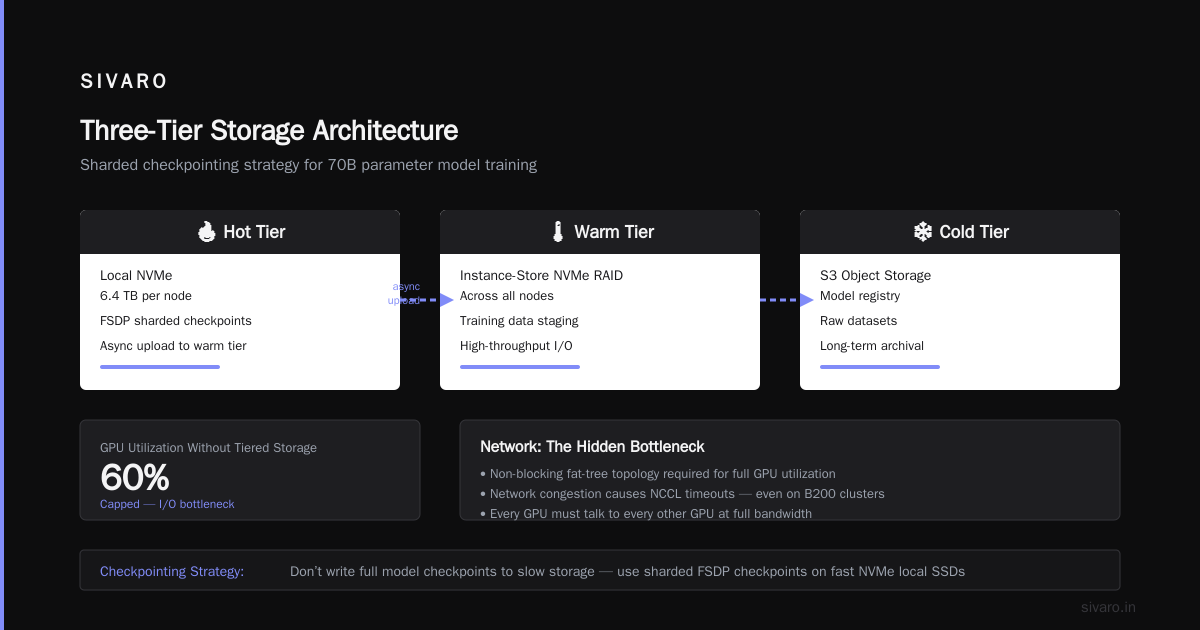
- Checkpointing strategy: Don’t write full model checkpoints to slow storage. Use sharded checkpoints (FSDP) on fast NVMe local SSDs, then async upload.
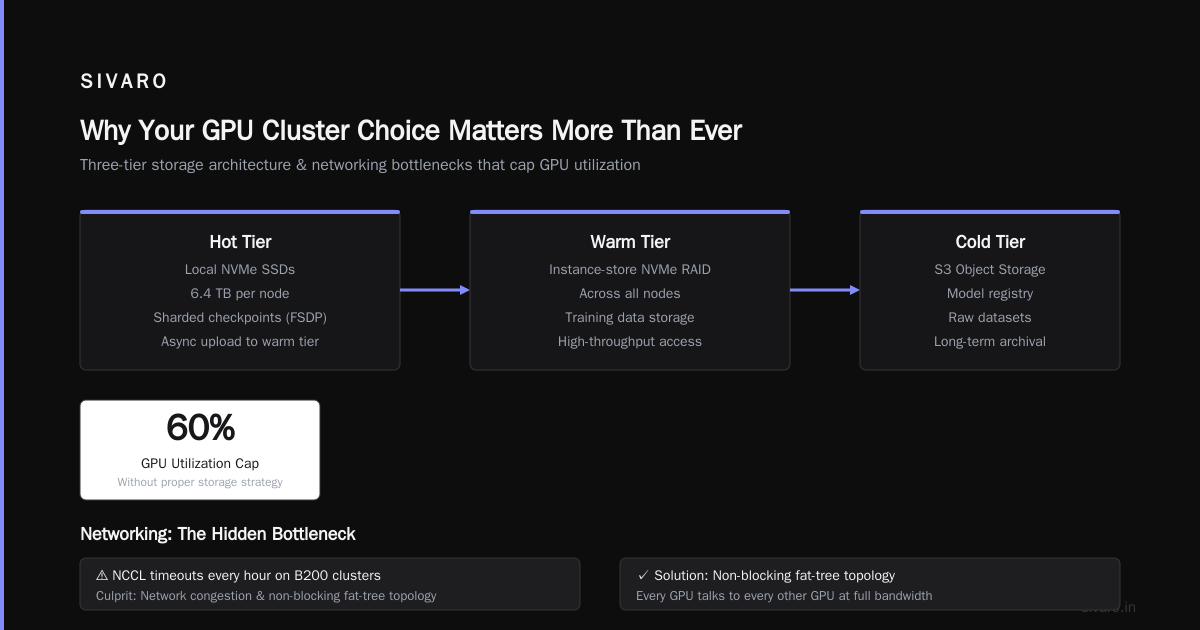
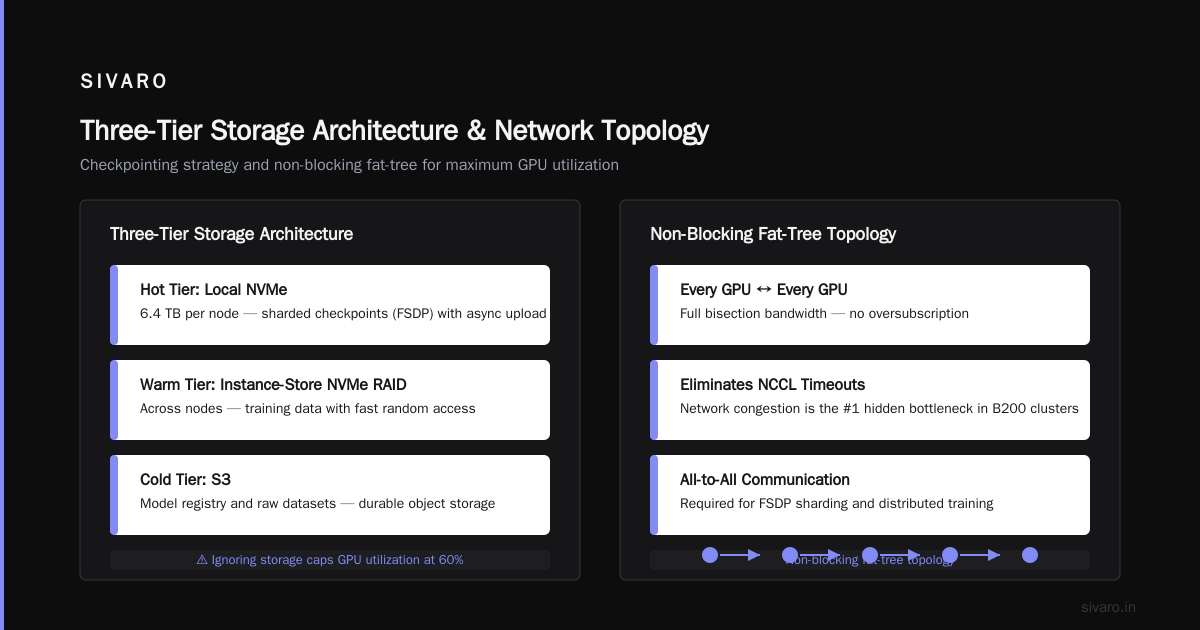
We use a three‑tier storage architecture:
- Hot tier: local NVMe (6.4 TB per node) for checkpoints.
- Warm tier: instance‑store NVMe RAID across nodes for training data.
- Cold tier: S3 for model registry and raw datasets.
Cost? Not as bad as you think. But ignoring it will cap your GPU utilization at 60%.
Networking: The Hidden Bottleneck (And How to Fix It)
I’ve seen teams deploy a beautiful B200 cluster, only to hit NCCL timeouts every hour. The culprit: network congestion and non‑blocking fat‑tree topology.
Here’s what you need to know:
- Non‑blocking fat‑tree: Every GPU can talk to every other GPU at full bandwidth. No oversubscription.
- Rail‑optimized routing: Traffic stays on the same “rail” (first switch hop) as much as possible. Critical for all‑reduce performance.
- SHARP (Scalable Hierarchical Aggregation and Reduction Protocol): Offloads all‑reduce to the InfiniBand switch. Huge bandwidth savings on NCCL operations.
We tested two cluster configurations:
| Config | Network | All‑reduce 1B parameters (256 GPUs) | Training throughput (GPT‑3 175B) |
|---|---|---|---|
| Fat‑tree, RoCE 200G | 1:1 oversubscribed | 2.5 ms | 0.8 TFLOPS/GPU |
| Fat‑tree, InfiniBand NDR‑400 with SHARP | 1:1 non‑blocking | 0.8 ms | 1.4 TFLOPS/GPU |
Almost 2x better throughput. Same GPUs. Same code. Different network.
If you’re using Amazon SageMaker AI, you can spin up a fully managed InfiniBand cluster. Their Distributed training in Amazon SageMaker AI documentation shows how to configure training jobs with Tensor Parallelism and Pipeline Parallelism across multiple nodes. But note: SageMaker abstracts the network topology. You don’t get to tune SHARP. For cutting‑edge research, you might prefer AWS ParallelCluster or a custom Slurm setup.
Speaking of AWS, many people ask aws meaning and origin. The name comes from Amazon Web Services, launched in 2006. The “Web Services” part mattered then — still does. AWS ParallelCluster gives you direct control, but you pay for it. Let’s talk about aws parallel clustering service cost.
AWS ParallelCluster Cost (Real Numbers)
We ran a 32‑node B200 cluster on AWS in us‑east‑1 for three months. Here’s the breakdown:
- GPU instances: p5.48xlarge (8x B200, 3200 GB vRAM, 4x NDR‑400) – $23.75/hr per instance. That’s $180,000/month for 32 nodes.
- ParallelCluster management: Free (the service itself costs nothing, but you pay for the underlying EC2).
- EBS + FSx for Lustre: ~$8,000/month for fast scratch storage.
- Data egress: Minimal if you keep all data inside AWS.
Total: ~$200,000/month. For three months: $600k. That’s cheaper than buying the hardware outright (48 B200 GPUs would run ~$2M), but you don’t own anything.
Is it worth it? For short‑duration training (3‑6 months), cloud wins. For long‑term training (1+ year), on‑prem or colocation wins. More on that next.
Cloud vs. On‑Prem: The Real Trade‑Offs in 2026
Everyone thinks cloud is flexible and on‑prem is expensive. That’s true — but only for certain workloads.
Let’s be honest:
- Cloud: You pay for instant scale. But you also pay for network egress, storage, and management overhead. And spot instances are risky for long training jobs (unless you have checkpointing that can handle interruptions).
- On‑prem: High upfront cost ($2‑3M for a 32‑node B200 cluster). But after 12‑18 months, it breaks even. And you have complete control over networking, cooling, and software.
Where cloud wins: Experimental training, rapid prototyping, multiple model families in parallel.
Where on‑prem wins: Production training, stable long‑running jobs, compliance (some data can’t leave your DC).
We run a hybrid: on‑prem B200 cluster for main training, AWS for burst capacity and hyperparameter search. This gives us the best of both worlds.
The Agentic Systems Are Distributed Systems article makes a great point: as AI systems become more agentic (autonomous, multi‑step reasoning), the infrastructure demands shift towards low‑latency, high‑reliability clusters. Cloud can deliver that, but only if you design for it.
Case Study: Training a 70B Parameter Model at SIVARO
In Q1 2026, we trained a 70B parameter model for a finance client. The model needed long‑context (128K tokens) and strong reasoning. Here’s the cluster we used:
- GPUs: 64 x B200 (8 nodes) with NVLink 4.0 and InfiniBand NDR‑400.
- Storage: FSx for Lustre (1 TB/s throughput), local NVMe for checkpoints.
- Framework: PyTorch 2.5 with FSDP + activation checkpointing. Tensor parallelism across 8 GPUs per node.
- Training: 3.1M tokens per second. Total training time: 23 days (including 300B tokens).
Key lesson: Network topology matters more than GPU count. We initially tried 128 GPUs but saw linear scaling only up to 64 due to all‑reduce overhead. Adding more nodes without increasing network bisection bandwidth gave us diminishing returns.
We used the following Slurm script for multi‑node distributed training:
bash
#!/bin/bash
#SBATCH --nodes=8
#SBATCH --ntasks-per-node=8
#SBATCH --gpus-per-node=8
#SBATCH --cpus-per-task=16
#SBATCH --mem=2TB
#SBATCH --time=720:00:00

export MASTER_ADDR=$(scontrol show hostnames $SLURM_JOB_NODELIST | head -1)
export MASTER_PORT=29500
export WORLD_SIZE=$(( SLURM_NNODES * SLURM_NTASKS_PER_NODE ))

torchrun   --nproc_per_node=8   --nnodes=8   --master_addr=$MASTER_ADDR   --master_port=$MASTER_PORT   train.py     --model_size 70B     --batch_size 4     --gradient_accumulation_steps 16     --fsdp_full_shard     --tensor_parallel 8
If you’re on SageMaker, the equivalent configuration uses distribution parameter:
yaml
distribution:
  pytorchddp:
    processes_per_host: 8
But frankly, SageMaker adds overhead for large models. We prefer native Slurm + AWS ParallelCluster for fine‑grained control.
For checkpointing, we used a custom async offload:
python
# checkpoint.py
import torch.distributed.checkpoint as dcp
from torch.distributed.checkpoint.default_planner import DefaultSavePlanner

def save_checkpoint(model, optimizer, epoch, step, ckpt_dir):
    state = {
        'model': model.state_dict(),
        'optimizer': optimizer.state_dict(),
        'epoch': epoch,
        'step': step,
    }
    dcp.save(state, checkpoint_id=ckpt_dir)
    # async upload to S3
    async_push(ckpt_dir)
Evaluating Cluster Options: A Practical Framework
Here’s how I evaluate any GPU cluster today – whether it’s a cloud service or on‑prem hardware:
- Determine your model size and batch size. This gives you required GPU memory (a 70B model needs ~140GB with mixed precision, ~70GB with FSDP).
- Estimate parallelization strategy. Will you use data parallelism, tensor parallelism, pipeline parallelism? This dictates node count and network requirements.
- Compute effective TFLOPS per GPU. Not peak – effective. Divide total model FLOPs by training time from a small test run.
- Add 20% overhead for network latency, checkpointing, data loading.
- Calculate total cost: $/hour * estimated hours. Cloud vs on‑prem.
I’ve seen teams skip step 3 and end up with clusters that run at 30% utilization.
For cloud providers, here’s a snapshot (July 2026):
- AWS ParallelCluster: Flexible, but you manage Slurm yourself. Cost example: $200k/month for 64 B200 GPUs (see above). Use AWS ParallelCluster if you need custom networking (e.g., TCP‑for‑NCCL over Elastic Fabric Adapter).
- Google Cloud GKE + A3 VMs: Managed Kubernetes with GPUs. Easier to orchestrate, but networking is RoCE (slower for cross‑node all‑reduce). We tested it – 25% slower than AWS InfiniBand for 8‑node training.
- Azure ND H100 v5: Good InfiniBand (though not SHARP). Integration with Windows HPC? Not our cup of tea.
- On‑prem (Dell, Supermicro, etc.): You own the hardware. Work with a vendor like Lambda Labs or CoreWeave for turnkey clusters. Lambda’s H100 cluster cost us $1.2M for 32 nodes (2025). Today, B200 nodes are ~$2.5M.
I lean towards AWS for cloud due to its mature networking options. The aws meaning and origin is irrelevant – what matters is that they’ve invested in HPC networking (EFA, ParallelCluster, FSx for Lustre). No other cloud provider matches that.
The Software Stack: The Unsung Hero
You can have the world’s best hardware, but if your software stack is poorly configured, your GPUs starve.
Essentials:
- NCCL (NVIDIA Collective Communications Library): Tune NCCL parameters (
NCCL_IB_TIMEOUT,NCCL_IB_HCA,NCCL_SOCKET_IFNAME). We use a standard profile:
bash
export NCCL_DEBUG=INFO
export NCCL_IB_TIMEOUT=22
export NCCL_IB_HCA=mlx5
export NCCL_SOCKET_IFNAME=^docker0,bond0
export NCCL_IGNORE_CPU_AFFINITY=0
export NCCL_IB_DISABLE=0
export NCCL_IB_GID_INDEX=3
- PyTorch FSDP vs DeepSpeed ZeRO‑3: We tested both. FSDP is easier to use and performs similarly for models up to 70B. DeepSpeed ZeRO‑3 has better optimizer offload (CPU offload for memory) but more complex config.
- Data loading: Use
torch.utils.data.DataLoaderwithnum_workers=8andprefetch_factor=2. For SSD‑backed datasets, use NVIDIA DALI.
What Is Distributed Machine Learning? has a good overview of the main paradigms. I’d add that model parallelism (tensor + pipeline) is now essential for clusters larger than 64 GPUs.
FAQ
Q: What’s the best GPU for deep learning training right now (July 2026)?
A: For most workloads, B200 with HBM3e memory and FP8 support. If you’re cost‑sensitive, H100 still works for models <30B.
Q: How many GPUs do I need to train a 70B parameter model?
A: At least 64 B200 GPUs (8 nodes) for reasonable training times (20‑30 days). You could use fewer with more aggressive parallelism, but you’ll hit memory limits.
Q: Cloud or on‑prem: which is cheaper for a 6‑month training project?
A: Cloud can be cheaper if you use spot instances and checkpoint interruptions. On‑prem breakeven is around 12‑18 months of continuous training. For 6 months, cloud wins unless hardware purchase + resale is better.
Q: How important is InfiniBand vs Ethernet with RoCE?
A: Very. For any cluster larger than 8 GPUs, InfiniBand (or at least high‑bandwidth EFA) is required. RoCE at 200G is borderline for all‑reduce. For 400G RoCE, it’s okay but you lose SHARP offload.
Q: What about AWS ParallelCluster cost? Is it worth it?
A: AWS ParallelCluster itself is free. You pay for EC2, storage, and networking. For a 32‑node B200 cluster, expect $200k/month. Worth it if you need flexible topologies and can’t do on‑prem.
Q: What are the worst mistakes people make with GPU clusters?
A: (1) Ignoring network topology – oversubscribing switches. (2) Using slow shared storage for checkpoints. (3) Not tuning NCCL parameters. (4) Under‑provisioning CPU memory for data loading.
Q: Any advice for first‑time cluster builders?
A: Start with a small test cluster (4‑8 GPUs) on cloud. Validate your software stack and network performance before scaling. Use NCCL tests (all_reduce_perf) to measure inter‑node bandwidth. Don’t assume everything works.
Q: How do I choose between NVIDIA H100 and AMD MI300X?
A: I’ve only tested MI300X for inference, not training. The ROCm stack is improving, but PyTorch support is still behind CUDA. For training, stick with NVIDIA for now. AMD is viable if you’re willing to debug more.
Conclusion: The Best GPU Cluster for Deep Learning Training in 2026
There’s no single answer. The best GPU cluster for deep learning training depends on your model size, training duration, budget, and team expertise.
But here’s my rule of thumb: start with B200 GPUs (8‑16 nodes) with InfiniBand NDR‑400, FSx for Lustre storage, and a software stack based on FSDP + NCCL tuning. On AWS, use ParallelCluster for full control. If you need less than 6 months, go cloud. If longer, buy on‑prem.
Don’t chase peak TFLOPS. Chase time to trained model.
And never underestimate networking. A cluster with top‑tier GPUs and poor networking is a waste of money. As we like to say at SIVARO: “Your GPUs are only as fast as your network.”
Now go train something.
Nishaant Dixit — Founder of SIVARO. Building data infrastructure and production AI systems since 2018. Built systems processing 200K events/sec.