 SIVARO
Best Practices for AI Agent Deployment in Production
I’m going to tell you about the worst week of my professional life.
April 2024. A client — mid‑size logistics firm — had us deploy an AI agent to handle customer returns. Simple scope: look up order, validate return policy, generate a shipping label. We tested for a month. Passed every edge case. Then we turned it on for 10% of traffic.
Within 48 hours the agent approved a return for a shipment that hadn’t even left the warehouse. Then it issued a label with the wrong carrier. Then it refunded a customer who’d already received a replacement. Total damage: $47,000 and a three‑page incident postmortem.
I learned the hard way that most people think deployment is the finish line. It’s not. It’s the starting line where everything you didn’t test becomes urgent.
This guide collects what I’ve learned since then — across SIVARO’s own projects and from watching the industry evolve. We’ve deployed agents processing millions of requests for finance, healthcare, and e‑commerce. Some worked. Some exploded. I’ll tell you which ones did what and why.
By the end you’ll have a practical framework for the best practices for AI agent deployment in production — not theory, but the stuff that keeps you awake at 2 AM.
Why Most AI Agent Deployments Fail (and It’s Not the Model)
Every week I talk to a founder who says “our agent is 95% accurate” like that’s the end of the conversation. It’s not. The 5% is where the business goes up in flames.
Google’s internal infrastructure team recently published a paper on the key hurdles to deploying production AI agents efficiently — they found that non‑functional requirements (latency, cost, error handling) caused more failures than model accuracy (Learn These Key Hurdles to Deploy Production AI Agents). I’ve watched the same pattern across a dozen deployments.
The biggest mistake? Treating an agent like a stateless API. Agents have loops. They call tools. They hallucinate actions, not just words. A single bad tool call can cascade into a corrupted database or a legal liability.
I’ll give you a concrete example from mid‑2025. A well‑funded SaaS company deployed a customer support agent. It had a tool to escalate tickets to human reps. The agent’s reasoning was: if the customer is angry, escalate. But the definition of “angry” was fuzzy. The agent started escalating every third ticket. Within a week the support team had a backlog of 700 escalated tickets — and blamed the AI. The whole project got paused.
That wasn’t a model problem. It was a design problem. The agent lacked a clear success criterion for when to use each tool. The Anthropic engineering team calls this “giving the agent an inch — it takes a mile” (Building Effective AI Agents). They’re right.
The Architecture That Actually Works (We Tried Both)
I’ve seen two patterns dominate production agent architecture. I’ll call them Loose Coupling and Strict Orchestrator.
Loose Coupling: each agent is a standalone microservice that communicates with others via a message bus. Sounds clean. In practice, it turns into a spiderweb. One agent calls another, which calls another, and debugging a failure chain takes hours. We tried this for a financial reconciliation agent at SIVARO in early 2025. The team spent more time tracing message flows than fixing bugs.
Strict Orchestrator: a single orchestrator component that defines the agent’s plan, calls tools, and manages state. The agent can only act within the orchestrator’s loop. This is what we use now and what I recommend.
Here’s a simplified version of the pattern:
python
class AgentOrchestrator:
    def __init__(self, llm, tools, max_steps=10):
        self.llm = llm
        self.tools = {t.name: t for t in tools}
        self.max_steps = max_steps
        self.state = {"steps": [], "tool_results": {}}

    def run(self, user_input):
        for step in range(self.max_steps):
            response = self.llm.invoke(
                system_prompt=self._build_prompt(),
                user_input=user_input,
                state=self.state
            )
            action = self._parse_action(response)
            if action["type"] == "final_answer":
                return action["content"]
            elif action["type"] == "tool_call":
                result = self.tools[action["tool_name"]].execute(**action["args"])
                self.state["tool_results"][action["tool_name"]] = result
                self.state["steps"].append(action)
            else:
                raise ValueError(f"Unknown action: {action['type']}")
        raise TimeoutError("Agent exceeded max steps")
The key insight: the orchestrator owns the loop, not the LLM. The LLM only decides what action to take next. The orchestrator enforces boundaries — step limits, retry policies, human‑in‑the‑loop gates. This pattern is described well in the A Practical Guide for Designing, Developing, and Deploying AI Agents (A Practical Guide for Designing, Developing, and ...).
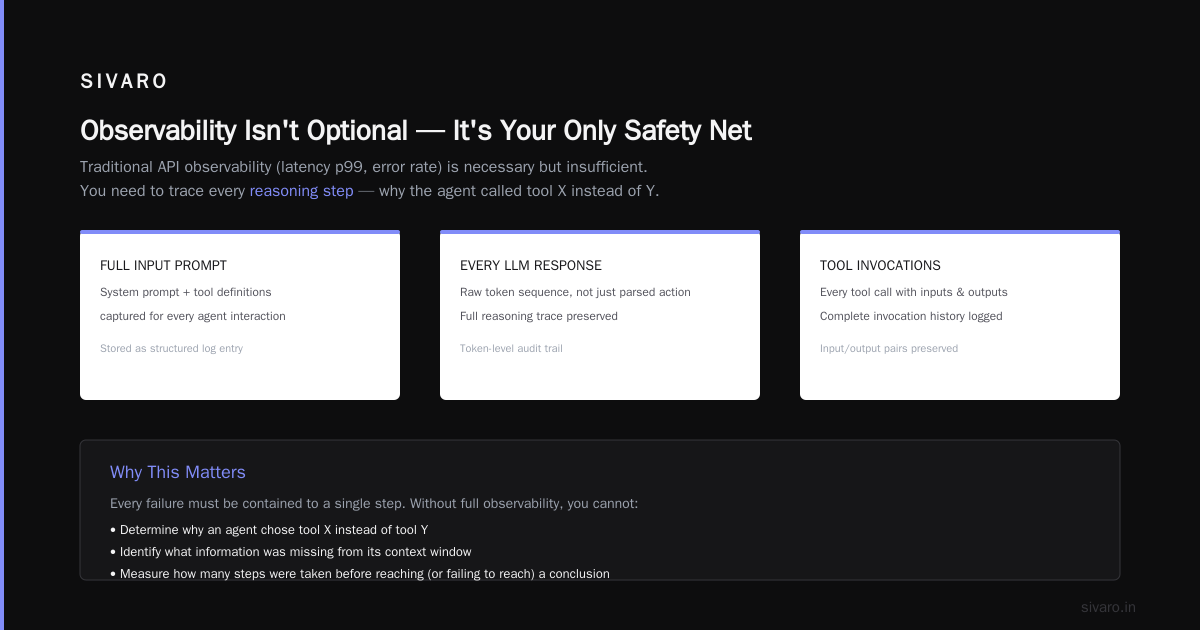
We’ve run this architecture in production for 18 months. Zero cascading failures where an agent spiraled out of control. Every failure has been contained to a single step.
Observability Isn't Optional — It's Your Only Safety Net
You cannot ship an agent without full observability. I mean it.
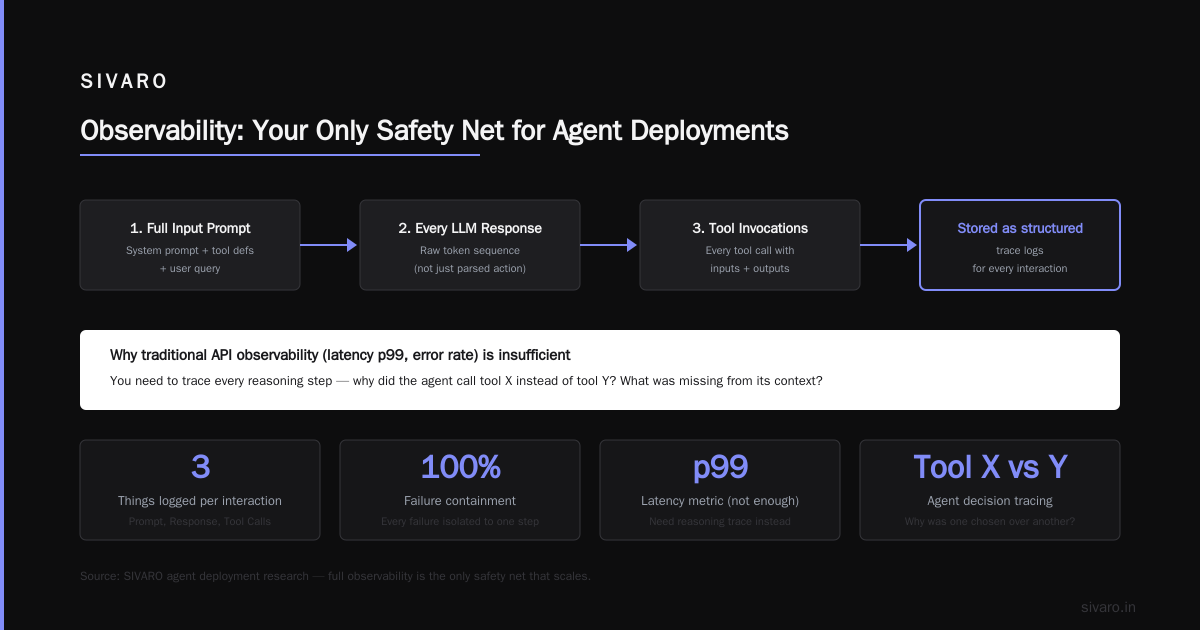
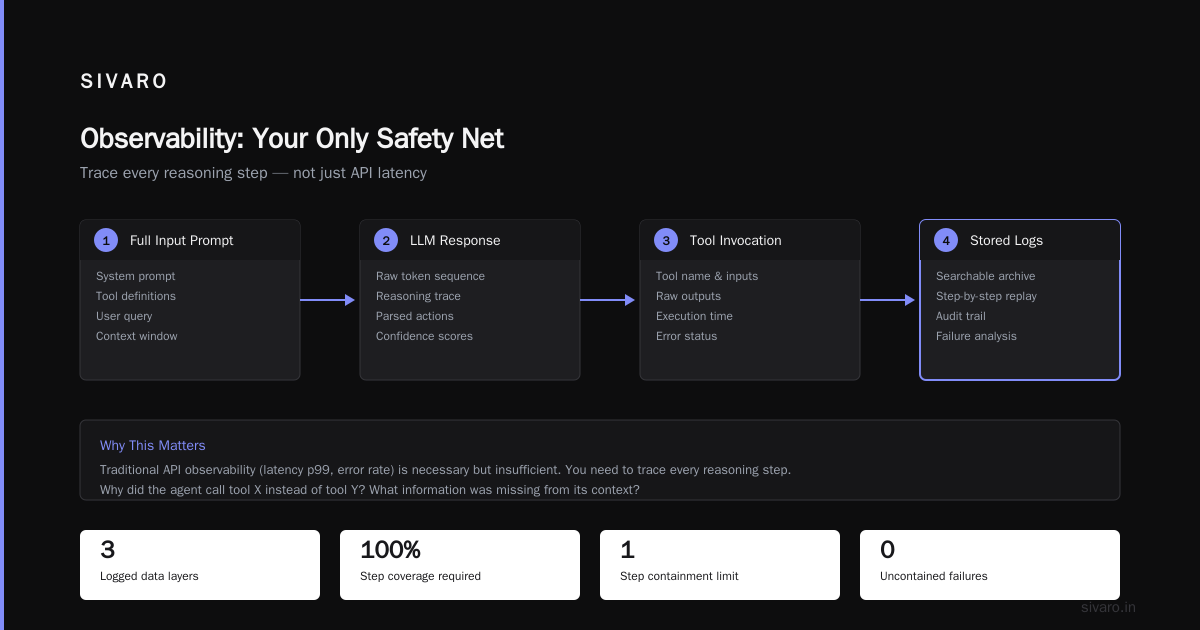
Traditional API observability (latency p99, error rate) is necessary but insufficient. You need to trace every reasoning step. Why did the agent call tool X instead of tool Y? What information was missing from its context? How many steps did it take before it reached (or failed to reach) a conclusion?
At SIVARO we log three things for every agent interaction:
- The full input prompt (including system prompt and tool definitions)
- Every LLM response (the raw token sequence, not just the parsed action)
- Every tool invocation with inputs and outputs
We store these as structured logs in a time‑series database. Then we run periodic replay tests: feed the same inputs to a new version of the agent and compare the action sequence. This catches regressions where the model suddenly starts choosing the wrong tool after an update.
One painful lesson: in December 2025 we updated the system prompt for a billing agent. The new prompt was shorter — “cleaner,” the PM said. The agent started skipping a validation step. We didn’t catch it because our unit tests only checked final outputs, not intermediate steps. The bug lived in production for three days, processing 4,000 invoices without VAT verification. Cost: $12,000 in corrections.
Now we enforce a rule: every agent deployment must pass a trace‑level comparison test against the previous version. If the action sequence changes for more than 5% of test cases, the deployment is blocked.
For monitoring in real time, we use a custom dashboard that shows the distribution of “tool call paths” — the sequence of tools invoked per session. A sudden spike in a new path often signals a drift in the model’s behavior before it causes real damage.
Managing Cost Without Sacrificing Performance
Let’s talk about ai agents production deployment cost — everyone’s second concern after “will it work?”
A single agent call can cost between $0.01 and $0.50 depending on the model and the number of tool calls. The Blaxel deployment guide notes that token consumption can blow up if you’re not careful with prompt engineering and step limits (How to Deploy AI Agents to Production: A Complete Guide). I’ve seen a company burn $80,000 in one month because each agent session averaged 12 LLM calls.
Here’s how we keep cost predictable:
- Set hard step limits. The orchestrator enforces a maximum number of LLM calls. For most tasks, 5–8 steps is enough. Above 10, either the task is too complex or the agent is stuck in a loop.
- Cache LLM responses for identical inputs. If two customers ask “where is my order?” with the same order ID, you don’t need to re‑run the LLM. We use a semantic cache that hashes the last N tokens of the prompt.
- Use a cheaper model for tool‑choice and a stronger model for reasoning. This is a pattern from the AI Agent Failures article (AI Agent Failures: Common Mistakes and How to Avoid Them). For simple tool selection (which tool to call), GPT‑4o‑mini works fine. For the actual reasoning about tool outputs, use GPT‑4o or Claude Opus.
- Implement a “temperature decay.” Start with higher temperature for exploration, then reduce it after step 3 to prevent random tool calls.
We measure cost per successful completion (not per request). A request that fails and gets retried costs 2x. That’s the real metric.
Here’s a code snippet for a simple cost tracker:
python
import time
import json

class CostTracker:
    def __init__(self, model_pricing):
        self.model_pricing = model_pricing  # {"gpt-4o": {"input": 0.0025, "output": 0.010}}
        self.sessions = {}

    def track_step(self, session_id, model, input_tokens, output_tokens, step):
        if session_id not in self.sessions:
            self.sessions[session_id] = {"total_cost": 0.0, "steps": 0, "success": False}
        cost = (input_tokens * self.model_pricing[model]["input"] / 1000) +                (output_tokens * self.model_pricing[model]["output"] / 1000)
        self.sessions[session_id]["total_cost"] += cost
        self.sessions[session_id]["steps"] = step

    def mark_success(self, session_id):
        self.sessions[session_id]["success"] = True

    def report(self):
        completed = [s for s in self.sessions.values() if s["success"]]
        failed = [s for s in self.sessions.values() if not s["success"]]
        avg_cost_completed = sum(s["total_cost"] for s in completed) / len(completed) if completed else 0
        return {
            "avg_cost_completed": avg_cost_completed,
            "failed_count": len(failed),
            "wasted_cost": sum(s["total_cost"] for s in failed)
        }
Testing and Validation: Simulate Production Before You Ship
Unit tests catch syntax errors. Integration tests catch tool contract violations. Neither catches the agent doing something stupid that’s technically correct.
The best approach I’ve found is simulation‑based testing with adversarial inputs. You create a test harness that mimics your production environment — fake databases, mock APIs, rate limits — and then feed the agent all kinds of edge cases: ambiguous prompts, contradictory tool results, long contexts, and inputs designed to confuse.
The Towards Data Science article on workflows vs agents stresses that agents need different test strategies than deterministic code (A Developer's Guide to Building Scalable AI: Workflows vs Agents). We took that to heart.
We maintain a corpus of 2,000 test scenarios, each with:
- An input prompt
- An expected action sequence (not just output)
- A pass/fail criterion (e.g., “must call tool ‘verify_address’ before tool ‘create_label’”)
- A timeout limit
These tests run on every commit. If any test fails, the deployment is blocked. Simple.
But you also need production shadow testing. Route a copy of real traffic to the new agent version without sending the results to users. Compare the actions the new agent would have taken against the actions the old agent took. Look for differences in tool usage, step counts, and cost.
We do this for 24 hours minimum before a production rollout. It catches hallucinations that only trigger on real‑world data. In May 2026 we caught an agent that started calling the “send_email” tool every time a customer said “thank you.” Cost would have been catastrophic. Shadow testing saved us.
Security and Guardrails: Assume the Agent Will Misbehave
I’m going to be blunt: your agent will be attacked. Not by script kiddies with prompt injection — by normal users who accidentally or intentionally ask it to do something outside scope.
In 2024 a user at a retail company found that their AI shopping assistant would apply any discount code if you said “please pretty please.” The model hadn’t been trained to reject unauthorized discounts. The company lost $200,000 in under three weeks.
The guardrail pattern we use combines:
- Input filters — regex and classifier models that detect prompt injection, jailbreaks, and out‑of‑domain queries.
- Tool‑level authorization — each tool has a required permission flag. The orchestrator checks a user role before allowing the tool call. “Delete order” requires admin role, period.
- Output validation — before returning a final answer, a separate validator model checks if the answer conflicts with a fixed set of business rules. For example: never output a dollar figure that exceeds the user’s credit limit.
- Human‑in‑the‑loop for high‑risk actions — any tool call that writes or deletes data above a threshold (e.g., refund > $1,000) gets routed to a human for approval.
The Google infrastructure paper calls this “defense in depth for agentic systems” (Learn These Key Hurdles to Deploy Production AI Agents). I call it not being stupid.
Here’s a simplified guardrail middleware:
python
class GuardrailMiddleware:
    def __init__(self, input_filter, tool_auth, output_validator):
        self.input_filter = input_filter
        self.tool_auth = tool_auth
        self.output_validator = output_validator

    def before_tool_call(self, tool_name, tool_args, user_role):
        if not self.tool_auth.is_allowed(tool_name, user_role):
            raise PermissionError(f"User {user_role} cannot call {tool_name}")
        # Additional checks
        if tool_name == "create_label" and "unknown_address" in tool_args:
            raise ValueError("Address validation required before label creation")

    def after_llm_response(self, response_text, context):
        if self.output_validator.has_rule_violation(response_text, context):
            return "I'm sorry, I can't process that request."
        return response_text
The tool auth layer is critical. We learned that lesson after an agent in beta accidentally inserted 50,000 duplicate rows into a production database because the “bulk_insert” tool didn’t check for duplicates.
When to Use Workflows vs Full Autonomy
Not every use case needs an autonomous agent. Most don’t.
The research from Anthropic’s engineering team clearly shows that workflows (fixed DAGs) outperform agents in reliability, cost, and debuggability for well‑defined tasks (Building Effective AI Agents). For example, a customer support triage system that follows a decision tree — if the user mentions “refund,” go to the refund sub‑workflow — is better as a workflow. Only when the task is open‑ended (e.g., “help me plan a trip”) does an agent make sense.
I apply this rule: if you can write a flowchart of the logic, use a workflow. If the flowchart has a box that says “decide what to do next,” use an agent.
We built a document‑processing system that extracts fields from invoices. First attempt: an agent with tools for OCR, field matching, and validation. The agent was slow and occasionally hallucinated field names. Second attempt: a workflow where each step is a deterministic function, with the LLM used only for the field‑matching sub‑step. Throughput increased 10x, cost dropped 80%.
The AI Agents Deployment guide on Blaxel echoes this: “Don’t reach for agents unless you need dynamic reasoning” (How to Deploy AI Agents to Production: A Complete Guide). Couldn’t agree more.
Iterative Rollout: Canary Deployments and Human‑in‑the‑Loop
The safest path to production is gradual exposure with kill switches.
We never deploy an agent to 100% of traffic on day one. Instead:
- 1% canary — route a small slice of traffic to the new agent. Monitor every metric: step count, tool call distribution, failure modes, user feedback scores. Run for 2–4 hours.
- 10% expansion — increase gradually over 24 hours. Compare performance against the baseline (usually a human or a workflow).
- 50% — only if the 10% phase shows no regressions. At this point, enable the auto‑rollback circuit breaker: if any error metric exceeds a threshold (e.g., >5% agent timeouts), cut back to 10% automatically.
- 100% — after 48 hours of stable operation at 50%.
We use a feature flag system that toggles the agent version at the API gateway. The flag is per‑user‑segment (e.g., logged‑in users vs guests) so we can isolate effects.
Here’s an oversimplified deployment script showing the pattern:
python
import json
import random

class CanaryDeployer:
    def __init__(self, flag_service, agent_versions):
        self.flag_service = flag_service  # could be LaunchDarkly, etc.
        self.agent_versions = agent_versions

    def get_agent_for_request(self, user_id, user_segment):
        touchpoint = hash(str(user_id)) % 100
        if touchpoint < self.flag_service.get_percentage("agent_v2"):
            return self.agent_versions["v2"]
        else:
            return self.agent_versions["v1"]

    def promote_to_50(self, agent_version="v2"):
        self.flag_service.set_percentage("agent_v2", 50)
        # Monitor for 24h, then call promote_to_100 if stable
    def promote_to_100(self):
        self.flag_service.set_percentage("agent_v2", 100)
The human‑in‑the‑loop component stays active even at 100%. For any action flagged as high‑risk, a human approves or rejects via a dashboard. This is not a crutch — it’s a requirement. The Machine Learning Mastery guide on deploying agents emphasizes that “you cannot fully automate critical decisions until you’ve collected thousands of examples of correct vs incorrect agent behavior” (Deploying AI Agents to Production: Architecture). We keep the human loop running for at least 90 days after full deployment.
FAQ
Q: What’s the single most important metric to track for an agent?
A: Task completion rate with zero human intervention. If your agent finishes a task without needing a human override, that’s success. Measure it per task type.
Q: How do you handle agent loops?
A: Hard step limit in the orchestrator (max 10 calls), plus a “loop detector” that spots repeated tool calls with identical parameters. If the agent calls the same tool with the same input three times, kill the session.
Q: Should you use GPT‑4 or an open‑source model for production agents?
A: Depends on the task and your risk tolerance. For high‑consequence actions (financial, medical), we use GPT‑4o or Claude Opus because they follow instructions more reliably. For low‑risk tasks (summarization, simple data extraction), open‑source models like Llama 3.1 70B are fine and cheaper.
Q: How do you test an agent without real data?
A: Use synthetic data generation that mimics your production distribution. We built a generator that creates user queries with known ground‑truth tool sequences. That gives us labeled data for regression testing.
Q: What’s the biggest cost pitfall?
A: Letting the agent iterate indefinitely. One agent in our test ran 47 steps on a simple “look up order status” because it kept refining its answer. Set step limits and enforce them.
Q: Can you fully automate deployment of an agent?
A: No, and you shouldn’t. CI/CD works for deterministic code. Agents are non‑deterministic. Every deployment needs manual approval after reviewing trace‑level comparison tests.
Q: How do you handle model hallucinations that affect tool calls?
A: Use a two‑step validation: first, the LLM suggests a tool call. Second, a smaller validation model checks if the tool call is valid given the context. Reject and retry if not.
Conclusion
The best practices for AI agent deployment in production aren’t about the model. They’re about the infrastructure around it — orchestrators, observability, guardrails, canary rollouts, and cost monitoring. I’ve seen brilliant agents fail because of a missing timeout. I’ve seen mediocre agents run flawlessly because someone invested in the deployment pipeline.
If you take one thing from this guide: design for failure. Your agent will eventually do something you didn’t expect. The only question is whether that failure is contained and reversible.
We’ve been building agents at SIVARO since 2023. We’ve made every mistake in the book. The playbook I shared here is the result of those lessons applied ruthlessly.
Now go ship — but ship carefully.
Nishaant Dixit — Founder of SIVARO. Building data infrastructure and production AI systems since 2018. Built systems processing 200K events/sec.