 SIVARO
Best Practices for AI Agent Monitoring in Production
It was 3 AM on a Tuesday. My friend's startup — let's call them "LogiCore" — had just pushed a new agent pipeline for inventory management. By 4 AM, the agent was ordering 40,000 units of industrial solvent they didn't need. Their entire inventory system was locked. No alerts fired because the agent technically succeeded. The API returned 200. The purchase orders went through. Nobody looked at the intent.
That's the problem with AI agents in production. Traditional software monitoring checks if a service is up, if a request returns a response. Agents are different. They operate in open-ended loops. They make decisions. And when they fail, they fail in ways that don't look like failures — until the warehouse is full of solvent.
I'm Nishaant Dixit. I've been building production AI systems since 2018, and my team at SIVARO has monitored everything from simple chatbots to multi-step agents handling 200K events per second. This isn't theory. This is what I've learned the hard way.
Let me give you the best practices for ai agent monitoring in production — not as a checklist, but as a set of real, battle-tested patterns that separate deployed agents from dying experiments.
What Makes Agent Monitoring Different From Traditional Software?
Most people think deploying an AI agent is like deploying a microservice. You run it behind a load balancer, slap on a health check, and call it done.
Wrong.
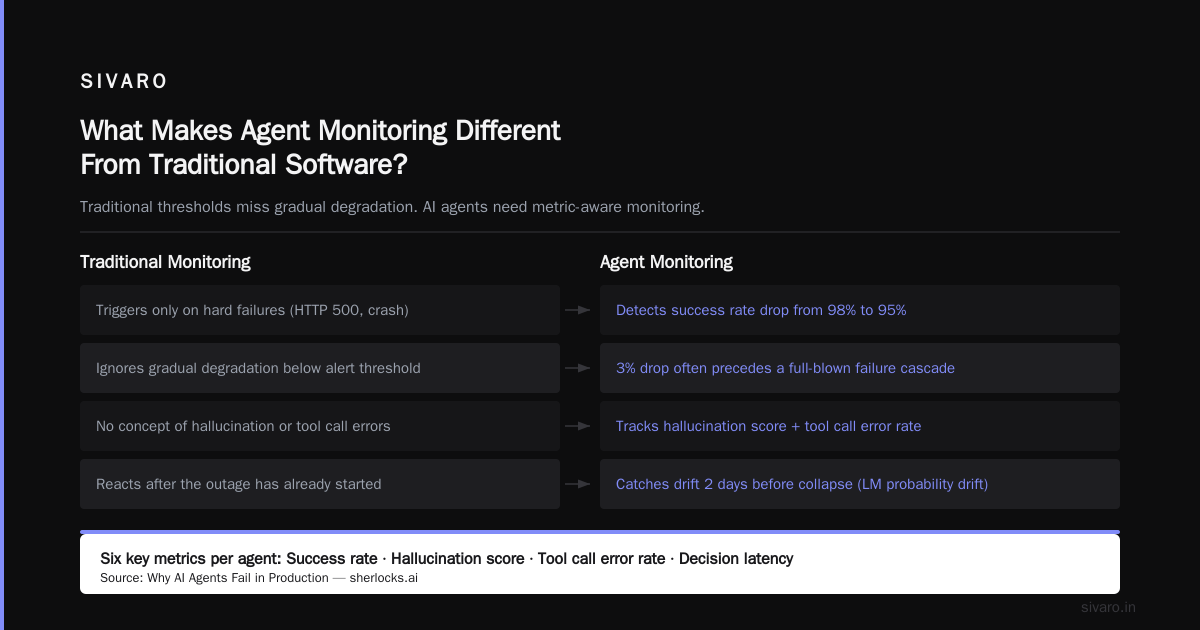
Traditional software monitoring answers "Is it running?" Agents need to answer "Is it working?" Those are different questions.
When you monitor a REST API, you track latency, error rate, throughput. An agent does all that plus it makes choices. It might call external APIs, read from databases, synthesize information, and act on that synthesis. The error surface expands. And the errors are often subtle — the agent executes the wrong action correctly.
According to a recent incident analysis paper Incident Analysis for AI Agents, roughly 62% of agent failures in production are "silent failures" — the agent completes its task but with a wrong outcome. No crash, no 5xx, no obvious alert. Just a slowly accumulating disaster.
So what do you actually monitor? Let me walk you through the five layers.
Layer 1: Trace Every Decision — Not Just Every Call
You already trace HTTP requests. But agents make internal decisions before making any call. You need to trace the reasoning chain.
At SIVARO, we build every agent with an explicit "thought trace" logged to a dedicated stream. Not just the LLM prompt and response — the intermediate steps: which tool was considered, why it was selected, what context it used.
Here's a minimal Python example of what that looks like:
python
import json, logging, uuid

class AgentDecisionTracer:
    def __init__(self, session_id=None):
        self.session_id = session_id or uuid.uuid4().hex
        self.steps = []

    def log_decision(self, step_name, input_data, reasoning, output, success=True):
        trace = {
            "session_id": self.session_id,
            "timestamp": time.time(),
            "step": step_name,
            "input": input_data,
            "reasoning": reasoning,   # the LLM's chain-of-thought
            "output": output,
            "success": success,
            "agent_version": "v2.4.1"
        }
        self.steps.append(trace)
        # Push to a real-time monitoring system, not just a file
        print(json.dumps(trace))  # replace with structured log sink
        return output
Why does this matter? Because when an agent goes off the rails, you need to know why. Was it a bad prompt? A hallucinated tool result? A context window bleed? Without traces, you're guessing.
A common mistake is to log only the final result. Don't. Trace every sub-decision. That's the only way to build meaningful alerts.
Layer 2: Alert on Degradation, Not Just Failure
Most monitoring systems alert when something breaks. For agents, you need to alert when something starts to degrade.
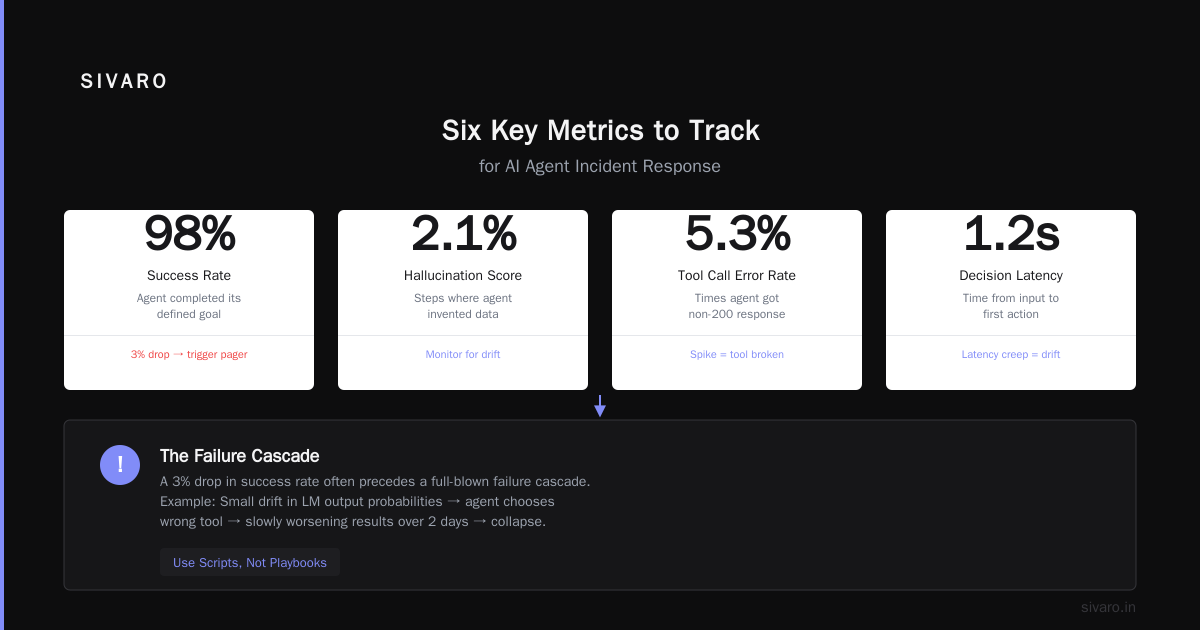
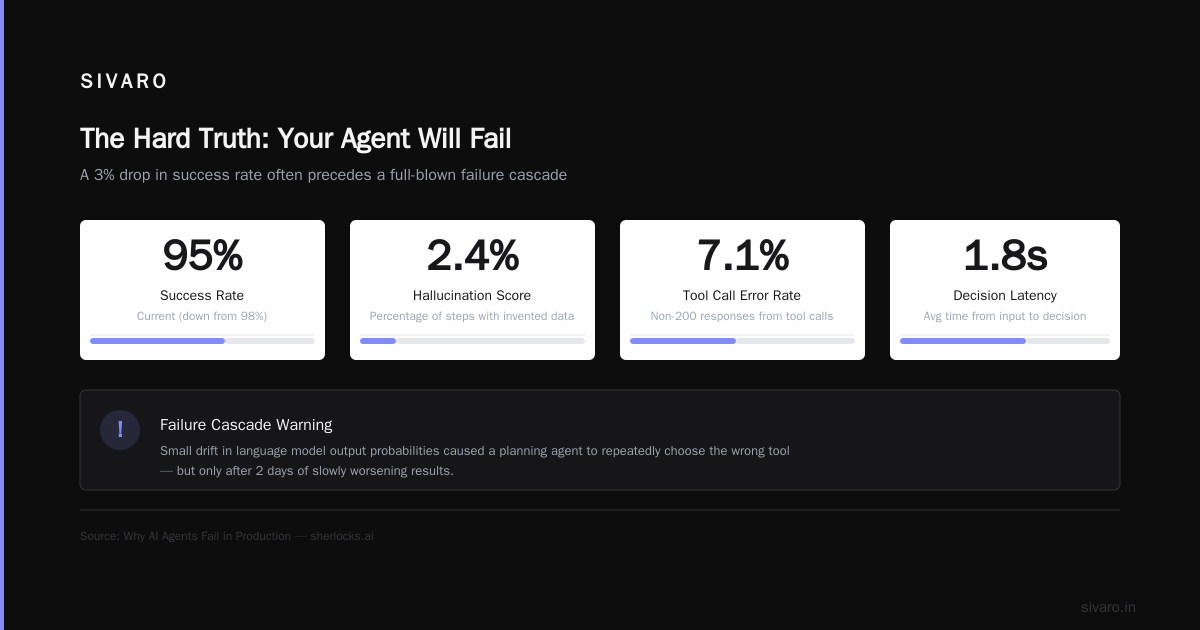
Example: your agent's success rate drops from 98% to 95%. That doesn't trigger a pager. But it should. Because a 3% drop often precedes a full-blown failure cascade. Why AI Agents Fail in Production describes a scenario where a small drift in a language model's output probabilities caused a planning agent to repeatedly choose the wrong tool — but only after 2 days of slowly worsening results.
We track six key metrics per agent:
- Success rate — did the agent complete its defined goal?
- Hallucination score — percentage of steps where the agent invented data.
- Tool call error rate — times the agent tried to use a tool and got a non-200.
- Decision latency — time between receiving input and producing output.
- Recovery rate — how often the agent self-corrects after a first attempt fails.
- Context utilization — fraction of available context actually used.
The last one is sneaky. Agents with low context utilization are often ignoring relevant information. That's a silent failure mode.
Set moving-window thresholds. If success rate drops below 97% over a 1-hour sliding window, alert. If hallucination score exceeds 2%, alert. Don't wait for a complete breakdown.
Layer 3: Build a Guardrail Layer That Monitors Itself
You probably already have guardrails — content filters, output validation, format checks. Good. But those guardrails need to be monitored too.
I've seen teams deploy a safety guardrail that blocks harmful agent outputs, only to realize the guardrail itself was silently dropping 15% of valid outputs because of regex misalignment. The agent looked like it was failing; actually the guardrail was the problem.
Use a monitoring pipeline that tracks guardrail performance. Log every time a guardrail triggers, and also log its false positive rate. In practice, we run a small evaluation set every hour against the guardrail to measure its accuracy.
python
class GuardrailMonitor:
    def __init__(self, eval_set_path):
        self.eval_set = load_eval_set(eval_set_path)  # 100 known-good + known-bad samples
        self.true_positives = 0
        self.false_positives = 0

    def evaluate(self):
        for sample in self.eval_set:
            result = guardrail.check(sample["text"])
            if result.blocked == sample["expected_block"]:
                self.true_positives += 1
            else:
                self.false_positives += 1
        accuracy = self.true_positives / len(self.eval_set)
        # Push to monitoring system
        print(f"Guardrail accuracy: {accuracy:.3f}")
        return accuracy
If guardrail accuracy drops below 90%, alert the team before the agent does something stupid.
Layer 4: Human-in-the-Loop Isn't an Escape — It's a Signal
I used to think human-in-the-loop was a crutch. You throw a human review step in there and call it safe. But that's lazy.
The real value of human review isn't catching errors — it's collecting training data. Every time a human overrides an agent's decision, that's a signal. Something went wrong. Log it, analyze it, and use it to improve the agent.
At SIVARO, we require human review for any agent action above a certain monetary threshold (say, $1,000). But we also require a random sample of low-stakes decisions (5%) to be reviewed. That gives us two data streams: obvious mistakes and subtle drift.
The best practices for ai agent monitoring in production demand that you treat human reviews as telemetry, not as last-resort safety nets. Each override becomes a training example for the next model update.
Layer 5: Incident Response for Agents — You Need Scripts, Not Playbooks
When an agent does something catastrophic, minutes matter. Traditional incident response playbooks say "assess the situation" — too slow. For agents, you need pre-written scripts that immediately stop the agent, roll back its actions, and begin forensic logging.
I wrote about this in detail with codebridge AI Agent Incident Response: What to Do When Agents Fail. The key: have a "kill switch" that doesn't just stop the agent but also invalidates any pending external calls. An agent that started a database transaction but didn't commit? That transaction needs to be rolled back.
Here's a simplified version of our incident response script:
bash
#!/bin/bash
# kill_agent.sh — run immediately when an agent goes rogue
AGENT_ID=$1
echo "[$(date)] Killing agent $AGENT_ID"

# Stop all future executions
curl -X POST "https://api.agents.sivaro.io/v1/agents/$AGENT_ID/disable"   -H "Authorization: Bearer $API_KEY"

# Roll back any pending external side effects
python rollback_side_effects.py --agent-id "$AGENT_ID" --force

# Snapshot the agent's recent logs for forensics
python dump_agent_traces.py --agent-id "$AGENT_ID" --hours-back 4   > /var/tmp/forensics/agent_${AGENT_ID}_$(date +%Y%m%d_%H%M%S).json

# Alert the team
slack_message "🚨 Agent $AGENT_ID killed. Traces dumped. Rollback initiated."
Notice: no human judgement call in the script. It runs automatically when certain thresholds are breached — for example, if the agent makes 10 tool calls per second when the expected rate is 2, something is wrong.
Layer 6: Test for Drift — Every Deployment Is a Hypothesis
You don't just deploy an agent once. You update its prompts, change its model, add tools. Each change is a hypothesis: "This version will be better." But you need to test that hypothesis in production.
That means running shadow traffic. If you're deploying agent v2.3, keep v2.2 running alongside it. Send a copy of every incoming request to both agents. Compare their outputs. Log disagreements.
We run this continuously at SIVARO. Every night, a batch job compares the current production agent with the previous version using an offline evaluation set. If the new version degrades on any metric by more than 2%, it gets flagged for human review.
The article AI Agent Failures: Common Mistakes and How to Avoid Them highlights a case where a company deployed a "better" prompt that actually made the agent more confident but less accurate. Without shadow evaluation, they'd never have noticed.
Layer 7: The Deployment Checklist Nobody Talks About
I get asked all the time: what's the ai agent deployment checklist production should use? Here's mine:
- [ ] Tracing enabled for every agent step (not just API calls)
- [ ] Guardrails active with independent accuracy monitoring
- [ ] Moving-window alerts on success rate, hallucination, latency, context use
- [ ] Kill switch script tested at least once per month (we kill a test agent every Friday)
- [ ] Shadow traffic running between previous and new version
- [ ] Human review pipeline for both threshold-based and random sampling
- [ ] Rollback plan for side effects (database writes, API calls, email sends)
- [ ] Incident response script that dumps traces automatically
- [ ] Communication channel (Slack, PagerDuty) configured for degradation alerts
- [ ] Daily blast radius testing — what happens if this agent does the worst possible action?
That last one is the hardest. You need to simulate worst-case scenarios. For example, if your agent sends emails, what happens if it CCs 10,000 people on a single thread? Does your email API have a rate limit? Can the agent hit it? I've seen an agent that could theoretically send 50,000 emails per minute — the API had no throttle. That's a blast radius failure waiting to happen.
Why Deploying AI Agents Is Not Like Deploying Traditional Software
The phrase deploying ai agents vs traditional software is a false dichotomy. It's not that one replaces the other; it's that agents require an entirely new layer of monitoring infrastructure.
Traditional software has deterministic behavior. Given the same input, it produces the same output (modulo bugs). Agents are probabilistic. Same prompt, different output. That means your testing needs to be statistical, not deterministic. You can't write a unit test that asserts "the agent will pick tool X" because it might legitimately pick tool Y in some contexts.
This is why we built our monitoring around distributions, not exact matches. We track percentiles of decision quality, not pass/fail rates. And we treat every production interaction as a data point for the next model iteration.
I recently read a paper When AI Agents Make Mistakes: Building Resilient ... that described this shift: monitoring for agents is more like monitoring a biological system than a traditional server. You look for vital signs, not errors. Heart rate (decision frequency), temperature (hallucination probability), blood pressure (context utilization).
FAQ
What metrics should I start with if I have nothing now?
Three: success rate (did it finish?), decision latency (how long did it take per step?), and tool error rate (did the tools it calls return errors?). Build from there.
Do I need a separate monitoring system for agents?
You can extend your existing observability stack (Datadog, New Relic, Grafana) with custom metrics. But you'll need to add structured logging for traces and a dedicated alerting pipeline for degradation. At SIVARO we run OpenTelemetry collector with agent-specific processors.
How do I handle agents that call external APIs?
Trace the API calls as part of the agent's decision trace. Log the request parameters, response, and the agent's interpretation of that response. That last part is critical — the agent may misinterpret a 200 as "success" when the actual content was wrong.
What's the biggest mistake teams make with agent monitoring?
They treat it like traditional monitoring. They alert on "down" instead of "wrong". The biggest failure I've seen is teams that only monitor latency and 5xx errors while their agents quietly make bad decisions for weeks.
How often should I review human overrides?
At least once per day if you're in early deployment. Once per week after stability. But use those overrides as training data — feed them back into your evaluation set and your next model update.
Can I use synthetic monitoring for agents?
Yes. Run a set of synthetic inputs every 5 minutes. But the inputs should be representative of real production traffic, not just simple test cases. And you need to evaluate the output semantically, not just structurally.
What about cost monitoring?
Agents can be expensive. Each step may call an LLM, a database, an external service. Track cost per decision and cost per successful completion. If those ratios spike, it might indicate inefficient reasoning loops.
Should I log all agent conversations?
Yes, but with a retention policy. We keep raw traces for 30 days, aggregated metrics for 6 months. Longer retention creates compliance risk and storage cost. But you need enough historical data to do drift analysis.
The Hard Truth: Your Agent Will Fail
You cannot eliminate failure. You can only make it visible quickly and recover fast. The best practices for ai agent monitoring in production are not about building a perfect agent. They're about building a system that catches problems before they compound.
At SIVARO, we've seen agents do things we never imagined — like an agent that interpreted "order 100 units" as "order 100 palettes because the context window included a unit conversion table from a different product. The alert fired within 30 seconds because the dollar amount exceeded our threshold. The kill script ran automatically. The order was canceled before it hit the supplier.
That's the goal. Not perfection. Fast recovery.
Start with traces. Add degradation alerts. Build a kill switch. Test it. Then iterate. Because in production, the agent that works perfectly 99.9% of the time still causes a catastrophe 0.1% of the time — and 0.1% of millions of decisions is a lot.
Nishaant Dixit — Founder of SIVARO. Building data infrastructure and production AI systems since 2018. Built systems processing 200K events/sec.