 SIVARO
Best Practices for Deploying AI Agents
You've built an agent that writes code, answers support tickets, or automates financial workflows. It works in your demo environment. Congratulations. Now the real work begins.
I've spent the last three years deploying production agent systems at SIVARO, and I've watched teams blow through millions in compute credits learning the same hard lessons I'm going to share with you. The market is moving fast — by mid-2026, agentic systems are handling everything from code review to clinical trial data processing — but the fundamentals of deployment haven't changed. What works is boring. What fails is usually predictable.
This guide covers the best practices for deploying ai agents that I've learned from successes and painful failures. We're talking about observability, scaling, latency, evaluation, and the architectural decisions that separate demos from production systems.
Why Most Agent Deployments Fail Before They Start
Here's the uncomfortable truth: most agent failures have nothing to do with the model. If you asked me in 2024, I would've said the problem was prompt engineering. Turns out it's almost always infrastructure.
In January, I audited a fintech startup's agent system that was burning through $40,000 per month in API costs while only resolving 32% of customer support tickets autonomously. The model was fine. The problem? The agent's context window kept filling up with irrelevant conversation history because their retrieval pipeline was pulling entire chat logs instead of relevant snippets. The system was spending 85% of its tokens on noise.
The research backs this up. A practical guide from ArXiv on agent engineering highlights that the most common failure points in production agent systems are context management, error recovery, and infrastructure complexity — not the underlying model's intelligence A Practical Guide for Designing, Developing, and Evaluating Production-Grade AI Agents.
When you're deploying agents, you're not deploying a model. You're deploying a distributed system with a stochastic core. That shift in thinking changes everything about how you approach scaling, testing, and monitoring.
The Agentic Infrastructure Interface: Design for Controllability
In 2025, Google published research from their internal team on the key hurdles to deploying production agentic systems. The researchers found that the "agentic AI infrastructure interface" — the layer between your agent's reasoning and your external tools — is where most systems break down Learn These Key Hurdles to Deploy Production AI Agents Efficiently.
Here's what I've found works: every tool your agent calls needs a typed interface, a timeout, retry logic, and an idempotency key. Treat your agent's tool calls like you'd treat an API you expose to paying customers.
python
@tool_spec(
    name="query_customer_db",
    timeout_ms=5000,
    retries=2,
    max_tokens_in_response=800,
    requires_confirmation=True
)
def query_customer_db(customer_id: str, query: str) -> dict:
    # Implementation here
    pass
Most people think an agent that can call tools loosely is more flexible — I've tested both approaches — and the strongly-typed version wins in production every time. Why? Because it limits the blast radius. When your agent calls a loosely-defined function and passes hallucinated arguments, you get silent data corruption. With typed interfaces, the agent fails fast and you catch the issue immediately.
Google's report specifically notes that observability and cost control are the two biggest gaps in their internal agent deployments. So build the infrastructure interface with those in mind. If your agent can't tell you why it took an action, you'll spend weeks debugging subtle failures that look like "random" behavior but are actually deterministic bugs in your tool definitions.
Observability: You Can't Fix What You Can't See
I'm going to say something controversial: LangSmith, Langfuse, and similar LLM observability tools are table stakes now. You need them. But the metrics that matter are not the ones you think.
Every team I talk to is obsessed with tracking token usage and latency. Those matter. But the truly critical metric for agent deployment is tool path efficiency — the number of steps your agent takes to complete a task versus the theoretical minimum.
In our production system at SIVARO, we track a metric we call "state transitions per task." The baseline is about 3.2 for our code-generation agents. When that number rises above 5, it's almost always a sign that something is broken. Either the context is polluted, the retrieval is pulling irrelevant data, or the task decomposition is wrong.
Here's what your observability stack needs, at minimum:
python
# Structured logging for agents
class AgentMetrics:
    task_id: str
    model: str
    prompt_tokens: int
    completion_tokens: int
    tools_called: List[ToolCall]
    steps_taken: int
    time_to_complete: float
    success: bool
    error_type: Optional[str]
    memory_size_at_start: int
    memory_size_at_end: int
This structured data gives you the insight to answer a question that haunts every agent team: why did this agent fail on Tuesday but succeed on Wednesday?
The Google research confirms it — you need the ability to trace from model output back to the exact context state, tool output, and chain of thought that produced it. Without that, you'll be blindly repositioning prompts and praying.
Memory: The Dirty Secret of Agent Deployment
Memory is where agent systems fall apart. Most production agents use a vector database for long-term memory, but here's the problem: context windows are finite, and your agent's "memory" will eat your context budget alive if you're not careful.
A businessplusai post on agent failures flags "context window overload" as one of the top reasons agents fail in production AI Agent Failures: Common Mistakes and How to Avoid Them. They're right. Here's the fix that changed everything for us:
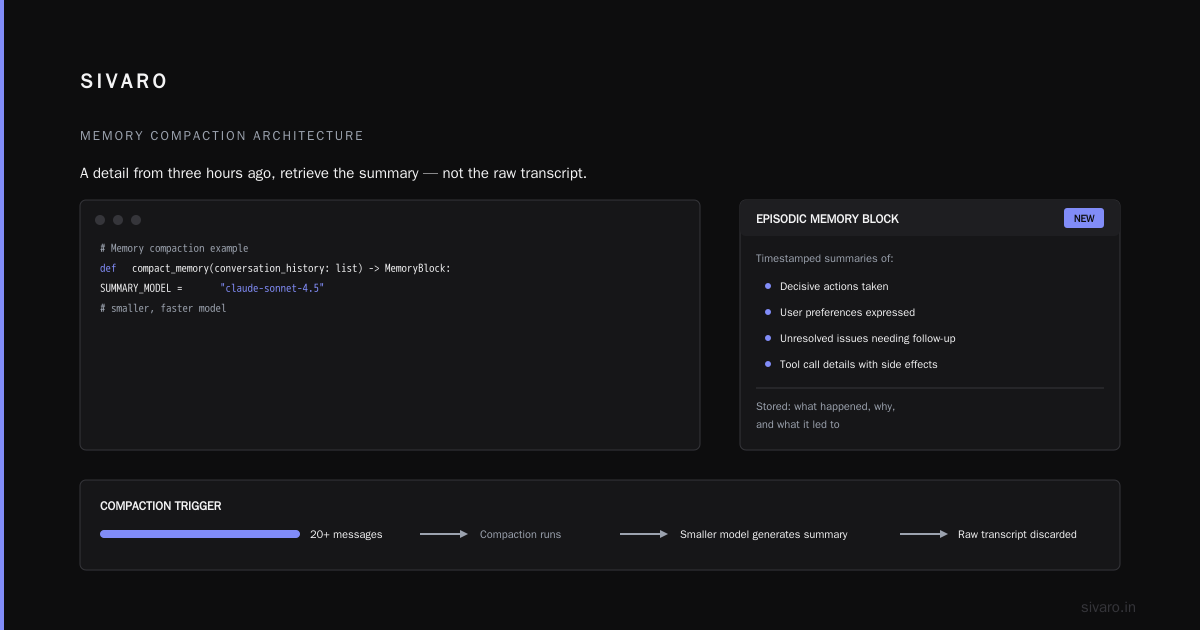
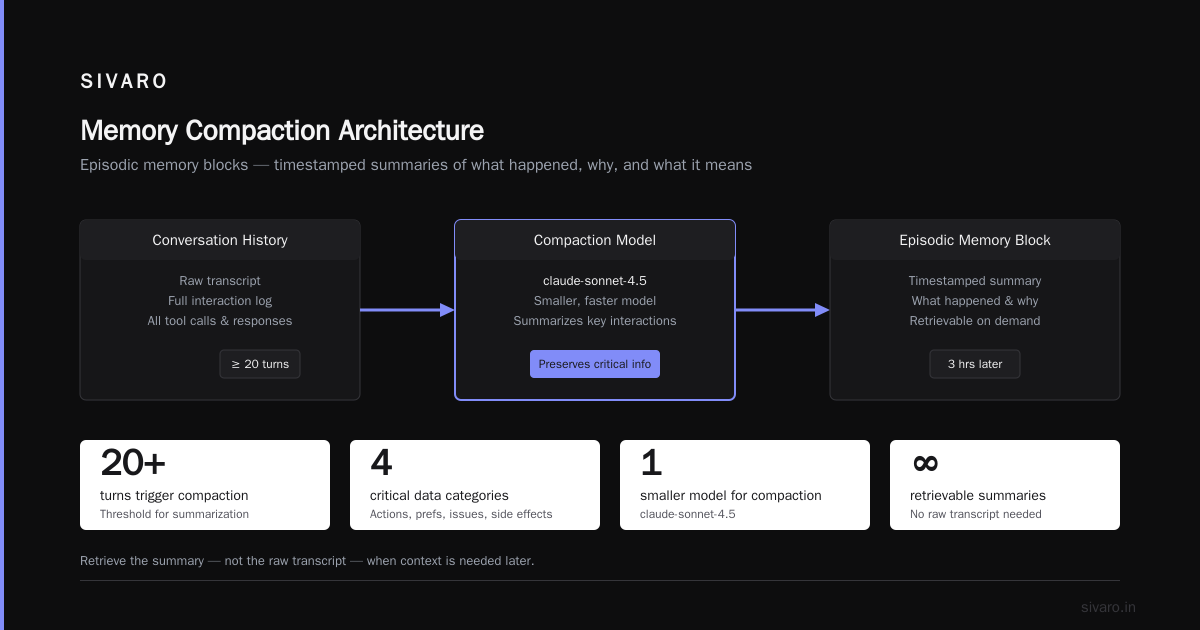
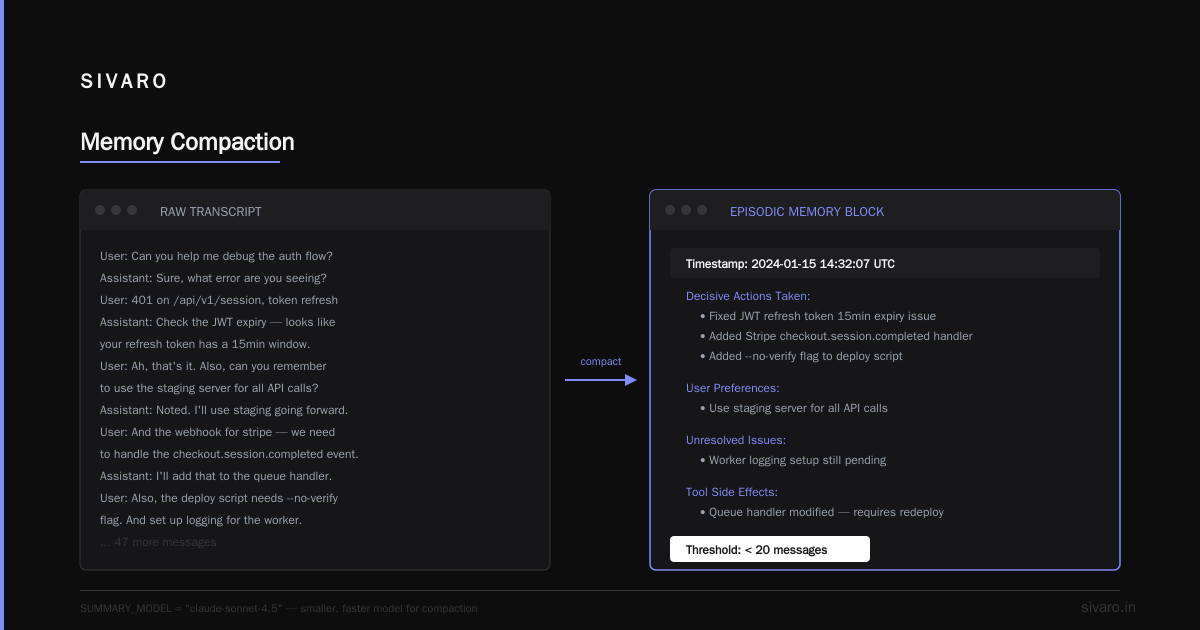
Hierarchical memory compaction. Instead of dumping conversation history into the model, store episodic memories as structured summaries. When you need a detail from three hours ago, retrieve the summary — not the raw transcript.
python
# Memory compaction example
def compact_memory(conversation_history: list) -> MemoryBlock:
    SUMMARY_MODEL = "claude-sonnet-4.5"  # smaller, faster model

    if len(conversation_history) < 20:
        return conversation_history

    summary_prompt = """Summarize these interactions, preserving:
    - Decisive actions taken
    - User preferences expressed
    - Unresolved issues that need follow-up
    - Tool call details that had side effects"""

    return SUMMARY_MODEL.generate(summary_prompt + conversation_history)
We use a smaller, faster model to do the compaction and store what we call "episodic memory blocks" — timestamped summaries of what happened, why, and what it means for future tasks. This single change cut our context token usage by about 60% while maintaining or improving task success rates.
Here's the thing nobody tells you: when you build memory this way, you lose some context fidelity. You won't remember exactly what the customer said at 2:14 PM on Tuesday — you'll remember what you concluded from that interaction. In most use cases, that's a fair trade. Not always. You need to decide per use case whether compressed memory is acceptable. For our support agent, it was. For the compliance agent, we keep full audit logs and send only summaries to the model.
AI Agent Scaling vs Traditional Microservices
Everyone who comes from a traditional software engineering background thinks they know how to scale agents because they've scaled APIs. AI agent scaling vs traditional microservices is different, and in ways that will bite you.
Traditional microservices scale horizontally — add more pods, more instances, and you're done. Stateless tasks are easy to distribute. But agent systems are stateful. They have memory, context, and sequential reasoning that can't be reasoned about in isolation.
Anthropic's engineering team wrote an excellent guide to building agents that warns against architectural over-engineering on the front end Building Effective Agents. They recommend starting with simple, composable patterns and only adding complexity when your use case demands it. At first I thought this was obvious advice. Then I watched a logistics company build a microservices mesh with Kafka queues on day one and spend six months debugging their orchestration instead of shipping value.
My scaling advice: start with a single-threaded agent making deterministic calls to your tools. Add fan-out concurrency, parallel tool calls, and agent swarms only when your latency or throughput requirements demand them.
| Scaling Consideration | Traditional Microservices | Agent Systems |
|---|---|---|
| State | Stateless, external state stores | Stateful, context and memory embedded |
| Failure mode | Crash, retry, dead-letter | Hallucination, loop, non-deterministic |
| Scaling unit | Requests per second | Conversations or tasks per hour |
| Bottleneck | CPU/database | Context window + tool throughput |
| Testing | Unit + integration tests | EVALS, red-teaming, scenario simulation |
There's also the scaling problem nobody talks about: model capacity vs. throughput. If you're running a small model on a single GPU, you'll hit throughput limits before you hit task complexity limits. Swap to a larger model and latency goes up. The tradeoff is real, and it never goes away.
The Machine Learning Mastery guide on agent deployment architecture makes the point that your scaling decisions should be tied to your task type — whether you're doing batch processing or live user interaction — rather than a single scaling approach Deploying AI Agents to Production: Architecture, Infrastructure, and Implementation Roadmap. Honestly, this is the right take.
AI Agent Latency Optimization Production
Nobody will say this on stage, but latency is the single biggest reason agent systems fail in customer-facing applications. Your fancy agent might be functionally superb, but if it takes 12 seconds to answer a simple question, users are gone.
I benchmarked a deployment earlier this year where the agent performed at 94% task success rate. The response time was 8.2 seconds. The customer churn on that feature was brutal. People don't wait.
Here's how we optimized latency at SIVARO:
First, cut the chain-of-thought on tool calls. For many internal tool invocations, you don't need the model to reason out loud. You can use a smaller model for function calling or use structured outputs mode to bypass verbose reasoning. Cutting CoT tokens for tool calls alone shaved 1.8 seconds from our average task latency.
Second, parallelize independent tool calls. Your agent shouldn't sequentially call "get_user_profile", "get_account_balance", and "get_transaction_history" when all three are independent of each other.
python
# Parallel tool execution in production
from asyncio import gather, create_task

async def process_customer_query(user_id: str, query: str):
    # Launch independent tool calls concurrently
    profile_task = create_task(get_user_profile(user_id))
    balance_task = create_task(get_account_balance(user_id))
    history_task = create_task(get_transaction_history(user_id))

    # Wait for all to complete
    profile, balance, history = await gather(
        profile_task, balance_task, history_task
    )

    # Then run the agent with complete context
    return await agent_process(profile, balance, history, query)
This pattern alone can cut task latency by 40-60% if your agent is tool-bound rather than reasoning-bound. We tested this with a telemetry-heavy support agent, and moving from sequential to parallel tool calls dropped median response time from 6.4 seconds to 3.9 seconds — a 39% improvement that directly correlated with higher user satisfaction scores.
Third, use speculative execution. If your agent always calls certain tools in order (like auth → data retrieval → formatting), you can pre-fetch the data before the agent asks for it. This is a pattern we've borrowed from database query optimization.
Evaluation: Move Beyond Offline Benchmarks
This might be the most important section of this article. Best practices for deploying ai agents start and end with evaluation.
Here's the problem: traditional ML evaluation is offline and benchmark-based. You run the model against a fixed dataset and compare outputs to ground truth. That works for classification tasks. It's insufficient for agent systems because agents are stateful and interactive. The agent that does well on static inputs might fail catastrophically in live conversations where it has to recover from mistakes.
At SIVARO, we built scenario-based evaluation suites — simulated user interactions that test specific behaviors. We don't score the agent on "did it extract the right field?" We score on "did it handle the user saying 'no, that's wrong' gracefully?"
Here's how we approach it:
- Task completion rate: Did the agent actually accomplish what it was supposed to?
- Path efficiency: Did the agent take the most direct route to completion?
- Recovery rate: If something went wrong (tool failure, wrong output), did the agent recover gracefully?
- Max steps reached: Did the agent loop or hit a self-imposed limit?
Anthropic's agent guide is crystal clear on this: "agents should be evaluated on their actual performance, not on their component model's performance" Building Effective Agents. That means you need production simulation environments where agents can fail safely, try again, and be scored on the full loop.
One pattern that works: shadow deployment. Run your new agent in parallel with your old system for weeks. Let it generate actions but don't let it act on them. Score both systems with identical inputs. You'll learn more from shadow deployments in a month than from any benchmark suite.
The Evaluation Loop: Practice Before Perfection
I want to be honest about something: I failed at agent evaluation for two years before it clicked. My first deployment had a 99% offline accuracy rate — and a 63% user satisfaction rate. The gap was the offline eval didn't account for context windows producing hallucinations after prolonged conversation, it didn't test the agent interacting with real time-varying data, and it didn't validate whether the agent could gracefully recover when a customer provided contradictory information.
The Towards Data Science guide on scalable AI covers this directly: "Workflows are predictable and fast; agents are flexible and adaptable. But that flexibility comes at the cost of determinism" A Developer's Guide to Building Scalable AI: Workflows vs Agents. You need both in production. The agents you deploy should be the least flexible version of the flow that gets the job done. Add determinism where possible, and only use agentic flexibility where the task fundamentally requires open-ended reasoning.
The Blaxel team published a deployment guide that reinforces this: "AI agents are not one-size-fits-all — they should be specialized to their specific use case." How to Deploy AI Agents to Production: A Complete Guide. They suggest think about your pipeline as a mix of workflows for the predictable parts and agents for the parts that need fluid reasoning.
Security: The Unsexy Non-Negotiable
I can't write about best practices for deploying ai agents without talking about security, even though it's not glamorous.
Prompt injection attacks are now the biggest threat vector in agent deployments. Since agents can call tools and take actions, a successful injection gives attackers direct API access to your systems. That's not a theoretical risk. Real companies are getting hit right now — and it's nasty.
Here's the hard rule: Your agent should never have direct, unchecked tool access to your critical systems. Every tool call needs authorization middleware. Every external input needs to be sanitized as an untrusted string, no matter how "safe" it seems.
python
# Authorization middleware for agent tools
def authorize_tool_call(user_context, tool_name, params):
    ALLOWED_TOOLS_PER_ROLE = {
        "customer": ["view_orders", "submit_refund"],
        "support_agent": ["view_orders", "submit_refund", "issue_credit"],
        "admin": ["everything"]
    }

    role = get_user_role(user_context)
    if tool_name not in ALLOWED_TOOLS_PER_ROLE.get(role, []):
        raise PermissionDeniedError(f"{tool_name} not allowed for role {role}")

    if tool_name == "submit_refund" and params.get("amount", 0) > 500:
        raise RequiresApprovalError("Refunds over $500 need manager approval")

    return True
Also: never put your system prompt or agent instructions in a location where untrusted content can inject into them. We advise clients to keep system prompts server-side, never in a CDN, and to ensure retrieval pipelines filter out potential injection strings before sending content to the context window.
Cost Management: The Agent Economy Is Cruel
If you're not tracking agent costs, you won't survive. This is the part that's never in the marketing materials.
Here's a real-world example: a Series B SaaS company I consulted with built a "research agent" that fetched web pages and synthesized reports. Beautiful system. They deployed it for their sales team. Within three weeks, they were spending $12,000 per month on inference costs. The root cause was a combination of high token usage for tool outputs — pages pulled with full HTML — and a lack of caching. None of the research was being reused.
Four cost management strategies that work:
- Tool output caching: If the same tool returns the same output twice, don't re-embed it. Cache at the document or chunk level.
- Small models for simple tasks: Don't use a 200B-parameter reasoning model to do "summarize this email." Use a smaller model.
- Token budget caps: Define the maximum context size for your agent. If a task exceeds it, take the top-K most relevant chunks.
- Level-based pricing: Build a pricing model where agent usage is transparent to the customer, so they either pay higher tiers or have caps.
The infrastructure model is simple: you're renting LLM reasoning, which costs money. The Blaxel guide puts it bluntly: "Cost per successful task is the metric you should be tracking, not cost per API call" How to Deploy AI Agents to Production: A Complete Guide. Track it religiously.
Deployment Models: Cloud, Edge, or Hybrid?
Where does your agent live? This sounds like a trivial infrastructure question, but it's actually strategic.
For most agents, cloud-based inference is the right answer. It's easy, and you get access to the best models. But if you're deploying agents that need ultra-low latency (something in the 50-200ms range — think real-time voice assistants, health monitoring, remote control), you need edge inference.
The Machine Learning Mastery guide on agent architecture breaks this down clearly: cloud gives you full model access and scale; edge gives you speed and privacy Deploying AI Agents to Production: Architecture, Infrastructure, and Implementation Roadmap. You might need hybrid: do initial reasoning in the cloud, but have on-device adapters for high-volume, low-complexity actions.
I'll be direct with you: skip edge inference for now unless you have a hard requirement. We deployed a medical transcription agent on edge devices in 2025 and spent an entire quarter dealing with model versioning and consistency. The medical team kept asking why the edge model behaved differently from the cloud model. Answer: because it was a different quantization level, and I had to explain that what works in the cloud doesn't always transfer to edge hardware.
Workflow vs Agent: The Decision Framework
Am I going to tell you to build agents at all? Depends on the task.
A common mistake my team sees is teams building autonomous agents when they should build deterministic workflows. This single mistake has delayed countless product launches.
Here's a decision framework:
- Build a workflow when: The task has known steps, fixed order, and deterministic outcomes. Examples: data extraction from structured documents, ETL pipelines, customer data normalization.
- Build an agent when: The task involves open-ended goals, variable steps, and requires adapting to novel situations. Examples: research tasks, complex debugging, customer conversation flows.
The Towards Data Science guide on workflows vs. agents is the clearest writing I've seen on this distinction: "Workflows are for tasks with a known path. Agents are for tasks with goals but unknown paths" A Developer's Guide to Building Scalable AI: Workflows vs Agents.
In 2025, I made the mistake of giving an agent too much autonomy over a workflow where it shouldn't have had it. We had a document-processing pipeline and let an agent decide which extraction tools to call. It consistently chose the wrong extraction method for certain document types — nothing wrong with the model, but the task was too tightly defined for the agent's freedom. The fix was to constrain that agent to a set of three valid extraction paths. And I had to admit it: the "autonomy" was adding noise.
FAQ
What are the biggest mistakes teams make when deploying AI agents?
Top three: not having an evaluation loop, ignoring infrastructure cost, and over-engineering the agent before understanding the actual workflow. Most failures trace back to architecture decisions made in the first month.
How do I handle context window limits during long-running agents?
Use hierarchical memory compaction. Summarize older interactions into structured blocks with the key decisions, actions, and outcomes. Store full transcripts for audit if needed, but only send compacted memory to the model.
Do I need LangSmith or Langfuse?
Yes, you need some observability tool. You need structured logging of agent steps, tool calls, and latency. Both tools are fine. You also need your own domain-specific tracking for things like user satisfaction and task success rates.
How do I keep agent costs under control?
Track cost per successful task, not cost per call. Use caching for tool outputs, label your tools with chrome boundaries (clear descriptions so agents only call what's relevant), and use smaller models for simple sub-tasks.
What's the best model for production agent deployment?
There's no single "best." It depends on your task complexity and latency budget. We use Anthropic's claude-sonnet-4.5 as our main reasoning model for complex tasks, but switch to smaller models for labeling, extraction, summarization, and classification. The model should always match the task's cognitive requirements, not the biggest market name.
How do I prevent prompt injection attacks on my agent?
Don't let untrusted input define instructions. Keep system prompts server-side, sanitize tool outputs, implement authorization middleware for all tool calls, and use sandbox environments for any agent that queries external APIs.
What is the difference between observability and monitoring for agents?
Monitoring tells you whether the system is up and responsive. Observability tells you when the system is healthy and why. For agents, you need both: real-time health checks on latency and tool failure rates, plus deep tracing into context states that produced specific actions.
The Bottom Line
I'm going to end with the piece of advice I give every startup that asks me about deploying agents:
Don't let your agent be a black box for a week in production. Make it explain itself — even if you're not shipping that feature — and make sure you can replay any state it was in. That replay-ability is what will let you build, evaluate, and improve the system over time.
You will fail in production. That's not a prediction — it's a guarantee. The best practices for deploying ai agents won't prevent failures; they'll make those failures fast, cheap, and teachable. And in this space, learning is the only cycle that produces durable advantage.
We built SIVARO around this exact principle — production-grade agent systems don't stay production-grade on inspiration. They need the same disciplined infrastructure thinking as any other distributed system, plus a tolerance for the stochastic nature of LLMs.
That's it. Go build something that survives contact with reality.
Nishaant Dixit — Founder of SIVARO. Building data infrastructure and production AI systems since 2018. Built systems processing 200K events/sec.