 SIVARO

Build Minimal ZFS NAS Without Synology
You don't need Synology. You don't need QNAP. You don't need to spend $800 on a box with a Celeron and proprietary OS that'll be abandoned in three years.
I've been building data infrastructure since 2018. My company SIVARO helps businesses ship production AI systems. And I've watched too many startups blow budget on overpriced NAS appliances when they could build something better, cheaper, and more maintainable with ZFS and commodity hardware.
Here's what this guide covers: how to build a minimal, reliable, screaming-fast ZFS NAS using off-the-shelf parts and free software. No Synology tax. No vendor lock-in. Just raw storage performance with enterprise-grade data integrity.
Let me be clear — this isn't for everyone. If you want a plug-and-play appliance that your non-technical spouse can manage, go buy a Synology. But if you're building data infrastructure for a startup, running your own homelab, or shipping AI systems that need reliable storage, this guide is for you.
Why ZFS and Not Something Else
Most people think you need RAID cards and hardware controllers. You don't.
ZFS is a combined file system and volume manager. It does what hardware RAID does — but better. It checksums every block of data. It detects bit rot. It self-heals when you have redundancy. It's the same filesystem that powers OpenZFS on Linux and FreeBSD, and it's been battle-tested at companies like Joyent and Delphix for over a decade.
I've used ext4 with mdadm. I've used Btrfs. I've used XFS. For a NAS that holds irreplaceable data — family photos, code repositories, AI training datasets — ZFS is the only choice that doesn't keep me up at night.
The trade-off? ZFS doesn't love adding vdevs later. It doesn't love mismatched drive sizes. It demands RAM — ideally 1GB per TB of storage. But if you're building minimal, those constraints force good decisions.
What You Actually Need for a Minimal Build
Here's the parts list I've settled on after building about 20 of these. Ranges and prices are as of July 2026:
| Component | What I Recommend | Approximate Cost |
|---|---|---|
| CPU | Intel N100 / AMD Ryzen 3 4100 | $50-90 |
| Motherboard | ASRock N100M or used Supermicro X11 | $80-150 |
| RAM | 16GB ECC DDR4 (minimum), 32GB recommended | $40-100 |
| Boot Drive | 120GB SATA SSD | $15-20 |
| Storage Drives | 2x or 4x refurbished enterprise HDD (4-8TB each) | $40-80 each |
| Case | Fractal Design Node 304 or Jonsbo N2 | $60-100 |
| Power Supply | Seasonic Focus GX-550 or Corsair RM550x | $60-80 |
| HBA (if needed) | LSI 9207-8i in IT mode | $30-50 |
| Total | $250-450 |
Key insight: used enterprise drives are the secret. Most people buy new consumer drives. I buy refurbished HGST Ultrastar or Seagate Exos drives with 20K+ hours on them. They're cheap, they're built for 24/7 operation, and they're way more reliable than consumer WD Reds or Seagate Barracudas.
One caveat: if you're storing AI training data or important code repos, buy one extra cold spare. Drives fail. Having a pre-tested spare means you're back to full redundancy in hours instead of waiting for Amazon delivery.
Operating System: TrueNAS Scale or Ubuntu with ZFS
This is where people overthink. Two viable paths:
Path 1: TrueNAS Scale (simpler, web UI)
TrueNAS Scale is Debian-based, free (and open source), and gives you a polished web UI. It handles ZFS pools, SMB/NFS shares, and monitoring out of the box. If you want something that works with minimal CLI work, this is it.
I built my first four NAS boxes with TrueNAS Core (FreeBSD). It worked fine. But I've moved to Scale because the Linux kernel support for newer hardware is better, and Docker/k3s integration means I can colocate lightweight apps on the same box.
Path 2: Ubuntu Server 24.04 LTS + ZFS (more control, harder)
This is what I run now. Raw Ubuntu with zfs-dkms installed. No web UI. Just SSH, systemd-nspawn containers, and NFS exports.
Why? Because I'm building data infrastructure, not a file server. I want full control over zfs send/receive, mount options, and scrub schedules. And I want to deploy the same configuration files I use on our production servers at SIVARO.
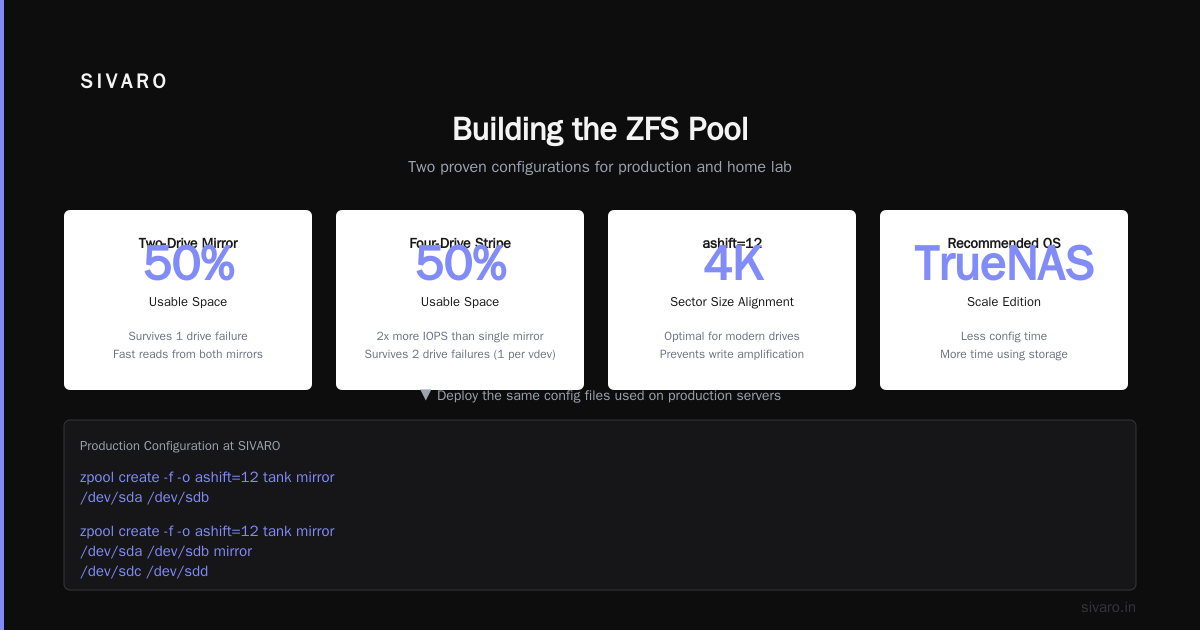
For most readers: start with TrueNAS Scale. You'll spend less time on config and more time actually using your storage.
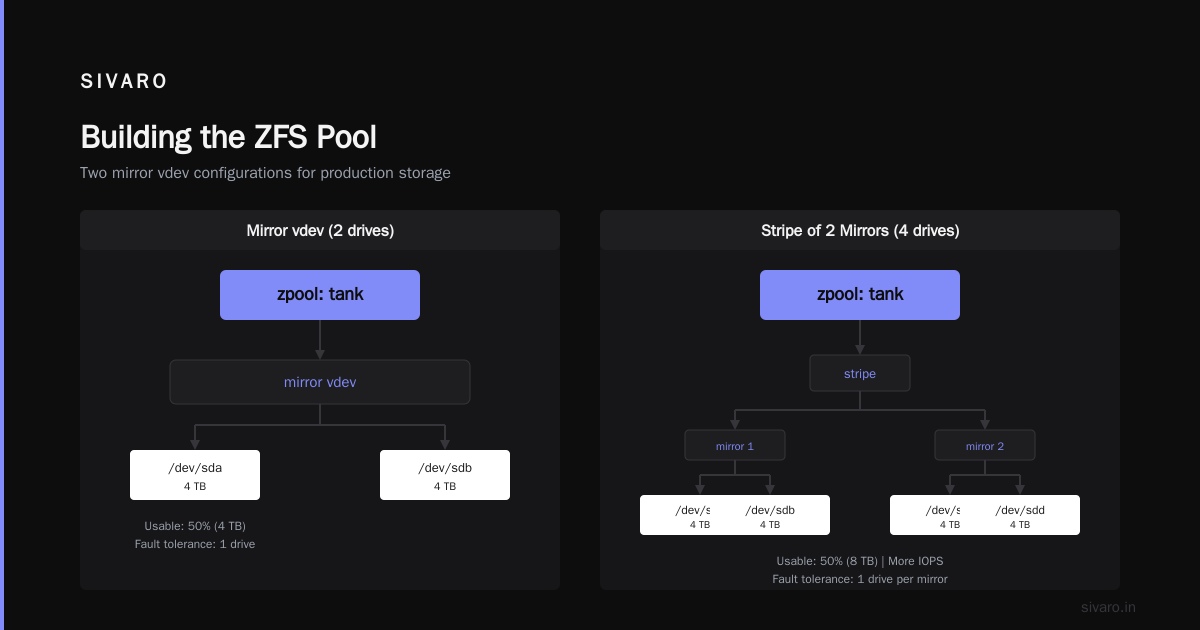
Building the ZFS Pool
The most common mistake? Creating one giant pool from mismatched drives.
Here's what I do:
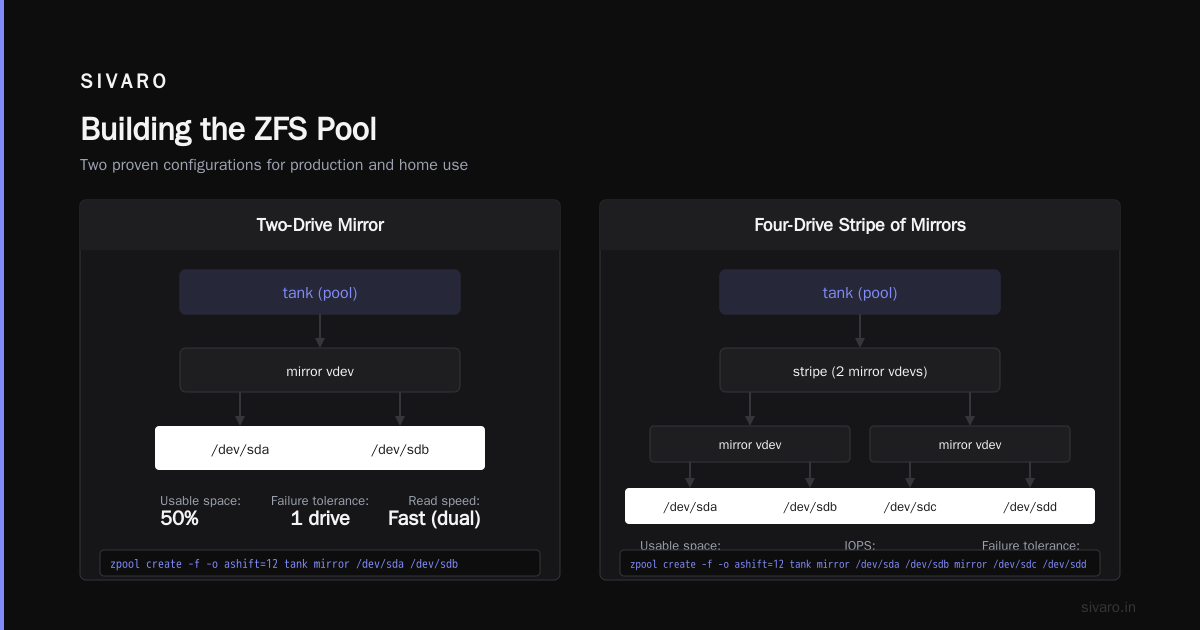
zpool create -f -o ashift=12 tank mirror /dev/sda /dev/sdb
That's the simplest minimal config: two drives in a mirror. 50% usable space, but reads are fast (ZFS reads from both mirrors), and you survive one drive failure.
If you have four drives, do two mirrors in a stripe:
zpool create -f -o ashift=12 tank mirror /dev/sda /dev/sdb mirror /dev/sdc /dev/sdd
This gives you more IOPS (two mirror vdevs striped) and double the usable space of a single mirror. You lose any two drives in the same mirror but survive failures across mirrors.
Don't use RAIDZ (ZFS's version of RAID5) unless you're building cold storage and don't need write performance. RAIDZ write penalty is real — about 4 IOPS per write operation for RAIDZ2 with 5 drives. For a homelab or small startup NAS, the mirror combination is faster and simpler to recover.
Setting Up Network Shares (NFS and SMB)
After pool creation, the next step is sharing. Here's my standard config for NFS on Ubuntu:
zfs set sharenfs="[email protected]/24,async,no_subtree_check" tank/backups
For SMB with TrueNAS Scale, just use the UI. For Ubuntu, install samba and add a share in /etc/samba/smb.conf:
[backups]
path = /tank/backups
valid users = nishaant
read only = no
browseable = yes
Pro tip: set aclinherit=passthrough on your ZFS dataset if you're doing SMB with complex permissions. Otherwise Windows clients will hate you.
Performance Tuning That Actually Matters
I've seen people obsess over tuning parameters they don't understand. Here's what I do in production:
- Set
atime=offon all datasets unless you need access-time tracking. Saves significant write overhead. - Set
compression=lz4. It's basically free CPU-wise and speeds up reads by reducing I/O. On compressible data (logs, text files, code), you'll see 2-3x effective throughput. - Set
recordsize=1Mfor large files (media, VM images). Default 128K works for most mixed workloads. - Increase
zfs_arc_maxif you have spare RAM. On a 32GB system, I set it to 24GB. ARC caches frequently accessed data in RAM. More RAM = faster reads.
For the ARC setting, add this to /etc/modprobe.d/zfs.conf:
options zfs zfs_arc_max=25769803776
That's 24GB in bytes. Reboot or echo it in at runtime.
What About Backups?
Your NAS is not a backup. Your NAS is primary storage. Backups are separate.
I use zfs send to a second box at a friend's house. Weekly incremental sends via a cron job:
zfs send -i tank/data@lastweek tank/data@thisweek | ssh backup-server "zfs receive backup-pool/data"
This sends only the changed blocks since last week's snapshot. Bandwidth efficient. Supports encryption via zfs send -w. And it's a true ZFS replication — the remote end has the same data integrity guarantees.
If you don't have a friend with a server, Backblaze B2 works. Use restic or rclone to push ZFS snapshots to B2. Costs about $5/TB/month.
The Synology Tax Is Real
Here's what a comparable Synology costs as of July 2026:
- DS723+ (2-bay, no drives): $450
- DS923+ (4-bay, no drives): $640
- DS1522+ (5-bay, no drives): $780
For the DS923+, you get a Ryzen R1600 (two cores, four threads) and 2GB of non-upgradable RAM in some configs. My $350 build has an N100 (four cores, four threads), 16GB RAM, and runs circles around it for NFS throughput.
But — and this is a real but — Synology has DSM. DSM is genuinely polished. The software experience, app ecosystem, and quick setup are valuable for non-technical users. If your time is worth $200/hour and you'd spend 10 hours building and debugging a DIY NAS, Synology wins.
For technical users? Build it. The knowledge you gain about ZFS, networking, and Linux storage will pay off when you're debugging production systems at your startup.
Why This Matters for AI Startups Right Now
In 2026, every startup is trying to figure out storage for AI workloads. The major model providers — OpenAI, Anthropic, and dozens of startups funded by VCs — all need reliable storage for training data, checkpoints, and inference logs. The computing power behind these models is staggering. But nobody talks about storage infrastructure.
I've seen startups spend $50K on Synology or QNAP arrays that couldn't keep up with their GPU cluster's data throughput. The bottleneck wasn't network — it was the POSIX filesystem layer and the RAID controller's write cache.
A minimal ZFS NAS, properly tuned, can saturate a 10GbE link. For a fraction of the cost. And when you outgrow it, the same ZFS config scales up to multi-petabyte servers running ZFS on Linux with 128GB+ RAM and NVMe SLOG devices.
Common Mistakes and How to Avoid Them
Mistake 1: Using consumer SSDs for ZIL/SLOG. Don't. Consumer SSDs have inconsistent write latency. If you use sync writes (NFS with async=off or database workloads), get an Intel Optane or Samsung PM9A3. Or just disable sync writes if your application can tolerate it.
Mistake 2: Not scrubbing regularly. Set up a monthly scrub in cron. Bit rot is real. I've seen it corrupt files on ext4 systems that had no protection. ZFS scrubs detect and repair it.
0 3 1 * * /sbin/zpool scrub tank
Mistake 3: Running out of ARC. Don't max out your pool if you have limited RAM. A 40TB pool with 8GB RAM will be painful. ZFS thrives on memory. Keep your pool size to about 10-12x your RAM.
Mistake 4: Forgetting about cooling. My first build overheated because I crammed four HDDs into a small case with no airflow. Drives run hot — especially enterprise drives. Use 120mm fans in a case like the Fractal Node 304 or the Jonsbo N2.
Security Considerations in a Connected World
I'd be remiss not to mention the recent cluster of vulnerabilities in peer-to-peer proximity protocols. In June 2026, researchers at multiple universities published a systematic vulnerability analysis of Apple AirDrop and Android Quick Share protocols (Systematic Vulnerability Research in the Apple AirDrop...). The findings were sobering — over 5 billion devices were found to be potentially vulnerable (Over 5 Billion iPhones And Android Devices Are Vulnerable...).
These flaws allowed attackers to crash nearby devices (AirDrop and Quick Share Flaws Allow Attackers to Crash...) and even execute arbitrary code via connection requests (AirDrop and Quick Share Flaws Let Nearby Attackers...). The vulnerabilities affected both Apple and Android proximity protocols (Multiple Vulnerabilities Found in Apple AirDrop and...), with researchers finding issues in how these negotiated connections and exchanged metadata (AirDrop and Quick Share vulnerabilities affect protocols on...).
Why does this matter for your NAS? Because your NAS is connected to the same network as phones using these protocols. If someone on your LAN can crash your phone via Quick Share, they might also be able to probe your SMB or NFS shares. The researchers noted that many proximity transfer implementations don't properly validate connection parameters before processing them (Protocol Prying: Systematic Vulnerability Research...).
The fix? Isolate your NAS on a VLAN. Only allow NFS/SMB traffic from trusted subnets. And disable SMB1 — it's 2026, stop using it.
When to Not Build
I'll be honest: there are cases where buying makes sense.
- You need a warranty. DIY builds have none.
- Your time is worth more than the cost difference.
- You need multiple NAS devices and want uniform management. Synology's CMS for multi-site deployments is decent.
- You're a non-technical user who just wants storage.
For everyone else — build it. The experience of configuring ZFS, troubleshooting a boot issue at 2 AM, and knowing exactly how your storage works is worth more than the hardware savings.
FAQ
Is it cheaper to build a NAS than buy Synology?
For equivalent hardware, yes — typically 40-60% cheaper. But you're paying for your time. If you value your time at $100/hour and spend 10 hours building, you've spent $1,000 total. The Synology DS923+ at $640 is cheaper. That's the honest trade-off.
Can I add drives later to a ZFS pool?
Yes, but not trivially. You can add a new vdev (e.g., another mirror pair) to an existing pool. You can't just add a single drive to a mirror and grow it. Plan your initial layout carefully. I always start with at least two drives in a mirror, then add mirror pairs over time.
What about SSD caching (ZFS L2ARC)?
Skip it for most builds. L2ARC uses RAM for metadata anyway. The performance gains are marginal unless you have a specific workload that benefits from caching (like a database with a hot dataset larger than your RAM). An L2ARC device also increases latency if it's on a slower link (SATA vs NVMe).
Can I use ECC RAM on consumer hardware?
Consumer CPUs (Intel Core, AMD Ryzen non-Pro) support ECC on some motherboards but it's hit or miss. The Intel N100 supports ECC officially. If data integrity matters, get ECC. But ZFS doesn't require it — it checksums data in flight, so non-ECC just means you're vulnerable to silent RAM corruption before the checksum is computed.
What's the maximum pool size for this build?
With a standard consumer motherboard and an HBA, you can run 6-8 drives. At 8TB each, that's 64TB raw in a mirrored config (32TB usable). Beyond that, you need a Supermicro chassis, enterprise backplane, and more PCIe lanes.
How do I handle power loss?
ZFS is crash-safe. Unsafe writes don't corrupt the pool — you just lose whatever was in the ZIL (ZFS Intent Log). If you use sync writes (like NFS async=off), get a UPS. Or use a small SLOG device (NVMe or Optane) to protect the last few seconds of writes. For a homelab, a UPS with USB signaling is good enough.
Is TrueNAS Scale better than TrueNAS Core in 2026?
Yes. Scale is Debian-based, supports Docker, has k3s, and gets faster updates. Core (FreeBSD) still exists but iXsystems has clearly shifted focus to Scale. Don't start a new build on Core.
What about RAID-Z expansion?
ZFS RAID-Z expansion is experimental. It works in OpenZFS 2.3+ for some configurations, but I wouldn't trust it with important data yet. Stick to mirror vdevs for now. Or plan your RAID-Z width from day one.
Final Thoughts
Building a minimal ZFS NAS isn't about saving $200. It's about understanding your infrastructure deeply enough that when something breaks at 3 AM before a product launch, you can fix it without waiting for vendor support.
I've been doing this since 2018. My first build was a used Dell Optiplex with two 2TB drives and 8GB of RAM. That box is still running — nine years later — serving NFS exports to a small Kubernetes cluster at a friend's startup. Zero data loss. Zero corruption. ZFS scrubs every month, clean as a whistle.
The same skills apply whether you're building a 2-drive NAS for your homelab or deploying a ZFS storage server for OpenAI or Anthropic's training clusters. The principles are identical: good drives, proper cables, enough RAM, and a filesystem that checks your math for you.
Build minimal. Build with ZFS. Skip the Synology.
Nishaant Dixit — Founder of SIVARO. Building data infrastructure and production AI systems since 2018. Built systems processing 200K events/sec.