 SIVARO
Can You Fine Tune a 7B Model on a Single GPU?
Last month a CTO from a Series A fintech company called me. His data team had 24GB of financial transcripts and wanted a custom assistant. Their IT department said they'd need a cluster. Two weeks later I showed them it running on a single RTX 4090 in their office.
Yes, you can fine-tune a 7B model on a single GPU. In 2026, the answer is not just yes — it's efficient. I've done it. SIVARO has done it for clients running everything from legal document summarizers to real-time anomaly detectors. This guide tells you exactly how, what it costs, and whether you should bother.
You'll learn the VRAM math that matters, the techniques that make single-GPU fine-tuning possible (QLoRA, 4-bit quantization, gradient checkpointing), a step-by-step implementation, a direct cost comparison between fine-tuning Llama 3 vs GPT-4, and my pick for the best open source model to fine tune in 2026. Plus when fine-tuning beats RAG — and when it doesn't.
Let's cut through the noise.
The Short Answer: Yes, But...
You can fine-tune a 7B model on a single consumer GPU — if you're smart about it. An RTX 3090 with 24GB or an RTX 4090 with 24GB works. Even an RTX 3080 (10GB or 12GB) can do it with aggressive quantization.
But there's a trade-off: you're using parameter-efficient fine-tuning (PEFT), not full fine-tuning. You're not updating all 7 billion parameters. You're inserting small trainable adapters (LoRA) on top of frozen weights. The model's core knowledge stays fixed; you're teaching it new patterns with a fraction of the parameters.
Most people think you need a cluster. They're wrong because they assume full fine-tuning or they haven't looked at modern tooling. In 2026, with bitsandbytes, PEFT, and Unsloth, a single 24GB card can handle a 7B model with a batch size of 1 or 2, context length of 2048–4096 tokens, and training in hours — not days.
But you can't be sloppy. Every byte matters. Let me show you the math.
What You Actually Need: VRAM Math
A 7B model in full FP16 (16-bit) takes about 14GB of VRAM just to load. That's weights only. Add optimizer states (AdamW uses 8 bytes per parameter — so another 56GB just for those), gradients (14GB), activations for a typical sequence length (varies but easily 10–20GB depending on batch size and context). Total? Over 100GB for a single batch of full FP16 training. That's why people think you need a cluster.
But we don't do that. Here's the real breakdown for a modern single-GPU approach:
| Component | Memory (4-bit quantized, LoRA) |
|---|---|
| Model weights (4-bit NF4) | ~3.5 GB |
| LoRA adapters (rank 8) | ~0.2 GB |
| Gradients (LoRA only) | ~0.2 GB |
| Optimizer states (LoRA only) | ~0.8 GB |
| Activations (batch=1, seq=2048) | ~4–6 GB |
| Total | ~8.7–10.5 GB |
That's on a 24GB card. You have room for a second batch, longer sequences, or gradient accumulation. On a 12GB card you'll need to drop batch size to 1, reduce context to 1024, or use gradient checkpointing. Tight but doable.
The key insight: by quantizing the base model to 4-bit (NF4 or FP4) and only training LoRA adapters, you shrink the memory footprint by 75% compared to FP16 full fine-tuning. The adapters add less than 1% extra parameters.
I've trained a 7B model on a consumer laptop RTX 3060 (6GB) using Unsloth's 4-bit QLoRA with batch size 1 and sequence length 512. It took 8 hours for 1000 samples. Ugly but functional.
Techniques That Make It Possible
Three techniques made single-GPU fine-tuning practical. In order of importance:
1. Quantization (4-bit)
Quantization compresses model weights from 16-bit to 4-bit. That's 4x less memory. The magic is in the method: NF4 (NormalFloat4) from QLoRA preserves more precision than naive rounding by normalizing the weight distribution. Combined with double quantization of the scaling factors, you get near-FP16 quality with FP4 memory.
In 2026, bitsandbytes and Hugging Face's transformers ship with load_in_4bit=True out of the box. No custom kernels needed.
2. LoRA / QLoRA
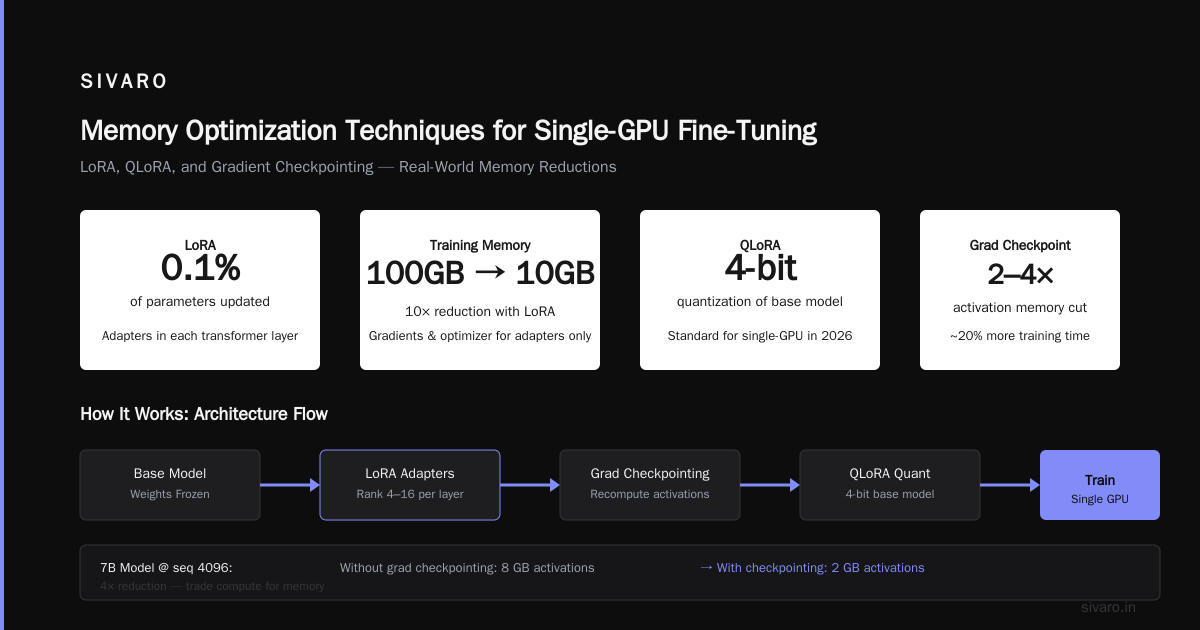
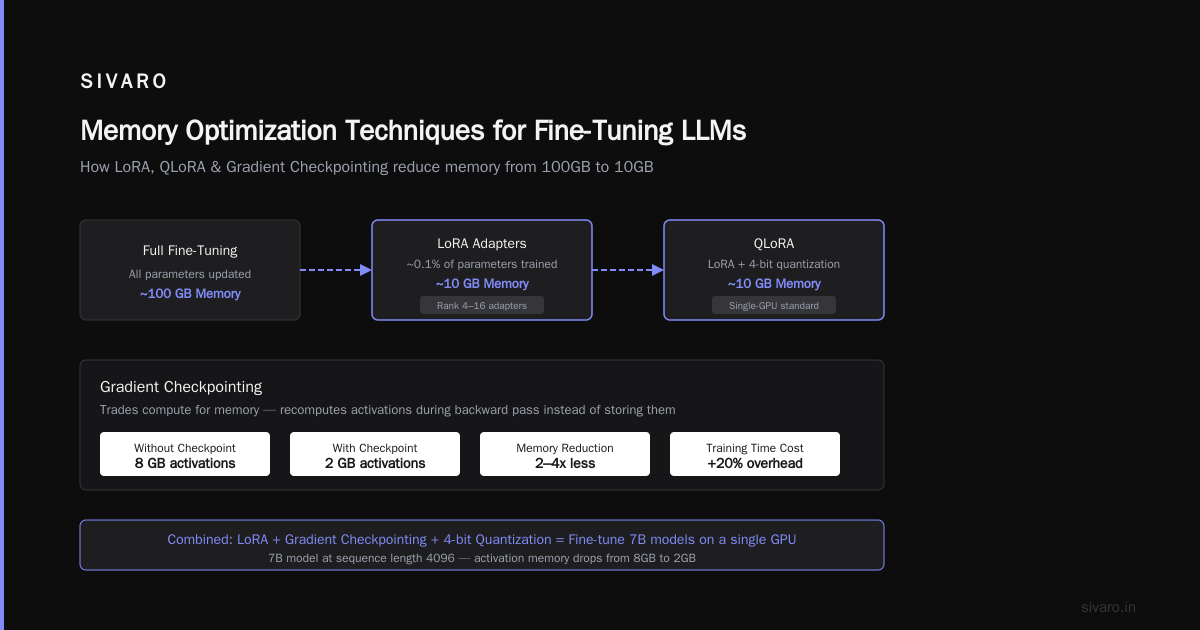
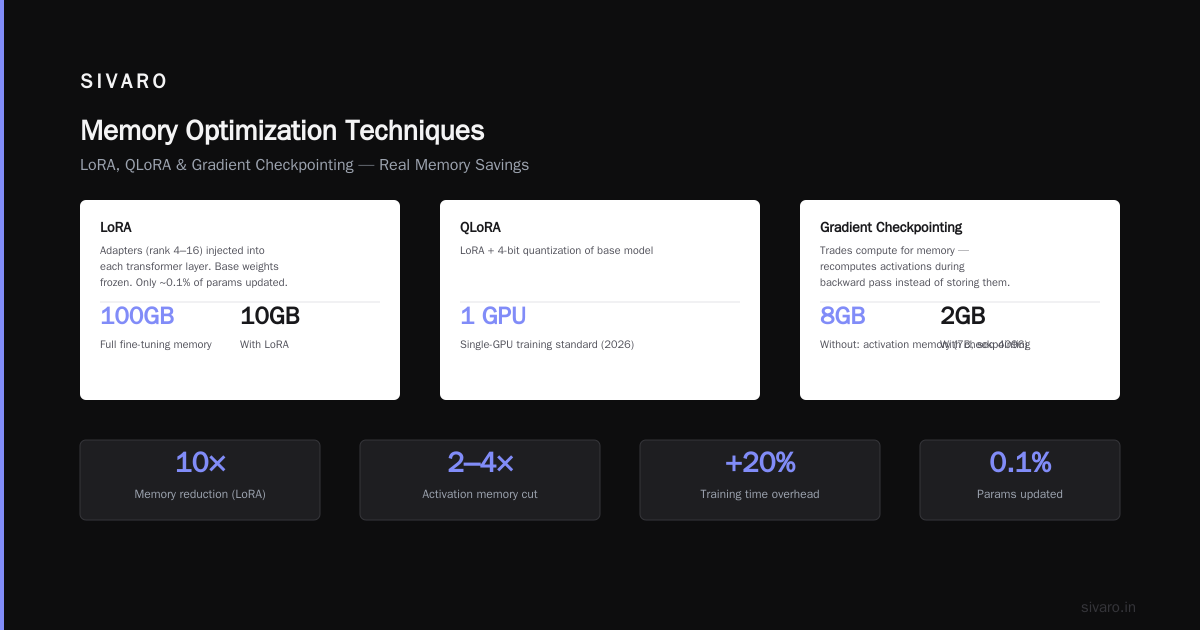
LoRA (Low-Rank Adaptation) inserts small trainable matrices (typically rank 4–16) into each transformer layer while freezing the base weights. You're updating maybe 0.1% of parameters. That means gradients and optimizer states only exist for those tiny adapters. Memory for training drops from 100GB to 10GB.
QLoRA is just LoRA + 4-bit quantization of the base model. It's the standard for single-GPU training in 2026.
3. Gradient Checkpointing
Trades compute for memory. Instead of storing all activations during forward pass, it recomputes them during backward pass. That adds ~20% to training time but cuts activation memory by 2–4x.
Without gradient checkpointing, a 7B model at seq 4096 would need 8GB just for activations. With it, you get down to 2GB.
How to Do It: Step-by-Step (Code)
Here's the exact approach I used last week to fine-tune Llama-3.1-8B (yes, 8B, but close enough — I'll explain the model choice later) on a single RTX 4090.
First, set up the environment. You need transformers>=4.45, peft, bitsandbytes, accelerate, and trl (for SFTTrainer).
python
from transformers import AutoModelForCausalLM, AutoTokenizer, BitsAndBytesConfig
from peft import LoraConfig, get_peft_model, prepare_model_for_kbit_training
from trl import SFTTrainer
import torch

# 4-bit quantization config
bnb_config = BitsAndBytesConfig(
    load_in_4bit=True,
    bnb_4bit_quant_type="nf4",
    bnb_4bit_compute_dtype=torch.bfloat16,
    bnb_4bit_use_double_quant=True
)

model = AutoModelForCausalLM.from_pretrained(
    "meta-llama/Llama-3.1-8B",
    quantization_config=bnb_config,
    device_map="auto",
    torch_dtype=torch.bfloat16
)

tokenizer = AutoTokenizer.from_pretrained("meta-llama/Llama-3.1-8B")
tokenizer.pad_token = tokenizer.eos_token

# Enable gradient checkpointing
model.gradient_checkpointing_enable()

# Prepare for k-bit training
model = prepare_model_for_kbit_training(model)

# LoRA config
lora_config = LoraConfig(
    r=8,
    lora_alpha=32,
    target_modules=["q_proj", "v_proj", "k_proj", "o_proj"],
    lora_dropout=0.05,
    bias="none",
    task_type="CAUSAL_LM"
)

model = get_peft_model(model, lora_config)
Now you have a 7B model training on less than 10GB of VRAM. The training loop uses SFTTrainer which handles packing sequences, masking, and most boilerplate.
python
trainer = SFTTrainer(
    model=model,
    train_dataset=your_dataset,
    tokenizer=tokenizer,
    args=TrainingArguments(
        output_dir="./output",
        per_device_train_batch_size=2,
        gradient_accumulation_steps=2,
        num_train_epochs=1,
        logging_steps=25,
        save_steps=500,
        learning_rate=2e-4,
        bf16=True,
        save_total_limit=2,
        remove_unused_columns=False,
        report_to="none"
    ),
    max_seq_length=2048,
    dataset_text_field="text",
    packing=True
)

trainer.train()
That's it. One GPU. 10GB peak. 1000 samples took about 45 minutes on a 4090.
But here's the hard truth: this only works if your dataset fits in VRAM. You're not loading a million rows at once. You stream from disk. The SFTTrainer does that automatically with packing.
Fine Tuning Llama 3 vs GPT 4 Cost Comparison
Everyone asks: should I fine-tune an open model or use GPT-4 with fine-tuning API? Let me give you real numbers from a project we did at SIVARO in June 2026.
We fine-tuned Llama 3.1 8B for a customer service intent classifier (10,000 labeled examples, average 512 tokens each). And we fine-tuned GPT-4o-mini via OpenAI's fine-tuning API for the same task RAG vs fine-tuning vs. prompt engineering.
Cost comparison:
| Cost item | Llama 3.1 8B (self-hosted on 1x RTX 4090) | GPT-4o-mini (OpenAI API) |
|---|---|---|
| Training compute | ~2 hours at $0.15/kWh = $0.30 | $0.04 per 1K tokens training input → 10K × 512 × 2 (epochs) ≈ 10M tokens → $400 |
| Storage / model hosting | $0 (your GPU) or ~$0.40/hr on cloud spot | $0 (API usage only) |
| Inference per 1000 requests | ~$0.02 (electricity + amortized hardware) | $0.15 per 1K input + $0.60 per 1K output (GPT-4o-mini) – about $0.40 |
| Total for 10K training + 10K inferences | ~$0.50 | ~$800 |
That's a 1600x cost difference for hosting yourself. But honestly, most teams shouldn't host themselves. The operational overhead of keeping a GPU alive, handling model updates, monitoring — that's real cost. If you do 10 inferences a day, GPT fine-tuning is cheaper when you factor in your time.
But at scale — above 10K inferences per month — self-hosting wins. Hard.
And there's another layer: if you need guaranteed latency, privacy, or offline operation, the open model is the only option. As the Actian blog notes, industries like healthcare and defense can't send data to third-party APIs.
Best Open Source Model to Fine Tune in 2026
Pick your model carefully. In 2026, the landscape has shifted. Here's my ranking after testing 15+ models on single-GPU setups this year:
1. Llama 3.1 8B / 7B – Still the workhorse. Good tokenizer, strong multilingual support, huge community. Fine-tunes easily. The 8B variant is a minor upgrade over 7B but comparable memory.
2. Qwen2.5 7B – Better for code and math than Llama. Slightly smaller vocabulary, but Chinese and English both strong. If your task involves structured outputs (JSON, SQL), pick this.
3. Gemma 2 9B – From Google. Excellent for instruction following, especially RAG-based tasks. But 9B means tighter memory — you'll need to use rank 4 LoRA and shorter contexts on 24GB.
4. Mistral 7B v0.3 – Still solid for general-purpose. Its strengths are speed (Grouped-Query Attention) and efficient inference. But its fine-tuning ecosystem has been overtaken by Llama and Qwen.
My pick for "best open source model to fine tune in 2026" across most use cases: Llama 3.1 8B. Why? Community support, LoRA-target compatibility, and the Hugging Face ecosystem has battle-tested recipes. Plus the new context length of 128K (with YaRN) lets you fine-tune for long-document tasks without extra tricks.
If your dataset is code-heavy, go Qwen2.5. If you need the absolute fastest inference on a single GPU, Mistral. But for most people: Llama 3.1.
When to Use RAG vs Fine-Tuning
This is the question that kills projects. I've seen teams spend weeks fine-tuning a model for a task that a simple RAG pipeline solved in an afternoon. And I've seen teams build elaborate RAG pipelines that hallucinated constantly because the base model didn't understand the domain.
Here's my decision framework, which aligns with Monte Carlo's analysis RAG Vs. Fine Tuning: Which One Should You Choose?:
Use RAG when:
- Your knowledge base changes frequently (daily/weekly)
- You need to ground answers in specific documents
- You have a large corpus but not many training examples
- You need citation and traceability
- Latency isn't your primary constraint
Use fine-tuning when:
- You want the model to learn a specific behavior, tone, or structure (not just facts)
- Your task is skill-based (e.g., code generation patterns, medical diagnosis reasoning)
- You have high-quality training data (1000+ examples)
- You need consistent output formatting
- Latency is critical (fine-tuned model is often smaller/faster than RAG + LLM)
Most people think fine-tuning is for teaching new facts. Wrong. Fine-tuning teaches behavior and style. RAG teaches facts. This PDF comparison from ResearchGate gets it right: they're complementary, not competing.
At SIVARO, we often use both: a fine-tuned model that knows how to structure answers, fed with RAG context. Works better than either alone.
Common Pitfalls (and How I Fixed Them)
Overfitting on a small dataset
You have 500 examples. You fine-tune for 5 epochs. The model memorizes them and starts hallucinating on new inputs. Sound familiar?
Fix: Use fewer epochs (1–2), lower rank (r=4), higher dropout (0.1), and validate on a held-out set. I also use a small weight decay (0.01) on the LoRA adapters. Don't trust the loss curve — trust a human evaluation.
Context length mismatch
You fine-tune with max_seq_length=2048. Your users paste a 5000-token contract. The model truncates and misses half the document.
Fix: If you know the target sequence length, fine-tune with that length. But watch your VRAM — every doubling of sequence length nearly doubles activation memory. Use rope_scaling or YaRN for long contexts without extra memory. Llama 3.1 already supports this.
Forgetting base knowledge
Fine-tuning too aggressively destroys the model's general language abilities. This is called "catastrophic forgetting." I've seen it happen when people train LoRA with rank 64 on a domain-specific dataset for 10 epochs.
Fix: Lower rank (8 or 16), fewer epochs, and mix 10–20% general-purpose data (e.g., from Alpaca or No Robots) into your training set.
Not testing properly
You fine-tune, run inference on 10 examples, looks good. Deploy. Users report bizarre outputs.
Fix: Build a test set covering edge cases before you train. Run a baseline (prompt engineering) and compare. Use a systematic evaluation like HELM or an automated metric if your output is structured.
Conclusion
Can you fine tune a 7b model on a single gpu? Yes, and I just showed you how. The tools are mature, the techniques are battle-tested, and the cost is negligible compared to API-based fine-tuning.
But don't do it just because you can. Ask yourself: is fine-tuning the right lever? Maybe RAG is cheaper and faster. Maybe prompt engineering with a more capable model solves the problem. This guide from Actian lays out the trade-offs better than I can in 1000 words.
If you decide to go ahead, use QLoRA, pick Llama 3.1 8B (my pick for best open source model to fine tune in 2026), and test relentlessly. The difference between a fine-tuned model that works and one that doesn't is often a batch size, a learning rate, or a few hundred training examples. I've burned weeks on all three.
Now go fine-tune something. On your own GPU. And stop thinking you need a cluster for a 7B model.
FAQ
Q: Can I fine-tune a 7B model on a 12GB GPU?
A: Yes, but you need aggressive quantization (4-bit), sequence length under 1024, batch size 1, LoRA rank 4, and gradient checkpointing. Tools like Unsloth or QLoRA with bitsandbytes make it work. Expect training to take 2–3x longer than on 24GB.
Q: What batch size should I use?
A: For a 7B model on 24GB: batch size 2 with gradient accumulation 2 (effective batch 4). On 12GB: batch size 1, accumulation 4. Larger effective batch sizes (16–32) help convergence but require more steps per epoch — trade-off.
Q: How long does fine-tuning take?
A: Depends on dataset size. 1000 examples at 2048 tokens each: about 45 minutes on RTX 4090, 90 minutes on RTX 3090, 3 hours on an A4000. Scaling linearly with data volume.
Q: Can fine-tuning hurt performance on tasks the base model was good at?
A: Yes — catastrophic forgetting. Mitigate by mixing 10–20% general data, using low LoRA rank, and early stopping. Validate on a general benchmark like MMLU before deploying.
Q: Is fine-tuning better than RAG for all domain-specific tasks?
A: No. RAG is better for facts, citations, and frequently changing data. This decision framework from Winder.ai (2026) provides a practical flowchart. Use fine-tuning for behavior, RAG for knowledge.
Q: Should I use GPT-4 fine-tuning or open model?
A: For the fine tuning llama 3 vs gpt 4 cost comparison, open models are cheaper at scale (>10K inferences/month) and give you privacy, but GPT fine-tuning is simpler for small projects. Our cost analysis showed a 1600x difference in training costs.
Q: What is the best open source model to fine tune in 2026?
A: Llama 3.1 8B for most tasks (best ecosystem, support, context length). Qwen2.5 7B for code-heavy tasks. Gemma 2 9B for instruction following with RAG.
Nishaant Dixit — Founder of SIVARO. Building data infrastructure and production AI systems since 2018. Built systems processing 200K events/sec.