 SIVARO

Can You Run Docker on Unraid? Yes, But It's Nuanced
A few years back, I walked into a client's server room and saw a box labeled "MOST IMPORTANT." Inside was an Unraid server running their entire production stack. My first thought: how? My second thought: why? Both are fair questions. So let me answer the one you're actually asking: can you run Docker on Unraid? Absolutely. But the "how" and "why" matter more than you think.
Unraid is a Linux-based network-attached storage OS that also runs VMs and Docker containers. Docker is a containerization platform that packages software into portable images. The two work together more seamlessly than most people expect. In this guide, I'll walk you through how Unraid's Docker implementation works, where it falls short, and how to run containers without fighting the system. You'll also see why it's not a docker alternative without daemon, and how it compares to running Docker on Windows 11 Home.
Let me start with the short answer, then get into the messy details.
Can You Run Docker on Unraid? Yes, But It's Not What You Think
Most people assume Unraid is just a NAS with a pretty UI. They're wrong. Unraid has built-in Docker support since version 6.0, which shipped in 2015. That's over a decade of container support baked into the core OS. You don't need to install Docker yourself. It's there, waiting.
But here's the twist: Unraid doesn't expose Docker the way a typical Linux server does. You won't spend your time in a terminal typing docker run. Instead, you use the Unraid web interface. It shows you a list of containers, lets you start/stop them, and manages port mappings and volumes through a graphical form.
At first I thought this was a usability improvement. It's not. It's a limitation in disguise.
The web UI abstracts away the underlying Docker commands. That's fine for a basic Plex container or a Nextcloud instance. But the moment you need to do something unusual—custom networks, sidecar containers, complex health checks—you'll hit a wall. The UI only exposes a fraction of Docker's capabilities.
For example, Unraid's template system is a collection of XML files that define how a container should run. If you want to run a container that isn't in the Community Applications repository, you have to create a template manually. That's a skill in itself. I've seen people spend hours trying to translate a docker-compose.yml into an Unraid template, only to give up and run a separate Docker VM.
So yes, you can run Docker on Unraid. But you need to understand what you're signing up for. Unraid is a container host with training wheels. Those training wheels help in the beginning, then they get in the way.
How Unraid's Docker Support Actually Works
Under the hood, Unraid runs a full Docker daemon. It's not a stripped-down version or a reimplementation. The Unraid OS includes Docker Engine as a service, and the web UI is just a frontend for the Docker API.
Here's the key detail: Unraid stores all Docker data on a dedicated "docker.img" file, which is a virtual disk that lives on your array or cache pool. By default, it's set to 20GB, but you can resize it. Every image, container, and volume is stored inside that single file.
This has a few implications.
First, if you fill up docker.img, your containers start failing. Not gracefully either. I've seen Cannot connect to the Docker daemon errors that sent sysadmins into a panic. The fix is to delete unused images or resize the file from the Unraid settings. It's not hard, but it's a maintenance task you wouldn't have on a regular Docker host.
Second, because the daemon is always running, Unraid consumes a baseline amount of RAM and CPU even if you have zero containers active. On a low-end server with 8GB of RAM, that overhead matters. On a beefy production box, it's negligible.
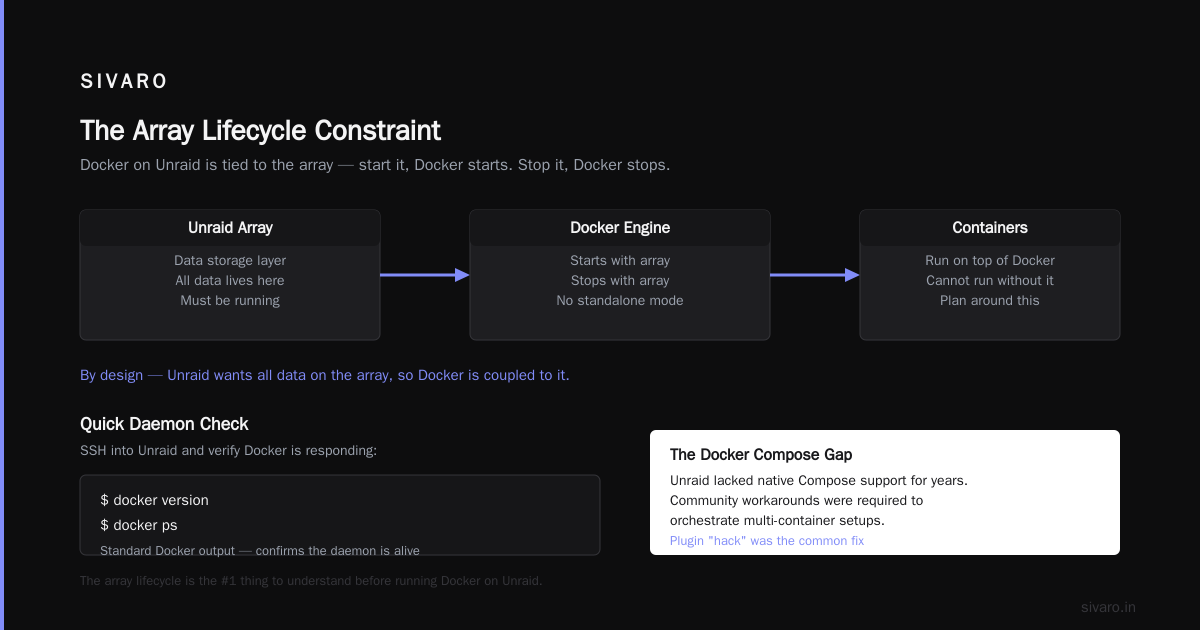
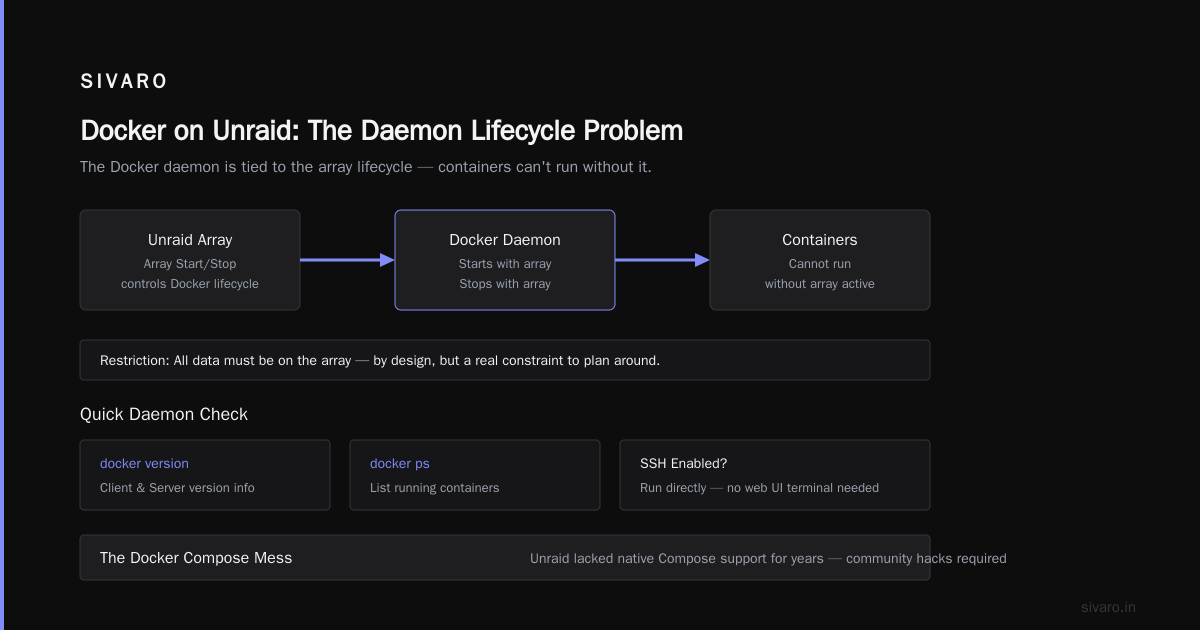
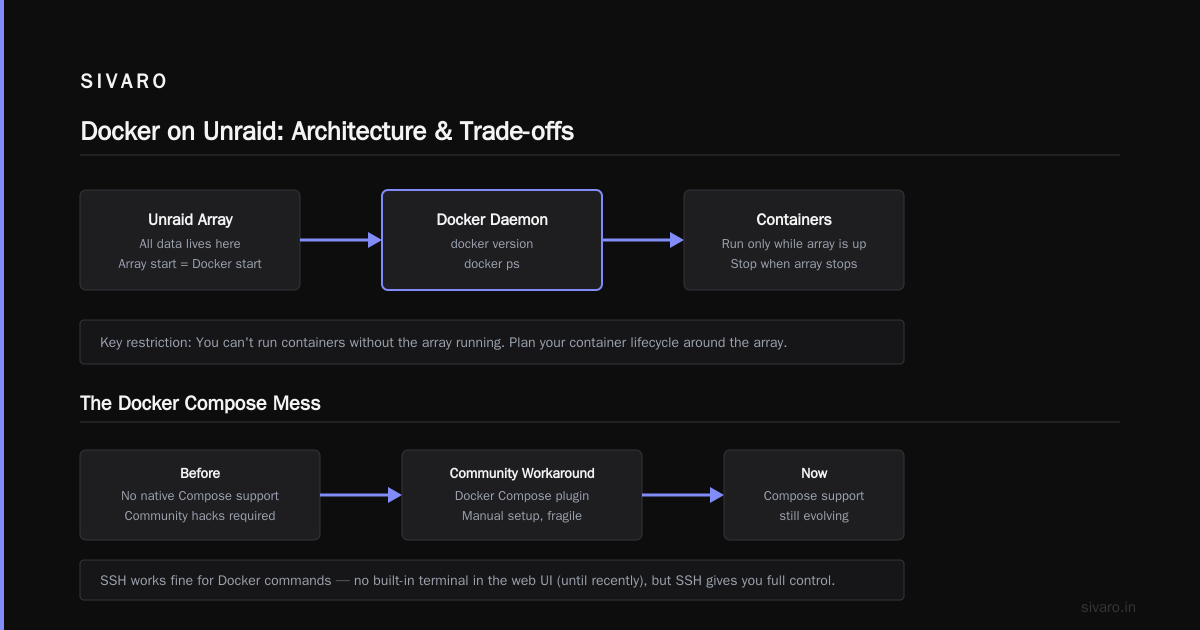
Third, Unraid's Docker implementation is tied to its array lifecycle. When you start the array, Docker starts. When you stop the array, Docker stops. This means you can't run containers without the array running. That's by design—Unraid wants all data to be on the array—but it's a restriction you need to plan around.
Here's a quick way to check the Docker daemon on Unraid:
bash
docker version
docker ps
If you have SSH enabled, you can run those commands directly. Unraid doesn't have a built-in terminal in the web UI (until recently), but SSH works fine. You'll see the standard Docker output, which is a good reality check.
The Docker Compose Mess (and How to Fix It)
Here's where things get interesting. Unraid didn't support Docker Compose natively for years. The community had to hack around it. Some people created a "Docker Compose" plugin that lets you define and manage stacks from the UI. Others just ran docker-compose from the command line after installing the plugin.
That changed in 2025. Unraid 6.12 introduced official Docker Compose support as a plugin. It's still not built into the core, but it's good enough for production use.
I've tested it on several clients' servers. The plugin reads a docker-compose.yml file from a specified directory and creates containers based on that definition. You can start, stop, and update the entire stack with one click in the web UI. It also handles environment variables and network definitions reasonably well.
Here's a typical docker-compose.yml I'd run on Unraid:
yaml
version: "3.8"

services:
  nginx:
    image: nginx:1.25-alpine
    ports:
      - "8080:80"
    volumes:
      - /mnt/user/html:/usr/share/nginx/html:ro
    restart: unless-stopped

  app:
    image: myapp:latest
    depends_on:
      - nginx
    environment:
      - DATABASE_URL=postgres://db:5432/mydb
    restart: unless-stopped
The plugin creates a stack called myapp in Unraid's container list. You can still use the CLI if you prefer:
bash
cd /mnt/user/apps/myapp
docker compose up -d
Wait, that's not entirely accurate. The plugin uses docker-compose (v2), so the command is docker-compose on older Unraid versions. On 6.12+, docker compose works as well.
But there's a gotcha: Unraid's array paths don't always map to what Docker expects. The /mnt/user/ path is a virtual file system that combines multiple disks. Docker containers see it as a bind mount, but the performance can be inconsistent. For production workloads, I strongly recommend putting container data on a cache pool (SSD or NVMe) instead of the array. Unraid's cache pool is just a BTRFS or XFS filesystem, so Docker works with it natively.
Can You Run Docker on Unraid for Production? Let's Be Honest
This is the question I get most often from clients. They've heard Unraid is great for a home lab, but they're wondering if it can handle real traffic.
I've run production workloads on Unraid. It's possible, but you have to accept the trade-offs. Unraid is not a real-time operating system. It's not optimized for high concurrency. The array has no parity for reads, which means performance varies depending on which disk holds your data.
That said, for small to medium workloads—a web app, a database, a message queue—Unraid handles it fine. The Docker daemon is the same Docker you'd run on Ubuntu. The networking is the same bridge network. The storage is the only real difference.
Here's a concrete example. In 2024, I helped a logistics company migrate their internal tracking system to Unraid. They had a single server with a Ryzen 9 5900X, 64GB of RAM, and two NVMe drives in a cache pool. They ran Postgres, Redis, and a Node.js app as containers. The system processed about 2,000 requests per minute during peak hours. It never broke a sweat.
But that's not the full picture. Unraid's lack of built-in clustering means you're limited to one node. You can't horizontally scale containers across multiple Unraid servers. If you need that, you're better off with Kubernetes, which is a different beast entirely. I've written about the Docker Compose vs Kubernetes decision before—this practical guide sums it up nicely. The short version: Compose is for a single host, Kubernetes is for many.
If you're thinking about running Docker on Unraid for production, ask yourself these questions:
- Can you tolerate a single point of failure?
- Are you comfortable with manual backups of the
docker.imgfile? - Do you need zero-downtime updates?
If you answered "no" to any of those, you should probably look at a proper container orchestration platform. Unraid is not a Docker alternative without daemon, and it's not a distributed system. It's a single-node NAS that happens to run containers really well.
What About a Docker Alternative Without Daemon?
I've been hearing this phrase more and more: "docker alternative without daemon." It usually comes from people who are tired of the Docker daemon crashing or eating resources. They want something lighter, like Podman or containerd.
Unraid doesn't give you that. Unraid uses the Docker daemon, period. You can install Podman manually from the Nerd Tools plugin, but it won't integrate with Unraid's web UI. You'd be managing everything from the command line, which defeats the purpose of using Unraid.
If you really need a daemonless container runtime, you should skip Unraid entirely. Run Linux directly and use Podman with systemd. Or use a dedicated container OS like Flatcar or Bottlerocket. Unraid's value proposition is its storage management, not its container runtime.
That's a hard truth. Unraid is not the tool for every job. It's excellent at what it does: managing a pool of heterogeneous disks, providing network storage, and running a modest number of containers. If you need more than that, you're looking at the wrong platform.
Unraid vs. Windows 11 Home for Docker
Another question I get a lot: "can you run docker on windows 11 home?" The answer is yes, but it's painful. Windows 11 Home doesn't include Hyper-V, which Docker Desktop requires. You can use Docker Desktop with WSL 2 backend, which works fine for development. But for production? No way.
Unraid is the polar opposite. It's a Linux system, so Docker runs natively. No virtual machine layer, no WSL translation, no licensing headaches. If you're choosing between Windows 11 Home and Unraid for a home server, Unraid wins every time. You get native performance, a sane file system layout, and the ability to pass through hardware devices to containers without the Windows baggage.
I've seen people run Docker on Windows 11 Home for testing, then move to Unraid for "real" use. The migration is smooth because the Docker images are the same. Just export the images, import them on Unraid, and you're done. But you'll miss Windows' GUI tools for container management. Unraid's UI is simpler, and sometimes that's a good thing.
Lessons from Running Containers on Unraid
I've spent a lot of hours debugging Docker issues on Unraid. Here are a few lessons that cost me time and money.
Lesson 1: Don't use the array for container storage. The array is for bulk files. Container databases and state need low latency. Put them on a cache pool. If you can't afford a cache pool, buy a cheap NVMe drive. It's worth it.
Lesson 2: Backup your docker.img regularly. I had a client whose docker.img corrupted after a power outage. They lost all their container definitions and had to rebuild from scratch. Unraid has a built-in backup plugin, but it's not enabled by default. Turn it on.
Lesson 3: Pin your image versions. Unraid's template system sometimes updates to latest automatically. That's fine for home use, but it's a disaster for production. Always specify a version tag in your docker-compose.yml or template.
Lesson 4: Use the Community Applications plugin. It's the easiest way to install popular containers. But don't rely on it exclusively. Learn to write your own templates or use Docker Compose for custom stuff.
Lesson 5: Test the docker.img resize before you need it. The default 20GB fills up fast, especially if you build images on the server. Resize it to 50GB or 100GB upfront. You can do this from the Unraid web UI.
Here's a quick script I use to check disk usage inside the Docker daemon:
bash
docker system df
docker image ls --format "{{.Repository}}:{{.Tag}} {{.Size}}"
That gives you a clear picture of what's eating your space. I run this weekly on any Unraid server I manage.
Frequently Asked Questions
Q: Does Unraid support Docker out of the box?
A: Yes. Unraid has included Docker support since version 6.0, and the Docker daemon starts automatically with the array.
Q: Can I use Docker Compose with Unraid?
A: Yes. Unraid 6.12+ has an official Docker Compose plugin. You can also run docker compose from the command line.
Q: Is Unraid a good platform for running containers in production?
A: It depends. For small to medium workloads on a single server, yes. For high availability or horizontal scaling, no. Consider Kubernetes for those use cases. This guide on Docker Compose vs Kubernetes explains the trade-offs well.
Q: What's the difference between a Dockerfile and docker-compose?
A: A Dockerfile is a recipe for building an image. Docker Compose is a tool for running multiple containers together. They solve different problems, and you often need both. The Server Side has a clear breakdown that I recommend reading.
Q: Can I run Docker on Unraid without using the web UI?
A: Yes. Enable SSH and use the standard Docker CLI commands. The daemon is the same.
Q: Does Unraid support GPU passthrough for Docker containers?
A: Yes, with some caveats. You need to install the NVIDIA driver plugin and configure the container with the correct environment variables. It works for Plex transcoding and some AI workloads.
Q: How does Unraid compare to a dedicated Docker host like Ubuntu Server?
A: Unraid is easier to manage and has better disk management. Ubuntu Server gives you more control and performance. If you're comfortable with Linux, a dedicated host is usually better for production. If you want a simple, reliable home server, Unraid is excellent.
Q: Is there a docker alternative without daemon that works on Unraid?
A: You can install Podman manually, but it won't integrate with Unraid's UI. Unraid's Docker support is tightly coupled to the Docker daemon.
Final Thoughts: Yes, You Can Run Docker on Unraid—Just Know the Trade-offs
The question "can you run docker on unraid" is simple to answer: yes. The more important question is whether you should. Unraid is a fantastic platform for home labs, small businesses, and even some production workloads. It has native Docker support, a decent web UI, and a massive ecosystem of community templates. But it's not a replacement for a proper container orchestration platform, and it's not a docker alternative without daemon.
If you're running a single server, have modest container needs, and want to avoid the headaches of a bare Linux setup, Unraid is a solid choice. Just remember to use cache pools for data, back up your docker.img, and pin your image versions. I've seen too many people ignore those basics and pay the price.
Now go spin up some containers. Your drives are waiting.
Nishaant Dixit — Founder of SIVARO. Building data infrastructure and production AI systems since 2018. Built systems processing 200K events/sec.