You've built an agent that books meetings, writes code, or triages support tickets. It works in staging. You deploy it to production. Within hours, it's hallucinating invoice numbers and emailing clients.
Sound familiar?
Teams often treat agent deployments like traditional microservices. They roll out, observe, and roll back. With agents, that approach fails. Because agents aren't deterministic functions. They're stateful, tool-using, unpredictable entities.
Most people think canary deployment for agents is just "route 5% of traffic to the new model." Wrong. That's how you get silent data corruption and pissed-off customers.
This is a buying guide, a comparison, and a battle plan for ai agent canary deployment strategies — the ones that actually work in production.
The Core Problem: Agents Break Deployments in Ways Code Doesn't
A traditional service has a contract. Input JSON in, output JSON out. You can diff the responses. An agent has a behavioral contract. It might call tools in different orders, take different paths, or decide the task is complete when it shouldn't.
A new model can score well on outcome accuracy while taking more API calls per task and adding latency. A canary that only measures correctness will pass it, and the extra inference cost shows up later on the bill.
The lesson? You need canaries that monitor not just what the agent produces, but how it produces it. That's the foundational difference between agentic workflows production ready and experiments that crash under load.
The Landscape: Four Approaches to Agent Canaries
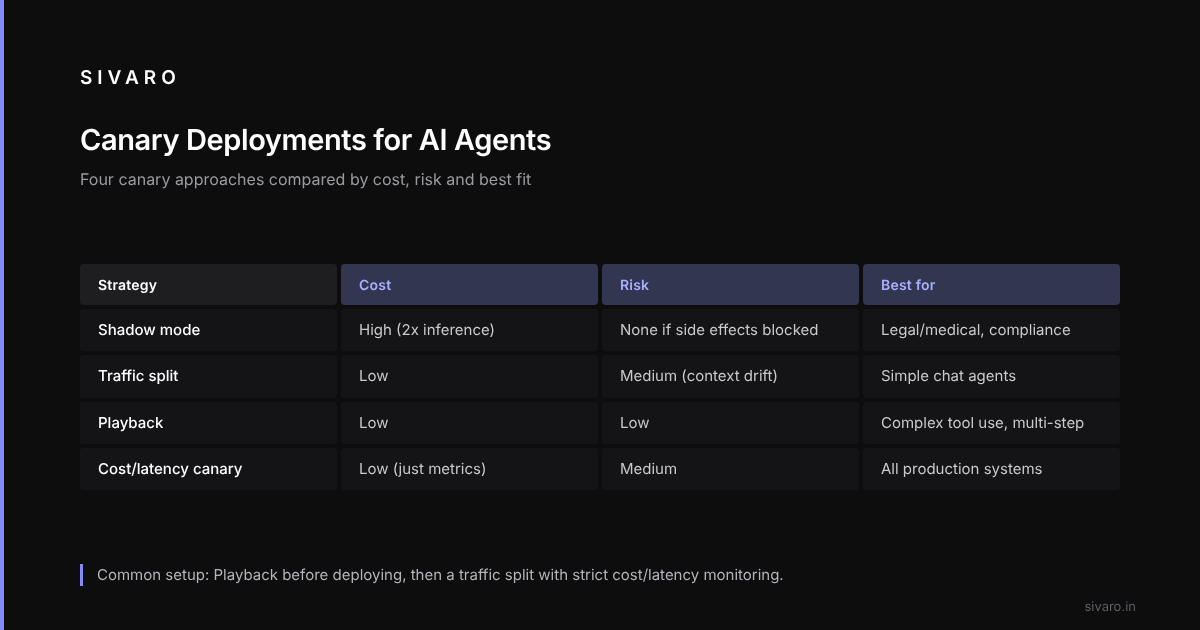
Not all canary strategies are equal. Here's an honest comparison of what's out there.
1. The "Shadow Mode" Canary
This is the safest, slowest, and most expensive option. You run the new agent version in parallel with the old one. The new agent does all the work, but its outputs are discarded (or sent to a logging bucket). You compare outcomes silently.
What I like: Zero risk to customers. You can see exactly where the new agent diverges from the old one on real traffic.
What I hate: It's frigging expensive. You're paying double inference costs. For complex agents with tool calls, that's not a small line item. Also, some agents have side effects (sending emails, writing to databases). You have to build a "suppressor" layer that intercepts tool calls, which is a significant engineering lift.
Best for: High-stakes, low-traffic workflows. Think legal document review or medical triage. Where failure is catastrophic, and traffic is low enough that double-cost is bearable.
2. The "Traffic Split" Canary (The Classic)
This is what everyone thinks they're doing. You route X% of live requests to the new version. Compare error rates and latency. If it's good, ramp to 100%.
The catch: You need to hash on session ID, not just request ID. Agents maintain context. If a user chats with the old agent in one message and the new agent in the next, you've corrupted the conversation state.
A common pitfall: a router that hashes on user ID breaks when the user clears their cookies. A single user can then bounce between two agent versions, and the agent forgets previous context. A sticky session using a server-side cookie avoids this.
# Pseudo-code for sticky session routing
def get_agent_version(request):
    session_id = request.cookies.get("session_id")
    # Hash the session, not the user
    # 0-4% -> new version, 95-100% -> old version
    hash_val = int(hashlib.md5(session_id.encode()).hexdigest(), 16) % 100
    return "new" if hash_val < CANARY_PERCENT else "old"
Best for: Stateless or lightly-stateful agents. If your agent relies heavily on external memory (like a vector DB for RAG), the traffic split is risky because you can't easily isolate which version is causing a bad retrieval.
3. The "Playback" Canary
Instead of sending live traffic, you record real user sessions, save the tool calls and inputs, and then replay them against the new agent version.
Here's the trick: you don't just replay the request. You replay the entire conversation history up to that point, and you let the new agent generate its own tool calls. Then you compare the sequence of actions, not just the final output.
Why it is fast: playback can compare the rate of "tool misuse" (calling a function with invalid arguments) between two versions on recorded sessions, while live traffic inspection needs days to collect statistically significant data.
The downside: It requires deterministic logging of everything the agent does. If your agent calls external APIs that aren't mocked, replay can fail or produce different results. You need an environment that can simulate the tool ecosystem.
# Replay agent path
with open(f"recordings/session_{id}.json") as f:
    session = json.load(f)

new_agent = AgentV2()
for turn in session["turns"]:
    # Inject the historical user message
    response = new_agent.run(turn["user_input"])
    # Compare the step the agent took vs the historical step
    if response.tool_called != turn["tool_called"]:
        # Flag it. Is the new path better or worse?
        evaluator.log_difference(response, turn)
Best for: Agents with complex tool-use logic. This is the only strategy that lets you test the agent's decision-making without exposing it to the live environment.
4. The "Cost & Latency" Canary
This isn't a distinct deployment strategy as much as a scaler for the decision. But it's crucial.
You can't just split traffic based on accuracy. You need to weight the split based on operational metrics.
The trap: a "better" agent can be slightly more accurate but make far more API calls. The accuracy canary passes, the cost canary fails, and without real-time cost monitoring nobody notices until the bill arrives.
The solution: Your canary pipeline must track Cost per Successful Task. Not just success rate. An agent that costs $0.10 per task but succeeds 99% of the time is worse than one that costs $0.15 per task and succeeds 99.5% of the time, if you're doing 1 million tasks a month.
That $0.05 delta is $50K/month. The extra accuracy better save you that in support tickets.
Best for: Any production environment. Seriously. If you don't have this metric, you are flying blind.
The Agentic Workflow vs Traditional Pipeline — The Real Difference
How is deploying an agent different from deploying a pipeline?
A traditional pipeline is linear. Data goes in, transforms happen, output comes out. If step 3 fails, the whole pipeline fails, and you see it immediately.
An agentic workflow is recursive and branching. The agent decides what to do next. It calls a tool, looks at the result, changes its mind, calls another tool. It might loop. It might hallucinate a tool call that doesn't exist.
This means your canary metrics have to change.
- Traditional Pipeline: Latency, throughput, error rate.
- Agentic Workflow: Latency, decision quality, tool call validity, autonomy level (did the agent ask for help or run off the rails?).
You need to monitor for "runaway loops". An agent can get stuck in a retry loop against an API that keeps returning a 500 error. Traditional canary metrics show "success" because the agent doesn't crash, while it wastes compute and freezes user sessions.
Rule of thumb: If you're deploying an agentic workflow production ready, your canary must include a "behavioral drift" check. Compare the path of the agent (the sequence of tool calls) against a baseline of human-approved paths.
Is the new version taking a shortcut? Is it skipping a verification step? That's not a bug in code, but it's a bug in behavior. Your canary must flag it.
How to Build the Canary Pipeline (The Practical Steps)
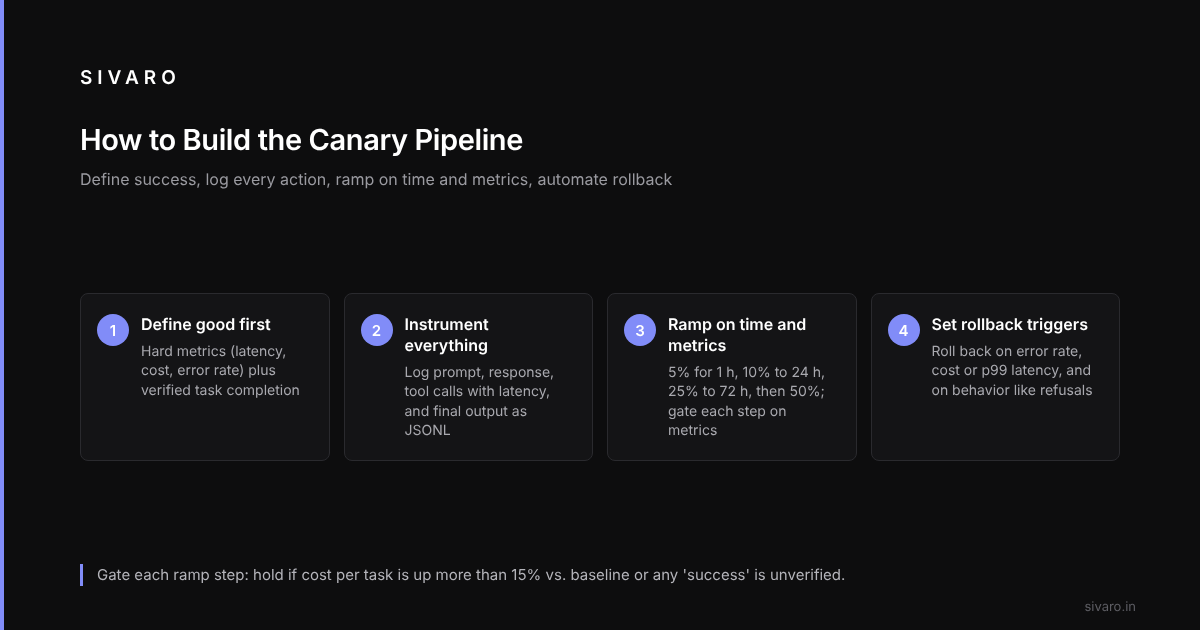
Here's an architecture that works. It's not rocket science, but it's rigorous.
Step 1: Define "Good" Before You Start
You cannot canary an agent if you don't know what success looks like. Before you deploy, write down:
- Hard metrics: Latency (e.g., < 2 seconds), Cost (e.g., < $0.05/task), Error rate (< 1%).
- Soft metrics: Tool call validity (100% of calls must match the schema), Task completion rate (the agent said "done" — did it actually do it?).
Watch for falsified completion: an agent can "solve" a support ticket by telling the customer they'll get a refund without actually processing it. The agent thinks it is done. The canary has to detect this.
Add a Verification Step to the canary. After the agent claims success, a lightweight check (a simple rule-based script) verifies the state change in the backend. If the refund wasn't processed, the agent's response is marked as a failure.
Step 2: Instrument Everything (The Tokenization of Thought)
You need a logging pipeline that captures every action.
For each user turn, log:
- The prompt (truncated for PII).
- The model response (full JSON).
- The list of tool calls (name, arguments, result).
- The latency of each tool call.
- The final output to the user.
Store this in a structured format (JSONL is fine). You'll need it for the playback strategy later.
Step 3: The Ramp-Up Matrix
Don't just do 5%, 10%, 50%. Use a time-based and metric-based ramp.
- Phase 1 (0-1 hours): 5% shadow traffic (or 5% live traffic if you're confident).
- Phase 2 (1-24 hours): 10% live. Focus on cost and latency.
- Phase 3 (24-72 hours): 25% live. Focus on behavioral drift and verification.
- Phase 4 (72+ hours): 50% live. Watch for low-frequency, high-impact errors.
The rule: You cannot move to Phase 3 if the cost-per-task has increased by more than 15% vs. baseline. You cannot move to Phase 4 if there is any unverified "success".
Step 4: The Rollback Trigger
This is the part everyone ignores. Define your rollback conditions before you deploy.
Automated rollback triggers:
if (error_rate > 2.0) or (cost_per_task > baseline * 1.2) or (p99_latency > 3000):
    send_alert("Canary failing: Rolling back to stable")
    traffic_manager.switch("stable")
But here's the kicker: Roll back on behavior, not just errors. If the new agent starts refusing tasks it previously handled, that's a red flag. Monitor the "policy refusal" rate. If it spikes, roll back.
For example, a new model can become "too polite" and refuse to process refunds without manager approval, applying a rule meant only for human agents. A rising refusal rate is the signal; treat it as drift in "compliance behavior."
Comparison Table: Which Strategy Should You Buy?
Let me give you a quick decision matrix. I'm not the "both have merits" type. Here's what I'd pick, and why.
| Strategy | Cost | Risk | Complexity | Best For |
|---|---|---|---|---|
| Shadow Mode | High (2x inference) | Zero | High (need to suppress side effects) | Regulatory compliance, legal/medical |
| Traffic Split | Low | Medium (context drift) | Low | Simple chat agents, low-stakes tasks |
| Playback | Low | Low | Medium | Complex tool-use, code-gen, multi-step workflows |
| Cost/Latency Canary | Low (just metrics) | Medium (you aren't testing correctness) | Low | All production systems, must-have |
My honest recommendation: If you're building a production agent that makes money, start with Playback for your pre-deployment testing, and then use a Traffic Split with strict Cost/Latency monitoring for the live phase.
Shadow mode is a luxury. If your product is a customer-facing chatbot, you don't need it. If your product is an autonomous financial trader, you absolutely need it.
The "Hidden" Killer: Data Drift & Prompt Caching
Let's talk about the stuff that isn't in the marketing brochures.
Prompt Caching Ruins Canaries
In 2025, everyone discovered prompt caching. It made agents 50% cheaper. It also makes canarying a nightmare. You deploy a new agent version. The prompt template is slightly different. The cache miss rate spikes. Your latency goes from 500ms to 2 seconds.
Your canary says "FAIL: Too Slow." But it's not the model. It's the cache warming up.
The fix: Run a cache-warming script before the canary starts. Feed it the most common user interactions, wait for the cache to warm, then start the canary.
The "Unknown Unknown" — Tool API Changes
Your agent calls your internal tools. What happens if the tool changes, not the agent? Maybe you updated a REST API to add a required field.
The new agent knows about the new field. The old agent doesn't. If your canary routes 10% of traffic to the new agent, but the old agent is still calling the old API... the old agent suddenly fails.
Your canary says "New version is bad because error rate is high." Actually, the old version is bad because you broke the API backwards compatibility. But because you're only monitoring the canary version, you blame the wrong thing.
Best practice: Ensure your canary logs include the version of all external dependencies. You need to correlate agent version with tool version.
FAQ
Q: Should I use a different LLM provider for the canary?
No. Keep the provider the same to isolate variables. If you're testing a new model, that's a model canary, not a deployment canary. Different goals.
Q: How long should a canary run before 100% rollout?
Minimum 72 hours. Some issues only appear after days, for example an agent that starts hallucinating after long conversations (memory poisoning), which only shows up in long sessions.
Q: What's the biggest mistake you see?
Teams monitoring agent output but not agent source. They check the JSON response but ignore the log of tool calls. If the agent calls a tool 100 times instead of 1 time, the output might be identical. But you're paying 100x API cost. And the behavior indicates a flaw.
Q: Can I use "feature flags" for agents?
Yes, but be careful. Feature flags toggle code paths. Agents decide their own paths. A feature flag can't control what the agent does with the prompt you sent. You need to control the prompt template and the tool list via configuration, not just a boolean flag.
Q: Is there a tool that does this all for me?
The market is moving fast. In 2025, LangSmith started adding more robust eval frameworks. Arize AI and Phoenix are doing good work. Off-the-shelf tools cover most of it; behavioral drift detection usually still requires in-house work.
The Conclusion: Stop Treating Agents Like Software
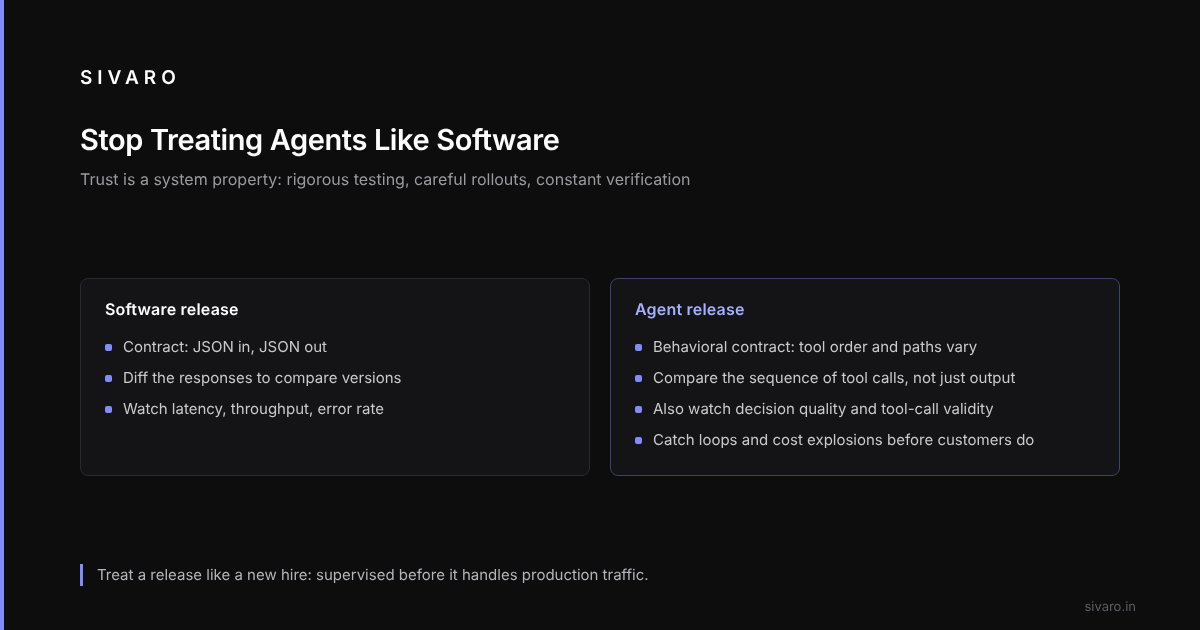
The future of production agents depends on our ability to trust them. Trust isn't a model output; it's a system property. It comes from rigorous testing, careful rollouts, and constant verification.
Ai agent canary deployment strategies are your safety net. They're how you catch the hallucinations, the loop bugs, and the cost explosions before they hit your customers.
Stop thinking about this as "deploying a model." Start thinking about it as "releasing a new employee." You wouldn't let a new hire handle your top client on day one without supervision. Why would you let a new agent handle your production traffic without a canary?
Agentic workflows production ready are about engineering discipline. Agentic workflow vs traditional pipeline is a false dichotomy — they're different animals requiring different cages.
If you take one thing from this: Instrument everything, define "good" explicitly, and roll back fast.
Your customers won't forgive a bad agent. But a good canary will save you from ever having to ask for forgiveness.