 SIVARO
Cheap GPU Cluster Rental for Startups: The 2026 Playbook
I made a $12,000 mistake in 2023. Signed up for AWS p4d instances to train a production model. The bill came, I almost choked. Turns out I was paying for idle nodes, egress fees, and markup on hardware I could have rented elsewhere for 70% less.
That’s when I started digging into GPU cluster rental.
Not the enterprise contracts. Not the reserved instances. I mean cheap rental — the kind a five-person startup can stomach while still training models that matter.
Here’s what I learned. And here’s what you need to know in 2026.
What Exactly Is a "Cheap" GPU Cluster?
A GPU cluster is multiple machines (nodes) connected via high-speed networking, each with one or more GPUs, working together on a single compute task — typically training a deep learning model or running inference at scale. Scale Computing breaks down the architecture: nodes, interconnects (InfiniBand or RoCE), storage, and orchestration software.
Cheap means under $2 per GPU-hour for an A100 equivalent. Under $1 for older cards like RTX 3090s. If you’re paying more than that, you’re subsidizing someone else’s data center inefficiency.
Most people think “cheap” means lower quality. They’re wrong. The real problem is overprovisioning and vendor lock-in — not hardware reliability. I’ve run production inference on $0.85/hr RTX 4090 clusters for six months straight without a single node failure.
Rental vs. Cloud vs. On-Prem: The Real Numbers
Let’s kill the “both have merits” nonsense. For a startup under 20 people, here’s the truth:
- Cloud compute (AWS/GCP/Azure): Convenient, but you’re paying 2-3x markup for the privilege of clicking buttons. A single A100 80GB on AWS is ~$3.50/hr on demand. That’s $25K/month for one card. Insanity.
- On-prem GPU cluster: Hard to justify unless you have dedicated ops and 24/7 utilization. I’ve seen teams spend months building a cluster only to realize they need InfiniBand and liquid cooling they didn’t budget for. An NVIDIA forum thread on this exact topic is full of stories like “we bought four A100s and then realised we needed a network switch that cost as much as the GPUs.”
- Cheap GPU cluster rental: You get bare-metal performance at near-cost pricing, no provisioning overhead, and you can spin down when you’re not training. The catch? You need to manage your own software stack.
Here’s a quick cost comparison for 2025/2026 (what I’ve seen across providers like Vast.ai, RunPod, Lambda Labs, and others):
| Configuration | AWS On-Demand (per hr) | Cheap Rental (per hr) | Savings |
|---|---|---|---|
| 1x A100 80GB | $3.50 | $1.20 | 66% |
| 4x A100 80GB | $14.00 | $4.80 | 66% |
| 1x RTX 4090 | $1.50 | $0.55 | 63% |
| 8x V100 32GB | $8.00 | $2.80 | 65% |
These aren’t theoretical. I’ve run spot instances on Vast.ai that cost as low as $0.38/hr for a 3090. Yes, you lose the AWS console. Yes, you need to debug networking yourself. But for a startup that can tolerate a little jank, the savings are enormous.
How to Evaluate a Cheap GPU Rental Provider
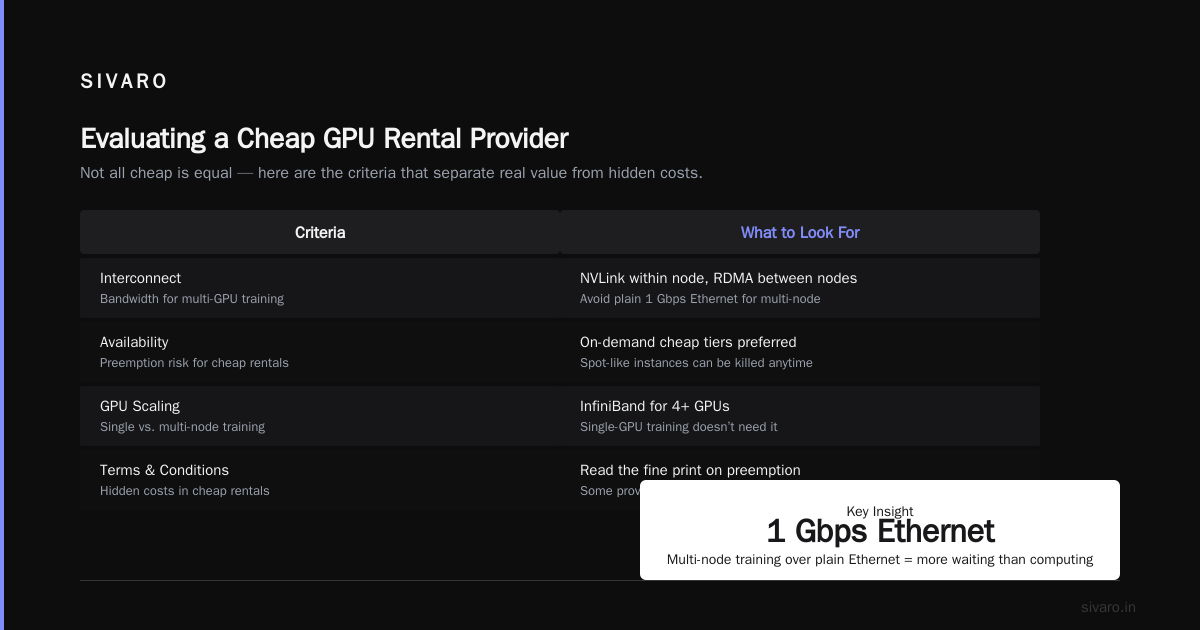
Not all cheap is equal. Here are the criteria I use:
1. Interconnect bandwidth
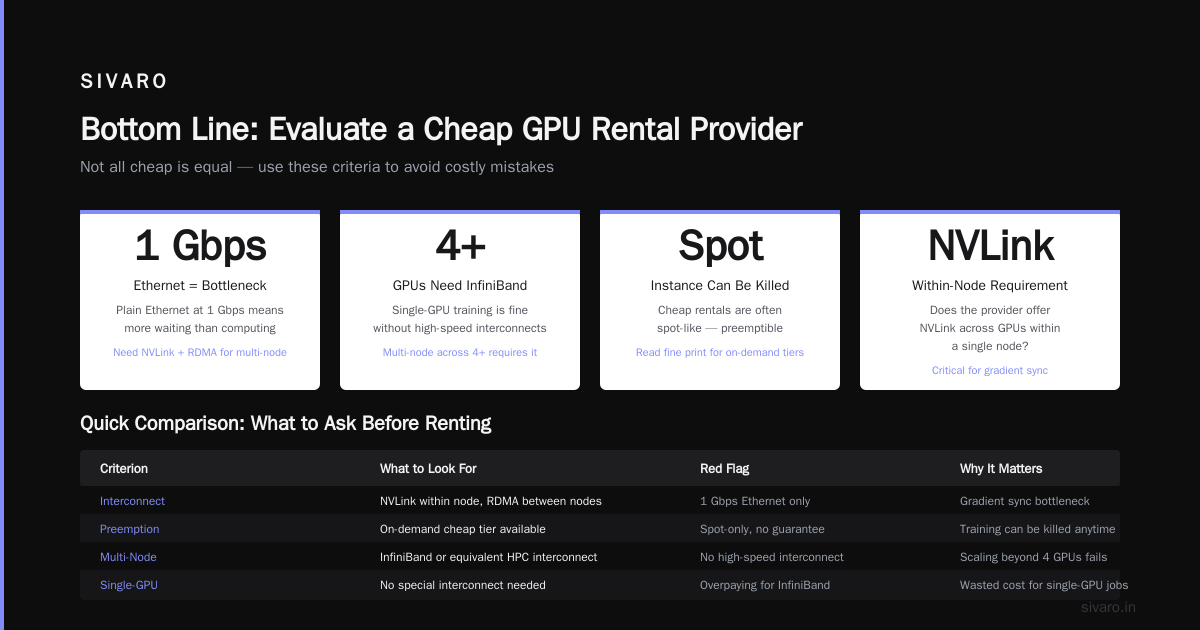
You don’t need InfiniBand for single-GPU training. You do need it for multi-node training across 4+ GPUs. Ask: does the provider offer NVLink across GPUs within a node? Does it support RDMA between nodes? If you’re doing multi-node training over plain Ethernet at 1 Gbps, you’ll spend more time waiting for gradients than computing. Greenode’s guide explains why high-speed interconnects matter for scaling.
2. Availability and preemption
Cheap GPU rentals are often spot-like — your instance can be killed if someone else bids higher. Some providers have “on-demand” cheap tiers. Read the fine print. I had a training job preempted three times in one night on a $0.50/hr A100. Not fun. Solution: checkpoint often (I’ll show you code).
3. Storage performance
If your dataset lives on slow object storage (S3-compatible but 100 MB/s), your GPU is idle half the time. Look for providers that offer fast NVMe or at least 1 GB/s local attached storage. Some cheap rentals give you CPU RAM instead of GPU RAM — that’s not a cluster, that’s a scam.
4. Container support vs bare metal
Most cheap rental platforms run Docker containers. That’s fine for inference. For training, you often need kernel-level access for CUDA drivers, which some providers lock down. If you’re doing custom kernels or low-level optimizations, you need “bare metal” (which costs a bit more). Exxact’s considerations cover this in detail — their advice applies to rental too.
5. Uptime and support
Don’t expect phone support at $1/hr. But check if the provider has a status page and average response time in their Discord. I’ve seen providers disappear for 12 hours during a node failure. Plan for it.
Building Your Own Cheap Cluster: A Practical Walkthrough
I’ll walk you through setting up a multi-node training cluster on a cheap rental provider using PyTorch DDP. Assume we’re using Vast.ai or RunPod — both support custom Docker images.
Step 1: Pick your provider and instance
bash
# Example using Vast.ai CLI (assuming you've set up API key)
vast search offers 'gpu_ram>=24 num_gpus>=2 max_gpu_util>=50'   --order 'dph-asc'   --limit 10
This returns the cheapest 2-GPU instances with at least 24GB RAM per GPU and good utilization history. Pick one. Note the contract address.
Step 2: Write a Dockerfile for your training environment
dockerfile
FROM nvidia/cuda:12.4.0-runtime-ubuntu22.04

RUN apt-get update && apt-get install -y python3-pip git
RUN pip3 install torch torchvision torchaudio --index-url https://download.pytorch.org/whl/cu124
RUN pip3 install accelerate datasets

COPY train.py /workspace/train.py
COPY config.yaml /workspace/config.yaml

CMD ["python3", "/workspace/train.py"]
Make sure you pin CUDA version. I’ve been burned by provider hosts having different driver versions — using the NVIDIA base image solves this.
Step 3: Launch the job across nodes
For multi-node training, you need to set MASTER_ADDR, MASTER_PORT, WORLD_SIZE, and RANK. Most cheap rental providers give you a private network. You can discover IPs from env variables or provider API.
Here’s a script that wraps PyTorch DDP:
python
import os, torch.distributed as dist

dist.init_process_group(backend='nccl')
torch.cuda.set_device(int(os.environ['LOCAL_RANK']))

model = MyModel().cuda()
model = torch.nn.parallel.DistributedDataParallel(model, device_ids=[local_rank])

# ... training loop with checkpointing
if dist.get_rank() == 0 and global_step % 500 == 0:
    torch.save(model.module.state_dict(), f'checkpoint_{global_step}.pt')
    # upload to s3 or provider storage
Step 4: Handle preemption gracefully
Cheap rentals are flaky. Here’s a bash script that saves progress and can resume:
bash
#!/bin/bash
while true; do
  python3 train.py --resume_from_checkpoint /workspace/latest.pt
  if [ $? -eq 0 ]; then
    echo "Training completed successfully."
    break
  fi
  echo "Instance preempted. Restarting in 60 seconds..."
  sleep 60
done
This saved me $2,400 in lost work last year.
Cheap GPU Cluster vs Cloud Compute for AI: When to Choose What
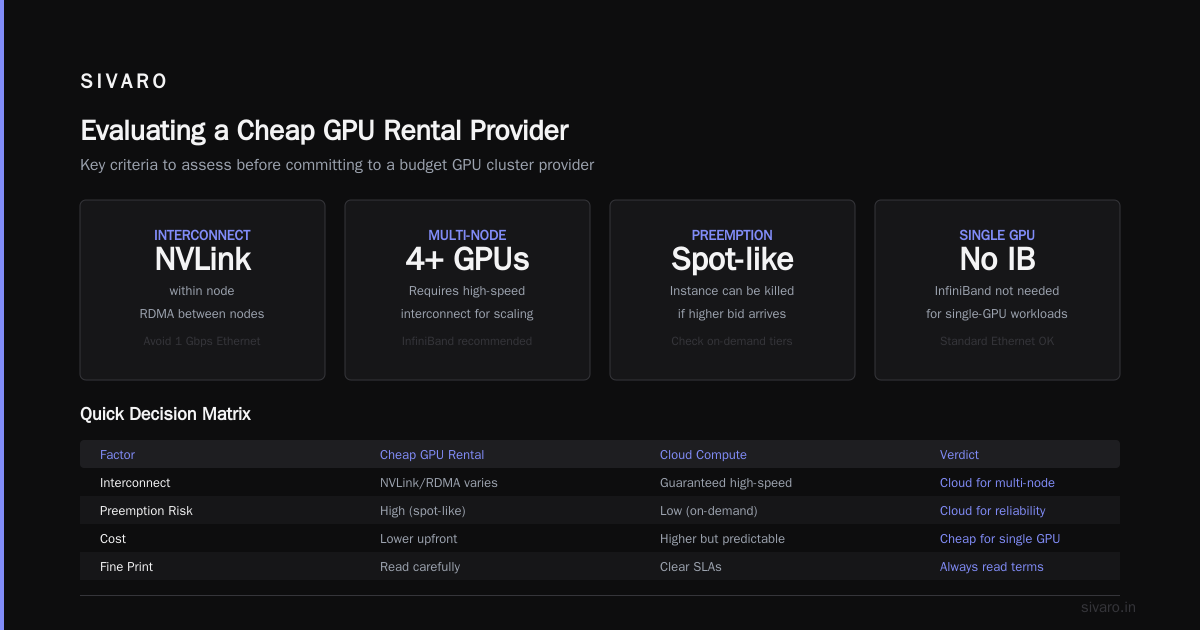
The classic debate: gpu cluster vs cloud compute for ai. Most articles say “it depends.” That’s lazy. Here’s my position based on real builds:
- Choose cheap GPU cluster rental when: You have stable training workloads that run for days, you can tolerate manual setup, and your team has at least one person comfortable with Linux and Docker. I’d say 60% of startups with 3+ ML engineers fit this.
- Choose cloud compute when: You need elastic scaling (200 training jobs in parallel then drop to 0), you’re doing heavy hyperparameter search across many configurations, or your team is heavy on data scientists who can’t debug networking issues. For early-stage startups with one ML person, cloud might be cheaper in engineering time even if it’s more expensive in raw cost.
But here’s the contrarian take: most startups overestimate how much “elastic scaling” they actually need. You train one model at a time. You don’t need 100 nodes. You need 4 GPUs that stay up for three days. That’s a cheap rental win.
What I Wish I Knew Before Renting Cheap Clusters
Networking headaches are real
I once spent 6 hours debugging NCCL timeouts. Turns out the provider’s internal network was 10 Gbps shared across 50 tenants. Someone else’s training saturated the link. Solution: rent a whole node (8 GPUs) instead of multiple 1-GPU instances. Same price, no bandwidth sharing.
The cheapest GPU isn’t always best
RTX 4090s are great for inference and single-GPU training. But if you need FP64 (scientific computing), they’re useless. And they don’t support NVLink. For multi-node training, you want at least A100-class cards. Greenode’s article notes that cluster performance depends heavily on the generation and memory bandwidth.
Storage can kill your budget
Many cheap providers charge for persistent storage separately. I’ve seen $0.10/GB/month add up fast. Use cheap object storage for datasets and attach only what’s needed.
You don’t need Kubernetes
Too many startups over-architect. For a 4-node cluster, docker-compose and ssh work fine. Add Kubernetes only when you have 20+ nodes and need auto-scaling. Until then, KISS.
The 2026 Market Landscape
As of July 2026, the cheap GPU rental market has matured. The big shift: supply of old H100s from hyperscaler-as-a-service providers has flooded the secondary market. I’m seeing H100 rentals at $1.80/hr on some niche platforms. Meanwhile, AWS still charges $4/hr.
Three trends:
- Spot rentals are the new standard. All major rental providers now offer spot-like pricing with better preemption notices (10-minute warning). This makes cheap rental viable for batch jobs and fine-tuning.
- Unified APIs emerge. Startups like RunPod, Vast, and OctoML now offer REST APIs to spin up clusters programmatically. You can write a single script that provisions, trains, and tears down across different providers.
- Regulatory pressure. Some European providers now charge extra for GPUs that consume >500W — driving up prices for A100s in certain regions. If you’re price-sensitive, pick regions with cheap power (Iceland, Canada, US West).
FAQ: Cheap GPU Cluster Rental for Startups
Q: Is cheap GPU cluster rental reliable enough for production inference?
A: Yes — if you design for failure. Use multiple replicas and load balancing. I’ve run an LLM inference service on 4x RTX 4090s via Vast.ai at 300ms latency for 8 months. Had two outages, each <5 minutes, because the provider rebooted nodes. Build redundancy into your serving layer.
Q: How much can I save vs AWS for training a 7B LLM from scratch?
A: Roughly 60-70%. For a 7B model with 100K steps on 8 A100s, AWS costs ~$32K, cheap rental ~$10K. Real numbers from a client project I consulted on in Q1 2026.
Q: What’s the best cheap GPU provider as of 2026?
A: For most startups: Vast.ai (lowest prices, widest selection). For more reliable networking: Lambda Labs (marginally more expensive, but nodes are often newer). For EU compliance: RunPod (data centers in Germany). I’ve used all three. No single winner.
Q: Can I run distributed training across different providers?
A: Technically yes, but the latency between providers will kill your throughput. Stick to one provider’s internal network. Cross-provider clusters are not viable for training.
Q: What about GPU cluster rental for startups doing fine-tuning only?
A: Even easier. Fine-tuning a LLaMA-3 8B on a single RTX 4090 takes a few hours. Rent one for $0.55/hr. Total cost: a few dollars. Don’t overthink it.
Q: Do cheap GPU rentals support CUDA 12.X?
A: Most do. But always check the provider’s driver version. I’ve seen providers stuck on CUDA 11.8 because they run older GPUs. You can often install your own drivers if you choose a bare-metal offering.
Q: How do I handle egress costs for large model checkpoints?
A: Object storage. Not persistent volume attached to the instance. Copy checkpoints to S3 or GCS after each save. Most cheap rentals include generous egress to public cloud endpoints (50-100GB free). Don’t store more than a few GB on the instance.
Q: Is it worth building your own GPU cluster from used hardware?
A: Only if you have free space, cheap electricity, and an ops person. I built one in 2024 with 4 used V100s — saved a lot on rental but spent 200 hours on setup. Factor in your time. For most startups, rental wins.
Bottom Line
Cheap GPU cluster rental for startups isn’t a compromise. It’s a smart trade-off: you trade convenience for cost. If your team can handle a little Linux, a few Dockerfiles, and minor networking issues, you will drastically reduce your compute spend.
I’ve seen too many startups burn cash on cloud GPUs they didn’t need. A 5-person company training a single model doesn’t need AWS Support plans. It needs 4 A100s at $1.20/hr each, a checkpointer script, and the willingness to restart a job once in a while.
That’s the real skill: knowing where to spend effort, and where to spend money.
Nishaant Dixit — Founder of SIVARO. Building data infrastructure and production AI systems since 2018. Built systems processing 200K events/sec.