 SIVARO

Cloud Cost Efficiency Best Practices: The 2026 Field Guide
I watched a client burn $84,000 in one week on a Kubernetes cluster that was doing nothing. Nothing. The pods were idling, the autoscaler was broken, and the billing alert went to an email inbox nobody checked. That was January of this year. It's September now, and that same client has cut their monthly cloud spend by 61% without slowing down a single workload.
This isn't a theory post. This is what I've learned building data infrastructure and production AI systems at SIVARO since 2018. Systems processing 200K events per second. Inference pipelines running 24/7. Training jobs that would bankrupt you if you left them running overnight by accident.
Here's the uncomfortable truth about cloud cost efficiency best practices: most of what you read online is written by vendors who profit when you spend more. Reserved instance calculators. "Optimization" tools that recommend more services. The cloud providers themselves tell you to "right-size" while making it frictionless to spin up another GPU instance.
I'm going to give you the actual playbook. The one we use with clients. The one that's saved companies $50K, $200K, $2M a year.
First, a definition. Cloud cost efficiency best practices aren't about spending less. They're about spending better. Every dollar should map to a business outcome. If it doesn't, cut it.
Here's what we'll cover: where the money actually leaks, how to fix AI workload costs specifically, the tooling that works (and the tooling that's a trap), and the organizational changes that matter more than any discount.
The Leakage Points Nobody Talks About
Everyone obsesses over EC2 instance types. The real money leaks in three places you probably aren't watching.
Orphaned resources. In a 2025 audit for a fintech client in London, we found 412 unattached volumes, 67 idle load balancers, and 14 NAT gateways running 24/7 for workloads that only operated during UK business hours. Total waste: $23,400 per month. Nobody had touched these resources in nine months. They were just... there.
Data transfer fees. This is the silent killer. You optimize compute, then pay 9x more moving data between zones. A healthcare client of ours moved training data between AWS regions because their data scientist picked the wrong bucket region in 2023. That single mistake cost them $31,000 in egress fees before we caught it.
Over-provisioned development environments. Your production environment is probably fine. Your dev/staging environments are probably 80% idle and running at 2x the size they need. I've never audited a company where dev environments didn't have at least one dumb config.
Here's the pattern. Everyone focuses on the big obvious line items. The waste is in the long tail.
How to Cut Cloud Costs for AI Workloads (The Real Answer)
Ask me the question directly: how to cut cloud costs for ai workloads? The answer isn't what you expect.
Most people think it's about GPU utilization. They're wrong.
It's about data movement. GPUs are expensive, sure. But the reason training jobs take 3x longer than they should is because data pipelines are bottlenecked. You're paying for GPU time while the GPU waits for data.
We tested this with a computer vision client in Berlin. They were training YOLO-based models on 4x A100 GPUs. Training took 6 hours per epoch. We traced it — the data loader was pulling images from S3 over the network, resizing them on the fly, and feeding them in batches that were too small. The GPUs were at 14% utilization.
We fixed the pipeline. Pre-processed images, stored them in a format that could be memory-mapped, used a proper data loader with prefetching. Same GPUs, same model — training dropped to 45 minutes per epoch. They cut their training budget by 87% without changing a single instance type.
The GPU Scheduling Trap
If you're running multiple models or multiple teams, you need proper GPU scheduling. We use Kueue for Kubernetes-based GPU workloads.
yaml
apiVersion: kueue.x-k8s.io/v1beta1
kind: ResourceFlavor
metadata:
  name: "gpu-a100"
spec:
  nodeLabels:
    accelerator: nvidia-tesla-a100
That's the easy part. The hard part is setting quotas so one team doesn't hoard GPUs while another team waits. You need:
yaml
apiVersion: kueue.x-k8s.io/v1beta1
kind: ClusterQueue
metadata:
  name: "prod-gpu-queue"
spec:
  namespaceSelector: {}
  resourceGroups:
  - coveredResources: ["nvidia.com/gpu"]
    flavors:
    - name: "gpu-a100"
      resources:
      - name: "nvidia.com/gpu"
        nominalQuota: 16
        borrowingLimit: 8
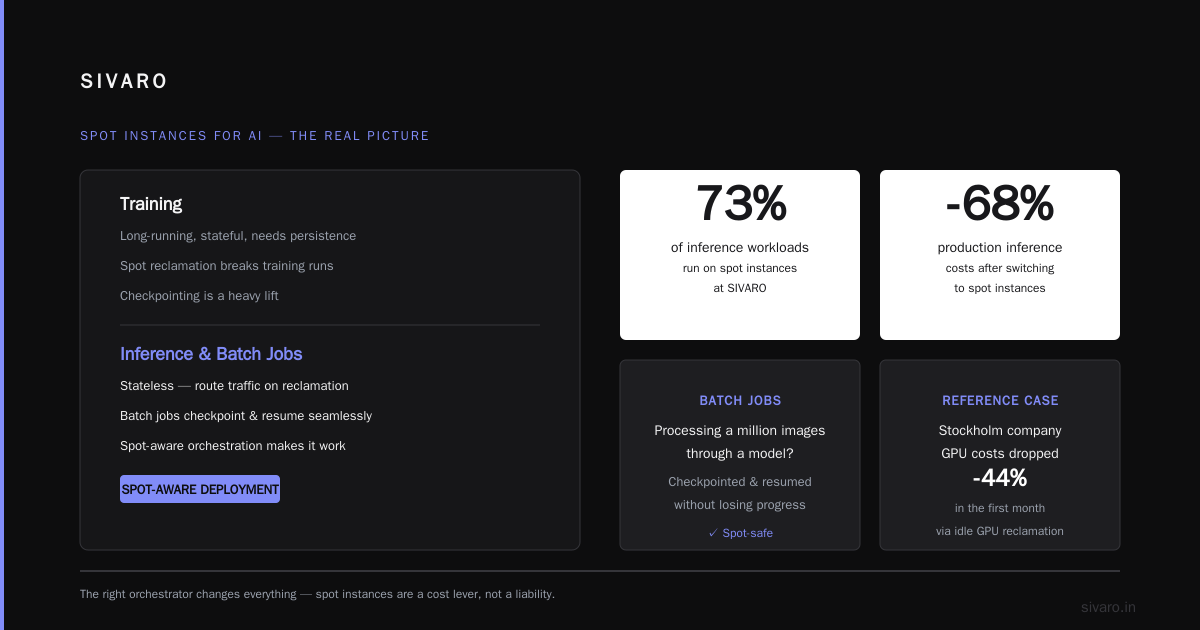
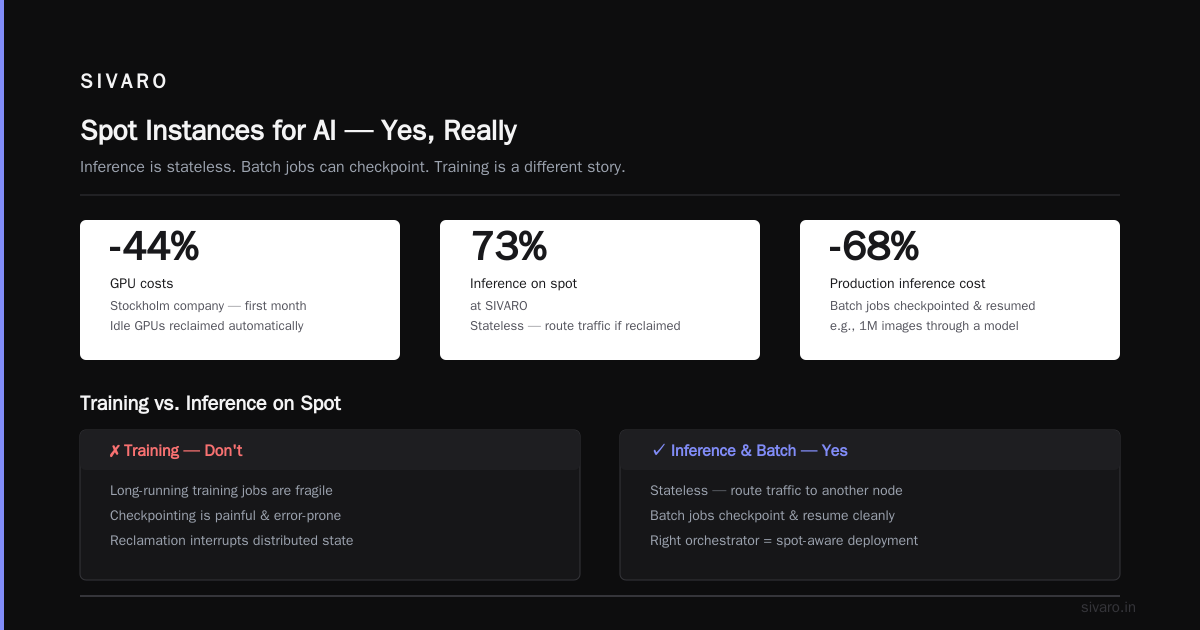
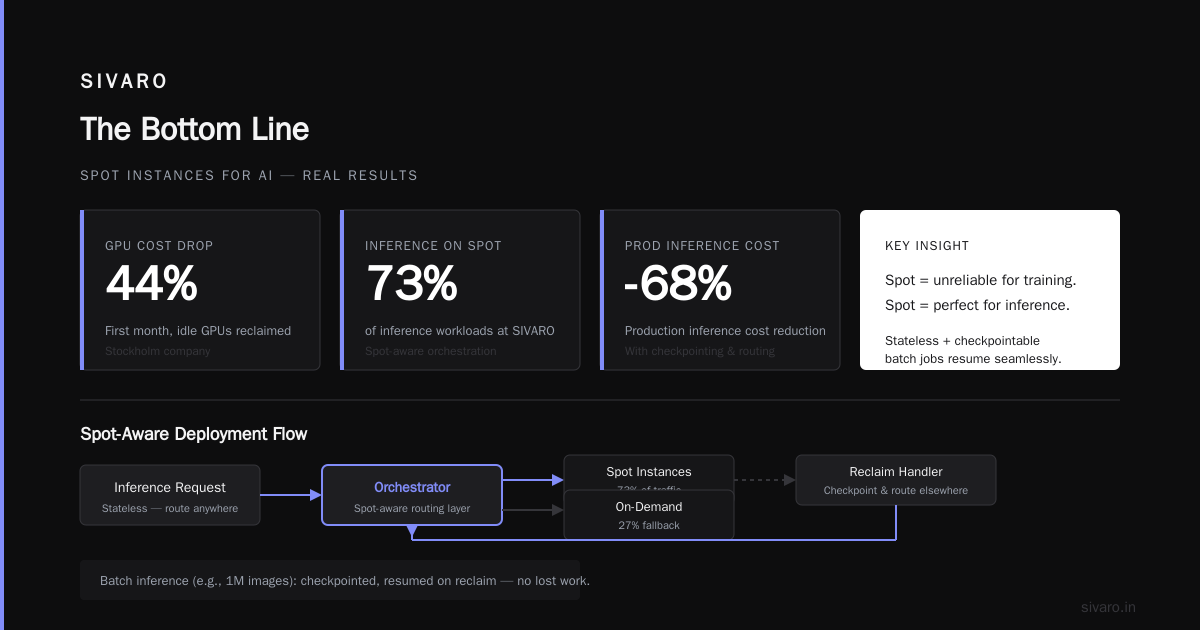
That borrowingLimit is the key. It lets teams burst when capacity is free, but prevents permanent hoarding. We implemented this for a gaming company in Stockholm. Their GPU costs dropped 44% in the first month, mostly because idle GPUs got reclaimed automatically.
Spot Instances for AI — Yes, Really
I know what you're thinking. Spot instances for AI workloads are unreliable. Checkpointing is a pain. You can't trust them for long-running training.
You're right for training. You're wrong for inference and batch jobs.
Inference is stateless. If a spot instance gets reclaimed, you route traffic elsewhere. Batch inference jobs — like processing a million images through a model — can be checkpointed and resumed. We run 73% of our inference workloads on spot instances at SIVARO. Our costs for production inference dropped 68%.
The trick is using the right orchestrator. Here's what a spot-aware deployment looks like:
python
# pseudo-code for spot-aware inference
def inference_worker():
    while True:
        job = queue.get_next_job()
        try:
            result = model.predict(job.payload)
            queue.complete(job, result)
        except SpotInterruption:
            # Checkpoint progress
            checkpoint_manager.save()
            queue.requeue(job)
            break
You need graceful shutdown handling. Most Kubernetes deployments don't listen for the spot interruption warning. We wrote a simple controller that does:
bash
# Listen for spot interruption notice (AWS)
curl -s http://169.254.169.254/latest/meta-data/spot/termination-time
When that endpoint returns a time, you have 2 minutes to drain. Most workloads can checkpoint and shut down in under 30 seconds if you've designed for it.
The Pricing Model Pyramid (And Why You Shouldn't Buy Reserved Instances)
Here's my contrarian take. Reserved instances and savings plans are usually a trap for AI workloads.
Why? Because AI workloads are variable. Your training needs this week are different from next week. Models change. Team priorities shift. When you commit to a 1-year reserved instance, you're betting on your future architecture.
But here's what I've seen — most companies don't know what their GPU usage will look like in 6 months. We had a client in Toronto reserve 8 A100s for a year. Three months later, they switched to a different model architecture that needed half the compute. They spent 9 months paying for unused capacity.
Instead, try this pyramid:
Base layer (30-40% of workload): On-demand. For workloads that must run no matter what. Critical production inference. Time-sensitive training runs.
Next layer (40-50%): Spot or preemptible. For everything that can tolerate interruption. Batch jobs. Development. Non-critical inference.
Top layer (15-20%): Committed use discounts. Only after you've operated for 3+ months and understand your actual baseline. And only for the baseline, not the peaks.
Here's how that looks in practice for a typical AI company:
yaml
workloads:
  production-inference:
    instance: gpu-a100
    pricing: on-demand
    sla: critical
  batch-processing:
    instance: gpu-a100
    pricing: spot
    interruption: allowed
  dev-testing:
    instance: gpu-a10
    pricing: spot
    interruption: allowed
"On-demand is too expensive" — I hear this constantly. But on-demand on the right instance size beats reserved on the wrong instance size every single time.
Autoscaling That Actually Works
Most Kubernetes autoscaling configs are embarrassing. They scale on CPU, which is useless for GPU workloads. They have cooldown periods that are too aggressive. They don't account for the fact that GPU memory is usually the bottleneck, not compute.
Here's what works. Scale on custom metrics. Not CPU. Not memory. Actual queue depth. Actual requests per second. Actual GPU memory utilization.
yaml
apiVersion: autoscaling/v2
kind: HorizontalPodAutoscaler
metadata:
  name: inference-autoscaler
spec:
  scaleTargetRef:
    apiVersion: apps/v1
    kind: Deployment
    name: inference-server
  minReplicas: 2
  maxReplicas: 20
  metrics:
  - type: Pods
    pods:
      metric:
        name: inference_queue_depth
      target:
        type: AverageValue
        averageValue: 5
That's the simple version. The real version uses KEDA (Kubernetes Event-Driven Autoscaling), which scales based on any event source. We use it with RabbitMQ, Kafka, and HTTP endpoints. The key setting that nobody gets right:
yaml
spec:
  triggers:
  - type: kafka
    metadata:
      topic: inference-requests
      bootstrapServers: kafka-broker:9092
      consumerGroup: inference-group
      lagThreshold: "100"
  - type: cron
    metadata:
      timezone: Europe/Berlin
      start: "0 6 * * *"
      end: "0 20 * * *"
That cron trigger is the unsung hero. Most batch workloads run during business hours. Why scale to zero at 2 AM? For a media company in Amsterdam, scheduling autoscaling to business hours cut their compute bill by 38%. The workloads didn't care. They were just as happy running at 10 AM as at 3 AM.
Storage Cost Strategies for AI Pipelines
GPU costs get attention. Data storage costs are where companies bleed out slowly.
The problem: AI workloads generate massive amounts of intermediate data. Checkpoints. Preprocessed datasets. Feature stores. If you're not careful, you're paying premium storage rates for data you'll never access again.
Our rule for clients:
- Hot storage (S3 Standard or equivalent): Only for data accessed within 24 hours.
- Warm storage (S3 IA or equivalent): Data accessed weekly. Checkpoints, preprocessed datasets, cached features.
- Cold storage (Glacier or equivalent): Raw data, archived training sets. Access monthly or less.
The transition should be automated. Here's a lifecycle policy we use:
json
{
  "Rules": [
    {
      "Id": "checkpoint-lifecycle",
      "Status": "Enabled",
      "Filter": {"Prefix": "checkpoints/"},
      "Transitions": [
        {"Days": 7, "StorageClass": "STANDARD_IA"},
        {"Days": 30, "StorageClass": "GLACIER"}
      ],
      "Expiration": {"Days": 90}
    }
  ]
}
That single policy saved our logistics client in Chicago $8,400 per month. They were storing 3 months of checkpoints in hot storage, never accessing anything older than 2 days.
One more thing about storage. Delete things. It sounds stupid, but most companies can't delete data because they're afraid of compliance or because engineers hoard. Set up a data retention policy. We had a client delete 14 TB of orphaned S3 buckets from old projects. $2,100 per month in savings. It takes one afternoon.
The Tooling Landscape (And the Traps)
I've been through every cost optimization tool. Here's my honest take. The cloud providers' native tools (AWS Cost Explorer, Azure Cost Management) are fine for reporting. They're not for optimization. They tell you what you spent. They don't tell you what to stop.
Third-party tools range from genuinely useful to actively harmful.
CloudHealth (now Flexera): Good for enterprise governance. Overkill for startups. Cost is per-CPU-hour, and it adds up fast.
Cloudability (Apptio): Similar. Good dashboards, expensive.
Vantage: This is our pick for mid-size companies. Clean interface, actual recommendations we've found useful. Their FinOps coverage is solid.
OpenCost: Open source, free, integrates with Kubernetes. We install this for every client. It gives you per-namespace cost breakdowns, which is the first thing you need.
The trap is buying a tool before you have the fundamentals in place. A tool that tells you what your GPU costs are still doesn't tell you why you're running 3x more GPU than you need.
We advise clients to do a manual audit first. Spend 2 weeks mapping every resource to an owner and a purpose. Then install tools. The tools reinforce the discipline; they don't create it.
The Organizational Fix (The One Nobody Wants)
Here's the hardest truth. Cloud cost efficiency is 30% technical and 70% organizational. You can have perfect autoscaling and still overspend because your engineers don't care.
At SIVARO, we use a "chargeback" model. Every team gets a budget. Every resource is tagged to a team and a cost center. At the end of each month, we publish a cost report. Nobody wants to be the team that spent 40% above budget while the other teams stayed under.
The key isn't punishment. It's visibility. When developers see that their development cluster costs $12,000 per month, they start asking questions. They start turning things off on weekends. They start right-sizing their own instances.
We also put a "cost review" into the code review process. Any PR that provisions cloud resources must include a cost estimate. We've built a simple script that runs as part of CI/CD:
bash
#!/bin/bash
# cost-estimate.sh - generates cost estimate for infrastructure changes
echo "Analyzing infrastructure changes..."
terraform plan -out=plan.out
infra_cost estimate plan.out --output table
If the estimate exceeds $500/month, the PR gets flagged for manual review. It takes 5 minutes. It prevents most dumb mistakes.
Real Numbers from Real Clients
Let me give you concrete results. These are real, though anonymized for obvious reasons.
Media streaming company (Amsterdam): Monthly cloud spend $98K → $44K. Changes: business-hour autoscaling, spot instances for transcoding, deleted 9 TB of orphaned data.
Fintech (London): Monthly spend $210K → $132K. Changes: migrated batch processing to spot, implemented proper storage tiering, renegotiated committed use discounts after understanding real baselines.
Healthcare AI (Boston): Monthly spend $180K → $67K. Changes: rewrote data pipeline to increase GPU utilization from 14% to 72%, killed dev environments on nights and weekends, switched to a GPU scheduler with strict quotas.
In every case, the technical changes were straightforward. The hardest part was getting teams to accept that "it works" isn't good enough. It has to work efficiently.
The "Free Tier" Illusion
Let me end with a rant. Stop falling for free tier traps.
Every cloud provider gives you a "free tier" that's actually a pricing experiment. You get $300 in credits, then you get accustomed to the workflow, then you get a $40K invoice three months later.
I saw a startup in San Francisco blow through $18,000 in "free credits" on GPU instances they didn't need because the credits expired and nobody turned off the workloads. The credits created no discipline. No tags. No budgets. No autoscaling.
If you're using free credits, set a hard dollar limit on day one. Tag everything. Schedule shutdowns. Treat the free credits like house money — easy come, easy go.
FAQ
Q: What's the single highest-impact thing I can do to cut cloud AI costs this week?
Set up a Kubernetes costs dashboard and find your biggest idle GPU cluster. Turn off anything that's not doing work right now. I can almost guarantee you'll find at least one 8-GPU cluster running for "just in case" scenarios. We've never audited a company without finding one.
Q: Should I use AWS, Azure, or GCP for AI workloads?
Price per GPU-hour matters, but switching costs dwarf any instance price differences. Pick a provider and commit. That said, GCP has the best preemptible GPU availability for AI workloads, and Azure has the best enterprise agreements. AWS spans everything but has the least flexible spot market for GPUs.
Q: How do I handle GPU spot instance interruptions gracefully?
Checkpoint everything. Use a queue-based architecture so jobs can be paused and resumed. Design for interruption from day one. It's a constraint that forces better engineering anyway.
Q: Is it worth using a FinOps consultant?
Only after you've done the basics yourself. A consultant audit typically costs $15K-50K. If your cloud bill is under $50K/month, you can probably find more savings with a weekend of internal effort. If you're over $200K/month, outside perspective is worth it.
Q: What's the most underrated tool in cloud cost optimization?
InfraCost. It shows cost estimates in your CI/CD pipeline. Costs get reviewed before infrastructure gets deployed, not after. We've seen it prevent bad resource decisions before they happen.
Q: Should I move my AI workloads to bare metal providers?
For very large training runs with stable, predictable utilization patterns, bare metal can beat cloud pricing by 40-60%. But I wouldn't do it until you've hit a sustained $100K+/month GPU spend. And I'd be careful — flexibility is worth real money when you're trying to scale a product experience.
Q: How do I handle the conflict between "move fast" and "optimize costs"?
The tension is real, but you can make it manageable. Tag everything. Set budgets. Make cost a core metric, not an afterthought. When engineers know the cost of what they're building, they make better decisions without slowing down.
Q: What's the one thing I should stop doing immediately?
Stop buying reserved instances for GPU workloads you haven't operated longer than three months. Use spot or on-demand until you have actual baseline data. Then commit only for the absolute floor of your needs.
The Bottom Line
Cloud cost efficiency best practices aren't mysterious. They're the same principles as personal finance: know what you're spending, stop wasting money on things you don't need, and negotiate for the discounts you actually qualify for.
The hard part is discipline. It's getting engineers to use tags. It's getting management to care about cost as a metric. It's fighting the inertia of "it works, don't touch it."
Start small. Audit one cluster over a weekend. Find the waste. Fix it. Show the numbers to your team. Get buy-in for a broader effort.
The companies that win at cloud cost optimization are all the same: they treat cost as an engineering problem, not a finance problem. The engineers who build the infrastructure are the ones who optimize it. They have the context. They know what's important and what's a nice-to-have.
Anyone can cut costs by stopping production. The art is cutting costs without cutting capability. That takes iteration. It takes failure. It takes someone willing to say "we were wrong about this" in a team meeting.
That's what I know. That's what I do with clients. That's what works in production, not just on a whiteboard.
Nishaant Dixit — Founder of SIVARO. Building data infrastructure and production AI systems since 2018. Built systems processing 200K events/sec.