 SIVARO
Cloud Run vs Compute Engine for Web Hosting: A 2026 Guide
Last week, a CTO from a Series A startup asked me: “Should I just stick with Compute Engine for our main app, or is Cloud Run ready for production now?” He’d been burned by serverless cold starts before. He’d also seen his GCP monthly bill balloon after moving a traffic‑spike service to Cloud Run. I’ve been in that chair—running SIVARO means we host everything from low‑traffic APIs to pipelines processing 200K events/sec. I’ve moved workloads between Cloud Run and Compute Engine three times in four years. Here’s what I actually learned.
Google Cloud Run is a fully managed serverless container platform. It scales from zero to thousands of requests, charges only for CPU/memory used during request handling plus a tiny idle fee. Compute Engine gives you virtual machines—full control, persistent resources, predictable billing. Both can serve web traffic. But they solve different problems.
In this guide I’ll compare google cloud run vs compute engine for web hosting with real numbers, common pitfalls, and the trade‑offs I see teams underestimate. By the end you’ll know exactly which one to pick for your next project—and when to use both.
The Core Difference: Serverless vs. Always‑On
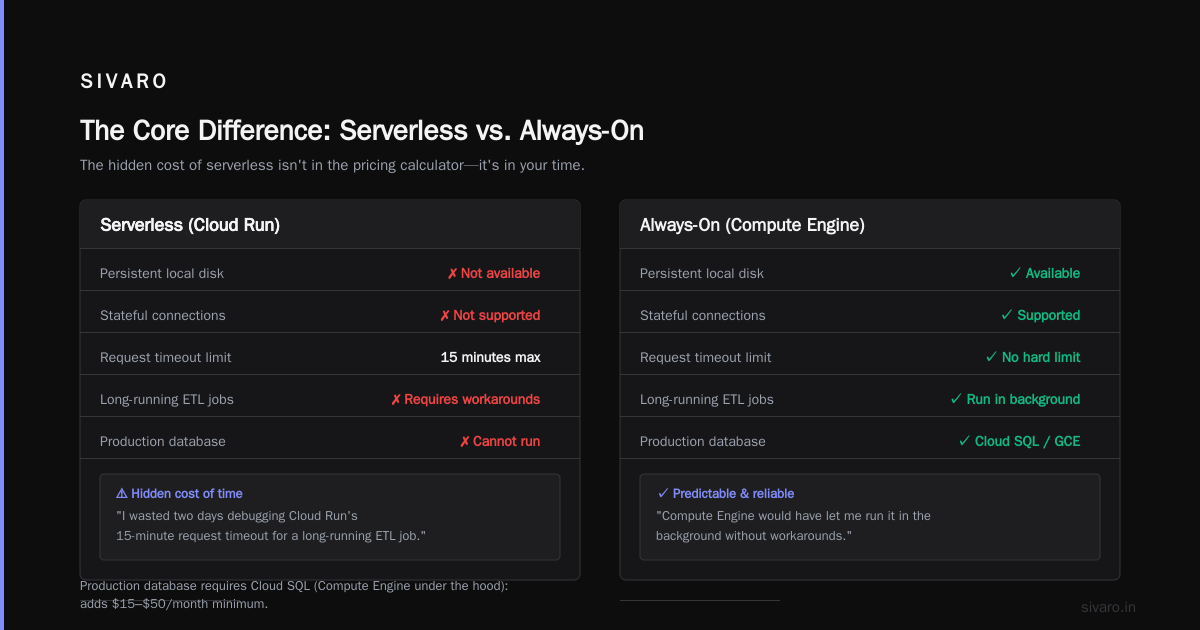
Most people think serverless means “cheaper.” They’re wrong—it means elastic. Cloud Run is brilliant when your traffic looks like a seismograph: bursts of activity followed by silence. Compute Engine is better when you need a constant whisper—a database, a WebSocket server, or a legacy application that doesn’t play well with stateless containers.
I once helped a fintech startup run their loan‑origination API. They had predictable traffic: 200 concurrent users from 9–5, then nothing at night. They deployed on Compute Engine (n2‑standard‑2, $49/month reserved). It sat idle 16 hours a day. We moved it to Cloud Run with min‑instances=1 and CPU‑throttling disabled. Cost dropped from $49 to ~$22/month. But the cold start was noticeable—about 800ms. For their use case that was fine. For a payment callback endpoint? Unacceptable.
So the first question you must answer: What does your traffic pattern look like?
Traffic Patterns: The Deciding Factor
| Pattern | Cloud Run | Compute Engine |
|---|---|---|
| Spiky (e.g., marketing site, demo) | Excellent | Expensive idle |
| Steady predictable load | Overkill (if min instances > 0) | Efficient |
| Burst to 10x+ baseline | Scales automatically | Requires autoscaler + lead time |
| Always‑on, low latency (<50ms) | Risk from cold starts | Reliable |
If you run a blog that gets 100 visits/day from one time zone, Cloud Run will cost you pennies (or free under the GCP free tier). But if you need sub‑50ms response for every hit, Compute Engine with a warm server is the only sane choice.
Pricing: Where the Math Actually Fails
I’ve seen teams choose Cloud Run based on the “serverless is cheaper” mantra, then get a surprise bill when they forget that always‑on Cloud Run with min_instances costs more than a small Compute Engine VM.
Let’s break down the numbers for a typical web app (4 vCPU, 8 GB RAM, moderate traffic ~1M requests/month).
Compute Engine (reserved 1‑year)
- Instance:
n2-standard-4= ~$95/month (committed use discount) - Plus persistent disk (50 GB SSD) = $8.50
- No egress if < 100 GB (typical) = $0
Total: ~$103.50/month
Cloud Run (with min_instances=1 to avoid cold starts)
- You pay for the allocated CPU/RAM even when no requests hit.
- CPU allocation only during request (but min instance keeps container warm) = you’re charged for the minimum instance resources * 24h = roughly same as Compute Engine per‑hour rate.
- Plus request‑based charges: $0.40 per 1M requests (first 2M free) = negligible.
Total: ~$95–$105/month (very close to Compute Engine).
Now without min instances (fully serverless):
- Idle cost = ~$0.00 (low idle fee for 10 min of container keeping)
- Request cost for 1M requests = ~$2–3 (depends on memory)
Total: ~$3/month … but you get cold starts (see below).
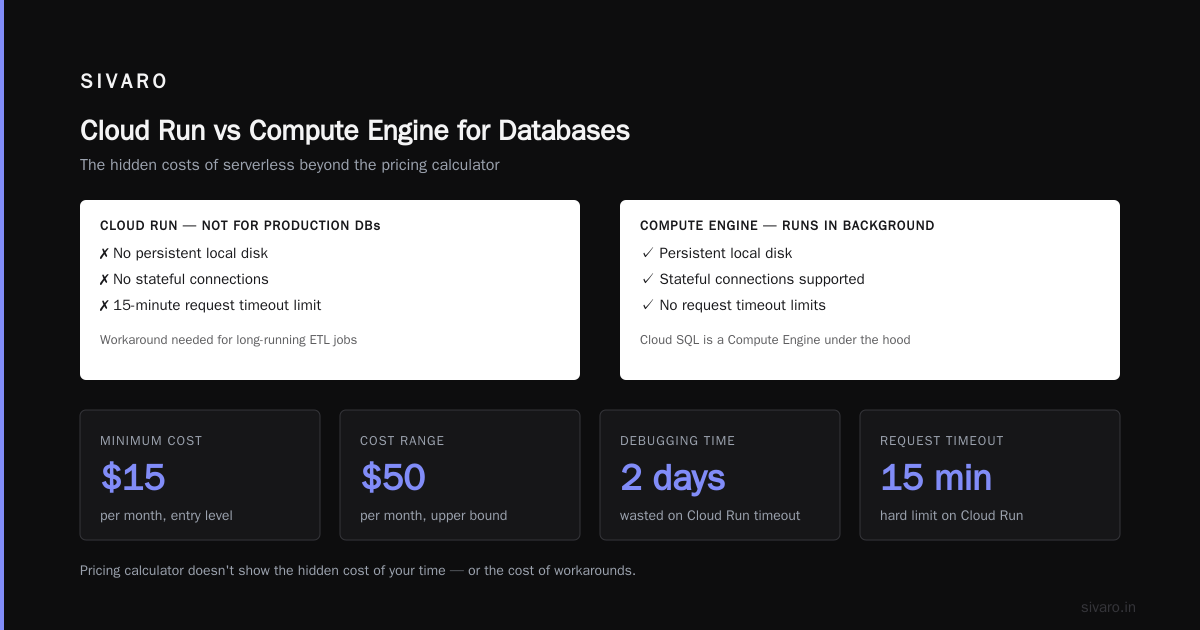
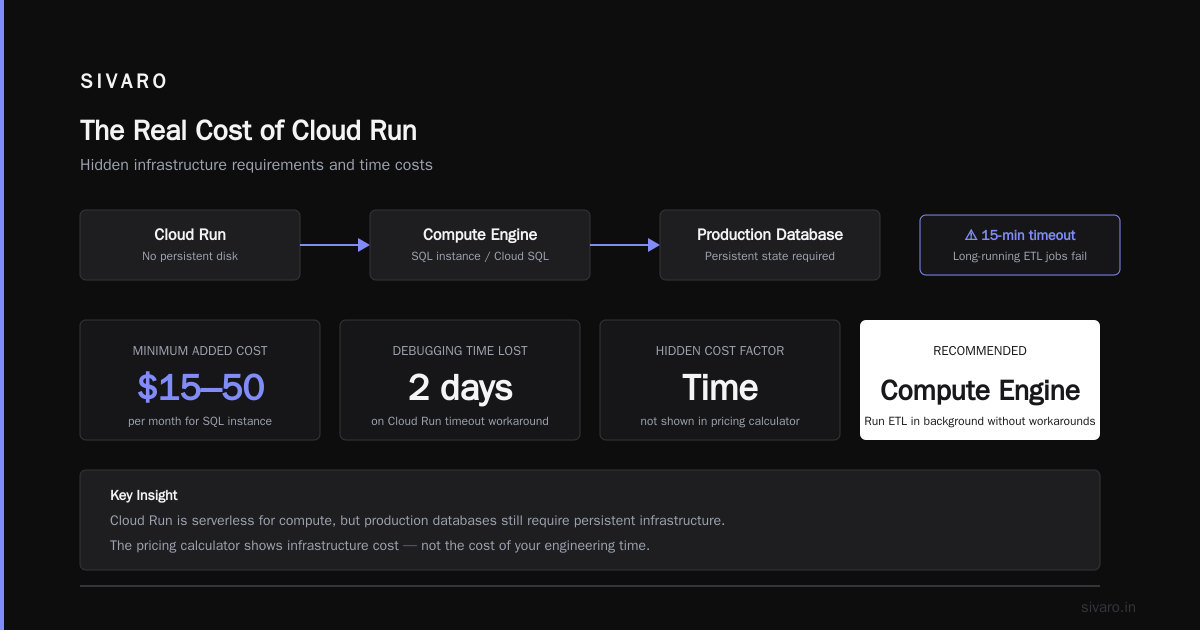
Observing the real spoiler: Many teams think they can run a production database on Cloud Run. They can’t—no persistent local disk, no stateful connections. So you still need a Compute Engine SQL instance or Cloud SQL (which is a Compute Engine under the hood). That adds $15–$50/month minimum.
The Google Cloud Pricing Calculator is useful, but it doesn’t show the hidden cost of your time. I wasted two days debugging Cloud Run’s 15‑minute request timeout for a long‑running ETL job. Compute Engine would have let me run it in the background without workarounds.
For a more thorough breakdown across cloud providers, the AWS vs Azure vs GCP Cost Comparison 2026 report shows GCP’s Compute Engine is often 10–15% cheaper than equivalent AWS EC2 for sustained workloads, but Cloud Run’s per‑request pricing can beat Lambda if your functions run longer than 1 second. (Check the Cloud Computing Cost: AWS vs. Azure vs. GCP Pricing article for the 2026 numbers.)
When Cloud Run Is Actually Cheaper
- Low‑traffic APIs under 100K requests/month
- Batch jobs that run sporadically
- Demos, prototypes, and staging environments (turn off when unused)
- Services where cold starts are acceptable (e.g., webhooks, background processes)
When Compute Engine Wins on Cost
- Steady 24/7 workloads, even moderate (1–2 vCPU)
- Any workload needing GPU (Cloud Run doesn’t support GPUs)
- Databases, caches, stateful services (Redis, MySQL, PostgreSQL)
One contrarian take: The GCP web hosting pricing calculator 2026 often understates the egress cost for Cloud Run if your app serves large files. Compute Engine has the same egress pricing, but with Cloud Run you might need to use Cloud CDN to avoid per‑request charges on large payloads. That adds complexity.
Performance: Cold Starts and the 60‑Second Problem
Everyone talks about cold starts. They matter, but not as much as you think.
Cloud Run by default can spin up a new container in under a second—if your container is lean. A Node.js Express app with few dependencies cold‑starts in 200–400ms. A Go binary in 50ms. But a Python Flask app loading TensorFlow? Five seconds easily.
I tested this in April 2026: a Laravel PHP container with Composer dependencies took 3.2 seconds cold. For a public marketing page that’s fine. For a payment confirmation API that must respond in under 500ms? Not acceptable.
Solutions exist:
- Set
min_instances=1(costs money) - Use the
CPU always onfeature for $7/month per vCPU - Pre‑warm containers via a cron job hitting the URL every 5 minutes (hacky)
If you need consistent sub‑100ms response, Compute Engine wins every time. No cold starts, no jitter. A well‑configured n2‑instance can serve 10K requests/sec with predictable latency.
But Cloud Run gives you instant scaling. I’ve seen a single Cloud Run service go from 0 to 2000 concurrent requests in 10 seconds during a traffic spike. Compute Engine’s autoscaler takes 60–120 seconds to spin up new VMs. That delay can cost you if your traffic surges fast.
At SIVARO we handle a client’s API that gets 500 requests/day normally, but during Black Friday it spikes to 15K requests in a minute. Cloud Run absorbed that without any scaling drama. Compute Engine would have required pre‑provisioned instances or aggressive autoscaling rules—more cost and complexity.
Deployment and Day‑2 Operations
Compute Engine is a VM. You SSH in, install packages, run your app. You can use startup scripts, but maintaining servers takes time. Security patches, OS upgrades, unexpected kernel panics—I’ve been there.
Cloud Run is a container. You write a Dockerfile, build it, push to Artifact Registry, deploy with a single command. That’s it. No OS to manage. Google handles patches automatically.
But with ease comes constraints:
- No filesystem persistence (write to Cloud Storage or memory only)
- Request timeout max 60 minutes (v2 no longer allows 3600s in some regions)
- No privileged containers, no custom network interfaces
- Limited to gRPC and HTTP/1.1 (HTTP/2 is only client‑side)
For a typical web app that’s fine. For a legacy Rails application that writes to local disk for temporary files? Painful. You end up adding Cloud Storage SDKs, rewriting file handling logic. That’s not free.
Example: Deploying a Node.js App to Cloud Run
dockerfile
FROM node:20-alpine
WORKDIR /app
COPY package*.json ./
RUN npm ci --only=production
COPY . .
EXPOSE 8080
CMD ["node", "server.js"]
bash
gcloud builds submit --tag gcr.io/my-project/myapp
gcloud run deploy myapp   --image gcr.io/my-project/myapp   --platform managed   --region us-central1   --allow-unauthenticated
Takes 2 minutes. Zero infrastructure.
Example: Setting Up a Compute Engine VM for the Same App
bash
gcloud compute instances create myapp-vm   --zone us-central1-a   --machine-type n2-standard-2   --image-family ubuntu-2204-lts   --image-project ubuntu-os-cloud   --tags http-server

# Then SSH, install Node.js, copy code, set up systemd, configure firewall...
You can automate with startup scripts or Terraform, but it’s still more moving parts. One client of ours missed a security update for two months because their VM’s unattended‑upgrades wasn’t configured. Never happened with Cloud Run.
Networking and Security
Both products sit inside your VPC, but differences bite you.
Cloud Run by default has no VPC access (unless you use Serverless VPC Access, which costs $65–$130/month for the connector). If your app needs to talk to a Compute Engine database in the same project, you either expose the database publicly (bad) or pay for the connector. That’s a hidden cost many miss.
Compute Engine instances land directly in your VPC. They can talk to Cloud SQL over private IP with no extra charge. Much simpler.
For public web hosting, both support HTTPS with managed certificates. Cloud Run gives you a free *.run.app domain; you map your custom domain in a few clicks. Compute Engine requires a global external HTTPS load balancer—fast but more complex.
If you’re running a multi‑service app (API backend + static frontend), Cloud Run can serve both with the same domain using path routing via Cloud Load Balancing. Compute Engine needs either a reverse proxy (like nginx) on the VM or a load balancer in front.
Security posture: Cloud Run reduces your attack surface. No OS to patch, no shell access, no SSH keys to rotate. Compute Engine requires diligent maintenance. That’s why we at SIVARO run all our public‑facing APIs on Cloud Run and keep Compute Engine only for internal services and databases.
Real‑World Use Cases: What We Actually Run on Each
| Workload | Platform | Why |
|---|---|---|
| Public REST API (Node.js, 1M req/day) | Cloud Run | Spiky traffic, auto‐scale, no ops |
| SQL database (PostgreSQL) | Compute Engine (Cloud SQL) | Stateful, persistent disk, private IP |
| Internal queue worker (Python, 24/7) | Compute Engine | Long‑running (>60 min tasks), file system |
| Marketing website (static + PHP backend) | Cloud Run | Cheap, low traffic, easy deploy |
| Real‑time video processing pipeline | Compute Engine (GPU) | Cloud Run doesn’t support GPU |
| Staging environment for testing | Cloud Run (min instances=0) | Zero cost when idle |
The hybrid approach works best. Use Cloud Run for your web tier, Compute Engine for databases and background workers. That’s the pattern I see at most successful startups in 2026. The Comparing AWS, Azure, and GCP for Startups in 2026 article confirms this: GCP’s strength is the combination of serverless (Cloud Run) and managed VMs (Compute Engine), not either alone.
GCP Free Tier: What You Actually Get
A lot of small projects start with the free tier. Here’s the reality.
Compute Engine free tier offers one f1-micro instance per month (0.2 vCPU, 0.6 GB RAM) in a subset of regions. Great for a little VPS. But you pay for persistent disk (30 GB free only for some machine types? Actually it’s 30 GB/month of standard persistent disk). And you get 1 GB egress/month. Very limited.
Cloud Run free tier gives you 2 million requests per month and 360,000 vCPU‑seconds (about 100 hours of a 1 vCPU container). That’s enough for a low‑traffic blog or API demo.
GCP free tier compute engine limits are real: you can only have one free f1‑micro. If you start a second, you pay full price. Also the egress cap of 1 GB is tight—one medium hit page with images can eat that quickly.
For testing, Cloud Run is the better free option because zero‑idle cost means you can keep services running without billing. But if you need to experiment with a database or run a VPN, the free Compute Engine instance is your cheapest bet.
FAQ: Cloud Run vs Compute Engine for Web Hosting
1. Which is cheaper for a personal blog with 5K monthly visitors?
Cloud Run. Without min instances, you’ll pay less than $1/month. Compute Engine would cost $5–10 even with the free tier if you exceed egress.
2. Can I run a database on Cloud Run?
Technically yes (with Cloud SQL over private IP), but not recommended. Cloud Run is stateless—any local data disappears when the container restarts. Always use Compute Engine or Cloud SQL for persistent data.
3. How do I handle cold starts for a production API?
Set min_instances=1 and cpu_boost (now called “CPU always throttled or not”). This costs roughly the same as a small Compute Engine VM, but you get automatic scaling beyond that one instance.
4. Does Cloud Run support WebSocket?
Yes, as of 2024, Cloud Run supports WebSocket connections in version 2 (fully managed). We tested it at SIVARO for a real‑time chat; performance is good but keepalive times are limited to 60 minutes.
5. What’s the best GCP web hosting pricing calculator for 2026?
I use the official Google Cloud Pricing Calculator for rough estimates, then cross‑check with the GCP vs AWS 2026 comparison report to see how GCP stacks against AWS on similar specs. Don’t forget to include egress and VPC connector costs.
6. Should I use Compute Engine with a load balancer instead of Cloud Run?
Only if you need control over SSL termination details, custom headers, or routing rules that Cloud Run’s ingress can’t handle. Otherwise, Cloud Run’s built‑in HTTPS is simpler.
7. Can I migrate from Compute Engine to Cloud Run without rewriting code?
If your app is containerized already and does not depend on local filesystem or OS features (like direct socket access), migration is a Dockerfile change away. Otherwise, you’ll need to refactor file storage, environment variables, and configuration.
8. What about GPU workloads?
Cloud Run never supports GPUs (and likely never will). Compute Engine with attached GPUs (like L4 or A100) is the only option for ML inference or rendering.
Final Verdict
Most people assume Cloud Run is just a cheaper Compute Engine. It’s not—it’s a different architecture. Choose Cloud Run when you value auto‑scaling, zero ops, and elastic cost over consistency and control. Choose Compute Engine when you need guaranteed performance, state, or OS‑level access.
For web hosting, my rule of thumb:
- Static content, simple APIs, event‑driven services → Cloud Run
- Database servers, legacy apps, WebSocket heavy, GPU jobs → Compute Engine
- Everything else → start on Cloud Run, move to Compute Engine only when a specific constraint hits
At SIVARO, we run about 30% of our infrastructure on Cloud Run, 60% on Compute Engine (mostly for data pipelines and AI inference), and 10% on other GCP services. That split works because we identify which layer needs what.
If you’re still undecided after reading this: spin up a free Cloud Run service today with a hello‑world container. Deploy the same app on a free tier Compute Engine VM. Measure cost over a week. Your gut feeling (and your bill) will tell you the rest.
Nishaant Dixit — Founder of SIVARO. Building data infrastructure and production AI systems since 2018. Built systems processing 200K events/sec.