 SIVARO
Containerizing AI Agents for Deployment: A Practical Guide
I’ll never forget the first time one of our AI agents went down in production. It was late 2024. The agent had been orchestrating a multi-step data pipeline for a fintech client. Suddenly, it started returning hallucinations — not just wrong answers, but completely fabricated transaction histories. The root cause? A missing Python package in the runtime environment that silently failed during import, corrupting the agent’s internal state. We lost six hours of logs and $12,000 in compute credits before we figured it out.
That’s when I stopped treating containers as “just a Dockerfile” and started treating them as the core reliability layer for AI agents.
Containerizing AI agents for deployment isn’t just about packaging code. It’s about controlling every variable — dependencies, model version, API keys, memory limits, retry logic — so that when something fails (and it will), you can isolate, debug, and roll back in minutes, not days. This guide covers exactly what I’ve learned from shipping production AI agents at SIVARO: how to build, orchestrate, monitor, and manage the cost of running AI agents in production, all inside containers.
Let’s get into it.
Why Your AI Agent Needs a Container (Not Just a Dockerfile)
Most people think containerization is about “reproducibility.” They’re right, but that’s the boring part. The real value is blast radius control.
An AI agent isn’t a stateless web server. It talks to LLMs, vector databases, external APIs, and sometimes executes code. One bad prompt can cascade into a corrupted session, a leaked credential, or a runaway loop that burns through your API budget. When that happens, you want to kill the container, not the whole cluster.
At SIVARO, we run agents in their own pods with strict resource limits. If one agent starts consuming too much memory due to a hallucination-induced memory leak (yes, that happens), its OOM killer fires while the other 50 agents keep humming. Without containers, you’d be facing a server-level outage.
Why AI Agents Fail in Production breaks down the “Agent Failure Stack” — environment mismatches, dependency drift, missing model files, and runtime state corruption. Every single one of those is a containerization problem first. A well-built container image locks in the Python version, the library pinning, the model artifact hash, and the environment variables. It turns a production incident into a simple “rollback the image tag.”
I’ll say it again: containerizing AI agents for deployment is your first line of defense against the chaos of production AI.
Building the Image: Base Images, Dependencies, and Model Weights
Here’s where most teams screw up. They start with python:3.11-slim, pip install everything, and call it done. That image is probably 2.5GB and includes a thousand packages you don’t need. Then they wonder why the agent takes 90 seconds to cold-start.
Base image strategy: Use python:3.11-slim-bookworm (or 3.12-slim if you’re on the edge). Remove apt packages after install. Then install only the exact PyPI packages your agent needs — not the entire langchain ecosystem.
But the real challenge is model weights. If your agent uses a local LLM (like Llama 3 or Mistral), you can’t download 7GB of weights at startup. It’ll time out. Instead, bake the weights into the image using a multi-stage build.
Here’s the Dockerfile we use at SIVARO for an agent that runs a small on‑device LLM and connects to an external API:
dockerfile
# Stage 1: Build environment
FROM python:3.11-slim-bookworm AS builder
WORKDIR /app
COPY requirements.txt .
RUN pip install --user --no-cache-dir -r requirements.txt

# Stage 2: Runtime
FROM python:3.11-slim-bookworm AS runtime
WORKDIR /app
COPY --from=builder /root/.local /root/.local
COPY agent/ agent/
COPY model/ model/   # Pre-downloaded quantized weights

# Set environment variables (no secrets in image)
ENV MODEL_PATH=/app/model/llama-3-8b-q4.gguf
ENV AGENT_TIMEOUT=30

# Health check
HEALTHCHECK --interval=30s --timeout=10s --retries=3   CMD python -c "import agent; agent.health()" || exit 1

ENTRYPOINT ["python", "agent/main.py"]
This image weighs 980MB. We cut 60% from the old 2.5GB version by removing dev dependencies and using a slim base.
Dependency pinning is non‑negotiable. Use pip freeze > requirements.txt and commit it. Then pin the pip version in the Dockerfile. I’ve seen a pip install that worked fine on Monday break on Wednesday because pip resolved a transitive dependency differently. That’s a production incident waiting to happen.
One more thing: don’t put secrets in the image. Ever. Use environment variables injected at runtime (Kubernetes Secrets, AWS Secrets Manager, HashiCorp Vault). If your container image gets pulled by a malicious actor, they shouldn’t see your OpenAI API key.
Orchestration: Kubernetes vs Nomad vs AWS ECS for Agent Workflows
You’ve got your image. Now where do you run it?
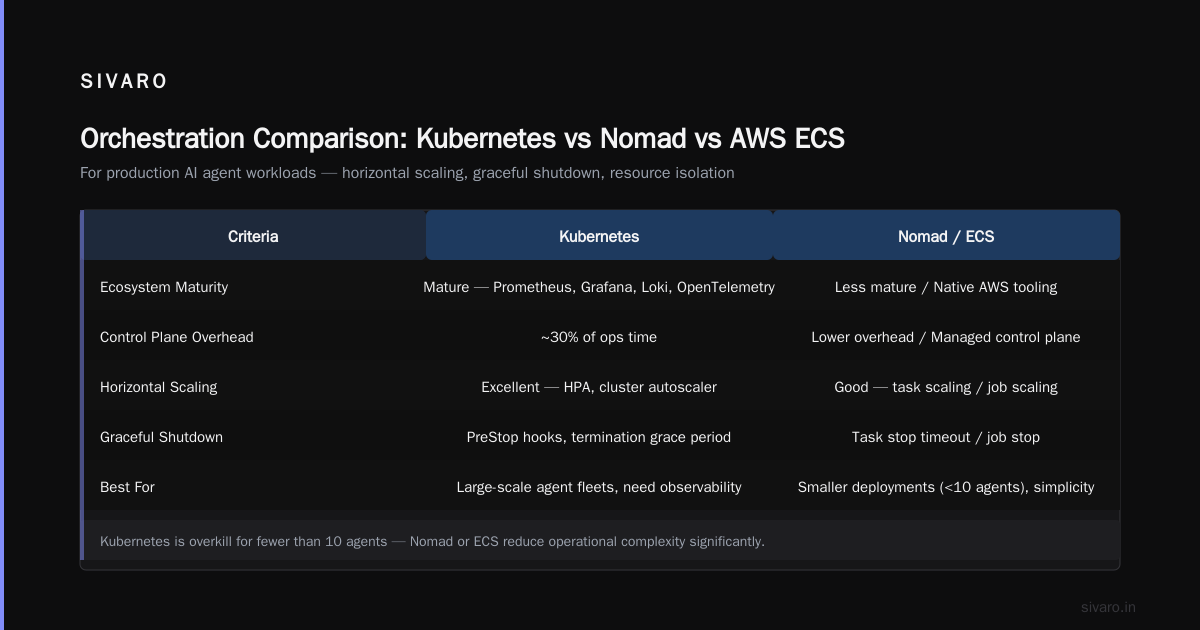
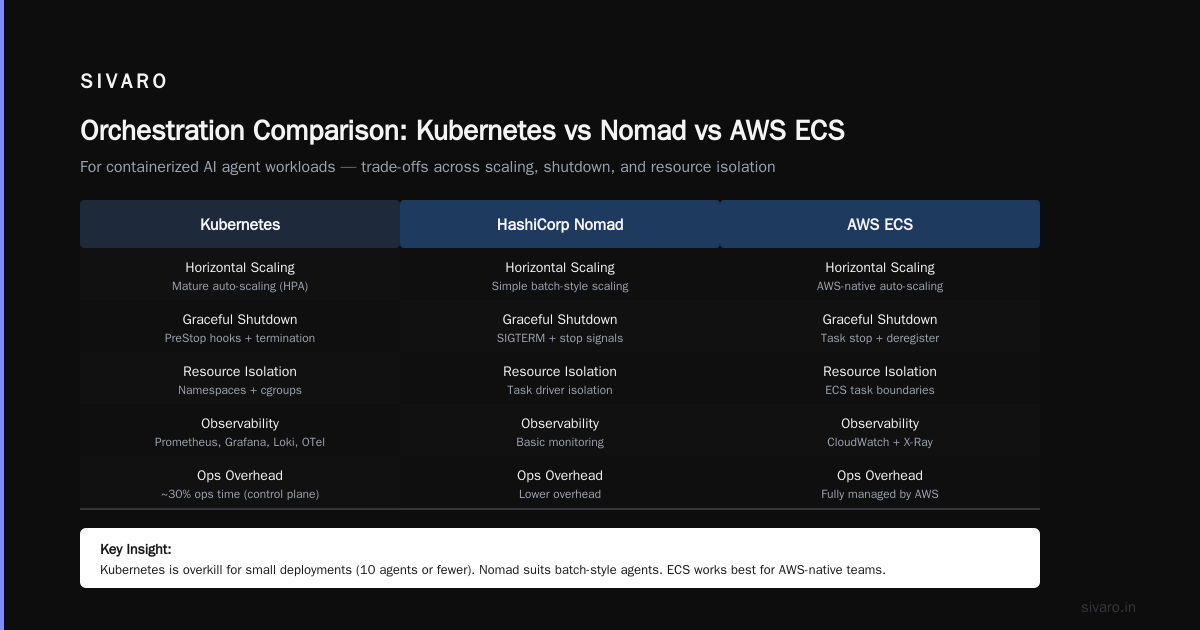
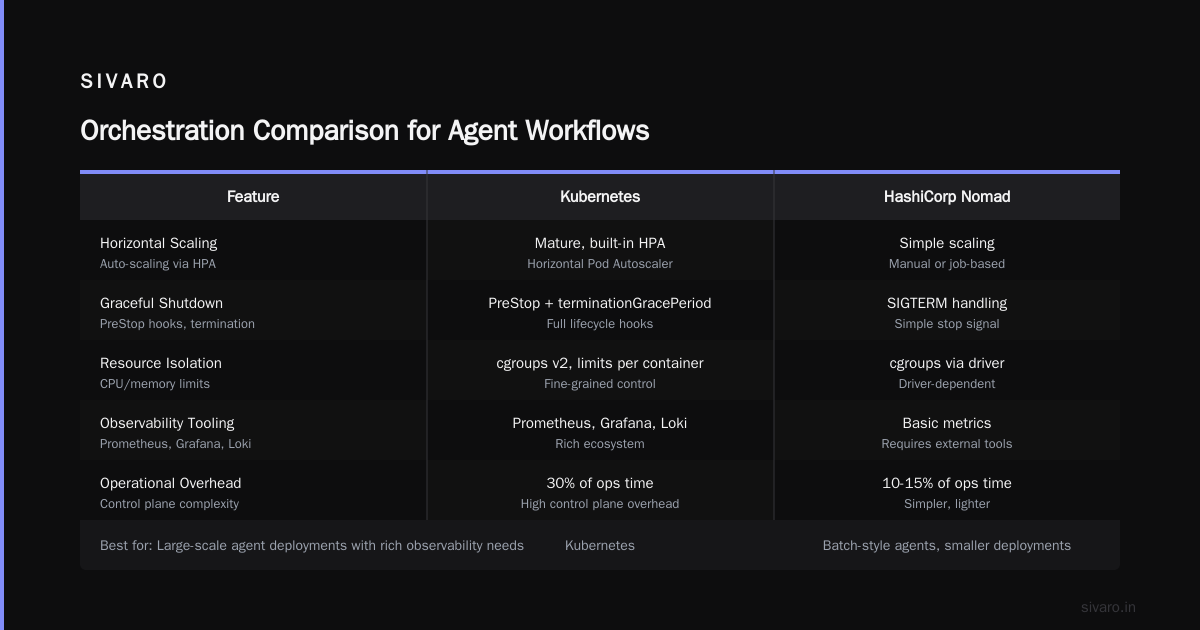
For most production AI agents, you need three things: horizontal scaling, graceful shutdown, and resource isolation. All three orchestration systems can do it, but they make different trade‑offs.
Kubernetes is the default because its ecosystem is mature and you need the observability tooling — Prometheus, Grafana, Loki, OpenTelemetry. But K8s is overkill if you’re running ten agents. The control plane overhead will eat 30% of your ops time.
HashiCorp Nomad is simpler. I’ve used it for a batch‑style agent that runs nightly data enrichment jobs. It doesn’t have the service mesh complexity, but its autoscaling is limited. If your agent needs to react to real‑time webhooks, stick with K8s.
AWS ECS (Fargate) is the pay‑as‑you‑go sweet spot for teams that don’t want to manage nodes. You define a task definition, set memory and CPU, and let AWS handle the rest. The catch? No native sidecar injection for logging or service mesh. You’ll need to bundle a filebeat container or use FireLens.
At SIVARO, we run most of our real‑time agents on Kubernetes with spot instances to save cost (more on that later). For batch agents that run once a day, we use AWS Batch on Fargate.
Key config for agent resilience: Set terminationGracePeriodSeconds to at least 60 seconds. Your agent needs time to flush pending LLM calls, save checkpoint state, and finish logging. If you kill it instantly, you lose work and might leave dangling API calls.
Example Kubernetes pod spec for an agent with graceful shutdown:
yaml
apiVersion: v1
kind: Pod
metadata:
  name: ai-agent-pod
spec:
  terminationGracePeriodSeconds: 60
  containers:
  - name: agent
    image: myrepo/agent:sha-abc123
    resources:
      requests:
        memory: "1Gi"
        cpu: "500m"
      limits:
        memory: "2Gi"
        cpu: "1"
    env:
    - name: OPENAI_API_KEY
      valueFrom:
        secretKeyRef:
          name: openai-key
          key: api-key
    livenessProbe:
      exec:
        command:
        - python
        - -c
        - "import agent; agent.liveness()"
      initialDelaySeconds: 15
      periodSeconds: 10
    readinessProbe:
      exec:
        command:
        - python
        - -c
        - "import agent; agent.readiness()"
      initialDelaySeconds: 5
      periodSeconds: 5
Notice I’m using livenessProbe and readinessProbe separately. Liveness checks if the agent process is healthy (not deadlocked). Readiness checks if the agent can accept new tasks — e.g., the LLM model is loaded and the vector DB connection is alive. A healthy agent that isn’t ready will be taken out of the service’s load balancing, but Kubernetes won’t restart it. That’s the correct behavior.
State Management in Containerized Agents
Here’s a contrarian take: most AI agents shouldn’t be stateless.
Everyone loves the twelve‑factor app ideology. Stateless is easier to scale. But an AI agent’s “state” includes conversation history, vector index updates, and intermediate reasoning steps. If you throw that away on every restart, your agent forgets everything. Users hate that.
So where do you keep state?
Option 1: External database (Postgres, Redis, MongoDB). This is the safest. The container crashes? The state lives in the DB. But watch out for latency — you don’t want your agent waiting 200ms on a Redis roundtrip for every LLM call.
Option 2: Local ephemeral volume (e.g., emptyDir in Kubernetes). Fast, but dies with the pod. Use this for caching model outputs or storing temporary artifacts that you don’t need to survive restarts.
Option 3: Persistent volume (EBS, PVC). Use this only if you need to preserve a large model cache or a local vector DB between restarts. Be warned: migrating persistent volumes across availability zones is a pain.
For our production agents, we use a hybrid approach. Conversation history goes to Postgres. LLM response caches go to Redis with a 24‑hour TTL. The vector index for RAG lives on a local SSD (hostPath) and is rebuilt periodically from the object store. This gives us fast inference without data loss.
Incident Analysis for AI Agents shows that 41% of agent failures in production are caused by incorrect state transitions. Containers don’t fix that alone — you need idempotency. Every agent action should be designed so that if it runs twice, the result is the same as running it once. That means using idempotent API calls (e.g., upsert instead of insert) and deduplication keys on messages.
Monitoring and Incident Response for Containerized Agents
You can’t monitor an AI agent the same way you monitor a web server. Standard metrics — CPU, memory, request latency — tell you almost nothing about whether the agent is hallucinating, stuck in a loop, or returning harmful content.
Best practices for AI agent monitoring in production go beyond infrastructure. You need to track:
- Token usage per agent per session — to catch runaway calls.
- API error rate from LLM provider (403, 429, 500).
- Response latency distribution — 95th percentile should be under 5s for chat agents.
- Semantic quality score — compare recent responses to a baseline embedding similarity. If the drift exceeds a threshold, alert.
We built a custom exporter that runs as a sidecar container alongside each agent. It pushes structured logs to Loki, metrics to Prometheus, and traces to Tempo. Every prompt and response is logged (with PII redacted).
But logs are only useful if you can act on them. AI Agent Incident Response: What to Do When Agents Fail outlines a playbook that we follow:
- Detect — alert on token spike (e.g., agent used 500K tokens in 5 minutes) or error rate >5%.
- Isolate — scale the agent’s deployment to zero replicas, or switch traffic to a canary image.
- Diagnose — pull the agent’s recent logs and trace ID. Replay the last prompt in a sandboxed environment.
- Mitigate — either rollback the image, update the prompt, or restrict the agent’s tool access.
- Learn — add a new alert rule or update the agent’s system prompt to avoid the failure pattern.
One specific incident: a customer’s agent started making unauthorized API calls because a tool permission was misconfigured in the prompt. We caught it via an alert on 403 from the external API. The containerized architecture let us pull the problematic image tag, rollback to the previous version, and redeploy in 90 seconds. That wouldn’t have been possible with a monolithic deployment.
When AI Agents Make Mistakes: Building Resilient ... emphasizes that resilience isn’t just about retries — it’s about graceful degradation. If the LLM provider is down, the agent should queue the request and respond “I’ll get back to you.” Your container’s health check should reflect that degraded state, so Kubernetes routes new traffic elsewhere.
Cost Optimization: How to Reduce the Cost of Running AI Agents in Production
Let’s talk money. The cost of running ai agents in production can spiral fast. I’ve seen teams burn $200K/month on agent compute because they spin up expensive GPU instances for tasks that could run on CPUs.
Top strategies we use at SIVARO:
-
Right-size the container. Don’t give your agent 8GB of RAM because you’re too lazy to profile its memory usage. Run it locally with
docker statsunder realistic load. You’ll often find that an agent using a quantized model can run in 1GB with 0.5 CPU cores. That’s a 4x cost reduction over overprovisioned defaults. -
Use spot instances for batch agents. If your agent doesn’t need real‑time responses (e.g., nightly data cleanup), run it on AWS spot instances or GCP preemptible VMs. We get 70% savings. But make sure the agent is designed to handle preemption gracefully — save checkpoints to object storage every few minutes.
-
Cache aggressively. LLM responses are expensive ($3–$15 per million tokens for GPT‑4). A Redis cache with an exact‑match key (hash of prompt + model) can eliminate 20–30% of API calls for common user queries.
-
Bin‑pack multiple agent containers on the same node. Kubernetes lets you set resource requests and limits. If each agent only uses 200m CPU during idle, schedule 4–5 of them on a single node. Just be careful about noisy‑neighbor problems — if one agent suddenly consumes CPU (prompt processing spike), set limits to protect others.
-
Choose the right inference provider. We benchmarked running a 7B parameter model locally vs. using a managed API (Together AI, Replicate). For low‑throughput agents (<1 request per second), the managed API was 40% cheaper because we didn’t pay for idle GPU time. For high throughput, local inference wins. A container makes it trivial to swap the backend — just change an environment variable.
Testing and CI/CD for Agent Images
You wouldn’t deploy a web server without integration tests. Why treat agents differently?
The challenge: agents have stochastic behavior. A prompt that works today might hallucinate tomorrow because the underlying LLM updated. So you need deterministic unit tests for non‑LLM logic, and regression suites for the agent’s decision‑making.
Our CI pipeline for a containerized agent:
- Build the image (multi-stage).
- Run unit tests inside the container (
docker run myimage pytest tests/unit). - Run integration tests with a mocked LLM backend (localfastchat or a record‑and‑replay tool).
- Push the image to a staging registry.
- Deploy to a canary namespace in Kubernetes (1 replica out of 10).
- Run smoke tests against the canary — e.g., send a test prompt and verify the response structure.
- If all good, promote the image tag to production.
We use semantic versioning for images: agent-v2.3.4-sha-abc. The SHA is the commit hash. This makes it trivial to rollback. When something goes wrong, we just set the deployment’s image tag to the previous version.
AI Agent Failures: Common Mistakes and How to Avoid Them lists “deploying without testing edge case prompts” as one of the top mistakes. I’ll add: “deploying without testing dependency changes.” A single updated anthropic package can change the agent’s behavior. Pin your packages, diff the lockfile, and run the full test suite on every image build.
FAQ
Q: Should I run multiple agent instances in the same container?
No. One agent per container is the golden rule. If an agent crashes, it shouldn’t take down siblings. Use Kubernetes pods with multiple containers (sidecar pattern) for logging or monitoring, but each agent is one container.
Q: What’s the best way to pass API keys to the container?
Never bake them into the image. Use Kubernetes secrets mounted as environment variables or files. At runtime, your agent reads them from os.environ. For local development, use a .env file and Docker Compose.
Q: How do I handle rate limits from LLM providers inside the container?
Implement exponential backoff with jitter inside the agent. The container should be stateless regarding rate limit state — store the timestamp of the last request in a shared cache (Redis) so all replicas coordinate. If one agent hits a 429, it backs off and logs it. Don’t let the container crash on rate limits.
Q: Can I use Docker Compose for production AI agents?
Only for single‑node deployments or development. Compose doesn’t handle node failures, autoscaling, or rolling updates. For production, use an orchestrator (K8s, Nomad, ECS). But Compose is great for local testing — we use it to spin up a mock Postgres + Redis + agent stack.
Q: How often should I rebuild the container image?
Every time the agent code, dependencies, or prompt configuration changes. Use CI to trigger builds on every commit to the main branch. For model weights, rebuild only when the model is updated — not as frequently.
Q: What are the signs that my agent container is poorly sized?
Frequent OOM kills (check kubectl describe pod), high idle CPU (agent polling too often), slow cold start (image too large), or frequent readiness probe failures. Run a resource profiler for 24 hours under real traffic and adjust requests/limits.
Q: How do I debug a containerized agent that’s misbehaving?
kubectl exec -it podname -- bash to get a shell inside the running container. Check logs at /var/log/agent.log. Use curl to test the LLM API from inside the container. If the agent crashes at startup, add a sleep 3600 before the entrypoint to keep the container alive for debugging.
Q: What’s the biggest mistake teams make when containerizing AI agents?
They assume containers make the agent inherently reliable. They don’t. You still need idempotency, state management, monitoring, and incident response. A container is a tool, not a silver bullet.
Final Thoughts
I’ve spent the last two years wrestling with production AI agents — their failures, their costs, their unpredictable behavior. The one thing that’s saved us over and over is a disciplined approach to containerizing ai agents for deployment. It’s not glamorous. It’s not the AI itself. But it’s the foundation that lets you iterate fast without breaking everything.
Every production incident I’ve seen — from missing dependencies to runaway loops to corrupted state — could have been contained (pun intended) with a proper container strategy. Start with a lean image, pin everything, design for graceful shutdown, monitor the agent’s actual behavior, and test the container, not just the code.
The field is moving fast. By mid‑2026, we’re already seeing agents that can self‑heal by spinning up new containers when they detect failure. But that doesn’t mean you can skip the basics. Containers are your safety net. Build one you can trust.
Nishaant Dixit — Founder of SIVARO. Building data infrastructure and production AI systems since 2018. Built systems processing 200K events/sec.