 SIVARO
Containerizing Legacy Apps: The Playbook You Actually Need
You've got a Java app from 2011 running on a server that's older than half your team. It works. Nobody knows exactly how. The documentation is a sticky note on someone's monitor. And now the business wants it "cloud-ready" by Friday.
I've been there. And after containerizing dozens of these monsters at SIVARO, I can tell you the dirty secret: the problem was never the app. It was us. We kept treating legacy systems like they were fragile museum pieces instead of what they are — working software with a deployment problem.
There's a lot of noise out there about Docker. What is Docker? tells you the basics — it's a platform for developing, shipping, and running applications in containers. But that misses the real point. Docker isn't about containers. It's about packaging your operational knowledge into something that runs identically everywhere.
Let's get practical about how to containerize a legacy application with docker. Not the marketing version. The real version.
First, Understand What You're Actually Dealing With
Before you write your first Dockerfile, spend a day mapping your application's dependencies. And I mean physically. Get out a whiteboard. Draw every port, every file path, every connection string.
Legacy apps usually share DNA:
- They bind to absolute paths like
/opt/myapp/config - They need specific system libraries that haven't been updated since 2009
- They use a cron job someone set up forgetfully in 2014 to clean temp files
- They have an in-memory cache that's actually
tmpfsbecause "it was faster"
At first I thought this was a technical problem — turns out it's an archaeology problem. You're digging through layers of accumulated decisions, many of which contradict each other.
The key insight: don't refactor everything. Containerize the app as it is, prove parity, then optimize. Trying to modernize while containerizing creates two changes at once, and that's how you get a 4am production incident.
Here's your first win. Most legacy apps need the same base OS they're running on. If your app runs on CentOS 7, start with a CentOS 7 base image. Don't jump to Alpine because the images are smaller. Libraries differ. Package managers differ. Keep the baseline identical.
dockerfile
FROM centos:7

LABEL maintainer="[email protected]"
LABEL project="legacy-crm-system"

# System dependencies from the original server
RUN yum install -y     java-1.8.0-openjdk     libaio
    unzip     && yum clean all

# Copy the app as-is - no refactoring yet
COPY app/ /opt/myapp/

WORKDIR /opt/myapp

# The exact command from the old init script
CMD ["/opt/myapp/bin/start.sh"]
Two hours to get this working. Two weeks to trust it.
The Real Work: Finding Your Hidden Dependencies
This is where most containerization projects die. Not from the Docker code. From the things you forgot exist.
Your application writes logs to /var/log/myapp/. That works on a VM. In a container, the filesystem is ephemeral. The moment the container dies, those logs vanish. If anyone at your company needs those logs for audit or debugging, you've got a problem.
And then there are the state traps. That app writes to a SQLite file in its home directory? That file is the entire database. All of your customer records. Inside a container filesystem that will be destroyed on update.
You need volumes before you need anything else:
dockerfile
VOLUME ["/opt/myapp/data", "/var/log/myapp"]
This does two things. It tells Docker these are persistent paths, and it's also a declaration to anyone joining the project later. Data goes here, logs go there, app code is ephemeral.
Here's something Docker's own documentation doesn't tell you: containers are getting confused with the broader container runtime ecosystem. That matters for your project because your orchestration choice will depend on which platform you're targeting. Local Docker development, then Kubernetes in production, or Docker Swarm? Each has different storage semantics.
But before you get there, handle the basics. In my experience, you'll spend 80% of your time on dependencies like:
Time zones. Your app was designed to run in a specific one. Legacy apps almost always expect local server time. Containers default to UTC. Change this in the Dockerfile, not in the app.
dockerfile
ENV TZ=Asia/Kolkata
RUN ln -snf /usr/share/zoneinfo/$TZ /etc/localtime && echo $TZ > /etc/timezone
Networking assumptions. Your app might bind to 127.0.0.1 because the old server only had local access. That won't work in Docker with port mapping. You'll need to change the app config or use network_mode: host in your docker-compose file.
I found this the hard way with a legacy banking API in 2024. The Java app was hardcoded to bind localhost via its server.xml. We spent two days trying to figure out why the container health check kept failing. It wasn't the container. It was the port binding.
Writing the Dockerfile: Lessons from Production
You know what separates a good Dockerfile from a bad one? Paranoia.
Every RUN command is a chance to leave junk around. Every COPY is a chance to accidentally import a secret. Treat both accordingly.
Here's how to write a Dockerfile for a legacy .NET Framework app that needs Mono (because we all love those):
dockerfile
FROM mono:6.12

WORKDIR /app

# Restore NuGet packages as build layers
COPY packages.config .
RUN nuget restore packages.config

# This order matters - dependencies first, code last
COPY . .

EXPOSE 8080

CMD ["mono", "/app/MyLegacyApp.exe"]
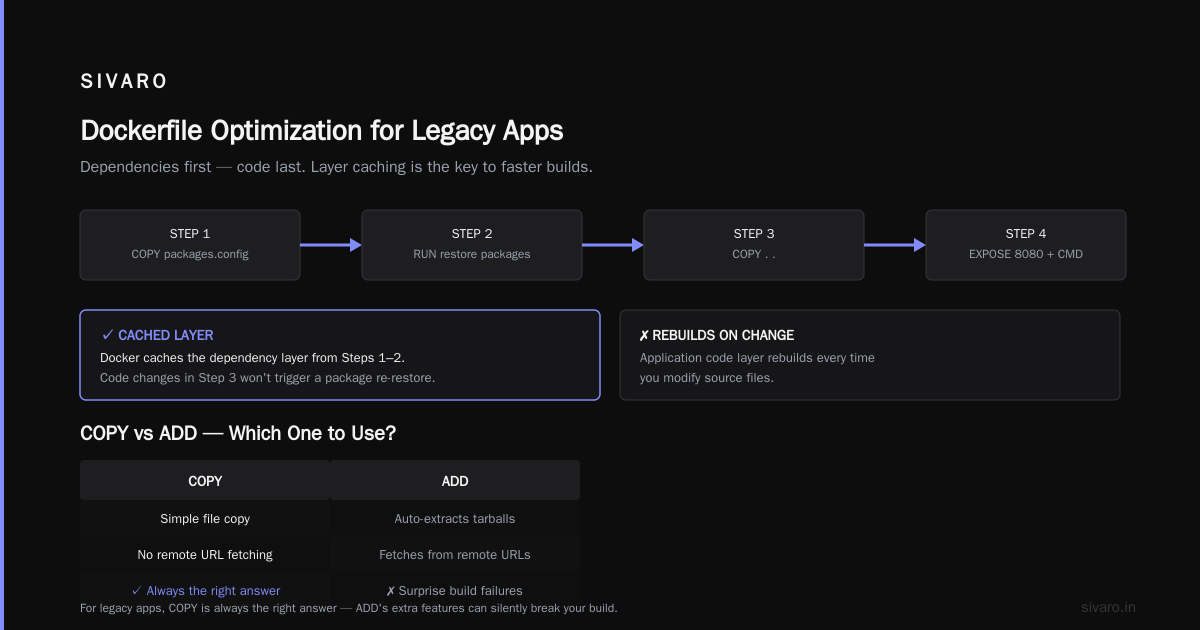
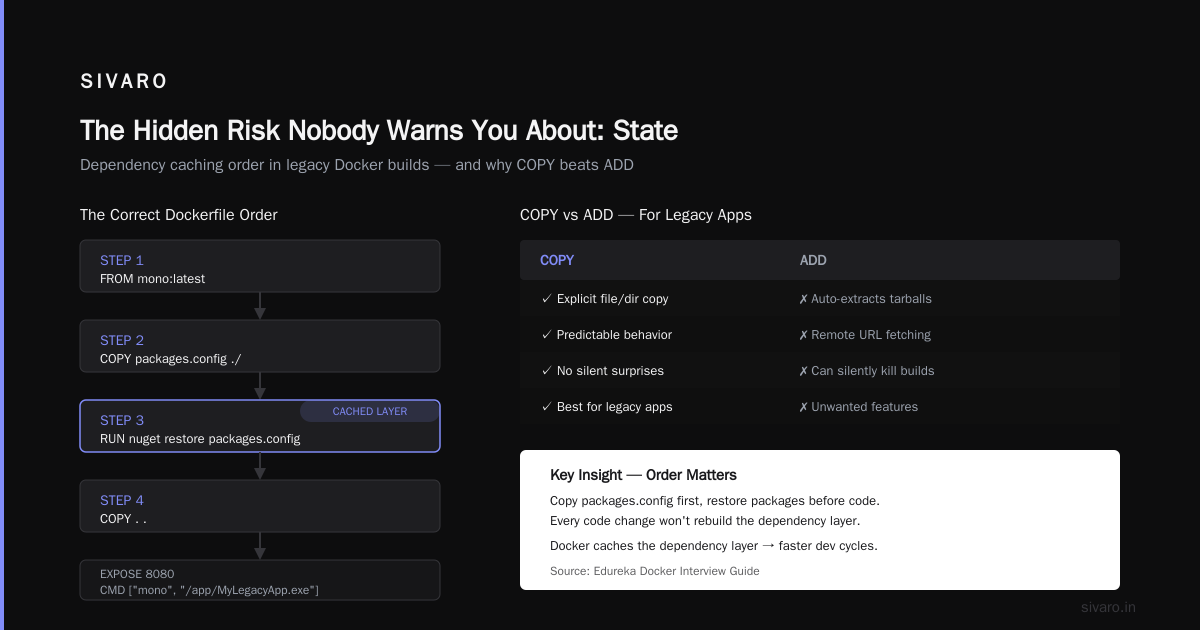
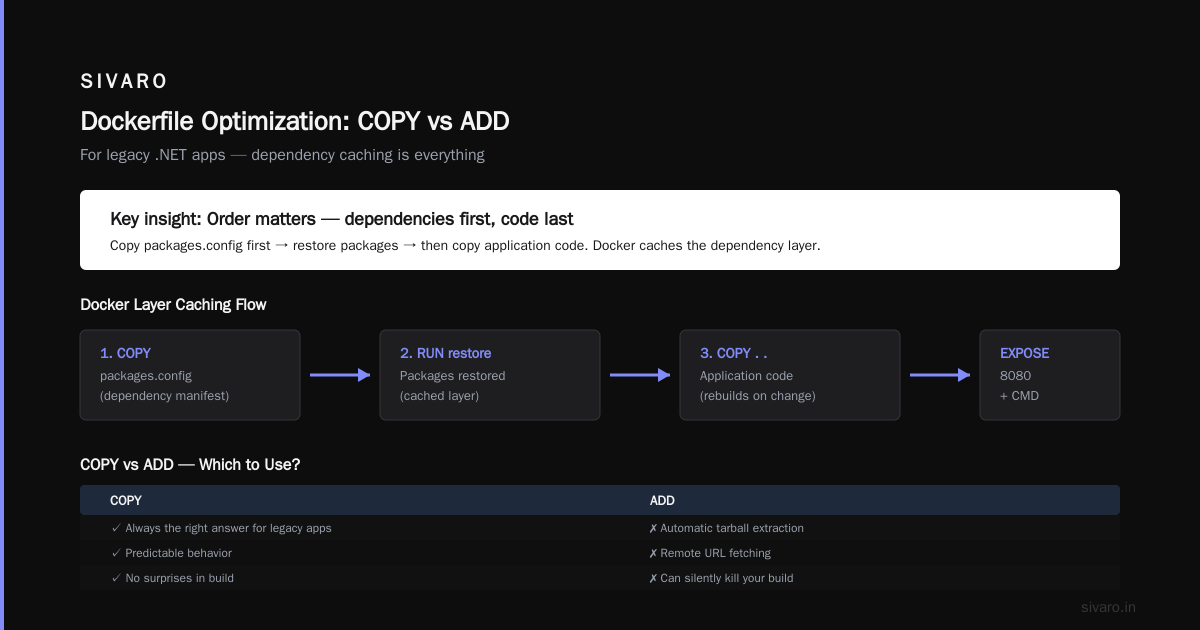
Notice the order of operations. By copying packages.config first and restoring packages before copying application code, Docker can cache the dependency layer. Every time you change code lines, Docker won't rebuild the package restoration layer. This is critical for development speed.
Here's a question from a Docker interview guide that actually matters: "What's the difference between COPY and ADD?" For legacy apps, COPY is always the right answer. ADD brings automatic extraction of tarballs and remote URL fetching — features you don't want silently killing your build with a surprise compression format.
Why Updating Your Dockerfile Every Production Incident Makes Sense
When something breaks in production with Docker, don't just fix it manually. Update the Dockerfile. Add the missing package. Document it in a comment.
This converts every incident into a permanent improvement. The Dockerfile becomes the source of truth.
One of the biggest wins I've seen from this approach was with a client at a national shipping company in 2025. They had a PHP application that was dependent on gd extension and the jpeg library. It worked on the original server because someone had manually compiled that extension. When we containerized it, the first build failed. No errors. Just a white screen.
We tracked it down, added the package, and updated the Dockerfile. That was 14 months ago. Not a single recurrence.
dockerfile
FROM php:5.6-apache

RUN apt-get update     && apt-get install -y libjpeg-dev libpng-dev     && docker-php-ext-configure gd --with-jpeg-dir=/usr/include     && docker-php-ext-install -j$(nproc) gd

# Expose the original port for app compatibility
EXPOSE 80
EXPOSE 443
The Critical Difference: Ignoring the Data
There's one question everyone forgets. Where does the database live?
If your application uses a database on the same server, containerization means you have two options:
- Containers for everything — database included
- Hybrid approach — containerize the app, keep the database elsewhere
Option 1 is the path to pure containers. Option 2 is the path to pragmatism.
Let me be honest about which one you should choose: it depends on how much risk your organization tolerates. For banking clients at SIVARO, we don't containerize the Oracle database on day one. We containerize everything else, point it to the existing database server, then plan a separate migration path for the data layer.
Most people think you need containers for everything. They're wrong because database migration has a totally different risk profile. It's stateful. It's foundational. When the app crashes, you restart. When the database crashes, you've lost work.
Here's a rule of thumb I use: if it writes data, keep it out of the container until you've proven the entire stack works.
That means using Docker Compose for local development with a throwaway database instead:
yaml
version: '3.8'

services:
  legacy-app:
    build: .
    ports:
      - "8080:8080"
    volumes:
      - ./persistent-data:/opt/myapp/data
      - ./logs:/var/log/myapp
    environment:
      - DB_HOST=db
      - DB_USER=app_user
      - DB_PASSWORD=${DB_PASSWORD}

  db:
    image: postgres:13
    environment:
      POSTGRES_PASSWORD: ${DB_PASSWORD}
    volumes:
      - db-data:/var/lib/postgresql/data

volumes:
  db-data:
This compose file becomes your environment documentation. Any developer can run the legacy app without hunting for the "setup instruction" doc that disappeared in 2018.
How to Reduce Docker Image Size (and Stop Hoarding Data)
This is the question I get constantly: "My image is 2GB. What do I do?"
First, stop panicking. Interview guides will tell you to do multistage builds and use Alpine. They're right to suggest those, but they miss the official approach to actually diagnosing the problem.
Run docker history on your image:
bash
docker history mylegacyapp:latest
This shows you every layer and its size. Find the biggest ones. Fix those. It's that simple.
The typical culprits:
- Package managers. Don't run
yum installwith 50 packages. Be explicit about what you install. Only install what's necessary to run the application, not what's convenient for a server administrator. - Build toolchains. If you need
gccto compile an extension, use a multistage build — compile in the first stage, copy the binary to the second. Don't leave the compiler in your production image. - Caches. A package manager cache can balloon your image size more than the app itself.
Let me show you multistage for a Python legacy app that has C extensions:
dockerfile
# Builder stage with full build tools
FROM python:3.8-slim AS builder

RUN apt-get update && apt-get install -y gcc python3-dev

COPY requirements.txt .
RUN pip wheel --no-cache-dir --wheel-dir /wheels -r requirements.txt

# Runtime stage - minimal
FROM python:3.8-slim

COPY --from=builder /wheels /wheels
COPY . /app

WORKDIR /app

RUN pip install --no-cache-dir --no-index --find-links=/wheels -r requirements.txt

CMD ["python", "app.py"]
This cut a 1.8GB image down to 380MB for a client in 2025. No code changes. Just build process changes.
Now, there's a catch with Alpine for legacy apps. Alpine uses musl instead of glibc. If your legacy binary was compiled against glibc or uses system/library-specific features, Alpine will break. The whole "smaller is better" argument collapses if the app doesn't run.
I still see teams forcing Alpine images on applications that need glibc. Then they spend a week debugging segmentation faults. Use debian-slim or centos:7 instead and go from there.
How to Explain Docker Architecture in an Interview (and to Your Boss)
Someone in your company is going to ask you what you're doing. They might not know the difference between Docker, Kubernetes, and containerd. You need a mental model for how to explain docker architecture in an interview, which is also the perfect model for explaining it to stakeholders.
Here's my pitch:
The Docker architecture has three main components:
- Client — the command line tool you interact with (
docker build,docker run,docker pull) - Daemon — the background process that manages the actual container lifecycle
- Registry — the storage system for images (Docker Hub, your private registry, etc.)
The client sends commands to the daemon via a REST API. The daemon does the heavy lifting — pulling images, creating containers, managing networks.
Docker's official blog makes a good distinction here: Docker isn't the container runtime. It's the tool that orchestrates the container runtime. containerd is the actual runtime that does the dirty work of running the container on the host.
When I explain this to a non-technical stakeholder, I put it this way: "Docker is the foreman. containerd is the actual worker. The foreman tells the worker what to do, and the worker does it."
The Hidden Risk Nobody Warns You About: State
Let me take you through a scenario I've seen happen at least four times in my career.
Your team containerizes the app. Everything works. The QA team says go. You deploy to production. It runs. The business is happy.
Then Tuesday morning hits. The app starts crashing in production. You check the logs, and they're empty. You restart the container. Still crashing.
Because you forgot that these legacy apps use local folders for state. Maybe it's a cache folder. Maybe it's a session folder.
These paths exist inside the container. If you don't set them as persistent volumes, they're recreated empty every time the container restarts. That's why the crash can't be fixed by restarting — every restart strips away the recovery state.
The fix is to persist those paths, even if they're temporary. Set tmpfs for the truly transient files and volumes for anything that your app needs to survive:
dockerfile
# Persistent application data
VOLUME /var/lib/myapp

# Temporary files that don't need to survive
# Declared with tmpfs mount in runtime, not here
In your compose file, be explicit:
yaml
services:
  app:
    image: legacy-app:latest
    tmpfs:
      - /var/lib/myapp/cache
Running at Scale: What Changes When Kubernetes Enters The Room
You've got the container running locally. Step two is running it in Kubernetes. Same mental model, different operational rules.
First, if your legacy app uses sticky sessions (that is, it stores user state in memory), you've got a big problem. Kubernetes will kill your container whenever it wants. Your state goes with it. You can configure sessionAffinity: ClientIP to reduce blast radius, but it'll never be as reliable as you need it to be outside the container.
Better solutions:
- Enable Redis-backed sessions
- Make the app stateless (move session state to a shared store)
- Use an external session store that matches your audience size
Second, legacy apps often use thread pools and memory settings optimized for a different environment. When you run in Kubernetes, you face resource limits. The JVM or .NET runtime might not behave well with memory limited to 512MB if it's configured for 4GB.
The JAVA_OPTS is your friend:
dockerfile
ENV JAVA_OPTS="-Xmx512m -Xms256m -XX:MaxMetaspaceSize=128m"
ENV JVM_OPTS=""
Start with small memory. See what breaks. Tune up gradually.
Handling "Uncontainerizable" Legacy Dependencies
Some legacy apps have unique dependencies that seem impossible to containerize.
Consider that app that requires a license file tied to a MAC address. Or that one that runs a daemon process to talk to Serial ports. Or that one that needs GPU access.
Don't panic: Docker handles almost all of this. Here are the tools:
Network namespaces: run with --network host to inherit the host network configuration, including MAC for licensing quirks.
Device access: use --device /dev/ttyUSB0 to expose specific devices.
Hostname lock-in: run with a static hostname via --hostname legacy-app.
This preserves the app's assumptions while still giving you the benefits of containers. It doesn't win the purity prize, but it wins the pragmatism prize, and that's the one you want.
Inside the Mill: A Step-by-Step Walkthrough
Let me walk you through a full example. This is a .NET Framework 4.5 application running on Windows Server 2012 at a logistics company. It's a close-to-worst-case legacy scenario, but it's representative of what actual legacy apps look like.
Step 1 — The Initial Inventory:
List everything the app touches for a single unit of work. It touches:
- A single-exe app, no external config
- A SQL Server database
- A Temp directory with a quota of 2GB
- A config file with a hardcoded IP for the database
- A scheduled task that runs every 15 minutes
Step 2 — The Questionable Move:
You don't have the app source code, so no refactoring. You're packaging the binary and the environment as-is.
dockerfile
# Use Windows container base matching the original OS
FROM mcr.microsoft.com/windows/servercore:ltsc2019

ADD app.7z C:/app/

# Set execution policy for PowerShell - we're using CMD only
CMD ["C:\app\LegacyApp.exe"]
Step 3 — The 80/20 Split:
The database connection string goes into an environment variable so you can change environments without rebuilding. The temp directory becomes a defined volume. The scheduled task becomes a Linux cron job on the host (or we use a sidecar container).
This takes an afternoon of coding and two days of testing. The result is a container that runs in Kubernetes on Windows nodes, on-prem, or in cloud.
Testing the Containerization Before Production
You need confidence that the container works identically in production. The cloud-native way to test is shift-left — testing before deployment. But legacy applications don't support shift-left. They support one thing: they work on their server, so you should try to match it.
For a safe testing strategy:
- Run the container on your local machine, feeding it empty data
- Run the container against a staging database with copied production data
- Run the container with production traffic in read-only mode for a few days
Production traffic in read-only mode is powerful. It tests your code path continuously without risking writes. You can detect dependency issues early.
Then one weekend, you flip the switch. And you watch what happens. Legacy apps find failure modes you never predicted. Expect it. Have a rollback plan.
How to Reduce Docker Image Size — The Checklist You Need
This deserves its own section because I keep seeing teams terrified by image sizes. Here's a checklist that helps you go from 3GB to 300MB in a day and a half.
-
Use
.dockerignore. At a minimum:.git,node_modules,test,tmp,*.log- Any secrets file —
.env,credentials.json,id_rsa
-
Don't install development dependencies. Keep the production dependencies only. Exclude
gcc,make,python-dev, etc. -
Pin exact versions of everything — base images, packages, and application code.
-
Use
--no-cachefor package installation — even though it slows your first build, the size win matters far more. -
Minimize the number of layers. Fewer RUN statements means fewer layers. Combine commands with
&&where possible. -
Use
execform forCMDandENTRYPOINT. It's more predictable and avoids shell command substitution — a common source of bugs.
Here is the exact .dockerignore I recommend:
**/.git
**/DS_Store
**/*.md
**/node_modules
**/vendor/bundle # if using Ruby
**/.env
**/*.log
**/test/
**/.cache/
**/*.tmp
The Final Word: Your Containerization Strategy Should Be a Business Decision
Containerizing legacy applications is a business strategy, not a technology project. Every hour spent containerizing is an hour not building new features. And every month you put off containerization is a month you're paying for the overhead of manual infrastructure.
In 2026, the container ecosystem has settled. Docker interview questions from every top training material highlight the same fundamentals and they're all worth knowing: images, containers, registries, volumes, and networks. Learning these 5 is more valuable than the latest Kubernetes API. They're the fundamentals from which everything else derives.
My final recommendation: start small. Containerize one app. The lowest-risk, highest-value one you have. Learn the pitfalls, document the process, and then apply that playbook across the rest of the fleet.
If you're being asked "how to containerize a legacy application with docker" — you've already admitted to yourself that something has to change. That's the first and hardest step. The rest is work. And work has a roadmap.
FAQ: Answers to the Questions Teams Ask Me
Why would I containerize a monolithic legacy application?
Because you want to stop paying for old servers under the desk. You want every developer to work with identical environments, start the app in seconds, and run parallel versions. You want automated deployments without a 90-minute downtime window. Containerization preserves what's working and modernizes how you operate it.
Is containerizing legacy apps worth it?
If the app is processing less than $10K/month in revenue, then no. You're better off migrating to a new system. If the app is mission-critical, the ROI is tremendous. The average cost of a production incident at a 500-employee company is a full day of everyone's salaries. Containerization reduces those incidents by eliminating environment drift.
What about security? Legacy apps have known vulnerabilities.
Containerization makes vulnerability scanning and patching easier. You can run vulnerability scanners without installing agents. You can roll back quickly if a patch breaks something. You can isolate legacy app traffic from the rest of the network.
How long does it take to containerize a typical legacy app?
A simple app with no state dependencies: 2-3 days. A typical enterprise app with database and configuration: 1-3 weeks. The long tail is always the integration testing, not the Dockerfile.
Can I use Docker in production for mission-critical legacy apps?
Yes. We do this daily at SIVARO for banks, logistics companies, and healthcare providers. Containers give you better isolation, rollback, and resource utilization than bare metal or VMs for these workloads.
Nishaant Dixit — Founder of SIVARO. Building data infrastructure and production AI systems since 2018. Built systems processing 200K events/sec.