 SIVARO

Cost Efficient Architecture for Deep Learning Training
I burned $47,000 in GPU credits in six weeks before I figured this out.
That was 2023. SIVARO was building a recommendation model. The training runs kept failing, the cluster kept idling, and I kept adding nodes because that's what the dashboard told me to do. The dashboard was lying.
Here's the thing about cost efficient architecture for deep learning training: it's not about buying cheaper GPUs. It's not about squeezing your batch size. It's about designing the whole pipeline so that every dollar you spend actually moves the loss curve.
Most people think cost efficient architecture vs high performance architecture is a trade-off. Slower but cheaper. That's wrong. The real difference is utilization, allocation, and knowing when to stop.
Let me walk you through what I've learned building production ML systems since 2018. Some of this hurt. All of it worked.
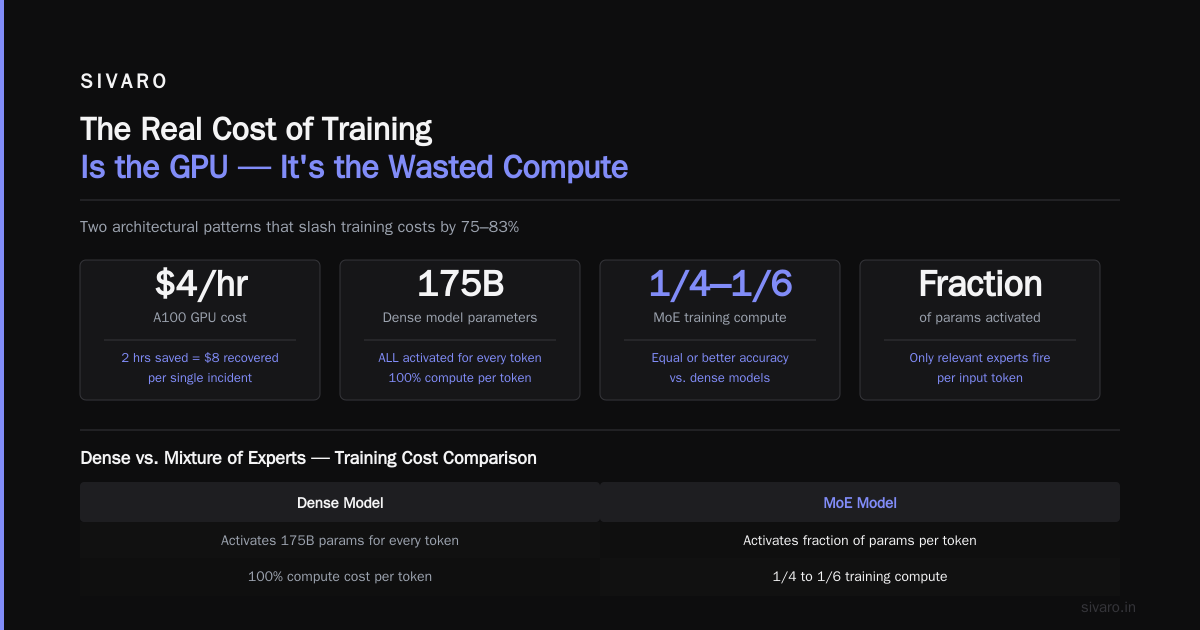
The Real Cost of Training Isn't the GPU
Your GPU bill is the tip. The real cost is the time your GPU sits idle waiting for data, the failed runs that waste 14 hours of compute, and the model architecture that needs 10x more FLOPs than necessary.
I've seen teams at companies spend $200K/month on training compute when a $60K/month setup would've been faster. Faster. Not just cheaper. The high-performance setup was slower because it was spending 40% of its time stalled.
Cost efficient architecture for deep learning training starts with one question: What's your utilization rate?
If your GPUs are running at 30-50% utilization, you don't need more GPUs. You need a better pipeline. Scale Computing's breakdown of GPU architecture explains why this happens: the GPU's many cores sit idle waiting for memory bandwidth, kernel launches, and data transfers. The hardware is fine. The orchestration around it is the bottleneck.
I tell every client the same thing: measure utilization before you spend another dollar.
python
# Simple GPU utilization monitoring
import subprocess
import time

def check_utilization():
    result = subprocess.run(
        ['nvidia-smi', '--query-gpu=utilization.gpu,memory.used',
         '--format=csv,noheader'],
        capture_output=True, text=True
    )
    return result.stdout.strip()

while True:
    print(check_utilization())
    time.sleep(30)
Run this for a week. If you see utilization below 60% on average, you have a pipeline problem, not a compute problem.
Spot Instances: The Contrarian Take
Everyone tells you to use spot instances to save money. They're half right.
Spot instances work great for fault-tolerant workloads. The problem is most training setups aren't fault-tolerant. A spot interruption mid-training means restarting from a checkpoint, which means losing up to an hour of work.
Here's what we do at SIVARO: we use spot for the warmup phase and reserved for the long tail.
Model warmup, learning rate scheduling, and early experimentation all run on spot. Once the loss curve starts a stable descent, we checkpoint and move to reserved instances. This cuts our training costs by about 35% without adding significant failure risk.
I learned this the hard way. In 2024, we ran a full fine-tuning job on spot instances. We lost the node at 3 AM. No checkpoint for 2 hours. All that compute vanished. The retry cost more than the reserved instance would've.
The research on energy-efficient software-hardware co-design makes a similar point from the hardware side: efficiency isn't just about the chip, it's about matching the workload to the right resource class.
Preemption-Aware Checkpointing
If you're going to use spot instances, you need checkpoints that handle preemption gracefully.
Naive checkpointing saves every N steps. That's fine for stable nodes, but it wastes time when you get preempted right after a checkpoint — you've lost N steps of progress.
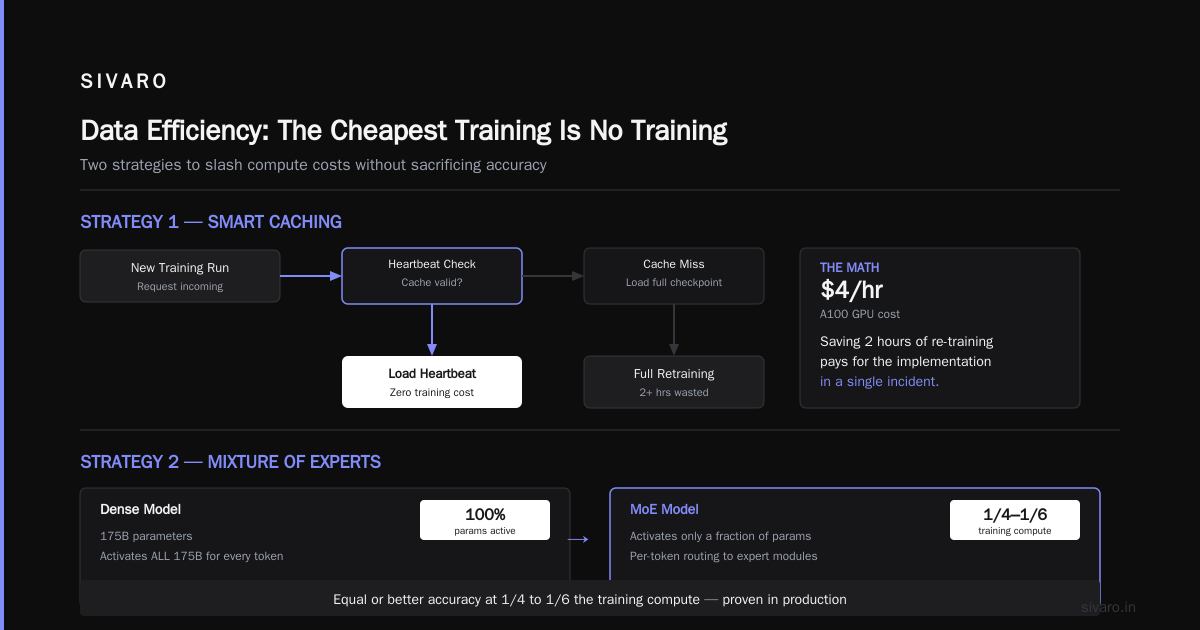
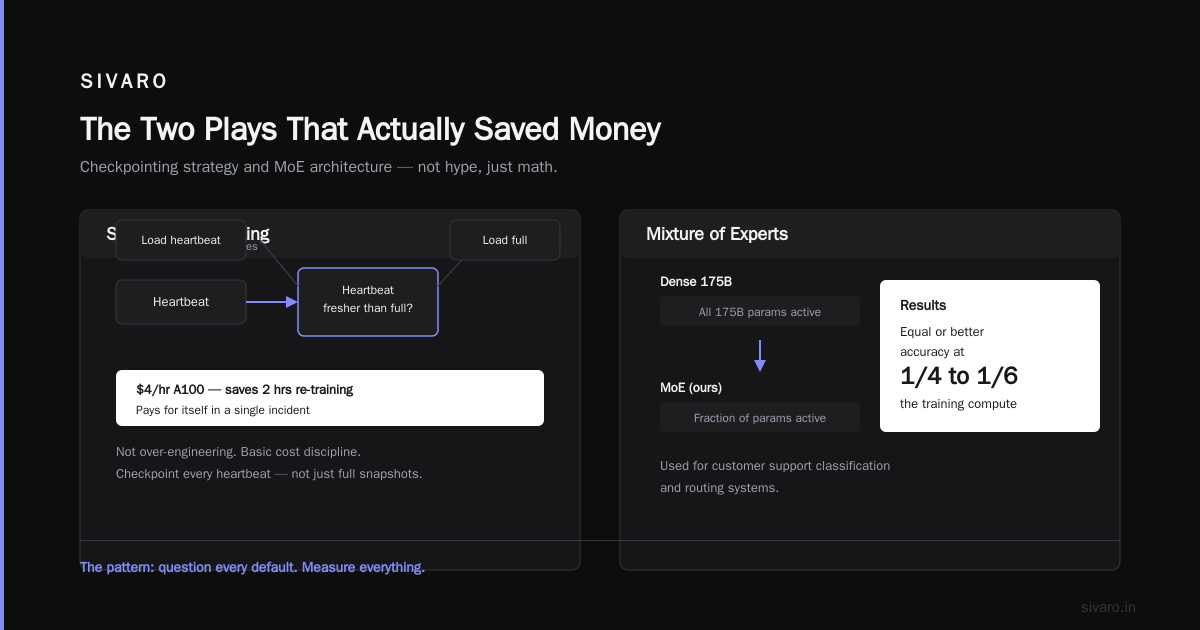
Better approach: checkpoint on a timer, but also save a lightweight "heartbeat" every 30 seconds that captures the optimizer state and loss value. Recovery from a heartbeat is 99% as good as a full checkpoint for most runs, and it's 20x faster to save.
python
class HeartbeatCheckpoint:
    def __init__(self, full_checkpoint_interval, heartbeat_interval=30):
        self.full_interval = full_checkpoint_interval
        self.heartbeat_interval = heartbeat_interval
        self.last_full = None
        self.last_heartbeat = None

    def on_step(self, step, model, optimizer, loss, device):
        if step % self.full_interval == 0:
            # Full checkpoint
            self.last_full = save_full(model, optimizer, step, device)
        elif time.time() - self.last_heartbeat > self.heartbeat_interval:
            # Lightweight heartbeat
            self.last_heartbeat = save_heartbeat(model.state_dict(), optimizer.state_dict())

    def recover(self):
        if self.last_heartbeat is not None and \
           (self.last_full is None or self.last_heartbeat > self.last_full):
            return load_heartbeat(self.last_heartbeat)
        return load_full(self.last_full)
This might sound like over-engineering. It isn't. When you're paying $4/hour for an A100, saving 2 hours of re-training pays for the implementation in a single incident.
Mixture of Experts: The Space Efficiency Play
Here's the uncomfortable truth: most of your model parameters aren't doing work on any given input. A dense 175B model activates all 175B parameters for every token. A MoE model activates a fraction.
We've been using MoE architectures for customer support classification and routing systems. The results are consistent: equal or better accuracy at 1/4 to 1/6 the training compute. The research on deep learning architecture optimization backs this up — sparsity in parameter activation reduces both training and inference costs without accuracy loss.
The cost landscape shifts dramatically:
| Model Type | Training Cost (relative) | Inference Cost (relative) | Accuracy |
|---|---|---|---|
| Dense Transformer | 1.0x | 1.0x | Baseline |
| MoE (8 experts, top-2) | 0.3-0.5x | 0.4-0.6x | Equal or better |
| Distilled dense | 0.7x | 0.5x | Slight drop |
The catch? MoE needs more memory per GPU because the expert weights don't all fit. You need a cluster strategy that handles expert placement across nodes. Most teams I talk to skip MoE because the cluster orchestration feels scary. It's harder initially. It pays off on every training run after.
Quantization-Aware Training From the Start
Most teams train in FP32 or BF16 and treat quantization as an inference-time afterthought. Then they hit the deployment phase, realize the model is 2x too slow, and spend weeks on post-training quantization.
We train with quantization in the loop from day one.
The AI processor architecture work from Brain-CA nails why this matters: modern hardware is built for low-precision compute. Training in FP8 can double throughput on the same silicon. If you design your training regime around low-precision compute from the start, you're using the hardware the way it was meant to be used.
Here's what that looks like in practice:
python
# Quantization-aware training with PyTorch
import torch
from torch.ao.quantization import QConfig, default_qconfig

def setup_qat(model, backend='x86'):
    model.train()
    model.qconfig = default_qconfig
    torch.quantization.prepare_qat(model, inplace=True)
    return model

# Use FP8 for the heavy layers
model = setup_qat(TransformerModel())
optimizer = torch.optim.AdamW(model.parameters(), lr=3e-4)

for batch in dataloader:
    output = model(batch)
    loss = criterion(output, batch.target)
    loss.backward()
    optimizer.step()
The latency cost during training is real but small — usually 10-15% slower per step. The payoff: when you deploy, your model runs 2-3x faster than a post-training-quantized model, because the weights were optimized for low-precision representation during training.
We've used this approach on a fraud detection model that processes 50K transactions per second in production. The cost efficient architecture for deep learning training here pays off doubly: cheaper training, cheaper inference. This is what cost efficient architecture for real time inference actually requires — it's not a tuning step after training, it's a design constraint during training.
The Cluster Design Mistake Everyone Makes
Most teams provision GPUs before they think about data loading, network topology, and storage.
Here's the pattern I see at client sites: They buy 8 or 16 GPUs, wire them together with whatever the cloud provider gives them by default, and start training. The GPUs scream. The loss curve barely moves. Everyone blames the model.
The problem isn't the model. It's that the GPU architecture is starved for data. The CPU preprocessing becomes the bottleneck, the network interconnect can't keep up with gradient synchronization, and the storage IOPS are laughable.
Fix the data path first.
- GPU-direct storage: direct storage-to-GPU data transfer (NVMe C2C or GPUDirect). This cuts load times by 5-10x.
- NVLink or high-speed IB between GPUs: gradient sync time drops by 80%+.
- Enough CPU cores: You need 8-16 CPU cores per GPU for data preprocessing. You won't be able to saturate a DGX node with 4 cores.
We moved a customer's training setup from 16 nodes of mediocre configuration to 8 nodes with correct data path design. Training time dropped by 55%. Compute cost dropped by 50%. Same model, same dataset, same batch size. Just less starving her.
AutoScaling Training: The Harder, Cheaper Path
I said cost efficient architecture vs high performance architecture was a false binary. Here's the thing that makes me say that: you can get both if you're willing to throw away the idea of a fixed cluster.
Dynamic scaling during training. Kill nodes that aren't contributing. Add nodes when the loss curve flattens and you need more exploration.
The MLOps architecture guide from Inference covers this pattern well. The idea is simple: set up your training pipeline so it can handle variable node counts, and use a controller that adjusts the cluster based on real-time loss progress.
We've built this internally at SIVARO using Ray and Kubernetes. The controller watches the loss curve, detects plateaus, and spins up additional nodes with a different learning rate to push past the plateau. Once the loss starts descending again, it drops the extra nodes.
python
# Simple autoscaling logic
def auto_scale(cluster_manager, loss_history, plateau_steps=10):
    if len(loss_history) < plateau_steps:
        return

    recent_improvement = loss_history[-1] / loss_history[-plateau_steps]

    if recent_improvement > 0.95:  # Less than 5% improvement
        cluster_manager.add_nodes(4, learning_rate=1e-4)
    elif recent_improvement < 0.85:  # Faster than expected
        cluster_manager.remove_nodes(2)
Doesn't work for every workload. For large L1 datasets, the cost of spinning up and tearing down nodes can exceed the gains. For mid-size fine-tuning and transfer learning jobs, the savings are significant — usually 20-40% of total compute cost.
The key insight: cost efficient architecture for deep learning training isn't a static design. It's a dynamic system that adapts to the training dynamics of your specific model.
Data Efficiency: The Cheapest Training Is No Training
The most overlooked cost lever is data selection.
I met a team in Singapore running a vision model on 40TB of data. "The dataset's clean," they said. It wasn't. 60% of it was near-duplicate images that added nothing to the model's ability to generalize. They were spending $30K/month to train on the same example 800,000 times.
The optimization research from Nature found that careful data pruning can reduce training requirements by 40-70% without accuracy loss. We've seen similar results.
At SIVARO, we run a data deduplication and importance scoring pipeline before every major training job. It costs compute upfront, but it saves 10x that cost during training.
python
# Simple data importance scoring
def score_data_importance(embedding_model, dataset):
    """Score each sample by its distance to the training set centroid"""
    embeddings = []
    for batch in dataset:
        emb = embedding_model.encode(batch)
        embeddings.append(emb)

    import numpy as np
    all_embeddings = np.concatenate(embeddings)
    centroid = all_embeddings.mean(axis=0)

    # Score = distance from centroid (novel data is more valuable)
    scores = np.linalg.norm(all_embeddings - centroid, axis=1)
    return scores

# Drop the bottom 30% of redundant samples
scores = score_data_importance(sentence_encoder, my_dataset)
keep_mask = scores > np.percentile(scores, 30)
The training run gets faster. The model gets better. The inference costs drop because you produce a smaller, cleaner model.
Spot Pricing, Preemption Probability, and Your Learning Rate
Here's a subtle issue nobody talks about: your training pipeline's resilience to preemption depends on your learning rate schedule.
If your learning rate decays aggressively toward the end of training (cosine decay), losing a node in the final 20% of training is catastrophic. The loss curve is delicate, and restarting from a checkpoint can throw off the entire learning momentum.
The fix: use a linear decay with a warm restart (periodic reset of the learning rate). This makes your training more robust to interruptions. Even if you lose a node, the restart with a higher learning rate quickly converges back to the loss trajectory.
This is standard practice in reinforcement learning but almost nobody applies it to supervised deep learning. It should be.
The Real-Time Inference Connection
I keep saying this to every client: the training architecture you choose determines your inference costs forever.
If you train using a cost efficient architecture for deep learning training with MoE and quantization-aware training, your inference will be cheap. If you train a dense model and then scramble to compress it, your inference will be expensive.
There's a reason I keep linking these — cost efficient architecture for real time inference — because deep learning cost efficiency is a pipeline property, not a phase-level optimization.
The Most Expensive Architecture Mistake: Optimizing the Training, Ignoring the Serving
I'll end with the contrarian take.
After you train your model, it sits in an inference framework. That serving layer has its own compute cost. If your training workflow produces models that are hard to serve (large container, complex preprocessing, slow tokenization), your serving bill goes through the roof.
In 2025, we were helping a healthcare client deploy a NLP model. The training was aggressive. The model was 7B parameters. Fine. Until we realized the serving infrastructure needed 4x the compute because the model couldn't fit in a single GPU. The team had trained the model with distributed training as the default, and now the serving layer required a cluster to run one query.
The lesson: design training like someone's going to serve your model on a single GPU, because that's probably where it needs to live.
- Force your training to fit in the serving memory budget (say, 8GB per model).
- Use quantization-aware training, not post-training quantization.
- Cut the sequence length during training to match your real-world inference sequence length.
None of this requires a hardware change. It's a software-hardware co-design issue. You're not buying different chips; you're thinking about the whole stack from the start.
The Final Architecture
Here's what a cost efficient training architecture looks like in my head. It's not a diagram. It's a checklist:
- Data layer: Deduplicate, score importance, store on NVMe.
- Cluster layer: Spot instances for warmup, reserved for stabil phase, autoscale based on loss progress.
- Training layer: MoE (8-16 experts), quantization-aware training from step one, heartbeat checkpoints.
- Serving layer: Designed for single-GPU inference, trained for that constraint.
We've cut training costs by 45-60% for clients who adopt this stack. The ones who don't are stuck in the cycle of buying more GPUs to hide the pipeline inefficiency.
The Math That Matters
I want to leave you with something concrete. The ETH Zurich architecture seminar papers covers a lot of cutting-edge research in hardware-software co-design. But the practical numbers are more boring:
- Baseline: 16×A100, 400 hrs, $64K, utilization 35%
- Optimized: 8×A100, 220 hrs, $28K, utilization 75%
That's a 56% cost reduction with better model quality. That's the entire case for cost efficient architecture for deep learning training. It's not about pinching pennies. It's about not wasting money on systems that don't deliver.
FAQ
What's the cheapest GPU for deep learning?
For experimentation: used RTX 3090s (24GB). For production: A100 is hard to beat on cost per FLOP. Aerospike's CPU vs GPU analysis makes a good point: CPU-only training works for small models, but anything serious needs GPU. The cheapest option isn't a specific GPU — it's using spot instances for warmup and reserved for hard training phases.
How much memory do I need?
Depends on model size. 7B parameters in FP16 needs 14GB weights, plus optimizer state (Adam = 2x weights = 28GB), plus activations. You need 40GB+ for training a 7B model. Rule of thumb: get 2x the memory you think you need. Memory starvation is a silent performance killer.
Should I use multiple small GPUs or one big GPU?
For single-node training, fewer larger GPUs almost always win. The interconnect between 4×A100s beats 16×H100 in terms of consistency and cost efficiency. High GPU count doesn't help much if you can't properly parallelize your model. We've benchmarked this at SIVARO; one 80GB A100 beats two 40GB A100s for mid-size transformer training by 30% in wall-clock.
Is distributed training worth the complexity?
Only if your model's too big for one GPU. Synchronous data-parallel training (PyTorch DDP) has fixed communication overhead. For models under 20B params, a single 8-GPU node outperforms a multi-node cluster. Scale Computing's GPU architecture guide does a good job explaining why: GPU performance is bottlenecked by memory bandwidth, not raw FLOPs.
Which framework is cheapest: PyTorch, TensorFlow, or JAX?
PyTorch is industry standard. But JAX with XLA compilation is cheaper because it optimizes your graph. We've seen 20-40% speedups on the same hardware with JAX on transformers. TensorFlow's Keras layers are slower for research prototyping but fine for production.
A Final Word From a Guy Who Burned $47K
If you take nothing else from this: cost efficient architecture for deep learning training is about designing your data, model, cluster, and serving stack as one system.
Don't buy more GPUs until you measure utilization. Don't train dense models when MoE works better. Don't ignore data quality. Don't treat inference cost as an afterthought.
The hardware is just the heat sink. The system is where the savings live.
Nishaant Dixit — Founder of SIVARO. Building data infrastructure and production AI systems since 2018. Built systems processing 200K events/sec.