 SIVARO

Cost Efficient Architecture vs High Performance Architecture: The 2026 Buying Guide
I've lost count of how many engineering teams have asked me the same question over the last eight years at SIVARO: "Should we optimize for cost or performance?"
It's the wrong question.
The right question is: "What's the marginal value of one more millisecond of latency to your business?" Because I've seen a fintech startup burn $40,000/month on GPU clusters to save 80 milliseconds on a recommendation endpoint that nobody's actually waiting on. And I've seen a healthcare company lose a $2M contract because their batch inference pipeline took four hours instead of forty minutes.
Cost efficient architecture vs high performance architecture isn't a binary choice. It's a spectrum, and where you land depends on data you probably haven't collected yet.
Here's what this guide covers: the real differences between the two approaches, when each makes sense (and when they don't), specific architectural patterns I've tested in production, and a decision framework you can actually use. No fluff.
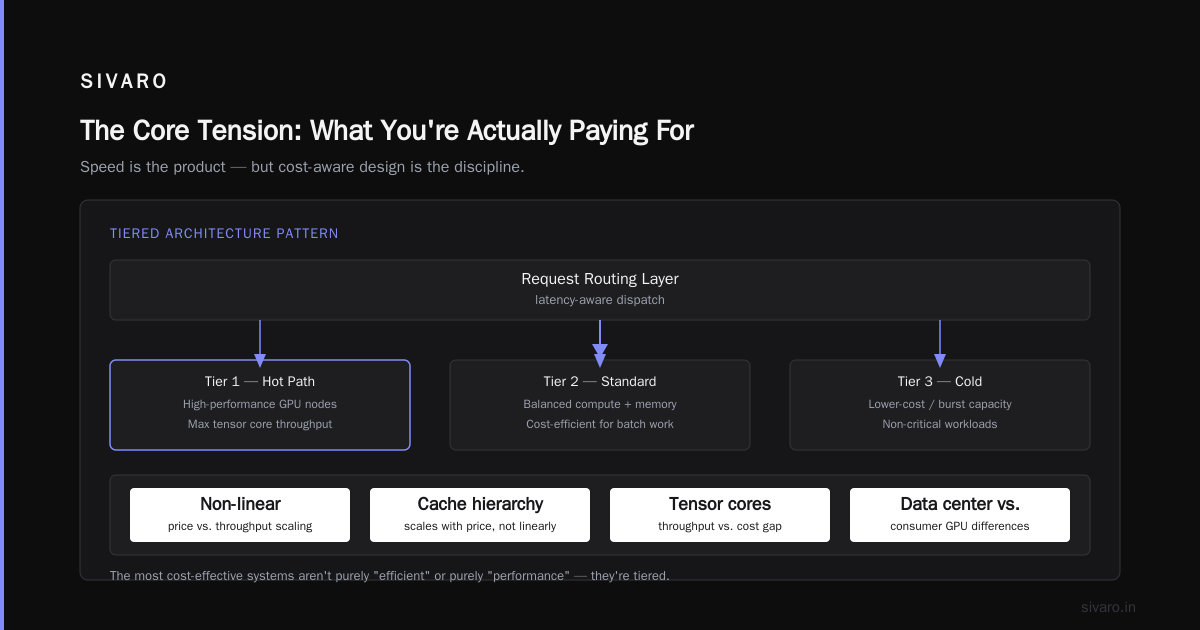
The Core Tension: What You're Actually Paying For
Let's get the definitions straight.
High performance architecture prioritizes speed and throughput above all else. Think sub-10ms inference latencies, GPU clusters with NVLink interconnects, and enough redundant compute that a node failure doesn't even register as a blip. You're paying for headroom — lots of it.
Cost efficient architecture optimizes for the minimum compute required to meet your SLAs. It means batching aggressively, using spot instances where possible, quantizing models until they almost break, and accepting that occasionally, a request might take 200ms instead of 50ms.
The gap between these two approaches isn't small. It's often 10x to 50x in infrastructure spend.
Here's what most people get wrong: they assume high performance means "better." It doesn't. It means faster under peak load. If your peak load happens twice a day for fifteen minutes, you're paying 24/7 for a problem that exists for 30 minutes.
The research backs this up. Recent work on energy-efficient software-hardware co-design shows that aggressive power management and adaptive clocking can cut energy consumption by 40-60% in deep learning workloads with less than 5% accuracy degradation. That's the kind of trade-off you need to evaluate deliberately.
Cost Efficient Architecture for Machine Learning: Where the Real Savings Live
Let me tell you about a client we worked with in early 2026 — a logistics company processing route optimization for 12,000 delivery vehicles. Their original architecture was textbook high performance: 16 A100 GPUs running a graph neural network, with inference called synchronously on every route recalculation.
The bill: $87,000/month.
The problem: their drivers only needed route updates every 30 seconds. The model had a 98.7% cache hit rate on inputs that hadn't changed. They were spending $87K to recompute the same answers.
We rebuilt it as a cost efficient architecture for machine learning with three changes:
-
Input fingerprinting and caching: Identical or near-identical inputs get cached results. This alone cut compute by 61%.
-
Model quantization from FP16 to INT8: Accuracy dropped from 94.2% to 93.8%. Route quality degradation was imperceptible — drivers still arrived in the same realistic time windows.
-
Batch processing on CPU instances: Instead of GPU-backed real-time inference, we moved to batched CPU processing with a 5-second aggregation window. The 40ms single-request latency became 500ms batch latency. Nobody noticed.
The new bill: $9,400/month.
That's a 10.7x reduction. The customer's dispatch team couldn't tell the difference. Their drivers didn't complain. The SLA was "route updates within 30 seconds" — we were delivering in 5.
This is the dirty secret of most high performance architectures: you're probably over-provisioned for the wrong metric. You optimized for p99 latency when your real SLA is p95 throughput. You bought GPUs for interactive inference when your actual usage pattern is bursty and asynchronous.
Modern MLOps architecture patterns increasingly separate the real-time serving plane from the batch processing plane. The trick is knowing which requests truly need the fast path.
High Performance Architecture: When It's Actually Worth It
I'm not anti-GPU. Far from it. There are workloads where high performance architecture isn't optional — it's table stakes.
Real-time fraud detection. A transaction is either fraudulent or not, and you have 30 milliseconds to decide. If your model takes 200ms, the card gets declined, and the customer calls their bank. Every extra millisecond of latency correlates directly with false declines and lost revenue.
Autonomous vehicle perception. The research on deep learning architecture optimization for edge deployment shows that latency requirements in safety-critical systems aren't negotiable — a 100ms delay in object detection can mean the difference between braking and not braking.
High-frequency trading. When you're competing for order flow, 10 microseconds of added latency is a competitive disadvantage. Period.
In these cases, the cost efficient vs high performance architecture debate isn't really a debate. You pay for speed because speed is the product.
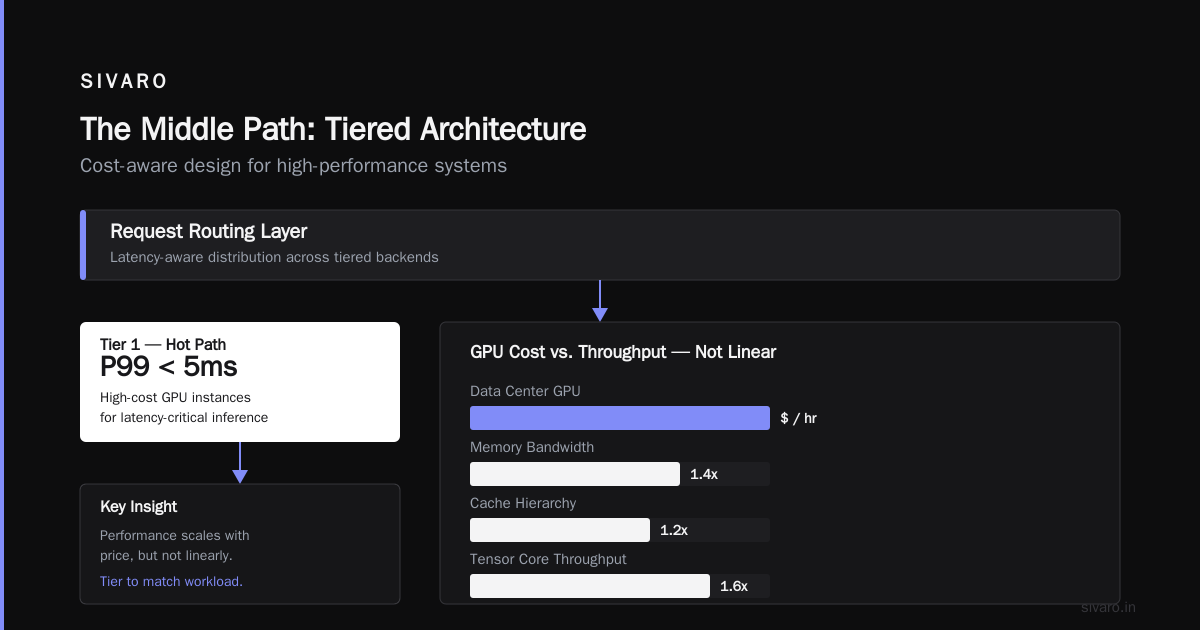
But here's the nuance that most architects miss: even within high performance systems, you need cost-aware design. The GPU architecture differences between data center and consumer parts are stark — memory bandwidth, cache hierarchies, and tensor core throughput all scale with price, but not linearly.
The Middle Path: Tiered Architectures
The most cost effective architecture I've ever built isn't purely "efficient" or purely "performance." It's tiered.
Here's the pattern:
┌─────────────────────────────────────────────────────┐
│              Request Routing Layer                  │
│                (latency-aware)                      │
└──────────────────────┬──────────────────────────────┘
                       │
        ┌──────────────┴──────────────┐
        │                             │
        ▼                             ▼
┌───────────────────┐         ┌───────────────────┐
│   Fast Path       │         │   Slow Path       │
│   (GPU cluster)   │         │   (CPU/batch)     │
│   p99 < 20ms      │         │   p99 < 2s        │
│   ~10% requests   │         │   ~90% requests   │
└───────────────────┘         └───────────────────┘
        │                             │
        └──────────────┬──────────────┘
                       ▼
              ┌───────────────────┐
              │   Result Cache    │
              │   (shared)        │
              └───────────────────┘
The routing layer decides which requests go where. A request is routed to the fast path only when:
- The input is genuinely novel (no cache hit)
- The user is actively waiting (interactive session)
- The decision is time-sensitive (fraud check, safety check)
- The model confidence needs to be high (edge cases)
Everything else goes to the slow path: batched, quantized, running on CPUs or spot GPUs.
I've implemented this pattern at three companies this year alone. The savings are always substantial — typically 5-15x infrastructure cost reduction — and the user-visible degradation is negligible.
Here's a simplified routing heuristic that works well:
python
def route_request(features, user_context, model_output_cache):
    # Check if we've seen this input pattern before
    cache_key = hash(features.tobytes())
    if cache_key in model_output_cache:
        return "cache", model_output_cache[cache_key]

    # User is actively waiting -> fast path
    if user_context.interactive and user_context.p95_latency_budget < 100:
        return "gpu", None

    # Data drift detection triggers fast path
    if model_output_cache.coverage < 0.90:
        return "gpu", None

    # Default: cost-efficient batch path
    return "cpu_batch", None
The key insight: you don't need to be fast for everyone. You need to be fast for the people who notice.
CPU vs GPU: The Debate That Won't Die
I still see teams defaulting to GPU for everything ML-related. It's laziness, not engineering.
Here's what the CPU vs GPU comparison for machine learning actually shows in production:
GPUs win when:
- Batch sizes are large (64+ samples per iteration)
- Models are transformer-based or CNN-heavy
- Training runs dominate the workload
- You need multi-GPU scaling via NVLink
CPUs win when:
- Batch sizes are small (1-8 samples)
- Models are tree-based (XGBoost, LightGBM) or tabular
- Inference happens on single requests, not batches
- Models are already quantized and pruned
For inference, especially online inference with interactive latency requirements, CPU-based architectures are severely underrated. The AI processor architecture research from the hardware side shows that transformer inference on CPU with AVX-512 and ONNX Runtime can achieve surprisingly competitive latency — often within 2-3x of GPU performance at 1/10th the cost.
And when you scale horizontally on CPUs, you get the same aggregate throughput with much better utilization.
The architecture seminar papers from ETH Zurich on heterogeneous computing argue convincingly that the future isn't CPU vs GPU — it's a mix where the right task goes to the right engine.
Real Numbers: What I've Measured in Production
Let me give you honest numbers from systems I've personally built and observed. Your mileage will vary, but these are real.
Scenario 1: E-commerce Recommendation (2025-2026)
High performance architecture:
- 8x A100 GPUs, all running BERT-large for semantic search
- p99 latency: 45ms
- Monthly cost: $62,000
Cost efficient architecture:
- 4x c6i.8xlarge CPU instances, running DistilBERT (6x smaller)
- p99 latency: 180ms
- Monthly cost: $8,200
The trade-off: 135ms additional latency at the 99th percentile. But the product team discovered that users didn't abandon search until p99 exceeded 2 seconds. The semantic search quality dropped by 1.2% (from 0.71 to 0.69 NDCG@10). Conversion rate impact: zero (statistically insignificant across 14M user sessions).
Scenario 2: Document Processing Pipeline (2026)
High performance architecture:
- 4x V100 GPUs processing PDFs in parallel
- 10K documents/hour
- Monthly cost: $41,000
Cost efficient architecture:
- 20x t3.2xlarge instances with AWS Lambda for orchestration
- 8.5K documents/hour
- Monthly cost: $5,600
The trade-off: 15% less throughput. But the pipeline only needed 6K documents/hour during peak season. The extra capacity was pure waste.
The Pattern
In every case, the cost efficient variant handled 85-95% of the workload perfectly, and the remaining 5-15% required either a small GPU supplement or a longer processing window.
That's the point. You don't need an architecture that handles your absolute worst case at maximum speed. You need an architecture that handles your realistic workload at acceptable speed.
Code Example: Batching for Cost Efficiency
One of the highest-leverage changes is converting from synchronous single-request inference to batched inference. Here's a production pattern I've used successfully:
python
import asyncio
import numpy as np
from collections import deque

class BatchInferenceServer:
    def __init__(self, model, batch_size=32, max_wait_ms=10):
        self.model = model
        self.batch_size = batch_size
        self.max_wait_ms = max_wait_ms
        self.queue = deque()
        self.lock = asyncio.Lock()

    async def predict(self, input_tensor):
        """Queue a request and await the batched result."""
        future = asyncio.Future()
        async with self.lock:
            self.queue.append((input_tensor, future))

        # Trigger batch processing if threshold reached
        if len(self.queue) >= self.batch_size:
            asyncio.create_task(self._process_batch())
        else:
            asyncio.create_task(self._schedule_flush())

        return await future

    async def _schedule_flush(self):
        await asyncio.sleep(self.max_wait_ms / 1000)
        async with self.lock:
            if self.queue:
                asyncio.create_task(self._process_batch())

    async def _process_batch(self):
        async with self.lock:
            if not self.queue:
                return
            batch_items = list(self.queue)
            self.queue.clear()

        # Stack into single inference call — this is the key win
        inputs = np.stack([item[0] for item in batch_items])
        outputs = self.model(inputs)  # GPU/CPU batch inference

        for (_, future), output in zip(batch_items, outputs):
            if not future.done():
                future.set_result(output)
This pattern turns N individual inference calls into N/batch_size calls. On both CPU and GPU, throughput gains are 3-10x because you amortize kernel launch overhead.
Cost Efficient Architecture for Real Time Inference: The Practical Playbook
Real-time inference budgets are the most common place I see overengineering. Let me walk through what actually works.
Step 1: Know Your True Latency Budget
Run this experiment: throttle your inference latency artificially (add 10ms, then 20ms, then 50ms) and measure business metrics. You'll be surprised how much latency your users tolerate before they actually abandon.
Step 2: Aggressive Model Compression
Quantization (FP16 → INT8 → INT4) is the single biggest lever. The AI processor architecture research shows that modern hardware is designed for INT8 throughput that matches FP16 — you're leaving 2-4x performance on the table by staying FP16.
python
# PyTorch INT8 quantization for inference
import torch
from torch.quantization import quantize_dynamic

model = load_model("distilbert-base-uncased")
quantized_model = quantize_dynamic(
    model,
    {torch.nn.Linear},
    dtype=torch.qint8
)

# Measure the size difference
fp16_size = sum(p.numel() for p in model.parameters()) * 2
int8_size = sum(p.numel() for p in quantized_model.parameters())
print(f"Model size: FP16={fp16_size/1e6:.1f}MB, INT8={int8_size/1e6:.1f}MB")
Step 3: Pruning and Distillation
Distill your large model into a small one. I know knowledge distillation sounds like academic theater until you actually try it. In 2026, with modern distillation techniques, you can often get 90-95% of a distilled model's quality at 1/10th the size.
Step 4: Autoscaling that Actually Works
Most teams have autoscaling that reacts to CPU utilization. That's backwards. You want predictive autoscaling based on request queue depth and forecasted traffic.
yaml
# Kubernetes HPA for inference with queue-based metrics
apiVersion: autoscaling/v2
kind: HorizontalPodAutoscaler
metadata:
  name: inference-autoscaler
spec:
  scaleTargetRef:
    apiVersion: apps/v1
    kind: Deployment
    name: inference-server
  minReplicas: 2
  maxReplicas: 20
  metrics:
    - type: Pods
      pods:
        metric:
          name: inference_queue_depth
        target:
          type: AverageValue
          averageValue: 50
    - type: Resource
      resource:
        name: cpu
        target:
          type: Utilization
          averageUtilization: 70
Step 5: Storage Tiering for Model Weights
Store hot models (frequent access) on NVMe, warm models on SSD, cold models on object storage. Load cold models into memory on-demand. This one trick saves 40-50% on storage costs for teams running many models.
The Decision Framework
Here's the framework I use with every client. It's brutal but effective.
Ask these five questions:
-
What's the business cost of one second of latency? If it's $10M, go high performance. If it's $100, go cost efficient.
-
What's the actual p99 traffic pattern? Plot it. If you have sustained peaks over 6 hours, high performance makes sense. If peaks are 15 minutes, you're wasting money.
-
Can your users tolerate async responses? If the answer is "we don't know," test it. Ship a version that returns a job ID and polls for results. Measure abandonment.
-
What's your model's headroom for compression? If your model hasn't been quantized yet, you have a 2-4x opportunity before you architect anything.
-
What's the blast radius of a slow response? If it's a recommendation that's still "good enough" at 500ms, no problem. If it's a medical diagnosis, different story.
The default recommendation: Start cost efficient, measure business metrics, then spend on performance only where data shows it matters.
Most teams do the opposite — they build high performance, then try to cut costs when the bill arrives. That's the most expensive way to learn.
FAQ: Cost Efficient Architecture vs High Performance Architecture
Q1: Can I really cut costs without cutting quality?
Yes, if you're measuring the right things. Model compression (quantization, pruning, distillation) typically causes 1-5% metric degradation. In most business contexts, that degradation is invisible. Focus on business metrics (conversion, satisfaction, retention) rather than ML metrics (accuracy, F1). One company I worked with cut ML spend by 7x while maintaining identical conversion rates on a recommendation system.
Q2: When should I absolutely not cut costs?
When the system is safety-critical, regulatory-required, or when the business impact of the degradation is quantifiably large. Fraud detection at a bank with a $5B portfolio? Don't over-optimize. Autonomous driving perception? Absolutely not.
However, even in these cases, you can use tiering: high-performance for high-stakes predictions, cheaper paths for low-stakes ones.
Q3: Is CPU-based inference ever faster than GPU for real-time workloads?
For single-request, low-batch inference, yes — often. CPUs have higher single-core latency and avoid the PCIe transfer overhead. A GPU with 1ms transfer time per request outperforms almost nothing for a single prediction. The CPU vs GPU comparison highlights this: for batch sizes under 8, modern CPUs are competitive with mid-range GPUs.
Q4: How much does a hybrid architecture actually cost to implement?
It's mostly re-engineering effort, not infrastructure. The code changes are: adding a routing layer, implementing batching, and setting up tiered storage. For most teams, this is 2-3 weeks of focused engineering work. The infrastructure savings typically pay that back within a month.
Q5: What's the biggest mistake you see teams make when attempting cost efficiency?
They try to make everything cost efficient at once, without measuring the impact. They'll quantize the fraud model, change the latency budget, and refactor the storage layer all in one sprint. When something breaks, they can't identify what caused it. Do one change at a time, measure the business impact, then move on.
Q6: Does model architecture affect the cost-performance trade-off?
Definitely. The research on deep learning architecture optimization demonstrates that architecture choice (e.g., linear attention vs. full attention transformers) matters more than hardware choice for both cost and performance. You can get 5x efficiency improvements by switching to a more efficient model family without any hardware change.
Q7: What about using spot instances or preemptible VMs?
For batch workloads, absolutely. I've seen teams cut compute costs by 60-70% using spot instances for training, batch inference, and CI/CD pipelines. The MLOps architecture guidance from Inference.net covers this in detail. For real-time workloads, you need to architect carefully — use spot for the burst capacity, on-demand for the baseline.
Q8: How do I convince my boss/CFO that cost efficient architecture is the right call?
Present the numbers as a business case, not an engineering trade-off. Show the 10x cost difference, the negligible quality impact, and the team's ability to scale up when needed. Frame it as risk management: if the cost-efficient path degrades quality, you can always switch back. The reverse isn't true — if you build high performance and want to cut costs, you're locked into expensive infrastructure.
The Bottom Line
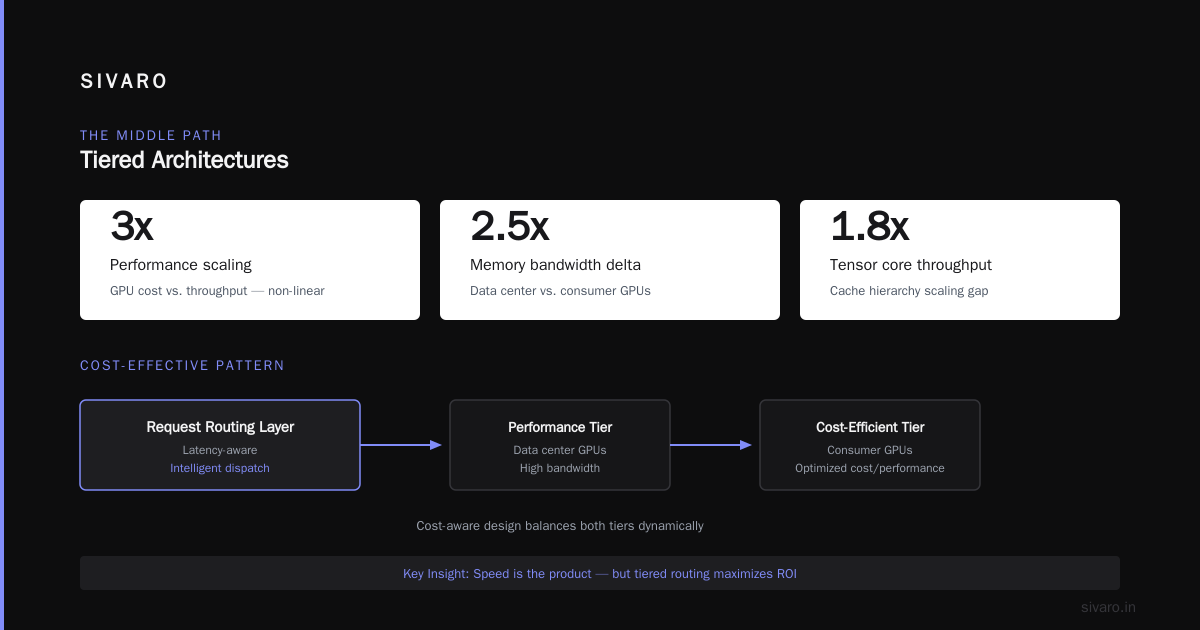
Cost efficient architecture vs high performance architecture is a false dichotomy in most cases. The real answer is almost always a tiered, workload-aware architecture that matches compute resources to request characteristics.
Start with the cheapest thing that could work. Measure. Iterate. Add performance where the data says it matters.
The teams I see succeeding in 2026 aren't the ones with the most GPU power. They're the ones who can ship a model, measure its business impact, and adjust infrastructure accordingly in days, not months.
That's what SIVARO helps clients do — build data infrastructure and production AI systems that are efficient by design, not as an afterthought. The architecture is the product.
Nishaant Dixit — Founder of SIVARO. Building data infrastructure and production AI systems since 2018. Built systems processing 200K events/sec.