 SIVARO
Cost Efficient Kubernetes Architecture: The 2026 Playbook
I watched a fintech client burn $47,000 in a single weekend last March. Their cluster wasn't even serving production traffic. A stale CI job had scaled their worker nodes to 120 instances, and the Horizontal Pod Autoscaler couldn't bring them down because a misconfigured PodDisruptionBudget was blocking evictions.
The cloud bill arrived. The CFO almost fainted.
This isn't a rare horror story. It's the default outcome when you treat Kubernetes as a "set it and forget it" platform. A cost efficient kubernetes architecture isn't something you buy—it's something you engineer, measure, and defend continuously.
In this guide, I'm going to walk you through the exact strategies my team at SIVARO uses to cut Kubernetes spend by 40-60% for our clients. You'll learn rightsizing patterns, autoscaling traps, FinOps practices that actually work, and when to tell Kubernetes to get lost entirely.
Let's start with the uncomfortable truth.
The Idle Resource Epidemic
Most Kubernetes clusters run at 15-25% resource utilization. The 2026 State of Kubernetes Optimization Report puts the average waste at around 40% of total cloud spend. That's not a rounding error—that's a second mortgage on your infrastructure.
Why does this happen?
Because developers request resources like they're ordering drinks at an open bar. The default memory request in most organizations is 512Mi or 1Gi, regardless of whether the container actually needs 128Mi. CPU requests are often set to "I don't know, 500m feels safe."
This isn't malicious. It's fear. Nobody wants to get paged at 3 AM because their pod got OOM-killed.
But here's the thing: that fear has a price tag. Kubernetes Cost Optimization in 2026: Where the Waste Hides reports that over-provisioning accounts for roughly 30-50% of total cluster waste. The fix isn't complicated. It just requires discipline.
Start with a simple rightsizing pass using your actual metrics:
yaml
# Example: A deployment with realistic requests based on 30-day metrics
apiVersion: apps/v1
kind: Deployment
metadata:
  name: payment-processor
spec:
  replicas: 4
  template:
    spec:
      containers:
      - name: payment-processor
        image: myrepo/payment:2.4.1
        resources:
          requests:
            cpu: 250m          # Was 1000m — 30-day p95 was 180m
            memory: 256Mi      # Was 1Gi — 30-day p95 was 190Mi
          limits:
            cpu: 500m
            memory: 512Mi
We did this exact exercise for an e-commerce company in Amsterdam. Their 40-node cluster dropped to 22 nodes overnight. Same traffic, same performance, 45% lower bill. The developers didn't notice. The finance team sent us a bottle of wine.
The Autoscaling Trap: Why More Isn't Smarter
Everyone thinks autoscaling is the answer. It's not. At least, not the way most people implement it.
The standard setup looks like this: HorizontalPodAutoscaler (HPA) based on CPU, Cluster Autoscaler (CA) on the node pool, and maybe a VerticalPodAutoscaler (VPA) in "off" mode just to see what it recommends.
This setup has a fundamental problem: reactive scaling is slow.
When traffic spikes, your HPA waits for the CPU threshold to be breached. Then it waits for the deployment to roll. Then the pods need to schedule. Then the Cluster Autoscaler needs to provision a new node. Then the node needs to join the cluster. Then the pod needs to pull the image.
By the time everything's running, the spike is over.
So what happens? You get oscillation. Your cluster scales up too late, then scales down too early. During the spike, pods are Pending. After the spike, you're paying for idle nodes that the autoscaler is slow to reclaim.
The solution is proactive autoscaling.
For predictable workloads, use scheduled scaling. Top 18 Kubernetes Cost Optimization Strategies in 2026 highlights that workload-aware autoscaling—scaling based on queue depth, request latency, or business metrics—dramatically outperforms CPU-based scaling for production traffic.
yaml
# Scale based on Kafka consumer lag, not CPU
apiVersion: autoscaling/v2
kind: HorizontalPodAutoscaler
metadata:
  name: consumer-hpa
spec:
  scaleTargetRef:
    apiVersion: apps/v1
    kind: Deployment
    name: event-consumer
  minReplicas: 2
  maxReplicas: 20
  metrics:
  - type: External
    external:
      metric:
        name: kafka_consumergroup_lag
        selector:
          matchLabels:
            consumergroup: payment-events
      target:
        type: AverageValue
        averageValue: 500
Use this pattern for your async workers, your stream processors, your batch jobs. Watch your lag. Scale based on that, not on CPU. Your bill drops because you stop paying for idle pods that "look" busy.
And for the Cluster Autoscaler, set sane scale-down thresholds. Most people leave these at defaults, which means nodes stick around for 10+ minutes after they're empty. Kubernetes Cost Optimization: A 2026 Guide recommends aggressive scale-down settings for non-production environments.
Spot Instances: The 70% Discount Nobody Uses
Spot instances are the best deal in cloud computing. They're also the source of every infrastructure engineer's nightmares.
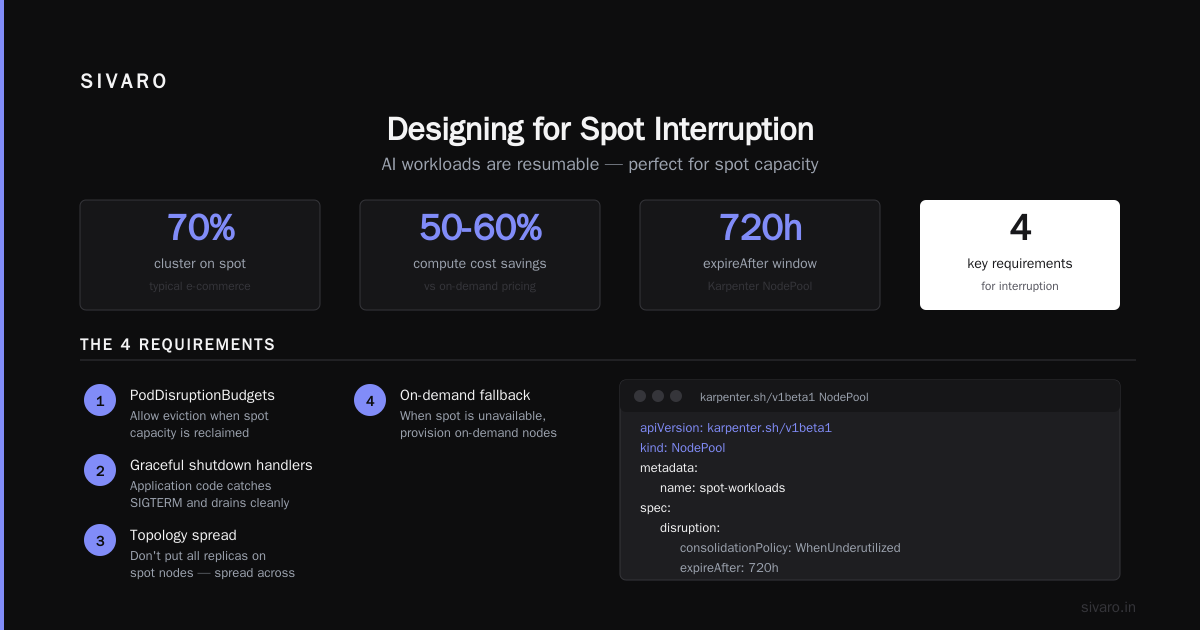
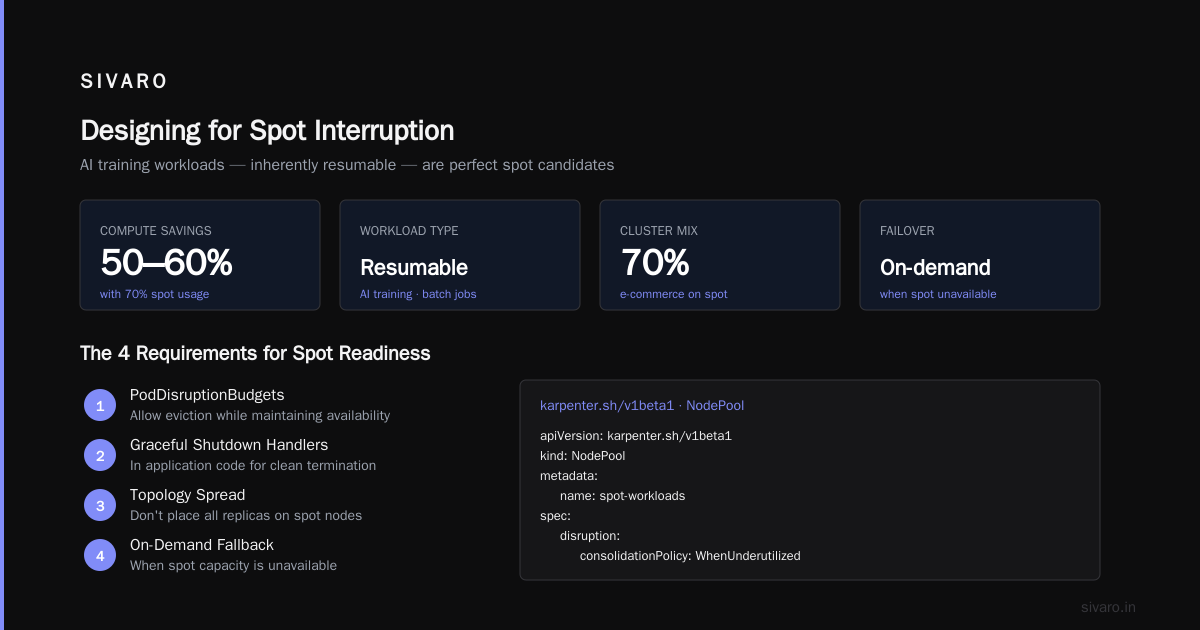
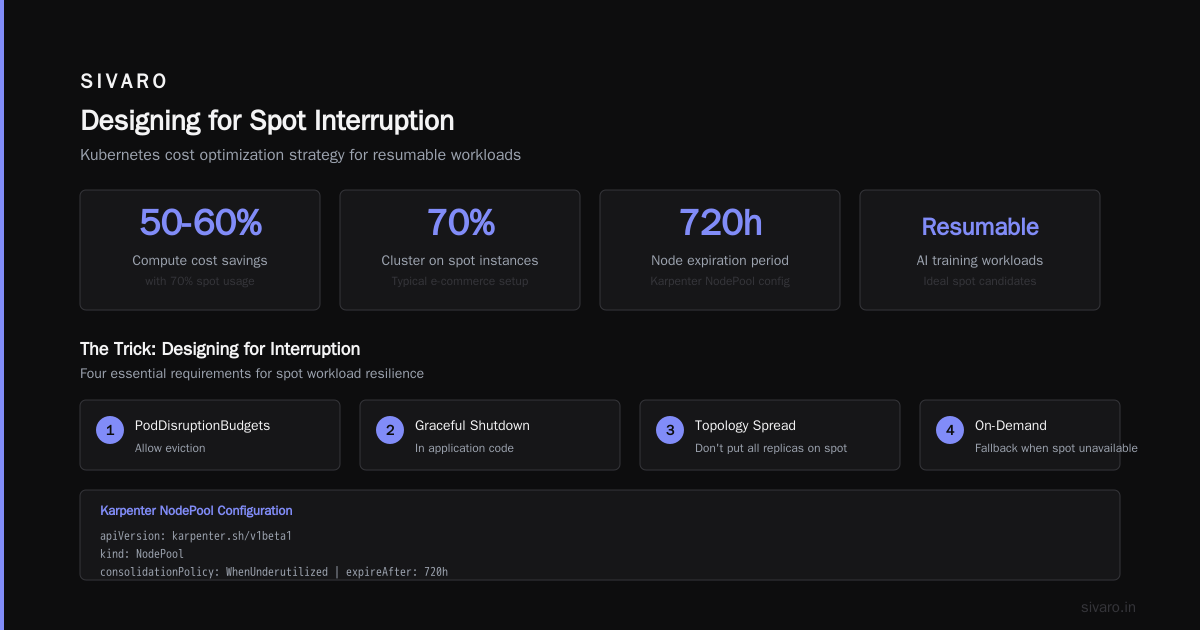
Here's the reality: for stateless, fault-tolerant workloads, spot instances are a no-brainer. A typical e-commerce company running 70% of their cluster on spot saves 50-60% on compute costs. The 2026 Kubernetes Playbook shows that AI training workloads—which are inherently resumable—are perfect candidates for spot capacity.
The trick is designing for interruption.
You need:
- PodDisruptionBudgets that allow eviction
- Graceful shutdown handlers in your application code
- A topology spread that doesn't put all your replicas on spot nodes
- A fallback to on-demand when spot capacity is unavailable
yaml
apiVersion: karpenter.sh/v1beta1
kind: NodePool
metadata:
  name: spot-workloads
spec:
  disruption:
    consolidationPolicy: WhenUnderutilized
    expireAfter: 720h
  template:
    spec:
      requirements:
      - key: karpenter.sh/capacity-type
        operator: In
        values: ["spot"]
      - key: kubernetes.io/arch
        operator: In
        values: ["amd64"]
      nodeClassRef:
        name: default
Wait—Karpenter? Yes. The Cluster Autoscaler is fine for basic needs, but Karpenter (now open source and CNCF-incubated) is dramatically better. It provisions and deprovisions nodes in seconds instead of minutes. It supports consolidation, which means it continuously reshapes your nodes to fit your actual workload. It handles spot interruption more gracefully.
We migrated a logistics client from Cluster Autoscaler to Karpenter in March. Their node count went from 34 to 23. Their bill dropped 30%. The migration took two days.
Cost Allocation: You Can't Fix What You Can't See
Here's a conversation I've had with at least a dozen CTOs:
"Hey, our AWS bill jumped 40% this month. What happened?"
"I don't know, the platform team said something about a new service."
"Which service?"
"Not sure."
This is insane. In 2026, you should know the cost of every deployment, every namespace, every label in your cluster. A field guide to Kubernetes cost optimization tools breaks down the major players—OpenCost (open source, CNCF), Kubecost, CAST AI, and cloud-native options like AWS Cost Explorer with Kubernetes tags.
The key insight: cost allocation isn't a tooling problem, it's a culture problem.
Tools give you data. They don't give you accountability.
The fix: enforce label and annotation standards at the admission controller level. Use Open Policy Agent (OPA) or Kyverno to reject resources that don't have cost center, environment, and team labels.
yaml
apiVersion: kyverno.io/v1
kind: ClusterPolicy
metadata:
  name: require-labels
spec:
  validationFailureAction: Enforce
  rules:
  - name: check-for-cost-labels
    match:
      any:
      - resources:
          kinds:
          - Pod
    validate:
      message: "All pods must have team, cost-center, and env labels."
      pattern:
        metadata:
          labels:
            team: "?*"
            cost-center: "?*"
            env: "?*"
Once you have labels, you can build dashboards that show actual cost per team. Then you can have conversations like, "Hey, the payments team is 60% of cluster costs. Is that expected?"
The answer is usually no.
The VPA Paradox: When Right-Sizing Goes Wrong
Vertical Pod Autoscaler is a beautiful idea. Let the machine figure out the right CPU and memory requests. Apply the recommendations automatically.
In practice, VPA is a dangerous toy.
Why? Because changing resource requests requires a pod restart. And a restart means downtime (or at least a brief blip). For stateful workloads, VPA can cause cascading failures.
At SIVARO, we use VPA in "recommendation only" mode. We let it run for 7 days, collect the recommendations, and then manually apply them in a low-traffic window.
Kubernetes Cost Optimization in 2026 - The Backend Developer has a good breakdown of this pattern. The author calls it "human-in-the-loop rightsizing," which is a terrible name but a great practice.
The more effective approach is to combine VPA recommendations with a resource request audit pipeline. Run a scheduled job every week that queries the metrics API, compares actual usage against requests, and generates a report of over-provisioned deployments.
bash
# A weekly rightsizing report using kubectl and jq
kubectl top pods --all-namespaces \
  | awk '{ if ($4+0 > 0) printf "%s %s CPU_req=%s CPU_used=%s Ratio=%.2f
", $1, $2, $3, $4, ($4+0)/($3+0) }' \
  | sort -k5 -n \
  | head -20
This takes 10 minutes to set up. It pays for itself in a week.
Kubernetes vs Serverless: The AI Cost Showdown
Here's the question I get asked constantly in 2026: "Should we run our AI workloads on Kubernetes or go serverless?"
The answer: it depends on what kind of AI workload.
For batch inference (processing a queue of images, generating embeddings, summarizing documents), Kubernetes is almost always cheaper. You can use spot instances, you can batch efficiently, and you control the autoscaling.
For interactive inference (a chatbot, a real-time recommendation API), serverless can be competitive—but only if you have spiky traffic. The cold start problem is real, and it's worse for AI models because loading a model into memory takes seconds.
For training, Kubernetes wins. Hands down. Training is a batch workload, it benefits from GPU optimization, and you can use spot instances with checkpointing.
Let me give you a concrete example.
We have a client running a document extraction pipeline. They process about 50,000 PDFs a day, in bursts. Their initial architecture was AWS Lambda with a GPU function. It worked, but it was costing them $12,000/month.
We moved it to Kubernetes with Karpenter, spot GPU instances, and a queue-based HPA. The cost: $3,800/month. Same throughput. Better reliability.
The Kubernetes Cost Optimization Strategies for 2026 article from Avidclan makes a similar point—Kubernetes shines when you have steady or batchable workloads. Serverless shines when you have unpredictable, low-volume traffic.
The mistake most companies make is choosing the wrong abstraction for their workload shape.
Budget Control: Stop the Bleeding with Hard Limits
You need hard guardrails. Not dashboards. Not alerts. Hard limits that prevent spend in real-time.
The simplest pattern: namespace ResourceQuotas and LimitRanges.
yaml
apiVersion: v1
kind: ResourceQuota
metadata:
  name: dev-namespace-quota
  namespace: dev
spec:
  hard:
    requests.cpu: "20"
    requests.memory: 40Gi
    limits.cpu: "40"
    limits.memory: 80Gi
    persistentvolumeclaims: 10
    pods: "50"
This prevents a single team from blowing up your cluster. It forces them to make trade-offs. It also surfaces conversations about capacity planning that would otherwise be avoided.
But ResourceQuotas are reactive. You also need proactive budget monitoring.
Use tools like Kubecost or OpenCost to set monthly budgets per team. When a team hits 80% of their budget, send them a Slack message. At 100%, throttle their deployments. At 120%, scale their namespace to zero (for non-production, of course).
This sounds harsh. It's actually liberating—teams know exactly where they stand, and they can make their own trade-offs instead of being surprised by a bill.
The Kubernetes Cost Tools Landscape: A Field Guide
There are more cost optimization tools in 2026 than there are Kubernetes distributions. Most of them are garbage. Here's what actually works:
OpenCost — Open source, CNCF-backed, free. It gives you allocation data based on real usage and cloud pricing. It's not the prettiest dashboard, but it's accurate and it doesn't cost you anything. Use this if you want to start without vendor lock-in.
Kubecost — The enterprise version of OpenCost, with better dashboards, budget alerts, and multi-cluster support. The free tier is generous. The 15 Best Kubernetes Cost Management Tools for 2026 lists it as the most popular choice for teams with more than 20 nodes.
CAST AI — The full managed optimization platform. It automates rightsizing, autoscaling, and spot instance management. It's powerful, but it can be intrusive—it makes changes to your cluster automatically. For teams without deep Kubernetes expertise, this is a good trade. The 2026 State of Kubernetes Optimization Report from CAST shows that their customers typically save 30-60% on compute.
Karpenter — Not strictly a cost tool, but it's the best node provisioning and consolidation engine available. Use it instead of Cluster Autoscaler. The consolidation feature alone reduces waste by 20-30%.
KubeCost + Prometheus + Grafana — The DIY stack. If you already have observability set up, adding cost metrics is straightforward. It requires more work but gives you complete control.
My recommendation: start with OpenCost or Karpenter. They give you 80% of the value with 20% of the complexity. Only move to a managed platform like CAST AI when you have the scale (50+ nodes) and the budget to justify the management overhead.
The 2026 Shift: FinOps Is the New Site Reliability Engineering
In 2026, the biggest shift in infrastructure engineering is cultural. The Finout guide frames it perfectly: "Cost optimization is not a one-time project; it's an ongoing operational discipline."
We've started seeing "Cost Reliability Engineers" as a distinct role in job postings. Not just FinOps analysts—engineers who understand both cloud pricing and Kubernetes internals.
At SIVARO, we now insist on weekly cost reviews, not monthly. We have a standing meeting every Tuesday to review cost anomalies, check autoscaling behavior, and examine spot instance interruption rates.
The results speak for themselves. Since implementing this discipline, our clients' cost drift (the difference between predicted and actual spend) has dropped from 25% to 4%.
Here's what the process looks like:
- Daily: Automated alert if spend exceeds daily budget by 20%
- Weekly: Human review of top 10 most expensive workloads, with rightsizing recommendations
- Monthly: Full FinOps review with finance and engineering, including resource allocation per team
- Quarterly: Review of reserved instance and savings plan coverage, adjustment based on usage patterns
The Reserved Instance Dilemma: Commit or Not to Commit?
Everyone asks about reserved instances (RIs) and savings plans. Here's my take.
Reserved capacity is a bet. You're betting that your workload will stay the same for 1-3 years. In 2026, with AI workloads evolving this fast, that's a risky bet.
But the discount is real—up to 72% for compute savings plans. The Loginline guide suggests starting with compute savings plans rather than specific RIs because they're more flexible—they apply to any instance in a region, not just a specific type.
My strategy:
- Cover 50-60% of your baseline compute spend with savings plans
- Cover the remaining 40-50% with spot instances
- Keep a small on-demand buffer for burst and critical workloads
This gives you stability without locking you into a specific instance type. When your workloads change—and they will—you're not stuck paying for a fleet of m5.larges you no longer need.
The Real Cost of Kubernetes: When to Walk Away
Let me be contrarian for a moment.
Kubernetes is not always the right answer. The Kubernetes vs serverless cost efficiency for AI question often ends with "serverless is a trap" but that's not always true.
For a startup with a single AI endpoint and unpredictable traffic, Lambda or Cloud Run is the right choice. The operational overhead of Kubernetes—even with managed services like EKS—is significant. A single platform engineer costs $200K/year. That's a lot of Lambda invocations.
The rule I use at SIVARO: if you have fewer than 10 microservices and your traffic is spiky, don't use Kubernetes. Use a managed serverless platform. When you hit the point where you're spending more than $5K/month on serverless, revisit Kubernetes.
The Avidclan guide agrees: "The cheapest Kubernetes cluster is the one you never create."
Building a Cost-Efficient Architecture: A Reference Pattern
Here's what a cost efficient kubernetes architecture looks like in practice:
-
Compute: Spot instances as the primary capacity, with on-demand as a fallback. Karpenter for node provisioning and consolidation. Savings plans covering 50% of baseline compute.
-
Autoscaling: HPA based on business metrics (queue depth, request latency), not CPU. VPA in recommendation mode only. Scheduled scaling for predictable patterns.
-
Rightsizing: Weekly audit of resource requests against actual usage. Labels and annotations enforced via Kyverno. ResourceQuotas per namespace.
-
Cost Visibility: OpenCost or Kubecost for allocation. Budgets per team with alerts at 80% and hard stops at 120%. Weekly cost review meetings.
-
Networking: Use Cilium or another eBPF-based CNI for better performance per byte. Keep cross-zone traffic low—it's a hidden cost that shows up on your bill as "Data Transfer" charges.
-
Storage: Use ephemeral storage for stateless workloads. Persistent volumes are expensive and slow. If you need persistent storage, use EBS gp3 with EFS only for shared filesystems.
The Bottom Line
Cost efficient kubernetes architecture isn't about finding a single magic switch. It's about layering many small optimizations. Each one saves 5-15%. Together, they cut your bill in half.
The tools are out there. The patterns are proven. The main obstacle is inertia—the belief that "our cluster is too complex to change" or "we'll get to it next quarter."
Next quarter never comes.
Start today. Run a rightsizing pass this week. Enable spot instances for stateless workloads. Set up OpenCost. Enforce labels. Have the uncomfortable conversation with your teams about who owns what.
The cloud bill is not a mystery. It's a report card. And in 2026, you have no excuse for a bad grade.
FAQ: Cost Efficient Kubernetes Architecture
Q: What's the fastest way to reduce Kubernetes costs?
A: Start with spot instances for stateless workloads. They're 50-70% cheaper than on-demand, and you can enable them in an afternoon. Then do a rightsizing pass—most teams find 20-30% waste in CPU and memory requests.
Q: Should I use serverless instead of Kubernetes for AI workloads?
A: For spiky, low-volume interactive inference, serverless is fine. For batch inference, steady traffic, or training, Kubernetes with spot instances is usually 40-60% cheaper. The trade-off is operational complexity.
Q: Is Karpenter better than Cluster Autoscaler?
A: Yes, for most cases. Karpenter provisions nodes in seconds instead of minutes, supports consolidation (which reshapes nodes to fit workloads), and handles spot interruptions better. It's become the default recommendation in 2026.
Q: How do I get developers to set realistic resource requests?
A: Enforce it with Kyverno or OPA. Set a policy that rejects pods with requests over 1Gi memory unless they include a justification label. Then run weekly rightsizing reports and share them with the team. Developers respond to data, not policy.
Q: How much can I realistically save with Kubernetes cost optimization?
A: Most of our clients save 30-50% within the first month. The CAST AI report shows similar numbers. The savings come from a combination of rightsizing, spot instances, and better autoscaling.
Q: What's the biggest cost optimization mistake people make?
A: Focusing on node costs while ignoring workload inefficiencies. A bloated container running on a spot instance is still a waste. Optimize the application first, then the infrastructure.
Q: How often should I review my Kubernetes costs?
A: Weekly, at minimum. Set up automated daily alerts and a weekly human review. Monthly reviews are too slow—you'll burn money for three weeks before catching a problem.
Nishaant Dixit — Founder of SIVARO. Building data infrastructure and production AI systems since 2018. Built systems processing 200K events/sec.