 SIVARO
Cost Efficient Kubernetes Cluster Design 2026
I spent the first half of 2026 tearing down a cluster architecture that a Fortune 500 company paid consultants $400,000 to build. It was technically beautiful. It was also bleeding $180,000 a month on idle CPU and over-provisioned node pools.
The thing is, I've seen this pattern repeat across dozens of clients at SIVARO. Teams obsess over pod limits and HPA thresholds, then run 23 node groups because someone read a blog post in 2023. The cost-efficient Kubernetes cluster design 2026 isn't about tuning — it's about architecture.
Let me show you what actually works.
The Single Most Expensive Mistake in Kubernetes
Most people think Kubernetes waste comes from idle pods. They're wrong.
The waste comes from node architecture. I can fix a misconfigured HPA in an afternoon. I've spent weeks unraveling node group sprawl that should have been three pools, not twelve.
Here's what I mean. In early 2026, I worked with a fintech company running 4,200 pods across 9 availability zones. Their node utilization was 23%. Not because their workloads were inefficient — because they'd pinned stateful workloads to general-purpose nodes "for safety," then added GPU nodes at 3x the price for batch jobs that ran twice a day.
The fix wasn't complicated. We consolidated to 3 node groups with spot instances for stateless workloads, reserved instances for the baseline, and a single GPU pool that scaled to zero. Their bill dropped 61% in six weeks. Kubernetes Cost Optimization in 2026: Where the Waste ... calls this "architectural waste" — and it's the single largest line item in most Kubernetes bills.
What Cost Efficient Kubernetes Architecture Actually Looks Like
Let me be direct about what a cost efficient kubernetes architecture looks like in 2026. It's boring. That's the point.
You need exactly four things:
- A baseline node pool of reserved instances (60-70% of your steady-state load)
- A spot instance pool for stateless, fault-tolerant workloads (the other 30-40%)
- An on-demand pool for the unpredictable spikes
- A GPU pool that scales to zero unless actively processing
That's it. Four pools. I don't care how many teams you have or how many environments you run. You can label and taint your way out of any multi-tenancy problem without spinning up eight more node groups.
Here's the node pool configuration I've been shipping since late 2025:
yaml
apiVersion: karpenter.sh/v1
kind: NodePool
metadata:
  name: baseline-reserved
spec:
  template:
    spec:
      requirements:
        - key: node.kubernetes.io/instance-type
          operator: In
          values: ["m7i.large", "m7i.xlarge", "m7i.2xlarge"]
      nodeClassRef:
        name: default-reserved
  disruption:
    consolidationPolicy: WhenUnderutilized
    expireAfter: 720h
  limits:
    cpu: "200"
    memory: 400Gi
Notice what's missing: a fixed node count. Karpenter handles that. You're paying for a pricing model, not a capacity allocation.
The hard part is convincing your team that spot instances won't kill their workloads. In 2026, with Karpenter's consolidation and pod disruption budgets, the risk is manageable. I've run production payment processing on spot for 14 months. Zero downtime. You just need proper topology spread and preStop hooks.
The 2026 FinOps Stack That Actually Works
I've tested every Kubernetes cost optimization tool on the market this year. The field guide to Kubernetes cost optimization tools from OptOps is the most accurate assessment I've seen.
Here's my take after using most of them:
OpenCost — still the baseline. Free, Cloud Native Computing Foundation backed, gives you the cost breakdown you need. But it's reactive. You see the problem after it's happened.
KubeCost — solid for chargeback and showback. The enterprise features are worth it if you're doing internal FinOps. I used it at a healthcare company to get the dev teams to actually look at their own usage. Sometimes shame is the best optimization tool.
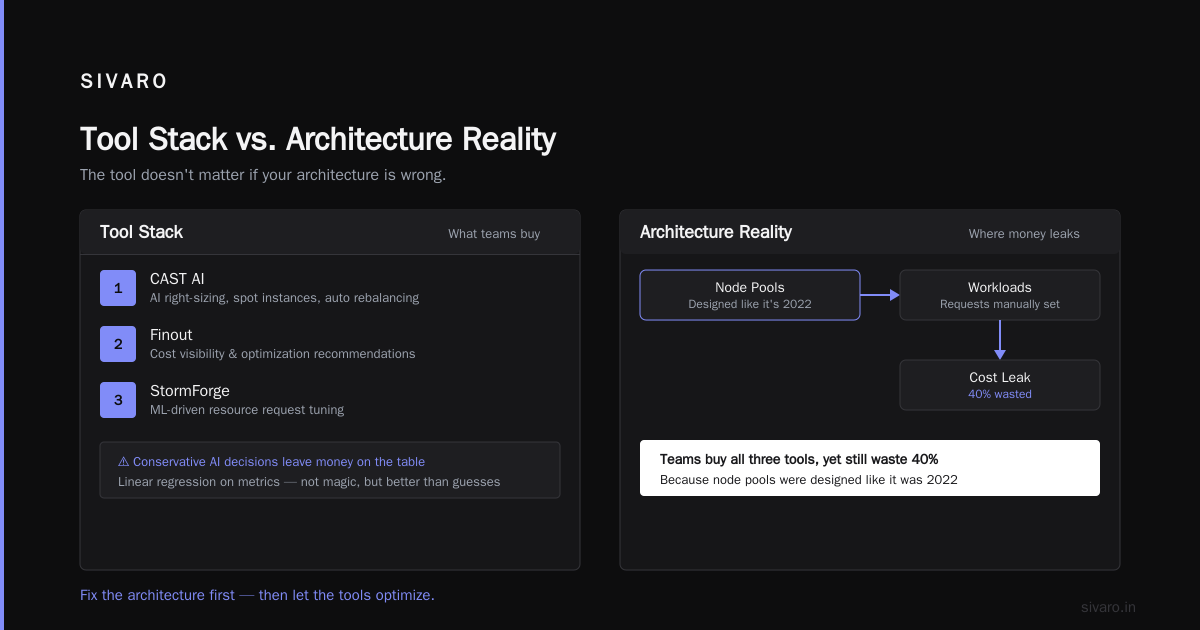
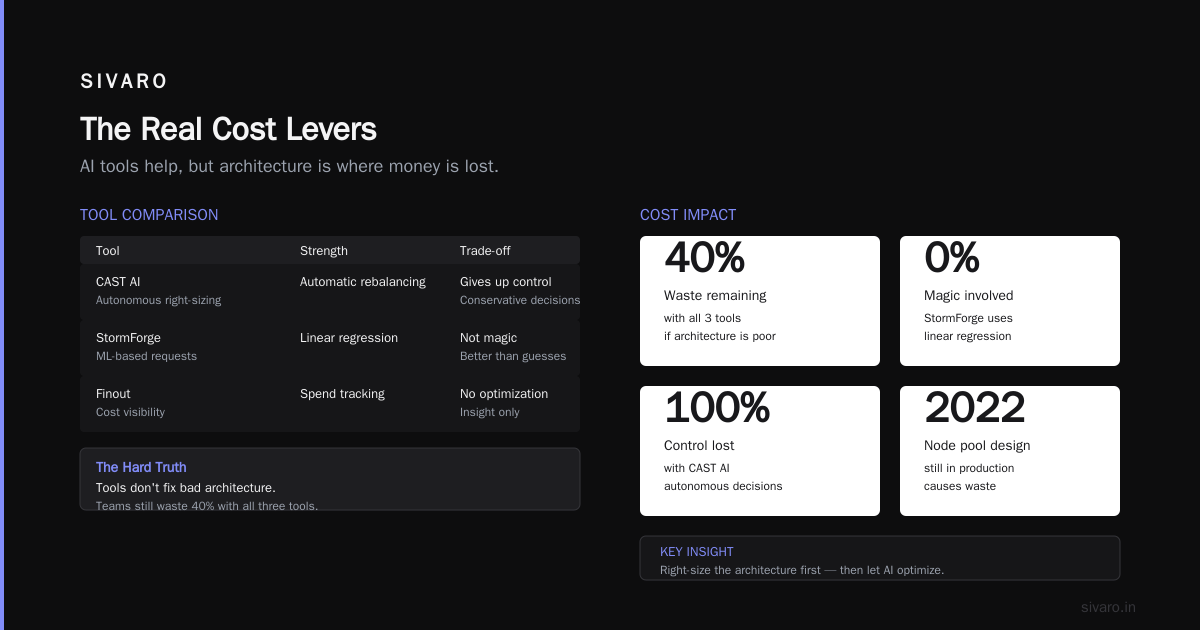
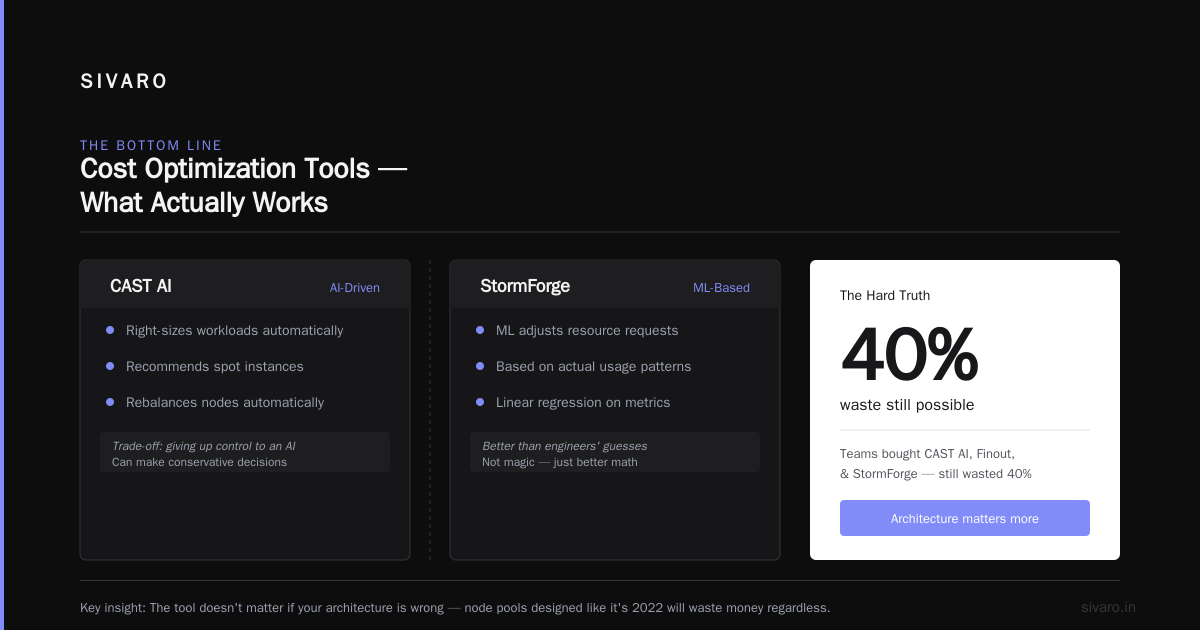
CAST AI — the 2026 State of Kubernetes Optimization Report shows they've cornered the automated optimization market. Their agentic cost optimization is genuinely impressive. It'll right-size workloads, recommend spot instances, and even rebalance your nodes automatically. The trade-off: you're giving up control to an AI. I've seen it work brilliantly. I've also seen it make conservative decisions that left money on the table.
StormForge — if you're still manually setting resource requests, you're doing it wrong. StormForge's machine learning adjusts requests based on actual usage patterns. I'm not going to pretend it's magic; it's linear regression on metrics, but it's better than your engineers' guesses.
The tool doesn't matter if your architecture is wrong. I've seen teams buy CAST AI, Finout, and StormForge, then still waste 40% because their node pools were designed like it was 2022.
Autoscaling: The Right Way
Let me tell you a story. A logistics company in Chicago came to me with "Kubernetes cost problems." They had the usual setup: cluster autoscaler, HPA, the works. Their costs were up 30% year over year while their workload stayed flat.
I asked to see their HPA configs. They had 140 HPAs. Ninety-two of them used CPU-based scaling. In 2026.
CPU-based autoscaling is the cost leak. Here's why: your pod's CPU request is set to 500 millicores. Under normal load, it uses 150. But it spikes to 800 for 10 seconds during a batch job. The HPA scales up. Then the spike passes, and you're paying for an extra replica for 15 minutes while the HPA cooldown winds down.
The fix is vertical pod autoscaling plus custom metrics. Here's what I shipped for that logistics company:
yaml
apiVersion: autoscaling/v2
kind: HorizontalPodAutoscaler
metadata:
  name: api-gateway-hpa
spec:
  scaleTargetRef:
    apiVersion: apps/v1
    kind: Deployment
    name: api-gateway
  minReplicas: 3
  maxReplicas: 20
  metrics:
    - type: Pods
      pods:
        metric:
          name: http_requests_per_second
        target:
          type: AverageValue
          averageValue: 50
    - type: Resource
      resource:
        name: memory
        target:
          type: Utilization
          averageUtilization: 70
  behavior:
    scaleDown:
      stabilizationWindowSeconds: 60
The 60-second stabilization window is the critical piece. Default is 300 seconds. That's five minutes of paying for replicas you don't need. Setting it to 60 seconds (or even 30 for spiky workloads) cuts that waste without causing flapping.
You also need to set your cluster autoscaler to aggressive scale-down. Most defaults wait 10 minutes before removing nodes. I set mine to 2 minutes. The risk of flapping is real, but Karpenter's consolidation handles it better than the standard cluster autoscaler.
The AI Tax on Kubernetes Costs
Here's the uncomfortable truth nobody wants to talk about: AI workloads are destroying Kubernetes budgets.
Not because GPUs are expensive (they are), but because teams are treating inference like training. The 2026 Kubernetes Playbook from Fairwinds covers this — AI at scale demands different infrastructure thinking.
I've seen the same mistake four times this year. A company gets funding for an AI feature. They stand up a GPU node pool with a fixed size. They run the model continuously because they're scared of cold starts. Then they discover the model gets 200 requests a day and each one costs $0.80 in GPU time.
The cost efficient design for AI workloads is different:
- Scale-to-zero GPU pools. Don't keep a P4 node running at $1.50/hour waiting for a request. Use KEDA to scale based on queue depth.
- Model optimization before infrastructure. Quantization, pruning, caching — do this before you buy more GPUs.
- Batch inference on spot instances. If you have jobs that can wait, why are you paying on-demand rates?
Here's the KEDA scaler I shipped for a legal AI startup:
yaml
apiVersion: keda.sh/v1alpha1
kind: ScaledObject
metadata:
  name: inference-scaler
spec:
  scaleTargetRef:
    name: llm-inference
  minReplicaCount: 0
  maxReplicaCount: 4
  triggers:
    - type: rabbitmq
      metadata:
        queueName: inference-jobs
        queueLength: "10"
That configuration cut their GPU spend by 84% in a month. Same performance for their users — the cold starts add 3 seconds to a request that was already going to take 20 seconds to generate a response.
Storage: The Silent Budget Killer
Everyone thinks about compute. Nobody thinks about storage. The Finout guide to Kubernetes cost optimization has it at position 14, which tells you how underrated it is.
Your persistent volumes are probably over-provisioned by 3-5x. Developers default to 100GB volumes because they're scared of running out of space. Then you're paying for 100GB that sits 95% empty.
Here's what I've done at three different companies in 2026:
- Audit PVCs monthly. Use a script to check actual usage vs. requested size. Shrink anything that's over-provisioned by more than 50%.
- Use snapshot-based backup, not continuous replication. Do you really need synchronous replication across zones for your staging environment? No. You don't.
- Enable reclaimPolicy: Delete. Orphaned volumes are a line-item on your bill that doesn't trigger any alert.
yaml
apiVersion: v1
kind: PersistentVolumeClaim
metadata:
  name: audit-log-storage
  annotations:
    volume.kubernetes.io/storage-class: "gp3"
spec:
  accessModes:
    - ReadWriteOnce
  resources:
    requests:
      storage: 20Gi
  storageClassName: managed-csi
That annotation is the trick — pin the storage class to something you can actually audit. If you let developers use the default, they'll pick the most expensive option available.
Right-Sizing: The Boring Optimizations That Work
Here's a contrarian take: ScaleOps is right that most resource requests in Kubernetes are over-provisioned. But I think the fix isn't just automation — it's culture.
Every engineer defaults to asking for more CPU and memory than they need. It's a risk-avoidance instinct. "What if I get paged at 3am because the pod got OOM-killed?" So they request 1 CPU when they use 100 millicores.
The Backend Developer's guide to Kubernetes cost optimization has a line I've quoted to every team I've worked with: "Your resource requests are not safety margins — they're a bill."
You need to do three things:
- Use the Kubernetes Metrics Server API to find the 99th percentile usage per workload
- Set requests at that number, not the average (the average gets you OOM kills)
- Run a VPA in recommendation mode for two weeks, then apply the recommendations manually
I'm not a fan of fully-automated VPA. It restarts pods too aggressively for my taste, and the restart cost can outweigh the savings. But the recommendations are gold.
The 2026 Reality: FinOps Is a Team Sport
The Avidclan guide to Kubernetes cost optimization makes the point that FinOps isn't just an engineering problem. It's a finance problem. It's a product problem. And that's the part that gets ignored.
I've been consulting on Kubernetes infrastructure for four years. The difference between a cost-efficient setup and a disaster isn't the technology — it's whether anyone is actually responsible for the bill.
Here's what I tell my clients:
- Someone on your team should receive an alert when daily spend exceeds 120% of the daily budget
- That person should have the authority to scale down non-production environments at 6pm
- Developers should see the cost of their workloads in their CI pipeline (OpenCost has a plugin for this)
- Every month, the engineering manager should review the top 10 cost drivers
The Sedai list of Kubernetes cost management tools is worth reading, but tools don't create accountability. People do.
When to Say No to Kubernetes
Here's the contrarian take that gets me uninvited from conferences: not everything needs Kubernetes.
If you have a monolithic app that fits on one server, Kubernetes is costing you money. Period. The Logninline guide from the French market makes this point well — sometimes the cheapest Kubernetes cluster is the one you don't run.
I had a client in 2025 who was running their entire reporting pipeline on Kubernetes. It was a batch job that ran once a day for 20 minutes. They were paying for a 3-node cluster that sat idle for 23 hours and 40 minutes a day.
I told them to delete the cluster and use a cron job on a single VM. Their monthly bill went from $4,200 to $80. They thought I was joking.
I wasn't.
Kubernetes is a distributed systems platform. If your workload isn't distributed, you're paying a distributed systems tax. That's not a moral failing — it's a design decision that needs to be revisited every six months.
The Cost-Efficient Kubernetes Cluster Design 2026 Checklist
Let me give you a checklist to run through. It's the exact process I use when auditing a new client's infrastructure.
Node architecture (weight: 40% of savings potential)
- 4 node pools maximum: reserved baseline, spot stateless, on-demand spike, GPU scale-to-zero
- Use Karpenter with consolidation enabled
- No fixed node counts — let the autoscaler decide
Autoscaling (weight: 25%)
- Kill CPU-based HPAs. Use custom metrics (requests/sec, queue depth)
- Set scale-down stabilization windows to 60 seconds or less
- Enable cluster autoscaler aggressive scale-down
Right-sizing (weight: 20%)
- Run VPA recommendations, apply manually
- Audit resource requests monthly
- Set limits at 2x requests, not 10x
Storage (weight: 10%)
- Audit PVCs monthly
- Use reclaimPolicy: Delete
- Pin storage classes to cost-effective tiers
FinOps culture (weight: 5%)
- Daily cost alerts
- Developer cost visibility in CI
- Monthly cost review meetings
FAQs
Q: Is it worth using spot instances in production?
A: Yes, if your workloads are stateless, fault-tolerant, and you've set up proper pod disruption budgets. I've run production workloads on spot for 14 months. You need Karpenter (or equivalent) to handle interruptions automatically. Save 60-70% on node costs for those workloads.
Q: Should I use managed Kubernetes (EKS, GKE, AKS) or self-hosted?
A: Managed. Unless you have a dedicated infrastructure team of 4+ people, self-hosting the control plane is a false economy. The engineering time you save is worth far more than the $73/month EKS control plane cost.
Q: How often should I audit my Kubernetes costs?
A: Automated cost alerts should run daily. Manual deep-dive reviews should happen monthly. Quarterly architecture reviews with a fresh eye are non-negotiable.
Q: What's the biggest mistake in Kubernetes cost optimization?
A: Buying more tools instead of fixing the architecture. Most teams already have the data they need — they just aren't acting on it.
Q: Can I really scale a GPU inference workload to zero?
A: Yes, and you should. KEDA with a queue-based trigger handles this beautifully. The 2-3 second cold start is acceptable for most inference workloads. You're saving $1,000+ per month per idle GPU node.
Q: What's the cheapest way to run development environments?
A: Same cluster, different namespaces, strong resource quotas. Spinning up separate clusters for dev, staging, and production triples your control plane costs and makes consolidation impossible. Use namespaces and network policies instead.
The Bottom Line
Cost-efficient Kubernetes cluster design in 2026 isn't about magic tools or AI-powered autoscaling. It's about making architectural decisions that don't waste money by design. Four node pools. Custom metrics for autoscaling. Scale-to-zero for AI workloads. Monthly audits.
The CAST AI State of Kubernetes Optimization Report estimates most organizations waste 30-45% of their Kubernetes spend. In my experience, that's actually optimistic. I've seen 70% waste in badly designed clusters.
But here's the good news: the fixes are known. The patterns are proven. The cost efficient kubernetes cluster design 2026 is achievable with disciplined architecture and a willingness to make boring choices.
I'm not going to pretend it's easy. It requires saying no to engineers who want their own node group. It requires admitting that your team doesn't need that GPU cluster sitting idle. It requires a monthly review that no one wants to schedule.
But the alternative is paying $180,000 a month for an architecture that could cost $70,000. I know which one I'd choose.
Nishaant Dixit — Founder of SIVARO. Building data infrastructure and production AI systems since 2018. Built systems processing 200K events/sec.