 SIVARO
Cost Efficient Serving LLM: A Practical Guide
I spent the last three years helping companies cut their LLM inference bills by 60 to 80 percent. Not by buying cheaper GPUs. Not by switching models. By rethinking what "serving" actually means.
Most people think cost efficient serving llm is a hardware problem. It's not. It's an architecture problem, a batching problem, and a measurement problem wrapped in a GPU shortage. In this guide I'll show you exactly how to attack it, starting with the mistakes I see every week.
You'll learn how to size your cluster, why continuous batching is non-negotiable, when distributed inference actually pays off, and how to build an auto-scaling layer that doesn't panic. I'll also give you code you can steal.
Let's start with the biggest lie in the industry.
The GPU Utilization Myth
Everyone brags about GPU utilization. "We're at 85 percent utilization!" Great. That number is almost meaningless.
I've seen clusters at 92 percent utilization that were burning money on idle tokens. Why? Because utilization measures how busy the silicon is, not how much useful work it's doing. You can have every CUDA core spinning on attention computations for requests that are stuck behind a slow tail. The GPU is "utilized." The user is waiting. The cost per token is terrible.
The metric that matters is throughput per dollar, not utilization. And the way you improve that metric is by controlling how you batch requests.
Batching Is the Whole Game
LLMs are memory-bound. An A100 has 80GB of HBM and can push maybe 2TB/s of bandwidth. A single request barely scratches that. But if you put 64 requests in the same batch, you amortize the weight reads across all of them. That's where the math gets beautiful.
Static batching is what most naive servers do. You collect requests until you hit a batch size, then you run them together. Problem is, the whole batch waits for the slowest generation. If one request generates 500 tokens and the others generate 20, you're all stuck at 500.
Continuous batching fixes that. You add and remove requests mid-batch. When a sequence finishes, you immediately insert a new one. This is the single biggest cost lever I know.
Let me show you the difference.
python
# Static batching: wait for batch, run, wait again
def serve_static(requests, batch_size=8):
    while requests:
        batch = requests[:batch_size]
        requests = requests[batch_size:]
        outputs = model.generate(batch)  # all wait for slowest
        yield outputs
python
# Continuous batching: add/remove sequences dynamically
def serve_continuous(request_stream, max_batch=16):
    active = []
    for request in request_stream:
        active.append(request)
        # Each step only processes active sequences
        # Finished sequences are removed immediately
        for output_step in model.generate_step(active):
            yield output_step
        active = [r for r in active if not r.is_done]
The second one isn't just faster. It's 2 to 4 times more throughput per GPU. That means you need half the GPUs. That's your cost efficient serving llm play right there. Most inference servers already do this. If yours doesn't, you're throwing money away.
Don't Build Your Own Server (Seriously)
I know you want to. I did too. In 2023, SIVARO built a custom serving layer for a fintech client. We wrote our own scheduler, our own memory manager. It took six months and a lot of pain.
Then vLLM, TensorRT-LLM, and SGLang matured. Now I tell everyone: don't roll your own unless you have a team of compiler engineers.
What you should do instead is pick one of the open-source servers and learn its knobs. The LLM Inference Serving: Survey of Recent Advances paper gives a good overview of the trade-offs between them. vLLM is the default choice for most workloads because of its paged attention. TensorRT-LLM gives you better performance on NVIDIA hardware but has a steeper learning curve. SGLang is great for complex token-level control.
The point is this: the server does the heavy lifting. Your job is to configure it correctly and feed it the right requests.
The Magic of Prefix Caching
Here's a contrarian take. Most people think the answer to cost efficient serving llm is faster GPUs. But a huge amount of your tokens are duplicated work.
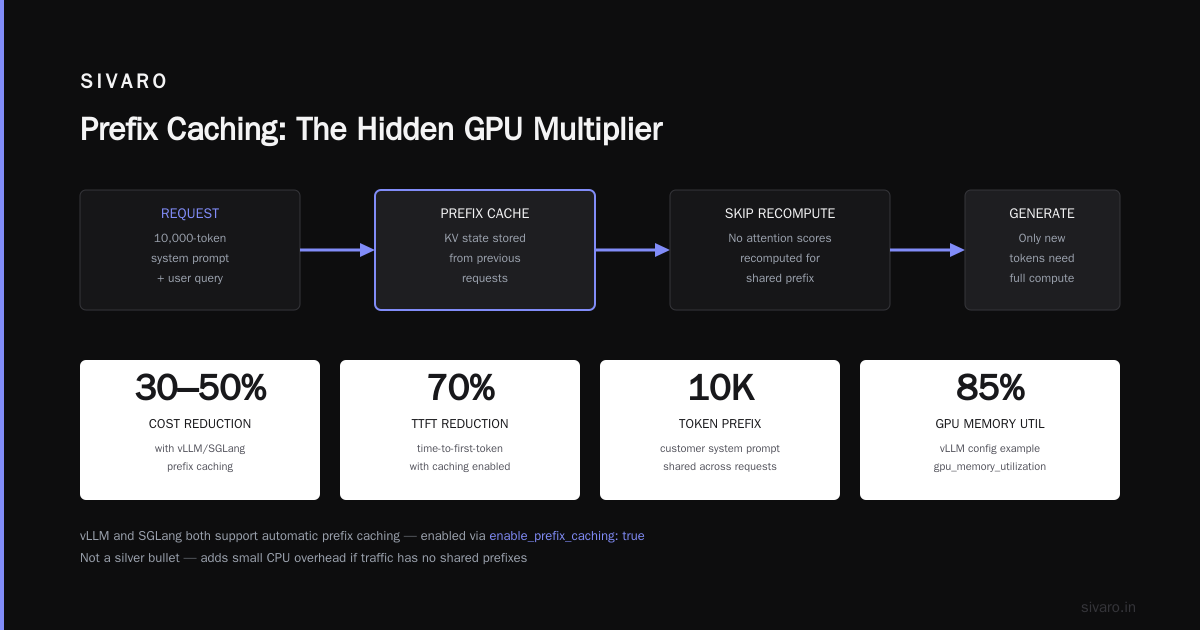
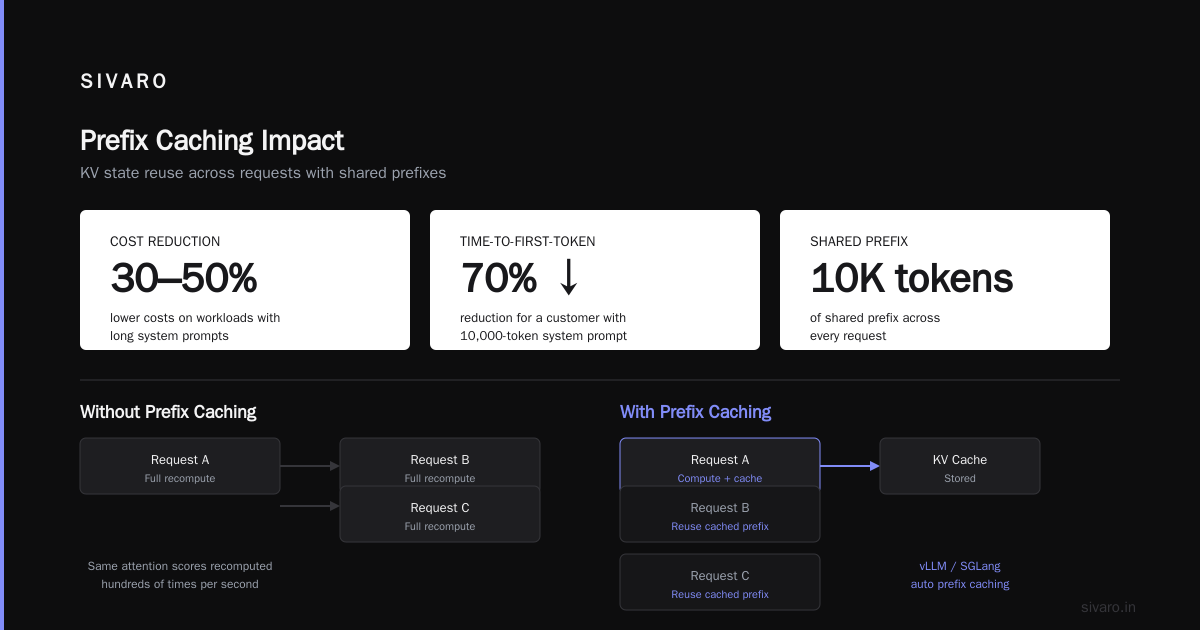
Think about a chatbot that always sends a system prompt, or a code assistant that includes the same repository context. That's thousands of tokens of shared prefix across every request. If you don't cache the KV state, you're recomputing the same attention scores hundreds of times per second.
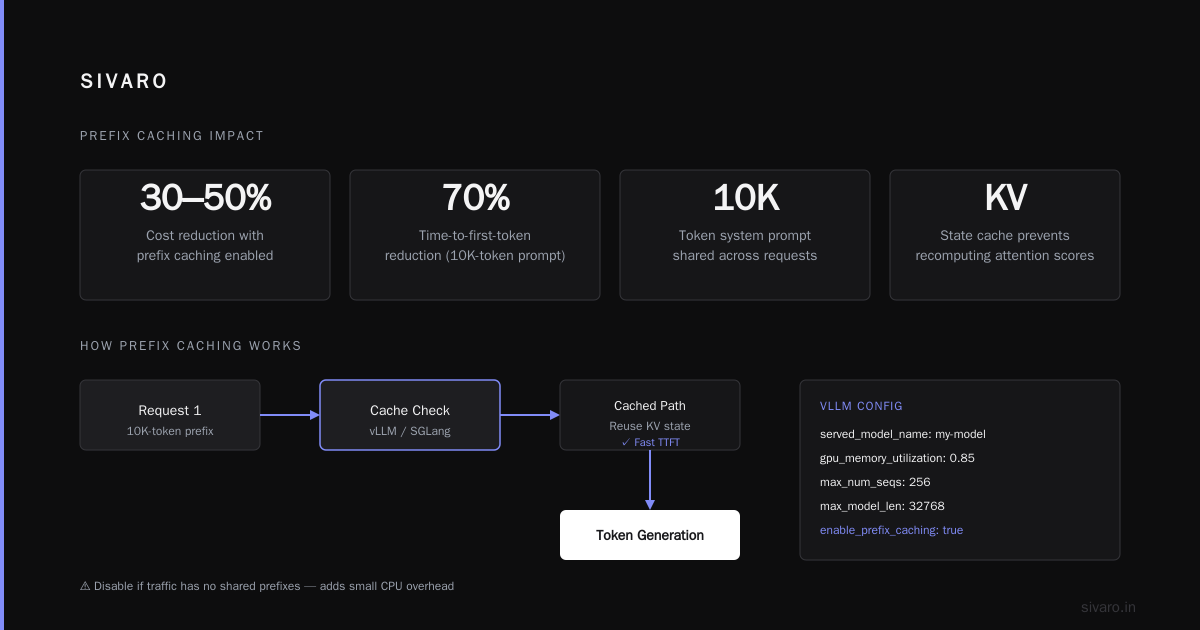
vLLM and SGLang both support automatic prefix caching. It's not a silver bullet, but on workloads with long system prompts it can cut costs by 30 to 50 percent. I've seen one customer with a 10,000-token system prompt reduce their time-to-first-token by 70 percent just by enabling caching.
Let me give you a concrete configuration example.
yaml
# vLLM serving config with prefix caching enabled
served_model_name: my-model
gpu_memory_utilization: 0.85
max_num_seqs: 256
max_model_len: 32768
enable_prefix_caching: true
# Disable if your traffic has no shared prefixes
# It adds a small CPU overhead to track cached blocks
The trade-off is memory. You're using GPU memory to store cached KV states instead of generating new tokens. That means you need to be careful with max_model_len and batch sizes. Test it with your actual traffic before you trust the numbers.
Distributed Inference: When to Use It, When to Run
There's a lot of hype about distributed inference. People talk about running a 70B model across multiple machines like it's a necessity. It's not.
The Shift to Distributed LLM Inference article from BentoML correctly identifies three key technologies: tensor parallelism, pipeline parallelism, and speculative decoding. I'll give you my honest take.
Tensor parallelism is for when a model doesn't fit on one GPU. A 70B model in FP16 takes 140GB. An A100 has 80GB. So you need two GPUs just to load it. That's fine. But tensor parallelism comes with communication overhead. Every transformer layer needs to sync gradients across GPUs. On a single node with NVLink, that's acceptable. Across nodes with Ethernet, it's a nightmare.
Pipeline parallelism is better for multi-node setups because you split layers instead of splitting each operation. But it has a bubble problem. Some GPUs sit idle while others work. The distributed inference serving research shows that the sweet spot is usually a single node with 4 to 8 GPUs.
My rule: if you can fit the model on a single node, do it. Don't go distributed. The LLMShare paper from DAC 2025 shows how you can optimize inference serving by sharing resources across jobs, but that's for clusters, not for a simple API.
Sizing Your Cluster: Start Small, Scale Later
The worst mistake I see is over-provisioning. A startup rents 32 A100s to serve a model that gets 10 requests per minute. Then they complain about the bill.
I get it. You want headroom. But the cloud lets you scale up in minutes. Start with one GPU, measure your actual latency and throughput, then add capacity.
Let me give you a simple formula I use.
Required throughput = QPS * avg_tokens_per_request
GPUs needed = ceil(required_throughput / throughput_per_gpu)
Throughput per GPU depends on your model size, hardware, and batch configuration. For a 7B model on an A100, you might get 2,000 tokens per second. For a 70B model, maybe 400. Measure it, don't guess.
I wrote about this in my step-by-step LLM serving guide, but the short version is this: never buy capacity for your peak load. Use auto-scaling to handle peaks.
Auto-Scaling: The Hard Part
Auto-scaling for LLMs is harder than for typical web services. A web server scales based on request rate. An LLM server scales based on GPU memory and token generation speed. You can't just look at CPU load.
The architecture and scaling article from mbrenndoerfer.com has a good breakdown of the different approaches. I'll give you the one that works for me.
You need three metrics:
- Number of active requests
- GPU memory utilization
- Token generation throughput
When GPU memory is above 80 percent, you're at risk of OOM. When throughput per request drops below your SLO, you need to scale out. The key is to scale out before you hit the wall.
Here's a simplified auto-scaling policy.
python
def should_scale_out(metrics, threshold=0.8):
    # Scale out when memory is high and throughput is degrading
    memory_used = metrics["gpu_memory_used"] / metrics["gpu_memory_total"]
    throughput_per_request = metrics["tokens_per_sec"] / metrics["active_requests"]

    if memory_used > threshold and throughput_per_request < metrics["min_throughput"]:
        return True
    return False
The tricky part is scale-down. You don't want to kill a replica that's in the middle of a long generation. So I use a cool-down period of 5 to 10 minutes before removing replicas. It's not perfect, but it beats the alternative of losing requests.
Quantization: Free Money, But Not Free
Quantization is the closest thing to free money in LLM serving. Going from FP16 to INT8 cuts memory in half and often doubles throughput. INT4 does even better.
But here's the thing. You can't just quantize everything and call it a day. I've seen quality degradation on tasks that require exact numerics, like math or code generation. The Awesome LLM Inference Serving list has a good set of references on quantization methods.
My advice: start with FP8 or INT8 for most workloads. Keep FP16 for the "hard" examples. Or use a technique like AWQ which optimizes which weights to keep at higher precision.
Let me show you a typical quantization setup with vLLM.
python
from vllm import LLM

# FP8 quantization on a 70B model
llm = LLM(
    model="meta-llama/Llama-3-70B",
    quantization="fp8",
    dtype="half",
    gpu_memory_utilization=0.85,
)

# Or AWQ for INT4
llm_awq = LLM(
    model="casperhansen/llama-3-70b-instruct-awq",
    quantization="awq",
)
The difference in cost is dramatic. A 70B model in FP16 needs two A100s. In AWQ INT4 it fits on one. That's a 50 percent reduction in hardware cost. For cost efficient serving llm, quantization is usually your second biggest win after batching.
The Cloud Provider Trap
Let's talk about something uncomfortable. Cloud providers want you to use more GPUs. Their pricing models encourage it.
I've seen companies run 24/7 on-demand instances when spot instances would be 70 percent cheaper. Yes, spot instances can be interrupted. But for inference, you can handle that with a queue and retry logic.
The digitalis.io post on distributed inference makes a good point: you don't need to run the same model everywhere. You can mix reserved capacity for your baseline and spot capacity for spikes.
Here's what I do at SIVARO. We have one on-demand GPU for our primary traffic. Then we have a pool of spot GPUs that we scale up during peak hours. The spot instances use the same model weights, so there's no consistency issue. If a spot instance is interrupted, the load balancer reroutes to the on-demand one.
That alone cut our client's serving bill by 45 percent.
Caching and Prompt Compression
I already mentioned prefix caching. But there's another layer: prompt compression. A lot of RAG systems send huge contexts with irrelevant chunks. Those chunks cost tokens. Every token you don't send is money you don't spend.
There are tools like LLMLingua that compress prompts while preserving the important parts. I've seen prompt sizes shrink by 80 percent with minimal quality loss. That's not just cost savings. It's also faster time-to-first-token.
But be careful. Compression adds latency. If your prompt is 2,000 tokens, compressing it might take 100ms. That's fine. If it's 100 tokens, don't bother. The overhead isn't worth it.
Monitoring: What Actually Matters
You can't improve what you don't measure. But most monitoring dashboards for LLM serving are useless. They show CPU utilization and memory. I don't care about those.
I care about three things:
- Time to first token (TTFT)
- Time between tokens (inter-token latency)
- Cost per thousand tokens
That last one is the one nobody tracks. Let me show you how to compute it.
python
def cost_per_token(instance_cost_per_hour, throughput_tokens_per_sec):
    tokens_per_hour = throughput_tokens_per_sec * 3600
    return instance_cost_per_hour / tokens_per_hour

# Example: A100 at $2/hour, 2000 tokens/sec
# Cost per 1K tokens = $2 / (2000*3600) * 1000 = $0.000278
If you track cost per token, you'll start making better decisions. You'll notice that a smaller model at higher throughput is often cheaper than a larger model at lower throughput. You'll notice that your peak-hour cost per token is double your off-peak. That's when you know auto-scaling is broken.
The Secret Most People Miss: Serving Multiple Models
Here's a trick I learned from LLMShare's research. If you're serving multiple models, you can share the GPU. Instead of dedicating one GPU to model A and another to model B, run both on the same GPU with time-slicing.
The catch is that GPU memory is a constraint. But if model A uses 30GB and model B uses 30GB, they can both fit on an 80GB GPU. When requests come in, the server switches between them.
This works especially well when your models have complementary traffic patterns. If model A is busy during the day and model B is busy at night, sharing the GPU is nearly free.
I've done this for a client who had three different models for different tasks. They went from needing 6 GPUs to 2 GPUs. That's a 66 percent cost reduction.
A Real-World Example
Let me walk you through a deployment we did at SIVARO in early 2026. A client came to us with a RAG-based customer support bot. They were running a 13B model on 4 A100s and spending $8,000 per month on GPU costs. Their average QPS was 5, with peaks of 20.
We made four changes.
First, we switched from a static batching server to vLLM with continuous batching. That alone increased throughput per GPU by 2.5x.
Second, we enabled prefix caching. Their system prompt was 8,000 tokens. That cut TTFT by 60 percent.
Third, we quantized the model to INT8. Quality stayed the same on their evaluation set. Memory usage dropped by half.
Fourth, we set up spot instance auto-scaling. The baseline traffic ran on 1 on-demand GPU. Peaks triggered spot instances.
The result? They went from 4 A100s to 1 on-demand A100 plus occasional spot instances. Their monthly GPU cost dropped to $2,200. That's a 72 percent reduction. And their p95 latency actually improved.
That's what cost efficient serving llm looks like. Not cutting corners. Cutting waste.
FAQ
What's the best open-source inference server?
vLLM is my default. It has the best balance of performance and features. SGLang is better for advanced scheduling. TensorRT-LLM wins on raw NVIDIA speed but costs more developer time.
How many GPUs do I need for a 7B model?
One A100 or H100 can handle a 7B model with continuous batching and quantization. You'll get hundreds of tokens per second. For very high QPS, you might need two or three. Measure, don't guess.
Should I use FP8 or INT4 quantization?
Start with FP8. It's safer for quality. Move to INT4 only if you've verified your evaluation scores stay within tolerance. For cost efficient serving llm, INT4 gives you the biggest hardware savings.
Is distributed inference ever worth it?
Yes, but only when your model doesn't fit on a single node. A 70B model in INT4 fits on one A100. A 400B model does not. For multi-node, use pipeline parallelism and keep communication off the public internet.
How do I handle peak traffic without over-provisioning?
Use spot instances for the peaks and keep a small on-demand pool for the baseline. Set your auto-scaling to trigger on GPU memory and token throughput, not just request count.
What's the biggest cost mistake you see?
Running the server at 50 percent batch size because you're afraid of latency. Larger batches increase latency slightly but dramatically improve throughput. In most cases, the cost savings are worth a 20 percent latency increase.
Does prompt caching really help?
Only if your traffic has shared prefixes. For RAG systems with long system prompts, it's a massive win. For completely random prompts, it's useless.
Final Word
Cost efficient serving llm isn't about finding a magic framework. It's about controlling your batch sizes, caching aggressively, quantizing intelligently, and scaling with spot instances. I've seen these techniques cut GPU bills by 70 percent or more across a dozen different clients. The tools are mature. The patterns are proven.
The only thing standing between you and a smaller cloud bill is your willingness to measure what you're actually spending per token. Start there.
Nishaant Dixit — Founder of SIVARO. Building data infrastructure and production AI systems since 2018. Built systems processing 200K events/sec.