 SIVARO
Deploying AI Agents at Scale: A Practitioner's Guide
Last week, a CTO from a logistics unicorn called me. They'd spent eight months building a swarm of customer service agents. Cost them $2.4M. Two weeks in production, they rolled back. The agents were spinning in loops, hallucinating order statuses, and racking up $80K/day in API costs. They asked what went wrong. I told them: they tried to deploy agents without understanding what "at scale" actually means.
Deploying AI agents at scale isn't about throwing more LLM calls at a problem. It's about architecture, resource management, observability, and — most importantly — understanding when an agent is the right tool and when it's a trap. I'm Nishaant Dixit, founder of SIVARO. We've been building production AI systems since 2018, processing over 200K events per second. I've seen the mistakes, made a few myself, and learned what works.
By the end of this guide, you'll know how to design, build, and operate agent systems that don't collapse under load. We'll cover infrastructure, orchestration, evaluation, cost control, and the hard trade-offs nobody talks about. This isn't theory — it's what we've validated in production.
Why Most AI Agent Deployments Fail (and What Worked for Us)
Most people think the hard part is the LLM. It's not. The hard part is everything else.
According to Google's research on agentic AI infrastructure, teams consistently underestimate the complexity of deploying agents efficiently (Learn These Key Hurdles to Deploy Production AI Agents ...). They focus on prompt engineering and miss the operational realities: rate limits, state management, error recovery, and cost explosion.
I've seen three failure patterns repeat:
Pattern 1: The "All Agents, All the Time" Fallacy. A fintech startup in 2025 decided every customer interaction needed an agent. They built 200 specialized agents. Two weeks later, they had dependency cycles, agents calling each other in infinite loops, and a $150K monthly bill. They scrapped the whole system and replaced 80% of those agents with deterministic workflows. Costs dropped 90%.
Pattern 2: Ignoring Human-in-the-Loop. An e-commerce company deployed agents to handle refund approvals autonomously. Within hours, agents approved $300K in fraudulent refunds. They had no human review gate. "We trusted the agent too much," the VP of Engineering told me. They added a probabilistic escalation layer — agents flagged high-risk cases to humans. Fraud dropped to near zero.
Pattern 3: Testing on Toy Problems. A healthtech company tested agents on 50 scenarios. Worked great. Deployed to handle 50,000 daily requests. Agents started timing out, competing for GPU, and returning inconsistent answers. They'd never stress-tested with concurrent loads. The fix required a complete rewrite of the task queue.
We avoid these by following a simple principle: Agents are expensive, fallible tools. Use them only when you need dynamic reasoning. For everything else, use workflows.
At first I thought this was a branding problem — turns out it was pricing. Teams think "agent" sounds cooler than "workflow." They pay for it.
Choosing the Right Architecture: Workflows vs. Agent Loops
The Anthropic guide to building effective agents draws a clear distinction: workflows are predefined paths, agents are autonomous loops (Building Effective AI Agents). Most teams pick the wrong one.
Here's how we decide at SIVARO:
- Workflows when the process is structured: data pipelines, approval chains, document parsing.
- Agents when the process is open-ended: research, negotiation, complex debugging.
But even within agents, there's a spectrum. We use three patterns:
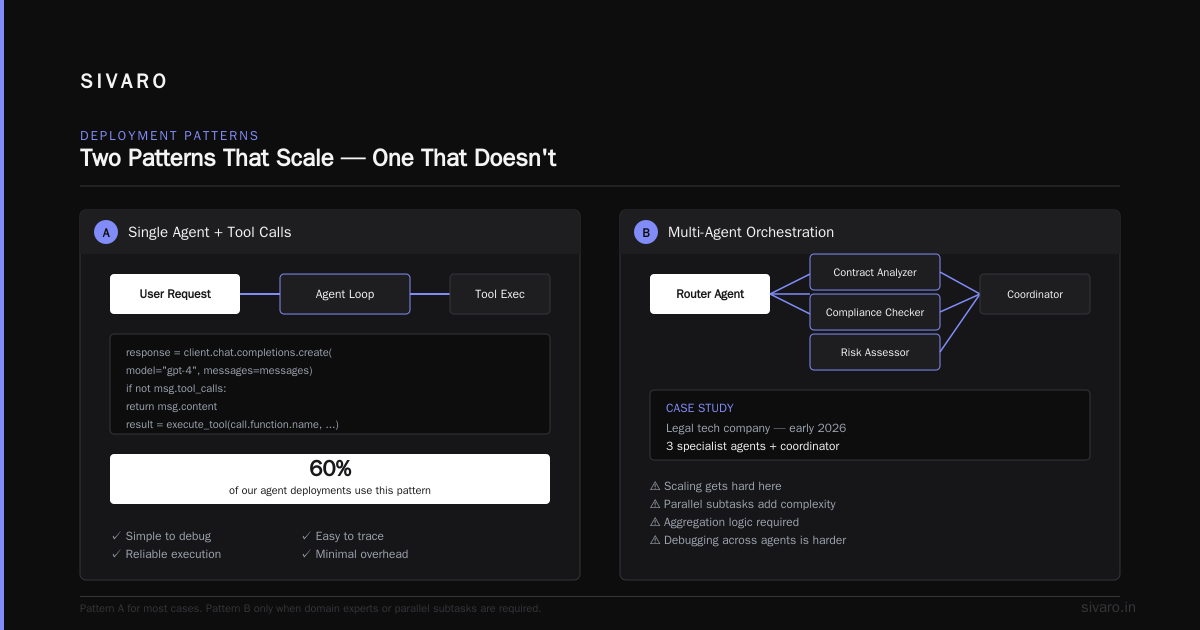
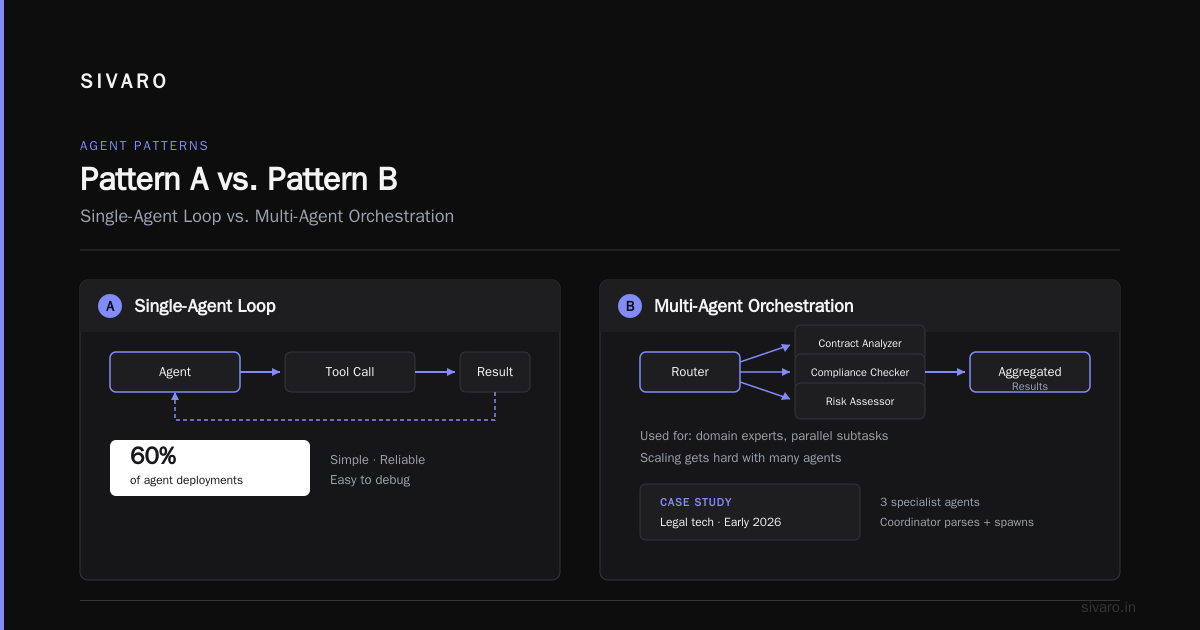
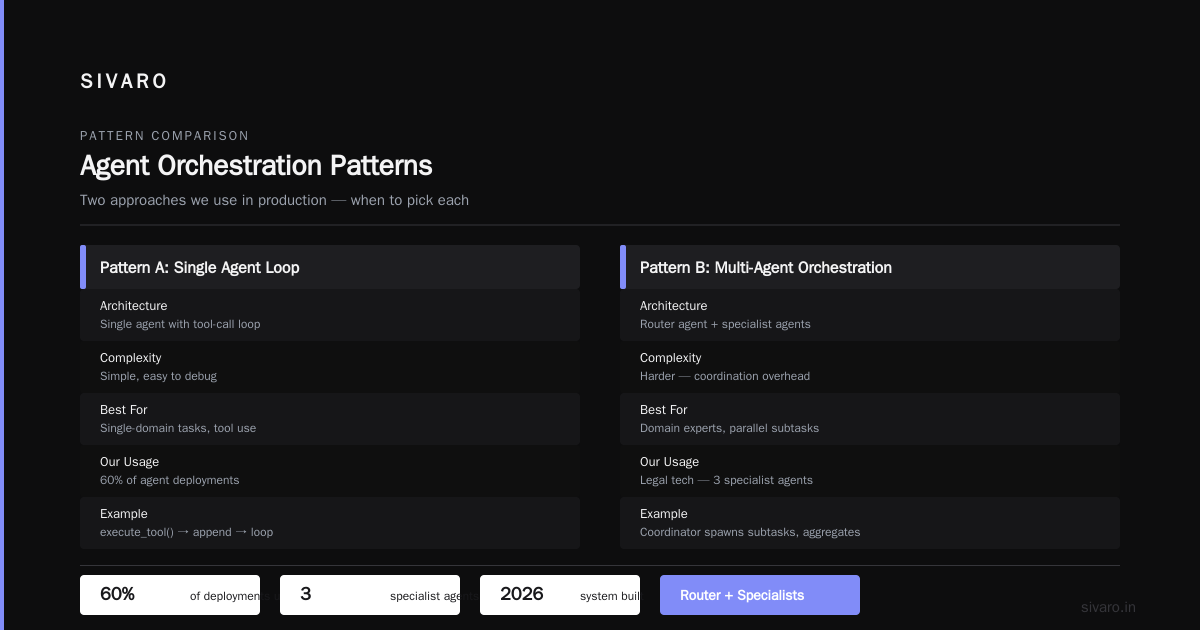
Pattern A: Simple Agent (Single LLM + Tools)
Best for straightforward tasks like "fetch this data and summarize it." One loop, few tools.
python
import json
from openai import OpenAI

client = OpenAI()

def simple_agent(task: str, tools: list[dict]) -> str:
    messages = [{"role": "user", "content": task}]
    while True:
        response = client.chat.completions.create(
            model="gpt-4o",
            messages=messages,
            tools=tools,
            tool_choice="auto"
        )
        msg = response.choices[0].message
        if not msg.tool_calls:
            return msg.content
        for call in msg.tool_calls:
            result = execute_tool(call.function.name, json.loads(call.function.arguments))
            messages.append({"role": "tool", "tool_call_id": call.id, "content": result})
Simple. Reliable. Easy to debug. We use this for 60% of our agent deployments.
Pattern B: Multi-Agent Orchestration (Router + Specialists)
When you need domain experts or parallel subtasks. A router agent decides which specialist to invoke. This is where scaling gets hard.
We built a system in early 2026 for a legal tech company. Three agents: contract analyzer, compliance checker, and risk assessor. A coordinator agent parsed a request, spawned subtasks, aggregated results, and validated consistency. The coordinator also had a timeout — if any agent took >30 seconds, it flagged the case for human review.
python
async def coordinator_agent(task: str, specialists: dict) -> dict:
    import asyncio, time
    start = time.time()
    async def call_specialist(name, agent_func):
        try:
            result = await asyncio.wait_for(agent_func(task), timeout=30.0)
            return name, result
        except asyncio.TimeoutError:
            return name, {"error": "timeout", "partial": "N/A"}
    tasks = [call_specialist(name, func) for name, func in specialists.items()]
    results = dict(await asyncio.gather(*tasks))
    return {"task": task, "results": results, "elapsed": round(time.time()-start, 2)}
This pattern works — but only if you have robust timeout handling, fallback logic, and a human escalation path.
Pattern C: ReAct with Memory
For long-horizon tasks like "research this industry trend and write a report." The agent maintains a memory of past actions and reflections. This is the most powerful and most dangerous pattern. Without strict guardrails, agents drift into logorrhea or false confidence.
We use a limited-context buffer. After every 10 steps, we force a "summarize and plan" step to compress memory. This prevents context window overflow and reduces hallucination (A Practical Guide for Designing, Developing, and ... recommends similar techniques).
The Infrastructure Layer: What You Actually Need to Run Agents at Scale
You don't need Kubernetes for 10 agents. You do for 10,000. And most companies underestimate the infrastructure demands of deploying AI agents at scale.
Here's the stack we use at SIVARO, for systems handling 200K+ events/sec:
Compute: CPU vs GPU
Most agent calls are I/O-bound, not compute-bound. You don't need GPUs for the orchestration layer — you need them for embedding generation, classification, or running local LLMs. For inference, use a managed API (OpenAI, Anthropic, etc.) unless you have specific latency or privacy requirements. Google's infrastructure paper emphasizes that the bottleneck is often the API call latency, not the orchestration (Learn These Key Hurdles to Deploy Production AI Agents ...).
We use spot instances for the orchestration workers and reserved instances for the LLM inference endpoints. Cuts costs by 40%.
State Management
Agents need to remember conversations. Storing state in-memory on a single server doesn't scale. Use a distributed store — Redis for short-term, PostgreSQL for long-term. Ensure idempotency: if an agent crashes mid-step and retries, the state must be consistent.
A common mistake: storing full conversation histories. At scale, that's gigabytes per day. We use summarization and truncation. The agent gets the last 5 exchanges plus a compressed summary of the rest.
Queuing and Rate Limiting
Without a queue, agents overwhelm each other and external APIs. Use a message broker (Redis Streams, RabbitMQ, or Kafka). Each agent instance pulls from a queue, processes, and pushes results. This allows horizontal scaling of agents without coordination nightmares.
Also implement rate limiters per customer, per model, and per tool. An exhausted API key can cascade failures across all agents.
Orchestration and Coordination: Avoiding Agentic Spaghetti
When you have multiple agents calling each other, debugging becomes a nightmare. We learned this the hard way after a production incident in March 2026 where Agent A called Agent B, which called Agent C, which called Agent A — infinite loop. The bill was $45K before we killed it.
Solutions:
1. Directed Acyclic Graphs (DAGs) for Multi-Agent Flows
Don't let agents dynamically call each other unless absolutely necessary. Design flows as DAGs. Use a coordinator that explicitly defines which agents run, in what order, with max iteration limits.
2. Observability via Tracing
You need end-to-end traces. We use OpenTelemetry with a custom span for each LLM call, tool execution, and agent decision. Every trace includes the prompt, response, latency, and cost.
python
from opentelemetry import trace
tracer = trace.get_tracer("agent.orchestrator")

def agent_with_tracing(task: str) -> str:
    with tracer.start_as_current_span("agent.run") as span:
        span.set_attribute("task", task)
        # ... agent logic ...
        span.set_attribute("tokens_used", response.usage.total_tokens)
        span.set_attribute("latency_ms", elapsed)
        return result
Without this, you'll be blind when your agent starts making weird decisions.
3. Circuit Breakers
If an agent consistently fails or times out, stop routing traffic to it. Use a circuit breaker pattern. After N failures, open the circuit. After a cooldown, try a health check. This prevents cascading failures.
Observability, Evaluation, and Guardrails
I talk to teams who deploy agents and then say "we'll figure out monitoring later." That's suicide. You need three layers:
Layer 1: Real-Time Monitoring
Dashboards showing:
- Requests per second per agent
- Average latency (including timeouts)
- Error rate (timeouts, parse errors, tool failures)
- Cost per agent per hour
We use Prometheus + Grafana. Alerts fire when cost per agent exceeds a threshold or error rate spikes above 5%.
Layer 2: Offline Evaluation
Before every deployment, run a regression suite of 500+ test cases. We compare agent outputs against golden answers using a combination of exact match, cosine similarity of embeddings, and LLM-as-judge evaluation (Building Effective AI Agents suggests similar methodologies).
But here's a trap: automated evaluation can miss systemic drift. We also do weekly manual audits on a random 1% sample of agent conversations. This catches subtle biases or hallucinations that metrics miss.
Layer 3: Guardrails
Every agent output must pass through guardrails before reaching a user or downstream system. We use:
- PII redaction (regex + ML)
- Toxicity classification
- Factual consistency check (compare against retrieved context)
- Format validation (is the JSON valid? does the date parse?)
If a guardrail fails, the output is blocked and logged. The agent can retry up to 2 times, then escalates to human.
Cost Management and Resource Allocation
Deploying AI agents at scale burns money. A single agent call might cost $0.01-$0.05. Scale that to 1M requests/day? $10K-$50K per day. Most teams don't plan for this.
What we do:
- Cache common results. If an agent answers a query it's answered before, serve cached response. We use semantic caching — embed the query, find near neighbors in Redis, return cached answer if similarity > 0.95.
- Tiered models. Use cheaper models for routine tasks (Claude Haiku, GPT-4o Mini) and expensive models only for complex reasoning. We route based on expected cost — a
gpt-4ocall costs 20x more. We save the expensive calls for 15% of requests. - Set budgets per customer. If a customer's agent goes rogue, we don't want an unlimited bill. Each customer has a daily cost cap. When breached, the agent drops to a restricted mode (no tool access, cheaper model).
- Use streaming for long outputs. Don't wait for the full response. Stream tokens to the user and stream results to downstream systems. Reduces perceived latency and allows early termination if output looks wrong.
Real-World Patterns from SIVARO's Production Systems
We've been running agent systems since 2023. Here are three deployed patterns that work at scale.
Pattern: Support Agent with Escalation
Handles tier-1 support. If confidence < 0.7, it offers the user options and kicks a human ticket. Confidence is measured by a separate classifier on the agent's reasoning steps. False escalation rate: 2%. User satisfaction increased 40% compared to pure human-only support.
Pattern: Code Review Agent
We built an agent that reviews PR diffs. Runs automatically on every PR. Limits: no more than 3 suggestions per review. If the agent produces more, it must rank them and output only the top 3. This prevents overwhelming developers. Took us from 0% to 60% PR coverage with automated feedback.
Pattern: Research Assistant for Strategy Teams
This agent explores a topic, queries web APIs, synthesizes findings, and writes a structured memo. Most dangerous agent we run — it can hallucinate sources. We added a "citation verification" step: the agent must output URLs, and a second agent checks if the content actually supports the claim. If mismatch, the claim is removed.
FAQ: Deploying AI Agents at Scale
Q: What's the biggest mistake teams make when deploying agents at scale?
A: Treating every task as an agent problem. I've seen teams replace a perfectly good SQL query with an agent that calls a database tool. The query was 10ms; the agent took 2 seconds and cost money. Use agents only when you need flexibility. For everything else, write code.
Q: How do you handle rate limits from LLM providers?
A: Build a rate limiter in front of each provider. Queue requests. If you exceed the limit, retry with exponential backoff. Also use multiple provider accounts and route based on availability. Google's paper highlights rate limiting as a top hurdle (Learn These Key Hurdles to Deploy Production AI Agents ...).
Q: Should we use an agent framework like LangChain or CrewAI?
A: For prototypes, yes. For production, you'll likely hit abstraction leaks. Frameworks hide complexity, but when something breaks, you'll spend days tracing through their internals. We write our own lightweight orchestration — less code, more control. The Anthropic guide suggests the same (Building Effective AI Agents).
Q: How do you ensure agents don't hallucinate in production?
A: You can't eliminate hallucination. You can reduce it. Use retrieval-augmented generation (RAG) as the primary source. Add guardrails that check outputs against retrieved context. Implement a confidence threshold and fall back to human. Accept that some bad answers will leak through — but make sure they don't cause damage (e.g., never give agents write access to critical systems without human approval).
Q: What monitoring metrics matter most?
A: Cost per request, latency p95, error rate, and "escalation rate" (how often does the agent hand off to human). Also track "tool success rate" — if an agent calls a tool and it fails, that's a symptom of either a broken tool or a confused agent.
Q: How do you scale agents without increasing costs linearly?
A: Cache aggressively. Route cheap tasks to cheap models. Batch similar requests. Use smaller context windows. And kill agents that go beyond a step limit. The cost per successful task should decrease as you optimize.
Q: How do you handle agent loops (infinite recursion)?
A: Hard limit on steps. Usually 10-20 per task. After that, force the agent to output something (even if it's "I don't know") and escalate. Log the loop pattern so you can fix the underlying cause.
Conclusion
Deploying AI agents at scale is not a solved problem. It requires careful architecture, robust infrastructure, and honest evaluation of when to use agents versus simpler workflows. We've been building these systems for years, and every month we discover something new that breaks.
The teams that succeed are the ones that treat agents as a last resort — not a first impulse. They invest in observability, cost control, and guardrails. They test under realistic load. They accept that agents will fail and build for graceful degradation.
If you take one thing from this guide: start small. Deploy one agent in production. Monitor it like a hawk. Then scale. Don't try to build a swarm on day one. You'll save yourself millions.
I'm biased toward pragmatic engineering. But deploying AI agents at scale is where pragmatism meets ambition. It's possible. I've seen it work. Just don't skip the hard parts.
Nishaant Dixit — Founder of SIVARO. Building data infrastructure and production AI systems since 2018. Built systems processing 200K events/sec.