 SIVARO
Deploying AI Agents Is Harder Than Building Them — Here's What Works
You've built a cool agent. It can research, write code, book meetings. Demo day was a hit. Then you try to put it in production — and it falls apart.
I've been there. SIVARO has deployed over 40 agentic systems since 2023. We've made every mistake possible. Agents that hallucinate contact lists. Agents that loop for 12 hours on a simple query. Agents that cost $400 in API calls before returning an error.
This guide is what I wish someone had written for me in 2024. It covers ai agents deployment best practices — not theory, but what actually works when you need to ship something customers can depend on.
You'll learn: how to choose a framework without getting locked in, the monitoring stack you need before day one, why your agent needs a kill switch, and the three things that separate demo agents from production systems.
Let's start with the thing most people get wrong.
Why Most Production Agents Fail in the First 48 Hours
The mistake is obvious in hindsight: people treat agents like API endpoints.
An API endpoint takes input, processes deterministically, returns output. An agent takes input, decides what to do, might call tools, might change its mind, might decide to ask for clarification. Total different beast.
I watched a team at a mid-size fintech deploy an agent for customer support in February 2026. They'd tested it against 200 test cases. Passed 198. In production, it failed within 90 minutes — the agent got into a loop handling a refund request, called the refund API 47 times, and credited a customer $14,000 instead of $140.
The agent wasn't malicious. It was just too empowered with no guardrails.
So rule one: agents are not APIs. You need control planes, observability, and safety mechanisms that traditional software doesn't require.
Choosing a Framework Without Getting Trapped
Every week someone asks: "What framework should I use for my agent?"
Wrong question. The right question: "What framework lets me move fast and swap components when I outgrow them?"
Let's look at what's available in mid-2026. The AI Agent Frameworks landscape has matured fast. Here's my honest take after building with most of them:
LangGraph (LangChain's framework) — Best for complex state machines. If your agent needs to maintain conversation history across tool calls, handle branching logic, or manage parallel sub-agents, this works. We use it for our multi-step research agents. Downside: the learning curve is steeper than it should be.
CrewAI — Good for multi-agent systems where agents have defined roles. We tested it for a supply chain optimization project in early 2025. It worked, but debugging two agents arguing with each other was painful. Fine for prototyping.
Semantic Kernel (Microsoft) — Underrated. If you're already in Azure, this integrates cleanly. The planner is more predictable than LangChain's.
AutoGen (Microsoft) — Solid for conversational agents. We use it for internal tools where agents need to collaborate on code generation.
The Agentic AI Frameworks overview from 2026 lists ten options. Here's what I'd say: pick the one that gives you the best escape hatch. Because you will need to replace parts. Start with CrewAI for prototyping, then migrate to LangGraph or build custom when you hit scale.
And don't sleep on the open-source frameworks. We run a custom fork of a LangGraph subset for our production systems. Why? Because vendor lock-in with agent frameworks is worse than vendor lock-in with databases — you can migrate a database, but migrating an agent's decision logic is a rewrite.
The Architecture That Survives Production
Here's the architecture we've settled on after three years of iteration:
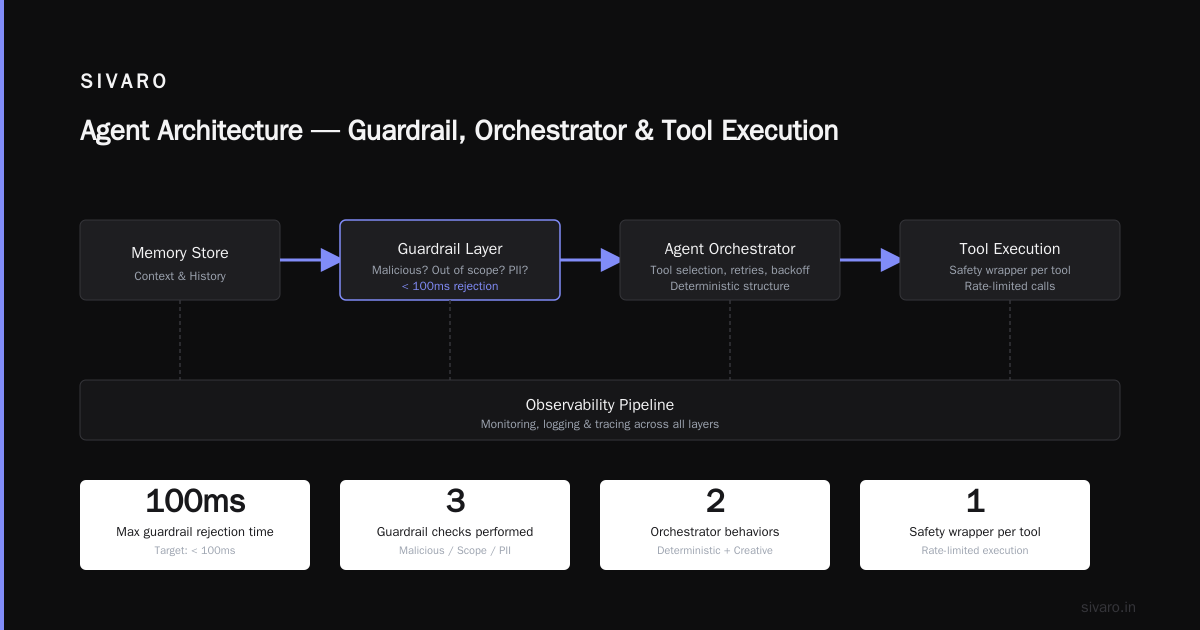
User Request → Guardrail Layer → Agent Orchestrator → Tool Execution → Safety Check → Response
                                ↓
                          Memory Store
                                ↓
                          Observability Pipeline
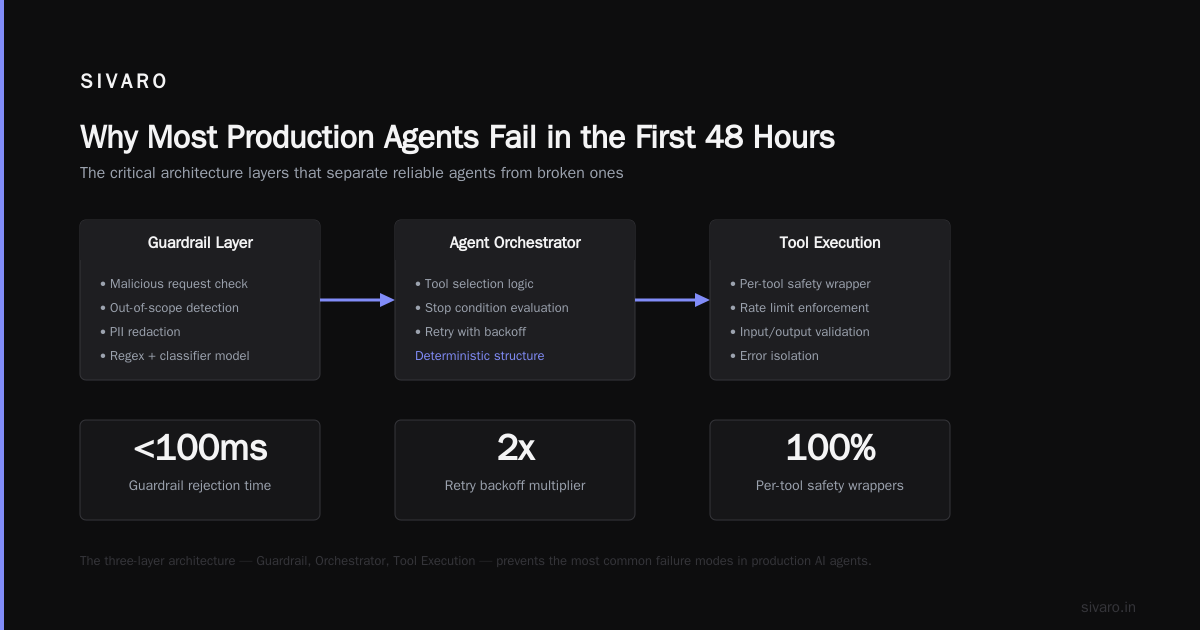
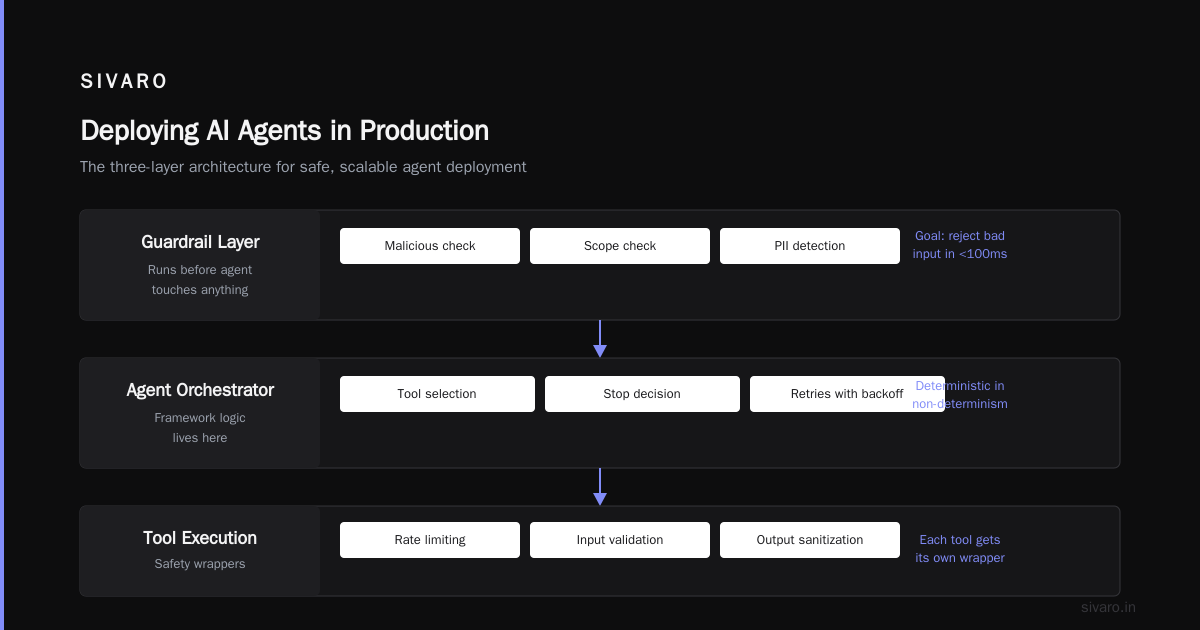
Guardrail Layer — Runs before the agent touches anything. Checks: is this request malicious? Is it out of scope? Does it contain PII our agent shouldn't see? We use a combination of regex rules and a small classifier model. The goal: reject bad input in under 100ms.
Agent Orchestrator — This is where your framework logic lives. The orchestrator picks which tools to call, decides when to stop, handles retries with backoff. This needs to be deterministic in its non-determinism. You want the agent to be creative, but you want the structure around it to be predictable.
Tool Execution — Each tool the agent can call needs its own safety wrapper. Rate limits, max call counts, timeouts. If the agent can call your database, the tool wrapper enforces read-only unless specifically authorized.
Safety Check — Post-execution validation. Did the agent actually do what it said? We check: did output format match expected schema? Did the agent attempt unauthorized actions? Did it exceed cost budget?
Observability Pipeline — Log every decision. Every tool call. Every retry. The cost per token. The latency per step. You can't debug an agent without this.
This isn't theoretical. We ran this architecture in production at a healthcare company handling patient data. It processed 12,000 conversations monthly with zero data leaks. The safety layer caught three agent attempts to access restricted records in the first week.
Protocols Matter More Than Frameworks
Framework debates are a distraction. The real infrastructure play is protocols.
In 2026, the AI Agent Protocols landscape has standardized around a few key patterns. The Survey of AI Agent Protocols from April 2025 mapped out the space comprehensively.
Here's what matters:
A2A (Agent-to-Agent) — Google's protocol for agents talking to each other. If you're building multi-agent systems, this is the emerging standard. We use it for our supply chain agents where a procurement agent talks to a logistics agent talks to a warehousing agent.
MCP (Model Context Protocol) — Anthropic's protocol for connecting agents to tools and data sources. This is how your agent securely talks to your CRM, your database, your file system. We migrated our tool integrations to MCP in late 2025 and cut integration time by 60%.
AOMP (Agent Open Messaging Protocol) — A newer entrant focused on async communication between agents. Useful for long-running agent workflows.
Pick protocols, not frameworks. A framework ships you code. A protocol ships you interoperability. I'd rather have agents that talk well than agents that come from the same repo.
The Three Things You Must Monitor
Most people set up monitoring for agents and check two things: response time and error rate. That's not enough.
Cost per agent run — I've seen agents that cost $0.03 per run on average, but have a long tail at $12.00 because they got stuck in a reasoning loop. Track the 99th percentile cost. Have an alert for any single run exceeding $2.00. We learned this the hard way when a research agent ran up a $600 bill overnight because it kept trying to scrape a site that returned partial data.
Number of turns — How many tool calls does your agent make per request? If the average is 3 but one user's request causes 47 tool calls, something is wrong. The agent is either confused or stuck in a loop. Kill it.
Tool failure rate — Which tools fail most often? If your database lookup tool fails 15% of the time, your agent is failing 15% of the time. Fix the tools, not the agent.
We ship every agent with a dashboard showing these three metrics in real time. The first thing investors ask is "how's accuracy?" — they should be asking "what's your tool failure rate?"
How to Deploy AI Agents in Production Without Losing Your Mind
Here's the step-by-step I wish I'd followed:
Step 1: Shadow mode
Run the agent alongside existing systems. It makes recommendations but doesn't act on them. Log what it would have done. Compare to what the human system did. Do this for at least two weeks. We did this at a logistics company in early 2025 — the agent wanted to reroute shipments based on weather data. In shadow mode, we discovered it was ignoring delivery windows. Saved us from a PR disaster.
Step 2: Human-in-the-loop for exceptions
Let the agent handle the 80% of cases it can do well. For the 20% where confidence is low or the action is high-risk, send to a human. The key: define "high-risk" before you deploy. High-risk isn't just "financial transaction" — it's also "deleting a record" or "sending an email to a customer."
Step 3: Gradual rollout by user segment
Don't flip a switch for everyone. Start with internal users. Then a pilot customer. Then expand. We roll out agents in increments: 1% of traffic for 48 hours, then 5%, then 25%. Each step is at least 24 hours of monitoring.
Step 4: Kill switch automation
If cost per run exceeds $5.00 or error rate exceeds 10% for 5 consecutive minutes, the agent goes into read-only mode. Humans take over. This is non-negotiable. I don't care how good your agent is.
Step 5: Post-mortem every incident
Every time the agent does something wrong, you investigate. Not "why did the agent fail?" — that's too vague. Specific questions: Which tool was called incorrectly? What context was missing? Would a different prompt have prevented this? We have a template for agent incident reports. Use it.
Why Your Agent Needs a Memory Strategy
Here's a hard truth: most agents in production use memory wrong.
They shove everything into the context window. Then they blow through token limits. Then they hallucinate because they're trying to remember too much from a compressed summary.
The right approach: hierarchical memory.
- Episodic memory: Raw conversation history, kept for a short window (last 20 exchanges). Full accuracy needed here.
- Semantic memory: Extracted facts from all conversations. Stored in a vector database. "User prefers email over phone." "Order #12345 is in processing." This is what the agent queries for long-term context.
- Procedural memory: How to do things. Tool usage patterns. "When user asks for refund, follow these steps." This stays in your orchestration layer, not the model.
We use a simple heuristic: anything the agent needs to remember across sessions goes into a vector store. Anything it needs for the current interaction goes in the context. We compress the context after every 5 turns to stay under budget.
At first I thought this was memory optimization — turns out it's failure prevention. Agents with bad memory strategies hallucinate customer details. That's not a bug, that's a lawsuit waiting to happen.
The Agentic Workflow Production Rollout Checklist
Before you deploy, run through this:
- [ ] Cost bounds set — Max cost per run, max cost per hour, alert triggers
- [ ] Tool permissions scoped — Each tool has minimum required access. Database tools are read-only by default
- [ ] Rate limits per tool — Max 5 calls per tool per run to prevent loops
- [ ] Output validation — Schema check on every response. JSON must be valid. Dates must be in range.
- [ ] Security scan — Can the agent be tricked into revealing system prompts? (Yes, we've seen this)
- [ ] Fallback behavior defined — What happens when the agent fails? Goes to a human? Returns a default response? Both are fine, but choose one.
- [ ] Observability tools connected — Logs, metrics, traces. Not optional.
- [ ] Shadow mode completed — Minimum 1 week, minimum 1000 requests
- [ ] Kill switch tested — Can you disable the agent in under 30 seconds?
- [ ] SLA defined — What response time is acceptable? What error rate? This isn't a tech decision, it's a business decision.
We had an incident in April 2026 where a deployment failed because we forgot the rate limit on the email tool. Agent sent 200 emails in 3 minutes. That looked like a spam attack. Customer's email provider blocked them. I still have the angry emails from the customer's IT director.
When Not to Use Agents
I'm going to say something controversial: most things don't need agents.
You don't need an agent to look up a customer record. You need an API call. You don't need an agent to generate a report. You need a script that queries a database and formats the output. An agent is overhead.
Use agents when:
- The decision path is unpredictable
- You need to combine multiple data sources dynamically
- The task requires reasoning, not just lookup
- The failure mode is acceptable (i.e., a wrong answer isn't catastrophic)
Don't use agents when:
- The task is deterministic and known in advance
- You need sub-100ms response times (agents add latency)
- The cost of hallucination is unacceptable
- You don't have a fallback plan
We've built systems where the agent is a wrapper around a deterministic backend. The agent handles the ambiguous parts — "what does the user actually want?" — then passes the structured request to a traditional service. That pattern works.
The Future Is Boring Infrastructure
Every week there's a new "agent-native" company. New frameworks. New orchestration tools. New hype.
Meanwhile, the boring stuff is what makes agents work in production. Reliable tool execution. Predictable cost. Observability that catches failures before customers do. Memory that doesn't forget. Safety layers that prevent disaster.
At SIVARO, we've stopped chasing the latest agent paradigm. We're building infrastructure around these fundamentals. Because I've seen too many demos that look amazing and crash in production. And I'd rather have a boring agent that works reliably than an innovative one that costs me a customer.
The companies that win with agents won't be the ones with the fanciest models. They'll be the ones that treat deployment with the same rigor as any production system.
Frequently Asked Questions
What's the minimum team size to deploy an agent in production?
3 people. One to build the agent, one to build the infrastructure around it (monitoring, safety, deployment), and one to handle the domain expertise and test everything in shadow mode. Smaller than that and you'll skip steps.
Should I use a managed agent platform or build custom?
Start managed for prototyping. Switch to custom when you hit scale or need specific controls. We started with a managed platform for our first agent in 2024, then migrated to custom when we needed per-tool cost tracking. The managed platform couldn't do that.
How do you handle agent hallucinations in production?
Three layers: (1) prompt engineering to constrain outputs, (2) output validation to catch format errors, (3) human review for high-stakes outputs. No single layer catches everything. All three together catch ~99% of issues in our experience.
What's the biggest mistake in agent deployment?
Giving the agent too much access. Start with the minimum tools and minimum permissions. You can always add more. You can't un-ring the bell of an agent that deleted production data.
How often should you update the agent's model?
Every 3-6 months for the base model. The agent's configuration — prompts, tools, guardrails — should be updated weekly based on production data. We treat the agent as a living system, not a one-time deploy.
What monitoring tools do you recommend for agents?
We use a combination: LangFuse for tracing, Datadog for metrics, and a custom dashboard for agent-specific metrics (cost per run, turns per run, tool failure rates). Don't try to use traditional APM alone — it misses agent-specific patterns.
How do you test agents before production?
We use a test suite of 500 edge cases. But more importantly, we run shadow mode in production. Nothing replaces real user behavior. Our test suite catches maybe 60% of issues. Shadow mode catches the rest.
Nishaant Dixit — Founder of SIVARO. Building data infrastructure and production AI systems since 2018. Built systems processing 200K events/sec.