 SIVARO
Deploying AI Agents to Production: What Actually Works
I've spent the last 18 months watching teams burn weekends on agent deployments that fall apart the second they hit real traffic. Not because the models were bad. Because nobody had a playbook for production.
At SIVARO, we ship data infrastructure for companies running AI in production. We've seen what works at scale — and what quietly dies at 2 AM on a Saturday. Some of these lessons cost us real money to learn. I'm giving them to you for free.
Let's be clear about what we're talking about. An AI agent isn't a chatbot with extra steps. It's an autonomous system that perceives its environment, makes decisions, and executes actions. It calls tools, maintains state across turns, and handles uncertainty without a human in the loop. If you're just wrapping an LLM in a Flask app, that's not an agent. That's a wrapper.
This guide covers the architecture, tooling, and practices we've validated across deployments handling 10K+ agent invocations per day. You'll get specific tool names, real failure modes, and the exact monitoring setup that caught our worst incidents before they hit customers.
The Framework Decision That Haunts You Later
I get asked "which agent framework should I use?" constantly. The real answer? It depends on whether you want to ship this month or survive next year.
Most teams start with a framework because it's fast. LangChain, CrewAI, AutoGen — pick your poison. They abstract away the hard parts: tool calling, memory management, prompt orchestration. And that's exactly the problem.
AI Agent Frameworks: Choosing the Right Foundation for Your Needs breaks down the major options, but here's my take after building with four of them:
LangChain is great for prototyping. It's terrible for production without significant surgery. The abstraction layers leak constantly, debug traces are nightmares, and version changes break things silently. We shipped an early customer on LangChain. Six weeks later, a minor update broke every agent that used their memory module. Not their fault — the API changed. But we owned the incident.
CrewAI works for small teams building internal tools. Role-based agents are intuitive. But the orchestration layer doesn't scale past ~50 concurrent agents without custom batching. We tried.
AutoGen from Microsoft handles multi-agent scenarios well. The conversation-driven architecture is solid. But it assumes you're okay with their communication patterns. If your use case doesn't fit their model, you'll fight the framework constantly.
Here's what I'd tell my 2025 self: How to think about agent frameworks nails the framing — think of frameworks as starting points, not final architectures. We now build agents on raw LLM APIs with lightweight orchestration layers we control. The framework is a scaffold, not the building.
For serious production work in 2026, Agentic AI Frameworks: Top 10 Options in 2026 ranks the mature options. Our stack: custom orchestration with Pydantic for state management, plus a thin wrapper around OpenAI and Anthropic APIs. It's more code upfront. But we don't wake up to framework bugs at 3 AM.
Production Architecture That Doesn't Fall Over
Your agent architecture needs three things: reliability, observability, and control. Everything else is implementation detail.
The State Management Trap
Every agent maintains state. Conversations, tool outputs, intermediate reasoning. Where you put that state determines everything about your failure modes.
Don't store agent state in memory. Python processes crash. Containers restart. Memory disappears.
We use PostgreSQL with a state table that stores serialized agent snapshots. Each step of execution gets a row. If the agent crashes mid-action, we replay from the last saved state. Here's the schema that's survived 200K invocations:
sql
CREATE TABLE agent_states (
    id UUID PRIMARY KEY DEFAULT gen_random_uuid(),
    session_id UUID NOT NULL,
    agent_type VARCHAR(64) NOT NULL,
    state_data JSONB NOT NULL,
    step_number INTEGER NOT NULL,
    created_at TIMESTAMP WITH TIME ZONE DEFAULT NOW(),
    parent_step_id UUID REFERENCES agent_states(id)
);

CREATE INDEX idx_agent_states_session ON agent_states(session_id, step_number);
The parent_step_id lets us reconstruct the exact reasoning chain for debugging. This single table caught a bug where agents were hallucinating tool calls — we traced it back to stale context in step 7 of 14.
Tool Execution: The Reliability Crisis
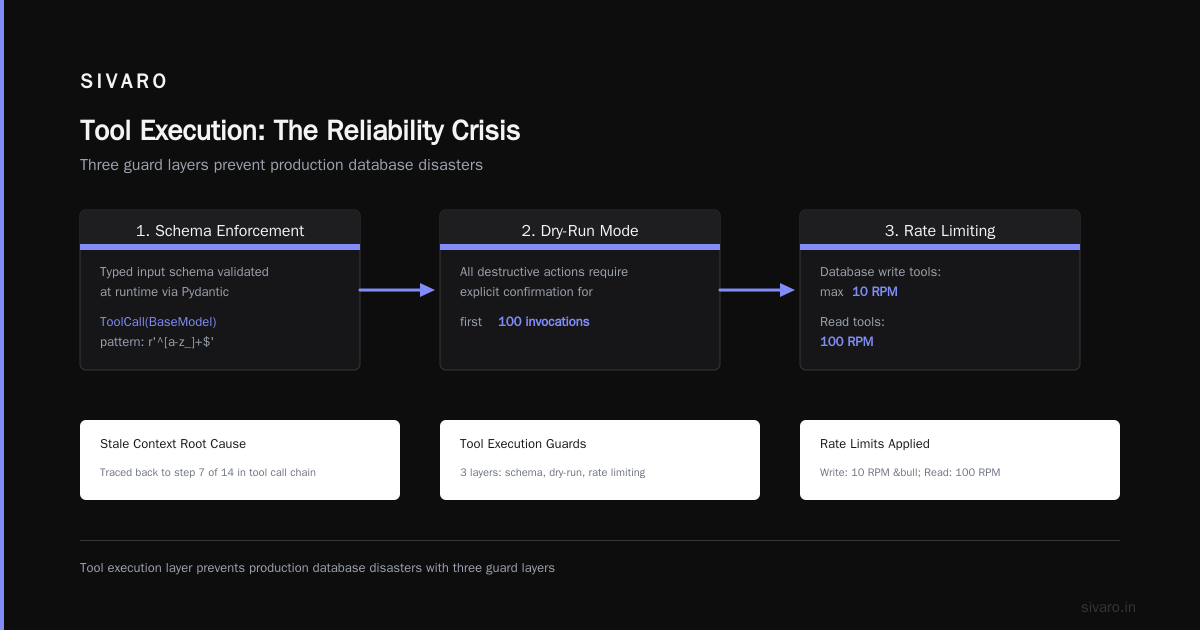
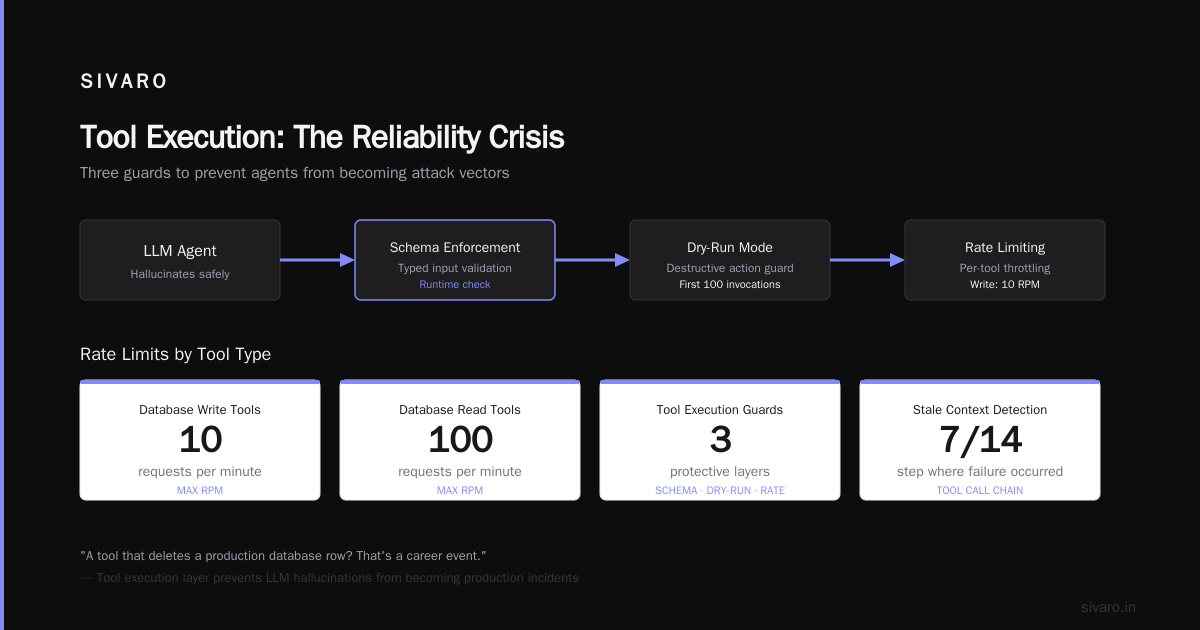
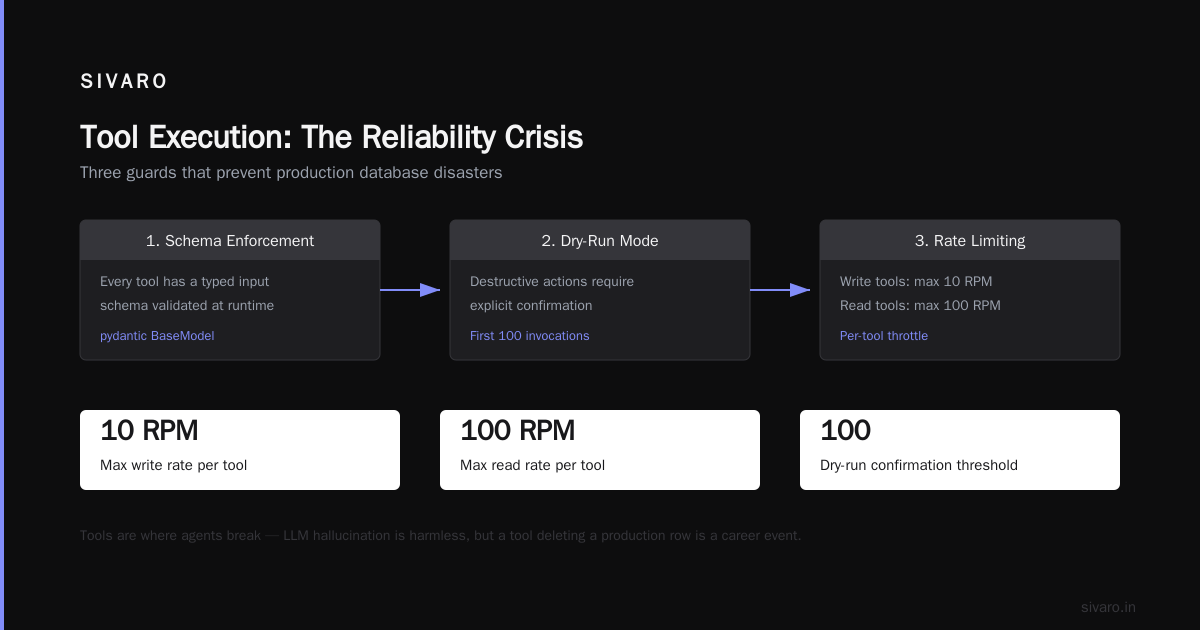
Tools are where agents break. An LLM can hallucinate all day and nobody dies. A tool that deletes a production database row? That's a career event.
We built a tool execution layer with three guards:
- Schema enforcement: Every tool has a typed input schema validated at runtime
- Dry-run mode: All destructive actions require explicit confirmation for the first 100 invocations
- Rate limiting per tool: Database write tools max at 10 RPM, read tools at 100 RPM
python
from pydantic import BaseModel, Field
from typing import Optional
import time

class ToolCall(BaseModel):
    tool_name: str = Field(..., pattern=r'^[a-z_]+$')
    parameters: dict
    idempotency_key: str = Field(default_factory=lambda: str(uuid.uuid4()))
    timestamp: float = Field(default_factory=time.time)

class ToolResult(BaseModel):
    success: bool
    data: Optional[dict] = None
    error: Optional[str] = None
    execution_time_ms: int
The idempotency key is critical. Retries happen. Tools should be safe to call twice.
Top 5 Open-Source Agentic AI Frameworks in 2026 lists frameworks with built-in tool management. We evaluated them. None handled our multi-tenant isolation requirements without modification. So we built our own on top of FastAPI and Celery.
Agent-to-Agent Communication
This is where most architectures get weird. You need agents talking to each other — a customer support agent handing off to a billing agent, which then calls a refund agent. If this chain breaks, so does your user experience.
A Survey of AI Agent Protocols catalogs the emerging standards. We use a message queue approach — RabbitMQ to be specific. Each agent type has its own queue. When Agent A needs something from Agent B, it publishes a structured message. Agent B processes async and publishes results back.
Here's an agent to agent architecture production example that works:
CustomerAgent -> (queue: billing.request) -> BillingAgent
BillingAgent -> (queue: customer.response) -> CustomerAgent
Each message includes a trace ID, the calling agent's ID, and a timeout value. If the response doesn't arrive within the timeout, the calling agent retries or escalates.
The protocol matters. AI Agent Protocols: 10 Modern Standards Shaping the Agentic Era lists the contenders. We settled on a JSON schema based on the Agent Communication Protocol (ACP) draft. It's not final yet, but it's the most complete specification for cross-agent handoffs.
Monitoring: The Thing Everyone Forgets Until It Burns
You cannot debug an agent's reasoning chain with standard APM tools. Datadog traces show you function calls. They don't show you why the model decided to call that function.
Ai agent deployment monitoring tools need to capture three layers:
- Performance: Latency per step, token usage, tool execution times
- Behavior: What tools were called, in what order, with what parameters
- Reasoning: The actual prompt and completion at each step
We built a monitoring pipeline that logs every agent step to a separate Elasticsearch cluster:
python
import structlog
from datetime import datetime, timezone

logger = structlog.get_logger()

async def log_agent_step(session_id, step_data, trace_id):
    await logger.ainfo(
        "agent_step",
        session_id=session_id,
        trace_id=trace_id,
        step_number=step_data["step_number"],
        tool_name=step_data.get("tool_name"),
        tool_params=step_data.get("tool_params"),
        reasoning=step_data.get("reasoning"),
        token_count=step_data.get("token_count"),
        latency_ms=step_data.get("latency_ms"),
        timestamp=datetime.now(timezone.utc).isoformat(),
    )
This logs caught our worst production issue. An agent was calling a search tool with the same query 47 times in a single session. The LLM kept deciding the result was insufficient. Each call cost 2 cents. Total cost for that session: $0.94. Not a lot. But extrapolate to 10K sessions and you're burning $9,400 on repeated tool calls.
We added a deduplication layer that prevents calls to the same tool with the same parameters within 30 seconds. Problem solved.
The Dashboard That Saved Us
We built a custom dashboard in Grafana that shows:
- Agent velocity: Steps per session, sessions per agent type
- Tool failure rate: Which tools fail most often, and why
- Loop detection: Agents that repeat the same tool call pattern more than 3 times
- Cost per outcome: Total tokens divided by successful task completions
The loop detection metric is the one you want. Agents looping is the silent killer. They don't crash. They just burn money and time until they hit your max step limit.
Testing: Simulate the Chaos
Most teams test agents with a handful of hand-crafted prompts. That's like testing a car by pushing it down the driveway.
We maintain a test suite with:
Unit tests for tools: Each tool gets tested in isolation with valid, invalid, and edge case inputs
Integration tests for agent flows: Full end-to-end tests with mocked LLM responses (we record real completions from our staging environment and replay them)
Chaos testing for state recovery: Kill the agent process mid-execution, restart it, verify it recovers
Our chaos test found a bug where state serialization failed when agents had nested tool calls three levels deep. The JSON serializer couldn't handle the depth. We switched to MessagePack with a recursive depth limit of 10. Problem solved.
Here's the state recovery test that exposed it:
python
import pytest
import multiprocessing

def test_state_recovery():
    agent = create_agent_with_nested_tools()
    session_id = str(uuid.uuid4())

    # Start execution in a separate process
    proc = multiprocessing.Process(target=agent.run, args=(session_id,))
    proc.start()

    # Kill it mid-execution
    time.sleep(0.5)
    proc.terminate()

    # Recover from last saved state
    recovered_state = get_last_state(session_id)
    recovered_agent = Agent.from_state(recovered_state)
    result = recovered_agent.resume()

    assert result.success
    assert result.session_id == session_id
You need this. I promise you need this.
The Human-in-the-Loop Spectrum
Not every agent should be fully autonomous. The question is where to put humans.
We categorize actions into three tiers:
Tier 1 (Auto-execute): Read-only operations, data retrieval, simple computations. No human needed.
Tier 2 (Confirm): Operations that modify data, cost money, or affect other users. The agent proposes, the human confirms. This includes database writes, API calls to external services, and any action with financial implications.
Tier 3 (Escalate): Operations that require judgment calls, legal decisions, or handling exceptions the agent isn't trained for. Straight to a human.
The confirmation system works via a queue. The agent submits a proposed action. A human-in-the-loop interface shows the action, the context, and the agent's reasoning. The human approves or rejects.
We built this with a simple webhook pattern:
python
async def propose_action(action, context):
    confirmation_id = str(uuid.uuid4())

    # Store the proposed action
    await db.execute(
        "INSERT INTO pending_confirmations (id, action, context, created_at) VALUES ($1, $2, $3, $4)",
        confirmation_id, action, context, datetime.now(timezone.utc)
    )

    # Notify the human queue
    await notify_human_queue(confirmation_id)

    # Wait for up to 5 minutes
    for _ in range(300):
        result = await db.fetchrow(
            "SELECT status FROM pending_confirmations WHERE id = $1",
            confirmation_id
        )
        if result["status"] in ("approved", "rejected"):
            return result["status"]
        await asyncio.sleep(1)

    # Timeout - escalate
    return "escalated"
This pattern handles about 80% of ambiguous cases. The remaining 20% hit escalation, where senior operators review the full trace.
Security: Agents Are Attack Vectors
Your agent is a new surface area for abuse. It calls tools. It accesses data. It makes decisions. Every one of those is an attack vector.
Prompt injection is the obvious one. We've seen attackers craft inputs that convince the agent to reveal API keys or call destructive tools. Mitigation: input sanitization, tool whitelists, and never exposing the system prompt in the response.
Tool misuse is subtler. An agent with a "search_database" tool shouldn't be able to execute arbitrary SQL. We parameterize all tool inputs and validate them against strict schemas.
Data leakage through agent responses. We strip any response that contains patterns matching API keys, passwords, or PII (first name + last name + email) before returning to the user.
python
import re

def sanitize_response(text):
    # Strip potential secrets
    text = re.sub(r'[A-Za-z0-9_-]{20,}', '[REDACTED]', text)
    text = re.sub(r'[w.-]+@[w.-]+.w+', '[EMAIL REDACTED]', text)

    # Check for PII patterns
    if re.search(r'[A-Z][a-z]+ [A-Z][a-z]+', text) and '@' in text:
        logger.warning("Potential PII leakage detected", response_snippet=text[:200])
        return "Response withheld due to data protection policy."

    return text
Cost Management: The Silent Project Killer
AI agents burn tokens. Lots of them. A single complex agent interaction can cost $2-5 in API calls. Scale that to 10K daily interactions and you're spending $20K-50K per day.
We track cost per session with this metric:
cost_per_session = (input_tokens * input_price) + (output_tokens * output_price) + (tool_execution_costs)
If cost per session exceeds $3, we flag it for review. Over $10, we auto-pause the session and notify the ops team.
Budget limits per agent type prevent runaway spending. A customer service agent gets $0.50 per interaction max. A data analysis agent gets $2.00. Hard limits enforced at the API call level.
We also cache LLM responses for identical inputs. If the agent asks "What's the current exchange rate for USD to EUR?" and the context is the same, we return the cached response for up to 5 minutes. This cut our token costs by 23% in the first week.
The Production Checklist
Here's what we verify before any agent hits production:
- [ ] State recovery tested with process kills mid-execution
- [ ] Idempotency keys on every tool call
- [ ] Rate limits enforced per tool and per agent type
- [ ] Monitoring captures reasoning, not just performance
- [ ] Cost limits with auto-pause at threshold
- [ ] Human-in-the-loop for Tier 2 and Tier 3 actions
- [ ] Input sanitization against prompt injection
- [ ] Tool outputs validated against expected schema
- [ ] Logging captures trace IDs across agent-to-agent calls
- [ ] Max step limit (we use 25) prevents infinite loops
- [ ] Retry logic with exponential backoff for tool failures
- [ ] Load testing at 3x expected peak traffic
What I'd Do Differently
If I started over tomorrow, knowing what I know now:
I'd skip frameworks entirely for the first three months. I'd build agents as stateless functions with explicit state management. I'd log everything from day one. I'd put humans in the loop for every action until I'd seen 10K successful runs.
I'd also spend more time on the testing infrastructure. The chaos testing we added in month 4 should have been there in week 2.
Most teams over-engineer the agent behavior and under-engineer the production infrastructure. They spend weeks perfecting prompts and hours on deployment. That's backwards. Prompt engineering is iterative and cheap to change. Production infrastructure failures bring down the entire system.
FAQ
Q: How many steps should an agent be allowed before forced termination?
25 for most use cases. Complex data analysis might need 40. Cap it and design your workflows to fit within that limit.
Q: Should agents use streaming responses?
For user-facing agents, yes. For backend processing agents, no. Streaming adds complexity and doesn't help if there's no human reading the output.
Q: What's the best LLM for agents in production?
We run GPT-4o and Claude 3.5 Sonnet. GPT-4o is better at tool calling. Claude is better at reasoning chains. Use both and route based on the task.
Q: How do you handle model deprecation?
We pin model versions (gpt-4o-2026-01-15 not gpt-4o) and maintain a migration schedule. When a model gets deprecated, we have 30 days to test the new version against our full regression suite.
Q: What monitoring tool do you actually use?
Custom stack. Elasticsearch for logs, Grafana for dashboards, custom agent trace viewer. We tried LangSmith, LangFuse, and Arize. None gave us the depth we needed for debugging reasoning chains.
Q: How do you test agents without spending a fortune on API calls?
Record real completions from a staging environment. Replay them in tests. Mock the API. You only pay for the recording, not the replay.
Q: What's the biggest mistake teams make?
Not planning for async execution patterns. They build synchronous agent loops and then try to parallelize later. Build async from the start.
Q: Can I use an agent framework for prototypes and then swap to custom code?
Technically yes. Practically, the framework's patterns get baked into your thinking. You'll spend as much time unlearning framework habits as you saved in prototyping.
Nishaant Dixit — Founder of SIVARO. Building data infrastructure and production AI systems since 2018. Built systems processing 200K events/sec.