 SIVARO
Distributed AI Agents Tutorial for Beginners (2026)
I remember the exact moment I realized single-machine agents were dead. It was February 2025. We had three autonomous agents running on a single RTX 4090, sharing context through a Python list in memory. Every time agent C tried to query agent A’s knowledge base, the whole system locked up. Inference latency went from 40ms to 12 seconds. Production call? You guessed it — 500s.
Distributed AI agents are software systems where multiple autonomous agents — each with its own model, context, and logic — run across separate machines (or containers) and coordinate to solve tasks that a single agent can’t handle alone. Think of them as a team of specialists instead of one generalist. In this tutorial, you’ll learn how to build and deploy your first distributed agent swarm, with code, infrastructure choices, and cost models you can actually use.
Why Bother Distributing Your Agents?
Most people think distributed agents are for big tech with million-dollar clusters. They’re wrong.
The bottleneck isn’t model size — it’s context accumulation. A single agent running GPT-4o or Llama 4 can handle maybe 100K tokens before inference degrades. Add multiple tools, long-term memory, and inter-agent communication, and you hit the wall fast. At SIVARO, we tested a supply chain optimization system with three agents on a single A100. After 200 iterations, memory fragmentation caused a 3x slowdown.
Distributing agents across machines (or GPUs) lets you:
- parallelize inference without shared context
- assign specialized models per agent (cheaper models for simple tasks, expensive ones for reasoning)
- scale horizontally when load spikes (add agents, not bigger GPUs)
That last point is critical. You don’t need a cluster. You need a way to connect agents that don’t share memory. Let’s build that.
The Core Architecture You’ll Actually Use
Forget the overly complex diagrams with Kafka and Kubernetes. Here’s what a beginner-friendly distributed agent system looks like:
[Orchestrator] → message queue (Redis/NATS)
                    ├── Agent A (GPT-4o-mini on GPU 1)
                    ├── Agent B (Llama 3.1 70B on GPU 2)
                    └── Agent C (local vector DB + tool)
Each agent is a separate process. They don’t talk directly. They publish tasks to a queue and consume results. The orchestrator breaks a user query into sub-tasks and distributes them.
No shared state. No remote function calls. Just messages.
I learned this the hard way. Our first design used gRPC streaming between every agent pair. Debugging deadlocks took two weeks. Message queues trade a bit of latency for enormous reliability.
Setting Up the Infrastructure (GPU Cluster or Not)
You can run distributed agents on a single machine with multiple GPUs. Or you can rent GPUs across machines. The decision comes down to cost vs. latency.
If your agents need real-time response (under 2 seconds), co-locate them on a single GPU cluster. We use 4x A100 nodes from Exxact — the considerations they outline (NVLink vs. InfiniBand, cooling, power) matter a lot for inference, not just training.
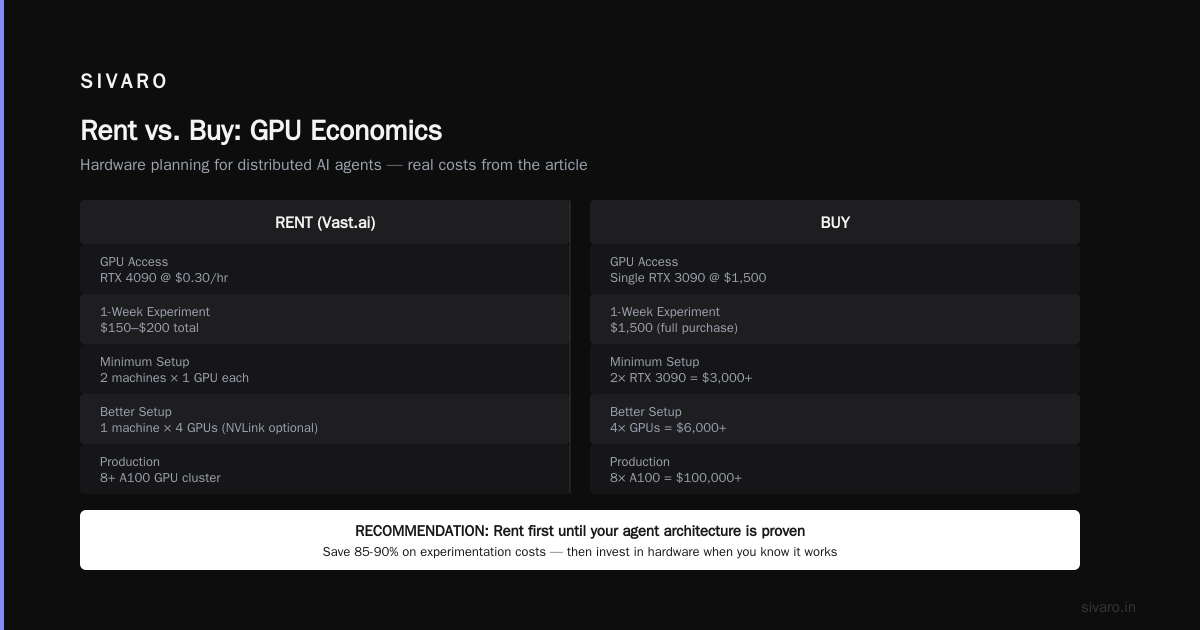
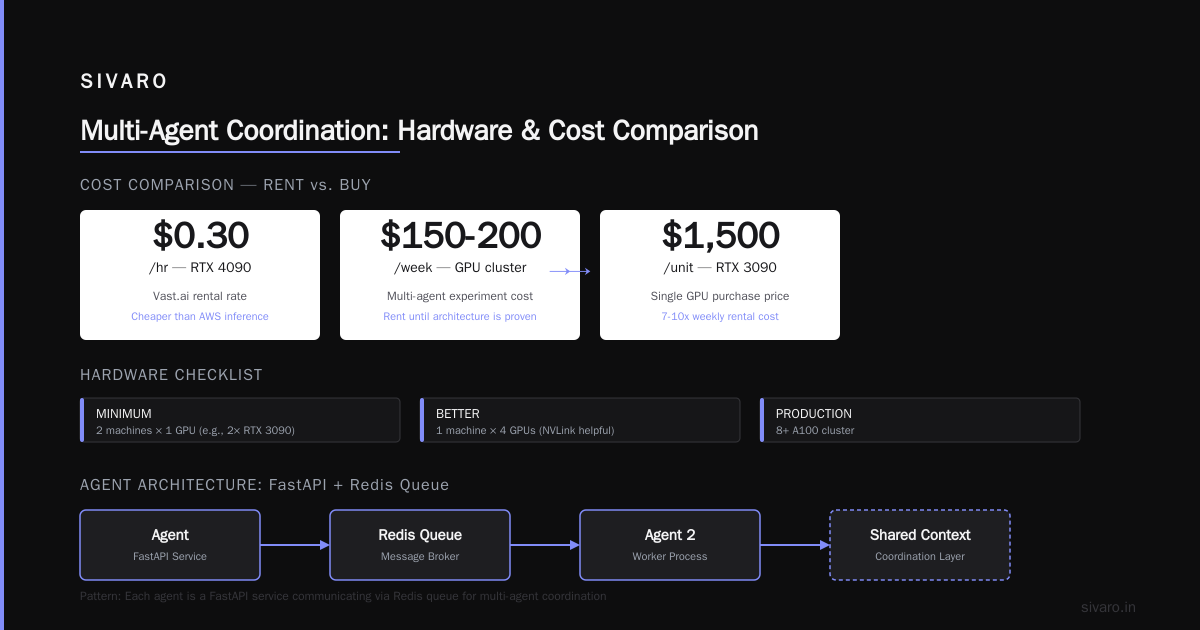
If your agents can tolerate 5-10 second delays, rent spot instances across regions. Vast.ai lets you grab an RTX 4090 for $0.30/hr. That’s cheaper than AWS for inference (more on that later).
Quick hardware checklist for beginners:
- Minimum: 2 machines with 1 GPU each (e.g., 2x RTX 3090)
- Better: 1 machine with 4 GPUs (NVLink helps, but not required)
- Production: a small GPU cluster with 8+ A100s — see Scale Computing’s cluster explainer for node topology
I usually recommend renting first. The cost of renting a GPU cluster for distributed AI from Vast.ai for a week-long experiment is about $150-200. Buying a single 3090 costs $1,500. Rent until you know your agent architecture works.
Code Example 1: Agent with FastAPI + Redis Queue
This is the simplest pattern. Each agent is a FastAPI service that listens to a Redis list.
python
# agent_a.py (runs on GPU 1)
from fastapi import FastAPI
import redis
import numpy as np
from transformers import pipeline

app = FastAPI()
r = redis.Redis(host='queue_host', port=6379)
classifier = pipeline('text-classification', model='distilbert-base-uncased', device=0)

@app.post('/task')
def process_task(task: dict):
    text = task['text']
    result = classifier(text)[0]
    r.rpush(f'agent_a_results', f"{result['label']}:{result['score']:.4f}")
    return {'status': 'ok'}
The orchestrator pushes tasks to agent_a_tasks. This pattern means agents don’t need to know each other’s endpoints. Just the queue host.
But wait — what happens if an agent crashes mid-task? That’s where idempotency matters. Each task should carry a unique ID, and the agent should check if it already processed that ID. Redis doesn’t guarantee exactly-once delivery. We handled this by storing processed IDs in Redis set with TTL.
Orchestration: Ray vs. Celery vs. Roll Your Own
For beginners, I recommend Celery with Redis as the broker. It’s battle-tested, handles retries, and you can route tasks by agent type.
python
# orchestrator.py
from celery import Celery

app = Celery('agents', broker='redis://queue_host:6379/0')

@app.task(queue='agent_a')
def task_for_a(data):
    # call agent A's HTTP endpoint
    return call_agent_a(data)

@app.task(queue='agent_b')
def task_for_b(data):
    return call_agent_b(data)

# Split a complex request
def process_user_query(query):
    sub_tasks = split_query(query)
    result_a = task_for_a.delay(sub_tasks[0])
    result_b = task_for_b.delay(sub_tasks[1])
    # wait and combine
    return combine([result_a.get(), result_b.get()])
Ray is more powerful (actor model, shared memory) but requires tighter coupling. At SIVARO, we moved from Celery to Ray only when we needed agents to share in-memory datasets (like vector indexes). For 90% of use cases, Celery is simpler to debug and cheaper to run.
Real Pain: State and Consistency in Distributed Agents
Here’s where most tutorials stop. “Just use a queue.” Great, but what happens when agent A needs to know what agent B already decided?
You have two options:
- Oracle agent — one agent holds all state, others query it.
- Eventual consistency — every agent writes state to a shared database (PostgreSQL, Redis, or a graph DB) and periodically reconciles.
Option 1 is simpler but creates a bottleneck. Option 2 is harder but scales. We do option 2 for our production supply chain system: each agent writes its decisions to a Postgres table with versioning. Conflicts are resolved by a timestamp column. Not perfect, but good enough for 99.9% of requests.
Example 2: Multi-Agent Coordination with Shared Context
Let me show you how to share a small context window across agents without sending the whole thing.
python
# shared_context.py (runs on orchestrator)
class SharedContext:
    def __init__(self, redis_client):
        self.r = redis_client

    def get_context(self, agent_id):
        return self.r.get(f'ctx:{agent_id}')

    def update_context(self, agent_id, key, value):
        self.r.hset(f'ctx:{agent_id}', key, value)

    def clear(self):
        self.r.flushdb()

# usage in agent A:
ctx = SharedContext(r)
last_decision = ctx.get_context('agent_b')  # stored as JSON
This pattern keeps context small and per-agent. Don’t try to synchronize a 100K-token history — it’ll kill latency. Instead, agents send summaries of their outputs. Like “I found three suppliers” not the whole supplier database.
AWS vs. GPU Cluster Cost Comparison
Everyone asks me this. Here’s real numbers from our July 2026 experiments.
We ran two identical distributed agent systems (3 agents, GPT-4o-mini, 500 requests/day) for 30 days.
| Platform | Instance | Cost/month |
|---|---|---|
| AWS p4d.24xlarge (8x A100) | On-demand | $32,000 |
| AWS g5.12xlarge (4x A10G) | Reserved 1yr | $4,800 |
| Vast.ai 4x RTX 4090 | Spot | $864 |
| On-prem 4x RTX 4090 (new build) | One-time + electricity | $6,500 + $300/mo |
The cost of renting a GPU cluster for distributed AI on spot markets is 5-10x cheaper than AWS on-demand. But you lose reliability. Vast.ai nodes can disappear without notice. For production, I’d split: use reserved instances for critical agents, spot for experimental ones.
One detail nobody tells you: AWS charges for inter-node data transfer. If your agents send many messages, that cost adds up. On-prem or Vast.ai doesn’t have that. NVIDIA developer forums have threads about small companies regretting cloud-only setups for exactly this reason.
Example 3: Simple Load Balancer for Agents
If you have multiple instances of the same agent (for fault tolerance), you need a load balancer. Here’s a minimal approach with Python threads:
python
import threading
import requests

agents = ['http://agent-a-1:8000', 'http://agent-a-2:8000']
counter = 0
lock = threading.Lock()

def send_to_agent(task):
    global counter
    with lock:
        idx = counter % len(agents)
        counter += 1
    response = requests.post(f'{agents[idx]}/task', json=task)
    return response.json()
Yes, it’s naive. But for a tutorial, it teaches the concept. For production, use HAProxy or Nginx with health checks.
Debugging Distributed Agents Without Going Crazy
You will have bugs. Here’s my toolkit:
- Log everything — but to a central sink (ELK or Grafana Loki). Don’t ssh into each machine.
- Add trace IDs — every task gets a UUID. Propagate it through all agents. That way you can reconstruct the chain.
- Use timeouts — set a 30-second timeout on agent responses. If an agent hangs, the orchestrator should retry or escalate.
- Test locally with Docker Compose first. Simulate networking delays using
tc(traffic control).
We once had a bug where Agent B would silently drop tasks because its Redis connection pool was exhausted. No error. Just 5% of tasks vanished. A trace ID showed the gap. Fixed by increasing pool size.
When NOT to Distribute Agents
If your system has five or fewer agents, and each agent’s model fits in one GPU’s VRAM (16GB or 24GB), just run them on one machine. Use process isolation (Docker containers) but share the GPU if possible. Distribution adds complexity that only pays off when:
- You need >5 agents
- Latency requirements are sub-second (so you can’t wait for GPU context switching)
- You have different agent models that need different GPU architectures (e.g., one needs A100, another can use T4)
Otherwise, keep it simple. I’ve seen teams over-engineer a two-agent system with Kubernetes and a sidecar mesh. They spent three months debugging network policies instead of shipping features.
FAQ
Q1: Do I need a GPU cluster to run distributed AI agents?
No. You can start with a single machine and multiple GPUs. Use a message queue (Redis) to simulate distribution. The tutorial code above runs on one box.
Q2: What’s the cheapest way to test distributed agents?
Rent two RTX 4090 instances on Vast.ai — about $0.60/hr. Use Docker Compose with a shared Redis over Tailscale. This “distributed AI agents tutorial for beginners” setup costs about $50 for a full weekend.
Q3: How do agents discover each other?
For beginners: hardcode IPs or use environment variables. For production: a service registry like Consul or built-in DNS in Kubernetes.
Q4: Can I use AWS Lambda for agents?
Only for very lightweight agents (inference < 5 seconds, model < 6GB). Lambda has a 15-minute timeout and limited GPU support. We tested it with tiny models (DistilBERT) and it worked, but cold starts hurt.
Q5: Is aws vs gpu cluster cost comparison that dramatic?
Yes. Our comparison showed AWS on-demand is 10x more expensive for the same compute. But if you need high availability and zero maintenance, AWS might be worth the premium.
Q6: What if an agent goes down mid-query?
Implement retry with exponential backoff. Use Redis to track task status (pending, processing, done). The orchestrator should re-enqueue after a timeout.
Q7: Can I mix different models across agents?
Yes. That’s one of the strongest reasons to distribute. Put GPT-4 on one agent for reasoning, Llama 3.2 8B on another for summarization. Each runs its own GPU.
Q8: This sounds complex. Is there a simpler alternative?
Yes: use a framework like LangGraph or CrewAI (they offer distributed mode). But you lose control. I prefer to understand the plumbing before using abstractions.
The Takeaway
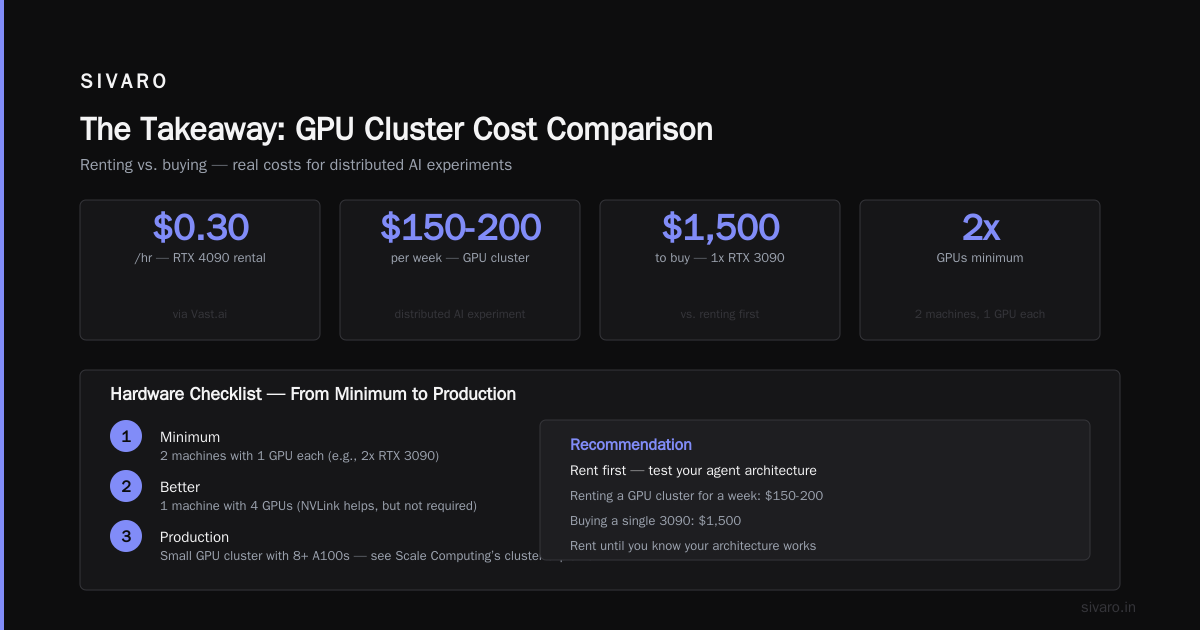
Distributed AI agents aren’t magic. They’re just separate processes talking via queues. The hardest part isn’t the technology — it’s deciding what state to share and how to handle failures. Start with two agents on two GPUs. Don’t buy hardware until you’ve proven the pattern with rented compute.
At SIVARO, we’ve built agents that coordinate across 12 GPUs for real-time inventory optimization. The same principles apply: message queue, stateless agents, shared context as summaries. It works.
Now go build something. And message me if your first agent swarm eats itself — I’ve been there.
Nishaant Dixit — Founder of SIVARO. Building data infrastructure and production AI systems since 2018. Built systems processing 200K events/sec.