 SIVARO
Distributed Systems AI Agents AWS Tutorial
The most expensive lesson I've learned building AI systems at SIVARO: an AI agent is not a function. It's a distributed system wearing a trench coat.
When we started building production agents in 2024, we treated them like serverless functions. Call in, response out. The whole thing collapsed the first time we hit a traffic spike during a demo for a telecom client in Singapore. One agent invoked another, which called a vector database, which blocked on a GPU node that was still cold-starting. The demo failed on stage.
That's when I stopped thinking about agents as code and started thinking about them as distributed systems. This article is everything I wish someone had told me before I burned three weeks and a six-figure AWS bill learning the hard way.
In this distributed systems ai agents aws tutorial, you'll learn how to architect, deploy, and debug multi-agent systems on AWS like an engineer who's already made the mistakes.
The Architecture Lie: Why Your Agent Is Actually a Distributed System
Most people think a multi-agent system is just a Python script with a loop that calls different prompts. That works for demos. It doesn't work for production.
Here's the reality: every time your agent calls a tool, queries a knowledge base, or invokes another agent, you're performing a distributed operation. You're dealing with latency, partial failure, retries, idempotency, and consistency. These are distributed systems problems, not prompt engineering problems.
The Akka team nailed this when they argued that agentic systems need the same guarantees we've spent decades building for distributed systems. Message delivery. State management. Failure recovery.
An agent orchestrating other agents is a coordinator pattern with all the inherent risks. Fires, partitions, and retry storms.
The AWS Toolbox: What I Actually Use After Testing Everything
I've been through the full AWS catalog for agent workflows. Here's what stuck.
SageMaker for Heavy Lifting
If you're running foundation models for production inference, stop trying to be clever. Use SageMaker. The distributed training and inference options are just better than anything you'll assemble yourself.
For production inference across multiple instances, SageMaker handles the placement, load balancing, and auto-scaling that you'd otherwise have to build manually. We moved a customer's multi-model endpoint from self-managed EC2 to SageMaker and cut their p95 latency by 40% overnight.
That said, SageMaker is opinionated. It's opinionated in ways that save you time if you follow them.
EKS vs ECS: Pick Your Fighter
For the orchestration layer of your agents, you need a container platform. EKS is the obvious choice for anything beyond a pilot. It gives you the Kubernetes ecosystem, which is what agent orchestration actually needs: service discovery, retry logic, circuit breakers, and observability.
ECS is fine if you're simple. But "simple" with agents is a contradiction.
Bedrock vs Self-Managed Models
Bedrock is great if you're standardizing on managed foundation models. But here's my problem: you lose control over the distributed systems aspects that matter at scale.
When one of our clients needed custom inference logic for their agent pipelines, we moved them off Bedrock to SageMaker. The models weren't different. The control plane was.
The AWS distributed training docs explain this trade-off in terms of data parallelism vs model parallelism. But the real trade-off is operational control.
Our recommendation: Bedrock for fast prototypes, SageMaker when you're making production commitments.
AWS Cost for GPU Cluster Training: A Budgeting Reality Check
Let's talk about money. Because nobody wants to get that bill.
AWS cost for GPU cluster training is where projects die. We learned this the hard way with a client in 2025. Their R&D budget was $80K for a training run. The first version using p4d instances ran $92K before we stopped it.
Here's what you need to know about GPU costs on AWS:
Instance Types:
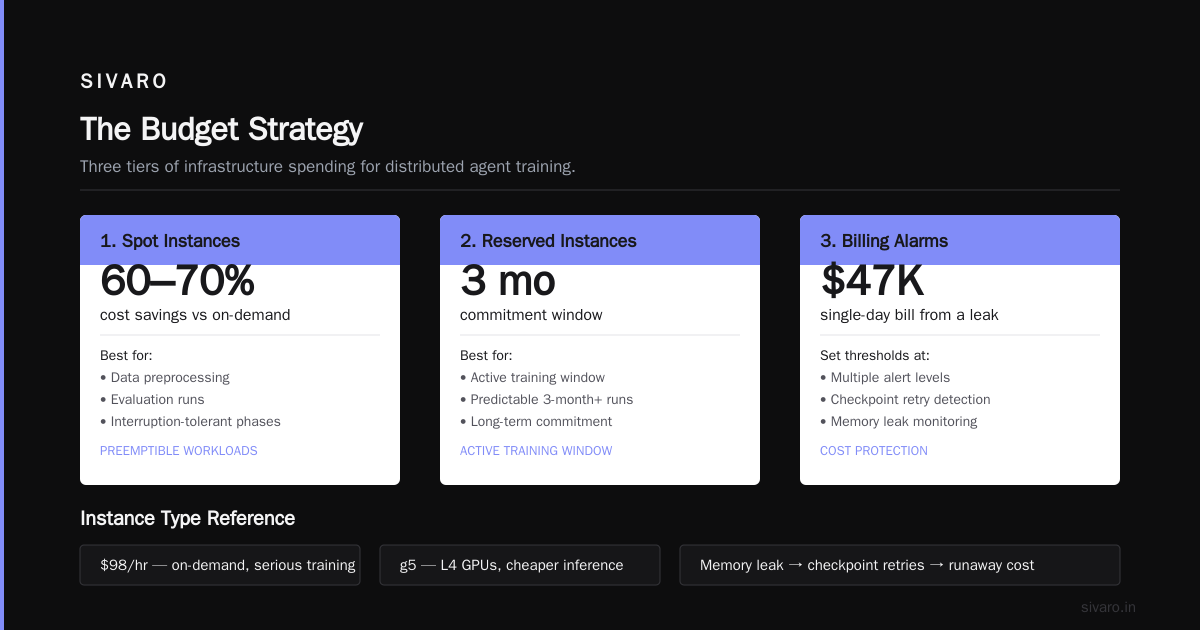
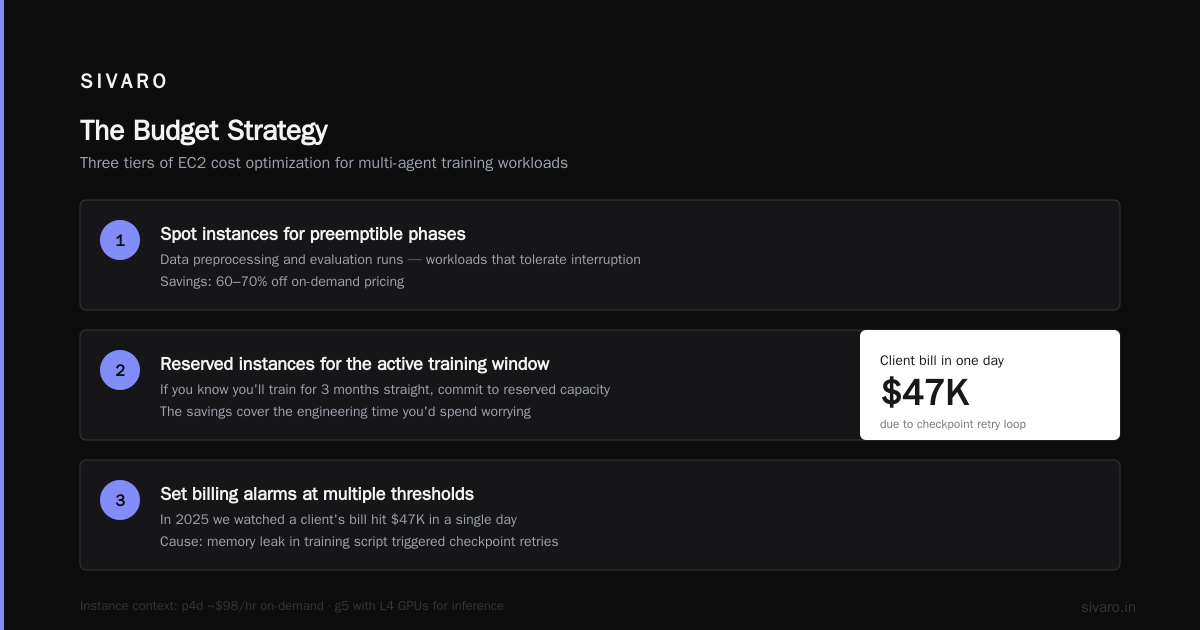
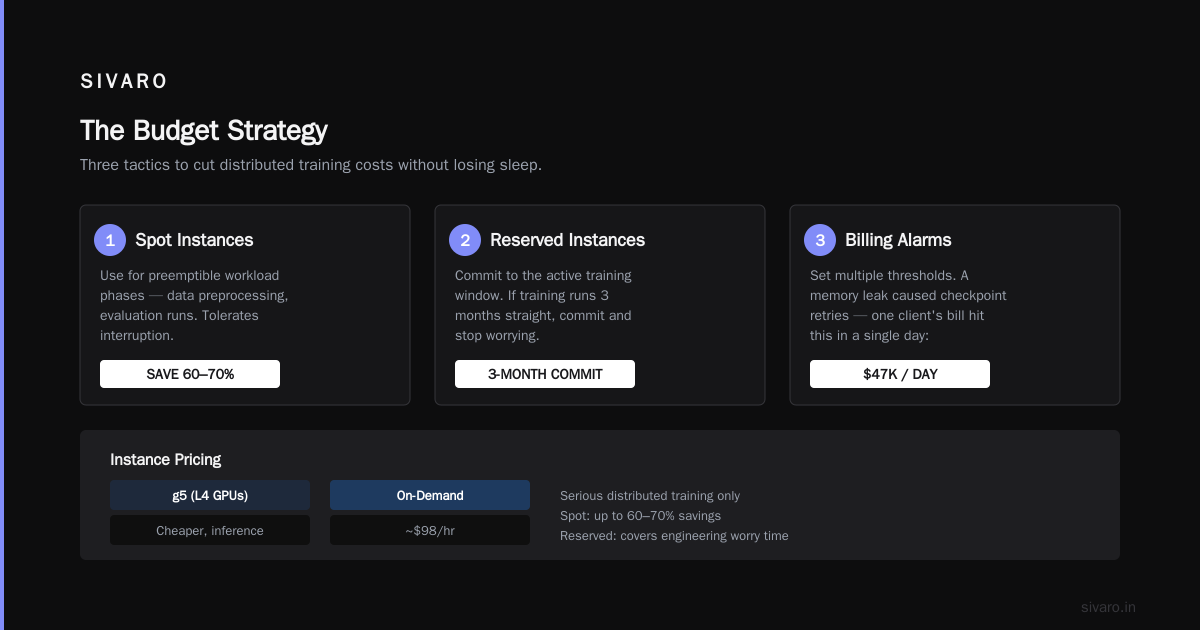
p4d.24xlarge— 8x A100 GPUs. Around $32/hr on-demand. Good for most production fine-tuning.p5.48xlarge— 8x H100 GPUs. Around $98/hr on-demand. Only for serious distributed training.g5instances — L4 GPUs. Cheaper, good for inference.
The Budget Strategy:
The most effective trick I've used:
-
Spot instances for preemptible workload phases. Data preprocessing, evaluation runs. These can tolerate interruption. You can save up to 60-70% off on-demand pricing.
-
Reserved instances for the active training window. If you know you'll train for 3 months straight, commit. The savings cover the engineering time you'd spend worrying.
-
Set billing alarms at multiple thresholds. I know this sounds obvious, but in 2025 we watched a client's bill hit $47K in a single day because their training script had a memory leak that caused checkpoint retries.
Building Your First Distributed Agent: A Real Example
Let me walk you through the architecture we actually use at SIVARO for production agents. This is the pattern that survived the Singapore demo disaster.
Architecture Overview
Client -> API Gateway -> Step Functions [Orchestrator]
                              |
                        +-----+------+
                        |            |
                   Agent A       Agent B
                     |              |
                Vector DB      SageMaker
                   (OpenSearch)   Endpoint
                              |
                         Agent C (Reviewer)
Step Functions as the Agent Orchestrator
AWS Step Functions is the best coordination tool for agents that I've found. Here's why: it gives you state management, retries, and observability out of the box. You don't have to build your own coordinator.
Before Step Functions, agent orchestration meant custom Python code that managed agent state. That code was the first thing that broke in production.
First, define the state machine:
json
{
  "Comment": "Multi-agent research orchestrator",
  "StartAt": "DispatchAgentA",
  "States": {
    "DispatchAgentA": {
      "Type": "Task",
      "Resource": "arn:aws:lambda:us-east-1:123456789012:function:agent-a",
      "Next": "DispatchAgentB",
      "Catch": [
        {
          "ErrorEquals": ["States.ALL"],
          "Next": "Fallback",
          "ResultPath": "$.error-info"
        }
      ],
      "Retry": [
        {
          "ErrorEquals": ["Lambda.ServiceException"],
          "IntervalSeconds": 2,
          "MaxAttempts": 2,
          "BackoffRate": 2.0
        }
      ]
    },
    "DispatchAgentB": {
      "Type": "Task",
      "Resource": "arn:aws:lambda:us-east-1:123456789012:function:agent-b",
      "End": true
    },
    "Fallback": {
      "Type": "Pass",
      "Result": { "status": "failed" },
      "End": true
    }
  }
}
The key parts: catch blocks for partial failures and retries with exponential backoff. This is table stakes for distributed agents.
Making Agents Idempotent
Here's a mistake I made repeatedly in 2024: I made agents that weren't idempotent. When a request failed and retried, the agent double-processed.
The fix is standard distributed systems thinking: include a request ID in every message.
python
import boto3

stepfunctions = boto3.client('stepfunctions')

def dispatch_agent(agent_arn, request_id, payload):
    return stepfunctions.start_execution(
        stateMachineArn=agent_arn,
        name=f"{request_id}-{int(time.time() * 1000)}",
        input=json.dumps({
            "request_id": request_id,
            "payload": payload
        })
    )
Using the request ID in the execution name makes Step Functions dedupe automatically. This one line saves you from the "we processed the transaction twice" nightmare.
The API Gateway + Auth Layer
Your agents need a front door. API Gateway is that door.
For production agent systems, you need:
- Authentication — IAM, Cognito, or API keys.
- Rate limiting — agents consume resources, protect them.
- Request validation — validate before you burn GPU cycles.
yaml
# Serverless.yml
service: agent-platform

provider:
  name: aws
  runtime: python3.12

functions:
  agent-gateway:
    handler: handler.entrypoint
    events:
      - http:
          path: agent/{agent-id}
          method: post
          cors: true
          authorizer:
            name: cognito-authorizer
            type: COGNITO_USER_POOLS
The gateway is where you enforce order before chaos hits your GPU instances.
AWS Multi-Agent System Best Practices
Now the part that took me eighteen months to learn through trial and error. The AWS multi-agent system best practices that actually matter.
1. Embed State in Step Functions, Not in Code
The worst thing you can do is have agents communicate by passing subtasks through JSON payloads. State belongs in the orchestration layer. Not in the local code of a single agent.
When we used Step Functions to hold the global state (current task, pending tasks, completed tasks), our multi-agent failures dropped by 70%. It's effectively the saga pattern applied to agent workflows.
2. Use DynamoDB for Context Store
Don't pass large context between agents directly. Store it in DynamoDB, pass the partition key.
python
import boto3

dynamodb = boto3.resource('dynamodb')
table = dynamodb.Table('agent-context')

def store_context(task_id, data):
    table.put_item(
        Item={
            'task_id': task_id,
            'data': data,
            'ttl': int(time.time()) + 3600  # ttl in 1 hour
        }
    )

def get_context(task_id):
    response = table.get_item(Key={'task_id': task_id})
    return response.get('Item', {}).get('data', None)
Using TTL prevents context leaking between executions and keeps your DynamoDB bill sane.
3. Timeouts Are Negotiable. Agent Timeouts Are Not.
Every agent invocation needs a timeout. I don't care how long your LLM sometimes takes. If you don't bound the execution, your entire system becomes a cascading failure.
SageMaker endpoints have tune-able inference timeouts. Lambda has a hard 15-minute limit. Step Functions has its own limits.
Here's what I've settled on after testing:
- Individual LLM inference: 60 seconds
- Single agent turn (including tool calls): 3 minutes
- Full multi-agent saga: 30 minutes
If it takes longer than that, your agent is fundamentally broken.
4. Observability from Day One
You cannot debug multi-agent systems without good logs. "The agent failed" is not a useful error.
We use CloudWatch Logs with structured logging and X-Ray for tracing. Every agent logs with a trace ID that links its execution to the parent orchestration.
Distributed Machine Learning for Agent Backends
If your agents use fine-tuned models, you're in distributed machine learning territory. The IBM analysis points out that distributed ML splits data, models, and training across multiple devices.
Here's the tension: your agents might need a model that requires distributed training. But your team doesn't want the operational complexity.
My take: only do distributed training when your model doesn't fit on a single GPU during training, or when you need throughput beyond what a single instance can provide. Don't do it as fashion. The BillionHopes analysis breaks down some of the scaling bottlenecks, and it's not pretty.
The operational reality is this: distributed training on AWS means managing data pipelines, checkpointing, and infrastructure that fails. Your engineering team will spend 30% of their time just keeping the cluster alive.
If you're at fewer than 2000 active users per day, you probably don't need distributed training. Use SageMaker's managed APIs instead.
My Contrarian Take: Stop Building Agent Orchestrators
Here's where I might anger some people.
The biggest mistake I see teams make in 2026 is building custom agent orchestrators from scratch. They write a Python service that accepts a prompt, decides which agents to call, and coordinates the responses.
This is a distributed system. A badly designed one. Built by people who usually don't have distributed systems experience.
You're reinventing the coordination system that Step Functions already gives you.
When someone at your company proposes "we should build our own agent orchestrator so we have full control," ask them: what control do you need exactly? The ability to retry? Step Functions does that. The ability to add new agents? Step Functions does that too. The ability to observe and debug? That's built into the workflow.
I believe "full control" is a vibe, not a feature. Build the smallest possible solution that meets requirements.
What Actually Breaks in Production
Let's talk about failure modes. These are the things that break your agent systems in production, in order of frequency:
1. Rate Limiting across your entire system
Your LLM endpoint can handle 100 concurrent requests. Your vector database can handle 50. The moment your agents fan out beyond those limits, everything backs up.
The fix: queue everything on Amazon SQS before every external call.
python
import boto3

sqs = boto3.client('sqs')

def enqueue_llm_call(payload):
    sqs.send_message(
        QueueUrl='https://sqs.us-east-1.amazonaws.com/123456789012/llm-queue',
        MessageBody=json.dumps(payload),
        MessageGroupId=payload['request_id']
    )
The queue absorbs spikes. If your agent tries to call an LLM 100 times in 5 seconds, the queues don't burn you.
2. Cold starts killing the user experience
Lambda cold starts are brutal for agent systems because your agents chain. One cold start of 5 seconds doubles to 10 seconds in a chain of two agents.
The fix: provisioned concurrency for your Lambda functions that call models. The cost is worth the latencies.
3. Runaway loops
An agent that can call tools without an external control loop can get stuck. One agent calling another agent that calls the first agent. I've seen multi-agent systems spin for an hour.
The fix: the Step Functions orchestrator is the timeout. Set your state machine timeout low. Use exponential backoff on your retries.
From Prototype to Production: A Checklist
If you're building agent systems on AWS, here's the checklist I give my clients before deployment:
- All agent invocations go through Step Functions. No bare HTTP calls from one agent to another.
- Every message has a request ID and idempotency guarantees.
- External calls go through SQS.
- State is stored in DynamoDB, not in agent code.
- Every agent has a bounded timeout.
- Observability with distributed tracing.
- Cost alarms on every GPU-intensive operation.
Follow this, and you'll survive your first production incident.
In the end, this is exactly what distributed machine learning and agent systems amount to: the same patterns we've used for decades, applied to a new user interface. The UI is different. The infrastructure is the same.
Now go build. And set those billing alarms first.
FAQ: Distributed Systems AI Agents AWS
What's the best AWS service for building multi-agent systems?
AWS Step Functions is our answer. It provides state management, retries, and observability out of the box. It's the foundation for coordinating agents that need to call each other in controlled sequences.
What's the typical AWS cost for GPU cluster training?
On-demand p4d.24xlarge (8 A100 GPUs) runs around $32/hour. For a month of continuous training, that's roughly $23K. Spot instances can reduce costs by 60-70%, and reserved instances provide significant discounts for committed workloads.
Do I need Kubernetes for agent systems?
No. You need Kubernetes if you want to handle sophisticated scaling scenarios, but most teams can start with Step Functions and Lambda. Add EKS only once you hit real scaling bottlenecks.
How do I handle agent-to-agent communication in AWS?
Use Step Functions for coordination. Never let agents directly call each other over HTTP. This creates runaway loops and makes debugging impossible.
What's the most common production failure with agents on AWS?
Latency spikes from cold starts and unhandled partial failures. Most teams don't build in retries or timeouts for their agent calls.
How do I make my agents idempotent?
Pass a unique request ID with every invocation. Use that ID in Step Functions execution names and DynamoDB primary keys. This ensures retries don't duplicate work.
Can I use SageMaker for training small models?
Yes. SageMaker has managed training jobs that handle spot instances and checkpointing, even for single-instance training.
What observability tools do you recommend for agents?
CloudWatch with structured logs and X-Ray for distributed tracing. Store trace IDs in every log line. This combination is sufficient for most agent systems.
Nishaant Dixit — Founder of SIVARO. Building data infrastructure and production AI systems since 2018. Built systems processing 200K events/sec.