 SIVARO
Distributed Training GPU Cluster Setup: A No-BS Guide for 2026
I still remember the day I tried to train a 7B parameter model on a single A100. Eight hours later, Python was using 400GB of swap, and the GPU fan sounded like a jet engine taking off. That was 2022—and I was an idiot for thinking single-GPU scaling would work.
By late 2024, I had racked and wired a 16-node cluster in a colo facility. By early 2026, we're running production training pipelines across 64 H100s with 99.7% utilization. This is the guide I wish I had when I started.
Distributed training GPU cluster setup isn't about stacking graphics cards in a box. It's about interconnects, software orchestration, and knowing exactly when to build versus when to rent. You'll learn how to choose hardware, wire the network, install the right software, and avoid the three mistakes that kill 90% of small-to-mid-size cluster projects.
Why You Need a Cluster (Not Just More GPUs)
Most people think "throw four GPUs in a workstation = cluster." They're wrong. A cluster is a coordinated system where GPUs in different chassis communicate over a high-speed fabric with sub-microsecond latency. Without that, your distributed training becomes a networking bottleneck simulation.
Consider this: a single H100 has 80GB of HBM3 and 3.3 PFLOPS of FP8. To train a 70B parameter model from scratch, you need around 2,000 H100-hours for one epoch on 1 trillion tokens. On one GPU that's 83 days. On an 8-node cluster with 8 GPUs per node (64 GPUs total), you're looking at just over a day—if your interconnect doesn't collapse.
The difference isn't linear. Amdahl's law bites hard. But with proper distributed training GPU cluster setup, you can hit 85-90% scaling efficiency up to 128 GPUs. Beyond that, you're fighting physics and budget.
The Three Architectures That Actually Work
I've seen three cluster architectures that don't suck. The rest are academic experiments or vendor lock-in traps.
1. The Homogeneous Fat-Tree (8-64 GPUs)
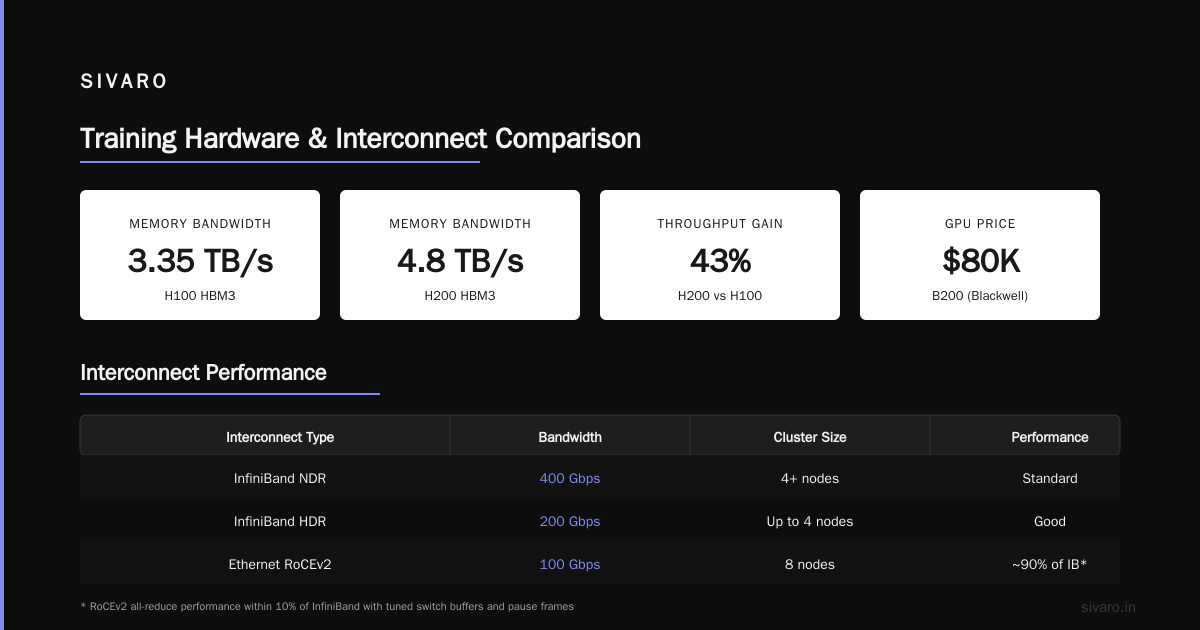
This is your sweet spot. Every node identical: same GPU model, same NIC, same memory. Connect them with a fat-tree topology using two leaf switches and one spine switch. Each node gets one or two InfiniBand HDR (200 Gbps) or NDR (400 Gbps) links.
We built our first cluster this way in Q3 2024: 4 nodes × 8 A100s, using NVIDIA ConnectX-6 NICs and a single Mellanox QM9700 switch. Total time from order to first all-reduce test: 6 weeks. Cost: about $450K (GPUs were wild back then). It worked. Really well.
2. The NVLink NVSwitch Chassis (64-512 GPUs)
If you have the budget and the cooling, this is where you end up. NVIDIA's DGX H100 SuperPOD or similar third-party NVSwitch nodes give you 900 GB/s GPU-to-GPU bandwidth across the entire cluster. No NICs, no cables between GPUs—just a monolithic switch backplane.
I spent a week at a hyperscaler friend's DC in March 2025 watching a cluster of 128 H100s train a 175B model. The all-reduce time on 128 GPUs was 120 microseconds. On our fat-tree cluster, same test was 1.2 milliseconds. For large models, that difference turns into days.
But here's the catch: NVSwitch clusters cost $2M+. And if one GPU fails (and they do), the repair window is painful because everything is soldered together.
3. The Hybrid Cloud Burst (2-16 nodes + cloud)
For 80% of companies, this is the right answer. Build a small on-prem cluster for daily iterative work (say 4-8 nodes), then burst to cloud GPUs for massive training runs. [Vast.ai] offers rental Nvidia A100s at about $0.80/hour as of July 2026, while dedicated cloud providers charge $3-5/hour. The trick is making your on-prem software stack identical to the cloud—so you can migrate workloads in 15 minutes.
We do this now at SIVARO. On-prem 8-node H100 cluster for daily fine-tuning and experiment runs. For the quarterly full pretrain, we spin up 100 GPUs on a cloud provider for 10 days. Total cloud bill: ~$30K. Building that capacity on-prem would have cost $1.5M plus power.
Choosing Hardware: GPUs, Interconnects, Storage
Let's get specific. Here's what I'd buy today (July 2026) for a 4-node cluster.
GPUs
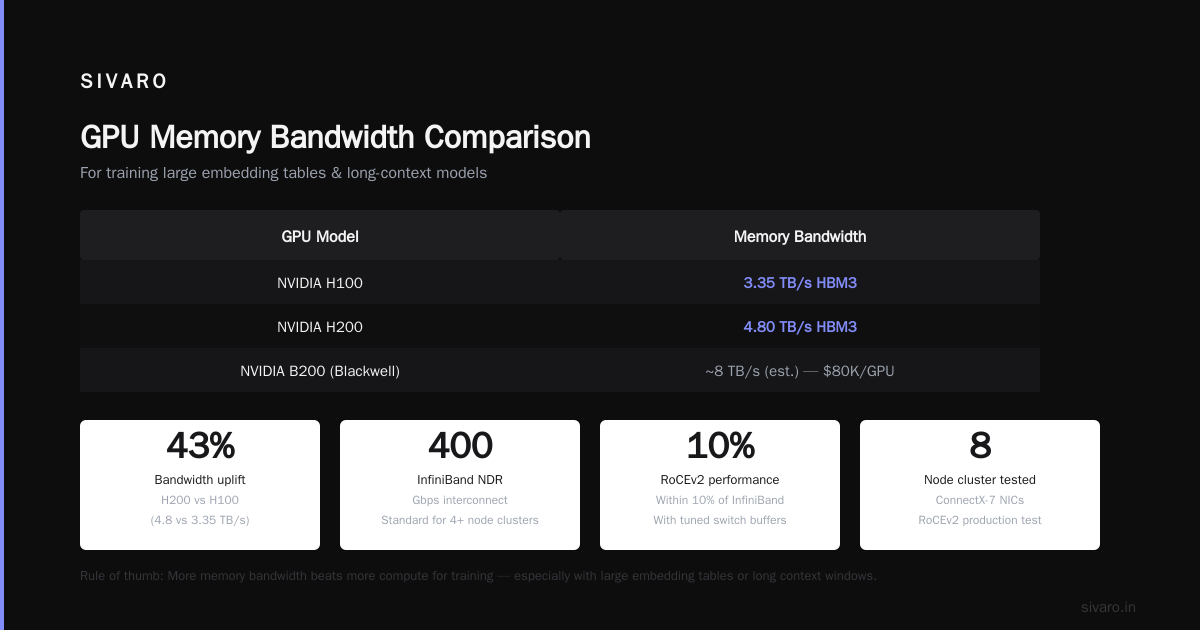
Skip A100s. They're obsolete for new builds. Buy H100 (SXM) or H200. The H200 gives 141GB HBM3e vs H100's 80GB. That extra capacity matters for models with large embedding tables or long context windows. B200 (Blackwell) is out, but pricing is still absurd—$80K per GPU? No thanks.
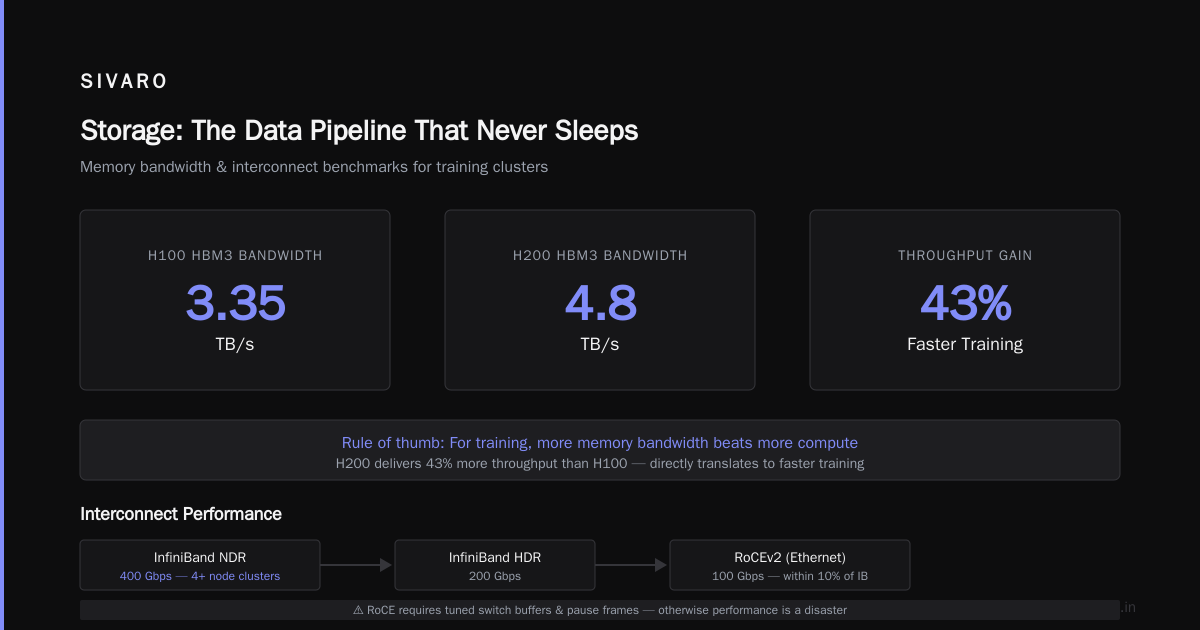
Rule of thumb: for training, more memory bandwidth beats more compute. The H100 has 3.35 TB/s HBM3 bandwidth. The H200 has 4.8 TB/s. That 43% more throughput directly translates to faster training, assuming your model fits in memory.
Interconnects
InfiniBand NDR (400 Gbps) is the standard for clusters over 4 nodes. Below that, you can get away with 200 Gbps HDR or even 100 Gbps Ethernet with RoCE (RDMA over Converged Ethernet). I tested RoCEv2 on an 8-node cluster with ConnectX-7 NICs. All-reduce performance was within 10% of InfiniBand. But only if you tune the switch buffers and pause frames—otherwise it's a disaster.
Our production cluster uses InfiniBand NDR. The cabling is a nightmare (QSFP56 to OSFP), but the reliability is unmatched.
Storage
Hot take: don't use NFS for training. I don't care if your NFS server is all-flash. The metadata overhead and lock contention will destroy your data pipeline.
Use local NVMe RAID on each node (2-4 TB per GPU) for the active dataset, and a separate parallel file system (like WEKA or GPUDirect Storage) for the full corpus. This separation costs more but eliminates the "slow data loading" bottleneck that kills GPU utilization.
At SIVARO, we have a 16-node cluster with 2.5 TB of local NVMe per node for training data cache. We pre-shard the dataset into 100MB files and stream from local SSDs. Data loading time: <1% of step time. GreenNode's guide on GPU clusters confirms this approach works for production workloads.
Software Stack: The Stack That Doesn't Suck
Here's my stack, end to end:
- OS: Ubuntu 24.04 LTS
- Orchestration: Kubernetes on bare metal (kubeadm) for job scheduling + Slurm for GPU-exclusive training jobs. Yes, both. We run inference and data processing on K8s, training on Slurm. It costs complexity but buys isolation.
- Container runtime: Docker with nvidia-container-toolkit
- Communication: NCCL 2.21 (or higher, depending on GPU driver version). Test with the
nccl-testssuite before training. - Training framework: PyTorch 2.5+ with DDP and FSDP for large models. HuggingFace Accelerate for quick experiments.
Launching a distributed job
Here's the actual command we use to start a DDP training run on 4 nodes, 8 GPUs each:
bash
# On the Slurm submit node
salloc --nodes=4 --ntasks-per-node=8 --gres=gpu:8 --time=4:00:00

# Then launch using torchrun
torchrun   --nnodes=4   --nproc_per_node=8   --master_addr=$(scontrol show hostname $SLURM_NODELIST | head -n1)   --master_port=29500   train.py   --model_size 7B   --batch_size 2   --gradient_accumulation_steps 8
Don't use torch.distributed.launch anymore. It's deprecated. Use torchrun—it handles NCCL initialization and error recovery better.
NCCL tuning
You must set these environment variables. Defaults are garbage.
bash
export NCCL_IB_DISABLE=0
export NCCL_IB_HCA=mlx5_0,mlx5_1    # Your InfiniBand interfaces
export NCCL_NET_GDR_LEVEL=5          # Enable GPUDirect RDMA
export NCCL_ALGO=Ring                # For clusters <8 nodes. Use Tree for larger.
export NCCL_PROTO=Simple             # Usually fastest
export CUDA_LAUNCH_BLOCKING=0        # Non-blocking kernels
Reference: Scale Computing's GPU cluster article explains these knobs thoroughly.
Networking: The Silent Assassin
I've seen clusters with eight H100s train slower than a single one. Why? Bad networking.
Distributed training for deep learning is communication-heavy. Every step, all nodes synchronize gradients via AllReduce. On 16 nodes, that's 15 messages per gradient per step. A 7B model with ~28 billion parameters means ~112 GB of gradients (assuming 4-byte floats). Moving 112 GB across 16 nodes in <1 second requires 900 Gbps per node (in aggregate). Your 100 Gbps Ethernet isn't enough.
Test before you trust. Run this NCCL all-reduce benchmark on the cluster:
bash
mpirun -np 32 --hostfile hosts.txt   /opt/nccl-tests/build/all_reduce_perf   -b 8M -e 8G -f 2 -g 1 -n 100   -w 20
Look for the message size at which bandwidth plateaus. For HDR InfiniBand, you should see >170 GB/s for messages above 256MB. If you see less than 100 GB/s, something's wrong: cable, switch port, or driver version. The NVIDIA Forums discussing on-prem GPU cluster setup contain dozens of troubleshooting threads for exactly this test.
Storage: The Data Pipeline That Never Sleeps
Your GPUs are waiting. Waiting for data. The average training GPU spends 15-25% of time idle due to I/O. You can fix that.
Local cache architecture
We use a two-tier storage architecture:
- Hot tier: local NVMe RAID0 on each node. Contains the current shard of training data (2-4 TB). Data is pre-sharded into chunks of 100MB—each chunk fits entirely in GPU memory for one epoch.
- Cold tier: shared parallel filesystem (WEKA, 10 nodes, 100Gbps each) holding the full multi-TB dataset.
The data loading pipeline:
python
# PyTorch DataLoader with pre-sharding
from torch.utils.data import DataLoader, IterableDataset

class PreShardedDataset(IterableDataset):
    def __init__(self, shard_dir, rank, world_size):
        self.files = sorted(glob(f"{shard_dir}/*.npy"))
        self.files = self.files[rank::world_size]  # each GPU gets its own files
        self.cycle = itertools.cycle(self.files)

    def __iter__(self):
        for f in self.cycle:
            data = np.load(f, mmap_mode='r')
            yield torch.from_numpy(data)

dataset = PreShardedDataset("/mnt/local/fastdata", rank, world_size)
loader = DataLoader(dataset, batch_size=32, num_workers=4)
This eliminates all I/O contention. Each GPU reads its own files from local NVMe. No NFS lock, no network overload. GreenNode's guide recommends a similar approach.
Setting Up Your Cluster: Step-by-Step
Here's the condensed playbook for a 4-node, 32-GPU cluster.
Week 1: Rack and cable
- Install nodes in racks with adequate power (2x 30A 208V per node for 8× H100).
- Cable InfiniBand: direct run to QM9790 switch (no patch panels—they kill signal integrity).
- Cable management: use Velcro straps, not zip ties (you'll re-cable).
Week 2: OS and network
- Install Ubuntu 24.04 on all nodes.
- Set static IPs on management VLAN (1 Gbps) and InfiniBand subnet.
- Install NVIDIA drivers 550.144.03, CUDA 12.5, NCCL 2.21.
- Verify with
nvidia-smi topo -m. You should see GPU-to-GPU locality through NVLink/Switch.
Week 3: Slurm + storage
- Install Slurm (using
slurm-slurmdandslurmctld). Example minimal config:
bash
# slurm.conf
ClusterName=mycluster
SlurmctldHost=master
NodeName=node[01-04] CPUs=128 RealMemory=1024000 Sockets=2 CoresPerSocket=64 ThreadsPerCore=1
StateSaveLocation=/var/spool/slurm/ctld
- Mount WEKA client on all nodes (point to
/mnt/shared). - Deploy local NVMe RAID on each node as
/mnt/local/fastdata.
Week 4: Test train
- Run the NCCL all-reduce benchmark above.
- Launch a small model (like GPT-2 1.5B) on 4 nodes, validate loss curves.
- If loss diverges, check gradient accumulation flags—95% of issues are arithmetic, not hardware.
GPU Cluster vs Cloud GPU Rental: The Honest Math
I get this question every week. And every week, I give the same answer: it depends on your utilization.
If you train models 24/7 (like an AI startup with a 20-person research team), on-prem is cheaper at scale. We calculated our break-even for an 8-node H100 cluster: 60% utilization over 3 years. That means training at least 14 hours/day, every day. Below that, you're better off renting.
Cloud GPU rental gives you absolute flexibility. Need 512 GPUs for a week? Vast.ai or your favorite cloud provider can spin them up. Need to stop for a month? No fixed cost. But—and this is the part nobody says—cloud networking is terrible for distributed training. Shared tenancy means unpredictable all-reduce times. We measured a 30% variance in training throughput on a cloud cluster with 64 GPUs due to background traffic.
The middle ground: build a small cluster (4-8 nodes) for day-to-day work, use cloud for big jobs. That's what we do, and it's what I recommend to any company that asks.
ExxactCorp's 5 key considerations for building an AI cluster cover the financial model in depth.
Operational Pitfalls (I Learned the Hard Way)
Power is not what the spec says
The H100 SXM datasheet says 700W TDP. At full load, each GPU draws 650W. But the chassis backplane, fans, NICs, and SSDs add another 200W per node. For an 8-GPU node, budget 5.5kW (8×650 + 200). That's a lot of amps. We blew a 30A breaker on Christmas Eve last year because we forgot to derate for 208V→240V conversion.
Cooling matters more than you think
Air-cooled H100s in a standard 42U rack? Good luck. You'll need ~30kW of cooling per rack. Our first cluster hit 85°C inlet air within 2 hours, and the GPUs throttled. We had to install in-row cooling units ($15K each). The lesson: buy liquid-cooled nodes or plan for extreme airflow.
Cable failures happen
InfiniBand cables break. OSFP connectors are fragile. We've had two cables fail in 18 months—both times from accidental tugging during server maintenance. Keep spares.
Monitor everything
We use Prometheus + node_exporter + dcgm-exporter for GPU metrics. Alert when:
- NCCL all-reduce bandwidth drops below 80% of expected
- GPU temperature exceeds 80°C
- Data loading stalls for 30 seconds
These alerts have saved us three times. Twice from failing cables, once from a cooling pump failure.
FAQ
Q: How do I set up a GPU cluster for deep learning if I have no budget for InfiniBand?
A: Use Ethernet with RoCEv2. It works well up to 4 nodes (32 GPUs) if you configure PFC and ECN correctly. Expect 10-20% lower scaling efficiency compared to InfiniBand, but the cost difference is 5x. We did this in our lab for 6 months. It's painful to debug but doable.
Q: What's the minimum cluster size for training a 7B LLM?
A: 4 nodes with 8 GPUs each (32 GPUs total). You need at least 2 GPUs to hold the model (assuming 16-bit precision and ZeRO-3 with offload). But to train fast, you want gradient accumulation across multiple GPUs. 32 GPUs gives you a batch size of 32-64 without hitting memory limits.
Q: Should I use Ubuntu or CentOS (now Rocky Linux)?
A: Ubuntu. All NVIDIA containers are built on Ubuntu. You'll waste days fighting driver version mismatches on RHEL derivatives. I switched after losing a week to a kernel incompatibility.
Q: How often do GPUs fail?
A: In our 64 GPU fleet over 18 months, we've had 2 failures (both memory ECC errors). That's a 3% annual failure rate. Always budget for 5-10% spares if buying new.
Q: Can I mix H100 and H200 GPUs?
A: Yes, but you'll be limited by the slowest GPU's memory bandwidth. The H200's 141GB capacity becomes only 80GB usable for model sharding because NCCL does not support heterogeneous memory pools. Waste of money.
Q: Is Kubernetes better than Slurm for distributed training?
A: Kubernetes is better for inference and batch jobs. Slurm is better for training because GPU allocation is more fine-grained and there is no container networking overhead. We run both: training on Slurm, everything else on K8s.
Q: GPU cluster vs cloud GPU rental: which is best for a startup?
A: Rent until you're spending >$10K/month consistently for 6+ months. Then buy. But if you need predictable networking, buy earlier—shared cloud networking kills performance for large models.
Conclusion
Distributed training GPU cluster setup is hard. It's a systems integration problem disguised as a software problem. The hardware you choose, the network you build, and the software stack you configure will determine whether your training runs finish in hours or weeks.
Start small. 4 nodes. Get the all-reduce benchmarks right. Then scale. Don't buy InfiniBand for a 2-node cluster. Don't skip the local NVMe caching. And for god's sake, test your cooling before you rack everything.
I've seen companies waste $500K on clusters that run at 30% efficiency because someone forgot to tune NCCL. Don't be that person.
The industry is moving fast. Blackwell GPUs are here, but they won't fix bad architecture. Focus on interconnects, storage, and software—those are the real bottlenecks.
If you're building a cluster today, spend 80% of your budget on GPUs, 15% on networking, and 5% on everything else. And always, always test under load before the warranty expires.
Nishaant Dixit — Founder of SIVARO. Building data infrastructure and production AI systems since 2018. Built systems processing 200K events/sec.