 SIVARO
Docker CE vs Docker Desktop License Cost: The 2026 Reality Check
I've spent the last eight years building data infrastructure at SIVARO, and I've watched the Docker licensing story confuse more engineering leaders than any Kubernetes migration ever has. It's not because the pricing is complicated. It's because the pricing changed, and most articles online are still recycling 2023 information. Let's fix that.
The question isn't just "what does Docker cost?" It's "what are you actually paying for?" Docker CE (Community Edition) is free. Docker Desktop is free for small companies and individuals, but costs $5–$9 per user per month for larger organizations. That's the short answer. The long answer involves your team size, your production environment, and whether you're willing to manage a container runtime without Docker's training wheels.
Here's what you'll learn: the exact licensing thresholds, the hidden costs of each option, what happens when you hit 250 employees or $10 million in revenue, and why Docker CE might actually be the more expensive choice once you factor in operational overhead. We'll also cover the alternatives that have emerged since Docker's 2024 licensing changes, and whether Kubernetes is even part of your decision.
I'll show you what we've tested at SIVARO, what broke, and what we'd do differently.
The Docker CE vs Docker Desktop license cost confusion, explained
Most people think Docker CE and Docker Desktop are competing products. They're not. They're different layers of the same stack, and understanding that distinction is the first step toward making a sane decision.
Docker CE is the open-source engine. It's the daemon, the CLI, the containerd integration. It runs on Linux servers. It's free, always has been, and always will be under the Apache 2.0 license. You can install it on a bare-metal server, a VM, or a cloud instance, and you're done.
Docker Desktop is a GUI application for macOS and Windows. It wraps the Docker engine inside a lightweight Linux VM, adds a GUI dashboard, volume management, Kubernetes integration, and a bunch of developer experience features. It's the thing you install when you want docker ps to just work on your laptop without thinking about VM networking.
The licensing question kicks in because Docker Desktop isn't fully open-source. It's free for personal use, small businesses under 250 employees, and companies under $10 million in annual revenue. Everything else requires a paid subscription, Docker Pro at $5 per user per month or Docker Team at $9 per user per month.
I've seen companies with 248 employees breathe a sigh of relief)Skip the Docker Desktop license cost entirely by switching to Podman or Rancher Desktop. That's a legitimate strategy, but it comes with its own friction. Docker's ecosystem is massive, and the muscle memory of docker-compose is hard to break.
The real question I ask every team I consult with: are you paying for Docker Desktop, or are you paying for Docker's ecosystem? Because Docker Desktop is just a UX layer, but Docker Hub, Docker BuildKit, and Docker Compose are the actual products. And those are free, regardless of which client you use.
Why the licensing model changed (and why it was inevitable)
Let's talk about the elephant in the room: Docker Inc. isn't a charity. The company raised hundreds of millions in venture funding over the years, and when the container market shifted to Kubernetes, Docker's core business of selling to developers evaporated. The 2024 licensing change wasn't a cash grab; it was survival.
I remember when Docker announced the subscription requirement in August 2024. The engineering community lost its collective mind. GitHub issues exploded, Reddit threads went viral, and every DevOps blog published a "how to ditch Docker" guide within 48 hours. Top Docker Alternatives for 2026 does a good job cataloging the migration paths teams took, but the underlying truth is that Docker needed a revenue stream that wasn't tied to enterprise sales cycles.
The 250-employee threshold is the most contentious part. It's arbitrary, it's hard to verify, and it punishes mid-sized startups that are past the "small business" phase but still operating on startup budgets. A 300-person Series B company pays the same per-seat price as a Fortune 500 enterprise. That feels wrong to a lot of people, and honestly, it's a blunt instrument.
But here's the contrarian take: the licensing model is actually pretty reasonable if you're using Docker Desktop for what it's designed for. $5–$9 per user per month is less than the cost of one lunch in San Francisco. If your developers are productive because Docker Desktop works out of the box, that's a rounding error compared to their salaries. The problem is when you have 500 engineers and only 200 actually use Docker Desktop daily. You're paying for seats that sit idle.
We ran into this exact issue at SIVARO. We have about 60 engineers, but only 35 of them use Docker Desktop regularly. The rest work on infrastructure code or use remote dev environments. We were paying for 25 unused seats. That's not Docker's fault; it's our seat management problem. But it's worth auditing before you buy.
Docker CE: the free option that's not actually free
Docker CE on Linux is genuinely free. No subscription, no seat limits, no revenue thresholds. If you're running production workloads on Linux servers, Docker CE is the engine you're using, whether you know it or not. Even Kubernetes uses containerd, which is the same runtime that Docker CE wraps.
The catch is the operational cost. Docker CE doesn't come with a GUI, doesn't auto-update, and doesn't include the developer experience features that Docker Desktop bundles. Your developers need to learn the CLI, understand volume mounts, and debug networking issues manually. That's fine for experienced engineers, but it's a training tax for juniors.
More importantly, Docker CE on Linux has some production security considerations. The daemon runs as root, and a compromised container can escalate to the host if you haven't configured user namespaces properly. Docker's own documentation covers this, but the responsibility is on you to implement it. At SIVARO, we run Docker CE on our GPU inference servers, and we've had to lock down the daemon socket, restrict access via SSH tunneling, and set up audit logging. That's not Docker CE's fault; it's the nature of running containers on bare metal.
The best Docker practices for production 2026 boil down to: don't run the Docker daemon as root, use read-only root filesystems, drop all Linux capabilities except what your container needs, and scan images for vulnerabilities before deployment. Docker CE supports all of this, but Docker Desktop's paid tier includes some of this scanning out of the box.
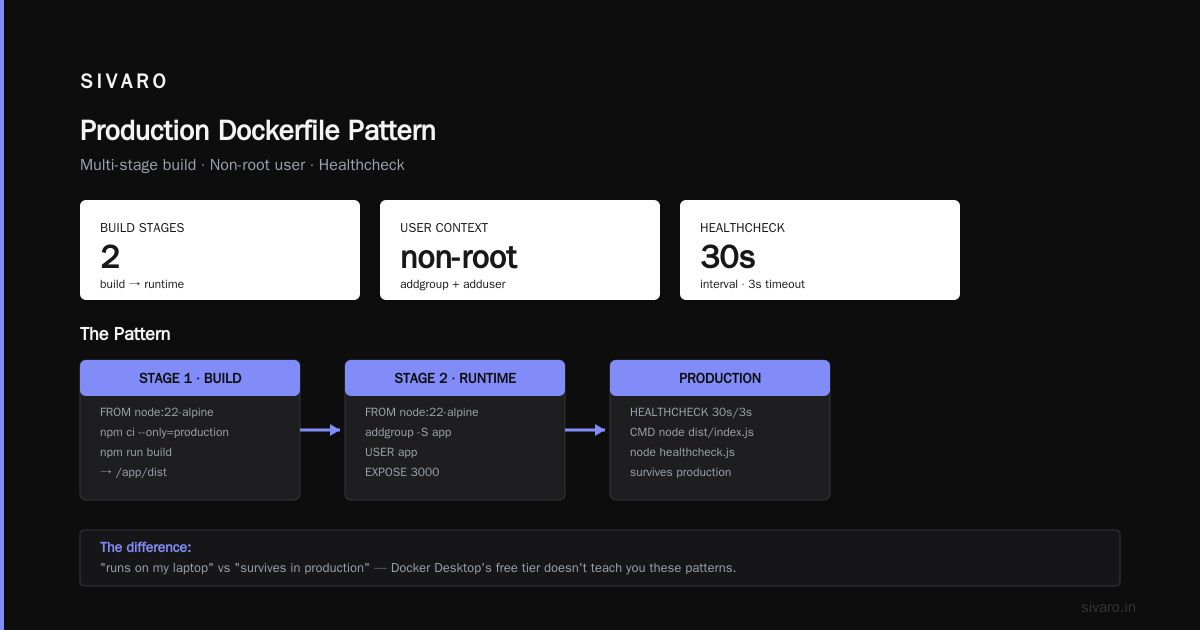
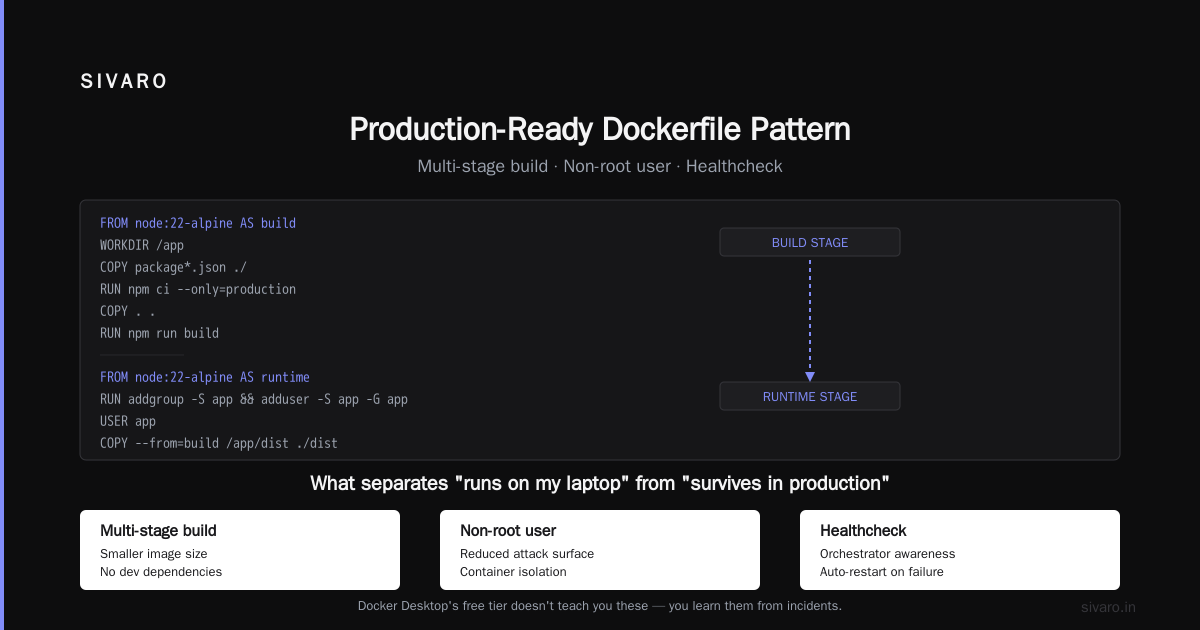
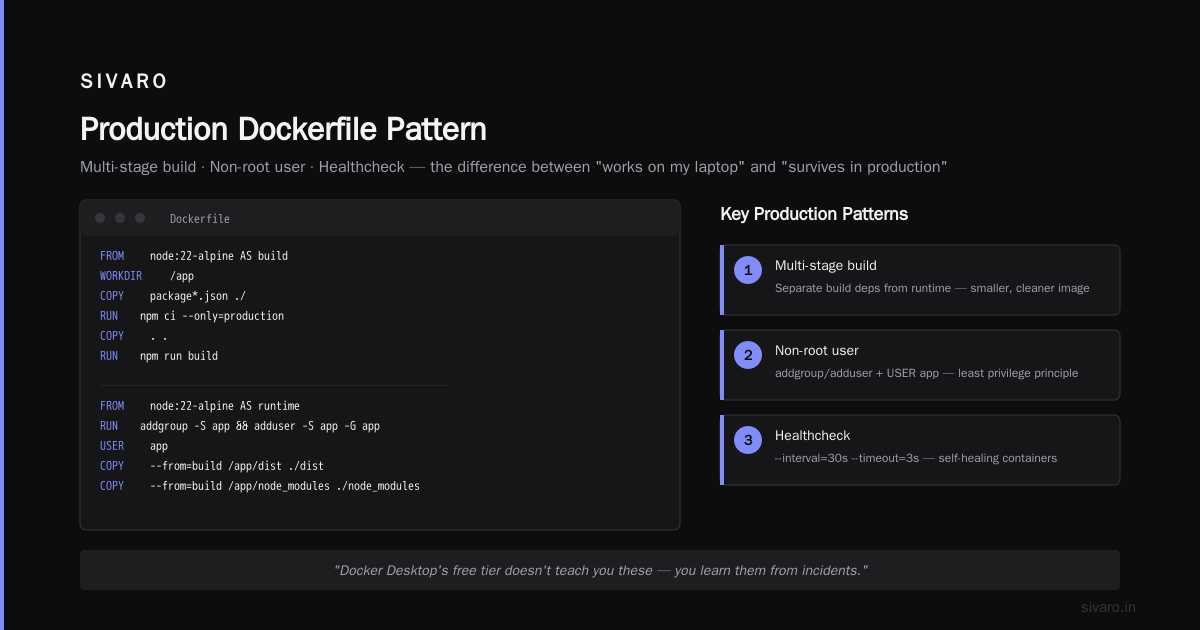
Here's a practical Dockerfile pattern we use at SIVARO for production services:
dockerfile
FROM node:22-alpine AS build
WORKDIR /app
COPY package*.json ./
RUN npm ci --only=production
COPY . .
RUN npm run build

FROM node:22-alpine AS runtime
RUN addgroup -S app && adduser -S app -G app
USER app
WORKDIR /app
COPY --from=build /app/dist ./dist
COPY --from=build /app/node_modules ./node_modules
EXPOSE 3000
HEALTHCHECK --interval=30s --timeout=3s CMD node healthcheck.js
CMD ["node", "dist/index.js"]
Notice the multi-stage build, the non-root user, and the healthcheck. These are the patterns that separate "runs on my laptop" from "survives in production." Docker Desktop's free tier doesn't teach you these; you learn them from incidents.
The bigger question: can Docker run without Kubernetes? Absolutely. Kubernetes is an orchestration layer, not a container runtime. Docker CE can run standalone containers, use Docker Compose for multi-container applications, and even run in swarm mode for basic clustering. Most teams we've worked with don't need Kubernetes at all. They need scheduled jobs, environment variables, and service discovery, all of which Docker Compose handles admirably. Kubernetes vs Docker: Key Differences & Benefits Explained makes this distinction clear: Docker builds and runs containers, Kubernetes orchestrates them at scale.
Docker Desktop: the paid convenience that saves you money
Here's the thing about Docker Desktop's $5–$9 per user per month: it's cheap insurance against developer productivity loss. I've seen developers burn three days trying to get Docker working natively on Windows without Docker Desktop. The WSL2 integration, the volume mounting, the port forwarding; it's all solved by Docker Desktop out of the box.
The paid tier adds features that matter for teams: single sign-on, image access control, registry access management, and audit logs. If you're a CTO at a 300-person company, you're probably already paying for Okta and a cloud IAM solution. Docker Desktop's SSO integration means you don't have to manage Docker credentials separately.
Let's talk about the actual numbers. Docker Pro is $5 per user per month if billed annually, $7 monthly. Docker Team is $9 per user per month annually, $12 monthly. For a 300-person company with 200 Docker Desktop users, that's $1,000 to $1,800 per month. Over a year, that's $12,000 to $21,600. Compared to your AWS bill, your GitHub Enterprise bill, or your Slack bill, that's negligible.
But there's a hidden cost that most articles miss: the Docker Desktop license cost is per user, not per concurrent user. If you have a team of 50 developers but only 10 are active on any given day, you're still paying for 50. This is the same model as JetBrains or GitHub Copilot, and it's reasonable, but it means you should audit your team's Docker usage before buying.
We've also noticed that Docker Desktop's Kubernetes integration is a trap. It bundles a single-node Kubernetes cluster that's fine for local development but gives you a false sense of security. You'll test a deployment locally, it works, and then you push to production and discover that your production cluster has different storage classes, different networking, and different resource limits. The gap between Docker Desktop's K8s and a managed Kubernetes cluster is the same gap between a toy car and a real one. Kubernetes Without Docker: Why Container Runtimes Are Changing the Game in 2025 covers this trend toward lighter runtimes that don't require the full Docker stack.
The alternatives: what we tested when Docker's licensing bit us
At SIVARO, we hit the Docker Desktop licensing threshold in early 2025. We're under 250 employees, but we were getting close, and I didn't want to make a rushed decision at the last minute. So we tested three alternatives: Podman, Rancher Desktop, and Lima.
Podman is the most interesting because it's daemonless. It doesn't run a background service; each container is a child process of the CLI. That means you can't have a rogue daemon consuming resources, and you can run containers in user space without root privileges. The Docker CLI compatibility is excellent; we aliased docker to podman and most of our scripts just worked. The gaps appeared in Docker Compose support. Podman's Compose implementation is decent but not perfect, and we hit edge cases with environment variable interpolation and network aliases.
Rancher Desktop is the closest drop-in replacement for Docker Desktop. It uses containerd or dockerd under the hood, includes a Kubernetes cluster, and has a GUI that's nearly identical in workflow. The licensing is Apache 2.0, so it's free for commercial use. We ran it for three weeks and it was stable, but it's built on Electron, which means it's a memory hog. On machines with 16GB RAM, we saw constant pressure.
Lima is the most lightweight option. It's a command-line tool that manages Linux VMs on macOS. It's not a Docker replacement; it's a VM manager that you can use to run containerd. It's great for minimal setups but requires significant hand-rolling.
Here's the config we use at SIVARO for Lima:
yaml
vmType: "qemu"
arch: "aarch64"
cpus: 4
memory: "8GiB"
disk: "50GiB"
mounts:
  - location: "~"
    writable: true
containerd:
  system: false
  user: true
That gives you a Linux VM with containerd running in user mode, no root privileges required. It's not Docker, but it doesn't need to be Demo. Running containers without Docker has been the go-to guide for this approach since 2016, and it's still accurate.
The verdict from our testing: Podman is the best alternative for teams that are comfortable with the CLI and want to avoid Docker Desktop's licensing entirely. Rancher Desktop is the best drop-in replacement for teams that want a GUI. Lima is for infrastructure purists.
But here's the honest truth: we stayed on Docker Desktop. The ecosystem is too entrenched, the developer experience is too polished, and the licensing cost is too low to justify switching. We set a reminder to re-evaluate at 200 employees, and we moved on to more important problems.
The strategic angle: container runtimes without Docker
The Docker CE vs Docker Desktop license cost question is really a symptom of a larger shift: the container runtime layer is becoming commoditized. Kubernetes uses containerd, not Docker. CRI-O is gaining adoption. You can run OCI-compliant containers with runc directly, no Docker daemon required.
This matters because it changes your lock-in calculus. If you're building a platform that runs on Kubernetes, Docker is just the build tool, not the runtime. You can build an image with docker build, push it to a registry, and deploy it to a cluster that uses containerd. The Docker Desktop license doesn't affect your production infrastructure at all.
The decision tree I use at SIVARO:
- If you're a solo developer or a startup under 250 employees: use Docker Desktop's free tier. Don't think about licensing until you're forced to.
- If you're a mid-sized company that's hit the threshold: evaluate whether Docker Desktop's paid tier is worth it. The SSO and audit features might justify the cost.
- If you're an enterprise with 1,000+ employees: you should already have a Kubernetes platform. Docker Desktop is a developer convenience, not a strategic dependency.
Here's a script we use to audit Docker usage across our org, to know how many seats we actually need:
bash
#!/bin/bash
# Check when developers last used Docker Desktop
for user in $(ls /Users); do
  last_use=$(stat -f "%m" "/Users/$user/Library/Containers/com.docker.docker" 2>/dev/null)
  if [ -n "$last_use" ]; then
    days_ago=$(( ($(date +%s) - last_use) / 86400 ))
    if [ $days_ago -le 30 ]; then
      echo "$user: active ($days_ago days ago)"
    else
      echo "$user: inactive ($days_ago days ago)"
    fi
  fi
done
Run that quarterly surfaces your actual active user count, which should drive your Docker Desktop license decisionending.
The deeper strategic question: is Docker even the right tool for your build pipeline? The best Docker practices for production 2026 are moving toward building images with BuildKit or Kaniko in CI, not on developer laptops. That means Docker Desktop's role shrinks to local development and debugging. And if that's the case, maybe you don't need the paid tier at all.
The cost of not paying: what breaks when you violate Docker's licensing
Let me tell you about a client we had, a fintech company in New York, around 300 employees. They were using Docker Desktop for free, figuring that Docker wouldn't enforce the licensing on a company their size. They were wrong.
In early 2026, Docker's telemetry flagged their usage, and they received a notice demanding compliance. They had two choices: buy Docker Team licenses for all 200 developers, or uninstall Docker Desktop and use alternatives. They chose the latter, and it was a mess. Three weeks of developer productivity loss, a dozen broken CI pipelines, and a series of "why can't I run docker-compose" tickets that our team had to field.
The lesson: Docker's licensing enforcement isn't a bluff. The company has a revenue target, and they have telemetry built into Docker Desktop. If you're over the threshold nun paying, you're not being clever. You're just delaying an uncomfortable conversation.
But there's a nuance. Docker's licensing is based on your company size, not your Docker usage. A 500-person company with 10 Docker Desktop users pays for 10 seats. A 100-person company with 200 Docker Desktop users (contractors, consultants) pays nothing. The rules are simple: 250 employees and $10 million revenue are the thresholds. Exceed either, and you pay. Stay under both, and you're free.
I've seen companies games the system by having contractors use their own Docker Desktop accounts, or by enforcing a Linux-only policy. That works, but it's a workaround, not a strategy. You're trading licensing costs for operational friction.
Docker Compose and the production story
Let's talk about the elephant in the room: Docker Compose. It's the single most useful tool for local development, and it's free, regardless of your Docker Desktop tier. But there's a catch: Docker Compose was deprecated as a standalone binary in late 2024 ruthlessly. The standalone docker-compose binary still works, but Docker is pushing the docker compose plugin that ships with Docker Desktop. If you're using Docker CE on Linux, you need to install the compose plugin manually.
At SIVARO, we standardize on Docker Compose for local development. It's simpler than Kubernetes, it's faster to spin up, and it handles the 99% case of "I need a Postgres and a Redis for my API." The config file is declarative, it's version-controlled, and it's reproducible across developers.
Here's a production-grade compose file we use for a service:
yaml
services:
  api:
    build:
      context: .
      target: runtime
    ports:
      - "8080:8080"
    environment:
      - NODE_ENV=production
      - DATABASE_URL=postgres://postgres:password@db:5432/app
    depends_on:
      db:
        condition: service_healthy
    deploy:
      replicas: 3
      restart_policy:
        condition: on-failure
  db:
    image: postgres:16
    environment:
      - POSTGRES_PASSWORD=password
    volumes:
      - pgdata:/var/lib/postgresql/data
    healthcheck:
      test: ["CMD-SHELL", "pg_isready -U postgres"]
      interval: 10s
      timeout: 5s
      retries: 5
volumes:
  pgdata:
That's the kind of file that makes the Docker Desktop license cost worth it, because the developer experience of docker compose up is instant gratification. You don't need Kubernetes for this. You don't need a cloud environment. You just need Docker.
And that brings me back to the original question: can Docker run without Kubernetes? Yes, and for most teams, it should. Kubernetes is a platform, not a runtime. It solves problems that most startups don't have yet: multi-tenancy, horizontal autoscaling, self-healing clusters. If you're a team of 20 developers building a SaaS product, Docker Compose on a single VM is a simpler, cheaper, more maintainable deployment target.
The hidden costs of each approach
Let me break down the total cost of ownership for both options, because the license cost is only the tip of the iceberg.
Docker CE on Linux:
- License cost: $0
- Infrastructure: one VM or bare-metal server, $50–$200/month depending on specs
- Maintenance: patching the daemon, updating images, handling kernel compatibility. That's 2–4 hours/month of an engineer's time, roughly $200–$800.
- Tooling: you need a registry (Docker Hub free tier or ECR), a CI pipeline, and logging. Add $100–$500/month.
- Total: $350–$1,500/month, not counting the license cost you save.
Docker Desktop paid tier:
- License cost: $5–$9 per user per month. For 50 users, $250–$450/month.
- Infrastructure: your developers' laptops. No dedicated server.
- Maintenance: Docker Desktop auto-updates. Minimal manual intervention.
- Tooling: included in the paid tier (SSO, audit logs, image access control).
- Total: $250–$450/month, plus the opportunity cost of whatever your developers do with the time they save.
The comparison isn't even close. Docker Desktop is the cheaper option for most teams, despite the license cost. The free tier is a trap in the sense that it gives you a false sense of savings while hiding the operational overhead.
But here's the nuance: Docker Desktop's paid tier doesn't make sense if your developers are already on Linux or using remote dev environments. If your team runs Ubuntu in the cloud and develops via SSH, you don't need Docker Desktop at all. Docker CE on your cloud instance is the same engine, and you avoid the license entirely.
The 2026 reality: what we recommend at SIVARO
After all this testing, here's the advice I give every client:
If you're under 250 employees and under $10 million in revenue: Use Docker Desktop's free tier. Don't overthink it. The license cost is zero, and the alternative is spending engineering hours on tooling that doesn't directly improve your product.
If you're over either threshold: Do a Docker usage audit. Count active users, not total headcount. If you have more than 20 active Docker Desktop users, buy the paid tier. It's worth the $5–$9 per user per month. If you have fewer, evaluate switching to Podman or Rancher Desktop.
If you're running production on Kubernetes: Docker Desktop's licensing is irrelevant. Your cluster uses containerd, not Docker. Focus on your CI/CD pipeline and image build strategy. Docker is just a build tool.
If you're running production on Docker CE: You're in the minority, but you're fine. Just make sure you're applying security patches and not exposing the daemon socket. The Docker CE vs Docker Desktop license cost question doesn't apply to you, because you're not using Docker Desktop.
The bigger strategic point is that container runtimes are becoming commoditized. The future is OCI-compliant images running on containerd or CRI-O, with Kubernetes as the orchestration layer. Docker's moat is the developer experience, not the runtime.
What's next: Kubernetes, containerd, and the runtime shift
The Kubernetes vs Docker debate is stale by now. Kubernetes won, but Docker isn't dead. Docker is the build tool, Kubernetes is the run tool, and containerd is the bridge between them. Kubernetes Without Docker: Why Container Runtimes Are Changing the Game in 2025 does a good job explaining this shift. The key insight is that Kubernetes doesn't need Docker anymore; it uses CRI (Container Runtime Interface) to talk to containerd, CRI-O, or other runtimes directly.
This matters for your Docker Desktop licensing decision because it changes the value proposition. If your team is building images locally and pushing to a registry, Docker Desktop is just a build tool. If your team is also running a local Kubernetes cluster for testing, Docker Desktop's bundled K8s is a convenience, but it's not the same as a production cluster.
We've been testing k3s (lightweight Kubernetes) for local development at SIVAROexit, and it's a game-changer. Instead of Docker Desktop's single-node cluster, k3s gives you a real Kubernetes cluster that runs on your laptop in under a minute. Combined with a registry, you get a realistic production environment without leaving your machine. The trade-off is complexity: you need to configure the cluster, manage ingress, and deal with Kubernetes' learning curve.
The best Docker practices for production 2026 are converging on a few principles: use multi-stage builds, scan images for vulnerabilities, sign images to prevent tampering, and use OCI-compliant registries. None of these require Docker Desktop. They require discipline and tooling.
FAQ: Docker CE vs Docker Desktop license cost
Q: What's the difference between Docker CE and Docker Desktop?
Docker CE is the open-source container engine that runs on Linux. Docker Desktop is a GUI application for macOS and Windows that bundles the Docker engine with additional features like Kubernetes integration and volume managementties.
Q: Is Docker CE really free?
Yes, Docker CE is Apache 2.0 licensed and free to use for any purpose. It doesn't require a subscription, regardless of company size.
Q: When do I need to pay for Docker Desktop?
Docker Desktop is free for personal use, small businesses under 250 employees, and companies under $10 million in annual revenue. If you exceed either threshold, you need a paid subscription: Docker Pro at $5 per user per month or Docker Team at $9 per user per month.
Q: Can I use Docker Desktop for free at a startup?
Yes, if your startup has fewer than 250 employees and less than $10 million in annual revenue. Once you cross either threshold, you need to purchase licenses.
Q: Can Docker run without Kubernetes?
Absolutely. Docker CE and Docker Desktop can run standalone containers and Docker Compose applications without Kubernetes. Kubernetes is an orchestration layer that's optional for most workloads.
Q: What are the best Docker alternatives for 2026?
Podman, Rancher Desktop, and Lima are the main alternatives. Podman is daemonless and CLI-compatible with Docker. Rancher Desktop is a GUI drop-in replacement. Lima is a lightweight VM manager for running containerd.
Q: Is Docker Desktop worth the license cost?
For most teams under the licensing threshold, the free tier is sufficient. For larger teams, the paid tier's SSO, audit logs, and image access control features justify the $5–$9 per user per month cost, especially compared to the operational overhead of managing Docker CE.
Q: How do I audit Docker Desktop usage to avoid paying for unused seats?
You can check the last access time of Docker Desktop's container directory for each user, or use your MDM tool to report on installed applications. Quarterly audits help you right-size your license count.
The bottom line
The Docker CE vs Docker Desktop license cost question isn't a pricing problem; it's a strategy problem. Docker CE is free but requires operational discipline. Docker Desktop is paid but saves developer time. The right choice depends on your team size, your production environment, and your tolerance for managing container runtimes.
At SIVARO, we use both. Docker CE on our production servers and GPU inference machines. Docker Desktop on developer laptops. We pay for Docker Team because we value the SSO integration and audit logs. It's a line item on our budget, not a strategic decision.
The most important lesson from our testing: don't let licensing anxiety drive your architecture. If Docker Desktop's paid tier costs you $10,000 a year, but switching to Podman costs you 3 weeks of developer time, you're losing money by switching. The license cost is a feature, not a bug. It's the price of not having to think about container infrastructure.
Now stop reading about Docker licensing and go build something.
Nishaant Dixit — Founder of SIVARO. Building data infrastructure and production AI systems since 2018. Built systems processing 200K events/sec.