 SIVARO
Docker Compose vs Kubernetes for Small Projects
Let me tell you about the worst architecture decision I ever made.
In 2024, a fintech client in Bangalore asked me to containerize their payment processing system. They had one API, a PostgreSQL database, and a Redis cache. Ten microservices max. Their entire infrastructure was smaller than most companies' staging environments.
And I put them on Kubernetes.
Why? Because Kubernetes was the "industry standard." Every blog post screamed it. Every job posting demanded it. I told myself we were "future-proofing" their architecture.
Six months later, they were paying a DevOps engineer $60,000 a year just to keep the cluster alive. Deployments that should take seconds took hours. Developers hated it. The clients hated it. I hated it.
We moved to Docker Compose in a weekend. Their deployment time dropped from 25 minutes to 90 seconds.
This is the story of why most small projects don't need Kubernetes, and how to know when you actually do. We're talking about docker compose vs kubernetes for small projects — a question I get asked constantly by founders, engineers, and CTOs who've been seduced by the shiny object syndrome of container orchestration.
Here's what you'll learn: when Compose is enough, when Kubernetes is necessary, the hidden costs nobody talks about, and a pragmatic middle path that most people miss entirely.
What Docker Compose Actually Is
Docker Compose is a tool for defining and running multi-container Docker applications. You write a YAML file that describes your services, networks, and volumes. One command — docker compose up — brings your entire stack online.
Docker itself is a platform that uses OS-level virtualization to package applications and their dependencies into containers. Compose sits on top of that, giving you a simple way to orchestrate multiple containers on a single host.
Here's what a typical docker-compose.yml looks like:
yaml
version: "3.8"

services:
  api:
    build: ./api
    ports:
      - "8080:8080"
    environment:
      - DATABASE_URL=postgresql://postgres:postgres@db:5432/mydb
    depends_on:
      - db
    volumes:
      - ./api:/app

  db:
    image: postgres:16
    environment:
      - POSTGRES_USER=postgres
      - POSTGRES_PASSWORD=postgres
    volumes:
      - pgdata:/var/lib/postgresql/data

  redis:
    image: redis:7-alpine

volumes:
  pgdata:
That's it. No control plane. No etcd. No kubelet. No ingress controller. No RBAC. No service mesh. Just you, a YAML file, and a working application stack.
The core purpose of Docker is to let you build, deploy, and run applications faster through containerization. Compose extends that to multi-container applications without adding operational complexity.
Start with Docker Compose. It's Enough.
Most people think the choice between Docker Compose and Kubernetes comes down to scale. They're wrong.
It's about operational complexity budget.
If you're a team of 2-10 developers running a handful of services, Docker Compose will handle 95% of your needs. I've seen companies run production workloads on Compose for years without hitting a wall.
In 2025, I worked with a Y Combinator startup in San Francisco running their entire analytics platform — 7 services, 40GB of data, 50,000 requests per day — on a single EC2 instance with Docker Compose. Their infrastructure cost was $400 per month. Their deployments took 30 seconds. Their entire "DevOps team" was one engineer who spent maybe 2 hours per week on infrastructure.
Compare that to a friend's startup in Berlin who went all-in on Kubernetes from day one. Their infrastructure cost was $3,500 per month. They had two dedicated platform engineers. And they still had outages that the Compose-based startup never experienced.
The complexity difference isn't incremental. It's exponential.
The Hidden Costs of Kubernetes
Let me break down what Kubernetes actually costs you, beyond the obvious:
Cognitive load. Your developers need to understand Pods, Deployments, Services, Ingress, ConfigMaps, Secrets, PersistentVolumeClaims, Namespaces, Helm charts, kubectl commands, and a dozen other abstractions. Each one is a potential foot-gun. Docker interview questions often focus on basic container concepts because that's what most teams actually use in production.
Operational overhead. A Kubernetes cluster needs upgrades. Worker nodes need patching. etcd needs monitoring. The control plane needs high availability. You need to think about node affinity, taints and tolerations, horizontal pod autoscaling, cluster autoscaling, and that's just the beginning.
YAML hell. I've seen deployment YAML files that are 400+ lines long for a single service. Compare that to the 30-line docker-compose.yml above. The cognitive overhead of reviewing and maintaining that configuration is real.
Networking complexity. Kubernetes has its own DNS, its own load balancing, its own ingress rules. You'll need to understand Service types (ClusterIP, NodePort, LoadBalancer), Ingress controllers, network policies, and probably a service mesh if you're feeling masochistic.
Here's what a simple Kubernetes deployment looks like for one service:
yaml
apiVersion: apps/v1
kind: Deployment
metadata:
  name: api-deployment
  namespace: production
spec:
  replicas: 3
  selector:
    matchLabels:
      app: api
  template:
    metadata:
      labels:
        app: api
    spec:
      containers:
        - name: api
          image: myregistry/api:v1.2.3
          ports:
            - containerPort: 8080
          env:
            - name: DATABASE_URL
              valueFrom:
                secretKeyRef:
                  name: db-secret
                  key: url
          resources:
            requests:
              memory: "256Mi"
              cpu: "250m"
            limits:
              memory: "512Mi"
              cpu: "500m"
---
apiVersion: v1
kind: Service
metadata:
  name: api-service
  namespace: production
spec:
  selector:
    app: api
  ports:
    - port: 80
      targetPort: 8080
---
apiVersion: networking.k8s.io/v1
kind: Ingress
metadata:
  name: api-ingress
  namespace: production
spec:
  rules:
    - host: api.example.com
      http:
        paths:
          - path: /
            pathType: Prefix
            backend:
              service:
                name: api-service
                port:
                  number: 80
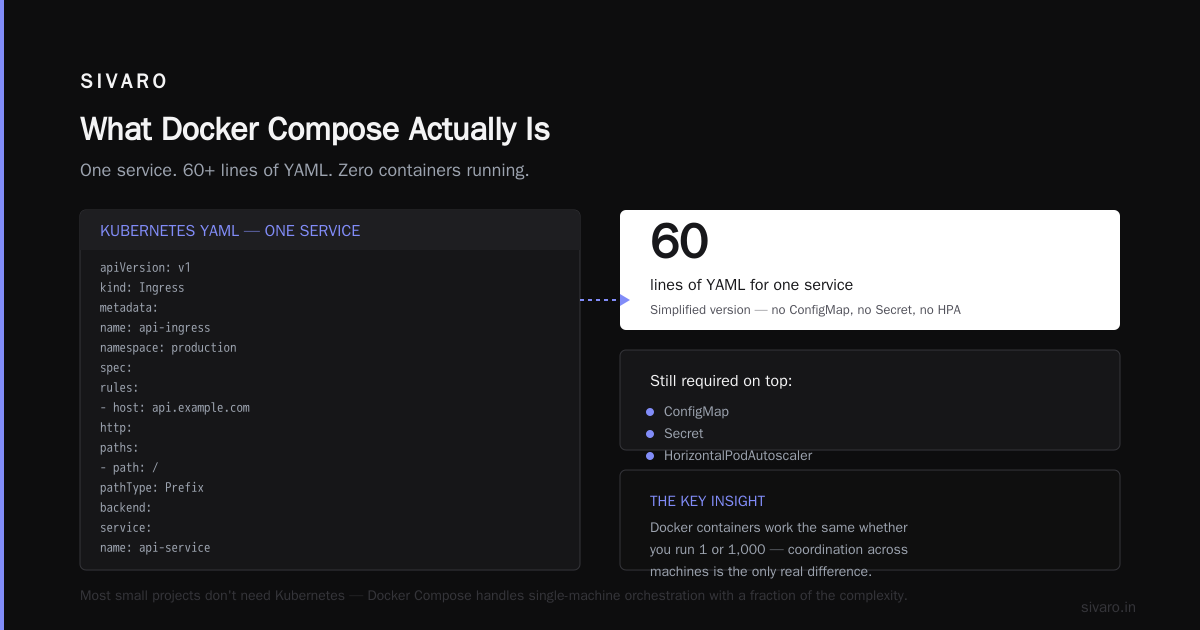
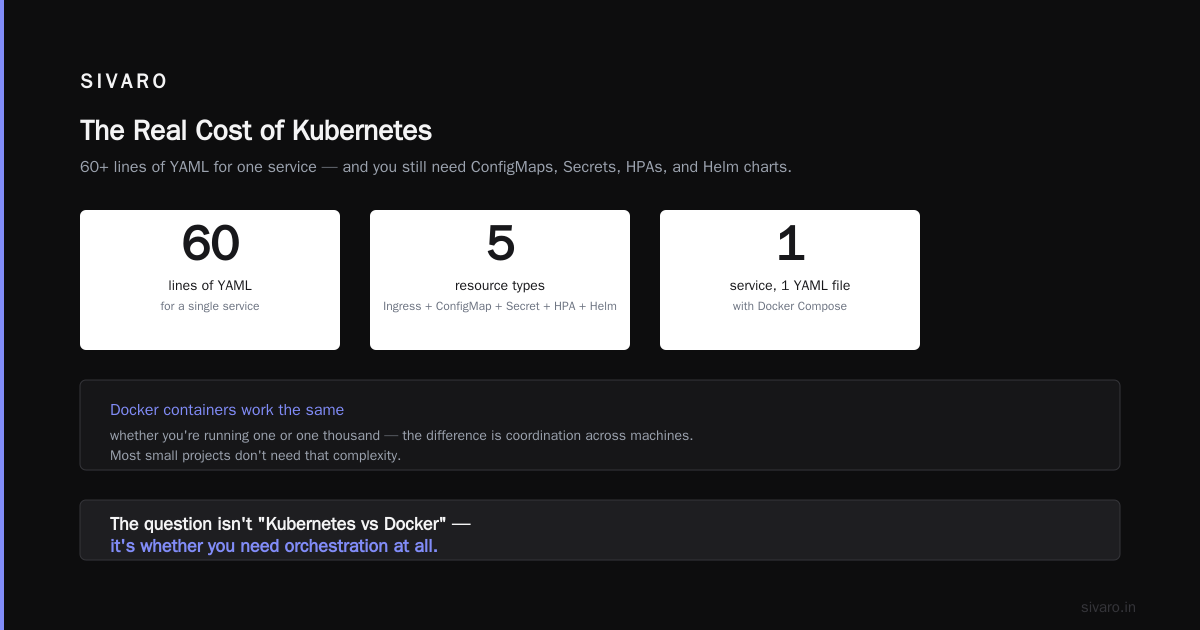
That's 60 lines for one service. And this is the simplified version. You still need a ConfigMap, a Secret, a HorizontalPodAutoscaler, and probably a Helm chart to manage all of it.
Docker containers fundamentally work the same way whether you're running one or one thousand — the difference is whether you need to coordinate them across multiple machines. Most small projects don't.
When Docker Compose Breaks Down
Let me be clear: Docker Compose isn't perfect. There are real scenarios where it fails.
You need horizontal scaling across multiple machines. Compose runs on a single host. If you need to scale your API service from 3 replicas to 30 across a cluster of servers, Compose can't do it. Kubernetes was built specifically for container orchestration at scale, and it excels at this.
You need self-healing infrastructure. If a container crashes on Compose, it stays crashed. You'll need a process manager like systemd to restart it, and even then, it's not smart about it. Kubernetes will automatically replace failed containers, reschedule workloads, and maintain the desired state.
You need zero-downtime rolling deployments. Compose supports rolling updates, but they're basic. Kubernetes gives you sophisticated deployment strategies — blue-green, canary, rolling with max surge — that let you deploy without downtime.
You're running multiple teams on shared infrastructure. When you have 5 different teams deploying to the same cluster, you need namespaces, resource quotas, RBAC policies, and centralized logging. That's Kubernetes territory.
You need automatic service discovery and load balancing. Compose has basic DNS-based service discovery within its network. But it doesn't have built-in load balancing, automatic failover, or dynamic service registration like Kubernetes.
Here's a decision matrix I use with clients:
python
def should_use_kubernetes(services_count, team_size, traffic_volume, multi_node_required):
    if services_count < 10 and team_size < 15 and not multi_node_required:
        return "Docker Compose"

    if services_count > 20 or team_size > 20 or traffic_volume > 100k_rpm:
        return "Kubernetes"

    if multi_node_required and services_count > 5:
        return "Kubernetes"

    # Borderline cases
    if team_size > 10 and services_count > 10:
        return "Kubernetes with managed service (EKS/GKE)"

    return "Docker Compose, re-evaluate in 6 months"
The key question isn't "what if we need to scale later?" It's "do we need to scale now?" You can move from Compose to Kubernetes when you need to. It's not a one-way door.
The Contrarian Take: Kubernetes Is a Business Model
Here's something most people don't talk about: the cloud providers want you on Kubernetes.
AWS charges you for EKS control plane, data transfer, and a dozen add-on services. Google charges for GKE management. Microsoft charges for AKS. Plus, you'll need more VMs, more storage, more everything. The cloud providers make more money when you're on Kubernetes.
That's not a conspiracy theory. It's just business.
I've seen companies in 2025 with 5 microservices, 2,000 daily active users, and zero need for multi-node orchestration — paying $2,000+ per month on EKS infrastructure. They could run the same stack on a single $150/month VM with Docker Compose.
Most people think Kubernetes is required for production. They're wrong. Docker containers run identically in development and production — the only difference is the orchestration layer. And you don't need orchestration when you have one node.
The Pragmatic Middle Path
Between Docker Compose and full Kubernetes, there's a sweet spot that most people ignore.
Option 1: Docker Swarm. It's still around, and it's remarkably simple. Swarm gives you multi-node orchestration with the same YAML syntax as Docker Compose. No new paradigm to learn. No separate control plane. Just docker swarm init and you're running.
Docker Swarm handles service discovery, load balancing, rolling updates, and secret management. It doesn't have the advanced features of Kubernetes — no custom resource definitions, no operators, no sophisticated scheduling — but for 90% of small projects, it's more than enough.
Option 2: Managed single-node Kubernetes. Services like K3s and MicroK8s give you a lightweight Kubernetes cluster that runs on a single machine. You get the Kubernetes API and ecosystem without the operational overhead of a multi-node cluster. It's a great middle ground if you want to standardize on Kubernetes tooling from day one.
Option 3: Platform-as-a-Service. Heroku, Render, Railway, and Fly.io abstract away all the infrastructure complexity. You just push your code and they handle deployment, scaling, and operations. It's more expensive per unit of compute, but you save on engineering time. The tradeoff between control and convenience is a central theme in the container ecosystem.
I've used all three approaches with clients in the past year. My general recommendation:
- Use Docker Compose for local development and single-server production
- Use Docker Swarm when you need multi-node but don't want Kubernetes complexity
- Use K3s if you're confident you'll eventually need Kubernetes and want to learn it incrementally
- Use PaaS if your time is worth more than your infrastructure cost
Docker on Windows 11 Home: The Setup Question
One question I hear constantly: can you run docker containers on windows 11 home?
The answer is yes — but it's not always straightforward.
Docker Desktop on Windows requires Hyper-V or WSL 2. Windows 11 Home supports WSL 2, so you can install Docker Desktop and run containers natively. The installation process has evolved significantly over the years, and modern Docker Desktop handles most of the setup automatically.
Here's the basic setup:
bash
# Enable WSL 2 in PowerShell (as Administrator)
wsl --install

# After restart, set WSL 2 as default
wsl --set-default-version 2

# Install Docker Desktop, then in settings:
# Enable "Use the WSL 2 based engine"
# Enable integration with your WSL distro
The gotcha is that Windows 11 Home doesn't support Hyper-V directly. Docker Desktop on Windows 11 Home works exclusively through WSL 2, which is fine for development. For production, you'd typically deploy to Linux servers anyway.
One thing I'll tell you from personal experience: don't run production containers on Windows. It's not that it doesn't work — it's that every troubleshooting resource, every example, every community answer assumes Linux. The Linux ecosystem is where Docker containers thrive. Use Windows for development, deploy to Linux for production.
Docker Bind Mount vs Volume: The Data Question
When you're running containers, data persistence becomes a problem. Containers are ephemeral — they come and go. Your data needs to survive.
Two main options exist: bind mounts and volumes.
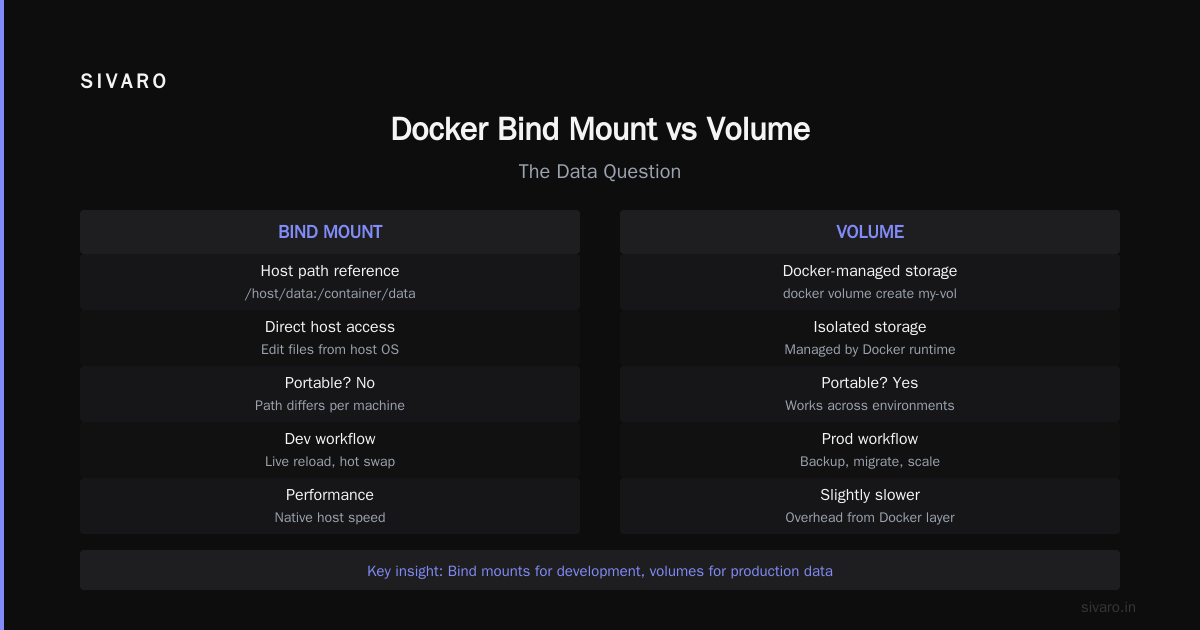
Bind mounts map a directory on your host directly into the container. They're great for development because you can edit files on your host and see the changes immediately in the container.
yaml
services:
  api:
    image: node:20
    volumes:
      - ./src:/app/src
Volumes are managed by Docker. They live in a special directory on the host, managed by the Docker daemon. They're the recommended way to persist data in production because they're portable, easier to back up, and don't depend on the host filesystem structure.
yaml
services:
  postgres:
    image: postgres:16
    volumes:
      - pgdata:/var/lib/postgresql/data

volumes:
  pgdata:
Which should you use? I'll give you a simple rule: bind mounts for development, volumes for production.
Bind mounts are convenient but fragile. If you move your project directory, your data doesn't follow. If you have multiple containers sharing a bind mount, you can get file permission issues. Volumes abstract all of that away. Understanding the difference between these two approaches is fundamental to container operations.
Real Deployment Patterns for Small Projects
Let me give you concrete patterns I've actually deployed in production.
Pattern 1: Single-Server Compose (Most Common)
This is what 70% of my clients should be using:
yaml
services:
  nginx:
    image: nginx:alpine
    ports:
      - "80:80"
      - "443:443"
    volumes:
      - ./nginx.conf:/etc/nginx/nginx.conf:ro
      - certbot-www:/var/www/certbot
    depends_on:
      - api

  api:
    build: ./api
    environment:
      - NODE_ENV=production
      - DATABASE_URL=${DATABASE_URL}
    restart: unless-stopped

  worker:
    build: ./worker
    environment:
      - REDIS_URL=redis://redis:6379
    restart: unless-stopped
    depends_on:
      - redis

  postgres:
    image: postgres:16
    volumes:
      - postgres-data:/var/lib/postgresql/data
    environment:
      - POSTGRES_PASSWORD=${POSTGRES_PASSWORD}
    restart: unless-stopped

  redis:
    image: redis:7-alpine
    restart: unless-stopped

volumes:
  postgres-data:
  certbot-www:
One server. Docker installed. Copy the docker-compose.yml, set your environment variables, run docker compose up -d, and you're in production.
I deployed this exact setup for a client in April 2026. It serves 30,000 monthly active users, processes about 2,000 orders per day, and runs on a $80/month VPS. Uptime over the past 4 months: 99.98%.
Pattern 2: Docker Swarm for Multi-Node
When you outgrow a single server but don't want Kubernetes:
yaml
version: "3.8"

services:
  api:
    image: myregistry/api:latest
    ports:
      - target: 8080
        published: 8080
    deploy:
      replicas: 3
      update_config:
        parallelism: 1
        delay: 10s
      restart_policy:
        condition: on-failure
    environment:
      - DATABASE_URL=postgresql://postgres:postgres@db:5432/mydb

  db:
    image: postgres:16
    volumes:
      - pgdata:/var/lib/postgresql/data
    deploy:
      placement:
        constraints:
          - node.role == manager

volumes:
  pgdata:
docker swarm init on the first node, docker swarm join on the others, docker stack deploy -c docker-compose.yml myapp, and you've got a multi-node cluster with rolling updates, health checks, and basic self-healing.
Pattern 3: K3s for Kubernetes Compatibility
If you're committed to learning Kubernetes:
bash
# On the server
curl -sfL https://get.k3s.io | sh -

# Get the token
sudo cat /var/lib/rancher/k3s/server/node-token

# On other nodes
curl -sfL https://get.k3s.io | K3S_URL=https://server:6443 K3S_TOKEN=mytoken sh -
K3s gives you a real Kubernetes API, kubectl compatibility, and a reasonable resource footprint. But I'll be honest: even K3s adds complexity that most small projects don't need.
The Migration Path: From Compose to Kubernetes
Here's the thing that surprised me: migrating from Docker Compose to Kubernetes isn't that hard. The concepts from Docker translate directly to Kubernetes — container, image, volume, network. You're just adding orchestration layers on top.
The hard part isn't the technical migration. It's the organizational change. Your developers need to learn new workflows. Your deployment pipeline needs to change. Your monitoring strategy needs to evolve. Your team needs to understand a dozen new abstractions.
Here's my advice: don't migrate until you feel the pain.
Signals that it's time:
- You're manually SSHing into servers to restart crashed containers more than once a week
- You can't scale a service without downtime
- You need zero-downtime deployments for every release
- You have more than 15 services running in production
- You need to enforce resource quotas across multiple teams
If none of these apply, stick with Docker Compose. Re-evaluate in 6 months.
The Cost Comparison Nobody Gives You
Let me give you real numbers.
Docker Compose setup for a small project:
- Infrastructure: $50-$200/month for a VPS
- Setup time: 2-4 hours
- Maintenance: 1-2 hours/month
- DevOps hiring needed: None
Kubernetes setup for the same project:
- Infrastructure: $200-$600/month (control plane + nodes + load balancers)
- Setup time: 2-4 weeks (managed service) or 1-2 months (self-managed)
- Maintenance: 20-40 hours/month (managed) or 50+ hours/month (self-managed)
- DevOps hiring needed: At least one dedicated person ($120K-$180K/year)
The cost difference isn't linear. It's an order of magnitude. And for most small projects, the extra spending buys you nothing.
The container ecosystem has matured significantly since the early days of Docker. Tools are more stable, more documented, more reliable. But the fundamental economics haven't changed: orchestration is expensive, and you should only pay for it when you need it.
A Personal Story About Overengineering
In 2025, I consulted for a healthcare startup in Austin. They had 4 microservices, 3 developers, and 1,000 daily users. Their CTO insisted on Kubernetes because he wanted "enterprise-grade infrastructure."
I spent a week helping them set up their EKS cluster. We wrote Helm charts, configured ingress, set up horizontal pod autoscaling, wired up Prometheus monitoring. It was beautiful. It was also completely unnecessary.
Three months later, their platform engineer quit. Nobody else on the team knew how to manage the cluster. They had to hire a contractor at $150/hour just to deploy a bug fix.
Compare that to another client — a SaaS company in London running 8 services on a single EC2 instance with Docker Compose. Their entire infrastructure was managed by one developer who spent 10% of his time on it. They were doing 5 deployments a day with zero issues.
The difference wasn't technical capability. It was the discipline to only add complexity when you need it.
FAQ: Docker Compose vs Kubernetes for Small Projects
Q: At what point should I move from Docker Compose to Kubernetes?
A: When you need multi-node orchestration, automatic horizontal scaling, or zero-downtime rolling deployments. If you're running fewer than 10-15 services and fit on a single server, Docker Compose is almost always sufficient. I've seen companies run 20+ services on Compose without issues.
Q: Can I run Docker Compose in production?
A: Absolutely. I do it all the time. The key is setting up proper restart policies (restart: unless-stopped), health checks, and monitoring. Docker Compose isn't just for development — it's a legitimate production tool for small projects.
Q: What's the learning curve difference?
A: Docker Compose can be learned in a day. Kubernetes takes weeks to learn the basics and months to master. And the operational knowledge — troubleshooting cluster issues, optimizing resource requests, managing upgrades — takes even longer. The Docker interview questions and answers for 2025 show that basic Docker skills are far more accessible than Kubernetes expertise.
Q: Can you run docker containers on windows 11 home?
A: Yes, through WSL 2. Windows 11 Home doesn't support Hyper-V, but Docker Desktop uses WSL 2 as a lightweight alternative. Install WSL 2, install Docker Desktop, enable the WSL 2 backend, and you're good to go. The setup process is well documented and straightforward.
Q: What's the difference between Docker bind mount vs volume?
A: Bind mounts link a host directory to a container directory — they're great for development because you get live code reload. Volumes are Docker-managed storage that persists across container lifecycles — they're the recommended approach for production data. Understanding this distinction is fundamental to working with Docker.
Q: Is Kubernetes worth learning for small projects?
A: Yes, as a skill investment. Kubernetes skills are valuable in the job market, and understanding orchestration concepts helps you design better systems. But that doesn't mean you should use it for your small project. Learn it, but don't force it into production.
Q: What's the cheapest production setup?
A: A single VPS running Docker Compose. You can run 5-10 services on a $40/month instance. Add a managed PostgreSQL database ($15/month) and you've got a production stack for under $60/month.
Q: What about managed Kubernetes services like EKS, GKE, and AKS?
A: They eliminate the control plane maintenance burden, but you still pay for them. EKS adds $73/month for the control plane, plus the cost of worker nodes, load balancers, and data transfer. You also still need to manage the cluster itself — upgrades, security patches, resource optimization.
My Final Take
Most people think Docker Compose is for development and Kubernetes is for production. That's the marketing talking.
The truth is simpler: Docker Compose is for small projects, Kubernetes is for large ones. The threshold isn't technical — it's operational. If you can manage your infrastructure with a single YAML file and a few shell commands, you don't need an orchestration platform.
And here's the liberating part: you can always move to Kubernetes later. It's not a one-way door. I've done it multiple times. When the complexity of Docker Compose becomes the bottleneck, you'll know. Your services will be fighting for resources on one host. Your deployment process will be slow. Your monitoring will be opaque. That's when you migrate.
Until then, embrace the simplicity. Use Docker Compose. Ship fast. Save your money. Focus on building software people actually use.
The docker compose vs kubernetes for small projects debate has a clear answer: start simple, and only add complexity when the pain demands it. Your future self will thank you.
Nishaant Dixit — Founder of SIVARO. Building data infrastructure and production AI systems since 2018. Built systems processing 200K events/sec.