 SIVARO
docker compose vs kubernetes when to use each: A Field Guide for Engineers Who Ship
Last Tuesday, 11:47 PM, I'm on a call with a founder whose entire production stack just fell over. Their "Kubernetes migration" — which they'd spent three months and a junior platform engineer's sanity on — had a single-node cluster running a PHP app and a PostgreSQL pod. The node had a kernel panic. Everything went down. What was running before the migration? A single docker-compose.yml file on a VPS that hadn't blinked in 14 months.
I tell this story a lot, because it captures the current state of orchestration in 2026. Most teams are over-orchestrating. They're solving scale problems they don't have with tools designed for scale they'll never reach.
This guide is about docker compose vs kubernetes when to use each. Not the marketing answer. The engineer's answer. The one you'll give your CTO at 2 AM when production is down.
What We're Actually Comparing
Let's be precise here.
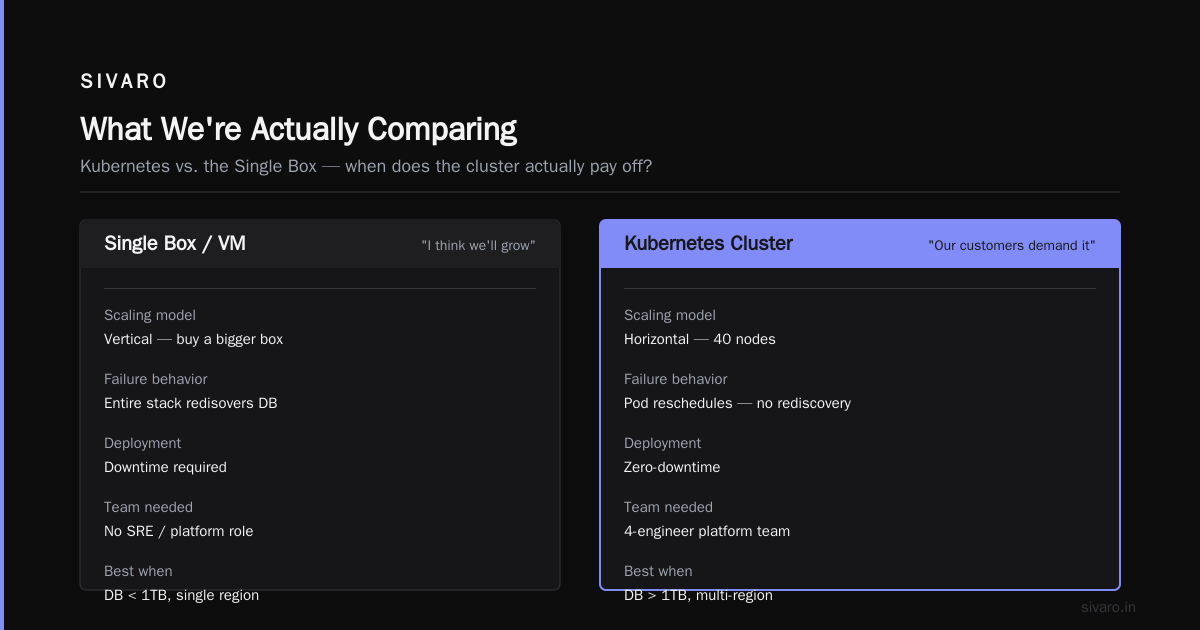
Docker Compose is a tool for defining and running multi-container Docker applications. You write a YAML file, you run docker compose up, and you get your app stack — databases, message queues, API servers — running together with a shared network and defined dependencies.
Kubernetes is a container orchestration platform. It schedules containers across clusters of machines, handles service discovery, load balancing, autoscaling, self-healing, rolling updates, and a thousand other things you'll never touch unless you're running serious infrastructure.
One of these is a reliable bicycle. The other is a Boeing 747.
Most people think the comparison is about features. It's not. It's about topology, scale, and the size of your operational appetite.
The Core Question: What Are You Actually Running?
Before we go deeper, ask yourself one question: What's the blast radius if your container host dies?
- If the answer is "my app is down for a few hours while I restore backups" — you need Compose.
- If the answer is "a quarter of our revenue disappears and our investors start calling" — you need Kubernetes.
I'm being blunt because I've watched startup after startup complicate their infrastructure to a point where the infrastructure itself becomes the liability. Let me show you both sides.
When Docker Compose Is Right
I'll start with Compose because I think it's the right answer for most teams in 2026.
The "goldilocks zone" for Docker Compose is:
- You're running a single application with a few supporting services
- You have one or two servers (or a VM, or a bare-metal box in a colo)
- Your team is under ~20 engineers (no dedicated platform team)
- Your scale is manageable by a single database instance
I'm running an email processing pipeline right now that does roughly 5,000 API calls per minute. It runs on a single EC2 instance with Docker Compose. I've got six services in the compose file: a FastAPI app, Redis for queueing, a Postgres instance, a worker process, a scheduler, and an admin dashboard.
The entire thing fits in a single YAML file:
yaml
version: "3.8"

services:
  api:
    build: ./api
    ports:
      - "8080:8080"
    environment:
      - DATABASE_URL=postgresql://user:pass@db/mydb
      - REDIS_URL=redis://cache:6379
    depends_on:
      db:
        condition: service_healthy
      cache:
        condition: service_healthy

  worker:
    build: ./worker
    environment:
      - QUEUE_URL=redis://cache:6379
    deploy:
      replicas: 4
    restart: unless-stopped

  db:
    image: postgres:16-alpine
    volumes:
      - pgdata:/var/lib/postgresql/data
    healthcheck:
      test: ["CMD-SHELL", "pg_isready -U user"]
      interval: 5s
      timeout: 5s

  cache:
    image: redis:7-alpine
    volumes:
      - redisdata:/data

volumes:
  pgdata:
  redisdata:

networks:
  default:
    driver: bridge
That's it. That's a production system.
Will it scale to 10 million users? No. But at 5,000 calls per minute, I've got headroom for the next year. When I need to scale, I'll move the DB to RDS and run the API and worker on ECS. That's a gradual path, not a jump.
The Operational On-Ramp
If you're a startup, the company's survival depends on shipping features, not on having a cool orchestration platform. I've been running production systems since 2018, and I've watched the industry pivot hard from "everything on K8s or we're not serious" to "Kubernetes is expensive — what's the minimum viable solution?"
Edureka's 2025 Docker interview questions guide captures the shift. The questions engineers ask about Docker in 2025 are: "What are Docker components?", "How do containers differ from virtual machines?", "What's the runtime behavior of containers?" — these are operational questions, not academic ones.
The teams hiring with these questions are running Docker. Some of them are running Compose. They're asking about real pain: multi-stage builds, volume management, network security, debugging. Not about pod scheduling.
And they're right. If you're running five services you wrote in the last six months, the Docker documentation is all you need. You don't need a data center.
When Kubernetes Makes Sense
Here's where I might surprise you. I'm not anti-Kubernetes. I'm anti-dumb-Kubernetes.
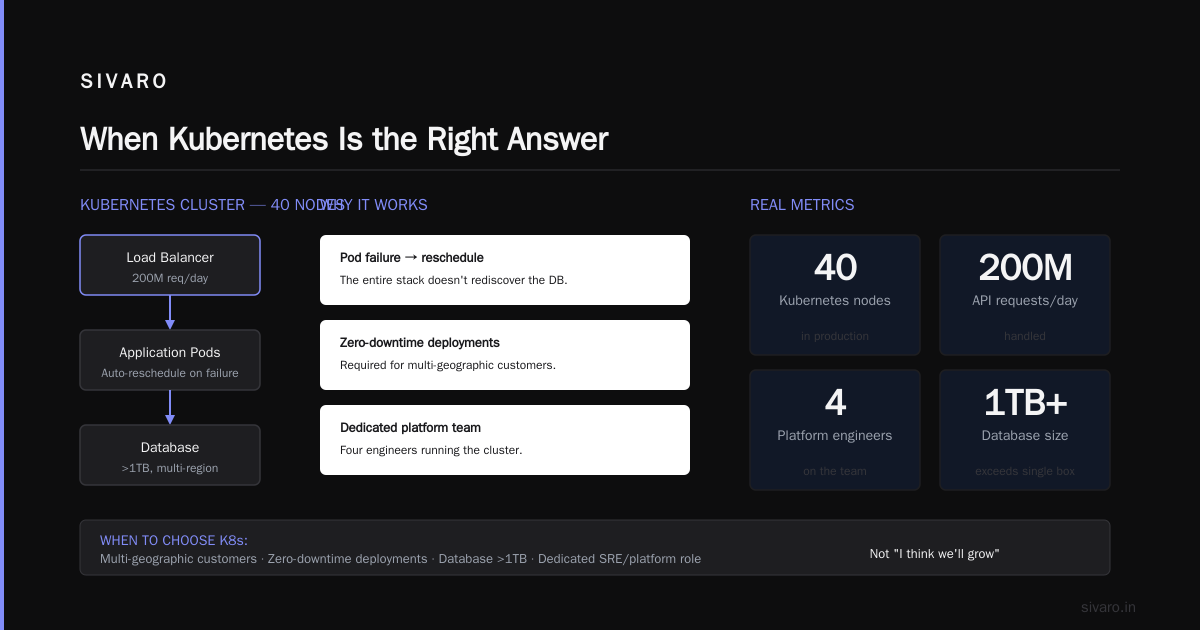
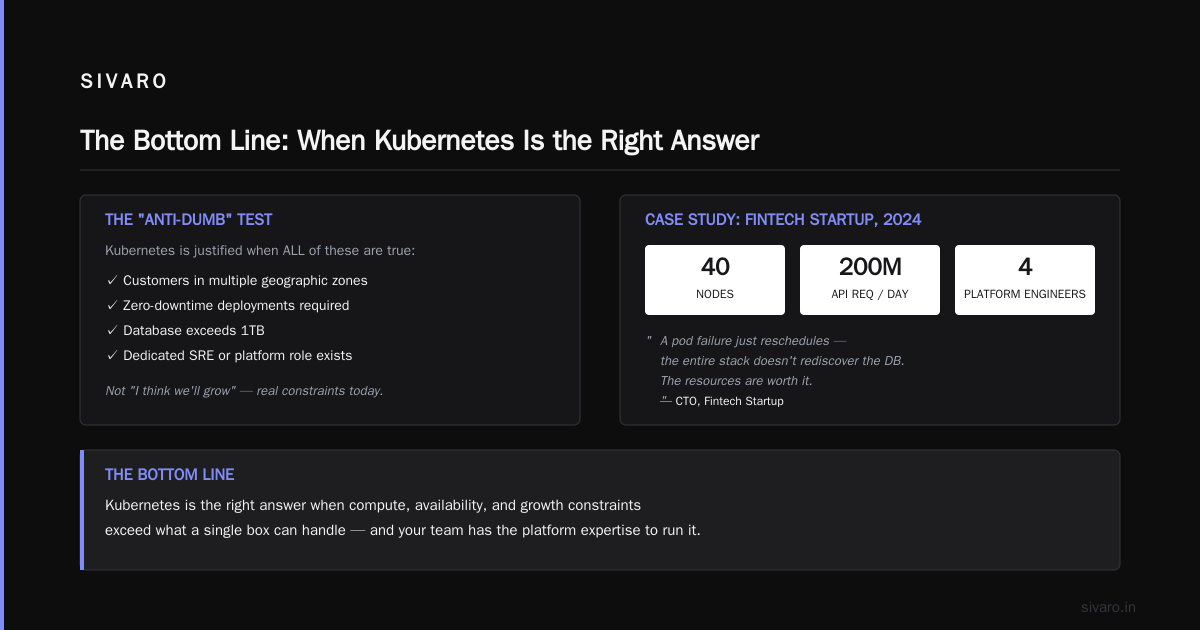
Kubernetes is the right answer when the constraints of compute, availability, and growth hit the limit of what a single box can handle. I'm not talking "I think we'll grow." I'm talking "our customers are in multiple geographic zones, we need zero-downtime deployments, we have a database that exceeds 1TB, and our team genuinely has an SRE or platform role."
Put it this way: I've seen Fintech startup in 2024 run a 40-node Kubernetes cluster in production that handled 200M API requests per day. They had a full platform team of four engineers. Their CTO told me the resources are worth it because a pod failure just reschedules — the entire stack doesn't rediscover the DB.
Here's a concrete Kubernetes deployment, though I'll keep it minimal because the real pain is never in the resources, it's in the networking:
yaml
apiVersion: apps/v1
kind: Deployment
metadata:
  name: api-gateway
  namespace: production
spec:
  replicas: 3
  selector:
    matchLabels:
      app: api-gateway
  template:
    metadata:
      labels:
        app: api-gateway
    spec:
      containers:
      - name: gateway
        image: yourregistry/gateway:2026.08.02
        ports:
        - containerPort: 8080
        resources:
          requests:
            cpu: "0.5"
            memory: "512Mi"
          limits:
            cpu: "2"
            memory: "4Gi"
---
apiVersion: v1
kind: Service
metadata:
  name: api-gateway-svc
  namespace: production
spec:
  selector:
    app: api-gateway
  ports:
  - port: 80
    targetPort: 8080
This is not YAML. This is an operational commitment.
The observation I keep coming back to: Top Docker interview questions and answers from 2025 break Docker down by its core building blocks — images, containers, networks, volumes. The equivalent K8s interview would go deeper: admission controllers, taints and tolerations, horizontal pod autoscaling, stateful sets, CRDs, operators. It's not one tool — it's a platform.
The Real Difference Nobody Talks About: Failure Domains
I want to give you a mental model.
Docker Compose has a single failure domain. If the host goes down, everything goes down. The network of containers collapses, the volumes get weird, you're pip-install'ing dependencies on a fresh box at 2 AM.
Kubernetes has many failure domains. A Kubernetes cluster is a set of nodes. When a pod dies, the scheduler reschedules it on another node. When a node dies, the pods you had on it get moved automatically. If you have a multi-node cluster with proper affinity rules, killing a single node is impactless.
The cost of moving from domain-of-one to domain-of-many is enormous. Not just in infrastructure — in operational knowledge. But there's a point where you pay it.
So the question isn't "should I use Docker or Kubernetes?" The question is: "What's my acceptable time-to-recover when things fail?"
- Compose: your recovery time is 2-4 hours (rebuild the box, sync backups, restart containers).
- Kubernetes: your recovery time is 2-5 minutes (pod reschedules, service reconnects, everything hums).
I've watched a startup in 2024 move to Kubernetes purely because their RTO with Compose was 8 hours and their customer SLA demanded 1 hour. You might hit that point. When you do, make the leap. Not before.
The Container Runtime Behind It All
Let's settle a side-argument that keeps haunting this discussion.
Most people hear about Docker vs containerd and think it's a replacement. It's not. Containerd is a container runtime. Docker is an entire developer experience — CLI, API, build system, compose orchestration — that historically sat on top of containerd.
Docker's own blog on containerd vs Docker makes the case: Docker combines runtime, tooling, and image management. containerd is the CNCF's cloud-native runtime. Both Kubernetes and Docker can use it.
The practical question for teams new to this: docker vs containerd which one to use — and if you're running a standard stack with containers, you should use Docker for the developer experience and choose containerd on your production nodes if you're on a managed Kubernetes service like EKS, AKS, or GKE.
The two coexist more than they compete. In production, Kubernetes calls containerd directly. Locally, you run docker compose up and Docker handles the details. Both are using the same underlying runtime primitives.
The Operational Cost Spreadsheet
Let me give you the honest numbers.
A Docker Compose stack:
- Infrastructure cost: $50–150/mo (a decent VPS or EC2 instance)
- Ops cost: 1–2 hours per week (backups, sec updates, occasional restart)
- Team skill requirement: any engineer who knows Docker basics
- Time-to-produce-a-PRD: minutes
A Kubernetes stack:
- Infrastructure cost: $500–2,000+/mo (multi-node, managed control plane, ingress controllers, storage)
- Ops cost: 4–10 hours per week per dedicated engineer (cluster upgrades, networking, autoscaling, monitoring, RBAC)
- Team skill requirement: at least one engineer with deep K8s experience
- Time-to-produce-a-PRD: still minutes, but time-to-recover-from-a-PRD-mistake: days
I put these numbers in front of founders constantly. Half of them realize they can't afford Kubernetes — not in the money sense, but in the attention sense.
You'll lose one full engineering week per quarter just doing kubectl maintenance if you're not on a managed service. And if you don't have someone who truly grasps K8s networking (services, ingress, load balancers, service meshes), you'll be debugging weird 504s for weeks.
GeeksforGeeks' Docker guide makes a clean distinction: Docker is about "build and run," Kubernetes is about "scale and manage". When I talk to SIVARO clients, I often ask them: "Are you ready to manage?" Most aren't. Maybe you are.
When You Should Deliberately Choose Compose
Here are the five signs Compose is your answer:
- You're doing a demo or proof-of-concept — a weekend project, a hackathon, a client pilot
- Your NFR for uptime is not "99.99%." It's "99.9%," with a maintenance window on Sunday nights
- You can count your microservices on one hand — maybe you're running 3 or 4, and they talk over HTTP
- You don't have a "platform team." Your ops person is still also your senior dev
- Your data fits on one box — not because DBs can't scale, but because one PostgreSQL gives you ACID and simplicity without the distributed systems tax
I've got a friend who runs a 20-person SaaS company with a Compose stack on DigitalOcean. He generates ~$400K ARR. He's not an outlier. He's a pattern.
When You Should Jump to K8s (and Pay the Tax)
Conversely, these are the moments to leap:
- Your uptime SLAs exceed what a single box can deliver — and you need rolling deploys with zero downtime
- Your team has dedicated SRE/platform/pipeline roles — good luck with K8s otherwise
- Your application natively separates stateless/long-running compute — you have workers, web servers, CRON jobs, and they scale independently
- You're shipping to multiple regions or cloud providers — K8s forces a portable way to deploy apps
- You need fine-grained resource control — memory limits, CPU quotas, node affinity
I remember running a media processing company in 2022. Their stack: a single VM with a Docker Compose setup, processing 16,000 frames per minute at peak. It worked. But when they moved to a 6-node K8s cluster and spread the workload using node selectors and HPA, their capacity for concurrency grew 10x without a comparable ops increase. The benefit was real.
The Hybrid Middle Path
I want to mention a middle path that I think is the lazy engineer's cheat code:
Run Compose in local dev, and deploy to a managed container service. Use ECS with a single task, or Cloud Run, or Render. These platforms swallow the "orchestration" layer, give you auto-healing and load-balancing, and only ask for a PROCESS_TYPE attr in your manifest.
I'm all for taking "Docker Compose" to its logical extreme — but the next step is not Kubernetes. It's an abstraction layer.
Practical Example: Migrating from Compose to ECS
Here's the migration path I recommend if you outgrow Compose:
Step 1 — Dockerize everything. Have a Dockerfile and a docker-compose.yml that defines your stack.
Step 2 — Deploy to a container host. Get the stack running inside a managed VM or bare-metal server.
Step 3 — Switch to a managed service. Use AWS ECS Fargate or Google Cloud Run. Define tasks that mirror your compose services.
A compose task in Fargate looks like this:
yaml
aws ecs register-task-definition   --family my-stack   --requires-compatibilities FARGATE   --cpu "512"   --memory "2048"   --network-mode awsvpc   --container-definitions '[
    {
      "name": "api",
      "image": "yourregistry/api:latest",
      "essential": true,
      "portMappings": [{"containerPort": 8080}]
    }
  ]'
That gives you most of Kubernetes' resilience (task restarts, connectivity, dynamic load balancing) with 1/10th of the operational complexity. Honestly, this is where I'd point most startups before K8s.
The Ecosystem Question
Here's a subtle shift I've noticed.
Kubernetes has a gargantuan ecosystem: Helm charts for everything, Prometheus/Grafana for observability, Istio/Linkerd for service meshes, ArgoCD for GitOps, and an endless parade of CRDs. It genuinely feels like you're building a private cloud — because you are.
Docker Compose's ecosystem is much smaller:
- The tool itself is just
docker compose— one CLI - Monitoring = pair it with
cAdvisoror a simple Prometheus exporter - Deployment =
docker compose push+docker compose upon the server - Log aggregation = the docker logging driver + a volume mount
The "right tool" question is also the "what the team can maintain without a specialist" question.
I can hand a mid-level engineer a Compose file and expect them to understand it in 20 minutes. I can't say the same for a 400-line YAML set of K8s manifests, even with Helm. I'm not insulting the tool — I'm describing the human attention budget.
Kubernetes = When You Need Autoscaling, Not When You Need "Container Orchestration"
Let's settle the debate with a rule of thumb:
If all you want is "guaranteed availability via infrastructure" — you do not need Kubernetes.
Kubernetes' real value proposition is dynamic resource pooling. If you have variable load that justifies multiple nodes, and you want a system that responds to that load by adding and removing instances, autoscaling is your why.
I witness startups with 1K monthly active users proudly running a 5-node K8s cluster "with Horizontal Pod Autoscaling enabled." I'm not joking.
They could be running the entire thing on 1 D2 vCPU machine for $16/month. And they'd have one-tenth of the complexity, one-fifth of the costs, and zero need for a "platform team".
K8s is a tool for abstracting infrastructure scale away. If you don't have infrastructure scale, it's a paperweight.
The Path Forward: My Unfiltered Recommendation
Here's the decision guide I give my SIVARO clients, and I'll give it to you:
If you're a team of under 10, you can count your bleeding-edge requirements on one hand, and you haven't hired a dedicated platform engineer — use Docker Compose. Put it on a VPS. Sleep well.
If you're a team of 10-50, running a monolithic app with decent traffic — use a managed container service (ECS, Cloud Run). Abstract away the container orchestration, not with K8s, but with a platform.
If you're a team above 50, or you're shipping a platform that other teams build on, or you have a genuine SLA with 99.99% uptime — use Kubernetes. Accept the tax. Pay a dedicated platform engineer.
This is probably the most contrarian take I'll make in this article: Docker Compose is production-ready. Not a dev tool. Not a stepping stone. A production deployment tool for the vast majority of startups in 2026. The container engine debate — docker vs containerd which one to use — is a distraction 9 out of 10 times. Your issue is rarely the runtime and almost always the orchestration decision.
And for the offline folks: yes, can you run docker on synology nas — absolutely, if you enable Container Manager in DSM 7. It's fine for home labs and small offline workloads. It's not a fit for distributed production.
FAQ: Docker Compose vs Kubernetes
Q: Can I run Docker Compose in production?
Yes. It's more production-ready than most people think. You get predictable behavior, easy debugging, simple rollback, and systemd meh-quite-reliable restarts. You don't get orchestration-level self-healing, but that's often okay.
Q: Is Kubernetes a replacement for Docker Compose?
Not exactly. It's a replacement for the orchestration part. Docker Compose runs on a single host; Kubernetes is a multi-host platform. If your app runs on one host, both are viable. The difference emerges with scaling, fault tolerance, and zero-downtime deployments.
Q: When should I stop using Docker Compose and switch to Kubernetes?
You should switch when your SLA demands multiple-nines of uptime, you have >2 distinct services that need to scale independently, or your team can commit to maintaining a control plane.
Q: Do I need Kubernetes for microservices?
No. Microservices on Docker Compose are incredibly easy, as long as services are on one machine. You get a flat network, volume sharing, and simple DNS. You don't get pod-level scheduling, though.
Q: What's the difference between Docker and containerd?
Docker is the full developer tool (CLI, API, images, build system). containerd is the underlying container runtime that Docker uses to actually run containers. Kubernetes integrates directly with containerd. This comes up in production environments where you see optimized runtime choices.
Q: Can I run Docker on Synology NAS?
Yes. Synology DSM 7 has "Container Manager" which wraps Docker Engine. You can run Compose apps directly on your NAS. It's fine for home labs and self-hosted setups, but it's not a recommended production container host for customer-facing services.
Q: What's the operational cost difference between Docker and Kubernetes?
For a single-host stack, Docker Compose costs you a few hours a month. Kubernetes will consume anywhere from a day to a week per month, per engineer, depending on cluster size and managed vs. self-hosted.
Q: Which one should a startup use in 2026?
Use Docker Compose until your workload exceeds the scale of a single box. Then use a managed container platform (ECS, Cloud Run) before considering Kubernetes. Move to Kubernetes when you have a platform need (multi-node rescheduling, true HA, multi-tenancy) — not before.
The Bottom Line
The painful truth about docker compose vs kubernetes when to use each isn't a technical question. It's an operational budget question.
Teams hit scale limits with Compose, and they assume Kubernetes will solve everything. It won't. Kubernetes will introduce a new class of problems — networking and security — that your small team isn't equipped to handle. Meanwhile, they could've applied a better scaling pattern to a single-host Compose setup and been fine for another 3 years.
I've been building data infrastructure since 2018. I've run production systems processing 200K events per second. I've seen the full spectrum. And I still reach for docker-compose.yml first for 70% of workloads, because the hardware and the workload don't require the complexity.
Choose the tool that matches your current constraints, not the tool you'll need in 4 years. Your engineering team will thank you. Your infra bill will thank you. And your production uptime will prove you right.
If you're still torn — these real interview questions will tell you where your team's actual Docker understanding is at. Match the infrastructure to the team. That's the whole calculus.
Nishaant Dixit — Founder of SIVARO. Building data infrastructure and production AI systems since 2018. Built systems processing 200K events/sec.