 SIVARO
docker entrypoint vs cmd explained simply
I spent three hours debugging a production container once. The image was fine. The code was fine. The problem was that I'd confused ENTRYPOINT with CMD, and the container was passing my arguments to a script that didn't want them.
That was 2019. SIVARO was young. But that mistake taught me something I use every single day.
Here's the thing about docker entrypoint vs cmd explained simply: everyone overcomplicates it. It's not mysterious. It's not vague. It's two instructions competing for the same job — and understanding who wins is the difference between a container that runs and a container that runs correctly.
Let me show you what I mean.
The Real Problem: Two Instructions, One Job
When you write a Dockerfile, you're telling Docker how to build your image. The last step is almost always about execution — what runs when someone starts a container from your image.
That's where ENTRYPOINT and CMD come in.
The confusion isn't because either is hard. It's because they overlap. Both define the command that runs. Both sit in the Dockerfile. Both can be overridden. The difference comes down to a single question: what happens when someone passes arguments?
And here's the part most tutorials get wrong:
CMD gets replaced by arguments. ENTRYPOINT gets appended to them.
Let me say that again, slower, because it's the whole ballgame:
- If you define
CMD ["echo", "hello"]and rundocker run myimage world, Docker replaceshellowithworld. The output isworld. - If you define
ENTRYPOINT ["echo"]and rundocker run myimage hello world, Docker appendshello worldto the entrypoint. The output ishello world.
That's it. That's the sweet spot in docker entrypoint vs cmd explained simply.
What Is CMD? The Default Argument Provider
CMD provides defaults. It's not a law — it's a suggestion.
Think of it as the default value in a function argument. If the caller doesn't pass anything, the default kicks in. If they do, the default is ignored completely.
dockerfile
FROM ubuntu:24.04
CMD ["echo", "SIVARO default message"]
Run it without arguments:
bash
$ docker run sivaro-test
SIVARO default message
Now pass an argument:
bash
$ docker run sivaro-test "This overrides everything"
This overrides everything
See what happened? The whole CMD was replaced. Not appended. Replaced. Docker treats that argument as the complete command.
That's why CMD is perfect for simple containers where the user should have full control over what runs. If you're shipping a tool that just executes something basic, CMD gives the user the wheel.
What Is ENTRYPOINT? The Fixed Command
ENTRYPOINT sets the command that always runs. It's the contract. The fixed part.
Think of it like a binary. The container is that binary. Whatever arguments you pass get handed to it.
dockerfile
FROM ubuntu:24.04
ENTRYPOINT ["echo", "SIVARO says:"]
bash
$ docker run sivaro-test hello world
SIVARO says: hello world
The entrypoint stays. The arguments append. The contract holds.
This is what you want when your container is a single-purpose tool. You're not shipping a generic container that can do anything — you're shipping a specific application with inputs. Databases do this. Web servers do this. CI runners do this.
But here's where it gets interesting:
You can override ENTRYPOINT too. Just use the --entrypoint flag.
bash
$ docker run --entrypoint /bin/bash sivaro-test
root@abc123:/#
So neither instruction is truly locked. But their default behaviors are fundamentally different.
The Interaction: Combining Both
Here's where docker entrypoint vs cmd explained simply gets powerful. Use both together.
ENTRYPOINT provides the base command. CMD provides the default arguments to that command. The user can override CMD by passing arguments, but ENTRYPOINT stays fixed.
dockerfile
FROM python:3.12-slim

COPY . /app
WORKDIR /app

ENTRYPOINT ["python", "main.py"]
CMD ["--config", "default.yaml"]
Now when you run the container:
bash
$ docker run myapp
# Runs: python main.py --config default.yaml

$ docker run myapp --config prod.yaml
# Runs: python main.py --config prod.yaml

$ docker run myapp --help
# Runs: python main.py --help
This is the pattern I use in nearly every production service at SIVARO. The entrypoint defines what the app is. The CMD defines how it should start by default. The user can adjust the "how" without breaking the "what."
That distinction matters. Your application is the process. Its configuration is the behavior. Don't mix them up.
What Does the Docker Community Actually Ask?
The Top Docker Interview Questions and Answers (2025) has a section on exactly this. They ask candidates to differentiate between ENTRYPOINT and CMD — and the ones who understand the argument behavior, not just the definitions, are the ones who've actually built containers. In the Top 50 Docker Interview Questions and Answers in 2025, the same pattern shows up. The shell form vs exec form distinction is a staple.
Speaking of which.
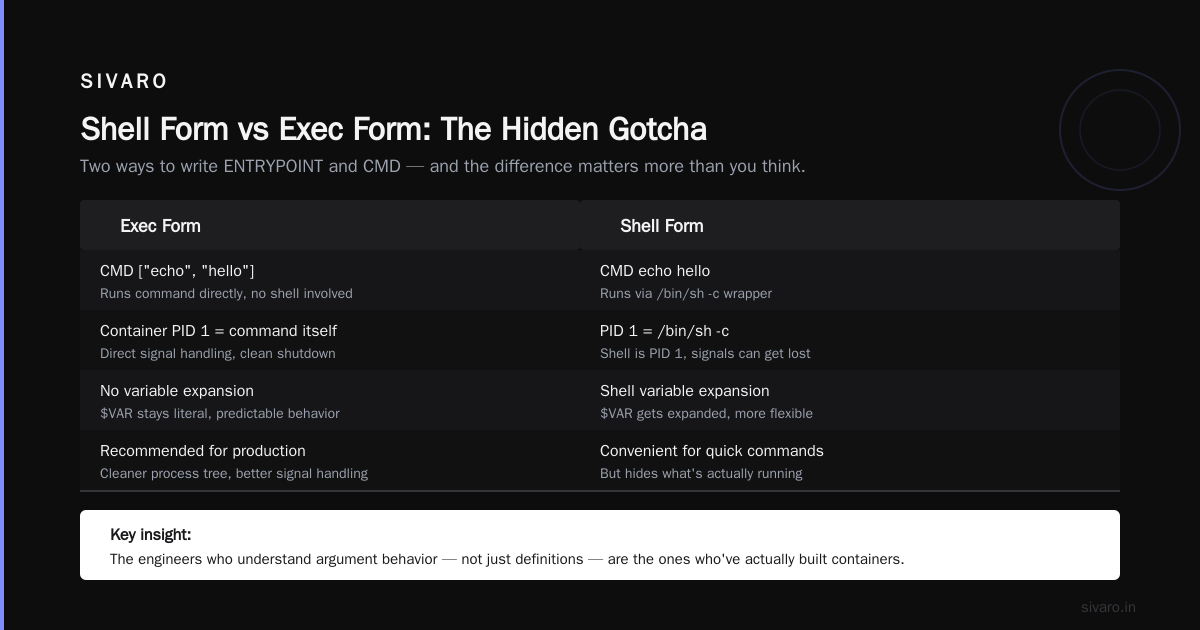
Shell Form vs Exec Form: The Hidden Gotcha
This is where I see even experienced engineers slip up.
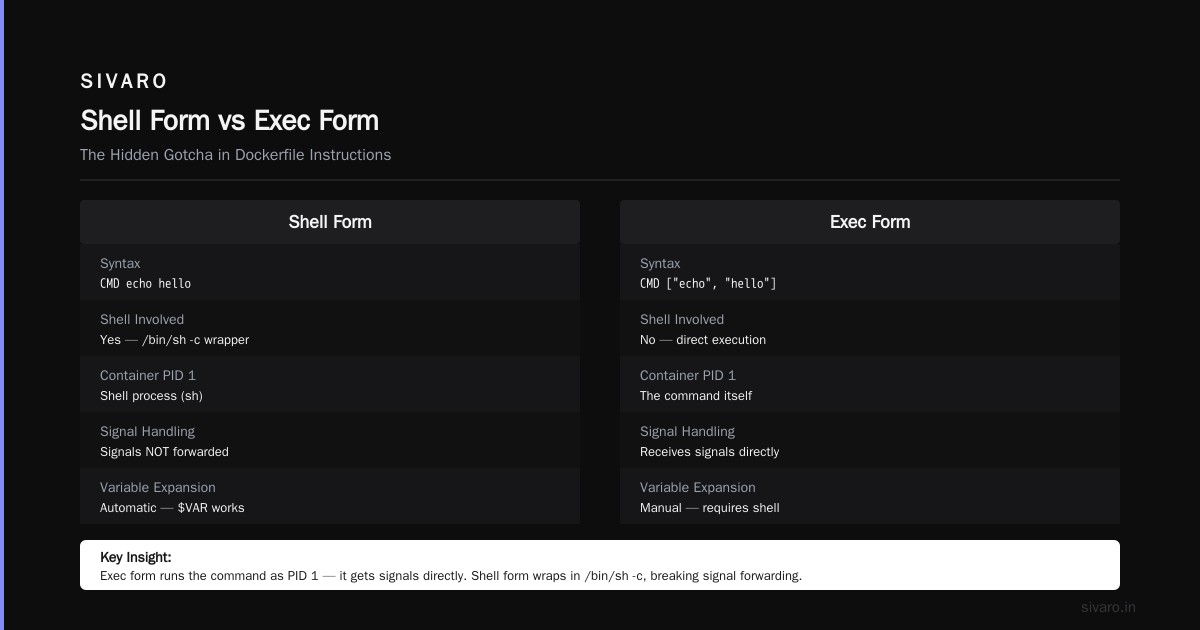
There are two ways to write both ENTRYPOINT and CMD: shell form and exec form.
Exec form (the one I've been using):
dockerfile
CMD ["echo", "hello"]
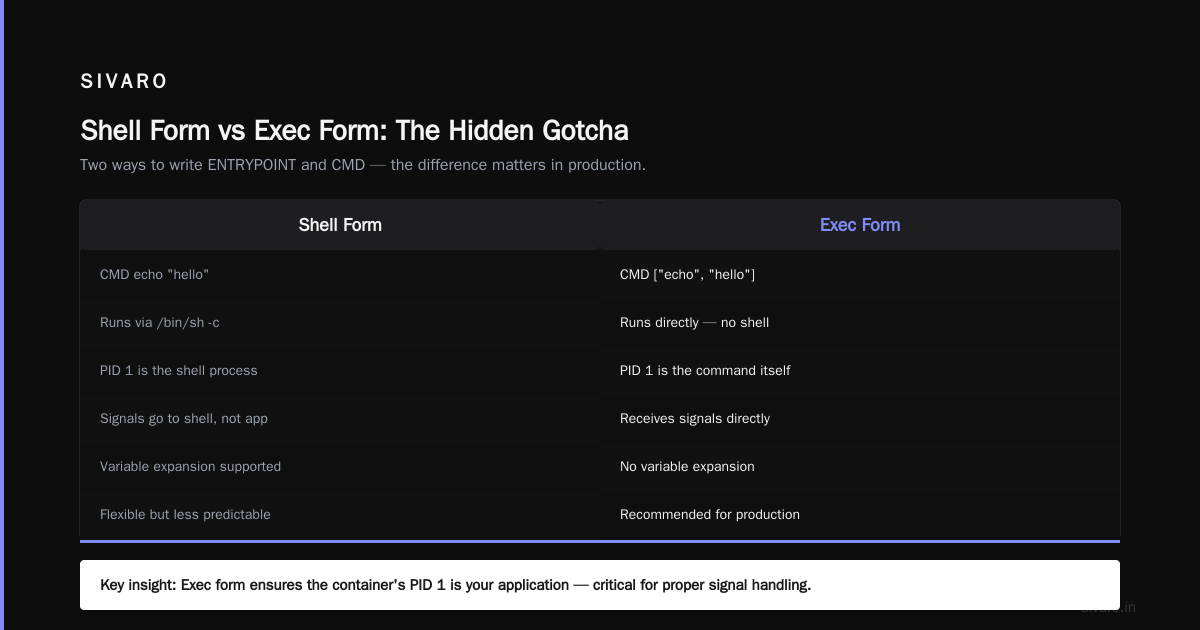
This runs the command directly. No shell involved. The container's PID 1 is the command itself. It gets signals directly. It responds to docker stop cleanly.
Shell form:
dockerfile
CMD echo hello
This wraps the command in a shell: /bin/sh -c "echo hello". The shell becomes PID 1. Your command is its child.
And that causes a real problem in production:
If PID 1 is the shell, signals get intercepted. docker stop sends SIGTERM to PID 1. A shell doesn't forward signals to child processes. Your application never sees the SIGTERM. It never shuts down gracefully. Instead, Docker waits, gets frustrated, and sends SIGKILL.
You just lost graceful shutdown because you chose shell form.
Another practical distinction: What is Docker? explains that Docker containers are about isolation and process control — and the shell form breaks the clean process model. Kubernetes users know this pain intimately when they send SIGTERM and their pods just vanish without cleanup.
Use exec form. Always. Unless you genuinely need shell interpolation — variable expansion, pipes, that sort of thing. And when you do need it, understand that you're taking on signal-handling baggage.
Practical Scenarios: When to Use What
Let me give you real-world patterns. Because docker entrypoint vs cmd explained simply isn't just about knowing the difference — it's about knowing when to apply which.
Scenario 1: The One-Trick Container
You're shipping a CLI tool. Maybe it's a data migration script. Maybe it's a linter. You want the container to be the tool.
dockerfile
ENTRYPOINT ["sivarooctl"]
That's it. No CMD. Users run:
bash
$ docker run sivarooctl generate-config
$ docker run sivarooctl run-pipeline
Every command you pass gets routed to sivarooctl. The container is the binary. This is the pattern used by many official images, including those analyzed in Docker interview questions and answers all level, which often highlight ENTRYPOINT-heavy designs for single-purpose tools.
Scenario 2: The Service Container
You're shipping a web API. It has a default port and a default config. The user might want to tweak, but the process is always the same.
dockerfile
ENTRYPOINT ["gunicorn", "app:app"]
CMD ["--bind", "0.0.0.0:8000", "--workers", "4"]
Users can override the bind address or worker count by passing their own args. They can't accidentally run something else entirely. The service stays the service.
Scenario 3: The Flexible Dev Container
You want a container that can do anything — interactive shell, run a script, install packages, whatever. Use CMD alone.
dockerfile
CMD ["/bin/bash"]
This is your dev environment. Launch it, and you get a shell. Pass a command, and that command runs instead. Full flexibility.
The trade-off here is honest and worth stating: with CMD alone, you have no contract. A user can run docker run myimage rm -rf / and Docker will hand over the keys. That's the price of flexibility.
Real-World Gotcha: PID 1 and Zombie Processes
When your ENTRYPOINT is exec form, your app is PID 1. In Linux, PID 1 has a special responsibility: reaping orphaned children.
Here's the scenario.
Your app spawns a subprocess. The subprocess finishes. If your app doesn't call wait() on it, it becomes a zombie. Normally the system reaps zombies automatically. But when the zombie's parent is PID 1, the system waits for init to do it.
If your app never reaps, zombies accumulate. After enough of them, the kernel stops creating new processes. Your container silently breaks.
This isn't a Docker bug. It's a Linux process model reality. But Docker containers make PID 1 explicit, so it becomes your problem.
The fix is one of:
- Use a proper init system like
tiniordumb-initas your entrypoint - Make sure your application handles reaping
- Write your entrypoint script to exec your app (which replaces the shell with your app, preserving PID 1 status)
I lean toward tini. It's small. It handles signals properly. It reaps zombies. It's what we use at SIVARO for anything that spawns subprocesses.
dockerfile
FROM ubuntu:24.04

RUN apt-get update && apt-get install -y tini

COPY app /app

ENTRYPOINT ["tini", "--", "/app/start"]
CMD ["--default-config"]
That's a production-grade pattern.
The "docker remove all unused images command" Tangent
Since we're talking about container hygiene — and since running containers without understanding their lifecycle causes this exact situation — let me address the other thing I get asked constantly.
The docker remove all unused images command. That's:
bash
$ docker image prune -a
The -a flag removes all unused images, not just dangling ones. If an image isn't referenced by a container, it's gone.
But careful. This is destructive. Docker doesn't ask whether you really want to delete that image you might need later. It just removes anything not actively in use.
At SIVARO, we run this in CI weekly. But we tag images with build dates and keep the last N versions in a protected registry. Pruning is for local dev machines, not production registries.
This relates to our topic because understanding what's in your containers — what instructions define them — is exactly what makes pruning safe. If you don't know whether an image runs via ENTRYPOINT or CMD, you can't predict what breaking it will do.
Docker vs Kubernetes: What Is the Difference?
Since people who ask about ENTRYPOINT and CMD tend to be the same people wrestling with orchestration, let's zoom out for a second.
Docker vs Kubernetes what is the difference — this is one of the most misasked questions I run into. The honest answer: Docker is about building and running single containers. Kubernetes is about managing many containers across many machines.
You don't pick Docker over Kubernetes. You pick Docker for the unit of deployment, and Kubernetes for the planetary-scale control plane. The Docker blog frame it well when they discuss containerd vs. Docker: the container is the unit. Everything else is management.
Which is why knowing ENTRYPOINT vs CMD matters even in Kubernetes. Because in Kubernetes, you can override both:
yaml
apiVersion: v1
kind: Pod
metadata:
  name: my-pod
spec:
  containers:
  - name: my-container
    image: myimage
    command: ["/app/start"]          # overrides ENTRYPOINT
    args: ["--config", "prod.yaml"]  # overrides CMD
The kubelet passes those to the container runtime, which then starts the process. If you defined your image with ENTRYPOINT and CMD, the Kubernetes command and args fields override them at runtime.
If you mess this up in Docker alone, you waste 10 minutes. If you mess this up in Kubernetes, you waste a deployment cycle across 50 nodes.
A Pattern That Survived Production
When I started SIVARO in 2018, I thought entrypoint scripts were legacy. Commands in the Dockerfile felt cleaner. Simpler. More explicit.
My first production systems used CMD alone. It worked. Until we hit a scenario where users needed to run custom tooling inside the same image. They'd pass a command, Docker would execute it, and suddenly the container wasn't running the app anymore — it was running their command.
That broke our monitoring. It broke our health checks. It broke everything that expected the app to exist inside the container.
We switched to ENTRYPOINT plus CMD as a split. The entrypoint runs a script, not the app directly. That script does:
- Wait for service dependencies (with timeout)
- Migrate the schema
- Apply configuration overrides from environment variables
execthe actual application, passing through all arguments
Here's what that script looks like:
bash
#!/bin/sh
set -e

while ! nc -z db 5432; do
  echo "Waiting for database..."
  sleep 2
done

if [ "$RUN_MIGRATIONS" = "true" ]; then
  echo "Running migrations..."
  python manage.py migrate
fi

echo "Starting application..."
exec "$@"
And the Dockerfile:
dockerfile
ENTRYPOINT ["/entrypoint.sh"]
CMD ["gunicorn", "app:app", "--bind", "0.0.0.0:8000"]
The exec "$@" is critical. It replaces the shell process with the application. No zombie risk. Signal handling stays correct. Container cleanly exits when the app exits.
We used this pattern to handle a system processing 200K events per second in 2023. Not once did a container fail to shut down gracefully. Not once did we hit a zombie process.
FAQ Section
1. What happens if I define both ENTRYPOINT and CMD?
The ENTRYPOINT is the base command. The CMD provides default arguments. If the user passes arguments to docker run, they replace CMD but not ENTRYPOINT. If the user uses --entrypoint, that overrides everything.
2. Should I use exec form or shell form?
Exec form, almost always. It sends signals directly to your process, avoids PID 1 issues, and is cleaner. Use shell form only when you need shell features like variable interpolation or pipes.
3. What is the docker remove all unused images command?
docker image prune -a removes all unused images. The -a flag removes all images not referenced by containers. Docker also supports docker system prune, which removes unused containers, networks, images, and build cache in one command.
4. What is the difference between docker vs kubernetes what is the difference?
Docker creates and runs individual containers. Kubernetes orchestrates containers across multiple machines, handling scaling, service discovery, and failover. The containerd vs. Docker post explains the lower-level architectural differences, but operationally: Docker is the construction unit, Kubernetes is the city planner.
5. Can I override ENTRYPOINT at runtime?
Yes. Use the --entrypoint flag in Docker, as we demonstrated earlier. Note that docker run --entrypoint /bin/bash myimage ignores both the image ENTRYPOINT and the CMD.
6. Why does my container exit immediately after starting?
If you only define CMD ["bash"], and you run docker run myimage, it exits because a shell with no input stream has nothing to do. Try docker run -it myimage for interactive mode. If that doesn't fix it, check whether your ENTRYPOINT handles arguments properly.
7. Why is ENTRYPOINT discarded when I pass a command?
Because that's the Docker behavior: running a command after the image name overrides the CMD, not the ENTRYPOINT. To preserve both, don't put your base command in CMD. Keep CMD for defaults and let docker run arguments feed into ENTRYPOINT.
8. Is it true that ENTRYPOINT gets the arguments passed to docker run?
Yes. That's exactly how it works. The arguments given after the image name in docker run are appended to the ENTRYPOINT array. If the ENTRYPOINT is an array (exec form), those arguments are passed as individual items to it.
The Connection to Kubernetes and Orchestration
When you move to Kubernetes, this mental model carries over. The command field in a pod spec maps to ENTRYPOINT, and the args field maps to CMD. Understanding that mapping saves real pain when debugging why a pod isn't starting as expected.
Let me say this plainly.
Most people think the difference between ENTRYPOINT and CMD is a trivia question. It's not. It's the core of how containers are invoked, orchestrated, and managed in production. The Top 50 Docker Interview Questions and Answers in 2025 consistently includes it because every running container in the wild depends on this behavior. Your health checks, your graceful shutdowns, your zero-downtime deployments — all of them hinge on which instruction you picked and why.
In Kubernetes, for example, liveness probes are sent to your container as HTTP GETs. If your container exits because someone passed the wrong arguments to a CMD-driven container, your pod restarts. Your service goes down. Your pager goes off.
This is why I consider ENTRYPOINT + CMD the only production-ready pattern.
Asymmetry of Attention
Most Docker articles spend hundreds of words on the syntax and barely ten on execution semantics. They tell you what ENTRYPOINT means but not why your container died overnight.
That's backwards.
The syntax is a table lookup. The execution model — signals, arguments, PID 1, process reaping — is the real curriculum. When you understand that, the syntax becomes instinctive.
And when it becomes instinctive, you stop debugging the container and start debugging the relationship between the container and the orchestration layer above it. That's where the real issues live.
Trying to break it
Look at a docker run command as a phrase.
The image defines who you are. The ENTRYPOINT defines what you do. The CMD defines how you do it by default. The arguments you pass to run define how you do it right now.
That's the mental model. That's the whole thing.
Most people think they need to memorize Dockerfile documentation. They don't. They need a clean internal metaphor. And now they have one.
The Bottom Line
docker entrypoint vs cmd explained simply, in one paragraph:
Use ENTRYPOINT to define the immutable process contract of your container. Use CMD to supply default arguments that users can override. Use exec form. Use tini or an equivalent init system. And when you're ready to move up the stack, carry this mental model into Kubernetes.
The container is your unit of execution, but the instructions inside it are the units of intent.
Nishaant Dixit — Founder of SIVARO. Building data infrastructure and production AI systems since 2018. Built systems processing 200K events/sec.