 SIVARO
docker exec vs docker attach what is the difference
I watched a senior engineer take down production in 11 seconds last month. He needed logs from a running container, so he ran docker attach and hit Ctrl+C when he was done. The container's main process caught SIGINT and died. Our API went dark. The postmortem was brutal, and the root cause was a command-level misunderstanding that most teams never bother to resolve.
docker exec vs docker attach what is the difference — it's a question I get from engineers at every level. I've interviewed dozens of candidates at SIVARO who can explain overlay filesystems but freeze on this one. Here's the core distinction: docker attach connects your terminal to the container's already-running main process (PID 1). docker exec starts a brand new process inside the container's namespaces. One shares the container's lifecycle. The other doesn't. That gap changes everything about when and how you use them.
By the end of this guide, you'll know exactly when to reach for each command, why your muscle memory is probably wrong, and how to stop killing your own containers.
The 30-second answer
docker attach is like plugging a monitor into a running machine. Whatever the container's main process writes to stdout or stderr appears in your terminal. Whatever you type goes to stdin. But here's the kicker: you're talking to the process that is the container. That process doesn't know you're there. If you hit Ctrl+C or Ctrl+D out of habit, you send those signals directly to PID 1. No warning, no "are you sure?"
docker exec is like opening a new SSH session into that machine. You get a fresh shell, a fresh process, fully isolated from the container's main process. When you exit your shell, the container keeps running. The main process never sees you. You're a guest, not a passenger.
That's the entire difference. What is Docker? explains the container model well, but this one nuance — who owns the process tree — is what separates safe usage from production incidents.
What docker attach actually does
When you run docker attach <container>, you bind your terminal's stdin, stdout, and stderr to those of the container's main process. Docker literally connects your file descriptors to PID 1's file descriptors.
Here's a concrete example. Run an nginx container:
bash
docker run -d --name web nginx
docker attach web
You'll see nginx's access logs streaming to your terminal. Every request that hits the server appears in real time. That's because nginx writes to stdout, and you've attached yourself to that stream.
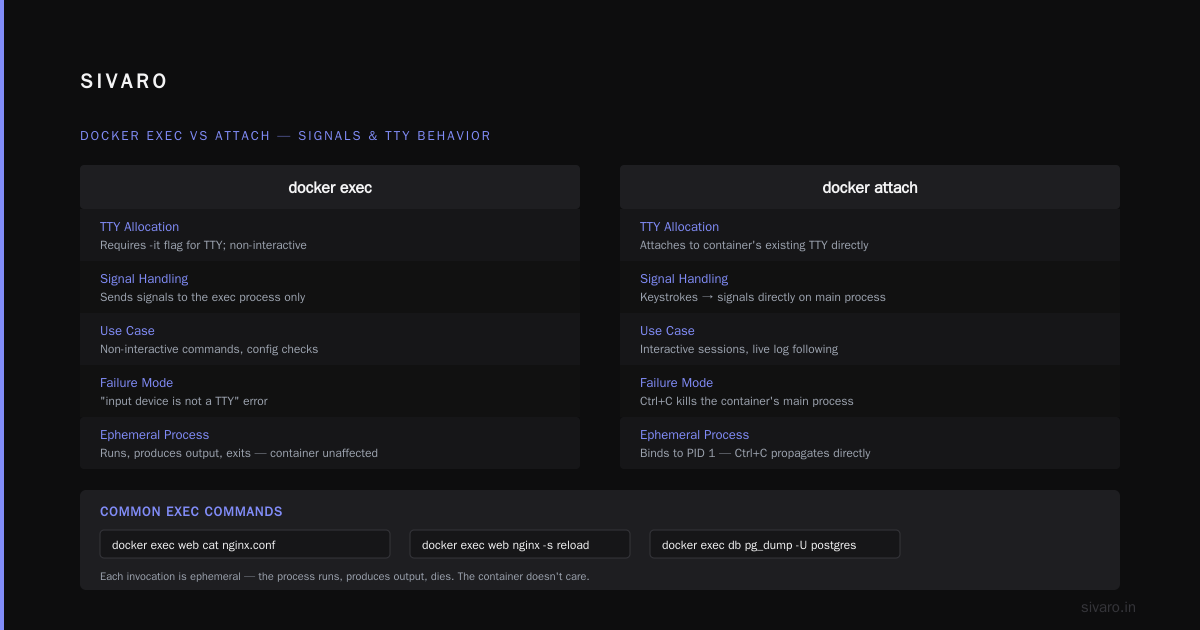
Now try exiting. Ctrl+C. What happens? The first signal kills nginx. The container transitions to exited state because its main process terminated. You didn't "detach" — you killed the server.
Ctrl+P then Ctrl+Q is the magic detach sequence. It sends an escape to the Docker daemon and detaches your terminal without signaling the container process. Almost nobody knows this. The ones who do learn it after an incident, not before.
Docker's behavior with docker attach also depends on whether the container was started with -it. If you started it with -d (detached mode) and no TTY, attach might not give you much interactivity at all. If you started it with -it, attach gives you a pseudo-TTY connection to the main process. But those flags aren't retroactive — you set them at docker run time, and attach inherits whatever you configured.
What docker exec actually does
docker exec uses the container's namespaces — PID, mount, network, and so on — but creates an entirely new process inside them. It's a separate process with its own PID (not PID 1), its own file descriptor table, its own life.
bash
docker exec -it web /bin/bash
This drops you into a bash shell inside the container. It's isolated from the nginx master process. When you exit the shell, nginx keeps serving. The container continues running. You left no trace — well, unless you modified files or killed system processes, but that's on you.
The -it flags matter more than most people think:
-ikeeps stdin open, even without a TTY-tallocates a pseudo-TTY
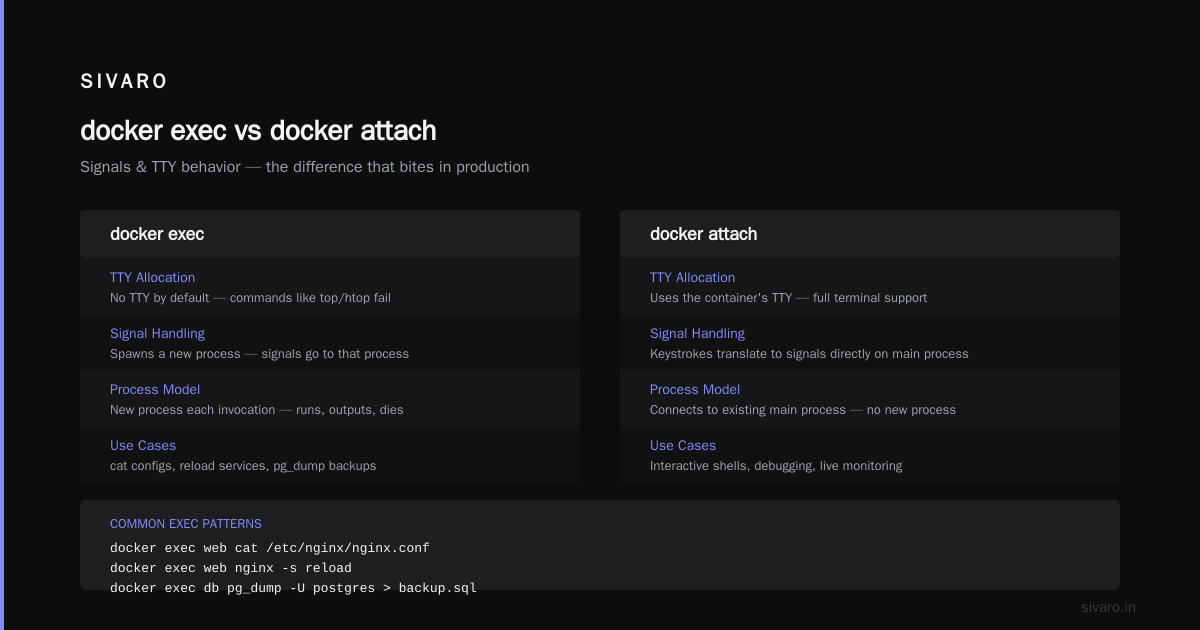
Run docker exec web /bin/bash without -it and you'll get a shell with no terminal. Commands that need a TTY — like top, htop, or interactive editors — will fail. You'll see "the input device is not a TTY" and wonder what went wrong.
Exec is also how you run non-interactive commands inside a container:
bash
docker exec web cat /etc/nginx/nginx.conf
docker exec web nginx -s reload
docker exec db pg_dump -U postgres > backup.sql
Each invocation is ephemeral. The process runs, produces output, dies. The container doesn't care.
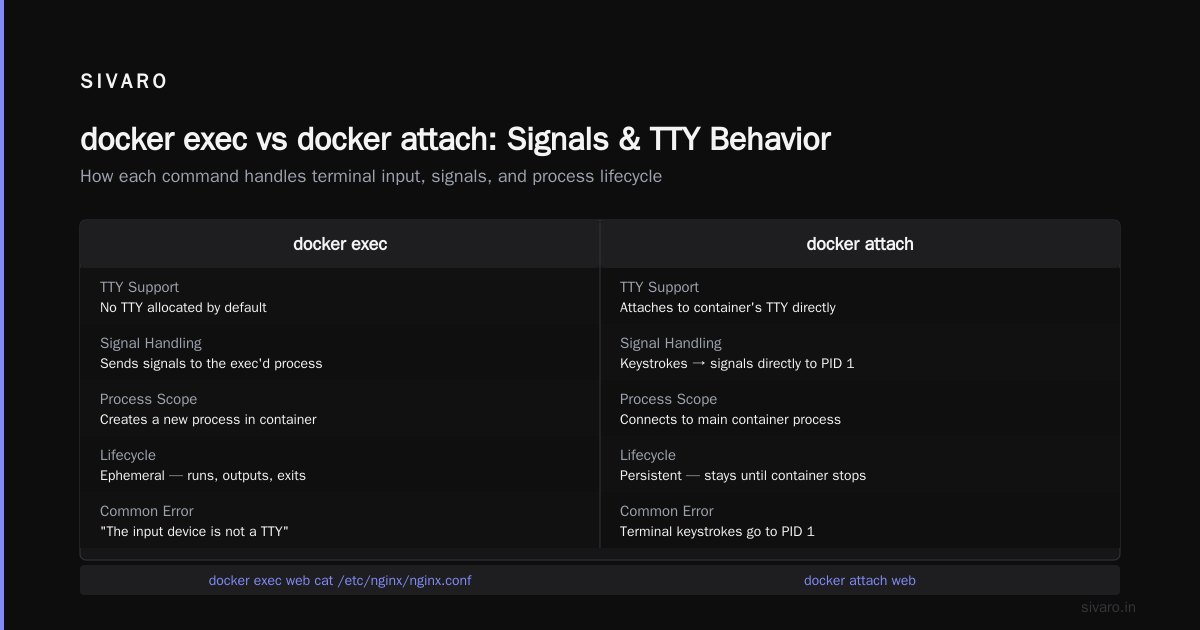
docker exec vs docker attach what is the difference: signals and TTY behavior
The signal handling difference is the one that bites people in production. Let's be precise about it.
With docker attach, your terminal keystrokes translate into signals directly on the container's main process. Ctrl+C sends SIGINT to PID 1. Ctrl+ sends SIGQUIT. Ctrl+Z sends SIGTSTP. Your terminal is literally wired to that process.
With docker exec, your terminal keystrokes go to the exec'd process — your bash session — not the container's main process. Ctrl+C kills your bash, not the container. The container's process tree is untouched.
Here's where it gets subtle. If you run docker exec -it web /bin/bash and then execute a foreground process, Ctrl+C kills that foreground process. It does not kill the container. That's nearly always what you want when debugging.
But there's a trap. The Docker CLI proxies signals in some configurations. With --sig-proxy enabled (the default in some setups), signals you send can be forwarded to the attached process. It's been a source of bug reports for years. My rule: never rely on signal forwarding. Always use the explicit detach sequence.
One more gotcha: the exec'd process can outlive your terminal if you background it. docker exec -d web touch /tmp/flag runs detached. You won't see output, and the process runs in the container even after your exec session ends. Top Docker Interview Questions and Answers (2025) flags this one, and it's a favorite question in my own interview loops.
When I use attach — and when you should too
I'll be blunt: docker attach has almost no place in modern container workflows. I use it maybe once a quarter, and only in specific scenarios.
One legitimate use case is attaching to a container that's running an interactive process you started with -it. If you're running a REPL or a long-lived interactive tool inside a container, attach lets you rejoin that session.
bash
docker run -it --name dev node
# inside: node > 1+1
# detach with Ctrl+P Ctrl+Q
docker attach dev
# back in the same node REPL session, same state
That's a real scenario. The process state persists, and attach resumes the connection. Exec would create a fresh session — useless if you need continuity.
Another use case: inspecting a container that's already running a TTY process, like a Rails server with an interactive console. The Docker interview questions and answers all level reference covers this use pattern under debugging workflows.
Otherwise? Use exec. Every time.
When exec is the right call — practically always
Debugging is exec's home turf. Something is broken, you need to inspect files, check processes, run tests. Exec a shell, poke around, exit.
bash
docker exec -it web /bin/sh
# inspect logs, test configs, check processes
Need to run a one-off command that changes container state without restarting it? Exec.
bash
docker exec web nginx -s stop
docker exec app python manage.py migrate
docker exec db mysql -u root -p
All of these are ephemeral processes. They run, they finish, they disappear. The container's main process — the actual service — remains unaffected unless your command targets it.
The only case where exec won't help is when the container's main process is dead. If PID 1 is gone but the container is still in some half-dead state, exec can't save you. You need to restart the container or fix it at the image level.
Restart policies: the other side of the coin
You can't talk about container lifecycle management without the --restart flag. It's the safety net that catches you when you accidentally kill PID 1 — and it's the reason the attach incident I mentioned earlier only caused a few minutes of downtime instead of hours.
Docker gives you four restart policies:
no              — default, never restart
on-failure      — restart if exit code is non-zero
always          — always restart, even if manually stopped
unless-stopped  — restart unless explicitly stopped by name
docker container restart policy best practices are straightforward, but most teams don't think about them until something breaks.
In production at SIVARO, we use unless-stopped for nearly all long-running services. always is tempting, but it restarts containers even when you deliberately stop them — which makes debugging confusing. unless-stopped respects explicit stops while still recovering from crashes.
For batch jobs or migrations, use on-failure with a retry limit:
bash
docker run --restart on-failure:3 my-migration-image
Three retries, then it gives up and lets you investigate. That's the docker container restart policy best practice I teach everyone: don't let a job retry forever with the same broken state.
Combine this with exec, and you have a solid operational loop: restart policy recovers from crashes, exec gives you a safe way to inspect the running container without destabilizing it.
The networking sibling confusion
While we're clearing up misconceptions: docker networking bridge vs host vs overlay is the other question that trips people up, and it's often confused with the exec/attach problem because both involve "connecting" to containers.
Bridge networking is the default. Each container gets its own IP on a private subnet, and it communicates with other containers via their IPs or Docker's built-in DNS. Host networking strips the isolation — the container shares the host's network stack, so it binds directly to host ports with no NAT. Overlay networking spans multiple hosts, typically with Swarm or Kubernetes on top.
For the container platform itself, the containerd vs. Docker post explains how the Docker daemon modernized its runtime. The short version: Docker now uses containerd as its runtime, which makes the platform more modular but doesn't change how exec or attach behave — those are client-level operations that talk to the daemon.
Which network mode should you pick? Bridge for most services, host when you need raw performance and low latency (we use host for our gRPC services at SIVARO), overlay for multi-host clustering. And if you're running containers in Kubernetes, the network model is different again — the container runtime orchestrates with CNI under the hood.
I only bring this up because the Docker networking choices get conflated with container access modes in the same way attach and exec do. Different dimensions, same flavor of confusion.
Common gotchas and how to avoid them
Let me give you the list of mistakes I've seen teams make — including my own.
Gotcha 1: Ctrl+C in attach kills the container. Use Ctrl+P, Ctrl+Q to detach safely. Or avoid attach entirely.
Gotcha 2: exec without -it fails for interactive commands. You'll get a TTY error. Add those flags when you need a real shell.
Gotcha 3: exec can't see files that aren't in the container's filesystem. If you're debugging and the container doesn't have curl or jq installed, exec is limited. That's why SIVARO ships a debug image with common tools for production debugging containers. A 40MB image saves hours when things break.
Gotcha 4: attach without a TTY. If the container was started with -d (no -t), attaching might not give you interactive input. Refer to Top 50 Docker Interview Questions and Answers in 2025 for the details on the exact flags and their edge cases.
Gotcha 5: PID 1 signal handling. Even when you use exec's signal proxy correctly, the container's PID 1 might handle signals poorly. For example, nginx ignores SIGQUIT but handles SIGTERM gracefully. That's a container design concern, but attach exposes it because attach sends signals directly to PID 1.
Gotcha 6: Attach to a running container with multiple processes. If the main process forks children, attach binds to PID 1's file descriptors only. You won't see child processes' output unless they inherit stdout.
Operational hygiene that saves you
A few practices I've adopted after years of running Docker in production:
- Never attach to a container you didn't start with
-it. If it's running in detached mode, exec is the only safe access point. - Alias exec commands in your shell.
dex()as a function that runsdocker exec -itwith a fallback to/bin/shwhen bash isn't present on the image. - Use exec for health checks. Running
curlvia exec periodically is a decent liveness probe, though most orchestrators prefer native health checks. - Set a restart policy on every container. The docker container restart policy best practices say: unless-stopped for services, on-failure with a limit for jobs. Even dev containers. Defaulting to
nomeans a transient crash takes your service down permanently.
bash
# my dev loop
docker run --name api --restart unless-stopped -p 8080:8080 my-api
docker exec -it api /bin/bash
The mental model that fixes everything
Simplify it like this: a container is just a process (the PID 1) with boundaries around it. The containerd vs. Docker ecosystem made that boundary more modular, but the model holds.
attachtalks to the process.execcreates a process inside the boundaries.
If you understand that, you'll never kill a production container again out of habit. You'll know attach is the wrong tool for debugging, and exec is the right one. You'll choose restart policies that match your workload. And you'll stop mixing up the networking modes, because those are about how processes talk to the world, not how you talk to processes.
FAQ
What happens if I press Ctrl+C while attached to a container?
It sends SIGINT to the container's main process. If that process doesn't handle it gracefully, the container exits. Use Ctrl+P then Ctrl+Q to detach without signaling.
Can I use docker exec to get the same output as docker attach?
Not directly. Exec gives you a new process and its output, while attach streams the main process's output. To see the main process's output without attaching, use docker logs.
Why does my exec command say "the input device is not a TTY"?
You're missing the -t flag. Run docker exec -it <container> /bin/bash to allocate a pseudo-TTY.
Does exec affect the container's main process?
Only if your command explicitly targets it, like sending a signal or killing a process. Spawning a shell for inspection is safe.
What's the safest way to get inside a container for debugging?
docker exec -it <container> /bin/sh. It spawns a new process, doesn't touch PID 1, and exits without consequences. Fall back to /bin/bash if your image has it.
What's the difference between --restart always and --restart unless-stopped?
always restarts the container even if you manually stop it with docker stop. unless-stopped restarts only after crashes or daemon restarts — manual stops are honored. The latter is usually the better choice.
Don't be that engineer
The engineer who ran docker attach on production — I should clarify something. He did it under pressure, with a customer on the line, and the muscle memory of Ctrl+C took over. The postmortem didn't blame him. It blamed the team for never documenting or enforcing the exec-first rule.
docker exec vs docker attach what is the difference isn't a trivia question. It's a production safety distinction. You're either observing the container's actual process or you're an independent operator inside it. Confusing those two costs real downtime.
Use exec for everything except cases where you genuinely need the session state of PID 1. Set unless-stopped on your services. Understand the network mode you're using. And when you hear someone say "just attach to the container and hit Ctrl+C," step in. Show them the Ctrl+P Ctrl+Q sequence. Show them the attach kill loop. The conversation takes two minutes and saves an incident.
Nishaant Dixit — Founder of SIVARO. Building data infrastructure and production AI systems since 2018. Built systems processing 200K events/sec.