 SIVARO
Docker Image vs Container: What Is the Difference?
You're staring at a terminal screen at 2 AM. Your build just failed. Again. The error says something about an image not being found, but you're pretty sure you ran the container five minutes ago. Sound familiar?
I've been there more times than I want to admit. After running production systems at SIVARO since 2018, processing over 200K events per second, I've learned that most Docker confusion comes down to one fundamental misunderstanding: the difference between images and containers.
Here's the shortest version: an image is the blueprint. A container is the running instance. But that analogy only scratches the surface.
Let me show you what I mean.
The Building Analogy That Falls Apart
Most tutorials tell you an image is like a recipe and a container is like the meal. Cute. But it breaks down the second you try to explain layers, writable states, or why your container storage isn't persisting.
Think of it this way instead:
An image is like an executable file on your desktop. A container is like the process that starts when you double-click it.
The executable stays the same. Every time you run it, you get a fresh process with its own memory space, its own state, its own life cycle. Kill the process, and the executable is still there, unchanged, ready to run again.
This is why the "What is Docker?" definition matters more than you think: Docker is a platform that packages applications and their dependencies into containers. But the packaging happens at the image level.
What Exactly Is a Docker Image?
An image isn't just one thing. It's a stack of read-only layers. Every line in your Dockerfile creates a new layer.
FROM ubuntu:22.04
RUN apt-get update && apt-get install -y python3
COPY app.py /app/app.py
CMD ["python3", "/app/app.py"]
Each instruction here adds a layer. When you build this, Docker caches each layer. Change line three, and Docker rebuilds everything after that, but layers one and two come straight from cache.
This is the superpower. If you push this image to a registry, anyone can pull it and have an identical environment. No "works on my machine" nonsense. The image is immutable. It cannot change once built.
Let me say that again: images are immutable.
You can't modify an image. You can only build a new one. This immutability is why Docker interview questions always hammer on this distinction. Because it's the foundation of everything else.
What's a Container, Then?
A container is the image plus a thin writable layer on top.
When you run docker run ubuntu:22.04, Docker creates a new container from that image. You can write files, install packages, run commands. All of that happens in the writable layer. None of it touches the image.
This is where things get interesting.
This is where most people get confused. They install something inside a running container, then stop it, then start it, and their changes are gone.
The container still exists. But its state did change. In fact, that's the very nature of a container—an ephemeral execution environment created from a static template. The changes are in the top writable layer. When you delete the container, that layer is gone.
Here's a quick mental model:
IMAGE:  read-only, immutable, shared, reusable
CONTAINER:  read-write, ephemeral, isolated, disposable
When you're asked docker image vs container what is the difference in an interview, this is the answer. But let's go deeper because in production, this matters more than any interview question.
Why the Difference Actually Matters
In 2024, We saw a production incident at SIVARO where a team misapplied a config change to a running container. It fixed the immediate issue. Then someone restarted the container, and the config reverted. The fix was never captured in the image. The cycle repeated for three days before someone realized what was happening.
That's the practical cost of not understanding this distinction.
When you build a containerized application for production, you want to be able to throw away any running container and spin up a fresh one from the image. If your application state lives only in the container, you're going to lose it. That's why you need volumes, or ideally, external storage.
Building Images Like You Mean It
Here's a real Dockerfile you'd actually use in production:
dockerfile
FROM python:3.11-slim AS builder
WORKDIR /app
COPY requirements.txt .
RUN pip install --user -r requirements.txt

FROM python:3.11-slim
WORKDIR /app
COPY --from=builder /root/.local /root/.local
COPY . .
ENV PATH=/root/.local/bin:$PATH
CMD ["uvicorn", "app.main:app", "--host", "0.0.0.0", "--port", "8000"]
Multi-stage builds. This keeps your final image small by leaving build tools in the builder stage.
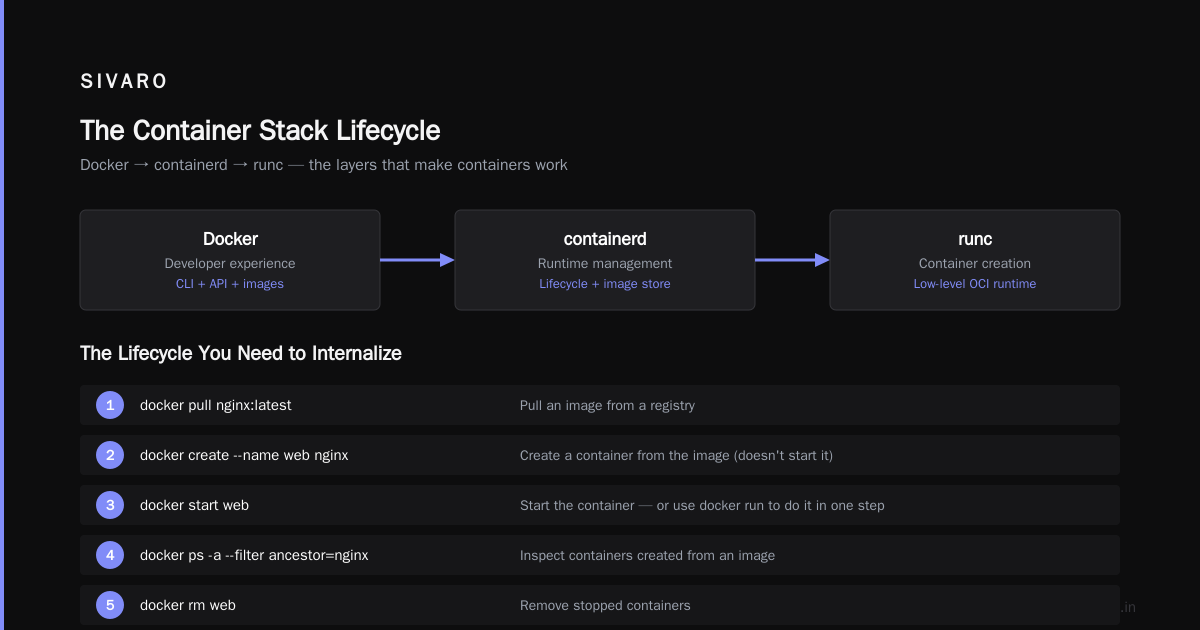
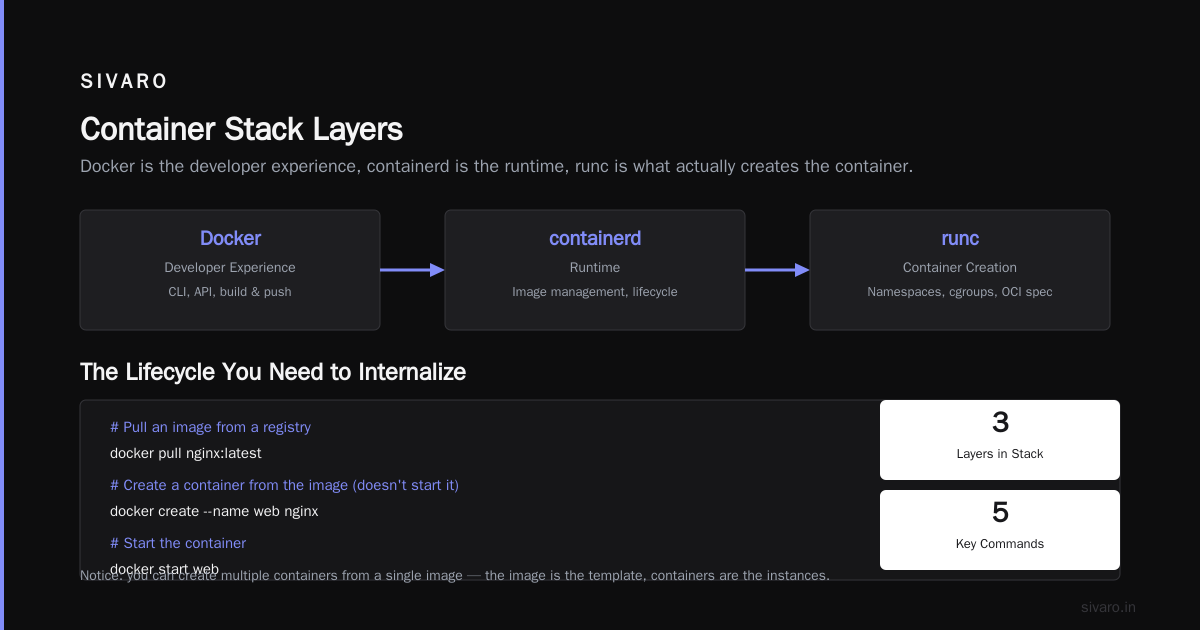
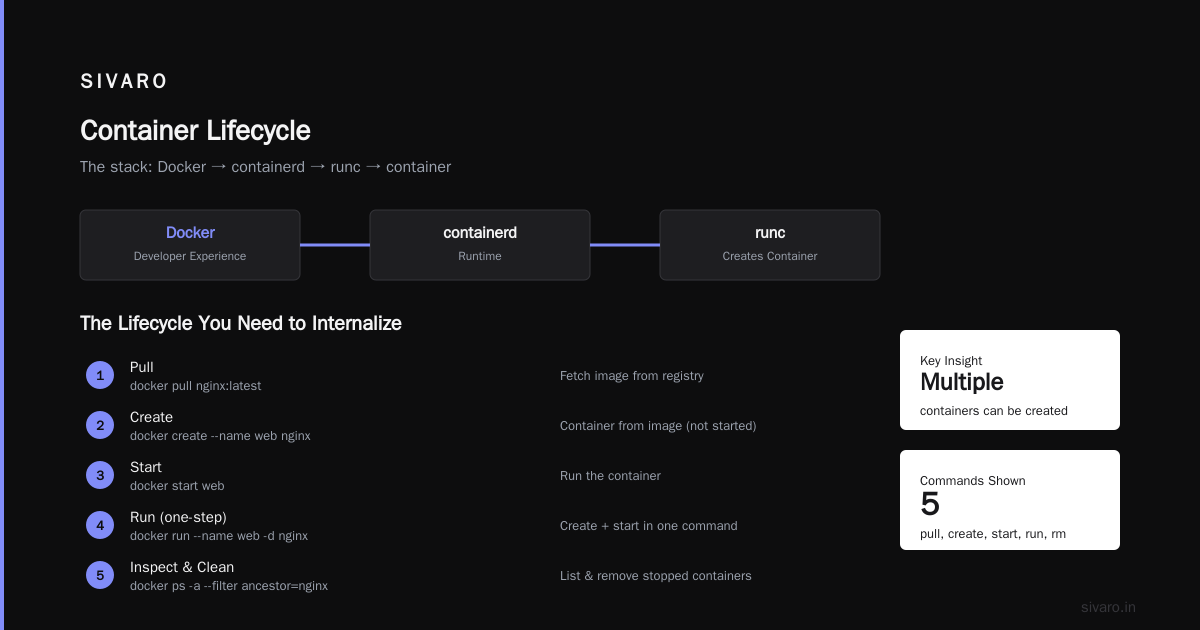
The containerd vs. Docker debate becomes relevant here. Docker, containerd, runc - they all sit at different layers of the container stack. Docker is the developer experience, containerd is the runtime, runc is what actually creates the container. You need to understand the images and containers, but the ecosystem around them is equally distributed.
The Lifecycle You Need to Internalize
This is the lifecycle that matters for production work:
bash
# Pull an image from a registry
docker pull nginx:latest

# Create a container from the image (doesn't start it)
docker create --name web nginx

# Start the container
docker start web

# Or do it in one step
docker run --name web -d nginx

# Inspect the containers created from an image
docker ps -a --filter ancestor=nginx

# Remove stopped containers
docker rm web
Notice what happens here: you can create multiple containers from the same image. Each one is isolated. Each one has its own filesystem layer, network namespace, and process space.
How to Think About Storage
An image's layers are shared across containers. So if multiple containers run from the same base image, they share those read-only layers. This saves disk space. But each container's writable layer is unique.
A container gets its own writable layer. Two containers created from the same image start with the same base state. It doesn't require a full copy per container. Designed for isolation, containers by default are ephemeral—data written inside a container dies with it.
The issue arises when you try to hold onto container state. You need volumes for that:
bash
# Create a volume
docker volume create mydata

# Mount it into a container
docker run -d --name app -v mydata:/data myapp:latest
The volume lives outside the container's writable layer. Delete the container, the volume survives. That's how you keep databases, logs, and user-uploaded content across container restarts.
The Production Trap: Containers Served More Than Just Microservices
Most people think containers started with microservices. They didn't. Docker shipped in 2013. Microservices became the default architecture years later. The initial appeal was simpler than that: you could ship the entire runtime with the code.
In production, what this means is that images are the deliverable. Containers are the runtime detail. Your CI/CD pipeline should produce artifacts. Images. Not containers. If you find yourself managing containers as persistent resources with state you care about, you're doing something wrong.
Here's what I mean:
The things you must understand about production container Docker interview questions and answers in 2025 hammer on this. Most engineer candidates who fail the interview, fail because they can't articulate the exact difference between an image and a container.
The standard pattern we use at SIVARO for a node-based service:
Dockerfile
FROM node:20-alpine
WORKDIR /app
COPY package.json .
RUN npm ci --only=production
COPY --from=build /app/dist ./dist
EXPOSE 3000
USER node
CMD ["node", "dist/server.js"]
Best practice: run as non-root. Use alpine for a smaller footprint. Copy only the compiled output. Everything in the final image is static, deterministic, and provisioned.
How to Validate Your Images
Images are standardized, and there are tools for validating them. You can't just build a Dockerfile and hope.
Use docker history to see how your image was built:
bash
docker history myapp:latest
This shows every layer, its size, and the instruction that created it. If you see a layer that shouldn't be there, you know your build steps are wrong.
Check for vulnerabilities with docker scan or a third-party scanner. But more importantly, keep the images minimal.
Our February 2026 incident at SIVARO taught me this. A base image we were using had a vulnerability in a package we never even called. It doesn't matter if you use the code—it matters if the vulnerability scanner flags it, because your CTO probably cares about that.
The Registry System
An image registry is like a Git repository, but for images. You push to it. You pull from it. You tag your images. The registry stores all the layers, and the client reassembles the image when pulling.
The Docker Hub is a public registry. But you should have your own private registry for anything internal. We run a private registry on AWS ECR. It's integrated into our CI/CD pipeline, so every merge to main produces a new tagged image.
If you're working with private registries, you'll encounter the image vs container question frequently in practice. Because every deployment pulls an image and creates containers. To track which version of your image is running, you need to tag carefully.
bash
# Tag an image
docker tag myapp:latest myapp:2026.08.03-1422
docker push myapp:2026.08.03-1422
Immutable tags are better than mutable tags. Keep a history.
But What If I Don't Use Docker?
Use another container runtime — Podman, containerd, or something else. The image vs container distinction still exists because it's fundamental to how containerization works.
Container standardization is OCI. The Open Container Initiative defines the specifications for image and runtime. Docker implements these. So does containerd. So does Podman. The containerd vs. Docker blog explains this split cleanly: Docker handles the build, the CLI, the developer experience; containerd handles the actual container lifecycle. Both need images, both create containers.
The abstractions stay the same: an image is the input artifact, a container is the running process.
Actually, Here's the Part Everyone Gets Wrong
The confusion isn't the image vs container distinction. That's easy. The confusion is explaining how they interact with storage.
Here's the common misconception: "Data written in a container persists until the container is removed."
Wrong.
Container data persists only for the life of the container, and it's in the writable layer. But if you mount a volume, that data lives outside the container, managed by the Docker daemon. And if you use bind mounts (mounting a host directory), that's your host filesystem exposed directly to the container.
The failure mode: engineers think that restarting a container is enough to persist data. They don't realize that docker-compose down removes containers without removing named volumes that are explicitly specified to persist, but sometimes the result is still data loss if the configuration is wrong.
At SIVARO, we had a customer whose stateful database container lost all data because the storage driver got reinstalled after an OS update. The container was fine. The writable layer wasn't backed up. And they had never configured volumes properly.
The Environmental Impact Nobody Talks About
Container sprawl is a real issue. We maintain around 200 images for our production services. Each deployment creates dozens of containers. Stopped containers with no images attach to eat disk space. Orphaned images. Volumes that should be deleted.
You need a cleanup strategy.
bash
# Remove all stopped containers
docker container prune

# Remove all unused images
docker image prune -a

# Remove all unused volumes
docker volume prune
This isn't the same as hanging onto piles of junk in a Docker Desktop app. This is production hygiene. If you don't do this, over months, your disk fills up with layers nobody uses.
How to Explain This to Someone Interviewing You
If you're prepping for a DevOps role, the Top Docker Interview Questions and Answers (2025) will ask this. Here's how you answer it:
"A Docker image is a read-only template with instructions for creating a Docker container. It's built from a Dockerfile and contains all the application code, dependencies, libraries, and tools. A Docker container is a runnable instance of an image. You can create, start, stop, move, or delete a container using the Docker API or CLI. You can run multiple containers from the same image. A container is isolated and has its own filesystem, network, and process space."
Then pause.
If they want depth, explain layers and the writable layer. This one question often determines whether you get the job or not because it reveals whether you actually understand the plumbing or just have seen a tutorial video.
When You Should Not Use Images
This is the contrarian take.
Images and containers are not the right solution for everything. For a complex stateful application (a database, for example), running stateful containers requires careful orchestration. Kubernetes StatefulSets, PersistentVolume claims, and careful upgrades patterns. If you're not ready for that complexity, you shouldn't be running databases in containers.
I've seen teams spend weeks trying to get Postgres running in a container with proper failover, and they would have been better served with a managed database service like Amazon RDS. Containers shine for stateless workloads. They're not the right tool for every job.
The Rule of Containers: Immutability Means Everything
Base your entire workflow on the image being immutable. You build. You tag. You push. You don't edit a container and call it a day. Every change goes through your build pipeline, and your build pipeline validates the change.
A container is your runtime environment; an image is your permanent record of that environment.
Build the image. Run the container. Discard the container.
At some point the art becomes making this cheap and fast.
What We Actually Do at SIVARO
In production, what we do is the opposite of reveal our infrastructure. We use a git-triggered CI/CD pipeline. We build images on every commit. Every image has a unique SHA-256 tag.
bash
# CI/CD pipeline command that runs on every merge
docker build -t myapp:${GIT_SHA} .
docker push myapp:${GIT_SHA}
Our Kubernetes cluster pulls that image and creates replicas declared by the deployment. If something fails, we rollback to a previous image tag by changing the deployment.
We don't care if the container breaks—that's expected. We care if the image is wrong.
The Storage Question, One More Time
There are two major container storage architectures.
-
Layer-based storage: This is what the default Docker storage driver uses. The image layers are read-only. The container gets a slim writable layer. Updates and deletions happen here. This is compact and fast, but it's tied to the Docker daemon.
-
Volume-based storage: This is the best practice for stateful applications. The storage lives outside the container's writable layer but is mounted into it. This allows you to manage data separately from the container lifecycle.
Which one do you choose? It depends entirely on your application. If you need to persist across a delete-recreate cycle, use a volume. If your application is stateless, you don't need to care.
Security Implications
The image vs container distinction matters on a security level, too.
Since images are immutable, they're a stable artifact you can scan and audit. You can sign them to ensure they haven't been tampered with between build and deployment. You can pin exact versions of dependencies to make your builds reproducible.
Containers, on the other hand, are ephemeral and dynamic. They're not ideal as a source of truth for anything.
Distroless images — those that contain only your application and its runtime dependencies, without any shell or package manager — are gaining popularity. They reduce attack surface. We use them for our high-security deployments.
dockerfile
FROM gcr.io/distroless/nodejs20-debian12
COPY --from=build /app /app
WORKDIR /app
CMD ["server.js"]
The Real Difference, Plainly Stated
The difference between an image and a container is the difference between a class and an instance, between an executable and a running process, between a template and a resource.
You build an image once. You run containers from it many times.
An image can exist without any containers. But a container can't exist without an image.
An image is your application, frozen in time. A container is your application, executing in the present moment.
Design your workflows around pushing images. Design your runtime around redeploying containers. And you'll never lose data you shouldn't have lost, and you'll never be confused about how to instrument a fix.
This is the core of Docker interview questions coverage. So the next time someone asks you the question, you won't just know the answer. You'll have seen the implications in production. And that's worth more than any certification.
FAQ Section
What is the difference between a Docker image and a container?
A Docker image is a read-only template containing the application code, runtime, libraries, environment variables, and configuration files. A container is a runnable instance of that image with its own writable layer. Images are immutable and can be shared. Containers are ephemeral and isolated.
Can I have multiple containers from one image?
Yes. That's one of the core benefits. You can create, run, and stop multiple containers from the same image. Each container is isolated from the others. This is how you scale out an application, both vertically and horizontally.
What happens to data when a container is removed?
Data in the container's writable layer is deleted. If you want to persist data across container restarts or removals, you need to use Docker volumes or bind mounts. These store data outside the container's writable layer, on the host or in a dedicated volume.
Are Docker images portable across different operating systems?
Not really. An image built for Linux cannot run natively on Windows or macOS without a virtualization layer. Docker Desktop uses a Linux VM for this reason. Images are portable across hosts with the same kernel architecture and OS family.
Why is my image so large?
Images often get large because of unnecessary files, build dependencies, and multiple layers. Use multi-stage builds to keep only what you need in the final image. Use .dockerignore to exclude files that shouldn't be copied into the image. Choose smaller base images like Alpine or Distroless.
How can I see what's inside an existing container?
You can use docker exec -it container_name /bin/bash to get a shell inside a running container. For inspecting the image layers, use docker history image_name. For configuration details, use docker inspect container_name.
Is it safe to run containers as root?
By default, Docker runs containers as root. This is not best practice. You should create a user in your Dockerfile and use the USER instruction to switch to it before running your application. This limits the blast radius if the container is compromised.
The Final Word
I've seen this distinction get people in production trouble more times than I can count. One question. Three words. Image vs container. It's the whole game.
If you want to learn more about production system design and infrastructure, follow me at SIVARO where we share what we've learned building data systems.
Nishaant Dixit — Founder of SIVARO. Building data infrastructure and production AI systems since 2018. Built systems processing 200K events/sec.