 SIVARO
Docker Interview Questions for Experienced Developers: What I Actually Ask When Hiring
The worst Docker interview I ever conducted was in 2019. Candidate had five years of Kubernetes experience on paper. Could recite docker run flags like a monk. The moment I asked how to debug a container that was crashing in production, he froze. That's when I stopped asking questions.
That's when I started breaking things.
The Docker ecosystem has changed a lot since then. containerd is the default runtime now. Docker Desktop has licensing terms that still confuse people. And if you're interviewing today, the questions aren't "what is Docker?" — they're "how does this actually work under the hood?"
This guide covers docker interview questions for experienced developers — the ones that separate people who've actually run containers in production from people who've only read the docs.
You're not getting a list of flashcards. You're getting the questions I ask, the answers I look for, and the trade-offs I want to hear you discuss.
The Containerd Shift: Why "Docker" Isn't What You Think It Is
Here's the thing most people miss: Docker isn't one thing anymore.
Since 2020, the Docker engine has been wrapping containerd. When you run docker run, it's containerd that actually manages the container lifecycle. The Docker CLI is just the front door. This matters in interviews because it shows you understand the architecture, not just the commands.
The question I ask: "What happens when you run docker run nginx?"
Good answer walks through the layers:
bash
# What you type
docker run -d -p 8080:80 nginx

# What actually happens
# 1. CLI talks to dockerd via REST API
# 2. dockerd uses containerd to create the container
# 3. containerd uses runc to spawn the process
# 4. runc talks to the kernel (namespaces, cgroups)
The containerd vs. Docker distinction isn't academic. It's practical. When Docker Desktop has licensing problems on your dev machine, you can run containerd directly. When you're building a production platform, you're probably using containerd directly anyway. That's the direction the industry went.
I also ask: "Which one should you use?"
My answer: For local development? Docker. It's an integrated developer experience. For production? Use containerd directly as your runtime, either standalone or via Kubernetes. In 2026, these are different tools for different jobs.
At SIVARO we've ran both. Docker for the dev loop, containerd for production workloads. They don't compete — they're different layers of the same stack.
Docker Architecture: Explain It Like I'm an Engineer
I ask this early on. "Explain Docker's architecture simply." It's a trap.
Most candidates launch into a diagram lecture. "You have a client, a daemon, containers, images..."
No. Tell me about boundaries.
Here's what I'm listening for:
Docker has three parts — client, daemon, and runtime. The client sends commands. The daemon (dockerd) handles the API, images, volumes, networks. The runtime (containerd + runc) actually runs containers.
The kernel does the heavy lifting. Namespaces isolate processes. cgroups limit resources. Union filesystems layer images. The GeeksforGeeks explanation gets this right — containers aren't virtual machines. They're processes with boundaries.
yaml
# docker-compose.yml — the orchestration layer that ties it together
version: "3.9"
services:
  api:
    build: ./api
    ports:
      - "8080:80"
    depends_on:
      - db
  db:
    image: postgres:16
    volumes:
      - pgdata:/var/lib/postgresql/data

volumes:
  pgdata:
If a candidate can't explain that compose relies on the same daemon and runtime underneath, they don't understand the stack. Diagrams aren't understanding. Understanding is knowing where one component ends and another begins.
How Docker Images Actually Work
This is where experience shows.
I don't care if you've shipped a hundred images. I care if you know what FROM actually means.
Question: "What's in a Docker image? Why is it layered?"
The answer should touch on:
- Images are immutable templates. Containers are running instances.
- Layers are read-only. Each instruction creates one. Union filesystem mounts them together.
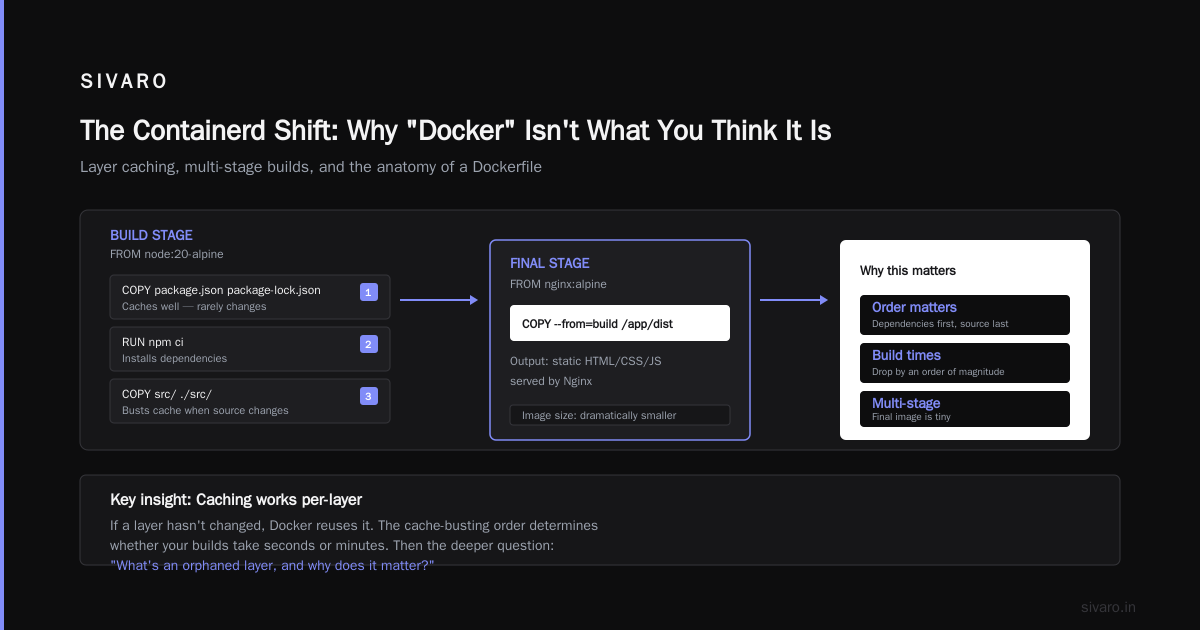
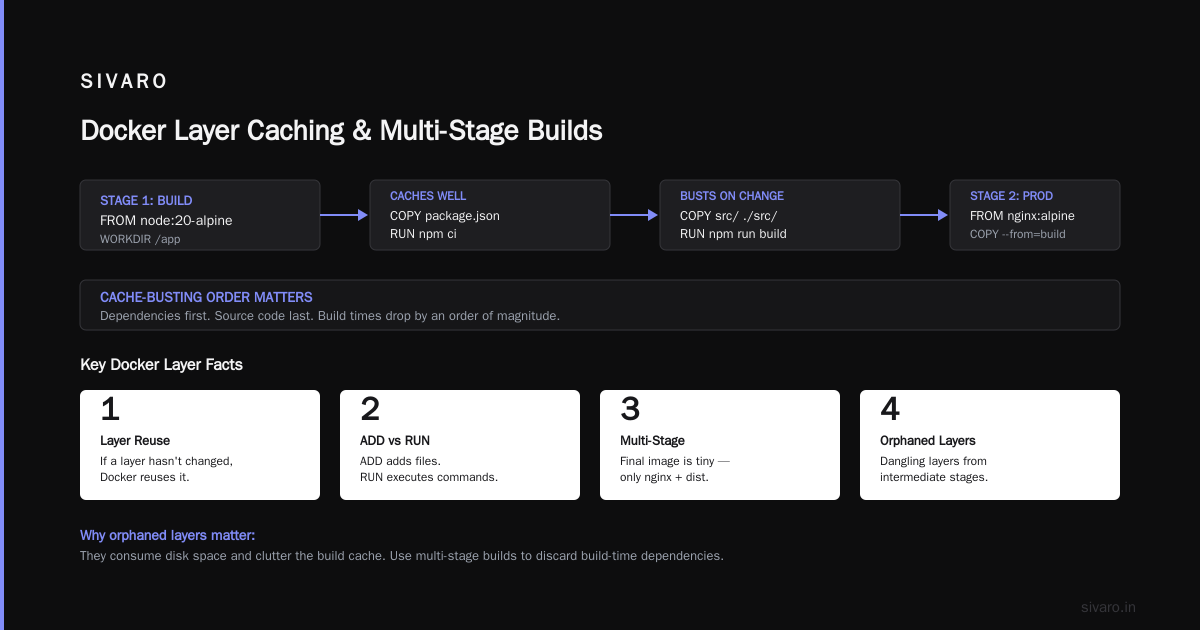
COPYandADDadd files.RUNexecutes a command and captures the filesystem changes.- Caching works per-layer. If a layer hasn't changed, Docker reuses it.
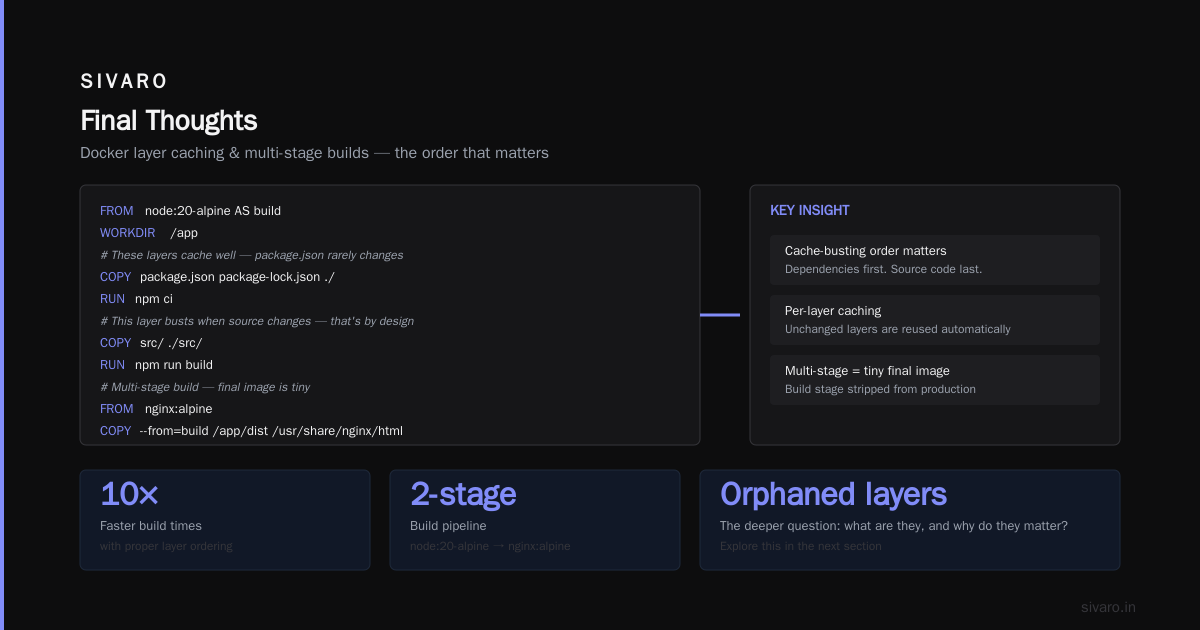
The Dockerfile illustrates this:
dockerfile
FROM node:20-alpine AS build
WORKDIR /app

# These layers cache well — package.json rarely changes
COPY package.json package-lock.json ./
RUN npm ci

# This layer busts when source changes — that's by design
COPY src/ ./src/
RUN npm run build

# Multi-stage build — final image is tiny
FROM nginx:alpine
COPY --from=build /app/dist /usr/share/nginx/html
An experienced developer knows the cache-busting order matters. Dependencies first. Source code last. Your build times drop by an order of magnitude.
Then the deeper question: "What's an orphaned layer, and why does it matter?"
Orphaned layers are image layers no longer referenced by any container. They sit in your daemon's storage, eating disk. Running docker system prune cleans them. It's not interview trivia — I've seen production hosts fill up because nobody cleaned up orphaned layers.
A candidate answers this well, they've been in production. They've had No space left on device at 3am.
The Layer Caching Question That Filters People
Here's my favorite caching question.
"Your build is slow. What can you do without changing your application code?"
The obvious answers: --cache-from, build arguments for dependency versions, multi-stage builds.
The experienced answer: build with BuildKit.
bash
# Enable BuildKit (default in Docker 23+)
DOCKER_BUILDKIT=1 docker build -t myapp:latest .

# Build with cache from a remote registry
docker buildx build --cache-from=type=registry,ref=myuser/myapp:cache   --cache-to=type=registry,ref=myuser/myapp:cache   -t myuser/myapp:latest .
In 2026, not knowing BuildKit is a red flag. It's been the default for years. BuildKit does parallel layer builds, better cache management, and can export builds to different formats. The Edureka guide mentions BuildKit as an advanced topic — it shouldn't be advanced anymore. It's the standard.
I had a client at SIVARO in 2024 who had 15-minute builds on a monorepo. One afternoon with BuildKit's cache mounts and they got it down to four. That's not optimization homework. That's engineering.
Security: Secrets, Rootless, and the Trust Problem
"How do you get secrets into a container?"
Candidate says "environment variables" and I stop listening. That's wrong.
Here's where I want them to land:
- Environment variables leak into the process list. Anyone who can access the host can read them.
- The
envcommand prints all environment variables. - Docker history for the image can include secrets baked into layers.
The right approaches:
dockerfile
# DON'T do this
ENV DATABASE_PASSWORD=super-secret

# DO this — read from a file at runtime
# docker run --env-file .env myapp
Even better, use a secrets manager. Run the container with the secret injected at startup via a file. The container reads from the file system, not the environment.
"What about rootless containers?"
Rootless containers run without root privileges on the host. The daemon runs as a user. containerd handles user namespaces. It's the direction Kubernetes has been heading.
The trade-off: performance implications with I/O. Rootless containers can have higher latency on certain operations. Not always a dealbreaker — but you should know about it.
A candidate tells me they run everything rootless because "security," they haven't tested it in production under load. I want to hear about the trade-offs, not the hype.
Networking: More Than Port Mapping
Docker networking confuses people who've never left -p flags.
"Walk me through Docker's network model."
Here's the core:
- Bridge network — default. Each container gets its own IP in a private subnet. NAT for outbound.
- Host network — container shares the host's network. Better performance, less isolation.
- Overlay networks — for Kubernetes and Docker Swarm across multiple hosts.
- Macvlan — containers get MAC addresses. Direct access to the physical network.
For production, the real question is "How do containers find each other?"
They want to hear: "You use DNS, not IP addresses." Containers are ephemeral. Their IPs change. Embedded DNS at 127.0.0.11 for user-defined networks handles service discovery.
dockerfile
# Dockerfile with bad network assumptions
FROM python:3.12-slim
COPY . /app
CMD ["python", "/app/server.py"]
yaml
# docker-compose with proper networking
version: "3.9"
services:
  api:
    networks:
      - backend-network
  db:
    networks:
      - backend-network

networks:
  backend-network:
    driver: bridge
An experienced developer doesn't hardcode IPs. They use service names and let Docker's DNS resolve them. Change the IP and nothing breaks.
Debugging in Production
This is where I test whether they've actually lived in production.
"A container is crashing on startup. What do you do?"
Wrong answer: "I'd check the logs."
Right answer: You check dependencies first. The container is part of a system. The database isn't up. The volume isn't mounted. The healthcheck is too aggressive.
bash
# Check logs
docker logs <container_id>

# Check runtime state
docker inspect <container_id>
It's not just logs:
- Check the exit code. Exit code 137 means OOM — the kernel killed the process.
- Check
docker inspectfor mounts, health status, and restart policy. - If the container restarts, container exits before your
docker runattached — use-itto interact.
For a quick live check:
bash
# Exec into a running container
docker exec -it <container_id> /bin/sh
The real killer interview question: "What's the difference between exit code 137 and 143?"
137: SIGKILL — usually OOM killer. The kernel killed the process.
143: SIGTERM — graceful shutdown attempt. The container got a termination signal and didn't exit within the timeout.
Nobody who's worked with orchestrators doesn't know this. If you've had a pod killed by OOM at 3am, you remember this.
Handling Memory and CPU: The docker run Flags That Matter
Most candidates know -p for ports. Fewer know CPU and memory flags.
"Your container is hogging the host. How do you constrain it?"
bash
# Limit memory
docker run --memory=512m myapp

# Limit CPU — 1.5 cores
docker run --cpus=1.5 myapp

# Set CPU shares — relative weight
docker run --cpu-shares=768 myapp
The breakdown:
--memoryis hard limit. Container hit limit, it gets OOM'd. Not graceful.--cpusis a hard cap on CPU time. A container cannot exceed this.--cpu-sharesis relative weight. It's only enforced when there's contention.
Bonus points for mentioning that --memory-swap exists but you shouldn't use it. Virtual memory gets weird. Stay predictable.
The InterviewBit experience-level breakdown has these as advanced questions. They're not advanced. They're the bare minimum for production.
Docker Volumes: The Data Problem
"Where does Docker store data? What's the difference between volumes and bind mounts?"
Volumes are managed by Docker. Stored in /var/lib/docker/volumes/. They're the recommended way for persistent data.
Bind mounts map a host directory into the container. They're useful for development — hot-reload source code. But they're a security and performance trade-off. The container can modify host files.
Named volumes are even better for multi-container setups. Docker Compose handles their lifecycle.
yaml
# docker-compose.yml with persistent storage
version: "3.9"
services:
  postgres:
    image: postgres:16
    volumes:
      - dbdata:/var/lib/postgresql/data

volumes:
  dbdata:
An experienced developer knows that volume persistence and backup strategy is an application-level decision. Docker doesn't back up your data. You need a backup plan.
Docker in Production: The Hard Truths
Here's my final assessment question.
"You have a production Docker service running on one host. It crashes. How do you restart it?"
If they say "I restart it," they're not ready.
The answer in 2026 is: you should use an orchestrator. Raw Docker is not production-ready. Docker has restart policies, but they're not adequate. If docker run --restart=always myapp is the answer, your host is a single point of failure.
They should be mentioning:
- Systemd units for Docker containers. At minimum,
docker run --restart=always. - Docker Swarm — Docker's native orchestration. Anti-pattern in 2026, but still applicable.
- Kubernetes — the standard for multi-node orchestration.
I ask this to see what scale they think in. The candidate who says "I'd configure an init system" has run production. The candidate who says "Marathon" or "Kubernetes" has operated a cluster. The candidate who says "--restart=always" is a developer with a hobby server.
There's no right answer. There are grades of right answers.
The "What's Your Resume vs. Reality" Check
"You've written that you know Docker. Tell me about a time you had to debug a container that was behaving badly in production."
This is the real question. I want a story with constraints:
- What version of Docker were you using?
- What was the host OS?
- What was under the hood — containerd version? runc?
If they tell me a story that ends with "we restarted it and it was fine," smile and move on. I'm not hiring someone who's never had to dig in.
I want to hear about the time they had to:
- Use
nsenterto get into a container's PID namespace becausedocker execwouldn't work. - Read kernel logs from
/var/log/kern.logfor OOM kills. - Realize containers were sharing a volume and the race condition was the app, not the container.
Real production stories don't fit tidy narratives. They're messy. Containers are the easiest part. The damage is in the networking, storage, and orchestration.
Docker's Real Competitors
I ask about alternatives to see if they understand the ecosystem.
"Is Docker dying? Do you need to use Kubernetes instead?"
The answer: Docker isn't dying. The runtime has merged into containerd. The Docker CLI is still the development interface. But the production ecosystem has folded most Docker concepts into Kubernetes. Pods, services, namespaces — the mental model transfers.
For candidates who mention Podman — they get bonus points. Podman is rootless, daemonless, and more secure. It uses the same OCI standards, so podman run is drop-in compatible. It's not a replacement — it's an alternative workflow with the same ideas.
Common Docker Interview Questions and Answers
Q1: How do you reduce Docker image size?
Use multi-stage builds. Smaller base images. Remove source code, caching, and temporary files. Don't install build dependencies in the final image.
Q2: What's the difference between docker build and docker buildx build?
docker buildx is the modern Builder. It supports multi-platform builds, better cache export, and parallel building.
Q3: How do you hot-reload code in a local Docker development setup?
Use bind mounts. Map your source directory into the container and run a dev server with file watching. No rebuild needed.
yaml
# docker-compose.dev.yml
version: "3.9"
services:
  api:
    build: .
    volumes:
      - ./src:/app/src
    command: nodemon server.js
Q4: What's the difference between Docker Compose v2 and v3?
Compose v2 was the Docker CLI's plugin. Removed version key in favor of simpler YAML. v3 was actually a Kubernetes-influenced schema, now deprecated.
Q5: What is the distribution and how does it relate to Docker?
The distribution (formerly distribution) is a registry server for storing and distributing container images. Docker Hub and other registries are built on it.
Q6: Why would you use Docker's registry API?
To automate image pushes, pulls, and tag management. CI/CD pipelines need it.
Q7: How do you handle configuration across environments?
Use environment variable substitution in Compose. .env files. Docker configs in orchestrators.
Q8: What happens when you run docker rm on a running container?
It stops and deletes it if you use -f. It removes the container's data — but not the volumes. Volumes outlive containers by default.
Final Thoughts
Docker is a tool, not a religion.
A candidate who understands the layers, the runtime, and the storage is more valuable than someone who memorized commands. A candidate who knows when to use Docker, when to use containerd, and when to use Kubernetes is an architect.
But the truth is — the interview is just the beginning. The experienced-level questions from Edureka help you prepare, but production experience teaches you what the books don't.
We've built stacks processing 200K events per second at SIVARO. Every container failure taught us something new. Containers give you power — but they give you complexity too.
Nishaant Dixit — Founder of SIVARO. Building data infrastructure and production AI systems since 2018. Built systems processing 200K events/sec.