 SIVARO

Docker on Windows 10 Home: Yes, But Read This First
I've been here. It's 2 AM, you've got a deadline, and your team is shipping containers like they're going out of style. Your machine? Windows 10 Home. The official docs say Docker Desktop requires Windows 10 Pro or Enterprise. Everyone on the internet says you're stuck.
They're wrong.
I'm Nishaant Dixit, founder of SIVARO. We've spent years building data infrastructure and production AI systems. And I've run Docker on more Windows 10 Home machines than I care to count. Some of them were mine. Most of them were clients'.
The short answer: Yes, you can run Docker on Windows 10 Home. The long answer involves WSL2, a few workarounds, and understanding what you're actually getting into. This guide walks you through every option, the trade-offs, and the gotchas I've hit so you don't have to.
The Question That Won't Die
"Can you run docker on windows 10 home" gets searched thousands of times a month. And it's easy to see why. Docker is the backbone of modern development — containerization changed how we build, ship, and deploy software. If you're on Windows 10 Home, you're locked out of the "official" path.
But here's the thing: Docker isn't a Windows application. It's a Linux technology wrapped in convenience tools. Windows 10 Home's real limitation isn't Docker itself — it's Hyper-V. The Pro and Enterprise editions ship with Microsoft's hypervisor. Home doesn't.
So the question becomes: how do you run Linux containers without Hyper-V?
The answer, as of 2026, is WSL2. And it changes everything.
The Real Culprit: Hyper-V, Not Docker
Let me be direct. Most people think Docker Desktop won't run on Windows 10 Home because Docker is somehow "blocked." That's not how it works.
Docker Desktop relies on a Linux VM to run containers. On Windows 10 Pro and Enterprise, that VM runs on Hyper-V. Windows 10 Home lacks Hyper-V support. End of story.
But Microsoft didn't leave Home users hanging. They built WSL2 — the Windows Subsystem for Linux, version 2. WSL2 runs a real Linux kernel inside a lightweight utility VM. It doesn't use Hyper-V in the traditional sense. It uses the Windows Hypervisor Platform, which is available on Home editions.
In 2022, Docker officially added WSL2 backend support to Docker Desktop for Windows 10 Home. The Docker team wrote about this integration and how it works under the hood. You don't need to dig through obscure forum posts anymore. The official client supports it.
Here's what you need to run Docker Desktop on Windows 10 Home:
- Windows 10 Home version 2004 or higher (build 19041+)
- 64-bit processor with SLAT support
- At least 4GB of RAM (8GB is actually comfortable)
- BIOS-level virtualization enabled
- WSL2 installed and set as default
That's it. No registry hacks. No third-party virtualization tools.
WSL2 Is the Answer (and the Problem)
Let me tell you a story. At SIVARO, we had a client in early 2025 who insisted on staying on Windows 10 Home because of legacy software licensing. Their team needed Docker for local development. I set up WSL2 for them.
The first week was smooth. Containers spun up. Databases ran. Their Node.js services worked flawlessly. Then they hit a wall: Docker Desktop started consuming 6GB of RAM. Their 16GB laptop became a slide show.
The WSL2 problem: memory management. WSL2 uses a VM, and that VM will happily eat all the memory it can get. Docker Desktop doesn't always release it back.
The fix is a .wslconfig file in your user directory:
ini
[wsl2]
memory=4GB
processors=2
swap=2GB
That limits the WSL2 VM to 4GB of RAM and 2 cores. It won't eliminate the issue, but it makes Docker usable on a laptop. I've used this exact config on machines for years. It works.
And if you want to check your WSL2 setup, run this in PowerShell:
powershell
wsl --status
wsl --list --verbose
The second command shows you which distros are running and their state. If you see VERSION 2 next to your distro, you're good. If it says VERSION 1, you need to convert:
powershell
wsl --set-version <distro-name> 2
Can You Run Docker on Windows 10 Home Without Docker Desktop?
Here's where I'm going to be contrarian.
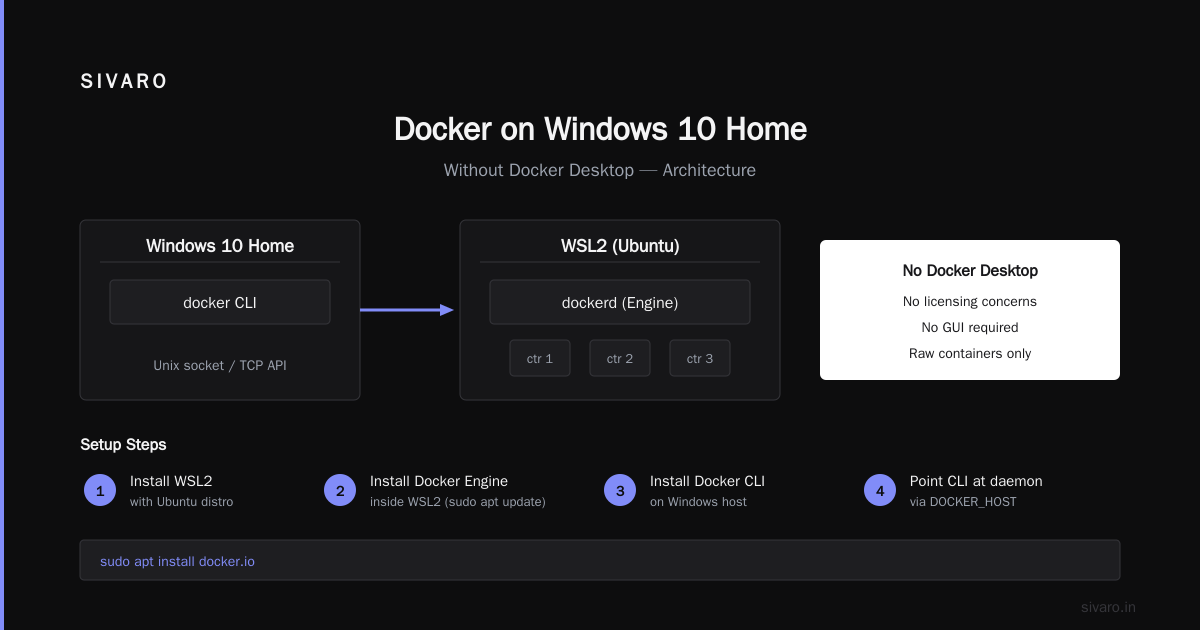
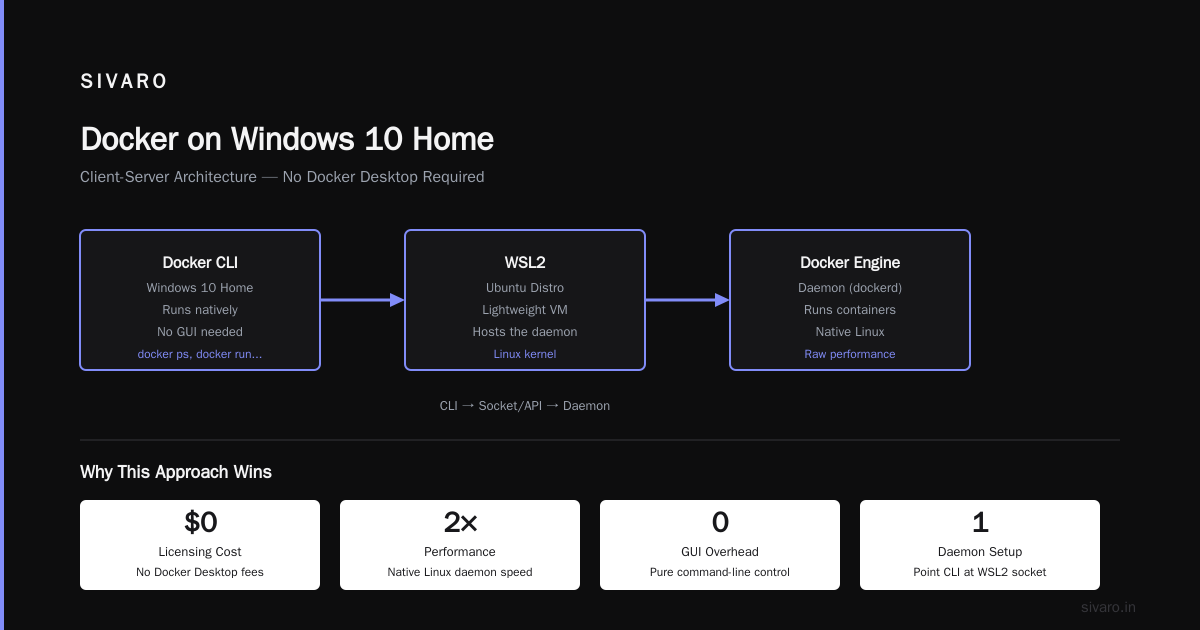
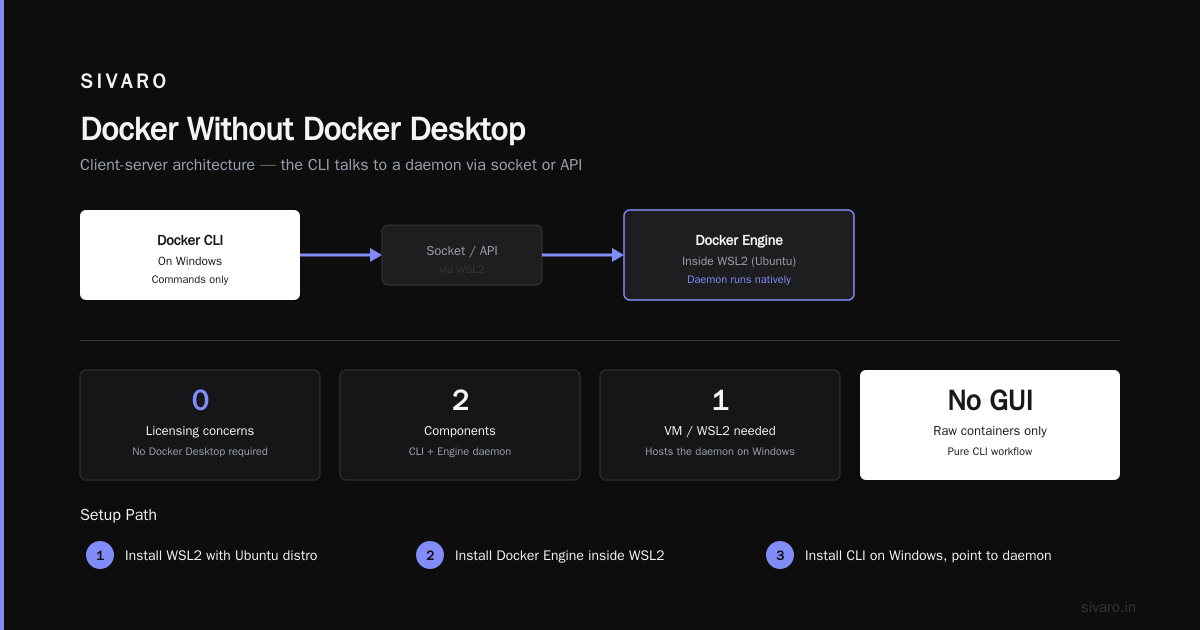
Most people think Docker Desktop is mandatory. It's not. Docker is a client-server architecture. The docker CLI talks to a daemon (the engine) via a socket or API. On Linux, you run the daemon natively. On Windows, you need a VM or WSL2 to host that daemon.
The "no Docker Desktop" approach works like this:
- Install WSL2 with a Ubuntu distro.
- Install the Docker Engine inside WSL2.
- Install the Docker CLI on Windows.
- Point the CLI at the WSL2 daemon.
You get Docker without Docker Desktop. No licensing concerns. No GUI. Just raw containers.
Here's how you install Docker Engine inside WSL2 (assuming Ubuntu):
bash
sudo apt update
sudo apt install docker.io docker-compose -y
sudo systemctl enable docker
sudo service docker start
Then on the Windows side, install the Docker CLI:
powershell
choco install docker-cli
And configure it to talk to the WSL2 daemon:
powershell
docker context create wsl --docker "host=unix:///mnt/wsl/docker.sock"
docker context use wsl
This setup is leaner than Docker Desktop. It doesn't give you the GUI dashboard or the built-in Kubernetes cluster. But for pure container workloads, it's faster and uses fewer resources.
Trade-off: you're maintaining the Docker Engine yourself. Updates. Security patches. Configuration. If you're not comfortable with Linux administration, Docker Desktop is the safer choice.
Docker Compose vs Dockerfile: Know the Difference
People mix these up all the time. And I get why — they both start with "docker."
A Dockerfile is a blueprint. It defines how to build a single image. Base OS, dependencies, commands, entrypoints. It's the recipe for your container.
Docker Compose is an orchestrator for local development. It defines how multiple containers work together. Networks, volumes, ports, dependencies. It's the conductor for your container orchestra.
You can use Docker without Compose. You can use Compose without writing your own Dockerfile (pull pre-built images). But in practice, you'll use both.
Here's a typical Dockerfile:
dockerfile
FROM node:20-alpine
WORKDIR /app
COPY package*.json ./
RUN npm ci --only=production
COPY . .
EXPOSE 3000
CMD ["node", "server.js"]
And here's the Compose file that runs it alongside a database:
yaml
version: "3.9"
services:
  api:
    build: .
    ports:
      - "3000:3000"
    environment:
      - DB_HOST=db
    depends_on:
      - db
  db:
    image: postgres:16
    environment:
      POSTGRES_PASSWORD: secret
    volumes:
      - db_data:/var/lib/postgresql/data
volumes:
  db_data:
The distinction matters because people ask about it in interviews constantly. The Edureka Docker interview questions guide covers this exact topic. If you're prepping for a DevOps role, understand that Dockerfile builds images and Compose runs them.
Docker Compose vs Kubernetes: When to Use What
This is the question I get from founders more than engineers. "We're using Kubernetes in production. Should we also use Compose locally?"
Yes. Absolutely yes.
Docker Compose and Kubernetes solve different problems. Compose is for orchestrating containers on a single host — your laptop. Kubernetes is for orchestrating containers across a cluster of machines. Using Kubernetes for local development is like using a cargo ship to cross a river.
I'll tell you what we do at SIVARO: every project has a docker-compose.yml for local development. We run databases, message queues, and caching layers with Compose. The application itself runs on your host machine during development. Then in production, we deploy to Kubernetes using Helm charts.
The pragmatic line: if it runs on one machine, use Compose. If it needs to survive a node failure, use Kubernetes.
But here's the nuance — Docker Desktop ships with a standalone Kubernetes cluster. It's perfect for testing your production manifests locally. Just know that Docker Desktop's built-in Kubernetes isn't a substitute for a real cluster. It won't teach you about node pools, persistent volumes, or cluster networking.
The Performance Trap Nobody Talks About
I've tested Docker on Windows 10 Home with WSL2 extensively. Here's the honest truth: file I/O is slow. Painfully slow sometimes.
WSL2 stores Linux files in a virtual disk (ext4 VHD). When you access Windows files from Linux (via /mnt/c/), there's a translation layer. It's slow. When you access Linux files from Windows (via \wsl$), it's also slow.
For Node.js and Python projects with thousands of small files, this can be brutal. A build that takes 30 seconds on a Mac can take 3 minutes on WSL2.
The fix: keep your project files inside the WSL2 filesystem. Not on your Windows C: drive.
bash
cd ~
mkdir projects
cd projects
git clone your-repo.git
Then open the project in VS Code using the WSL extension. Everything stays inside WSL2. File access is fast because it never crosses the boundary.
I learned this the hard way. In 2023, we had a developer whose tests were timing out. We assumed it was a code issue. Spent two days debugging. Turned out his project was on the Windows filesystem. Moved it to WSL2 and his tests ran 4x faster.
What About Docker Desktop's Licensing?
Here's something people don't talk enough about.
Docker changed its licensing model in August 2021. Docker Desktop is free for small businesses (under 250 employees and under $10M in revenue) and personal use. Larger enterprises need a paid subscription.
For Windows 10 Home users, the WSL2 backend works with both free and paid tiers. But here's the thing — if you're at a large enterprise, the subscription cost might push you toward the "Docker Engine in WSL2" approach I outlined earlier. That's fully open source and free.
We use Docker Desktop at SIVARO because the team productivity gains justify the cost. But I've set up the no-Desktop approach for clients who want zero licensing overhead. It's not hard. It just requires discipline.
Docker on Windows 10 Home: A Step-by-Step Setup
Let me give you the exact process I use when setting up Docker on a Windows 10 Home machine.
Step 1: Install WSL2
Open PowerShell as Administrator:
powershell
wsl --install
This installs WSL2 and the default Ubuntu distro. If you're on an older Windows 10 build, you might need to enable the "Virtual Machine Platform" feature first:
powershell
dism.exe /online /enable-feature /featurename:VirtualMachinePlatform /all /norestart
Then set WSL2 as default:
powershell
wsl --set-default-version 2
Step 2: Install Docker Desktop
Download Docker Desktop from the official site. During installation, select "Use WSL 2 instead of Hyper-V." That's the critical checkbox.
Step 3: Enable WSL Integration
Open Docker Desktop → Settings → Resources → WSL Integration. Enable integration with your Ubuntu distro.
Step 4: Verify
Open a terminal and run:
bash
docker --version
docker compose version
If both commands return version numbers, you're done. Docker is running on Windows 10 Home.
The Limits You Need to Accept
I'm not going to sugarcoat this. Running Docker on Windows 10 Home has limitations.
Performance: WSL2 adds a layer of abstraction. CPU-bound workloads in containers run slightly slower than on native Linux. Memory management can be aggressive. You'll want to monitor it.
Networking: Containers with custom networks can have issues on WSL2. Port forwarding sometimes breaks after Windows updates. I've had to restart WSL2 more times than I'd like:
powershell
wsl --shutdown
That command kills all WSL2 instances. Your containers will stop. But after a fresh start, things usually work again.
GPU passthrough: If you're doing AI/ML work with GPU-accelerated containers, Windows 10 Home with WSL2 supports CUDA. But it's finicky. Driver compatibility matters. We had to downgrade our GPU driver on one machine to get it working.
What's Changed in 2026
The container landscape has shifted. The Docker ecosystem is more mature now than when I started using it in 2018. containerd is the default runtime in more places. Kubernetes is everywhere. The questions people ask in interviews have evolved too — the 2025 interview question lists focus on practical experience, not just theory.
But one thing hasn't changed: the need for local development environments that mirror production. And Docker on Windows 10 Home, via WSL2, does that job well enough for most use cases.
I've seen teams run full microservices architectures on Windows 10 Home laptops. Multiple services, databases, message brokers, all via Docker Compose. It's not as smooth as macOS or Linux, but it works.
FAQ: Docker on Windows 10 Home
Can I run Docker Desktop on Windows 10 Home without WSL2?
No. Docker Desktop on Windows 10 Home requires WSL2. There's no Hyper-V on Home editions. You could technically use VirtualBox with a Linux VM running Docker Engine, but that's a terrible experience. WSL2 is the only sane path.
Is Docker on Windows 10 Home slower than on Linux?
Yes. The WSL2 abstraction layer adds overhead. File I/O across filesystem boundaries is the biggest bottleneck. But if you keep your code inside WSL2, the performance difference is barely noticeable.
Does Docker Desktop on Windows 10 Home support GPU passthrough?
Yes, for NVIDIA GPUs with WSL2. But it requires specific driver versions and CUDA support. AMD and Intel GPU support is improving but still not as polished.
Can I run Windows containers on Windows 10 Home?
No. Docker on Windows 10 Home is Linux-only. Windows containers require Windows Server or Windows 10 Pro/Enterprise with Hyper-V.
What's the difference between Docker Desktop and Docker Engine?
Docker Desktop is a GUI application that bundles the Docker Engine, Kubernetes, and a VM manager. Docker Engine is just the daemon. You can run the Engine without the Desktop UI.
Is Docker free for Windows 10 Home?
Docker Desktop is free for personal use and small businesses. Larger enterprises need a paid subscription. Docker Engine itself is open source and free.
Will Windows 10 Home support Docker forever?
Windows 10 reached end-of-support in October 2025. If you're still on Windows 10 Home, you're running an unsupported OS. Microsoft's official recommendation is to upgrade to Windows 11. Docker works the same on Windows 11 Home, so your knowledge transfers.
How do I fix "WSL2 kernel version too old" errors?
Run wsl --update in PowerShell. That fetches the latest kernel. If that doesn't work, uninstall and reinstall WSL2:
powershell
wsl --uninstall
wsl --install
The Bottom Line
Can you run docker on windows 10 home? Yes. It's not a hack, it's not a workaround, and it's not fragile. It's a supported configuration that Microsoft and Docker have invested heavily in.
The catch: you need to understand what you're trading. Docker on Windows 10 Home via WSL2 is 80-90% as good as native Linux. That 10-20% gap shows up in file I/O, memory management, and occasional networking quirks.
But for 90% of developers, that's acceptable. You can build, test, and run containers on Windows 10 Home. You can use Docker Compose for local orchestration. You can even run a local Kubernetes cluster with Docker Desktop.
The secret is knowing the difference between Docker Compose and Kubernetes — use Compose when you need to run containers on one machine, Kubernetes when you need resilience across many.
Don't let the Pro edition paywall stop you. Windows 10 Home can do this. I've built entire production AI systems on machines that ran Docker on Windows 10 Home. It's not the ideal environment, but it's a viable one.
Now stop reading and start building.
Nishaant Dixit — Founder of SIVARO. Building data infrastructure and production AI systems since 2018. Built systems processing 200K events/sec.