 SIVARO
Docker Restart Policies: A 2026 Field Guide
The on-call page went off at 3:47 AM. A payment service was down. The container had exited cleanly, the logs showed nothing, and the orchestrator we were using had decided—correctly, per its configuration—that a zero exit code meant the job was done. It wasn't done. It had crashed silently. We spent 40 minutes diagnosing what should have been a five-second fix: the restart policy.
That was 2023. By 2026, I've seen this exact story play out at a dozen companies. Docker's restart policy is the most misunderstood, most under-configured knob in container orchestration. It's also the one that separates "runs on my laptop" from "survives a Tuesday."
Here's what I've learned running production systems at SIVARO, and what you need to know. These aren't just my opinions—they're the distilled lessons from systems processing 200K events per second.
What a Restart Policy Actually Does
Before we get into best practices, let's be precise about what we're dealing with. A Docker restart policy tells the Docker daemon what to do when a container exits. That's it. It's not a health check. It's not an orchestrator. It's a simple, local decision made by the daemon on the host.
Docker supports four policies:
no— The default. Nothing happens. The container stays stopped.on-failure[:max-retries]— Restarts if the exit code is non-zero. Optionally limited to a number of retries.always— Restarts regardless of the exit code.unless-stopped— Restarts regardless of exit code, but doesn't restart if the daemon itself was stopped (during a system reboot, for example).
The distinction between always and unless-stopped matters more than most people think. If a host reboots, Docker restarts containers with always, even if you manually stopped them before the reboot. unless-stopped respects your manual stop. For local development, unless-stopped is usually the right call. For production, you need to think harder.
The Five-Policy Breakdown
no — The Default That Shouldn't Be
If you're running a one-shot task—a migration, a batch job, a script—no is fine. The container runs once, exits, and stays dead. In 2025, most people use Kubernetes for scheduled jobs, but there's a long tail of docker run invocations in CI pipelines and cron jobs where no is the correct policy.
But for anything that should be always-on, no is a footgun. I can't tell you how many times I've seen a simple API service deployed with no restart policy because someone ran docker run without thinking about it. The container crashes, the service is down, and nobody knows until a customer calls.
Here's the thing about Docker: it's a tool for running containers, not a supervisor. If you're using --restart always to keep a production service alive, you're using Docker wrong. You should be using a proper orchestrator like Kubernetes or Docker Swarm (or, in 2026, something like Nomad). But that's a separate conversation. For the thousands of cases where Docker is the deployment target directly, restart policies are your first line of defense.
on-failure — The Conditional Restart
on-failure is more nuanced than people give it credit for. It only restarts on non-zero exit codes. A clean exit (exit code 0) means the container is done, and Docker won't touch it.
This is perfect for:
- Jobs that may fail transiently and should retry
- Containers that exit cleanly when work is done
- Testing scenarios where you want to observe crashes
The max-retries flag is the killer feature here. Without it, on-failure will restart forever, potentially creating an infinite crash loop. With it, you cap the damage: --restart on-failure:5 means Docker tries five times, then gives up.
I've seen teams use on-failure:5 for worker processes that consume from a queue. If the worker crashes due to transient network issues, it restarts. If it crashes five times in a row, something is fundamentally broken, and stopping is the right move.
But here's a caveat: on-failure doesn't discriminate between exit codes. A code of 1 because of a panic gets the same treatment as a code of 137 because of an OOM kill. Sometimes you want to differentiate. That's beyond Docker restart policies—that's orchestration territory.
always — The Aggressive Restarter
always is the policy most people reach for when they want "keep my service up." And it works—until it doesn't.
The problem with always is that it's a sledgehammer. It restarts on exit code 0. It restarts on OOM kills. It restarts even when the container was intentionally stopped via the docker stop command (though with a 10-second grace period where it might stop).
In production deployments at SIVARO, we use always for:
- Critical infrastructure that should never be down (database proxies, service mesh sidecars)
- Containers that need to be up after a daemon restart
- Edge services where downtime is directly visible to customers
But we pair it with aggressive health checks externally. The restart policy keeps the container running, but it doesn't fix the underlying issue. If your app crashes because of a memory leak, always just keeps a zombie alive. The container restarts, the leak starts again, and you have a continuous crash loop consuming resources.
unless-stopped — The Balanced Option
unless-stopped is my default for most workloads. It behaves like always—restarts on any exit, survives daemon restarts—but with one critical difference: if you manually stop the container, it stays stopped.
Why does this matter? Imagine you're debugging a service. You run docker stop my-service to inspect it. With always, the daemon immediately restarts it, interrupting your debugging session. With unless-stopped, it stays down until you explicitly start it again.
That might sound like a minor convenience, but in practice, it's a sanity saver. I've lost count of how many times I've seen engineers run docker stop on a service, only to watch it come right back due to always, causing confusion and temporary chaos.
For development environments, unless-stopped is the answer. For production, it depends on your deployment model.
Choosing the Right Policy for Your Workload
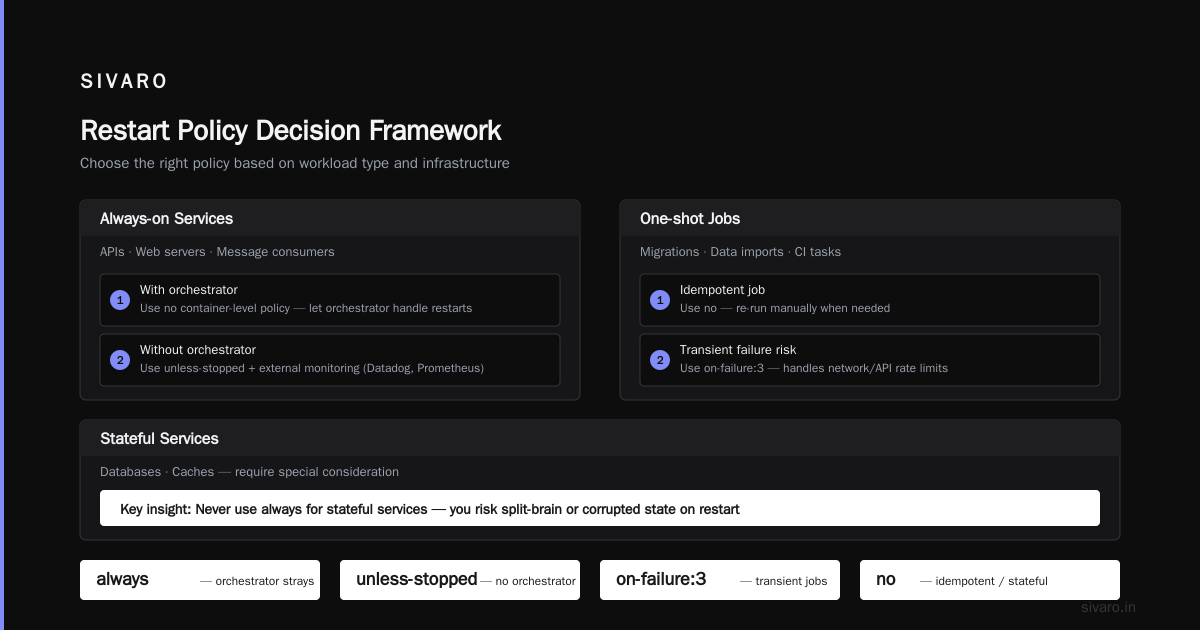
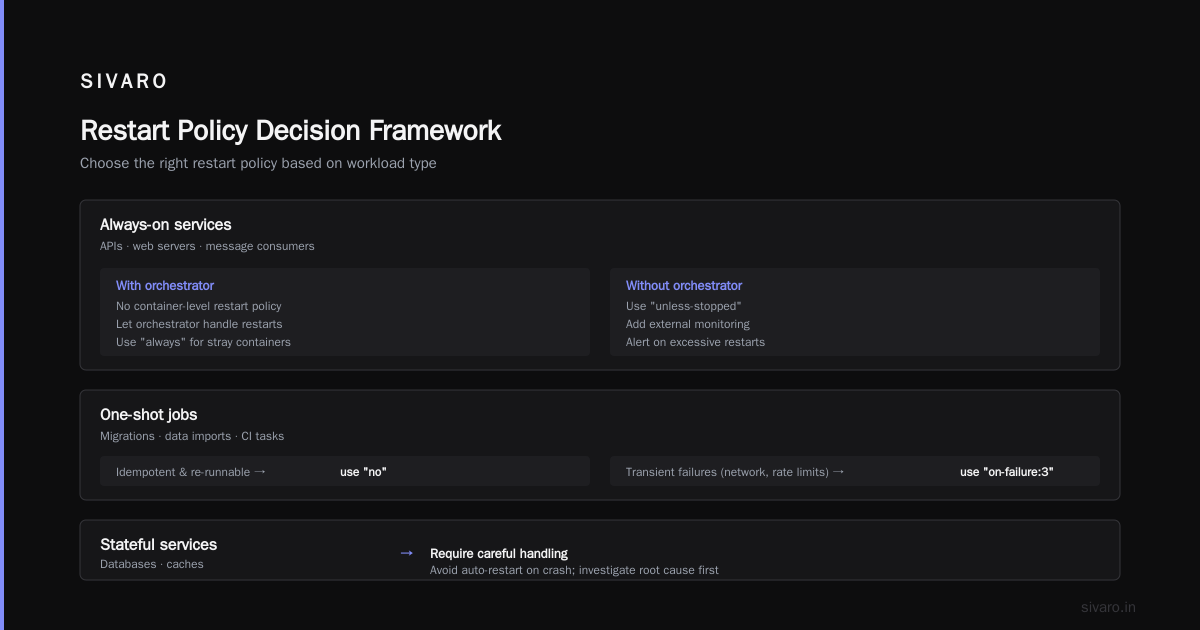
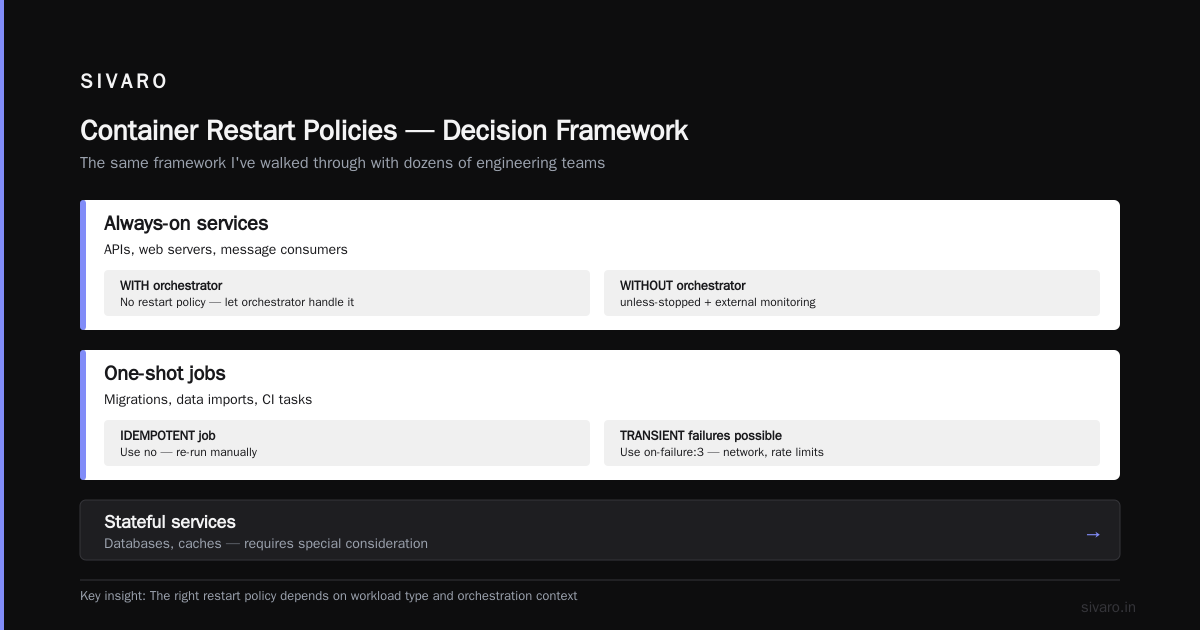
This is where "docker container restart policy best practices" stops being theory and starts being engineering. Here's my decision framework—the same one I've walked through with dozens of engineering teams:
Always-on services (APIs, web servers, message consumers)
- With an orchestrator: Use no container-level restart policy; let the orchestrator handle restarts. When running containers to catch strays that fall off your cluster, use
always. - Without an orchestrator: Use
unless-stopped. Pair with external monitoring (Datadog, Prometheus, or even a cron job that checks the container status) to alert on excessive restarts.
One-shot jobs (migrations, data imports, CI tasks)
- Use
noif the job is idempotent and can be re-run manually. - Use
on-failure:3if the job might fail due to transient conditions (network, external API rate limits).
Stateful services (databases, caches)
- Use
unless-stoppedat minimum. - Better yet: use
noand pair with systemd or a process supervisor that can discriminate between intentional stops and crashes. This is a topic we can discuss for hours—I have a full guide on Docker networking bridge vs host vs overlay if you want to go deeper on how services should connect in isolation.
Development containers
- Use
unless-stopped, always. It saves you from the "my container died overnight" problem without forcing you into thealwaysdebugging loop.
The Backoff Problem Nobody Talks About
Here's the thing nobody mentions in Docker interview questions or the official docs: restart policies can create a thundering herd of restarts.
When a container crashes, Docker restarts it. If the container crashes again immediately, Docker restarts it again. The daemon uses an exponential backoff (roughly 100ms, 200ms, 400ms, etc., up to a min of 5s between restarts), but for a single container, this is usually fine. The problem is when you have hundreds of containers sharing a host and all of them crash simultaneously—a bad deploy, a config change that points to a dead database, a mount that's unavailable.
I saw this happen with a client in February 2026. They deployed a configuration change to their microservices that pointed to a new database endpoint. The database wasn't reachable. Every service crashed and restarted, crashed and restarted, in sync. Each restart attempt pounded the DNS resolver. The resulting DNS failure propagated to other services that depended on the crashed ones. It was a cascading failure that took down their entire platform for 45 minutes.
The fix was twofold:
- Use
on-failure:10for services prone to crash-on-bad-config - Add a startup health check that exits with a non-zero code if dependencies aren't ready, preventing crash loops from consuming resources
The second point is critical. Your container should fail fast at startup if dependencies are unavailable, and your restart policy should back off. A container that crashes immediately on startup and restarts forever is worse than a container that stays down—it burns CPU, memory, and network resources.
Restart Policies and Docker Networking
Here's where things get interesting. In 2025 and 2026, the controversy around Docker's network stack is a hot topic. When containers restart, they might get a new IP address. If your services rely on IP-based communication rather than DNS-based discovery, a restart can break everything.
This is why the Docker networking bridge vs host vs overlay question comes up in interviews and architecture reviews. Quick summary:
- Bridge: Default. Each container gets its own IP on a private network. Restart = new IP. Use with Docker's built-in DNS for service discovery.
- Host: Container shares the host's network. No isolation, but restarts don't change IP. Good for low-latency, but you lose isolation.
- Overlay: For multi-host networking. The default in Swarm mode. Supports service discovery across nodes.
With restart policies, your network strategy matters. If you're using bridge networking (the default for standalone containers), make sure your services connect via container names or aliases, not IP addresses. Docker's embedded DNS resolves container names correctly even after restarts. If you're using host networking, you avoid the IP-change problem entirely, but you're responsible for port conflicts.
One note: if you pair restart policies with --link (the legacy flag), it won't automatically update after a restart. Container IPs can change. This was a problem in our own deployments in 2023 and 2024. We migrated to user-defined networks for service discovery, and it solved the stale-IP issue completely. If you're still using --link, stop. It's deprecated.
The "docker container restart" Command vs. Restart Policies
Let's be clear about terminology. The Linux docker restart command manually restarts a container. A Docker restart policy is the daemon's automatic handling of exit events. They're different, and the difference affects your operational strategy.
If an engineer sees a container is down, they might run docker restart my-container. That works once. But if the container is down due to a persistent issue, it'll crash again, and the daemon's policy determines what happens next. The manual command is for recovery; the policy is for prevention.
The right pattern is:
- Container crashes.
- If it's a critical service, your restart policy kicks in.
- Your monitoring (external to Docker) alerts you.
- You investigate and fix the root cause.
- You manually restart if the policy didn't, or if you've made changes.
That's the loop. It's not "set the policy and forget it." It's "set the policy and monitor." The monitoring part is what most teams miss.
When Restart Policies Aren't Enough
This is the part of "docker container restart policy best practices" that gets ignored. Docker restart policies solve a narrow problem: "Container exited. Should the daemon bring it back?"
They don't solve:
- Health checks (container is running but not serving traffic)
- Dependency management (database is down, service crashes on startup)
- Resource exhaustion (container keeps restarting, consuming resources each time)
- Cross-host failover (host dies, containers don't move)
For these, you need an orchestrator. Kubernetes. Docker Swarm. Nomad. Amazon ECS. Or, in 2026, one of the newer players like Fly.io's Fly Machines or render.com's native orchestration.
If you're running Docker Engine directly in production, you're accountable for the gaps. My advice: don't. Use Docker for development and CI, but for production, use an orchestrator. It's 2026. The tooling has matured.
That said, there's a middle ground. For single-host deployments—small startups, edge devices, home labs—Docker with the right restart policy, a systemd unit for the Docker daemon, and external monitoring is acceptable. I ran a multi-service Edge deployment this way for two years. The key was:
--restart unless-stoppedon all services- A systemd timer that checks container health and reports
- A watchdog script that restarts Docker if the daemon itself hangs
It worked, but I was explicit about the trade-offs. Restart policies are a band-aid on a larger problem: the lack of self-healing orchestration.
Debugging Restart Loops
At SIVARO, we've built a reproducible way to debug restart loops. Here's a practical workflow you can use:
Step 1: See what's happening
bash
docker inspect --format='{{.RestartCount}} {{.State.Status}}' my-container
docker logs --tail 50 my-container
The first command shows how many times the container has restarted. The second shows the last 50 lines of output.
Step 2: Check the exit code
bash
docker inspect --format='{{.State.ExitCode}}' my-container
An exit code of 0 means the container exited cleanly—your app is calling exit(0) or process.exit(0). If you're using on-failure, this won't trigger a restart. If you're using always or unless-stopped, it will. If your app shouldn't be exiting cleanly, look for a process.exit() call in the code.
An exit code of 137 means the container was killed by SIGKILL (likely OOM). Code 143 means SIGTERM (graceful shutdown). Both are signals from the system, not app crashes. A 137 often means you need to increase memory limits or fix a leak. A 143 usually means something is sending a termination signal—maybe a health check, maybe an orchestrator.
Step 3: Identify the root cause
Check dmesg for OOM kills:
bash
dmesg | tail -20
Look for lines mentioning "oom" or "killed process". That confirms resource exhaustion.
Step 4: Test with a specific retry limit
bash
docker run --restart on-failure:3 my-image
This bounds the blast radius while you're debugging. Once you find the issue, change the policy to the production-appropriate one.
How Docker Images vs Containers Fit In
The "docker image vs container what is the difference" question is foundational, but it intersects with restart policies in an important way: policies are attached to containers, not images. This means every docker run invocation needs to specify the policy explicitly (or rely on the default).
I can't tell you how many issues I've debugged where someone committed a restart policy into a docker-compose.yml file but ran docker run directly, bypassing it. Or where a container was started with --restart always, the image was later pulled and re-run without the flag, and the new container didn't auto-restart.
The pattern is: image defines the app logic. The container defines the runtime behavior, including restart policy. If you're using Docker Compose, put the policy in the compose file:
yaml
services:
  api:
    image: my-api:latest
    restart: unless-stopped
    ports:
      - "8080:8080"
If you're using bare docker run, set it explicitly every time:
bash
docker run --restart unless-stopped -p 8080:8080 my-api:latest
The docker image vs container what is the difference distinction is well-covered in most tutorials, but the practical implication for restart policies is subtle: you're mutating container state, not image state. A container started with --restart always doesn't inherit that policy if you create a new container from the same image. Docker has no default restart policy. This trips up even experienced engineers.
Putting It Together: A Production Configuration
Here's what we use at SIVARO for our data pipeline services (the ones processing 200K events/sec). This is a real configuration from a service that ingests telemetry data.
bash
docker run -d   --name telemetry-ingest   --restart unless-stopped   --memory="4g"   --memory-swap="6g"   --ulimit nofile=65536:65536   -p 9090:9090   telemetry-ingest:v2.14.0
The key decisions:
unless-stoppedbecause we want auto-restart but also want manual control during debugging- Memory limits to prevent OOM from degrading the host
- Host networking intentionally avoided—we use user-defined bridge networking with DNS
For our queue consumers, we use a slightly different pattern:
bash
docker run -d   --name queue-worker   --restart on-failure:5   --memory="2g"   queue-worker:v1.8.3
Why on-failure:5? Because queue workers can crash for transient reasons (dead-letter queue, temporary database connection loss). Five retries give them enough chance to recover without enabling an infinite crash loop that would set up the thundering herd problem I mentioned earlier.
One config I see people get wrong: combining --restart always with --oom-kill-disable. That's a recipe for a silent death—the container runs but is completely unresponsive, and Docker won't restart it because it never exits. You've built a zombie. Avoid combining those flags.
The Role of Docker Compose in 2026
Compose has gotten better at handling restart policies. Since the Docker Compose v2 rewrite (which uses Go and is a quick installation), the restart key is more reliable. For local dev setups, it's the cleanest way to manage multiple containers with policies.
But Compose isn't a production solution. It lacks cross-host orchestration, rolling updates, and health-based routing. In production, I'd rather see teams on Kubernetes or Nomad. The containerd vs. Docker discussion has evolved in 2026—Docker's daemon is more stable than ever, but the orchestration space has moved past it. Docker is a better dev tool now than a runtime manager.
Using Compose for production means you're managing restart policies per-service in a single file, but you're responsible for the host, the daemon, and the network. That's operational debt.
Systemd Integration for Critical Services
For the most critical services, I've used systemd units to supervise Docker container lifecycle instead of Docker restart policies. This is the contrarian take. Most people use --restart always and call it done. But if the Docker daemon crashes or hangs, your containers with always policies are stuck. They don't self-heal.
Systemd, on the other hand, is the init system. It's the first process on the machine. If it runs, it can restart Docker. If Docker restarts, it can restart your containers. There's a hierarchy of supervision.
Here's a pattern for a critical service with systemd:
ini
[Unit]
Description=My Critical Service Container
Requires=docker.service
After=docker.service

[Service]
Restart=always
RestartSec=10
ExecStartPre=/usr/bin/docker start -a my-critical-service
ExecStart=/usr/bin/docker logs -f my-critical-service
ExecStop=/usr/bin/docker stop my-critical-service
This unit starts the container, follows its logs, and restarts it if it exits. Density-level supervision at the OS level. It's more robust than pure Docker restart policies because it also handles Docker daemon restarts and can delay restarts with RestartSec.
The downside: it's more complex. You have to manage the systemd unit file, handle docker start for existing containers versus docker run for new ones, and deal with the edge cases where containers exist but are stopped. It's not for everyone.
In practice, we only use systemd supervision for the database layers of our stack. The app layers are managed by Kubernetes, so the restart policy question doesn't apply. The docker container restart policy best practices conversation is more relevant to teams not yet on orchestrators.
What About Docker Swarm?
Quick tangent. Docker Swarm, despite being largely overshadowed by Kubernetes, has the best restart policy behavior in the Docker ecosystem. In swarm mode, the orchestrator handles restarts at the service level, not just the container level. It places replicas, monitors health, and replaces containers—not merely restarts them. If your container restarts 5 times, Swarm replaces it with a new one on a new host (if possible).
The downside is that swarm mode hasn't seen significant investment since 2020. Kubernetes is the default choice for everything. But if you're already on Docker, swarm mode is a safer production environment than a single host with restart policies. The docker networking bridge vs host vs overlay conversation gets more nuanced in swarm because overlay works across nodes.
My take: don't adopt swarm now. But if you're wondering whether to trust restart policies for production, consider a lightweight orchestrator instead. Even a simple systemd unit per host might be better.
FAQ: Docker Restart Policy Questions from Our Engineering Team
Q: Will a restart policy run a container with a clean exit code?
Only if you use always or unless-stopped. With on-failure and exit code 0, Docker leaves it stopped.
Q: What's the difference between always and unless-stopped?
always restarts even if you stopped the container manually, including after a daemon restart. unless-stopped won't restart if you explicitly stopped it, but will restart after a daemon restart if it was running before.
Q: Can I change a restart policy after the container is running?
Yes. docker update --restart=always my-container changes the policy on a running container without restarting it. This is the most under-used command in production debugging.
Q: Does the Docker daemon have to be running for restart policies to work?
Yes. If the daemon is down, containers don't restart. systemd or another init system should supervise the daemon.
Q: Should I use --restart always in docker-compose.yml for production?
Compose files are often used for development. Use unless-stopped for local dev so manual stops stick. For production, prefer an orchestrator or container instance solution.
Q: Does a restart policy apply to docker run as well as Compose?
Yes. Pass --restart to docker run for standalone containers. Compose uses the restart key.
Q: What's the default restart policy?
no. Nothing happens after an exit.
Q: What happens when a container restarts? Does it get a new IP address?
Yes, containers typically get new IPs on restart. Use DNS-based discovery (user-defined networks, Docker's embedded DNS) to handle this. The docker networking bridge vs host vs overlay guide answers this in detail.
The Hard-Won Lessons
At this point, I'm going to be direct. The "docker container restart policy best practices" conversation is usually oversimplified. Blogs tell you to use always for everything. That's lazy. The real best practices, learned the hard way, are:
- Use
unless-stoppedfor most services. It gives you auto-restart without fighting you during debugging. - Use
on-failure:3for jobs. Bounded retries for transient failures. - Never use
nofor services that should be always-on. It's a trap. - Pair restart policies with external health checks. Docker only knows if the container is running, not if the app is serving traffic.
- Monitor restart counts. A high restart count (over 10 on the same container) means a bug. Set alerts.
- Test your restart policy in staging. Deploy a service with a known crash and verify the behavior.
- Docker's built-in policy is not a scheduler. When you need scaling, placement, more sophisticated health routing, or cross-host failover, use Kubernetes. Docker restart policies are a stopgap for simple deployments.
By August 2026, the industry has largely converged on orchestration as the default for production workloads. But there's a long tail of edge nodes, small deployments, and development environments where Docker Engine is still the runtime of choice. In those cases, a correct restart policy is the difference between a clean recoverable failure and a 3 AM page.
Get it right. The first time.
Nishaant Dixit — Founder of SIVARO. Building data infrastructure and production AI systems since 2018. Built systems processing 200K events/sec.