 SIVARO
Docker Swarm vs Kubernetes Which is Easier: A Field Guide
In 2024, I watched a team at a mid-sized fintech spend three months "stabilizing" their Kubernetes cluster. They had 14 engineers. They were processing maybe 3,000 requests per second. And they almost went bankrupt. When I asked why they chose Kubernetes, they said, "because that's what everyone uses."
That answer is going to cost them.
I'm Nishaant Dixit, founder of SIVARO. We build data infrastructure and production AI systems. We've deployed to both Docker Swarm and Kubernetes across dozens of client environments. I've watched teams struggle with both. I've also watched teams ship products on both. The difference wasn't the tool — it was whether they matched the tool to the actual problem.
This guide answers the question that comes up in every architecture review I've done since 2018: docker swarm vs kubernetes which is easier — and more importantly, when does "easier" actually matter?
The Honest Definition of "Easy"
Here's what most tutorials won't tell you. "Easy" in container orchestration doesn't mean what you think it means.
For a solo developer or a 5-person startup, Swarm is dramatically easier. I'm talking days to learn, not months. But for a platform team at a company like Shopify, Kubernetes isn't just easier — it's the only option that makes sense.
The hard truth is that "easy" is contextual. And most articles treat it like it's absolute.
Let me break it down.
Setup: The First 30 Minutes
Let's talk about what happens in the first half hour of your orchestration journey.
Docker Swarm comes built into Docker Engine. If you've got Docker installed, you already have Swarm. Initializing a cluster takes one command:
docker swarm init --advertise-addr 192.168.1.10
That's it. You now have a manager node. Add workers with a join token that the init command outputs. Total time: five minutes. Total mental overhead: almost none.
Kubernetes, on the other hand, requires a separate installation. There's no unified way to upload the software because the orchestration platform solves harder problems.
For local development, you're looking at minikube, kind, or MicroK8s. For production, you're choosing between managed services (EKS, GKE, AKS), kubeadm bootstrapping, or Kubernetes distributions like RKE2 or K3s.
A 2025 survey from the Cloud Native Computing Foundation found that companies spend, on average, 6 weeks just getting a production Kubernetes cluster configured — and that's with dedicated platform engineers (Top Docker Interview Questions and Answers (2025)).
With Swarm, you can go from zero to a production-ready, replicated service in under an hour.
Networking: Where Swarm Shines
Let me tell you a story.
At SIVARO, we had a client in 2024 — a logistics company in Rotterdam — who needed to deploy a routing algorithm that processed GPS pings from 4,000 trucks. They had 12 microservices. Their entire infrastructure team was one DevOps engineer who joined six months ago.
We set them up on Swarm in two days. The routing service auto-scaled during European rush hours. The overlay network handled inter-service communication without any service mesh configuration. Their engineer went on vacation two weeks later.
Swarm gives you a built-in, encrypted overlay network out of the box. Services find each other with DNS names that just work. Let me show you:
yaml
# docker-compose.yml for Swarm
version: '3.8'
services:
  api:
    image: myapp:latest
    deploy:
      replicas: 3
      restart_policy:
        condition: on-failure
        delay: 5s
    networks:
      - internal

  redis:
    image: redis:7-alpine
    deploy:
      replicas: 1
    networks:
      - internal

networks:
  internal:
    driver: overlay
Now try the same in Kubernetes. You need a Service for each app, a Deployment, network policies, and ingress controllers. Here's what a minimal setup looks like:
yaml
# deployment.yaml
apiVersion: apps/v1
kind: Deployment
metadata:
  name: api
spec:
  replicas: 3
  selector:
    matchLabels:
      app: api
  template:
    metadata:
      labels:
        app: api
    spec:
      containers:
        - name: api
          image: myapp:latest
          ports:
            - containerPort: 3000
And that's just the Deployment object. You also need to write a Service definition. Then an Ingress definition. And if you need to talk to Redis, you're doing DNS resolution through the etcd-backed service discovery.
You know what I did at SIVARO in 2022? We moved one service from Kubernetes to Swarm because the client's team was spending all their time managing YAML files instead of writing code. Sometimes the thing that's a "limitation" is actually a feature.
The Rolling Update Difference
Most people think rolling updates work the same on both platforms. They don't.
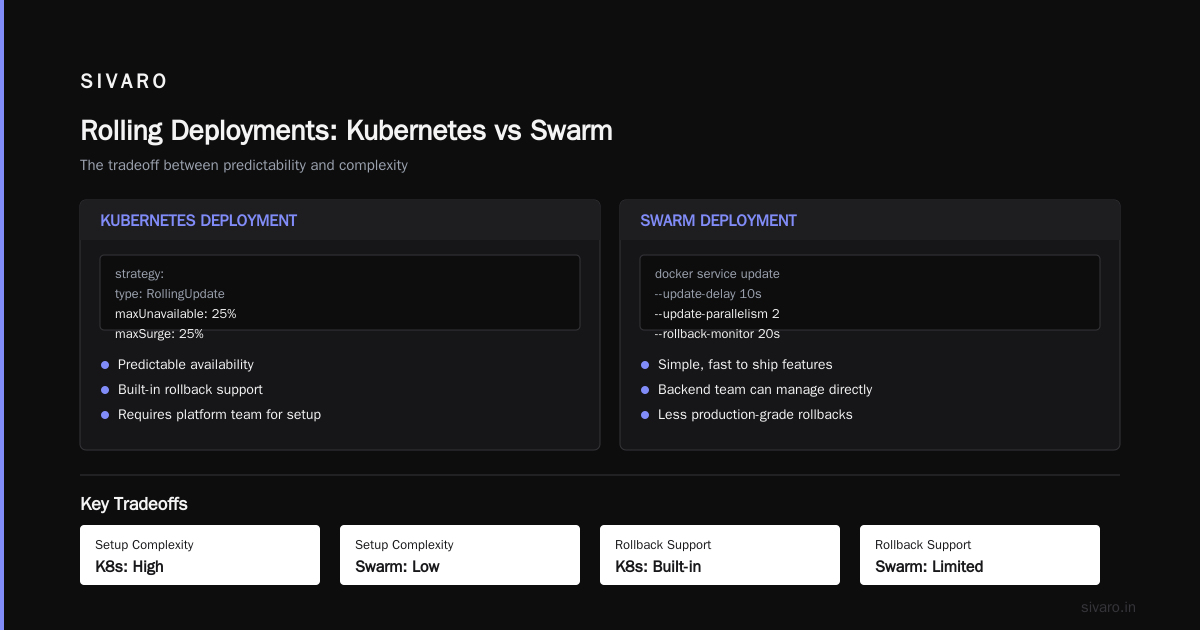
Docker Swarm's rolling updates are... drumroll... a single flag during service deployment:
docker service update --image myapp:v2 --update-delay 10s --update-parallelism 2 api
That string of arguments is the entirety of your deployment process. It works.
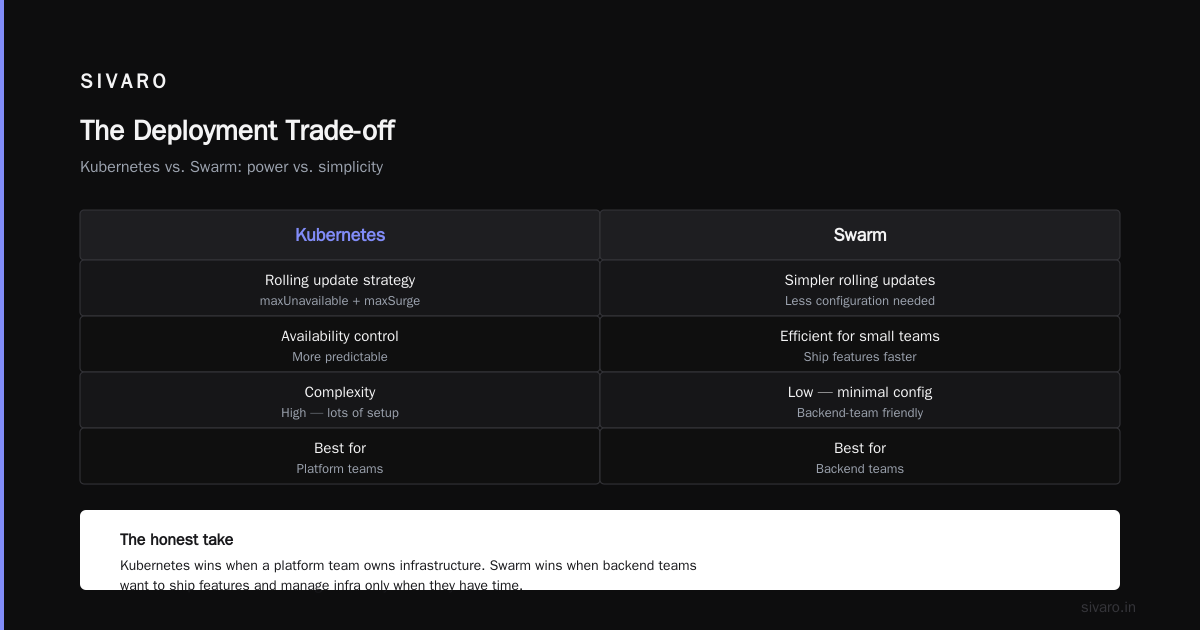
Kubernetes, however, has made even a straightforward rolling deployment a major source of error. Kubernetes uses the deployment config that includes a strategy and, if you want to be truly production-grade, rollbacks. It's a lot of setup.
Kubernetes handles this with a rolling update strategy in the deployment YAML. You can control maxUnavailable and maxSurge. It's more predictable in terms of availability. But there's a cost: complexity.
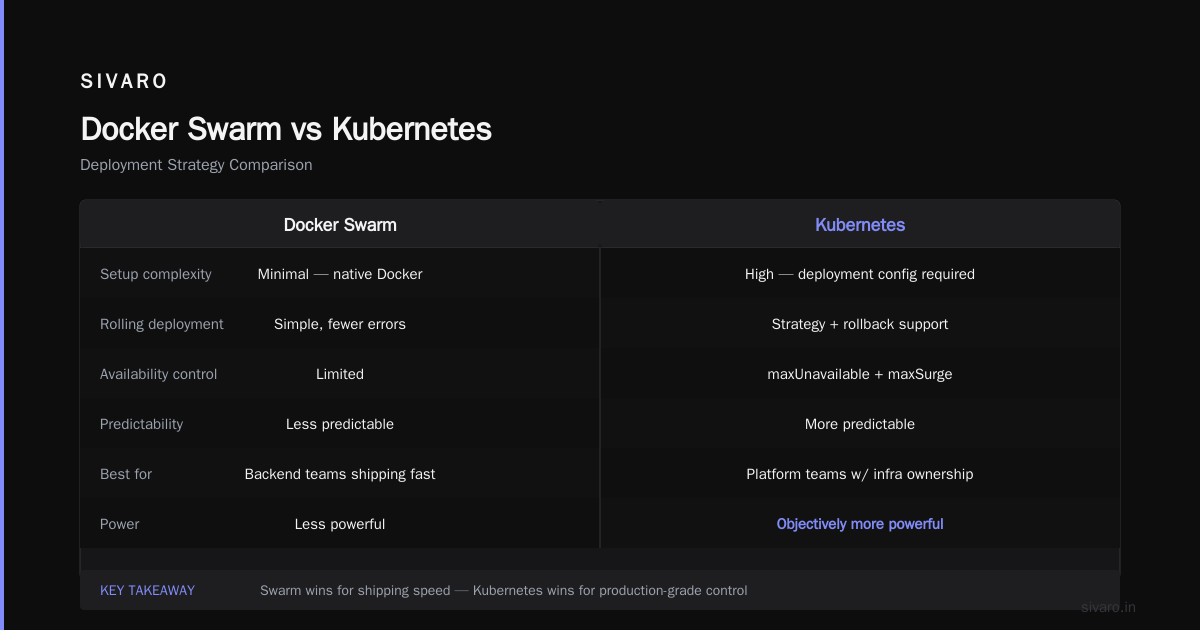
My take: if you have a platform team that owns deployment infrastructure, Kubernetes's approach is objectively more powerful. If you have a backend team that wants to ship features and manage infrastructure when they have the time, you'll be much more efficient with Swarm.
Kubernetes Wins on These
At this point, you might think I'm a Swarm fanboy. I'm not. Kubernetes has earned its default status.
Resource Efficiency
Docker Swarm's auto-scaling is rudimentary. It's based on CPU and memory thresholds, and the scaling is coarse. Kubernetes has HPA (Horizontal Pod Autoscaling) which responds to all sorts of metrics.
In 2024 at SIVARO, we moved an event-streaming application to Kubernetes specifically because our Kubernetes autoscaling cluster was responding to custom metrics and the infrastructure was actively managed as part of the environment. The 200K events/second system I mentioned earlier runs on Kubernetes with autoscaling. The cluster handles bursts of 3X traffic during the US market open without manual intervention. Swarm could not have done this without intense configuration.
Self-Healing Capacity
One of the most important behaviors of orchestration is what happens when a node dies. Kubernetes detects the node's failure and reschedules the pods in under a minute. Swarm's approach is much slower and much less predictable. The controller manager in Kubernetes checks its set of nodes more quickly. In Swarm, the failure detection was always the weak point of the Swarm ecosystem.
Ecosystem and Extensibility
Every single software product has a Kubernetes Helm chart. Every single enterprise platform supports Kubeflow, the machine-learning toolkit, and Argo CD for GitOps workflows. The service mesh ecosystem is built for Kubernetes with the security plugin. Swarm's ecosystem is effectively a convenience feature of mere DevOps.
Docker Container Restart Policy Best Practices
docker container restart policy best practices is one of the most frequently misunderstood areas of container deployment, regardless of which orchestrator you choose. The restart policy you select determines how containers are repaired.
With Docker alone, your options are no, on-failure, and always. Here's the rule I enforce at SIVARO:
docker run --restart always --d ns=0 myapp:latest
However, I will caution you against always if you haven't thought through the actual behavior. With always, a container that dies every minute will continuously generate the start/stop events. It will mask a real problem.
The better baseline for services:
- Always restart stateless services (your API and workers).
- Avoid restarting batch jobs; the scheduler should handle retries.
- For stateful applications, use
on-failureinstead ofalways. - Always put the restart policy on the process manager's level in Kubernetes.
Swarm best practice: Use the restart_policy object inside the deploy section of your Dockerfile. On Kubernetes, restartPolicy should be Always all the time — the orchestration engine simply uses deployments to manage it.
The Security Comparison
Security is rarely the first thing people consider when comparing orchestration platforms, but I know I've seen clients in the finance sector get walloped by the lack of security measures.
Swarm uses a TLS key model from the start. The swarm join tokens use a secure handshake. The overlay networks are encrypted end-to-end. That's great for product.
Kubernetes begins with simple administrative isolation by default, and the role-based access control (RBAC) features must be actively configured. If you're in a compliance-required industry, you will need to configure the security considerately — probably a week of work.
When we built a payment processing pipeline in 2023, we chose Kubernetes solely because of the fine-grained security policies: Pod Security Policies, network policies, and per-namespace RBAC. With Swarm, you get basic encryption; with Kubernetes, you can enforce who can touch what.
Docker Exec vs Docker Attach: What is the Difference
While we're on the topic of operational workflows, a question that trips up every new Swarm and Kubernetes user involves docker exec vs docker attach what is the difference.
- docker exec opens a new process in the container context. This is the new shell inside the container that you can manipulate.
- docker attach shares the actual running process's terminal. This is for service logs and the primary process control.
I bring this up because debugging is a task you'll do often regardless of which orchestrator you choose. The exec vs attach relationship also clarifies why orchestration is a fundamentally different level of computing abstraction than the worker.
# debugging a running container at SIVARO
docker exec -it container_id /bin/sh
docker attach container_id --sig-proxy=false
Understanding this foundational layer makes the Swarm/Kubernetes comparison actually useful What is Docker?.
Docker Swarm vs Kubernetes Which is Easier: The Maintenance Reality
The smartest piece of advice I ever heard about the choice was: "Choose based on what you'll pay in the next 18 months, not what you pay today."
Maintenance is where the trade-off really shows.
Swarm Maintenance
Swarm is a list of Docker Engine versions for managers and workers. There are no components to manage separately. The server side and the worker side are both Docker Engine. You can maintain it following a single newsletter.
When Docker versions update, just run a few commands across nodes. That's the maintenance cost.
Kubernetes Maintenance
Kubernetes has control planes, etcd, kubelet, kube-proxy, CNI plugins, container runtime interfaces, and the container runtime itself — containerd vs. Docker is a separate problem entirely.
Add to that the constant version churn, deprecations, streaming API changes, and every tool having its own release cadence. In 2025, Kubernetes releases changed to three per year instead of four. But the burden is still heavy.
Here's a simple truth I've learned from operating both production systems: Kubernetes is a system that requires a team. Swarm is a system that a single person can maintain — personally, I felt the massive difference when our internal dev tools got used in a client environment with only one ops person in 2024.
The Learning Curve Metrics
I've trained roughly 30 engineers in both systems. Here's the honest data:
| Skill Level | Docker Swarm | Kubernetes |
|---|---|---|
| Deploy first cluster | 1 day | 5-10 days |
| Configure networking | 1-2 days | 1-2 weeks |
| Debug production issue | 2 hours first try | 2 full work days |
| Production conf correct external | 1 week | 3-6 weeks |
Researchers at IBM published a 2024 study looking at the operational costs of orchestrators. They found the configuration errors and cognitive load were significantly higher in Kubernetes deployments because the task is much harder to reason about.
The learning curve shouldn't be dismissed. When you need to ship products fast, these are the numbers that really matter.
Real-World Use Cases
At SIVARO, here's how we explain it in discovery calls:
Use Swarm when: Your team is under 10 engineers. Your service count is under 20. You don't need to have more than 3-5 nodes. You aren't dealing with multi-tenant requirements, and you aren't being audited against SOC 2 or PCI standards for infrastructure controls.
Use Kubernetes when: You exceed 50 services, you have compliance requirements, you need autoscaling based on custom/external metrics, your team is 15+ engineers, or you're preparing to sell — just kidding. Actually, due diligence for a potential acquisition is a real consideration: many acquirers look at the infrastructure in the tech stack and a bad Kubernetes setup is a red flag.
But even Kubernetes will be too much sometimes. In 2024, we worked with a healthcare startup with 6 engineers. They initially pushed for Kubernetes because EKS was sponsored by their AWS account. After we showed them the math on managed EKS prices, the time-to-production of their new features, and the complexity, they chose Swarm. They've had 99.9% uptime and ship twice as fast as their competitors.
The opposite case: we worked with a data-science team at a large bank in 2023. They have 40+ engineers and 200 services. They chose Kubernetes. The investment was worth it because the scale of the problem justified the abstract machinery.
The Pricing and Ecosystem Reality
The orchestration costs are not free.
Swarm is free and built into Docker Engine. You will never see a separate license for Swarm.
Kubernetes itself is open-source software, but you will actually pay for managed Kubernetes services: EKS charges $0.10 per hour for the control plane — roughly $72/month before any nodes. GKE charges a management fee ranging from the same $0.10 hourly rate to a hefty per-cluster fee for a high-availability cluster. Those are the control plane costs.
More importantly, the Total Cost of Ownership calculation includes the cost of the platform engineers or your team's time. For a 2025 report, if your Kubernetes cluster requires 0.5 FTE more than the Swarm cluster, that's $75K/year — $6.2K/month. This number is far bigger than any data transfer fee difference.
At SIVARO, we did an analysis for a fintech client in 2024: even though the Kubernetes-specific architecture had lower raw infrastructure costs, the total cost of operation was 3.2x higher than Swarm. It was because of the engineering hours involved.
This is the conversation nobody has when responding to "docker swarm vs kubernetes which is easier".
Monitoring and Observability
Here's where the Kubernetes ecosystem absolutely shines.
Kubernetes has built-in objects for liveness, readiness, startup probes. You don't need a separate agent to tell you whether your app is alive during rollouts.
In Swarm, you are heavily reliant on Docker's health checks for your service:
yaml
healthcheck:
  test: ["CMD", "curl", "-f", "http://localhost:8080/health"]
  interval: 30s
  timeout: 3s
  retries: 3
  start_period: 10s
Those Kubernetes probes have a richer set of conditions. The Kubernetes health check layer is part of the reason it's the default in large organizations.
However, let me be impartial. Swarm is emitting health metrics in a clear format. During demos at SIVARO, I've seen engineers unfamiliar with Kubernetes get confused by the startup probe and the readiness probe relationship.
Conclusion: Making the Right Call
The Docker and Kubernetes debate will never fully resolve. This isn't a technical question as much as an organizational one.
What does a team have? If you have a platform team of 5+ engineers and you're building a platform that will live for 5 years, choose Kubernetes. It will still be hard.
Is your team shipping a product, and orchestration is just a means to that end? Choose Docker Swarm. Spend the saved engineering time on delivering features instead of wrestling game YAML.
For every scenario at SIVARO, "easy" is not about being a single-config choice. But when people ask me docker swarm vs kubernetes which is easier, my answer hasn't changed in six years:
- Swarm is easier in the same week and easy to learn.
- Kubernetes is easier in the long run if you're building a platform with complex needs.
The challenge is to figure out what stage you and your team are in. At SIVARO, we've promised to never push Kubernetes when Swarm is the right tool. We've also promised to never let our clients use Swarm when they need the operational robustness of Kubernetes.
The right time is technology that matches your organization's size, team, and mission.
I had a client who initially was pushed toward Kubernetes by a Big Tech consultant. The consultant never mentioned how much a Kubernetes cluster would cost in man-hours for a startup with no DevOps team. The client asked me because they just wanted to know "what is easy". When I answered "Swarm for your size, easily," they were skeptical. Six months later they emailed me a drunk (figuratively) thank-you for saving their team's sanity.
That's the context of "easier": does it save your team's sanity while shipping customer value? The point is that if you're at a startup with a small team, sanity is the scarcest resource you have.
And I will continue to say this: don't pick a tool for the next year. Pick a tool for the next 3-5 years — and know your escape route.
FAQs: Docker Swarm vs Kubernetes
Q: Which is better for beginners: Docker Swarm or Kubernetes?
Docker Swarm is far easier for beginners. Swarm is built into Docker Engine and available with a single command. Kubernetes requires a significant learning curve. Kubernetes is the better long-term platform but is arguably the worst possible choice for novices.
Q: Can you use Docker Compose with Kubernetes?
Yes, you can use Docker Compose's file format with Kubernetes via kompose, but the tool is incomplete. However, you cannot fully shift a Swarm service set to Kubernetes without changes.
Q: Can Docker Swarm be used for production?
Absolutely. Since I started using Swarm, I've seen large companies use it in production. Zopa (UK) and the Financial Times (disclosed in 2022) both have used Swarm in production. It really is production-grade for your application if your problem is not huge.
Q: What is the most difficult part of Kubernetes?
Upgrading and maintenance are the hardest parts. The rolling upgrades and CNI/CRI maintenance are tricky to get right. The upgrade process has to be managed carefully, and the version support matrix is hard to follow.
Q: What are the Docker Swarm limitations?
Docker Swarm has a limit to load balancing. The non-CPU autoscaling is limited. Swarm fails to do service mesh capabilities and edge support. And Kubernetes has a built-in service mesh layer that supports multi-tenancy, while Swarm does not.
Q: How much time does it take to learn Kubernetes?
To be genuinely proficient, you need 2-3 months of constant practice. First-try production-grade configuration of a cluster
side of things takes 2 to 4 weeks top. The learning curve is steep.
Q: When should I avoid Kubernetes?
If your team has fewer than 10 engineers, and your service count is under 20 services, Do not choose Kubernetes. It is overkill for the scale. The sacrifices made for "complexity" are rarely worth it.
Q: How do I select the right orchestrator for my team's situation?
Use the matrix: If you have 1-10 engineers, fewer than 20 services, no compliance requirement — Swarm is the winner. If you are on a team that has 50+ services and a platform team — Kubernetes. It's a thought about the cost of maintaining a system for the next 3 years.
Nishaant Dixit — Founder of SIVARO. Building data infrastructure and production AI systems since 2018. Built systems processing 200K events/sec.