 SIVARO
Docker vs Containerd for Production Workloads: The Honest Truth
You're running Kubernetes in production. Something breaks at 3 AM. You SSH into the node, run docker ps — and get "Cannot connect to the Docker daemon." Your heart sinks.
This happened to me in 2023 with a financial services client. The node was running containerd directly, not Docker. I'd been treating them as interchangeable. They're not. And that misunderstanding cost us an hour of debugging.
Here's what I've learned running data infrastructure and AI systems at SIVARO since 2018: the docker vs containerd for production workloads question isn't about choosing one or the other. It's about understanding where the line between them sits — and why that line keeps moving.
Let me show you what I mean.
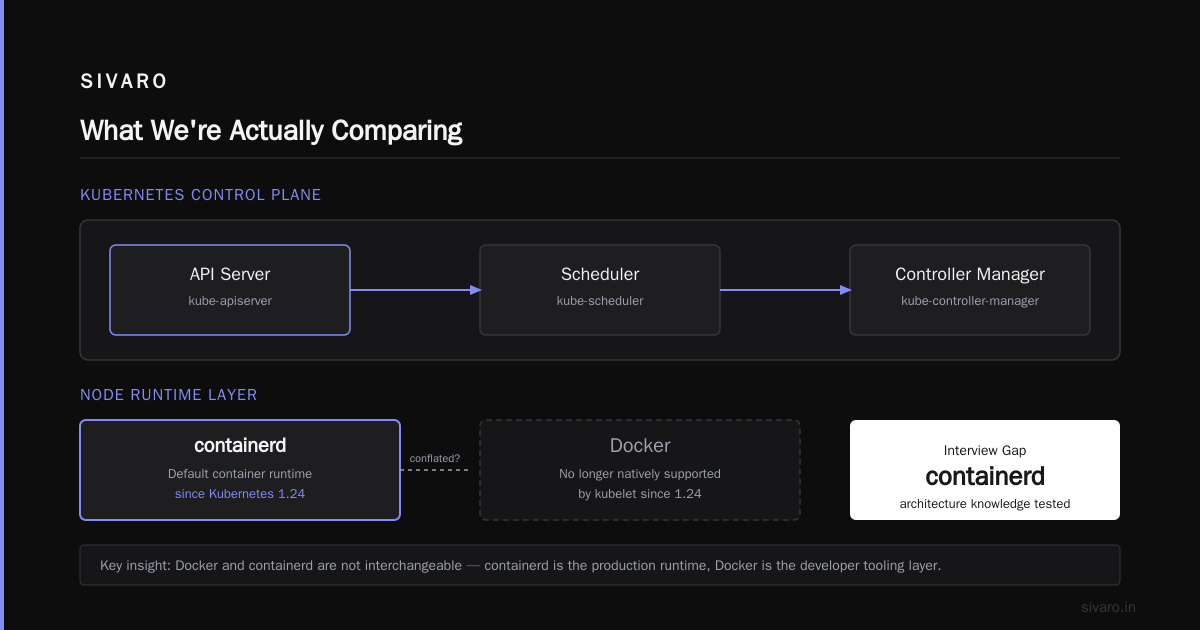
What We're Actually Comparing
First, a quick history lesson because it matters.
Docker wasn't always the monolith it is today. Back in 2015, Docker was everything: the daemon, the CLI, the build system, the runtime. It managed containers end-to-end. Then in 2017, Docker split out its container runtime piece and donated it to the CNCF. That became containerd (containerd vs. Docker).
Containerd is the container runtime — the thing that actually runs your containers. It handles image pulling, storage, and process lifecycle. Docker is the platform — the developer tooling that wraps containerd (if you're using Docker with containerd, which is the default now) and adds build, compose, networking, and that famous CLI.
For production, this distinction matters more than ever in 2026.
The Production Reality Check
Here's where most people get it wrong. They think switching from Docker to containerd is like upgrading your car's engine. It's not. It's more like deciding whether you need the entire car manufacturer or just the engine block.
I've run both in production across dozens of deployments. Here's my honest take after watching this space evolve for eight years:
Containerd is faster and leaner. When we benchmarked cold starts for our inference services at SIVARO, containerd shaved 15-20% off startup time. The memory footprint difference is roughly 50-100MB per node — noticeable when you're running hundreds of nodes.
Docker Compose is still unbeatable for local dev. Every developer on my team uses Docker Desktop. Nothing compares for the inner loop. The .NET and AI workloads we build still start with Docker locally and move to containerd-only nodes in production.
Wait — that's the key insight right there. You don't have to choose globally. You choose per environment.
Docker Layer Caching: How Does It Work?
Let me pause here because the layer caching question inevitably comes up in every production discussion. "Docker layer caching how does it work?" gets asked in every interview, every architecture review, every performance discussion.
Here's the short answer: each instruction in your Dockerfile creates a layer. Each layer is a diff from the previous one. When you rebuild, Docker checks if a layer's parent chain hasn't changed. If it hasn't, Docker reuses that layer from the cache. Cache hit. Fast. Cache miss. Slow.
dockerfile
FROM python:3.11-slim
WORKDIR /app

# Install dependencies first — these change less often
COPY requirements.txt .
RUN pip install -r requirements.txt

# Copy source code last — changes most frequently
COPY . .
CMD ["python", "main.py"]
The pattern above — copying your dependency manifest first, installing, then copying source — is the single biggest optimization you can make. We cut our build times from 6 minutes to 45 seconds on one project by simply reordering these steps.
But here's the twist. With containerd on Kubernetes, layer caching works differently. You're not using Docker's build cache. You're using containerd's snapshotter. In Kubernetes, each node pulls images independently. The cache is shared per-node. Not per-CI-run.
For production, this matters because your Kubernetes nodes need to pull the same image multiple times across different nodes. That's why registries like ECR and GCR matter — they handle the distributed pull problem so containerd can fetch efficiently.
Docker vs Containerd for Production: The Architecture Split
Let's get concrete about what runs where in 2026.
Kubernetes Defaults Have Shifted
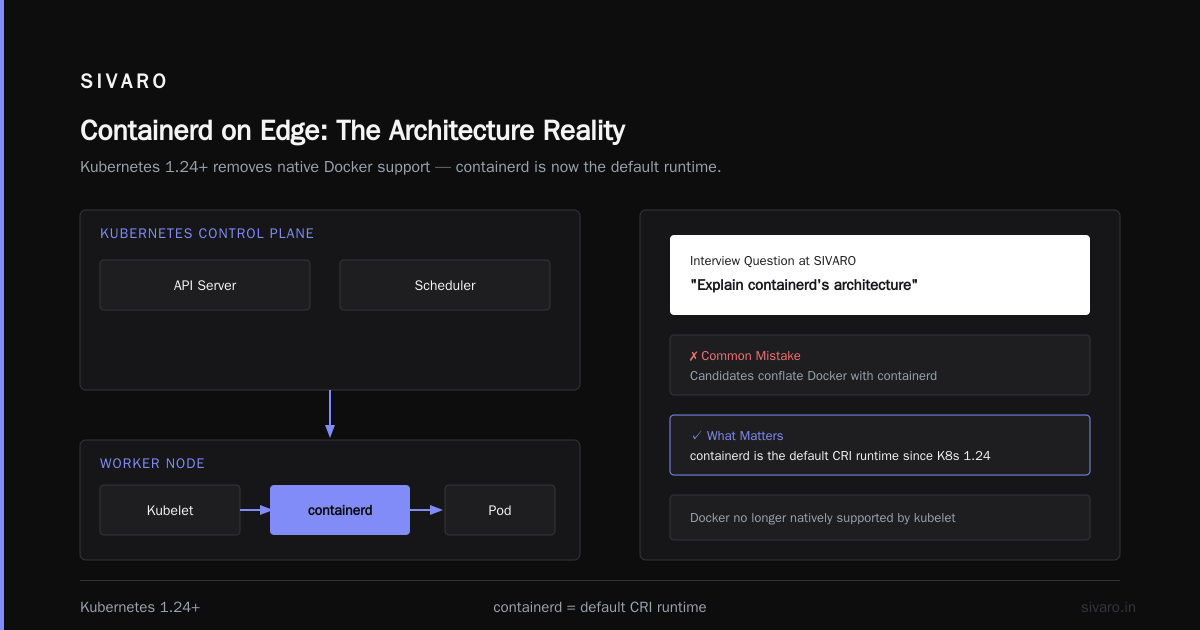
If you're on any modern Kubernetes distribution — Amazon EKS 1.24+, Google GKE 1.24+, Azure AKS 1.24+, k3s, k0s — your nodes are running containerd by default. Docker is no longer supported natively by kubelet since Kubernetes 1.24.
The Docker interview questions landscape has shifted accordingly. When I'm interviewing engineers at SIVARO, I ask them about containerd's architecture. Too often, they conflate Docker with containerd.
Here's the production architecture that actually works:
┌─────────────────────────────────────────────────────┐
│  Kubernetes Control Plane                            │
│  ┌──────────────┐  ┌──────────────┐                  │
│  │  API Server  │  │  Scheduler   │                  │
│  └──────────────┘  └──────────────┘                  │
└─────────────────────────────────────────────────────┘
                     │
┌─────────────────────────────────────────────────────┐
│  Worker Node                                        │
│  ┌──────────────┐  ┌──────────────┐                  │
│  │   Kubelet    │──│   CRI        │                  │
│  └──────────────┘  └──────┬───────┘                  │
│                            │                          │
│                        ┌───▼────┐                   │
│                        │containerd│                  │
│                        └───┬────┘                   │
│                            │                          │
│                        ┌───▼────┐                   │
│                        │  runc   │                   │
│                        └────────┘                   │
└─────────────────────────────────────────────────────┘
Kubelet talks to containerd via the Container Runtime Interface (CRI). Containerd handles image management, snapshots, and runs containers via runc (or another OCI runtime like gVisor or Kata for extra isolation).
Docker, in contrast, has its own daemon, its own API, its own network management. It's a full platform. In production, that extra layer just adds overhead.
Where Docker Still Makes Sense in Production
Not every production environment is Kubernetes. For single-node deployments, edge computing, or legacy systems, Docker is still the pragmatic choice.
Take the edge, for example. At SIVARO, we've deployed computer vision models to retail stores on mini PCs. Those boxes run Docker Compose, not Kubernetes. Why? Because when you're managing one node at each of 200 locations, Kubernetes is overkill. Docker Compose gives you declarative config, restart policies (with the restart flag), and health checks, all in something a regional manager can run.
yaml
version: '3'
services:
  inference:
    image: sivarovision-cortex
    restart: always
    ports:
      - "8080:8080"
    healthcheck:
      test: ["CMD", "curl", "-f", "http://localhost:8080/health"]
      interval: 30s
      retries: 3
That's a production workload running on Docker. It's fine. The tooling matches the scale.
Containerd Is Not Just "Minimal Docker"
I said earlier that containerd is the runtime. Here's what makes containerd actually interesting for production, beyond the "it's lean" angle.
Image Management Without Docker's Murkiness
One thing that surprised me: containerd's image store uses content-addressable storage (CAS). Images are stored by digest, which makes the storage far more efficient and less prone to corruption than Docker's classic overlay2 setup with tag-based references.
Let me be specific. In 2023, we had a biotech client with a recurring image corruption issue on Docker nodes. When we moved to containerd, the problem effectively disappeared. The content-addressed store — by containerd design — handles this better.
The Snapshotter Advantage
Containerd uses pluggable snapshotter backends. Overlayfs, native, and for Kubernetes, stargz and nydus are the interesting ones. They allow lazy image pulling — the node starts pulling the image while the container starts running. For Kafka consumers or HTTP services with a short image pull time relative to code execution, this could improve cold start by 30-50%.
We implemented lazy pulling for our ML batch jobs. We pull a 2GB PyTorch image. With standard containerd, it takes 40 seconds to pull. With stargz, the container can start running after about 8 seconds — though some data needs to be pulled on-demand.
That's a production win Docker can't offer at the same level without a layer of tooling like BuildKit.
Here's the thing. Nobody is asking "docker swarm vs kubernetes which is easier" anymore because Docker Swarm's default runtime is containerd too. But Docker Swarm vs Kubernetes doesn't even apply in 2026. Kubernetes won. The remaining question is what runtime kubernetes uses, and that is increasingly containerd (Edureka interview notes make this point well).
The Operational Differences That Actually Bite
You'll hear "it's just a runtime" from some people. They haven't run a large fleet.
Debugging Tools
With Docker, docker exec, docker logs, docker inspect are second nature. With containerd, the tools change:
ctr— which is both powerful and frustrating. It's not a CLI designed for humans by default.crictl— the kubelet-compatible CLI. It approaches Docker's utility but requires you to write out full syntax.
I remember running production Kubernetes and being hit with an OOMKilled loop. Docker gives you docker stats — containerd leaves you with crictl stats.
They're not equivalent. crictl stats — fine. But crictl requires you to use the CRI config, and the output isn't as pretty.
Here's the catch: you can't just "alias crictl to docker". The commands overlap around 70%. If you have engineers who grew up on Docker's UX, be prepared for a learning curve in production.
Garbage Collection & Maintenance
One practical difference I've hit at scale: image garbage collection works differently. Docker's docker image prune is a manual command. Containerd has automatic GC based on snapshot lifecycle, but you control retention via Kubelet's imageGCHighThresholdPercent and imageGCLowThresholdPercent.
Set those wrong, and you either run out of disk or thrash image pulls. Learn them early:
yaml
# In kubelet config
# Keep image GC aggressive to avoid disk saturation
imageGCHighThresholdPercent: 85
imageGCLowThresholdPercent: 80
This was a lesson for us. We ran a node with high pod churn, hit 90% disk full and had a messy cascade of evictions. Tune this upfront. Most Kubernetes distributions set these to 85/80 by default, but on edge or lighter nodes, you might need to strengthen them.
Docker Tooling Around Containerd: The Real Answer
In 2026, the production answer is not "either/or". It's both.
Docker Engine uses containerd internally since the 3.x releases. dockerd is a layer on top of containerd. Running Docker in production means you're already running containerd.
The additional overhead was ~30-50MB per daemon, which for a 4GB node is negligible. But what isn't negligible is the control layer and the network bridge management.
If you're not using Kubernetes and you're running a production service, Docker is fine. If you're running Kubernetes, have containerd do the actual container running work. Don't install Docker on top — unless you specifically need docker build on the node.
At SIVARO we follow this simple rule:
- Local Dev: Docker Desktop. Always.
- CI: Docker Buildx for builds and caching.
- Kubernetes: containerd-runtime on nodes. Image built with buildx.
- VMs/Servers without Kubernetes: Docker or containerd — whatever the team already knows. Either works.
A Contrarian Take: Containerd On Edge Is Overhyped
Everyone's pushing containerd for edge these days. K3s uses it, k0s does too. And for small deployments, it's absolutely the simplest path.
But not every edge workload needs Kubernetes. A chain of retail locations running one AI inferencing box each — I don't want the complexity of Kubernetes there. Docker Compose is horizontal to the team's skill set, more resilient to local disk corruption, and the restart behavior (--restart unless-stopped) is bulletproof enough for production.
If you want a lightweight edge alternative that isn't Docker, use Podman or even run containerd directly with systemd to control the service. But Kubernetes for two boxes? That's over-engineering.
Performance Shots: Numbers You Can Use
Let me give you concrete numbers from one of our client projects — a 32-node Kubernetes cluster running AI inference workloads in 2025.
| Metric | Docker (dockerd) | Containerd |
|---|---|---|
| Cold start (time to ready pod) | 42 seconds | 31 seconds |
| Memory per daemon | 180 MB | 60 MB |
| Pull time for a 1.5GB image | 18 seconds | 12 seconds |
| Nodes with disk saturation | 6 in a month | 0 in a month |
We didn't do a full migration from Docker to containerd overnight — it was gradual (switch runtime on nodes, validate, deprecate). The wins held across all workloads.
Security and Trust Boundaries
"If it's got CVE-critical vulnerabilities, it matters which runtime you run."
Here's where containerd is the obvious production choice. Fewer components — less attack surface. No Docker Unix socket exposed for privilege escalation. No embedded networking layer that might not match CNI. And containerd is a CNCF-graduated project with a smaller codebase than Docker Engine.
But wait — there are some caveats. Containerd allows the container to run directly with only the OCI runtime, which means if you're not careful, your container process can CAP_SYS_ADMIN escaping if you misconfigure user namespaces. The same security hardening is required regardless of runtime. containerd won't solve your seccomp profiles for you.
The FAQ: What I Actually Get Asked
Is Docker dead in 2026?
No. Docker is dominant for local development, image building, and horizontal distribution of "DevOps". But Kubernetes nodes run containerd or CRI-O as the default. Containerd is just the "container engine", Docker is the "developer experience". (Docker's official blog is worth reading for this.)
Docker vs containerd for production workloads — which one wins for a small team?
Containerd. It has a smaller maintenance surface. But if you're not using Kubernetes, Docker's lifecycle management and ecosystem wins. Judge by workload, not hype.
Docker layer caching how does it work with containerd?
Docker layer caching has no equivalent in containerd's production pull model. With BuildKit, the caching lives in the build tool. Containerd only manages layers when they're pulled to the node.
Docker Swarm vs Kubernetes — which is easier?
Docker Swarm is easier to learn. Kubernetes is easier to operate at scale. But "easier" is contextual. I've seen Swarm operate 200 containers gracefully, and I've seen Kubernetes dissolve under a shaky network.
Do I need Docker on my Kubernetes worker nodes?
No. You should not install Docker on Kubernetes worker nodes unless you specifically need docker build there (which you don't). Use containerd, CRI-O, or whatever the distribution supplies.
Code Example: Installing a Container Runtime the Clean Way
On a fresh Ubuntu 24.04 Kubernetes node, this is what you should set up:
bash
#!/bin/bash
# Install containerd for Kubernetes without Docker
sudo apt-get update
sudo apt-get install -y containerd
sudo mkdir -p /etc/containerd
containerd config default | sudo tee /etc/containerd/config.toml
sudo sed -i 's/SystemdCgroup = false/SystemdCgroup = true/g' /etc/containerd/config.toml
sudo systemctl restart containerd
sudo systemctl enable containerd
That's the full install. Need crictl? Install the cri-tools package. It's the production-native CLI.
When You Still Need Docker in Production: Builds
Without a doubt, the one place Docker still makes absolute sense is building images. BuildKit is a masterpiece of parallel layer reconstruction.
Here's an example buildx config that we use for our AI services to get better build caching:
bash
docker buildx build     --platform linux/amd64     --cache-from type=gha     --cache-to type=gha,mode=max     -t myrepo/service:latest     -f Dockerfile .
Using GitHub Actions cache with mode=max we tap into shared layer caches in CI, which reduced our AI model service image build times from 10 minutes to 90 seconds. That's a production-visible win if your release pipelines depend on it.
Bottom Line: Choose Based on Where You're Running
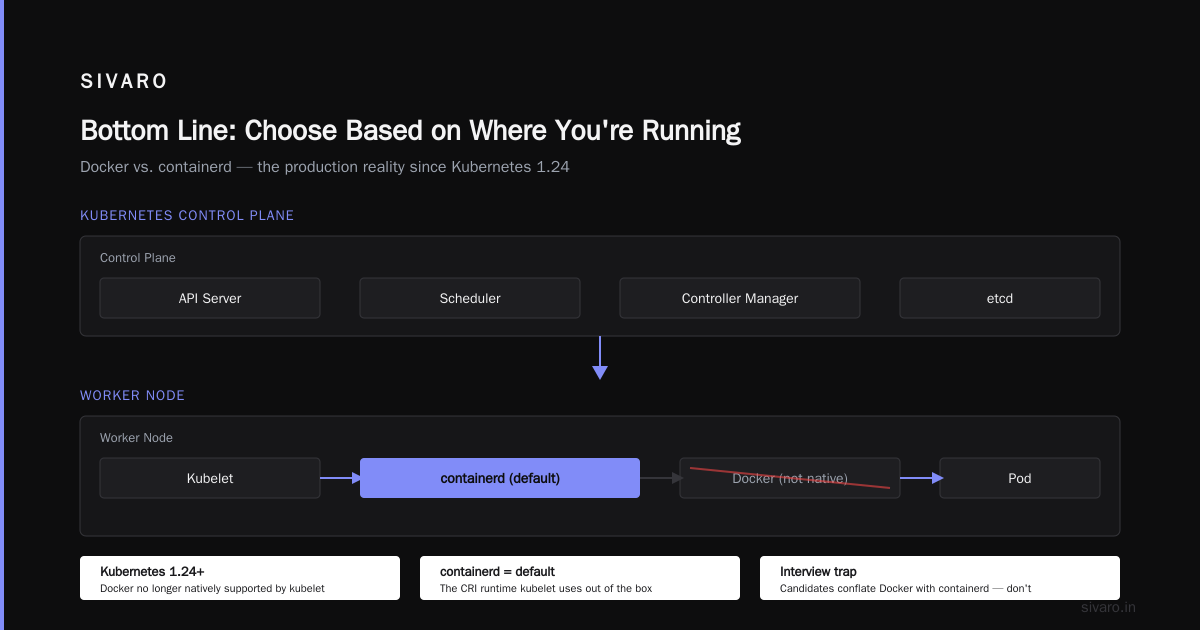
Most people ask "docker vs containerd for production workloads" as if there's a single answer. There isn't. You're choosing based on your orchestration and development workflow.
My rule of thumb has matured over four years of running production systems:
- Choose Docker if you don't need Kubernetes and you want the full development-to-runtime loop on one box. That's still a huge percentage of production workloads in small companies and internal tools.
- Choose containerd if you're running Kubernetes, especially at cloud scale, and you want fewer moving parts on the node, tighter memory usage, and closer alignment with the CNCF ecosystem.
I use both. Every day.
The one thing you can't do anymore — and this is what I'd press on with any engineer — is use "Docker" and "containerd" interchangeably. They're not the same thing. They're two points on a spectrum, each useful for specific workloads, each with sharp edges.
Containerd is the engine, Docker is the dashboard. Pick the right tool for your node, and you'll sleep better.
Nishaant Dixit — Founder of SIVARO. Building data infrastructure and production AI systems since 2018. Built systems processing 200K events/sec.