 SIVARO
Docker vs Kubernetes When to Use Each in 2026
I've spent the last eight years building data infrastructure at SIVARO, and I still see teams making the same container-orchestration mistakes. They adopt Kubernetes because it's the cool kid on the block, then spend six months drowning in YAML. Or they stick with Docker Compose in production and hit scaling walls they can't climb out of.
Here's the thing I tell every founder who asks: Docker and Kubernetes are not competitors. They're layers of the same stack. Docker builds and runs containers. Kubernetes orchestrates them at scale. One does not replace the other.
But the real question—docker vs kubernetes when to use each—is more nuanced than that. It's about your team size, your traffic patterns, your operational maturity, and honestly, how much pain you're willing to tolerate.
Let me walk you through what actually works, based on real deployments I've built and watched fail.
The Mental Shift Nobody Talks About
Most people think Docker is the container technology and Kubernetes is the orchestrator, period. End of story. Here's what they get wrong: Docker is a platform that includes container runtime, image building, and local orchestration. Kubernetes is a distributed system that assumes you need multiple machines working together.
The real distinction is about control plane overhead.
When you use Docker on a single machine, you have a simple daemon that manages the lifecycle of your containers. It's one system, one API, one failure domain. When you introduce Kubernetes, you're adding etcd for cluster state, an API server, controllers, schedulers, and networking layers. That's not a runtime upgrade—it's a fundamentally different deployment model.
I've seen teams at Series A startups spin up a three-node Kubernetes cluster for what was essentially a cron job that runs every hour. They spent more time maintaining the cluster than they did building the actual product. Meanwhile, I've seen enterprises at Paytm scale run production workloads on Docker Swarm because they needed simple, reliable orchestration without the cognitive load of Kubernetes.
When Docker Alone Is the Right Answer
You don't need Kubernetes if you have one machine, one Docker daemon, and a few containers. Period.
Docker Compose gives you multi-container orchestration on a single host. It handles networking between containers, volumes for persistent data, and a declarative way to define your stack. For development environments, staging deployments, small production workloads, and teams of 2-10 people, this is plenty.
Here's what that looks like in practice:
yaml
version: '3.8'
services:
  api:
    build: ./api
    ports:
      - "8080:8080"
    environment:
      DATABASE_URL: postgres://db:5432/app
    depends_on:
      - db
  db:
    image: postgres:16
    volumes:
      - pgdata:/var/lib/postgresql/data
  redis:
    image: redis:7-alpine
volumes:
  pgdata:
That's the whole thing. No service accounts. No Ingress resources. No RBAC. Just a file that describes what you want, and docker compose up makes it happen.
When should you stop here? I'd argue you should stay here for as long as humanly possible. The operational simplicity of Docker Compose is its killer feature. Upgrades are trivial. Debugging is straightforward. Your entire team understands it.
The Kubernetes Trigger Point
The moment you need more than one machine for reasons that actually require coordination? Now we need to talk about orchestration.
Here are the signals I look for before recommending Kubernetes:
- You need auto-scaling across multiple hosts
- You have services that need high availability across failure domains
- Your deployment rollouts need zero-downtime guarantees
- You have scheduled jobs that need to retry and manage state
- You need service discovery and load balancing at the platform level
At SIVARO, our event processing pipeline crosses that threshold. We were processing 200K events per second across multiple regions, and Docker Compose on a single host wasn't viable. The traffic spikes would hammer one machine, and failover meant downtime. Kubernetes gave us the horizontal scaling we needed.
But here's the thing—the migration cost us three months of engineering time. Three. Months. And we were a team that already knew the ecosystem.
Kubernetes is not a solution to a scaling problem. It's an infrastructure commitment that forces you to hire or train SREs, learn about pod scheduling, understand network policies, and suddenly your engineers are spending Fridays debugging etcd cluster health.
Docker Swarm: The Forgotten Middle Ground
Most people forget Docker Swarm exists. I get it—Kubernetes dominates every headline.
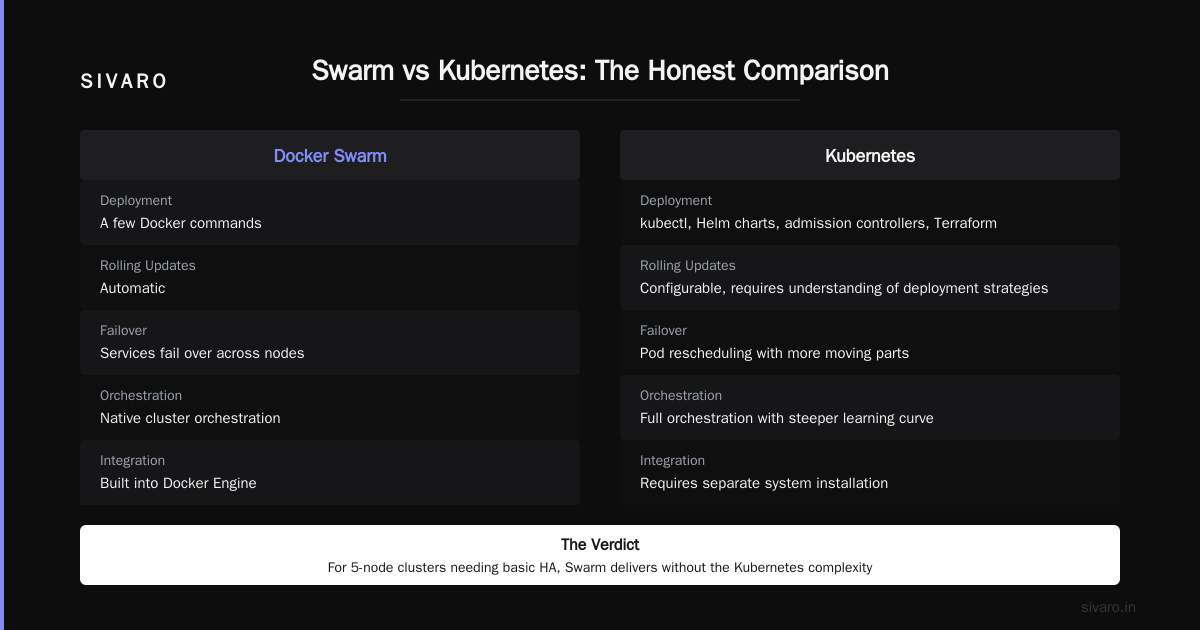
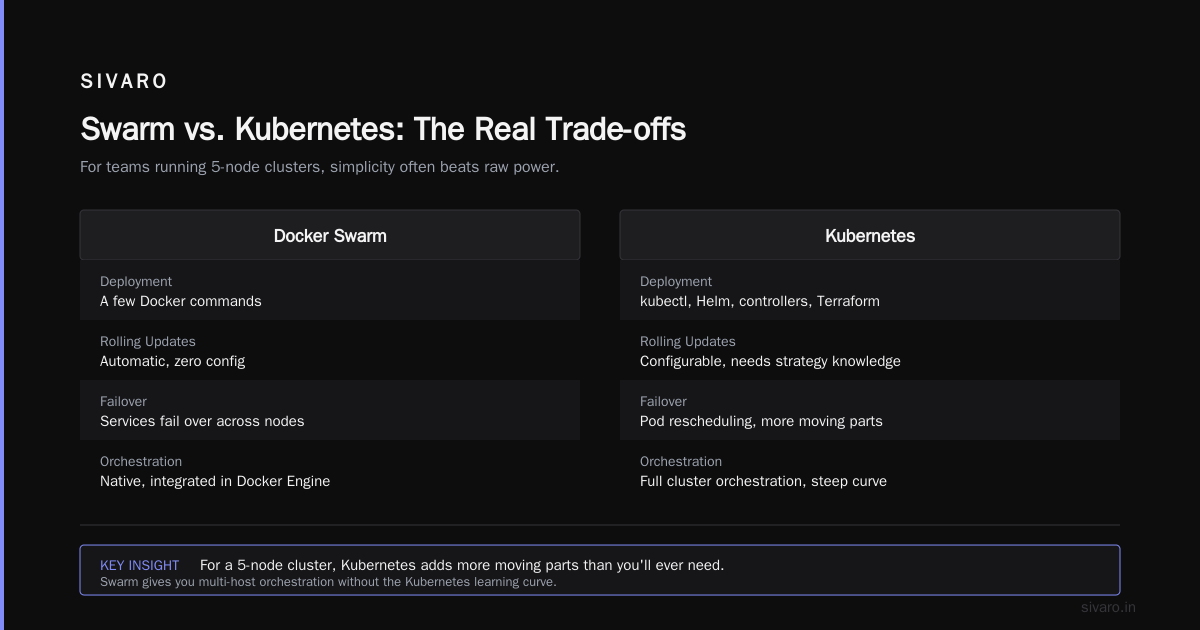
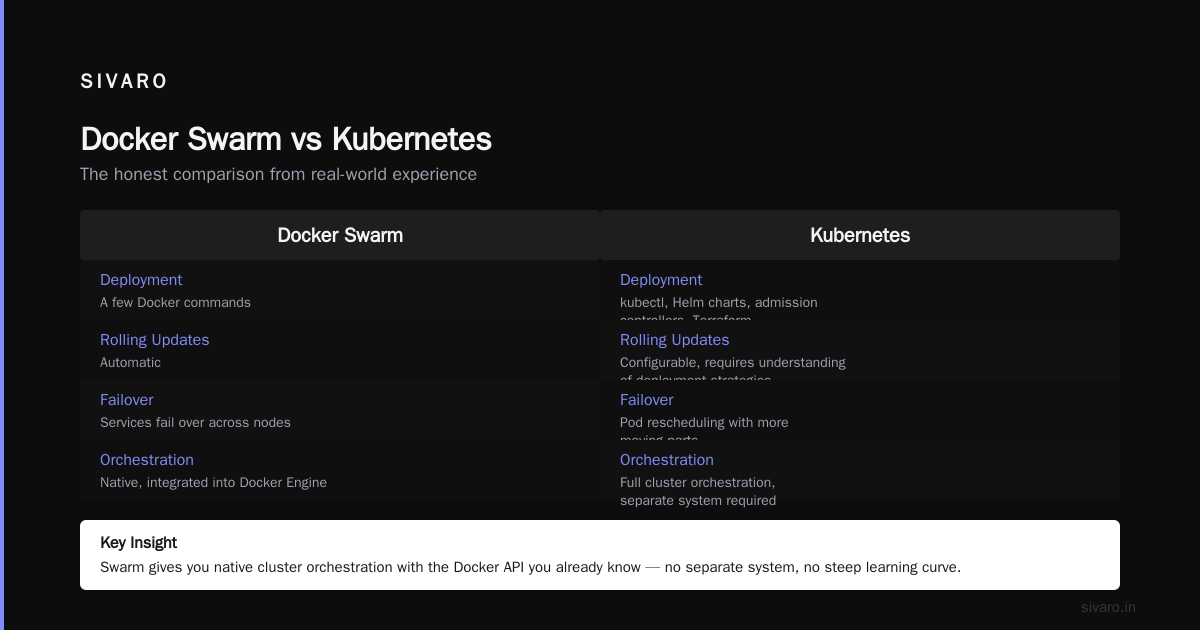
But Swarm solves a real problem: it gives you native cluster orchestration with the Docker API you already know. It's integrated into Docker Engine, so you don't install a separate system. For teams that need multi-host orchestration without the full Kubernetes learning curve, Swarm delivers.
Here's the honest comparison from my experience:
Swarm deployment is a few Docker commands. Kubernetes deployment is learning kubectl, Helm charts, admission controllers, and probably Terraform. Swarm's rolling updates are automatic. Kubernetes updates are configurable but require understanding of deployment strategies. Swarm fails over services across nodes. Kubernetes does this with pod rescheduling, but with more moving parts than you'll ever need for a 5-node cluster.
For production workloads that need basic HA across machines, Docker Swarm is a legitimate answer. I've run revenue-critical backends on Swarm for years without issues.
What Kubernetes Actually Solves That Docker Can't
Let me be direct about this. If you're running Docker Swarm in production and it's working, don't rush to replacing it. Unless you need these specific capabilities:
Self-healing at scale. Kubernetes continuously reconciles the desired state of your cluster. If a pod dies, it's rescheduled. If a node becomes unhealthy, workload moves. At large scale, this is worth the complexity.
Declarative infrastructure that supports GitOps. Kubernetes doesn't just orchestrate containers; it orchestrate the definition of your entire application. Tools like ArgoCD and Flux use Git as the source of truth, and the cluster reconciles against that. For regulated teams at companies like JPMorgan or Goldman Sachs, auditability and drift detection are non-negotiable.
Horizontal pod autoscaling with custom metrics. Docker Compose can't dynamically adjust based on request queue depth or custom business metrics. Kubernetes reads the HPA configuration:
yaml
apiVersion: autoscaling/v2
kind: HorizontalPodAutoscaler
metadata:
  name: event-processor
spec:
  scaleTargetRef:
    apiVersion: apps/v1
    kind: Deployment
    name: event-processor
  minReplicas: 3
  maxReplicas: 50
  metrics:
  - type: Pods
    pods:
      metric:
        name: events_per_second
      target:
        type: AverageValue
        averageValue: 5000
That config scales your pods up or down based on actual event throughput, not just CPU. You can't do this with Docker Compose.
Multi-tenant infrastructure with namespaces. Kubernetes separates environments and teams through namespaces with resource quotas. At SIVARO, we run staging, QA, and production in the same cluster, isolated by namespaces with different limits. This sharing reduces costs but maintains boundaries.
The Hidden Costs of Kubernetes
Nobody tells you about the operational tax.
First, there's resource overhead. A single control plane node with etcd consumes at least 2GB of RAM. Three control plane nodes for HA? That's 6GB just for management. Plus monitoring, logging, and networking components. Run a production cluster properly, and you're paying 10-15% resource tax.
Second, there's the human cost. Your engineers need to learn storage classes, persistent volume claims, ConfigMaps, Secrets, service accounts, RBAC, network policies, Ingress controllers, and that's before they deploy an actual workload. Each of these concepts introduces failure modes that didn't exist before.
Third, there's the upgrade treadmill. Kubernetes releases every three months. You can't skip versions for too long, or you break compatibility. Each upgrade risks breaking your Ingress controller, your cert manager, your monitoring stack, or whatever else you've integrated. I've seen teams at Meta spend entire quarters just on cluster upgrade cycles.
Fourth, there's the debugging complexity. When something goes wrong, you don't debug a single container—you debug scheduling, networking, and data stores spread across machines. Distributed debugging is a skill that takes years to develop.
Managed Kubernetes: The Pragmatic Middle Ground
Here's where I land on most recommendations: don't run your own Kubernetes cluster. Use a managed service.
EKS on AWS, GKE on Google Cloud, or AKS on Azure handles the control plane, upgrades, and node management. You get the full orchestration toolkit without the operational overhead of running etcd and the API server yourself.
But even managed Kubernetes isn't free. EKS charges $0.10 per hour per EKS cluster, which is $72 per month, before you add node costs, Fargate charges, and data transfer fees. And cloud providers add their own quirks—EKS has a learning curve just for the surrounding AWS ecosystem.
My actual recommendation for most teams: use a serverless product that hides Kubernetes entirely.
AWS Lambda, Google Cloud Run, or Railway. They give you auto-scaling without you ever seeing a pod.
Cloud Run, for example, scales to zero, charges per request, and handles the entire abstraction. Your team writes containers, deploys them, and moves on. I've run production services on Cloud Run for a fraction of the infrastructure complexity—and a fraction of the cost—compared to managing my own Kubernetes.
When to Move from Cloud Run to Managed Kubernetes
Serverless has limits. After running on Lambda or Cloud Run for a while, you may hit these walls:
- The 15-minute function time limit is too restrictive for long-running batch jobs
- You need gpu access that serverless doesn't provide
- Your memory, CPU, or concurrency limits are too constraining
- You need custom networking or VPC-level control
- Your reliability requirements demand multi-zone or multi-region control
When you hit these, managed Kubernetes becomes the right answer, not because Kubernetes is great, but because the alternative building blocks are worse.
Docker Desktop Alternatives for Linux 2026
We need to address the elephant in the room: Docker Desktop's licensing restrictions and the push toward alternatives.
Docker Desktop had a controversial licensing change in 2021, charging larger companies for usage. That drove an entire ecosystem of Docker alternatives on every platform.
For production containers, you're not running Docker Desktop anyway. But for development and local testing, you have options.
Podman is what I hear most about from teams building infrastructure. It's daemonless, runs containers rootless by default (arguably more secure), and has a Docker-compatible CLI. You can alias docker to podman and barely notice the difference for 90% of commands.
But here's the nuance I want to give you: Podman and Docker are not identical. Podman's networking is fundamentally different, its volumes manage differently, and some Docker Compose features don't translate seamlessly.
For teams already comfortable with Docker, the migration path is straightforward:
bash
alias docker=podman
podman system service --time=0 &
podman-compose up
I'd say the switch to Podman has a learning curve, but it's less painful than the annual Docker Desktop invoice. That's a trade-off many teams at startups in 2026 are making.
Docker vs Podman: Which One Should I Use?
Let's settle the Docker vs Podman debate with the clarity of someone who's run both in production.
Docker is the industry standard. It has the largest community, most images on Docker Hub, and the most mature Compose ecosystem. It's well-supported across every platform and every cloud provider. If you need consistency across a broad stack, Docker wins.
Podman is the security-first, daemonless alternative. The rootless container model is genuinely more secure for edge use cases, and Red Hat's backing gives it enterprise stability. If you're deploying containers to untrusted or multi-tenant environments, Podman's security model is the better choice.
For most development teams, Docker is still the path of least resistance. For security-conscious container deployments in production environments with strict threat models, Podman is gaining ground daily in 2026.
You won't choose wrong with either if you understand these differences.
Containers Without Orchestration at Massive Scale
Here's a contrarian take I've developed over years: you don't need Kubernetes to be a container orchestration company.
Some of the biggest workloads in the world don't use Kubernetes. Serverless platforms, SaaS applications with managed runtimes, and many data pipelines run on simpler abstractions that share the core philosophy of container-based deployments—but avoid the orchestration complexity.
At SIVARO, we run time-series processing pipelines on bare-metal VMs with Docker Compose and systemd. It's not glamorous. But the operational simplicity is the feature that keeps us alive.
If your workload has a predictable daily pattern, scheduled tasks, or low churn, simple Docker Compose deployment could be the best decision you make. The cost of orchestration complexity might be more than the cost of occasional manual scaling.
The Common Misconception About Docker and Kubernetes
Let me clear up the biggest misconception: Kubernetes doesn't replace Docker.
Kubernetes no longer uses Docker as its container runtime by default. It uses containerd (and CRI-O is a popular alternative). Kubernetes orchestrate containers generally—remove the Docker daemon entirely from your cluster, and Kubernetes doesn't care. containerd is a lighter-weight, more secure runtime designed for orchestration systems, built specifically to separate container lifecycle from higher-level tooling.
Similarly, 80% of the questions I see in common Docker interviews assume you need Kubernetes to be a Docker expert. You don't. Mastering docker build, security best practices, image optimization, and multi-stage builds is useful on its own, with or without an orchestrator.
A Practical Decision Flow
Let me give you a concrete way to think about Docker versus Kubernetes decision-making:
python
def orchestration_decision(team_size, traffic, complexity, has_sre):
    if traffic < 1000 req/sec:
        return "Docker Compose"
    elif team_size < 10:
        return "Managed Kubernetes or serverless"
    elif not has_sre:
        return "Managed Kubernetes (EKS/GKE)"
    else:
        return "Self-managed Kubernetes"
This isn't a precise formula—it's a heuristic. But you should be able to map your situation onto that decision tree and come out with the right answer.
If your traffic is low and your team is small, start with Docker Compose. You can build your entire application model on it—image builds, service definitions, local development parity.
When you outgrow that, go managed Kubernetes. Or even better, go serverless. Keep your team focused on the product, not the infrastructure ecosystem.
FAQs
Q: Is Kubernetes a replacement for Docker?
A: No. Kubernetes doesn't replace Docker—it extends container orchestration. Docker builds and runs containers; Kubernetes manages container placement, scaling, and failure recovery. They work together. Kubernetes uses containerd (not Docker) as its default runtime, but containers remain the abstraction.
Q: Can I use Docker Compose in production?
A: Yes. For single-host workloads, teams up to 10 people, and predictable traffic, Docker Compose is a solid production choice. The simplicity advantage often outweighs the orchestration complexity of Kubernetes, especially for small services handling under 1000 req/sec.
Q: When should I migrate from Docker Compose to Kubernetes?
A: Migrate when you need horizontal scaling beyond one host, high-availability across failure domains, advanced scheduling (like jobs), or self-healing at scale. The migration price is real—expect multiple months of engineering effort for a production-grade setup.
Q: What is Podman and how does it compare to Docker?
A: Podman is a daemonless container engine that's Docker-compatible in cli syntax but runs rootless containers by default. It's more secure for multi-tenant and edge deployments. Docker remains the larger ecosystem today, but Podman is strong for security-focused teams.
Q: What are the best Docker Desktop alternatives for Linux in 2026?
A: InterviewBit's guide touches on some of the ecosystem shifts. The top options are Podman Desktop, Rancher Desktop, and OrbStack. Podman remains the leading choice for Linux users in 2026.
Q: What is containerd and why does it matter?
A: containerd is the container runtime used by Kubernetes by default. It's a lightweight, robust runtime that Hansel introduced to handle container lifecycle separately from higher-level orchestration. Docker's own blog explains the split.
Q: Can I run containers without any orchestrator?
A: Absolutely. Docker Compose with a single host is a valid deployment pattern for small workloads. Serverless options like AWS Lambda and Google Cloud Run offer container-like orchestration without the manual infrastructure management.
The Bottom Line on Docker vs Kubernetes
Docker vs kubernetes when to use each isn't an either-or choice. It's a scaling decision.
Start with Docker when you're building your first containerized services. Use Docker Compose while your infrastructure fits on one machine. Move to managed Kubernetes (or serverless) when your scaling and availability requirements exceed single-host limitations. Consider self-managed Kubernetes only when you have deep SRE expertise and operational capacity.
Stop listening to hype cycles and technology marketing about container orchestration. Start looking at the operational cost normalized per request served.
I've run production systems all the way from Docker on a single VPS to multi-region Kubernetes clusters at high event rates. Every layer of abstraction buys you enormous capability at the price of enormous complexity. Choose only as much as you actually need.
The best decision for you is to minimize complexity while meeting your actual reliability targets. Everything else is noise.
Nishaant Dixit — Founder of SIVARO. Building data infrastructure and production AI systems since 2018. Built systems processing 200K events/sec.