 SIVARO
Docker vs Kubernetes: When to Use Which
You're staring at a production outage. Your containerized service just crashed, and you're SSH'd into a box at 2 AM trying to figure out why the orchestrator decided to reschedule your pod onto a node with a corrupted Docker daemon.
I've been there. SIVARO has operated data infrastructure since 2018, and we've run container workloads across bare metal, VMs, and managed Kubernetes clusters. The question of Docker vs Kubernetes isn't a technical one. It's a judgment call about what your team can actually operate.
Here's what you'll learn: the real differences between Docker and Kubernetes, when you're overcomplicating things with an orchestrator, when you're under-provisioning with just containers, and how teams at different scales should think about this decision in 2026.
The Fundamental Confusion
Most people think Docker and Kubernetes are competing technologies. They're not. These are two different layers of the same stack, and conflating them causes more architectural damage than any other single misunderstanding in modern DevOps.
What is Docker? is a containerization platform that packages your application and its dependencies into a portable image. It handles the runtime lifecycle of individual containers on a single host.
Kubernetes is a container orchestration system. It schedules containers across multiple machines, handles service discovery, load balancing, auto-scaling, and self-healing. It assumes you already have containers. It doesn't care if they were built by Docker, containerd, or CRI-O.
Nobody in 2026 would ask whether Django or Oracle is better. They solve different problems. Same thing here, but the industry spent eight years muddying the waters.
What Docker Actually Does
Docker solves packaging and local development. When I say "Docker," I'm talking about the container runtime and image format — not Docker Swarm, not Docker Compose in production, not Docker Desktop's Kubernetes bundle.
Here's the practical breakdown:
Docker gives you:
- Image building — reproducible artifacts with layer caching
- Local parity — what runs on your laptop runs in CI
- Single-host isolation — process, filesystem, and network namespaces
- Docker Compose — multi-container local workflows with a simple YAML file
That last point matters more than you think. Compose is genuinely good for local development. We run it at SIVARO for every service. Our developers spin up Postgres, Redis, Kafka, and our Go APIs with one command.
yaml
version: "3.9"
services:
  api:
    build: ./api
    ports:
      - "8080:8080"
    environment:
      - REDIS_URL=redis://cache:6379
  cache:
    image: redis:7-alpine
    ports:
      - "6379:6379"
This takes 30 seconds to start. No Kubernetes cluster needed. No kubeconfig context switching. No RBAC headaches. Just containers.
Container Runtimes Beneath Docker
Here's something most tutorials skip: Docker isn't even the only container runtime anymore. The containerd vs. Docker distinction has been a hot topic since containerd graduated from Docker's internals to becoming the industry standard runtime.
In 2026, containerd is the default container runtime for Kubernetes. You'll see this in managed Kubernetes offerings — on EKS, containerd runs instead of Docker Engine. Our team at SIVARO works with both daily.
Consider this: Kubernetes uses the Container Runtime Interface (CRI), which allows it to work with multiple runtimes. Most popular Kubernetes platforms now use containerd because it's stripped down and works well with orchestration-level tasks. Docker Engine adds features you won't need if you're not using Docker's own orchestration. containerd vs. Docker explains the architectural shift well.
This is why the "Docker vs Kubernetes" question gets uncomfortable for folks who haven't traced the layers.
Docker ENTRYPOINT vs CMD — The Confusion Is Real
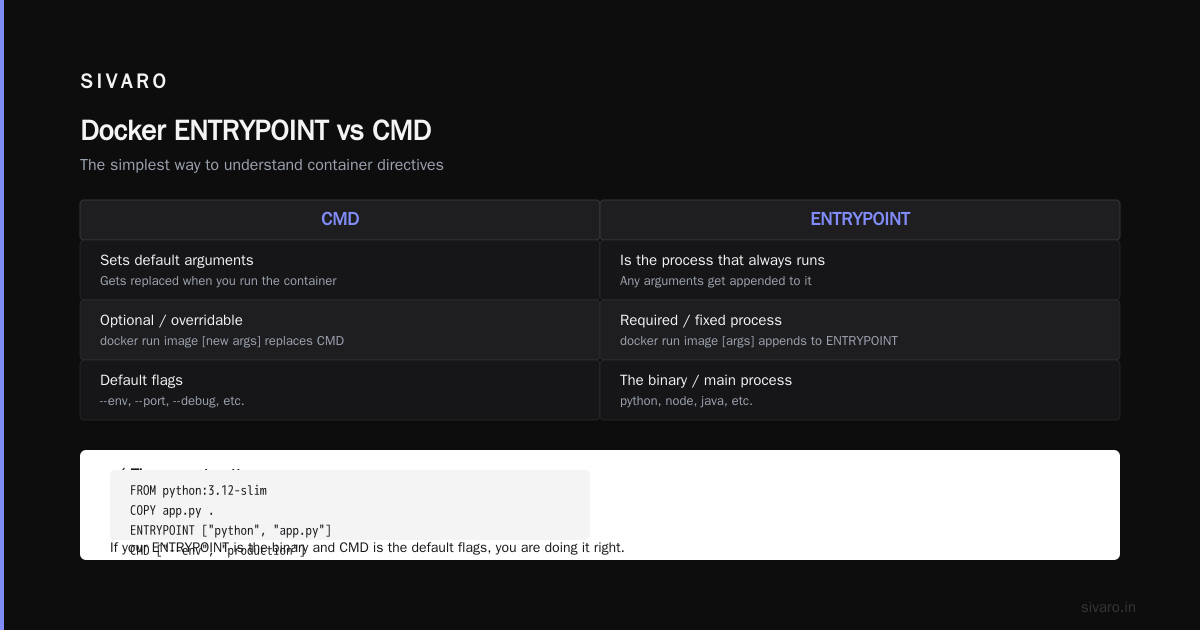
Before you worry about clusters, make sure your container basics are correct. One of the most common issues I see in code reviews at SIVARO is a misunderstanding of the ENTRYPOINT vs CMD directives in Dockerfiles.
Here's the simplest way I explain it:
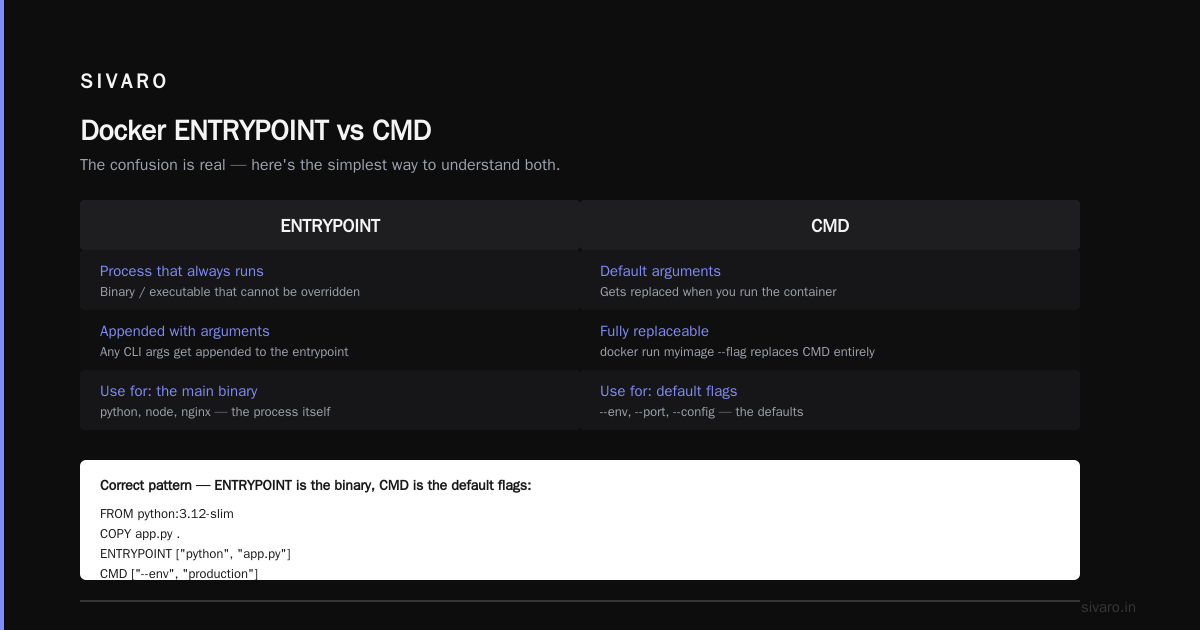
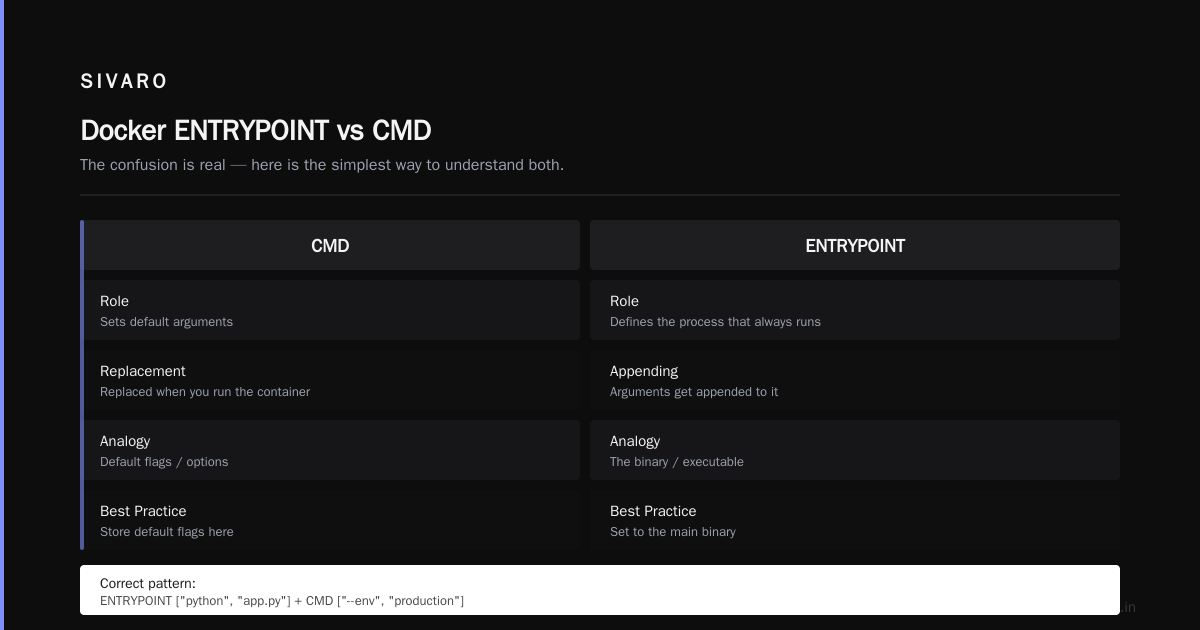
CMDsets default arguments that get replaced when you run the containerENTRYPOINTis the process that always runs, and any arguments get appended to it
If your ENTRYPOINT is the binary and CMD is the default flags, you're doing it right.
dockerfile
FROM python:3.12-slim
COPY app.py .
ENTRYPOINT ["python", "app.py"]
CMD ["--env", "production"]
You can override the CMD at runtime with docker run myimage --env staging. The ENTRYPOINT remains the same. This pattern is essential when building universally reusable images.
People who put everything in CMD hit issues when they try to override arguments at runtime. The whole container fails because the entrypoint gets replaced. That's not a Docker vs Kubernetes issue — it's a Docker quality issue that plagues Kubernetes too.
When you deploy to Kubernetes, the pod spec can override any Dockerfile defaults:
yaml
spec:
  containers:
    - name: app
      image: myapp:v2.1
      command: ["python", "app.py"]
      args: ["--env", "staging"]
This only works if your image follows entrypoint/cmd best practices. I've watched teams migrate to Kubernetes only to discover their Dockerfiles were designed around Compose assumptions.
The Killer Question: Do You Need Orchestration?
Scale is where the real answer lives.
Use Docker alone when:
- You have 1–5 services and a handful of hosts
- Your team doesn't have dedicated DevOps/platform engineering
- You don't need automatic node failure recovery
- Your elasticity needs are minimal (predictable traffic)
Reach for Kubernetes when:
- You have 10+ microservices with independent scaling needs
- You need zero-downtime deployments across nodes
- You're handling unpredictable traffic spikes
- You have someone who can operate the platform
And here's the honest part, the part the cloud vendors won't tell you: Kubernetes is expensive in human time. Not cloud spend. Human time. It's a distributed systems platform with a learning curve that eats months. The Top Docker Interview Questions and Answers (2025) touches on Docker Swarm vs Kubernetes, but in practice, Swarm is not a serious production option for new projects. It's Docker's built-in orchestration, but it's nowhere near Kubernetes in capability or community support.
At SIVARO, our real-time data pipeline runs on Kubernetes. We're processing 200K events/sec. We need node auto-scaling, pod rescheduling, and rolling deployments.
Our internal admin dashboard runs on Docker Compose on a single EC2 instance. It serves 100 requests a day. Kubernetes would add cost and complexity with zero benefit.
Docker Alone: The Solo Developer Path
Let me tell you about a client we had — AvantServe, a mid-sized logistics company in Austin. When they reached out in 2025, they were running 4 microservices in Python and Go on 3 VMs. They had a CI pipeline that built Docker images and deployed them via Docker Compose over SSH.
It worked. For two years.
Their traffic was predictable. Their team was 3 backend engineers and a manager. Nobody had Kubernetes certifications. Deep down, they knew Kubernetes would be a distraction. Their codebase needed features, not infrastructure posturing.
The mistake would have been assuming Kubernetes makes you "production-grade." Kubernetes doesn't make you production-grade. Good engineering does. If you have a rock-solid deployment script, automated backups, and real testing, you're already more production-grade than 90% of teams running Kubernetes without a clue.
Kubernetes: When Single Host Isn't Enough
Vividly ever happened: A company approaches you with a modern tech stack, a handful of services, and 2 million users. The system works reasonably well. But deployment is slow. Scaling is manual. Disaster recovery is scary because there's no real automation.
This is exactly the scenario where Kubernetes shines.
Here's why I think moving to Kubernetes in this stage was the right call: it deduplicated our work. Instead of each team writing custom scripts and policies to handle deployments, monitoring, and recovery, we built one platform running on Kubernetes. Teams push images. The platform handles everything else.
Kubernetes made "self-healing" a default. When a node falls over, pods reschedule to healthy nodes. This happens in seconds, not minutes. That level of reliability is not achievable with a simple Docker compose file. It's not a skill issue. It's a single-machine limitation.
The minute a single machine being unavailable causes user-facing downtime, you've outgrown Docker.
A Decision Framework That Works
The "docker vs kubernetes when to use which" question isn't answered by a feature table. Here's a framework SIVARO uses with clients:
| Your Situation | Your Choice |
|---|---|
| 1–3 services, solo dev, prototype | Use Docker alone |
| 1–5 services, small team, predictable traffic | Docker + Compose + basic CI/CD |
| 5–10 services, moderate traffic, team growing | Managed Kubernetes (EKS/GKE) |
| 10+ services, high traffic, on-call rotation | Kubernetes + service mesh + GitOps |
| Single-container stateless worker | Plain Docker on minimal VM |
This isn't gospel. It's a starting point.
The deeper truth: most teams should start with Docker and graduate to Kubernetes only when they hit a concrete limit. Starting with Kubernetes before you need it is like buying a cargo ship when a canoe would do.
The "Clean Up Your Docker Images" Problem
Now, let's talk about a dirty little secret of running Docker for production workloads: image cleanup.
Docker can be a disk hog. Unused images pile up. I've seen servers at clients running out of disk space because they had 10+ app images with multiple old tags each, plus dangling build layers.
The one command every Docker user should know:
bash
docker system prune -a
This removes all unused images, not just dangling ones. Use the exact syntax when you need to delete all stopped containers, unused networks, and old images. At SIVARO, we run a weekly cron job on VMs that do this.
bash
docker system prune -af
The -f flag skips confirmation. We pair it with --filter "until=720h" to keep images younger than 30 days.
bash
docker image prune -af --filter "until=720h"
There's a specific command for "docker remove all unused images command" that people always forget: docker image prune -a. It's not docker rmi -f $(docker images -q) — that one has side effects. The clean way is docker image prune -a.
If you're on Kubernetes, you need a different tool. On EKS, you'll set image garbage collection high/low thresholds on kubelet. That's the right level of control.
Kubernetes Overhead: Let's Be Real
Here's what the managed Kubernetes providers don't mention: the control plane doesn't remove your operational burden.
You still handle:
- Pod autoscaling tuning
- Horizontal vs vertical scaling strategy
- Blast radius control for multi-tenant workloads
- Network policy management
- Node pool upgrades
- Monitoring integration
We run a 16-node EKS cluster at SIVARO for the event pipeline. The cluster has low outgoing costs but the human cost is real. We have a dedicated platform engineer who does nothing but tune autoscalers, watch pod eviction patterns, and upgrade cluster versions. All worthwhile — we process far more traffic across those nodes than we could on static VMs — but it's a serious investment.
Docker in Development, Kubernetes in Production — A Warning
A pattern I see often: development in Docker Compose, production in Kubernetes. This creates drift between environments.
The networking model differs. Service discovery works differently. Kubernetes has ingress controllers, services, and pods — very different from a compose network with container names as DNS aliases.
We solved this at SIVARO by binning the "local Kubernetes" approach. We use Docker Compose for all local development, and accept that production behaves differently. We de-risk this by making our service definitions mirror each other as closely as possible — same env vars, same restart policies, same read constraints. But the gap remains.
Teams that try to run Kubernetes locally with Kind or Minikube are simulating the gap, not removing it.
FAQ
Does Kubernetes replace Docker?
No. Kubernetes needs a container runtime to work. It uses containerd or Docker Engine at the node level. Kubernetes orchestrates containers; Docker builds and runs them. They complement each other in a production container stack.
Can I use Kubernetes without Docker?
Yes. Kubernetes uses CRI-compliant runtimes. containerd is the most common one in 2026. Some edge cases even use crun or gVisor for security isolation. The container image format remains the same, but the runtime doesn't have to be Docker.
Is Docker still relevant in 2026?
Absolutely. Docker is the primary way developers build and package containerized applications. Top 50 Docker Interview Questions and Answers in 2025 confirms that knowledge of Dockerfile syntax, image optimization, and Compose workflows remains essential for hiring.
Should I run Kubernetes on my laptop?
No, unless you're testing Kubernetes features specifically. Use kind or minikube for learning, and Docker Compose for application development.
What's the learning curve for Kubernetes?
Steep. For an experienced engineer, plan on 6–8 weeks before feeling competent. Docker interview questions and answers all level shows that even Docker itself takes time to master. Kubernetes adds network overlays, service meshes, scheduling concepts, and health semantics on top.
Can Docker Compose scale?
Not in the orchestration sense. Compose supports multiple replicas but lacks intelligent scheduling, auto-scaling, or spot instance distribution. For single-host scaling, it works fine.
Which has better ecosystem — Docker or Kubernetes?
Docker has better local development ecosystem. Kubernetes has better production ecosystem. The difference is in observability, service meshes, and GitOps tooling.
The Final Answer
Stop asking "Docker vs Kubernetes" as if they were competitors.
If you ask us at SIVARO — Docker alone for the small stuff. Kubernetes when you outgrow a single host.
If a client asks, "Can we just use Docker?" in a tone that suggests they want a quick yes — I probe deeper. If their service is a single API with a load balancer in front, Docker is enough. If they need to run 6 microservices with per-service queue workers, they need Kubernetes.
The moment you're adding more complexity to run containers manually — shell scripts for failover, cron jobs for health checks, custom code to reschedule — use Kubernetes.
Don't adopt Kubernetes for future-proofing. Adopt it for present pains.
Because it's the only way to get the scaling, resilience, and operational efficiency that the modern containerized stack promises.
Nishaant Dixit — Founder of SIVARO. Building data infrastructure and production AI systems since 2018. Built systems processing 200K events/sec.