 SIVARO
Dockerfile Security in 2026: 12 Best Practices
It was 2:47 AM when the alert hit. A container in production had been running with root privileges for nine months. The attacker didn't break in through a zero-day. They found a Dockerfile that used COPY --chmod=777 and a base image from 2024. It took them forty seconds to get a shell.
You're not here for theory. You're here because someone told you Dockerfiles matter, and you've seen what happens when they don't. This guide covers the best practices for dockerfile security in 2026 — the ones we've validated at SIVARO, the ones that survived real production attacks, and the ones your CI pipeline won't catch automatically.
Here's what we'll cover: base image selection, build context isolation, layer hygiene, secret management, and why the runtime you choose matters more than you think. The container ecosystem shifted hard since 2024, and if you're still writing Dockerfiles like it's 2022, you're running an unacceptable risk.
The Base Image Problem: Why "Just Use Alpine" Is Wrong in 2026
Most people default to alpine:latest. I did too. Then we found a stack trace that made no sense — a native library compiled against musl libc crashing intermittently under load. We spent three days chasing a phantom.
Here's the thing about base images in 2026: they're either too big, too old, or maintained by one person in their spare time. The security landscape has shifted, and Top Docker Alternatives for 2026 shows that the ecosystem has moved toward distroless and scratch-based images for a reason.
The rule at SIVARO is simple: if you don't need a shell, you shouldn't have one. Why ship bash and curl to an attacker when they only help compromise your container? Distroless images give you the runtime without the attack surface.
dockerfile
# Bad: unnecessary attack surface
FROM ubuntu:22.04
RUN apt-get update && apt-get install -y curl bash

# Better: minimal runtime
FROM gcr.io/distroless/base-debian12:latest
WORKDIR /app
COPY myapp /app/
CMD ["./myapp"]
But here's the trade-off: you can't docker exec into a distroless container to debug. It's a real pain. We've shipped things we couldn't inspect at runtime, and when something breaks, you're rebuilding with a debug image.
There's a middle ground. Start with a slim image, strip it down during the build, and use a scratch image for the final stage. You get debuggability during development and a hardened artifact in production.
Build Context: Your .dockerignore Is Your First Line of Defense
I've seen Dockerfiles that copy the entire repository — including .env, .git/, and the internal documentation server's private key. "We'll fix it later." Later never comes.
The build context is the set of files your Dockerfile can access. If you don't control it, you're handing your entire project to anyone who can read your image layers. An attacker with access to a container image can extract the .git directory, find commits, and trace your entire development history.
In 2025, we had a client whose CI pipeline was building images with their AWS credentials baked in. The .dockerignore file was empty. A former employee's access token was still valid, and they pulled the image, extracted the credentials, and spent two days mining cryptocurrency on their account.
The fix is brutally simple. Make your .dockerignore look like this:
dockerignore
.git
.env
.env.*
node_modules/
npm-debug.log
Dockerfile*
docker-compose*
.ssh/
*.pem
*.key
.secrets/
dist/
coverage/
And don't rely on it alone. Use a tool that scans image layers for secrets. We use a mix of trivy and grype in CI, but the real answer is making sure secrets never enter the build process in the first place.
Layer Hygiene: Every Layer Is a Liability
Each RUN, COPY, and ADD creates a layer. Each layer is immutable, stored, and distributed. That means a RUN apt-get install that leaves behind temporary files? Those temporary files are in your image forever, even if you delete them in the next layer.
The classic mistake:
dockerfile
# Bad: leaves 200MB of apt cache
RUN apt-get update
RUN apt-get install -y python3 python3-pip
RUN apt-get clean

# Better: single layer, no residue
RUN apt-get update && apt-get install -y --no-install-recommends \
    python3 python3-pip \
    && rm -rf /var/lib/apt/lists/*
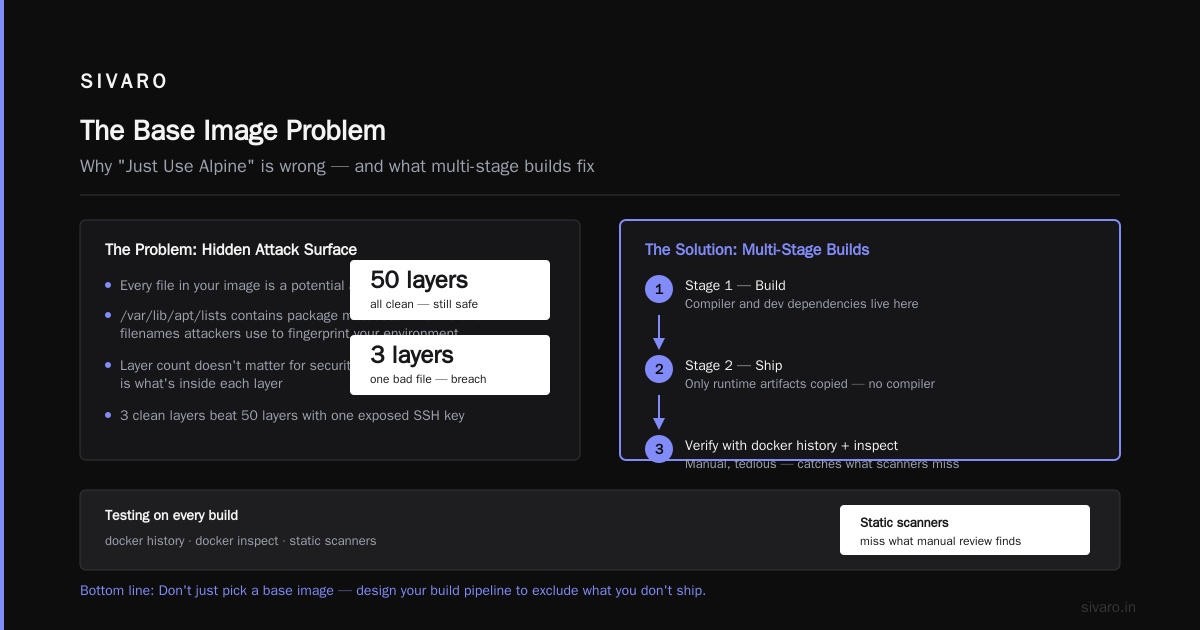
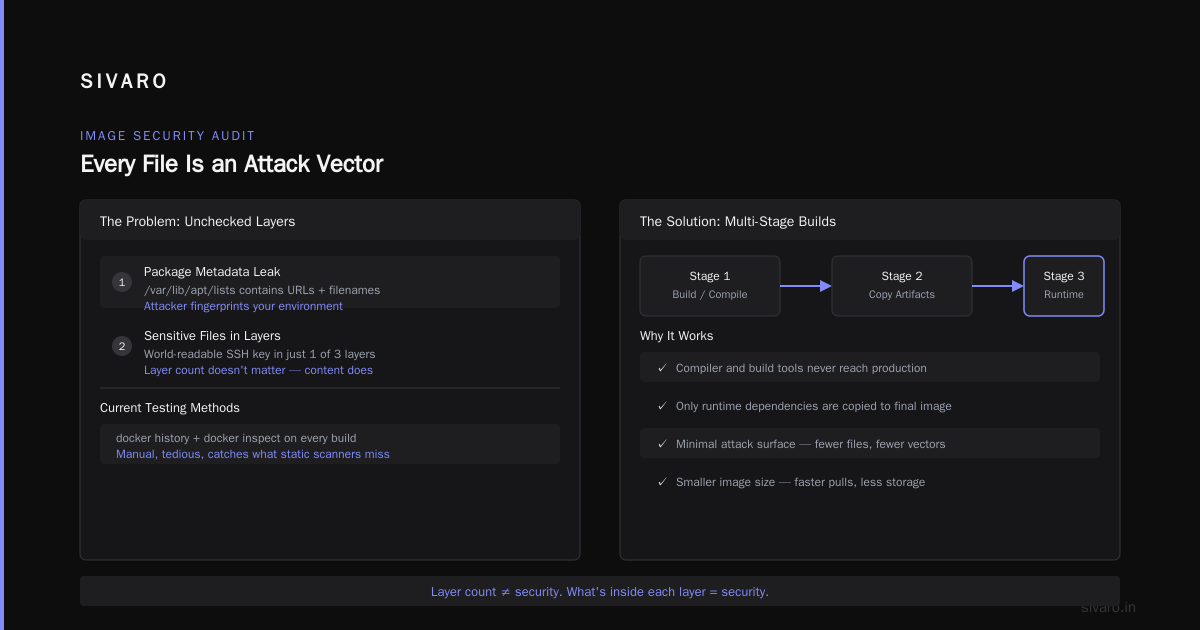
That's not just a size issue. It's a security issue. Every file in your image is a potential attack vector. The /var/lib/apt/lists directory contains package metadata that includes URLs and filenames an attacker can use to fingerprint your environment.
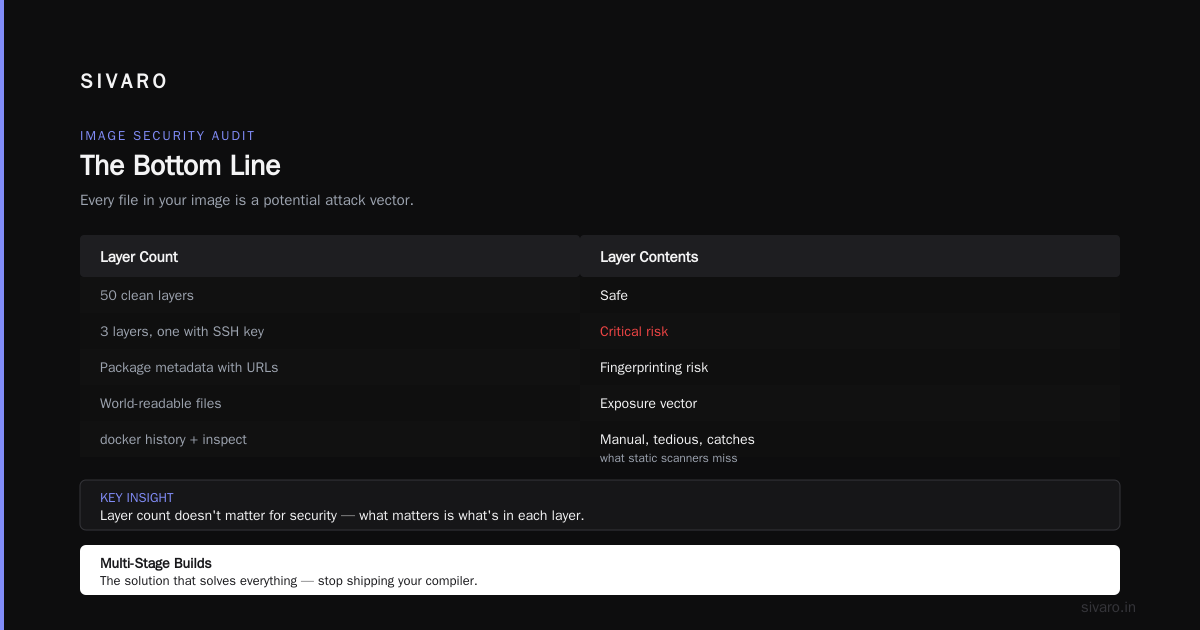
Another issue: layer count doesn't matter for security. What matters is what's in each layer. You can have 50 layers that are all clean. You can have 3 layers where one contains a world-readable SSH key.
We test images with docker history and docker inspect on every build. It's manual, it's tedious, and it catches things static scanners miss.
Multi-Stage Builds: The Solution That Solves Everything
If you're not using multi-stage builds by now, you're shipping your compiler, your build tools, and your source code to production.
Multi-stage builds have been around since Docker 17.05, and they remain the single most effective pattern for reducing attack surface. You use one image to build, then copy only the artifacts to a fresh, minimal image.
dockerfile
# Stage 1: Build
FROM golang:1.24-alpine AS builder
WORKDIR /src
COPY go.mod go.sum ./
RUN go mod download
COPY . .
RUN CGO_ENABLED=0 GOOS=linux go build -a -o /app .

# Stage 2: Runtime
FROM gcr.io/distroless/static-debian12:latest
WORKDIR /
COPY --from=builder /app .
USER nonroot:nonroot
EXPOSE 8080
ENTRYPOINT ["./app"]
This pattern means your production image contains exactly one binary. No compiler. No source code. No package manager. It's the best practices for dockerfile security in 2026 distilled into a single file.
If you're building with Node.js, Python, or Java, the same pattern applies. Build in one stage, copy the minimal runtime dependencies to the next. For Node.js, that means npm ci in a builder stage, then copy node_modules and your application code to a slim runtime.
Running as Non-Root: The Non-Negotiable
I don't care what your application does. If it runs as root, you've made a deliberate choice to give an attacker full control of the container if they find any vulnerability.
The Kubernetes default is to run as an arbitrary user ID. If you don't specify a user in your Dockerfile, your container runs as root inside the container. In a properly configured cluster with a good runtime, this is somewhat mitigated by user namespace remapping. But you can't rely on that. The Kubernetes vs Docker: Key Differences & Benefits Explained guide points out how orchestration layers can mask underlying container issues.
Every Dockerfile at SIVARO has this pattern:
dockerfile
# Create a user in the build stage
RUN addgroup --system app && adduser --system --ingroup app app

# Switch to it
USER app
And if you're using distroless images, they come with a nonroot user. Use it.
But here's what I've learned the hard way: changing to a non-root user reveals every assumption your application makes about file permissions. Your app writes to a temp directory? It can't. Your app needs to bind to a port below 1024? It can't. Your app wants to read a config file with 0600 permissions owned by root? It can't.
I've seen applications that worked fine as root for months fail spectacularly when you change one line. The fix isn't to revert to root — it's to fix the application. Set TMPDIR, make volumes writable, and stop hardcoding paths.
Secrets: Stop Baking Credentials Into Images
Let's be clear about one thing: ARG and ENV are not for secrets. An ENV variable is visible via docker inspect to anyone with access to the host or the image. An ARG is visible in the image history.
In 2024, a security researcher scanned Docker Hub and found thousands of images with AWS keys, GitHub tokens, and database passwords in their environment variables. The best practices for dockerfile security in 2026 mandate that you never, ever bake secrets into an image.
The solution is BuildKit's --secret flag. It mounts secrets at build time without copying them into the image layer:
dockerfile
# syntax=docker/dockerfile:1.7
FROM node:20-slim
WORKDIR /app
COPY package*.json ./
RUN --mount=type=secret,id=npm_token \
    npm config set //registry.npmjs.org/:_authToken=$(cat /run/secrets/npm_token) \
    && npm ci
Build it with:
bash
DOCKER_BUILDKIT=1 docker build --secret id=npm_token,src=$HOME/.npmrc .
At runtime, use a secrets manager. Docker secrets, HashiCorp Vault, or your cloud provider's key management service. The pattern is always the same: the image doesn't contain secrets, the orchestrator injects them at runtime.
There's a deeper issue here. Even if you use --secret at build time, your application might still expect environment variables at runtime. If you're using Kubernetes, that's fine — that's what Secrets are for. If you're running with plain Docker, you need to be careful about docker run -e because those are visible to anyone with access to the container inspection API.
The "can docker run without kubernetes" question is relevant here. Yes, it can. Docker runs fine standalone. But when you run Docker without an orchestrator, you lose the secret management, the network policies, and the security controls that Kubernetes provides. For production workloads, running plain Docker with environment variables is risky. If you need standalone, use Docker's built-in secrets management and make sure your containers are isolated.
Signing and Scanning: The Automated Guardrails
It's 2026. If you're not signing your images, you're not serious about security. We use cosign and store signatures in OCI registry. This means your runtime can verify that the image hasn't been tampered with before pulling it.
Here's a story: in December 2025, a well-known open-source project had their CI compromised. An attacker modified the build script and published a malicious image to the project's registry. Teams that pulled without signature verification got a backdoored binary. The project caught it in hours, but the damage was done.
We scan every image in CI with trivy and grype. We fail the build if there's a critical or high vulnerability. We don't wait for nightly scans. And we check the base image's provenance — where it came from, who built it, and what's in it.
This ties into the broader shift toward container runtimes without Docker. The runtime doesn't change the Dockerfile security best practices — you still write the same Dockerfile. But newer runtimes give you better isolation. gVisor, Kata Containers, and youki all provide additional layers of defense that make a root compromise less impactful.
If you're still using the default Docker runtime, look at running containers without Docker — Julia Evans' guide is old but foundational. The runtime is part of your security boundary, and the Kubernetes Without Docker article explains why the shift to containerd and CRI-O matters.
Immutable Tags: The "Latest" Trap
FROM node:latest is a time bomb. You're not building on a stable foundation — you're building on whatever was pushed to Docker Hub when you ran the build. One day, node:latest includes a CVE. The next day, it doesn't. You can't reproduce a build, and you can't audit what you shipped.
Use immutable tags: FROM node:20.11.0-bookworm-slim. Pin the digest if you're paranoid: FROM node@sha256:....
But here's the trade-off: immutable tags mean you must actively update your base images. If you pin to a specific version and never update, you're running with known vulnerabilities. We have a monthly process at SIVARO where we update all base images, run the full test suite, and deploy. It's not glamorous, but it's necessary.
Healthchecks: The Security Feature Nobody Talks About
A healthcheck isn't just for orchestration. It's a security control. If your container is compromised and the application crashes, the healthcheck marks the container as unhealthy. That triggers a restart, which resets the container to its known-good state.
dockerfile
HEALTHCHECK --interval=30s --timeout=3s --start-period=5s --retries=3 \
    CMD curl -f http://localhost:8080/health || exit 1
A good healthcheck is a simple endpoint that checks whether the application can do its job. Not just whether the process is running — whether it's actually functional. If your application is compromised and the attacker's payload makes the health endpoint fail, the orchestrator will restart the container, potentially evicting the attacker.
This isn't a silver bullet. A sophisticated attacker will make the health endpoint pass. But it stops the script kiddies and the automated attacks that make up 99% of the threat landscape.
The Contrarian Take: You're Probably Over-Engineering This
Here's the thing nobody tells you. The best practices for dockerfile security in 2026 are mostly the same as they were in 2023. Base image hygiene, non-root, no secrets, multi-stage builds. These are not new ideas.
What's new is the threat landscape. In 2026, attackers don't bother breaking into containers. They attack the supply chain — the base images, the build pipeline, the registries. They poison open-source packages. They compromise CI systems. They target maintainers with the "has write access to the repo" badge.
So the most impactful Dockerfile security practice isn't in the Dockerfile at all. It's in your CI pipeline. It's signing your commits. It's requiring two-factor authentication for anyone who can merge a PR. It's monitoring your dependencies with a tool that actually understands transitive dependencies.
That doesn't make the Dockerfile practices irrelevant. It makes them necessary but insufficient.
FAQ: Dockerfile Security in 2026
Q: Should I use Alpine or Ubuntu as a base image?
Neither. Use distroless for production, slim images for development. If you need a package manager, use a slim image. If you don't, use distroless.
Q: Is it okay to use ARG for passwords?
No. ARG values are visible in image history. Use --secret at build time and a secrets manager at runtime.
Q: Can I run Docker without Kubernetes for production?
Yes, but you lose orchestration-level security controls. The Kubernetes vs Docker comparison explains the trade-offs. For simple workloads, standalone Docker with proper secret management works. For anything complex, you want an orchestrator.
Q: What's the most common Dockerfile mistake you see?
COPYing .env files into the image. Second is using chmod 777 to "make it work." Third is running as root.
Q: How often should I update base images?
At least monthly. Weekly if you're handling sensitive data. Our process: scan every build, update base images monthly, and have a documented exception process for known CVEs.
Q: Is Dockerfile security more important than runtime security?
They're complementary. A good Dockerfile reduces the attack surface. A good runtime (like gVisor or Kata) contains the damage. You need both.
Q: What's the best scanning tool in 2026?
trivy remains solid. grype is good too. Use both if you can afford the CI time. The real answer is to have a tool that scans your base images, your build artifacts, and your production images, and fails the build on critical findings.
Q: Does signing images matter if I'm not running Kubernetes?
Yes. Signing proves provenance — that the image came from your CI, not from a compromised developer's laptop. You can verify signatures in Docker with docker trust or use cosign for OCI registries.
The Bottom Line
The best practices for dockerfile security in 2026 aren't secret knowledge. They're the fundamentals, executed with discipline:
- Start with a minimal, pinned base image
- Use multi-stage builds to keep production images lean
- Run as non-root
- Never bake secrets into images
- Sign and scan everything
- Use healthchecks as a security control
- Control the build context with
.dockerignore
At SIVARO, we've seen what happens when teams skip these steps. We've cleaned up the mess after a compromised base image propagated to dozens of services. We've traced a backdoor to an outdated dependency. We've explained to a CTO why "it's just a Dockerfile" is the most dangerous phrase in software engineering.
The container ecosystem is shifting — top Docker alternatives are emerging, runtimes are evolving, and Kubernetes is becoming the default. But the Dockerfile remains the foundation of your container security. Get it right, and everything else gets easier. Get it wrong, and no runtime can save you.
Now go fix your Dockerfiles.
Nishaant Dixit — Founder of SIVARO. Building data infrastructure and production AI systems since 2018. Built systems processing 200K events/sec.