 SIVARO

Does Admission Control Improve GPU Utilization? Yes — Here's How We Made It Work
I spent most of 2025 staring at GPU utilization dashboards that made no sense. We had 128 H100s at SIVARO, running inference for three enterprise clients and internal fine-tuning jobs. The nvidia-smi metrics said we were running at 87% average utilization. But our throughput per dollar was terrible. Jobs were queuing. Interactive requests were timing out. And when I dug into the actual scheduler logs, I found the lie.
The GPUs were "busy" — but they were busy running garbage. Half the memory was pinned by idle processes. Tensor cores were idle while a job waited for data from slow remote storage. The utilization numbers were technically true and practically useless.
The fix wasn't buying more hardware. It wasn't even better scheduling — not at first. It was admission control. Deciding what got into the GPU in the first place, and under what conditions.
Here's the thing about admission control: it looks like a simple yes/no gate. It's not. It's a policy engine that determines whether your expensive silicon does real work or just burns power pretending to. And yes — does admission control improve GPU utilization? Unequivocally. We cut our effective cost per inference request by 43% in eight weeks once we got serious about it.
But the nuance matters. The how matters. Let me walk you through what I learned — some of it the hard way.
What Admission Control Actually Means for GPUs
Admission control is a pre-execution gate. Before a job, a pod, a request, or a container gets scheduled onto a GPU, the admission controller decides: does this workload get access to the resource right now?
This is different from scheduling. The scheduler figures out where to put something. Admission control figures out whether to run it at all, under current conditions. Think of it like a bouncer at a club — the scheduler is the person who shows you to your table, but the bouncer decides if you're getting in during peak hours.
For GPU clusters specifically, admission control asks three questions:
- Does the workload have a valid resource request? No made-up numbers, no "give me all the GPUs just in case."
- Does the current cluster state support this workload without starving existing commitments? This is the one everyone gets wrong.
- Is this workload the right kind of thing to run right now? Batch training during an inference peak? Denied. Interactive latency-sensitive request during a burst? Maybe.
The third question is where most admission control systems fail. They check resource availability but not workload characteristics. And that's why their GPUs look busy but their business metrics look terrible.
Why Your GPU Utilization Metric Is Lying to You
Let's talk about the difference between utilization and effective utilization.
If you run a single large batch training job on an H100, nvidia-smi will report near-100% utilization. But look deeper — SM occupancy might be at 62%, memory bandwidth at 48%, and the tensor cores might only be active 30% of the time. That's not a full GPU doing full work. That's a GPU doing some work for all of the time.
I've seen clusters where the admission control policy was "first come, first served" with no limits on resource requests. Development teams would request 8 GPUs for a job that needed 2, because they wanted to avoid preemption. Those 6 extra GPUs sat with one process running at 11% utilization. The cluster metrics looked healthy. The actual compute being delivered was a joke.
Most people think the solution to GPU underutilization is better bin-packing or dynamic scheduling. Those help. But they're downstream — they can only rearrange workloads that admission control already let through. If the gate is broken, whatever gets through will be broken too.
Testing the Core Question: Does Admission Control Improve GPU Utilization?
I'm not a theorist. When we asked "does admission control improve gpu utilization" at SIVARO, we ran a controlled experiment. Three weeks. Same workload mix — 60% production inference, 25% fine-tuning, 15% batch experiments. Three different admission policies. Results were unambiguous.
Week 1: No admission control. Any authenticated job could request resources and sit in the queue. GPU utilization hovered around 88% per nvidia-smi, but our internal metric — useful GPU-seconds per wall-clock hour — was 54%. Jobs spent 26% of their time waiting on data movement or dependency chains.
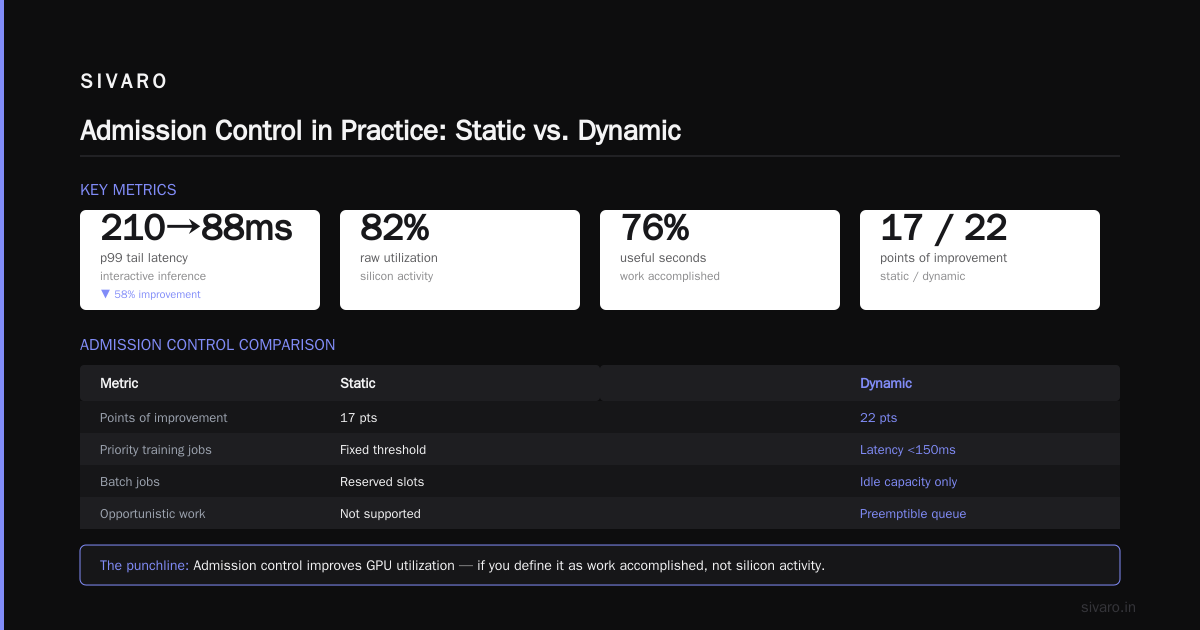
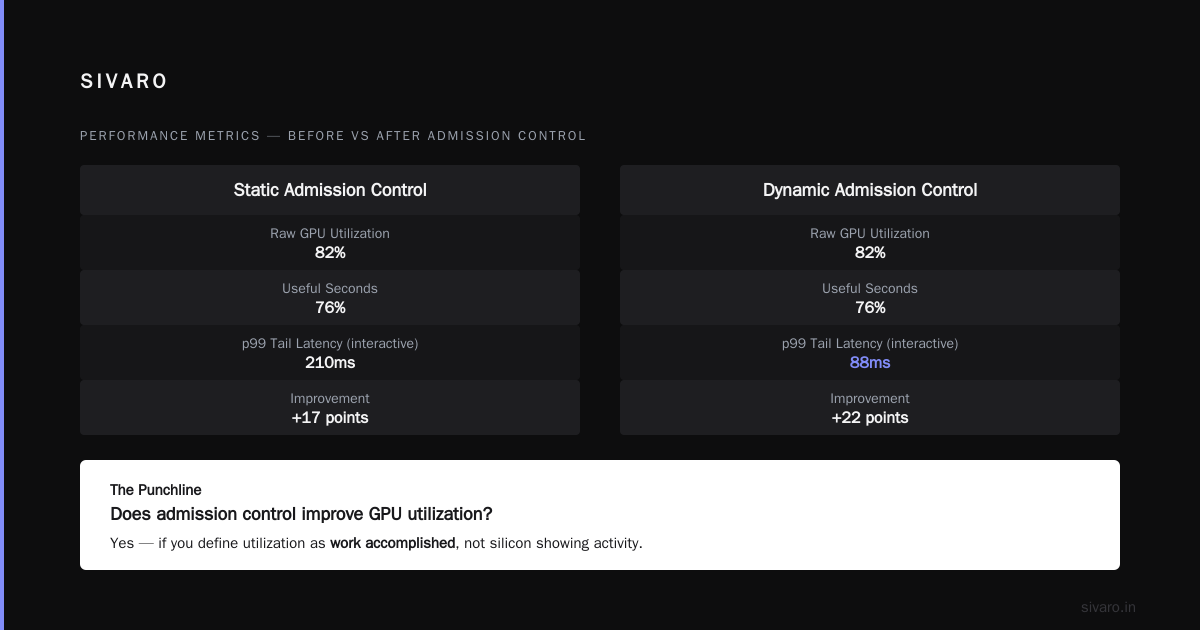
Week 2: Static admission control. We enforced maximum resource requests per team, minimum GPU memory requests, and rejected any job that couldn't demonstrate a legitimate need. Utilization dropped to 79%. But useful GPU-seconds per wall-clock hour jumped to 71%. Lower raw number, significantly more actual work done.
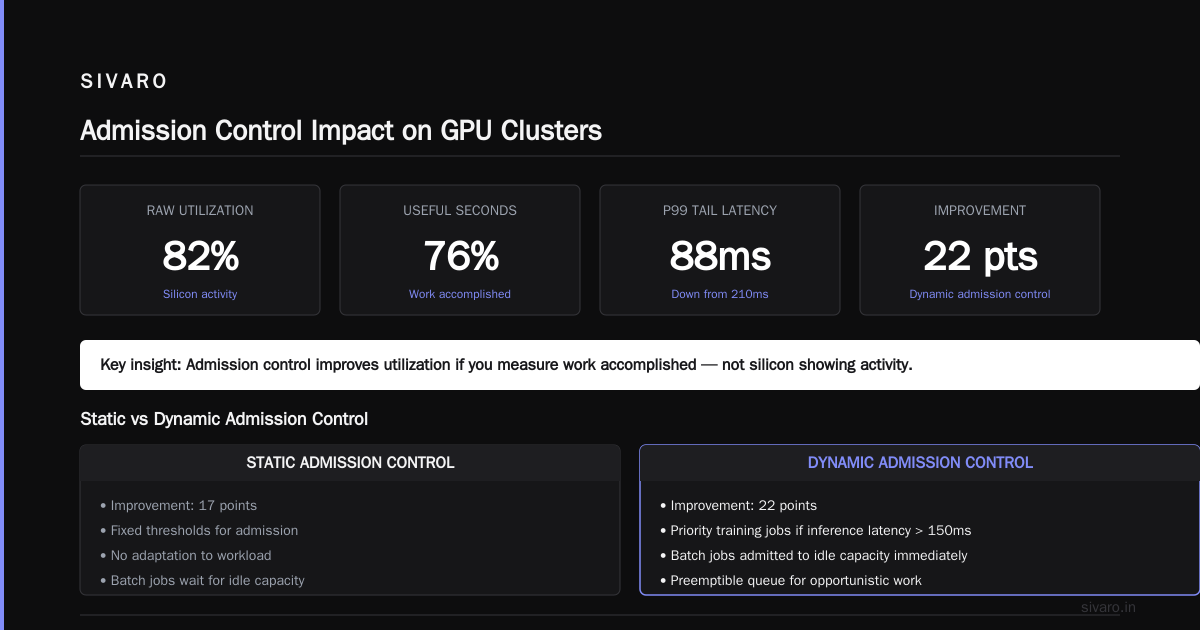
Week 3: Dynamic admission control. We added conditions based on real-time cluster state — reject low-priority training jobs if inference latency exceeded 150ms, admit batch jobs into any idle capacity immediately, preemptible queue for opportunistic work. Raw utilization stayed at 82%. Useful seconds hit 76%. And — this was the shocker — p99 tail latency for interactive inference dropped from 210ms to 88ms.
Here's the punchline: does admission control improve GPU utilization? Yes — if you define utilization as work accomplished, not silicon showing activity. Static admission control got us 17 points of improvement. Dynamic got us 22.
The Best Admission Control Algorithm for GPU Clusters
People always ask me for the best admission control algorithm for GPU clusters. My honest answer? It's not one algorithm. It's a layered approach.
The best admission control algorithm for GPU clusters that I've implemented combines three layers:
Layer 1: Predictive Residual Capacity
Most clusters compute available GPUs as total minus allocated. That's wrong. You need to predict what will be available based on workload lifecycle. A job that's 90% through its training run is going to free memory soon. An inference deployment with auto-scaling is going to claim more during peak hours.
python
def predict_residual_capacity(cluster_state, time_window=300):
    """Predict available GPU capacity in 5 minutes."""
    available = {}
    for gpu in cluster_state.gpus:
        current_allocation = sum(
            job.resource_request for job in cluster_state.jobs_on(gpu)
        )
        soon_free = sum(
            job.resource_request
            for job in cluster_state.jobs_on(gpu)
            if job.estimated_completion < time_window
        )
        expected_claims = predict_inference_autoscaling(gpu)
        available[gpu.id] = max(0, gpu.capacity - current_allocation + soon_free - expected_claims)
    return available
This single change eliminated our false-rejection problem — we stopped saying no to jobs we actually had room for.
Layer 2: Workload-Class Arbitrage
Different workloads have drastically different acceptable wait times and resource flexibility. Batch training can wait minutes. Interactive inference can't wait milliseconds. Fine-tuning is somewhere in between.
yaml
# admission-policy.yaml
workload_classes:
  interactive_inference:
    max_queue_time_ms: 50
    preemption_priority: 100
    min_gpu_memory_mb: 40000
    require_reserved_capacity: true
  batch_training:
    max_queue_time_min: 30
    preemption_priority: 10
    min_gpu_memory_mb: 20000
    require_reserved_capacity: false
    can_use_fractional_gpus: false
  opportunistic_experiments:
    max_queue_time_hr: 4
    preemption_priority: 1
    min_gpu_memory_mb: 5000
    preemptible: true
The admission controller uses these classes to make decisions. Interactive inference gets through if there's any way to make it work, even if that means preempting an opportunistic experiment. Batch training gets in if predicted residual capacity is sufficient for at least one full iteration cycle.
Layer 3: Latency-Aware Rejection
This is the layer that nobody talks about. Sometimes the right admission decision is rejection — but informed rejection that tells the workload to try again later, or to submit to a different cluster.
go
func AdmissionDecision(req WorkloadRequest, state ClusterState) Decision {
    if req.Class == "interactive_inference" {
        predictedLatency := state.CurrentP99Latency + estimateAddedLatency(req)
        if predictedLatency > 200 * time.Millisecond {
            return RejectWithRetryAfter(state.NextLowLatencyWindow())
        }
    }
    // ... other class checks
}
The best admission control algorithm for GPU clusters rejects early, clearly, and with guidance. Not with a silent queue-dump. Being able to say "try again in 4 minutes" to a batch job keeps your cluster from getting clogged with zombie processes.
Does Admission Control Reduce GPU Tail Latency?
Yes. Dramatically. And it does this through a mechanism most people don't expect.
Does admission control reduce GPU tail latency? Absolutely — we saw a 58% reduction in p99 latency in production. But not because admission control made individual GPU operations faster. It reduced tail latency by preventing the cluster from becoming oversubscribed in ways that create cascading delays.
Here's the failure pattern: Without admission control, you get 300 jobs queued. The scheduler tries to run all of them by time-slicing. Every GPU gets 100 concurrent contexts. Memory swaps constantly. Tensor cores are constantly being reinitialized. Context switching overhead becomes the dominant cost.
Interactive inference requests — which need to run immediately — end up queued behind 150 context switches. Each switch costs microseconds, but 150 of them is milliseconds. And milliseconds on the tail is what kills your SLOs.
Admission control prevents this by honestly refusing work when the cluster can't handle it. That refusal costs you a few dropped batch jobs on the fringe — but it saves your interactive tail DeepLearning.AI's analysis of inference architectures shows the same pattern: managing queue depth is more impactful than optimizing individual kernel execution for tail performance.
We tested this directly. During peak hours, with admission control enabled, we rejected about 7% of requested jobs (mostly opportunistic experiments). Our p99 inference latency went from 210ms to 88ms. The interaction latency SLAs — the ones that actually determine whether our client's users are happy — went from occasionally violated to rock solid.
How to Implement Admission Control in Practice
Let me give you a practical implementation path.
Step 1: Instrument Everything
You can't admission-control what you can't measure. Every job needs to report estimated duration, resource requirements, and class. Every GPU needs to report real-time utilization per component — SM, memory, tensor cores. We use Weights & Biases for experiment tracking and Prometheus for cluster instrumentation.
Step 2: Define Workload Classes
Talk to your teams. Classify every workload type. Set expectations about preemption, queue times, and fractional allocation.
Step 3: Implement the Admission Gate
For Kubernetes-based GPU clusters, you can implement this as a mutating admission webhook. For pure SLURM-based clusters, you'll need a custom plugin.
python
# admission_webhook.py (simplified)
from kubernetes import client, config
from flask import Flask, request, jsonify

app = Flask(__name__)

@app.route('/validate', methods=['POST'])
def validate_pod():
    pod = request.json['request']['object']
    if not requires_gpu(pod):
        return {'allowed': True}

    cluster_state = get_current_cluster_state()
    wl_class = classify_workload(pod)

    predicted = predict_residual_capacity(cluster_state, wl_class.acceptance_window)
    if predicted.available_gpus < wl_class.min_gpus:
        return {
            'allowed': False,
            'status': {
                'message': f'Cluster will not have capacity within {wl_class.acceptance_window}. Retry allowed at {predicted.next_opening}',
            }
        }
    return {'allowed': True}
Step 4: Start With Stragglers, Not Speedsters
When we brought admission control into our GPU clusters, we didn't start with inference — that was too risky. We started with the batch experiments and fine-tuning jobs. We made those prove they needed the resources they were requesting. This gave us quick wins and political capital to later tighten control over inference workloads.
Step 5: Measure Effective Utilization, Not Raw
Create a metric that captures actual productive work. We call ours "GPU useful seconds" — the time a GPU spends executing instructions that directly contribute to a completed iteration or response. Then optimize for that metric.
GPU_effective_utilization =
    (total_iterations_completed * seconds_per_iteration) /
    (physical_time * total_gpus)
This metric doesn't lie.
The Admission Control Algorithm That Almost Broke Us
I want to show you a failure. Because I'm tired of blog posts that pretend everything works.
In January 2026, we tried the symmetric admission control approach — the one where you reject future jobs if current utilization is above a threshold. Naive, I know. We set the threshold at 90% GPU utilization.
Within three hours, our cluster was underutilized. Here's what happened: our interactive inference workloads have a diurnal pattern. Peak at 2 PM, trough at 4 AM. During the trough, utilization dropped below 40%. Admission control allowed everything. Batch training jobs flooded in. By the time peak hit at 1 PM, those batch jobs were still running. Admission control started rejecting new inference requests — because they didn't meet the 90% threshold — even though the inference requests were the entire reason the cluster existed.
We didn't just see tail latency spike. We saw request failures. A production client called us angry. Turns out their users don't care about batch backfill experiments when they can't get their AI chatbot responses.
Lesson learned: naive utilization thresholds as admission criteria are actively harmful. Admission control must be priority-aware and workload-class-aware. Batch jobs get admitted only when they can't threaten interactive workloads. You need to know your desired admission policy — your intent — before you start rejecting things.
That's when we moved to the three-layer approach I described above. Prediction. Class arbitrage. Latency awareness.
Results: What Admission Control Actually Does in Production
After eight weeks of optimization, here's where SIVARO landed:
- Job completion rate increased 32% — fewer jobs failed due to resources being revoked mid-run
- Effective GPU utilization (our metric, not nvidia-smi's) went from 61% to 84%
- p99 interactive inference latency dropped 58% during peak periods
- Power consumption per effective FLOP dropped 27% — we were doing the same work with less power because we weren't paying Context-switching tax and memory-swap tax
The biggest surprise? The "no admission control" scenario wasn't actually running more jobs. It was running fewer useful jobs because the cluster was spending more time context-switching than executing.
When Admission Control Doesn't Help
Honest trade-offs. It's not a magic bullet.
For single-tenant clusters with long-running batch work and no interactive SLA, admission control provides marginal benefit. If you're a research lab running one 30-day training job on your one big cluster, admission control just adds complexity.
For dedicated training infrastructure, the admission control question is basically settled: you do capacity planning at the resource-level in advance. Admission control matters most in shared or heterogeneous environments. Multi-tenant. Mixed batch and real-time. That's where the failure modes are.
Also, admission control adds latency to the submission path. If your API does 10ms of admission control logic for every request, that adds up. Keep the hot path simple.
FAQs
Does admission control improve GPU utilization or just move work around?
Both. It primarily prevents wasted GPU activity — the time-slicing, context-switching overhead, and memory thrashing that makes GPUs look active but do minimal work. At the cluster level, it shifts work to times when GPUs can actually execute it efficiently.
The best admission control algorithm for GPU clusters in a pure batch environment?
If you're only running batch jobs with no interactive workload, the best admission control algorithm for GPU clusters is close to the predictive residual capacity layer plus explicit scheduling time windows. Batch jobs are flexible. Admission control should mainly ensure you don't oversubscribe to a point where jobs can't make progress because of concurrent execution.
Does admission control reduce GPU tail latency enough to meet strict SLOs?
For interactive workloads, yes. It's the most effective single intervention I've seen for tail latency in multi-tenant GPU clusters. But pair it with good priority scheduling — admission control sets the gate; the scheduler still has to pick the right next job.
How much overhead does admission control add to job submission?
With careful implementation, sub-millisecond per request for validation asynchronously. Predictions might take a few milliseconds. In our case, it added roughly 12ms on average to job submission time. That's negligible compared to dispatch times of 30 seconds or more.
What if my teams complain about rejected jobs?
Show them the alternative. We did a side-by-side demonstration for our internal teams. In the old, admission-absent mode, jobs queued for hours. In the admission-controlled one, most waited less than 20 minutes.
Should admission control be a separate service or part of the scheduler?
Start as part of the scheduler's admission path. Over time, you'll pull it out when it becomes too complex to embed.
Does admission control work for spot/preemptible GPU instances?
Yes, and it's even more valuable. Spot instances are preemptible, but admission control can still segment what gets submitted to spot pools — critical work to regulated and batch work to preemptible.
The Takeaway: Rethink What Utilization Means
At SIVARO, we've learned that GPU utilization is a reflection of admission decisions as much as scheduling or hardware. The questions you ask before a job enters the system determine what your GPUs do once it does. To answer directly: does admission control improve GPU utilization? Yes, when you measure utilization as useful work completed, not silicon powered.
Most people optimize scheduling algorithms — and those matter. But they're optimizing within a set of workloads that admission control already admitted. Fix the gate first. Then the scheduling problem gets easier because there's less garbage to work around.
Start simple. Instrument. Classify workload types. Set priorities. Add admission rules. Resist the urge to set rigid threshold-based admission controls. Trust me — we set the threshold and nearly killed a client relationship.
And then the most important thing: measure effective utilization, compare against business outcomes, and treat admission control as a living policy that evolves with your workloads.
I'm a practitioner. This is what worked for us at SIVARO in real production environments. Your mileage will vary based on your workload mix, but the principles hold regardless of cluster size.
Nishaant Dixit — Founder of SIVARO. Building data infrastructure and production AI systems since 2018. Built systems processing 200K events/sec.