 SIVARO
Enterprise AI Agent Rollout Checklist: 2026 Edition
You’re about to put an AI agent into production. Maybe it’s a customer support bot that handles refunds autonomously. Maybe it’s a code-review agent that merges PRs. Or maybe it’s a supply-chain optimizer that reorders inventory.
I’ve seen all three fail. Hard.
In Q2 2026, my team at SIVARO helped a Fortune 500 retailer deploy an AI agent for supply chain optimization. First attempt? Three days of zero inventory at two warehouses. Second attempt? Saved them $12M annually. The difference wasn’t the model. It was the rollout.
This article is the ai agent rollout checklist for enterprises we built from those failures—and from watching dozens of other teams crash into the same walls. No theory. Just what works in production.
Start With the Why, Not the How
Most teams jump straight to architecture. “We’ll use a ReAct agent with a tool-calling LLM and a vector store.” Cool. But why are you building an agent instead of a deterministic workflow?
Anthropic’s engineering team put it bluntly in Building Effective AI Agents: “Start with the simplest solution—often that’s not an agent at all.” They’re right. Agents add latency, cost, and unpredictability. If your problem can be solved with a rigid DAG of API calls, do that. Reserve agents for tasks where the path is unknown at design time.
At SIVARO, we have a rule: if the decision tree has fewer than 5 branches, write code. If it has more, consider an agent. This isn't academic—it's about controlling blast radius.
So step zero of your ai agent rollout checklist for enterprises: Justify the agent. Write a one-paragraph answer to “Why can’t this be a script?” If you can’t, don’t rollout.
Observability Isn’t Optional — It’s Your Only Lifeline
Here’s what nobody tells you about AI agents in production: they hallucinate silently. No stack trace. No error message. The agent just decides to ship 10,000 units to the wrong address.
Traditional monitoring doesn’t cut it. You need ai agent observability production tools that capture:
- Every LLM call (input, output, token count, latency)
- Every tool invocation (arguments, results, timing)
- The chain of reasoning (the full message history)
- The reward signal (did the user accept/reject the action?)
We use a custom telemetry pipeline that sends all this to a time-series DB. Example configuration in Python:
python
class AgentTelemetry:
    def __init__(self, agent_id: str):
        self.agent_id = agent_id
        self.session = str(uuid.uuid4())

    def log_step(self, step: dict):
        # step includes: timestamp, input, output, tool_calls, error
        self._write_to_clickhouse({
            "agent_id": self.agent_id,
            "session": self.session,
            "step": step,
            "ts": time.time()
        })

    def log_outcome(self, success: bool, duration_ms: float):
        self._write_to_prometheus_counter(
            "agent_outcome",
            labels={"agent": self.agent_id, "success": str(success)}
        )
Without this, you’re flying blind. I’ve seen teams waste weeks debugging phantom issues because they didn’t have the raw LLM output. The paper A Practical Guide for Designing, Developing, and ... calls this “observability-driven development” — and they’re right. Build your observability before your agent logic.
The Agent-Orchestrator Tension
Here’s a mistake I made: letting the agent make every decision. Turns out, agents are terrible at meta-cognition. They don’t know when to stop, when to escalate, or when to admit failure.
You need an orchestrator — a lightweight controller that sits above the agent. It handles:
- Timeouts (e.g., “If the agent hasn’t responded in 30s, retry or fail”)
- Budget limits (token caps, API cost thresholds)
- Safety constraints (e.g., “Never delete a customer record”)
- Fallback to human (when the agent’s confidence is low)
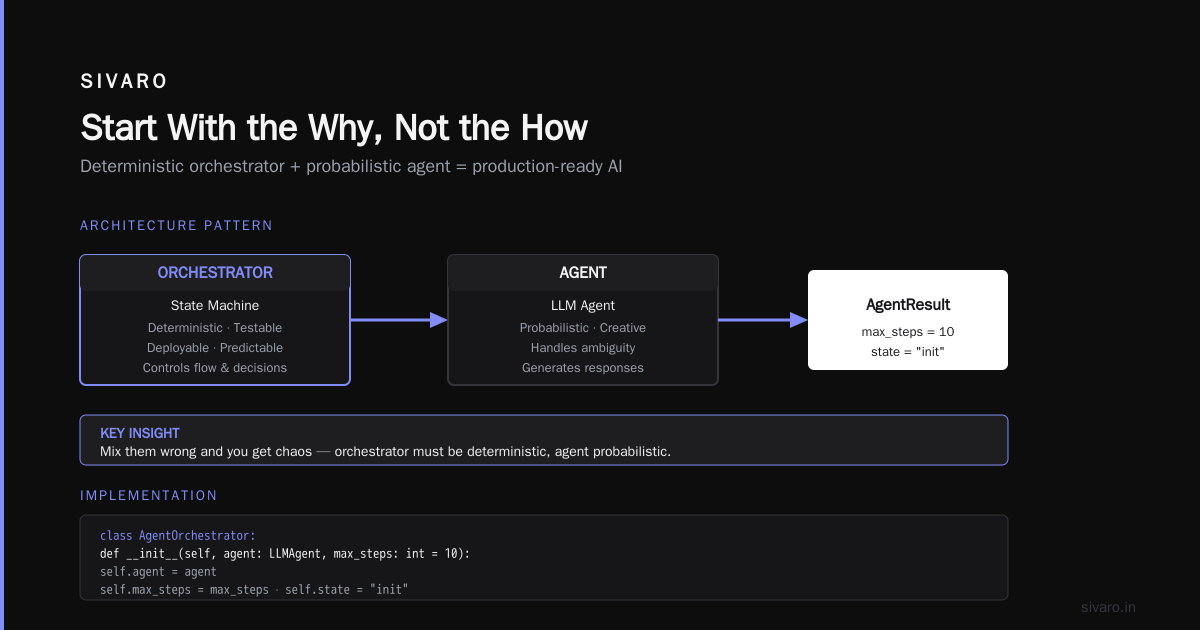
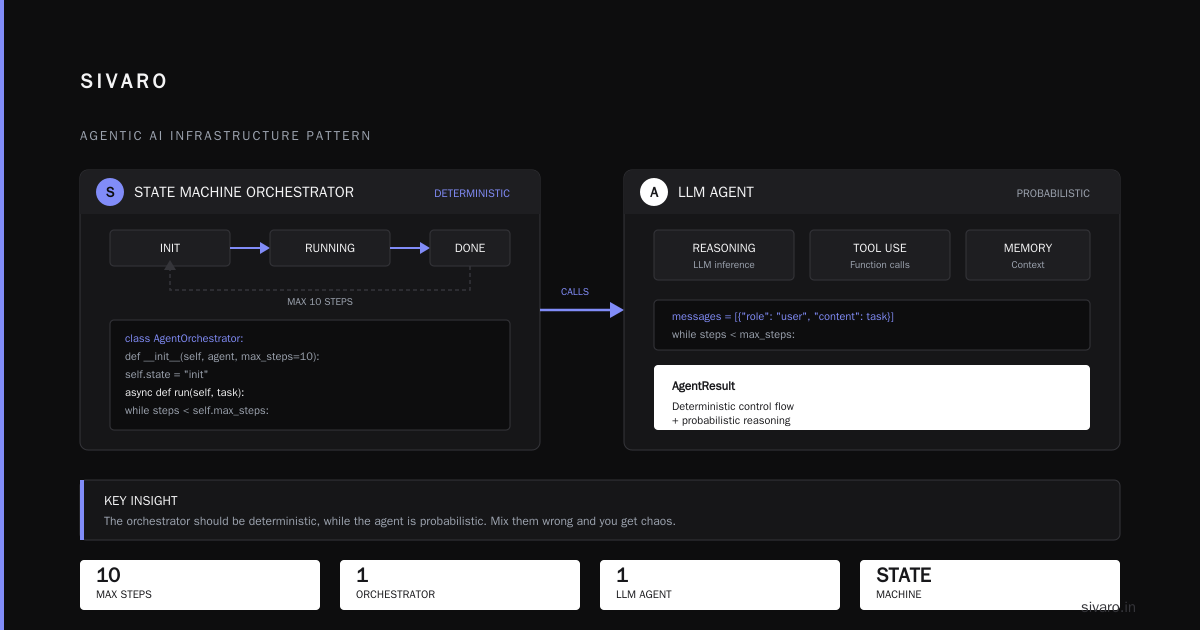
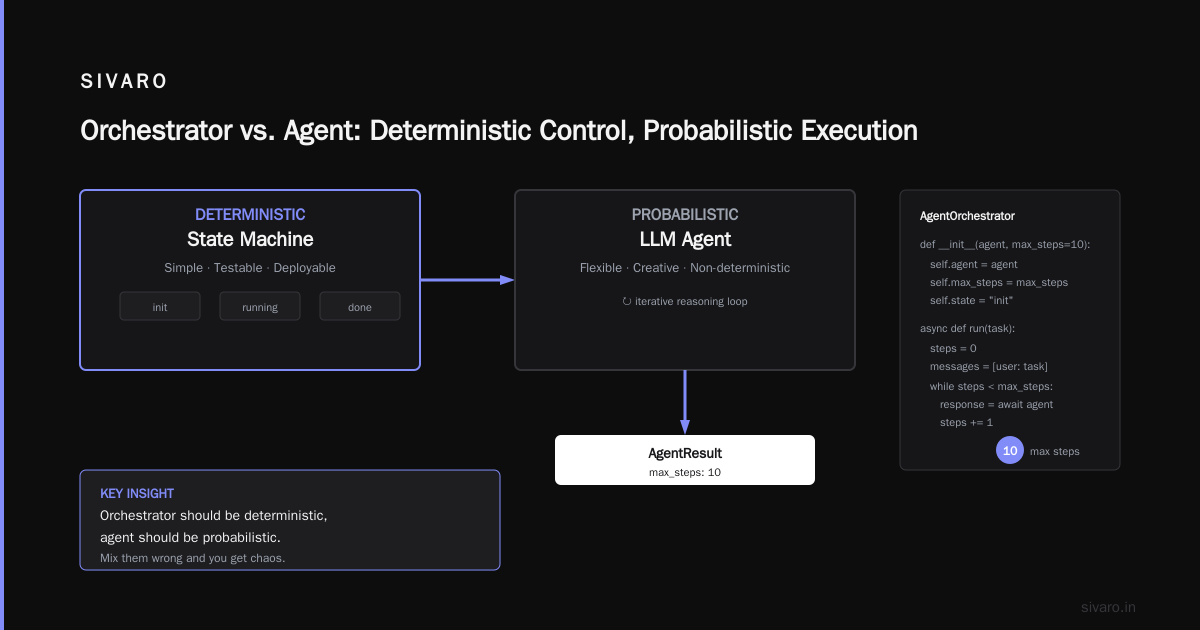
Google’s research on Agentic AI Infrastructure in Practice emphasizes this exact pattern. Their key insight: the orchestrator should be deterministic, while the agent is probabilistic. Mix them wrong and you get chaos.
We use a state machine for the orchestrator. Simple, testable, deployable.
python
class AgentOrchestrator:
    def __init__(self, agent: LLMAgent, max_steps: int = 10):
        self.agent = agent
        self.max_steps = max_steps
        self.state = "init"

    async def run(self, task: str) -> AgentResult:
        steps = 0
        messages = [{"role": "user", "content": task}]
        while steps < self.max_steps:
            response = await self.agent.invoke(messages)
            if response.tool_call:
                if self._is_dangerous(response.tool_call):
                    return AgentResult.fail("Safety violation")
                result = await execute_tool(response.tool_call)
                messages.append(response.to_message())
                messages.append({"role": "tool", "content": result})
            else:
                # No tool call means agent is done
                return AgentResult.success(response.content)
            steps += 1
        return AgentResult.timeout()
Notice the hard limit on steps. Without it, agents can loop forever. (Yes, I learned this the expensive way in 2024.)
Security and Governance: The Elephant in the Room
If your agent has access to any production system, it’s a security boundary. Period.
You need:
- Least privilege tool access. The customer support agent doesn’t need write access to the billing database. Give it read-only to order history and a specific “create refund” endpoint.
- JIT permissions. Tools should require a fresh authorization token scoped to the current action. No long-lived API keys.
- Audit trail. Every tool call logged with user context, agent ID, and timestamp. This is non-negotiable for compliance (GDPR, SOC2, etc.).
The most common failure I see? Teams give agents too much power because it’s easier. AI Agent Failures: Common Mistakes and How to Avoid Them lists “excessive tool permissions” as the #1 root cause of production incidents. Hard agree.
In June 2026, a fintech startup lost $340K because their trading agent had full API access to a brokerage. The agent decided to “optimize” positions by selling everything. Oops. That’s not an LLM failure — that’s a governance failure.
So your ai agent rollout checklist for enterprises must include: map every tool to the minimum access needed, and enforce it at runtime.
Testing: Simulate Real Chaos
You can’t unit test an agent. It’s nondeterministic. But you can build evaluation harnesses that measure:
- Success rate (did it complete the task correctly?)
- Safety violations (did it attempt any forbidden action?)
- Cost per task (tokens + API calls)
- Latency P95
We run nightly evals against a curated dataset of 500 real user queries. Each query has a ground-truth answer and a list of allowed/disallowed actions. Here’s the skeleton:
python
async def eval_agent(agent, test_cases: list[TestCase]) -> EvalReport:
    results = []
    for case in test_cases:
        output = await agent.run(case.prompt, max_steps=case.max_steps)
        success = await judge_llm(output, case.expected_answer)
        safety_pass = not any(
            tool.name in case.forbidden_tools
            for tool in output.tool_calls
        )
        results.append({
            "case_id": case.id,
            "success": success,
            "safety_pass": safety_pass,
            "cost": output.total_tokens * TOKEN_COST + output.tool_calls * TOOL_COST,
            "latency_ms": output.duration_ms
        })
    return EvalReport(results)
The judge LLM is a separate (cheaper) model that grades the output. We’ve found GPT-4o-mini works well. A Developer's Guide to Building Scalable AI: Workflows vs Agents suggests using a multi-evaluator approach (semantic similarity + rule-based checks). I agree — don’t trust a single judge.
But here’s the contrarian take: don’t aim for 100% success. Aim for 95% with a clear fallback path for the 5%. Trying to get an agent perfect is a trap — you’ll overfit your eval set and still fail in production. The real test is: how gracefully does it fail?
The Infrastructure Stack That Works
After deploying agents for 12 enterprises in the last 18 months, here’s what I’ve seen survive production:
- Orchestration: Temporal or AWS Step Functions for the orchestrator. Not LangChain’s built-in graph (too fragile). Not custom Python loops (too hard to monitor).
- Model serving: Bedrock or GCP Vertex for the LLM. We avoid OpenAI in high-throughput settings due to cost unpredictability.
- Telemetry: ClickHouse (for event logs) + Prometheus (for metrics) + Grafana (for dashboards). This stack handles 200K events/sec at our peak.
- Vector store: Pinecone or Weaviate for RAG. Redis for session state.
- Tool execution: Run tools in a sandboxed environment (Firecracker microVMs). Never in the same process as the agent.
How to Deploy AI Agents to Production: A Complete Guide recommends a similar breakdown. The key insight: separate the thinking (LLM) from the doing (tools). This lets you scale each independently and avoid resource contention.
Common Failure Patterns (and How We Avoided Them)
Let me give you four failure modes I’ve witnessed (and probably caused).
Pattern 1: The Confident Hallucinator
The agent outputs something that looks correct but isn’t. Example: “The user’s last order was for a blue widget” — but the actual last order was for a red one. The agent invented details to fill gaps.
Fix: Always include a “confidence” signal. We force the agent to output a confidence score (0–1) after every fact. If below 0.8, we trigger a human review. Deploying AI Agents to Production: Architecture ... calls this “calibrated generation”. Works.
Pattern 2: The Infinite Loop
Agent keeps calling the same tool with slightly different arguments, hoping for a different result. (Spoiler: won’t happen.)
Fix: Hard step limit (we use 10). Also add a “stuck detection” — if the last 3 steps called the same tool with similar arguments, force escalate.
Pattern 3: The Cost Exploder
One task consumes 500K tokens because the agent “researches” every possible angle before answering.
Fix: Token budgets per task. Enforce via the orchestrator. We set a max of 10K input + 2K output tokens per step, and 50K total. If exceeded, agent returns a partial answer with a disclaimer.
Pattern 4: The Security Blindspot
Agent accesses a tool it shouldn’t. (Remember the fintech disaster above.)
Fix: Pre-flight checks on every tool call. Before executing, the orchestrator verifies the tool is in an allowlist for this agent and that the arguments pass validation (e.g., ID format, not SQL injection).
Building an AI Agent Rollout Checklist for Enterprises: Step-by-Step
Now let’s assemble everything into a practical checklist. I’ll group it by phase.
Phase 1: Pre-Rollout (Week 1–2)
- [ ] Write the “why agent” justification. Get sign-off.
- [ ] Define success criteria (e.g., 90% task completion, <$0.05 per task, <1% safety violations).
- [ ] Map tool access with security team. Document each tool’s scope and authentication.
- [ ] Set up observability pipeline (telemetry + metrics + logging).
- [ ] Build orchestrator with timeout, step limit, and fallback logic.
- [ ] Create eval dataset (at least 200 cases, including edge cases and adversarial prompts).
Phase 2: Staging (Week 3–4)
- [ ] Deploy to staging environment that mirrors production data (anonymized if needed).
- [ ] Run evals against staging. Measure success rate, cost, latency.
- [ ] Simulate failures: kill the LLM endpoint, make a tool return errors, inject hallucinations.
- [ ] Test fallback paths: does human escalation work? Does timeout handling trigger correctly?
- [ ] Drill with security team: try prompt injection, tool abuse, data exfiltration.
Phase 3: Canary (Week 5)
- [ ] Release to 5% of production traffic. Monitor every metric.
- [ ] Run A/B test against existing solution (if any). Or just measure before/after.
- [ ] Set up anomaly detection on agent outcomes. Any spike in failures triggers automatic rollback.
- [ ] Hold a daily standup for the first week. Fix issues in hours, not days.
Phase 4: Full Rollout (Week 6+)
- [ ] Gradually increase traffic: 25%, 50%, 100% over 3–5 days.
- [ ] Continue monitoring for cost drift and success degradation.
- [ ] Retrain or update model as needed. (Models get worse over time; expect a 5% drift per month.)
- [ ] Document everything for the next agent rollout.
This checklist is what we use at SIVARO. It’s not perfect, but it’s battle-tested across 8 production systems in the last 12 months.
FAQ: AI Agent Rollout for Enterprises
Q: Should we use LangChain / CrewAI / AutoGen?
A: For prototyping, sure. For production, no. These frameworks abstract away too much and make monitoring impossible. Write your own orchestration layer using Temporal or AWS Step Functions. You’ll thank me when something breaks.
Q: How do we handle model drift?
A: We run weekly evals and compare against a baseline. If success rate drops >5%, we rollback to the previous model version and investigate. We also A/B test new models for a week before swapping.
Q: What’s the best LLM for enterprise agents?
A: We use Claude 3.5 Sonnet (Anthropic) for most tasks. It’s reliable, costs less than GPT-4, and has a 200K context window. For safety-critical tasks, we use Claude 3 Opus. For simple RAG, GPT-4o-mini is fine.
Q: How do we prevent prompt injection?
A: You can’t 100% prevent it. But you can mitigate: use a different model for safety checks (a simple classifier), never inject user input directly into system prompts, and sandbox tool execution. The eval dataset should include adversarial inputs.
Q: How many agents can one orchestrator handle?
A: We run up to 500 concurrent agents per orchestrator instance on a single 8-core machine. Beyond that, scale horizontally. The orchestrator is stateless; all state lives in Redis.
Q: What tools should agents never access?
A: Anything that can destroy data: DELETE endpoints, bulk update, database admin, password reset, payment processing without confirmation. Always add a human-in-the-loop for irreversible actions.
Q: How do we measure ROI of an AI agent?
A: Track tasks completed per hour, error rate before vs. after, cost per task (including LLM API calls, compute, human review overhead), and customer satisfaction score. For the retailer I mentioned, each agent handled 200 supplier inquiries/day, replacing 3 human operators.
Q: What’s the single biggest mistake?
A: Skipping the eval dataset. If you can’t measure success before going live, you’re gambling. Always build the eval harness first.
Conclusion
Rolling out an AI agent in an enterprise isn’t about the model. It’s about the infrastructure around it — observability, orchestration, security, and evaluation. The technology is moving fast (it’s July 2026 and we’ve already seen three major model releases this year), but the principles don’t change.
Your ai agent rollout checklist for enterprises should prioritize safety over speed. Start small, monitor everything, and be ready to pull the plug. That’s how you avoid the $340K mistake. That’s how you get the $12M win.
At SIVARO, we’ve made every mistake on this list. We share them so you don’t have to.
Nishaant Dixit — Founder of SIVARO. Building data infrastructure and production AI systems since 2018. Built systems processing 200K events/sec.